1
USER MANUAL
Type FLK30-120/240GA
67088 12/10 (MBC)
© 2010 OJ Electronics A/S
English................... 1
Français.. ................ 3
Español.................. 5
Type FLK30-120/240GA
English
Contents
Introduction.................................................................................. 1
Setting the temperature . ............................................................. 1
Ground Fault Circuit Interrupter (GFCI)........................................ 1
Checking the GFCI....................................................................... 1
Settings........................................................................................ 2
Standby........................................................................................ 2
Error messages............................................................................ 2
Introduction
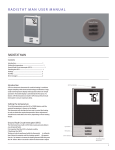
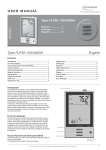
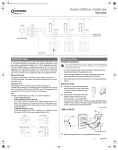
GFCI test button
UTN is an electronic thermostat for comfort heating. It combines
elegant simplicity with advanced technology and features a large,
easily read temperature display and Easy2Use buttons for simple
operation. The backlit display is activated by the first press of a
button. UTN thermostats have built-in GFCI (Ground Fault Circuit
Interrupter) to ensure maximum safety.
Setting the temperature
To set the temperature, press the UP or DOWN button until the
required temperature is shown on the display.
The thermostat will calculate the best way to control the heating in
order to obtain the required temperature. Minor adjustments should
first be made after a few hours, depending on floor heating design.
Ground Fault Circuit Interrupter (GFCI)
The thermostat has a built-in GFCI that ensures personal safety in
case of ground faults.
It is important that the GFCI is checked monthly.
Checking the GFCI
Up button
OK button
Testing can only be performed while the thermostat is calling for
heat. Adjust the setpoint until the heating symbol ( ) appears. Use
the Up button to increase the heating demand and then press the
OK button. Wait 10 seconds to allow the thermostat to adjust to the
new setpoint. Then press the TEST button on the top of the thermostat. The test is successful if the red light in the TEST button lights
up and GROUND FAULT is shown on the display. If this does not
occur, check the installation/contact your electrical installer. Press
Down button
© 2010 OJ Electronics A/S · ® The OJ trademark is a registered trademark belonging to OJ Electronics A/S
Standby button
Reset GFCI
1
Type FLK30-120/240GA English
the Standby/Reset button to reset the GFCI.
The red light should go out and the display returns to normal appearance.
Press the Down button to return to the original temperature setting.
If the test fails, check the heating cable and thermostat.
If during normal operation the GFCI trips without the TEST button
being pressed, there could be a ground fault! To check whether it
is a ground fault or nuisance tripping, press Standby/Reset. If this
causes the red light to go off and stay off, it was nuisance tripping
and the system is operating correctly. If this does not occur, there is
a ground fault! Contact your electrical installer.
Settings
The thermostat has an intuitive menu, allowing it to be easily set.
Press OK to access the following options:
FLOOR TEMP
Displays actual floor
temperature.
SCALE HIGH
Allows you to set the highest temperature to
which the thermostat can be adjusted.
Press OK and change the temperature with
the UP or DOWN button. Confirm with OK.
SCALE LOW
Allows you to set the lowest temperature to
which the thermostat can be adjusted.
Press OK and change the temperature with
the UP or DOWN button. Confirm with OK.
C°/F°
Allows °C (Celsius) or °F (Fahrenheit) to be
selected as the temperature unit. Press OK and change the temperature unit
with the UP or DOWN button. Confirm with
OK.
OFFSET
TEMP
Allows the difference in temperature between
the thermostat and a room thermometer to
be set.
Press OK. Press the UP or DOWN button
to set the offset temperature (in steps of
0.2°F/0.1°C). Confirm with OK.
APPLICATION
Allows you to select FLOOR SENSOR or
REGULATOR.
FLOOR SENSOR: A floor sensor is used. Only
floor temperature is controlled.
REGULATOR: The thermostat functions as a
simple regulator and no sensors are used.
Press OK. Press the UP or DOWN button
to select FLOOR SENSOR or REGULATOR.
Confirm with OK.
EXIT
Exits the menu.
Press OK to return to the initial display.
Standby
The thermostat has a standby function, which turns off the thermostat and display.
Press and hold the Standby button for 2 seconds. The display
shows OFF and then turns off.
To turn the thermostat on again, simply press the Standby button.
Error messages
E0 = Internal failure. Replace thermostat.
E1 = Internal sensor defective or short-circuited. Replace thermostat.
E2 = External sensor defective or short-circuited. Check external sensor.
2
© 2010 OJ Electronics A/S
M A N U E L D E L’ U T I L I S AT E U R
Type FLK30-120/240GA
Type FLK30-120/240GA Français
Contenu
Introduction.................................................................................. 1
Réglage de la température .......................................................... 1
Disjoncteur de fuite à la terre intégré (GFCI)................................ 1
Vérification du disjoncteur de fuite à la terre intégré.................... 1
Réglages....................................................................................... 2
Standby (attente).......................................................................... 2
Messages d’erreur........................................................................ 2
Introduction
L’UTN est un thermostat électronique pour contrôler le chauffage de
confort. Il associe simplicité élégante avec une technologie avancée
et possède un afficheur large et facile à lire ainsi que des boutons
faciles à utiliser pour une opération simple. L’afficheur rétroéclairé
s’active en appuyant sur n’importe quel bouton. Les thermostats
UTN possèdent un disjoncteur de fuite à la terre intégré (GFCI) pour
assurer un maximum de sécurité.
Bouton Test (essai) du disjoncteur de fuite à la terre intégré
Réglage de la température
Pour régler la température, appuyer sur les boutons UP (hausse) ou
DOWN (baisse) jusqu’à ce que la température souhaitée s’affiche.
Le thermostat calculera la meilleure façon de contrôler le chauffage pour obtenir la température requise. Des ajustements mineurs
devraient être exécutés après quelques heures dépendant de la
conception du chauffage de sol.
Disjoncteur de fuite à la terre intégré (GFCI)
Le thermostat possède un disjoncteur de fuite à la terre intégré pour
assurer votre sécurité au cas où une faute à la terre se produirait.
Il est important de vérifier chaque mois le disjoncteur de fuite à la
terre intégré.
Vérification du disjoncteur de fuite à la terre
intégré
Bouton Up
La vérification ne peut s’effectuer que si le thermostat active le
chauffage. Réglez le point de consigne jusqu’à ce que le symbole du
chauffage ( ) apparaisse. Utilisez le bouton UP (hausse) pour
Bouton OK
(hausse)
Bouton Down
(baisse)
Bouton Standby (attente)
Reset (réarmement) du disjoncteur de fuite à la terre intégré
© 2010 OJ Electronics A/S · ® OJ est une marque déposée de OJ Electronics A/S
3
Type FLK30-120/240GA Français
accroître le besoin de chauffage puis appuyez sur le bouton OK.
Attendez 10 secondes pour permettre au thermostat de s’ajuster
au nouveau point de consigne. Appuyez sur le bouton TEST (essai)
au haut du thermostat. Le test aura réussi si la lumière rouge dans
le bouton TEST (essai) s’allume et que GROUND FAULT (faute à
la terre) s’affiche à l’écran. Si ce n’est pas le cas, vérifiez l’installation/communiquez avec votre électricien-installateur. Appuyez sur
le bouton Standby/Reset (attente/réarmement) pour réarmer le
disjoncteur de fuite à la terre intégré. La lumière rouge s’éteindra et
l’afficheur reprendra son apparence normale. Appuyez sur le bouton
Down (baisse) pour retourner au réglage initial de température. Si la
vérification échoue, vérifiez le câble chauffant et le thermostat.
Si le disjoncteur de fuite à la terre intégré se déclenche pendant
l’opération normale sans que vous appuyiez sur le bouton TEST
(essai), il pourrait y avoir une faute à la terre ! Pour vérifier si c’est
une faute à la terre ou un déclenchement intempestif, appuyez sur
Standby/Reset (attente/réarmement). Si la lumière rouge s’éteint
et demeure éteinte, c’était un déclenchement intempestif et le système fonctionne correctement. Si ce n’est pas le cas, il y a une faute
à la terre ! Communiquez avec votre électricien-installateur.
Standby (attente)
Le thermostat possède une fonction de mise en attente qui éteint
le thermostat et l’afficheur.
Appuyer et tenir le bouton Standby (attente) pendant 2 secondes.
L’afficheur affiche OFF puis il s’éteint.
Pour remettre le thermostat en fonction, appuyez simplement sur le
bouton Standby (attente).
Messages d’erreur
E0 = Défaut interne. Remplacez le thermostat.
E1 = Sonde interne défectueuse ou court-circuitée. Remplacez le thermostat.
E2 = Sonde externe défectueuse ou court-circuitée. Vérifiez la sonde externe.
Réglages
Le thermostat possède un menu intuitif permettant un réglage
facile. Appuyez sur OK pour accéder aux fonctions suivantes :
FLOOR TEMP
(TEMP. SOL)
Affiche la température actuelle du sol.
SCALE HIGH
(HAUTE
ÉCHELLE)
Vous permet de régler la température la plus
haute à laquelle le thermostat peut être réglé.
Appuyez sur OK et changez la température
avec les boutons UP (hausse) ou DOWN
(baisse). Confirmez avec OK.
SCALE LOW
(BASSE
ÉCHELLE)
4
Vous permet de régler la température la plus
basse à laquelle le thermostat peut être réglé.
Appuyez sur OK et changez la température
avec les boutons UP (hausse) ou DOWN
(baisse). Confirmez avec OK.
C°/F°
Vous permet de choisir °C (Celsius) ou °F
(Fahrenheit) comme unité de température.
Appuyez sur OK et changez l’unité de température avec les boutons UP (hausse) ou
DOWN (baisse). Confirmez avec OK.
OFFSET
TEMP (DÉCALAGE TEMP)
Vous permet d’ajuster la différence de température entre le thermostat et un thermomètre
de pièce.
Appuyez sur OK. Appuyez sur les boutons
UP (hausse) ou DOWN (baisse) pour régler
le décalage de température (en incréments de
0.2 °F/0.1 °C). Confirmez avec OK.
APPLICATION
Vous permet de choisir
FLOOR SENSOR (SONDE AU SOL) ou REGULATOR (RÉGULATEUR).
FLOOR SENSOR (SONDE AU SOL) : Une
sonde au sol est utilisée. Seulement la température du sol est contrôlée.
REGULATOR (RÉGULATEUR) : Le thermostat fonctionne comme simple régulateur et
aucune sonde n’est utilisée.
Appuyez sur OK. Appuyez sur les boutons UP
(hausse) ou DOWN (baisse) pour sélectionner FLOOR SENSOR (SONDE AU SOL)
ou REGULATOR (RÉGULATEUR). Confirmez
avec OK.
EXIT (SORTIE)
Quitter le menu. Appuyez sur OK pour retourner à l’affichage initial.
© 2010 OJ Electronics A/S
MANUAL DEL USUARIO
Tipo FLK30-120/240GA
Tipo FLK30-120/240GA
Español
Contenido
Introducción................................................................................. 1
Ajuste de la temperatura ............................................................. 1
Interruptor de circuito de fallo a tierra (GFCI)............................... 1
Verificación del GFCI.................................................................... 1
Ajustes.......................................................................................... 2
Listo y en espera.......................................................................... 2
Mensajes de error......................................................................... 2
Introducción
El UTN es un termostato electrónico para sistemas de calefacción de confort. Combina la elegante simplicidad con tecnología
avanzada e incluye una amplia pantalla de temperatura, fácil de leer
y botones de uso fácil para la operación sencilla. La pantalla con iluminación de fondo se activa con sólo oprimir inicialmente un botón.
Los termostatos UTN tienen un interruptor de circuito de fallo a tierra
(GFCI por su sigla en inglés) para asegurar la máxima seguridad.
Botón de prueba GFCI
Ajuste de la temperatura
Para ajustar la temperatura pulse el botón UP (Arriba) o DOWN
(Abajo) hasta que en la pantalla aparezca la temperatura deseada.
El termostato calculará la mejor manera de controlar la calefacción
a fin de obtener la temperatura especificada. Se recomienda hacer
ajustes menores solamente después de unas pocas horas, dependiendo del diseño de calefacción del piso.
Interruptor de circuito de fallo a tierra (GFCI)
El termostato tiene un GFCI incorporado que garantiza la seguridad
personal si ocurren fallos a tierra.
Es importante verificar mensualmente el GFCI.
Botón Up
(Arriba)
Verificación del GFCI
La prueba se puede realizar únicamente cuando el termostato activa
la calefacción. Establezca el punto de ajuste hasta que aparezca
el símbolo de calefacción ( ). Use el botón Up para aumentar la
demanda de calefacción y después pulse el botón OK (Aceptar).
Espere 10 segundos para permitir que el termostato se acomode al
Botón OK
(Aceptar)
Botón Down
(Abajo)
© 2010 OJ Electronics A/S · ® OJ es una marca comercial registrada de OJ Electronics A/S
Botón Standby (En espera)
Reajuste del GFCI
5
Tipo FLK30-120/240GA Español
nuevo punto de ajuste. Después pulse el botón TEST (Prueba) en
la parte superior del termostato. La prueba tiene éxito si se ilumina
la luz roja en el botón TEST y en la pantalla aparece GROUND
FAULT (Fallo a tierra). Si esto no ocurre, verifique la instalación o
comuníquese con un electricista. Pulse el botón Standby/Reset (En
espera/reajuste) para reajustar el GFCI.
La luz roja deberá apagarse y la pantalla retornará a su aspecto
normal.
Pulse el botón Down para regresar al ajuste original de temperatura.
Si falla la prueba, verifique el cable calefactor y el termostato.
Si el GFCI se dispara durante el funcionamiento normal, sin pulsar el
botón TEST, podría haber un fallo a tierra. Para verificar si se trata
de un fallo a tierra o de un disparo de interferencia, pulse Standby/
Reset. Si se apaga la luz roja y permanece así, se trata de un disparo de interferencia y el sistema está funcionando correctamente. Si
esto no ocurre es porque hay un fallo a tierra! Comuníquese con un
electricista.
Listo y en espera
El termostato tiene una función de listo y en espera, la cual apaga
el termostato y la pantalla.
Pulse sin soltar el botón Standby (En espera) durante 2 segundos.
En la pantalla aparece OFF y después se apaga.
Para volver a encender el termostato, simplemente pulse el botón
Standby.
Mensajes de error
E0 = Fallo interno. Cambie el termostato.
El sensor interno está defectuoso o en cortocircuito. Cambie el termostato.
El sensor externo está defectuoso o en cortocircuito. Inspeccione el sensor
externo.
Ajustes
El termostato tiene un menú intuitivo, lo cual permite ajustarlo
fácilmente.
Pulse OK para acceder a las opciones siguientes:
FLOOR TEMP
(TEMP. DEL
PISO)
Muestra la temperatura real del piso.
SCALE HIGH
(ESCALA
ALTA)
Le permite ajustar la máxima temperatura a la
cual se puede ajustar el termostato.
Pulse OK y cambie la temperatura con el
botón UP o DOWN. Confirme con OK.
SCALE LOW
(ESCALA
BAJA)
Le permite establecer la mínima temperatura
a la cual se puede ajustar el termostato.
Pulse OK y cambie la unidad de temperatura
con el botón UP o DOWN. Confirme con OK.
C° / F°
Permite seleccionar °C (Celsius) o °F (Fahrenheit) como la unidad de temperatura. Pulse OK y cambie la unidad de temperatura
con el botón UP o DOWN. Confirme con OK.
OFFSET
TEMP (COMP.
DE TEMP.)
Permite establecer la diferencia en temperatura entre el termostato y un termómetro de la
habitación.
Pulse OK. Pulse los botones UP o DOWN
para ajustar la compensación de temperatura
(en pasos de 0,2 °F/0,1 °C). Confirme con
OK.
APPLICATION
(APLICACIÓN)
Le permite seleccionar
FLOOR SENSOR (SENSOR DE PISO) o REGULATOR (REGULADOR).
FLOOR SENSOR (SENSOR DE PISO): Se utiliza un sensor de piso. Solamente se controla
la temperatura del piso.
REGULATOR (REGULADOR): El termostato
funciona como un simple regulador y no se
usan los sensores.
Pulse OK. Pulse el botón UP o DOWN
para seleccionar FLOOR SENSOR o
REGULATOR. Confirme con OK.
EXIT (SALIR)
6
Permite salir del menú.
Pulse OK para regresar a la pantalla inicial.
© 2010 OJ Electronics A/S
Tipo FLK30-120/240GA Español
© 2010 OJ Electronics A/S
7
FLEXTHERM
2400 de la Province Street - Longueuil, Quebec J4G 1G1 -Canada
Tel: 1 800 FLEXTHERM (353-9843), (450) 442-9990
Fax: 1 877 FLEXTHERM (353-9843), (450) 442-1099
www.flextherm.com
OJ ELECTRONICS A/S
www.ojelectronics.com
© 2010 OJ Electronics A/S · ® The OJ trademark is a registered trademark belonging to OJ Electronics A/S
8