1
920_Prog Txr
User’s Manual – Preliminary Version
Filtering:
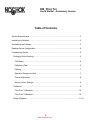
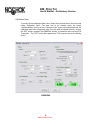
The filtering option allows the user to set the time response of the digital filter
implemented in the RTD Transmitter . There are four (4) different settings. The first
one is “none” which means the response time of the output is only dependent of the
mechanical construction of the RTD sensing portion. The other settings are 1, 3 and
5 seconds. To change the filter response time, simply click on the selection box
called “Filtering”, choose the appropriate setting and click on the “SET” button
located in the GENERAL section. It is recommended to set filtering to 1 sec. The
“SET” button will also update the TAG name as well as the calibration date.
Operation Range and Units:
The RTD Transmitter can be re-scaled within its construction limit range at any time.
The user can choose among a list of thirteen (13) different preset ranges or enter
the values manually. This section of the software, called OPERATION RANGE,
allows also the user to change the engineering units from Celsius to Fahrenheit and
vice versa.
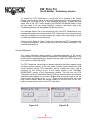
To change the engineering units, simply click on the selection box called “Units” and
select the desired value. Once it is selected, click on the “SET” button located in the
OPERATION RANGE section.
Each time you click on the “SET” button of the OPERATION RANGE section, a
warning message will appear on the screen, indicating that you are about to
re-scale the output of the RTD Transmitter. You can then choose to proceed or not
with the new settings.
When the units are changed, the operation range is also changed to the same
numerical values but in different engineering units. (Ex. If a RTD Transmitter is
configured as a 0 to 100 °C and the units are changed to Fahrenheit then the device
will become configured as a 0 to 100 °F). When the units are changed, the “Preset
Range” values are also automatically changed to match the new engineering units.
To re-scale the RTD Transmitter to one of the pre-defined range, simply click on the
“Preset Range” selection box, choose the appropriate range and then click on the
“SET” button located in the OPERATION RANGE section. Once the new range is
set, the “Actual Reading”, located in the bottom right of the Programming window,
will be updated with the new values.
7
www.comoso.com