1
Access the IP Camera using Intelligent IP Installer
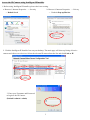
1. Before using Intelligent IP Installer, please check two setting.
a. Browser’s Internet Properties → Security
→ Default Level
b. Browser’s Internet Properties → Privacy
→ Uncheck Pop-up Blocker
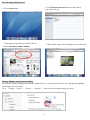
2. Click the Intelligent IP Installer Icon on your desktop. The main page will show up listing all active
camera and video server devices. Select the relevant IP camera from the list and click Link to IE.
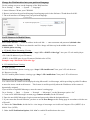
3. Enter your Username and Password
to login to the IP Camera.
(Default is admin / admin)
3