1
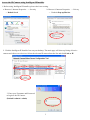
6. Under the Privacy Option, Click “On” to create an allow list.
7. Use your existing account to login to MSN Messenger.
8. Add the new MSN Messenger account (e.g.: Camera at home) to your contact list.
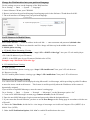
9. The IP Camera will send you a message with its Public IP and Private IP if the IP Notification Option is enabled.
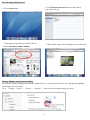
10. Click on the small camera icon. Then, choose “View a new contact's webcam”.
Camera at home says:
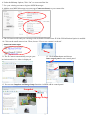
12. Click Action button and choose
Start control panel to use control panel
11. The IP Camera automatically accepts your
invitation and its live video is displayed.
13. You can use Snapshot and Image Setup function via MSN add-in control panel.
Snapshot
Image Setup
7