1
Table of Contents
About the iMcV-T1/E1/J1 Repeater
FCC Radio Frequency Interference Statement .................................................... ii
Limited Lifetime Warranty .................................................................................. ii
About the iMcV-T1/E1/J1 Repeater .....................................................................1
Installating an iMcV-T1/E1/J1 Repeater ...............................................................1
Configuration Instructions ..................................................................................2
Requirements.....................................................................................................2
DIP Switches ......................................................................................................4
LED Operation .................................................................................................11
Troubleshooting ...............................................................................................13
Specifications ...................................................................................................14
B&B Electronics Technical Support ...................................................................14
Fiber Optic Cleaning Guidelines.......................................................................14
Electrostatic Discharge Precautions ...................................................................15
Safety Certifications ..........................................................................................20
The iMcV-T1/E1/J1 Repeater chassis mounted media conversion module allows the
end user to extend the distances between T1, J1, and E1 copper telephony systems
by adding a fiber segment. The distances can support up to 100km depending on the
module used and the fiber type available.
Each iMcV-T1/E1/J1 Repeater includes one RJ-48 connector and one pair of SC or ST
fiber optic connectors, which can support any fiber type in MultiMode or
SingleMode. The Repeater series is also available in Single Strand Fiber, with SC
connectors.
Installating an iMcV-T1/E1/J1 Repeater
Each module requires one slot in the chassis. To install a module, remove the blank
brackets covering the slots where the module is to be installed (if present), by
removing the screws on the outside edges of the bracket. Slide the module into the
chassis, via the card guides, until the module is seated securely in the connector.
Secure the module to the chassis by tightening the captive screw. Save any “blanks”
removed during installation for future use should the configuration requirements
change.
Crossover/Straight-Through Connection
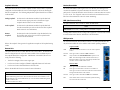
iMcV-T1/E1/J1 Repeater comes with an RJ-48 UTP connector that features a pushbutton switch, located next to the port, for selecting a crossover or straight-through
connection. To select a cross-over connection, press the push-button IN. A straightthrough connection is selected when the push-button is OUT. When unsure what
type of connection is needed, set the push button to the position that turns the NO
LNK LED off.
The iMcV-T1/E1/J1 Repeater Host and Remote modules cannot be both installed in
managed chassis. The recommendation, if using a managed chassis, is to install the
Host in the managed chassis; the Remote Unit should be installed in an unmanaged
chassis.
NOTE
Before installing the modules, they must be configured for Host/Remote via the DIP
Switches. The Master/Slave condition requires this configuration:
S3-2: ON Remote Unit Enabled (only at the REMOTE end)
S3-2: OFF Remote Unit Disabled (only at the LOCAL end)
iii
1