1
Loopback Testing
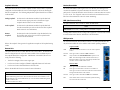
The iMcV-T1/E1/J1 Repeater includes the following loopback locations:
•
•
•
Local
Remote
Analog
The following illustrations show a typical progression of digital loopback tests; this
series allows the user to individually test each segment of the conversion. To test the
copper segment at the remote location requires the PRBS test described in the next
section.
Local Fiber Loopback Mode
Local Loopback
To set the loopback testing mode to Local Fiber Loopback Mode, perform the
following:
The Local loopback location on the module loops
the fiber-receive port to the fiber-transmit port.
1.
Set the Local iMcV-T1/E1/J1 Repeater module to Remote Loopback
(DIP Switch S3-3=Off and S3-4=Off)
2.
Set the Remote iMcV-T1/E1/J1 Repeater module Loopback to None
(DIP Switch S3-3=On and S3-4=On).
Remote Loopback
The Remote loopback location on the module
loops the fiber-transmit port to the fiber-receive
port.
This configuration allows the user to test the path from the CO copper port to the
Local iMcV-T1/E1/J1 Repeater module fiber port and loop it back. The transmitted
data is sent unhindered and the received data is ignored.
Analog Loopback
The Analog loopback location on the module
loops the copper-transmit port to the copperreceive port.
The iMcV-T1/E1/J1 Repeater can be configured to use the following loopback test
modes:
Local Fiber Loopback Mode
This setting tests the path from the CO copper
port to the Local iMcV-T1/E1/J1 Repeater
module fiber port and back.
Remote Fiber Loopback Mode
This setting tests the path from the CO copper
port to the Remote iMcV-T1/E1/J1 Repeater
module fiber port and loops it back.
Remote Copper Loopback Mode
This setting tests the path from the CO copper
port to the Remote iMcV-T1/E1/J1 Repeater
module copper port and loops it back.
Remote Fiber Loopback Mode
To set the loopback testing mode to Remote Fiber Loopback Mode, perform the
following:
1.
Set the Local iMcV-T1/E1/J1 Repeater module Loopback to None
(DIP Switch S3-3=On and S3-4=On)
2.
Set the Remote iMcV-T1/E1/J1 Repeater module to Local Loopback
(DIP Switch S3-3=Off and S3-4=On).
This configuration allows the user to test the path from the CO copper port to the
Remote iMcV-T1/E1/J1 Repeater module fiber port and loop it back. The transmitted
data is sent unhindered and the received data is ignored.
Remote Copper Loopback Mode
To set the loopback testing mode to Remote Copper Loopback Mode, perform the
following:
10
11