1
jtX`WW{niUGGwGX^GGt SGvG^SGYWWYGGZaYXGwt
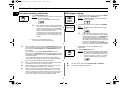
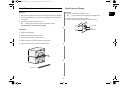
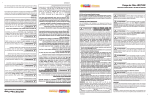
Installation Instructions for Stacking
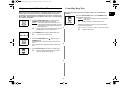
Replacement of Lamp
Important
Important
GB
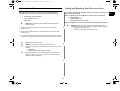
1. Remove a screw securing the lamp cover.
✉
1. Disconnect the power cord from the wall socket before attempting installation.
2. For stacking installation, you must use the “bracket plate” which is enclosed
with this unit.
You don’t need to remove outer panel to replace lamp.
2. Remove the lamp by rotating it clockwise.
3. Replace with a new lamp by rotating it counter-clockwise.
3. The maximum stacking height is two units.
✉
Stacking the two units is limited to the following models.
CAUTION: Be sure the oven cavity is empty.
Lamp
Cover
Installation
Outer
Panel
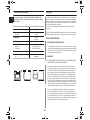
1. Stack two units together.
2. Remove 6 screws as shown in the figure.
3. Place the Bracket-plate to join the two units.
4. Attach and tighten 6 screws as shown in the figure here.
5. Ensure the top oven is at a safe and workable height.
Screw
Bracket-Plate
17
Lamp Holder
Lamp
(230V 25W)