1
moves the ship as appropriate. This allows for a smoother control using the
keyboard.
The mouse is slightly different. The player can move the mouse quickly
or slowly, but it wouldn’t be a good idea if the ship moved quickly along with
the player’s mouse pointer. So the mouse’s input loop checks the mouse
position and slowly moves the player toward the current position. Therefore if
one uses the mouse to play it is recommended to move the mouse pointer more
slowly.
4.2.2. Player Ships
The player has a ship object attached to it. There are several methods
that are usable to move the ship around, the keyboard and the mouse. Due to
the way the keyboard handles input, it’s recommended to use the mouse for
movement and the keyboard for firing.
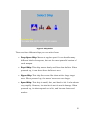
There are several different ships the player can choose from. Depending
on the ship chosen, the availability of weapons, velocity, and power are
affected.
The ships the player can choose from are:
•
Deep Space Ship: Moves at regular speed. It can handle many different
kinds of weapons, but not the most powerful version of each weapon.
•
Royal Ship: This ship moves slowly and fires slow bullets. When
powered up, it can shoot three bullets at once.
•
Hyper Ship: This ship fires wave-like shots with a large target area.
When powered up, the waves’ areas are even larger.
•
Speed Ship: This ship is small, fast, and hard to hit. It also shoots very
rapidly. However, its attacks do not do much damage. When powered up,
its shots spread out a bit, and become faster and weaker.
5