1
4. OPERATION
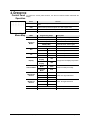
Control Panel
Operation
To access the control panel functions, use the four buttons located underneath the
display.
Button
<MODE/ESC>
<UP>
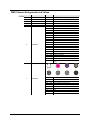
Menu Map
Function
Press to find an operation mode or to back out of the current menu
option
Press to scroll up the list of options or to find a higher value
<DOWN>
Press to scroll down the list of options or to find a lower value
<ENTER>
Press to activate a menu option or a selected value
Mode
Programming Steps
DMX Mode
001-512
Operation
Modes
NASL (SLoU)
Automatic Mode, Slow Program
NAFA (FASt)
Automatic Mode, Fast Program
NStS (SrUn)
Sound-Active Mode
Sets the DMX starting address
SLAv (Son)
Pan
Tilt
Display
Channel Mode
Manual Pan
Restrict
Manual Tilt
Restrict
Description
Slave operating mode
Normal Pan
PAn
Normal Pan operation
Inverse Pan
r PAn
Inverse Pan operation
Normal Tilt
tiL
Normal Tilt operation
Inverse Tilt
r tiL
Inverse Tilt operation
Normal
Display
diS
Inverse
Display
r diS
13-Channel
Mode
13CH
8-Channel
Mode
8CH
Pan 540
PA54
Pan 360
PA36
Pan 180
PA18
Tilt 270
Ti27
Tilt 180
Ti18
Tilt 90
Ti 9
Change the LCD display text position
Selects the DMX personality
Select Pan angle restrictions
Select Tilt angle restrictions
Reset
rESt
Resets fixture
Load
LoAd
Load factory defaults
Intimidator™ Spot LED 250 User Manual (Rev. 8)
Page 9 of 20