1
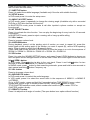
PANEL
1. MIC
2. POWER/ MUTE button
Press it to turn on the unit. When the unit is on, short press it mute the volume output, long
press it to turn the unit off.
3. MENU button
Press it to turn to the main menu quickly.
4. SETUP/EQ button
Press it to turn to setting menu quickly. Long press the button to enter into EQ setting.
5. EJECT button
Press to eject a disc. If the disc is not removed for about 10 seconds after eject, the disc is
reinserted automatically.
Press and hold for 2 second to adjust the Monitor tilt angle: TILT ANGLE 1 => TILT ANGLE 2
=> TILT ANGLE 3 => TILT ANGLE 4.
9