1
8
LAN
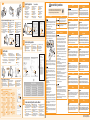
Register the paper size.
FRA
Enregistrez le format papier.
GER
Reportez-vous au manuel électronique.
SPA
ON
DUT
Consulte el e-Manual.
FIN
Gå til e-Manual.
Регистрация формата бумаги.
POL
FRA
Configurez les paramètres réseau si nécessaire.
GER
SPA
DUT
Rögzítse a papírméretet.
POR
FIN
POL
HUN
SWE
POR
CES
Nastavení formátu papíru.
Registre o tamanho do papel.
TUR
Consulte o Manual electrónico.
Kağıt boyutunu kaydedin.
Eğer gerekiyorsa, ağ ayarlarını yapılandırın.
Consulte o Manual electrónico.
- Do not install the printer in a location near alcohol, paint thinner, or other
flammable substances. If flammable substances come into contact with
electrical parts inside the printer, this may result in a fire or electrical
shock.
- Do not place the following items on the printer.
- Necklaces and other metal objects
- Cups, vases, flowerpots, and other containers filled with water or liquids
If these items come into contact with a high-voltage area inside the
printer, this may result in a fire or electrical shock.
If these items are dropped or spilled inside the printer, immediately turn
OFF the power switch (1) and disconnect the interface cables if they are
connected (2). Then, unplug the power plug from the AC power outlet (3)
and contact your local authorized Canon dealer.
2
1
Elektronik Kılavuza bakın.
D
D
9
2
1
* English sample
7
Install the driver.
FRA Installez le pilote.
SPA Instale el controlador.
NOR Installer driveren. Last ned
skriverdriveren fra Canons nettsted.
GER
DUT
RUS
POL
HUN
FIN
Установите драйвер. Загрузка
драйвера принтера с веб-сайта Canon.
Telepítse az illesztőprogramot.
POR
Installieren Sie den Treiber.
Installeer het stuurprogramma. Download het
printerstuurprogramma van de website van Canon.
Asenna ohjain. Lataa tulostinohjain Canonin web-sivustosta.
Zainstaluj sterownik. Sterownik drukarki można
pobrać ze strony internetowej firmy Canon.
Instale o driver.
(1)
Vérifiez que l'impression fonctionne.
Compruebe el funcionamiento de la impresión.
Kontrollere skriverfunksjonen.
Проверка операции печати.
Ellenőrizze a nyomtatás működését.
GER
DUT
FIN
POL
POR
Überprüfen Sie die Druckfunktion.
Controleer de printerwerking.
Tulostimen toiminnan tarkistaminen
Sprawdzanie działania drukowania.
Verifique a impressão.
ITA
DAN
SWE
CES
TUR
Installare il driver.
Installer driveren. Download
printerdriveren fra Canons websted.
SWE Installera drivrutinen. Hämta skrivardrivrutinen
från Canons webbplats.
CES Instalace ovladače.
TUR
(1)
- When installing or removing the optional accessories, be sure to turn the
printer OFF, unplug the power plug, and then disconnect all the interface
cables and power cord from the printer. Otherwise, the power cord or
interface cables may be damaged, resulting in a fire or electrical shock.
Sürücüyü yükleyin.
Follow the instructions on the screen.
GER
DUT
FIN
POL
POR
Folgen Sie den Anleitungen im Dialog.
Volg de instructies op het scherm.
Noudata näytön ohjeita.
Postępuj zgodnie z instrukcjami wyświetlanymi na ekranie.
Siga as instruções apresentadas no ecrã.
ITA
DAN
SWE
CES
TUR
Seguire le istruzioni visualizzate a schermo.
Følg vejledningen på skærmen.
Följ anvisningarna på skärmen.
Postupujte podle pokynů na obrazovce.
Ekrandaki talimatları izleyin.
Setup is finished.
FRA
SPA
NOR
RUS
HUN
If you have any questions about operations, see the
"Printer Driver Installation Guide."
FRA
SPA
NOR
RUS
HUN
Pour toute question sur ces
opérations, reportez-vous au
manuel "Guide d'installation
du pilote d'imprimante".
Si tiene preguntas sobre las
operaciones, consulte la
"Guía de instalación del
controlador de impresora".
GER
Hvis du har spørsmål om
hvordan du angir innstillingene,
går du til "Installeringshåndbok
for skriverdriver".
При возникновении
вопросов, касающихся
операций, см.
"Руководство по установке
драйвера принтера".
Ha a szükséges
műveletekről kérdései
merülnek fel, akkor lásd a
következőt: „Printer Driver
Installation Guide”.
FIN
DUT
POL
POR
Wenn Sie Fragen zu den
Vorgängen haben, lesen Sie
im "Installationshandbuch
zum Druckertreiber" nach.
Als u vragen heeft over de
bedieningshandelingen,
raadpleeg dan de
"Installatiehandleiding
printerstuurprogramma".
Jos sinulla on mitä tahansa
kysymyksiä toiminnoista,
katso "Tulostinajurin
asennusopas".
Informacje dotyczące
działania drukarki można
znaleźć w "Podręczniku
instalacji sterownika
drukarki".
Se tiver alguma pergunta
sobre o funcionamento,
consulte o "Printer Driver
Installation Guide".
ITA
DAN
SWE
CES
TUR
In caso di dubbi sulle
operazioni, consultare la
"Guida di Installazione del
Driver Stampante".
Hvis du har nogen
spørgsmål til betjeningen,
skal du læse i
"Installationsvejledning til
printerdriver".
Om du har frågor angående
förfarandet, se
"Installationsguide för
skrivardrivrutin".
Pokud máte v souvislosti s
ovládáním nějaké otázky, viz
„Printer Driver Installation
Guide“.
İşlemlere ilişkin herhangi bir
sorunuz olursa, "Printer
Driver Installation Guide"
bakın.
(3)
ITA
DAN
* English sample
Suivez les instructions à l'écran.
Siga las instrucciones de la pantalla.
Følg instruksjonene på skjermen.
Следуйте инструкциям на экране.
Kövesse a képernyőn megjelenő utasításokat.
(2)
Controllare il funzionamento di stampa.
Kontrol af printerfunktionen.
Kontrollera att skrivaren fungerar.
Kontrola tiskové operace.
Yazdırma işlemini inceleyin.
B or C
FRA
SPA
NOR
RUS
HUN
(2)
Check the printing operation.
FRA
SPA
NOR
RUS
HUN
10
La configuration est terminée.
La instalación ha finalizado.
Oppsett er fullført.
Установка закончена.
A beállítás ezzel befejeződött.
GER
DUT
FIN
POL
POR
Die Installation ist abgeschlossen.
De installatie is beëindigd.
Asennus on suoritettu.
Konfiguracja została zakończona.
A configuração está concluída.
ITA
DAN
SWE
CES
TUR
Installazione terminata.
Installationen er gennemført.
Installationen är avslutad.
Instalace je hotová.
Kurulum tamamlanmıştır.
For more about using the printer, see the e-Manual.
FRA
Pour plus d'informations sur l'utilisation de
l'imprimante, reportez-vous au manuel électronique.
SPA Para obtener más información sobre el uso de la
impresora, consulte el e-Manual.
NOR For mer om bruk av skriveren, se e-Manualen.
GER
RUS
POL
HUN
Подробнее об использовании принтера см. в
Электронном руководстве.
A nyomtató használatáról további információkért
lásd az e-Kézikönyvet.
DUT
FIN
POR
Français
User Manual CD-ROM
Weitere Details zur Verwendung des
Druckers finden Sie in der e-Anleitung.
Zie de e-Handleiding voor meer informatie
over het gebruik van de printer.
Katso lisätietoja tulostimen käyttämisestä
sähköisestä oppaasta.
Aby dowiedzieć się więcej na temat korzystania
z drukarki, zapoznaj się z e-Podręcznikiem.
Para mais informações sobre a impressora,
consulte o Manual electrónico.
ITA
Per maggiori info sull'uso della stampante,
vedere l'e-Manual.
DAN Se e-manualen for yderligere informationer
omkring brugen af denne printer.
SWE För mer information om att använda
skrivaren, se e-handboken.
CES Další informace o používání tiskárny
najdete v e-Příručce.
TUR Yazıcının kullanılmasına ilişkin daha fazla
bilgi edinmek için, Elektronik Kılavuza bakın.
To avoid the risk of personal injury or damage to the printer, and for legal
information, make sure to read the "Legal Notices" and "Important Safety
Instructions" in the e-Manual included on the accompanying User Manual
CD-ROM carefully before using the printer.
Pour éviter de vous blesser ou d'endommager l'imprimante, et pour consulter les
informations légales, veillez à bien consulter les rubriques "Publication judiciaire" et
"Consignes de sécurité importantes" du manuel électronique fourni sur le CD "User
Manual CD-ROM" qui accompagne le produit, avant toute utilisation de l'imprimante.
Symbols
Installation
Elektronik Kılavuza bakın.
Podle potřeby proveďte konfiguraci nastavení sítě.
TUR
English
AVERTISSEMENT
Viz e-Příručku.
Viz e-Příručku.
Ajuste as configurações de rede (se necessário).
Lásd az e-Kézikönyvet.
CES
Konfigurera nätverksinställningarna om så krävs.
Patrz e-Podręcznik.
Szükség esetén adja meg a hálózati beállításokat.
Se e-handboken.
Zarejestruj rozmiar papieru.
Se e-handboken.
Skonfiguruj ustawienia sieciowe, jeśli to konieczne.
См. "Электронное руководство".
SWE Registrera pappersstorleken.
Konfigurer netværksindstillingerne, hvis det er nødvendigt.
Katso sähköinen opas.
При необходимости настройте параметры протокола.
Rekisteröi paperikoko.
Se e-manualen.
Määritä verkkoasetukset tarvittaessa.
Gå til e-Manual.
RUS
DAN
This manual describes only warnings and cautions for the installation and the power
supply. Be sure to read "Important Safety Instructions" described in the e-Manual
(HTML manual) included in the supplied User Manual CD-ROM also.
Se e-manualen.
Configurare le impostazioni di rete se necessario.
Zie de e-Handleiding.
Om nødvendig, konfigurer nettverksinnstillingene.
Registrer papirstørrelsen.
Vedere l'e-Manual.
Configureer de netwerkinstellingen, indien nodig.
Consulte el e-Manual.
NOR
ITA
Siehe e-Anleitung.
Si es preciso, configure los ajustes de red.
DAN
See the e-Manual.
Konfigurieren Sie gegebenenfalls die Netzwerkeinstellungen.
Reportez-vous au manuel électronique.
Papierformaat vastleggen.
Patrz e-Podręcznik.
Lásd az e-Kézikönyvet.
Configure the network settings, if necessary.
Registrazione del formato carta.
Vedere l'e-Manual.
Katso sähköinen opas.
См. "Электронное руководство".
HUN
ITA
Zie de e-Handleiding.
NOR Registrer papirstørrelsen.
RUS
Registrieren Sie das Papierformat.
Siehe e-Anleitung.
Registre el tamaño de papel.
Important Safety Instructions
See the e-Manual.
- Do not install the printer in unstable locations, such as on unsteady
platforms or inclined floors, or in locations subject to excessive
vibrations, as this may cause the printer to fall or tip over, resulting in
personal injury.
- The ventilation slots are provided for proper ventilation of working parts
inside the printer. Never place the printer on a soft surface, such as a
bed, sofa, or rug. Blocking the slots can cause the printer to overheat,
resulting in a fire.
- Do not install the printer in the following locations, as this may result in a
fire or electrical shock.
- A damp or dusty location
- A location exposed to smoke and steam, such as near a cookery or
humidifier
- A location exposed to rain or snow
- A location near a water faucet or water
- A location exposed to direct sunlight
- A location subject to high temperatures
- A location near open flames
- When installing the printer, gently lower the printer to the installation site
so as not to catch your hands between the printer and the floor or
between the printer and other equipment, as this may result in personal
injury.
- When connecting the interface cable, connect it properly by following the
instructions in the e-Manual. If not connected properly, this may result in
malfunction or electrical shock.
- Be careful when handling the main board or the ROM. Touching the main
board or the sharp parts such as the edges of the ROM may result in
personal injury.
- When moving the printer, follow the instructions in the e-Manual to hold it
correctly. Failure to do so may cause you to drop the printer, resulting in
personal injury.
Indicates a warning concerning operations that may lead to
death or injury to persons if not performed correctly. To use the
machine safely, always pay attention to these warnings.
Indicates a caution concerning operations that may lead to injury
to persons if not performed correctly. To use the machine safely,
always pay attention to these cautions.
Deutsch
WARNUNG
- Do not damage or modify the power cord. Also, do not place heavy
objects on the power cord or pull on or excessively bend it, as this can
cause electrical damage, resulting in fire or electrical shock.
- Keep the power cord away from all heat sources. Failure to do so can
cause the power cord insulation to melt, resulting in a fire or electrical
shock.
- The power cord should not be taut, as this may lead to a loose
connection and cause overheating, which could result in a fire.
- The power cord may become damaged if it is stepped on, fixed with
staples, or if heavy objects are placed on it. Continued use of a
damaged power cord can lead to an accident, such as a fire or electrical
shock.
- Do not plug or unplug the power plug with wet hands, as this can result
in electrical shock.
- Do not plug the power cord into a multi-plug power strip, as this can
result in a fire or electrical shock.
- Do not bundle up or tie up the power cord in a knot, as this can result in
a fire or electrical shock.
- Insert the power plug completely in the AC power outlet. Failure to do
so can result in a fire or electrical shock.
- If excessive stress is applied to the connection part of the power cord, it
may damage the power cord or the wires inside the machine may
disconnect. This could result in a fire. Avoid the following situations:
- Connecting and disconnecting the power cord frequently.
- Tripping over the power cord.
- The power cord is bent near the connection part, and continuous stress
is being applied to the power outlet or the connection part.
- Applying a shock to the power connector.
- Do not use power cords other than the one provided, as this can result in
a fire or electrical shock.
- As a general rule, do not use extension cords. Using an extension cord
may result in a fire or electrical shock.
- Do not use a power supply voltage other than that listed herein, as this
may result in a fire or electrical shock.
- Always grasp the power plug when unplugging the power plug. Do not
pull on the power cord, as this may expose the core wire of the power
cord or damage the cord insulation, causing electricity to leak, resulting
in a fire or electrical shock.
- Leave sufficient space around the power plug so that it can be
unplugged easily. If objects are placed around the power plug, you may
be unable to unplug it in an emergency.
AVVERTENZA
Lesen Sie vor der Verwendung des Druckers auf der beiliegenden User Manual
CD-ROM in der e-Anleitung die Abschnitte "Rechtshinweise" und "Wichtige
Sicherheitsvorschriften", um Verletzungen oder Beschädigungen des Druckers zu
vermeiden und rechtliche Informationen zu erhalten.
Power Supply
Italiano
Per evitare il rischio di infortunio o di danni alla stampante, nonché per
informazioni di carattere legale, leggere attentamente le sezioni
"Avvertenze legali" e "Istruzioni importanti per la sicurezza" dell'e-Manual
contenuto nell'User Manual CD-ROM prima di installare la stampante.
Español
ADVERTENCIA
Nederlands
WAARSCHUWING
Para evitar el riesgo de sufrir lesiones personales o de causar daños a la impresora
(y para información legal), asegúrese de leer atentamente los "Avisos legales" y las
"Instrucciones de seguridad importantes" del e-Manual incluido en el disco User
Manual CD-ROM suministrado antes de utilizar la impresora.
Ter voorkoming van het risico van persoonlijk letsel of beschadiging van de printer en ter
kennisneming van de wettelijke informatie is het belangrijk dat u, voordat u de printer in
gebruik neemt, de "Juridische kennisgevingen" en de "Belangrijke veiligheidsvoorschriften"
aandachtig leest, die staan in de e-Handleiding op de begeleidende User Manual CD-ROM.
Dansk
Norsk
ADVARSEL
ADVARSEL
For at undgå risiko for personskade eller beskadigelse af printeren og for at
få juridiske oplysninger bør du inden du bruger printeren omhyggeligt læse
"Juridiske bemærkninger" og "Vigtige sikkerhedsinstruktioner" i den
e-manual, der findes på den medfølgende User Manual CD-ROM.
Hvis du vil unngå fare for personskade og skade på skriveren, og få juridisk
informasjon, må du lese nøye gjennom "Juridiske merknader" og "Viktige
sikkerhetsinstruksjoner" i e-Manual som ligger på User Manual CD-ROM som
følger med, før du begynner å bruke skriveren.
Suomi
Svenska
VAROITUS
VARNING
Jotta vältät henkilövahinkojen tai tulostimen vaurioitumisen riskin ja jos
haluat lisätietoja lakiasioista, varmista ennen tulostimen käyttöä, että luet
"Lakitiedot" ja "Tärkeitä turvaohjeita" sähköisestä oppaasta, joka löytyy
toimitukseen kuuluvalta User Manual CD-ROM -levyltä.
För att undvika risker för personskador eller skador på skrivaren och för
juridisk information se till att läsa "Juridiska meddelanden" och "Viktig
säkerhetsinformation" i e-handboken som finns i User Manual CD-ROM
noggrant innan du använder skrivaren.
Русский
ОСТОРЖНО
Polski
OSTRZEŻENIE
Во избежание травм и повреждения принтера, а также для получения юридической
информации внимательно прочтите разделы "Правовые вопросы" и "Важные указания
по технике безопасности" Электронного руководства, находящегося на компакт-диске
User Manual CD-ROM из комплекта поставки, перед началом использования принтера.
Aby zminimalizować ryzyko obrażeń ciała i uszkodzenia drukarki oraz zapoznać się z
informacjami prawnymi, należy przed rozpoczęciem korzystania z drukarki przeczytać
rozdziały "Uwagi prawne" oraz "Ważne instrukcje dotyczące bezpieczeństwa" w
e-Podręczniku umieszczonym na dysku User Manual CD-ROM dołączonym do drukarki.
Čeština
VAROVÁNÍ
Magyar
FIGYELEM
Proto, abyste předešli riziku zranění nebo poškození tiskárny a abyste znali
právní informace, si určitě pečlivě přečtěte „Právní pokyny“ a „Důležité
bezpečnostní pokyny“ v e-Příručce obsažené na disku User Manual
CD-ROM, a to dříve, než tiskárnu začnete používat.
A személyi sérülés, ill. a nyomtató károsodásának megelőzése, valamint a
jogi információk megismerése érdekében a nyomtató használata előtt
gondosan olvassa el a mellékelt User Manual CD-ROM-on megtalálható
e-Kézikönyv „Jogi tudnivalók” és „Fontos biztonsági előírások” c. részeit.
Português
Türkçe
AVISO
Para tomar conhecimento das informações legais e evitar riscos de lesão
corporal ou danos à impressora, leia cuidadosamente os "Avisos legais" e
as "Instruções de segurança importantes" no Manual electrónico fornecido
com o User Manual CD-ROM antes de usar a impressora.
UYARI
Bedensel yaralanma veya yazcının zarar görmesi riskini önlemek için ve yasal bilgileri
edinmek amacıyla, yazıcıyı kullanmaya başlamadan önce, yazıcıyla birlikte teslim
edilmiş olan User Manual CD-ROM içeriğinde bulunan Elektronik Kılavuz içindeki "Yasal
Bildirimler" ve "Önemli Güvenlik Talimatları" metinlerini okuduğunuzdan emin olun.
Printed on non-chlorine bleached paper.
Gedruckt auf chlorfrei gebleichtem Papier.