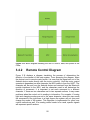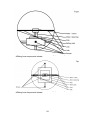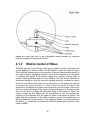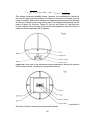
1
Puppy Pal
Senior Design Group 11
Marshall Smith
Cameron Riesen
Afzal Shafi
Anson Contreras
i
Table of Contents
1
2
Executive Summary ................................................................................................. 1
Project Description ................................................................................................... 2
2.1
2.2
2.3
Project Motivation............................................................................................... 2
Goals and Objectives ......................................................................................... 2
Project Specifications and Requirements ........................................................... 3
2.3.1
2.3.2
2.3.3
2.3.4
2.3.5
2.3.6
2.3.7
2.3.8
3
Durability...................................................................................................... 3
Mobility ........................................................................................................ 4
Autonomous Movement ............................................................................... 5
Remote Control ........................................................................................... 6
Wireless Charging ....................................................................................... 6
Motion Detection .......................................................................................... 7
Sound Projection ......................................................................................... 8
PCB ............................................................................................................. 9
Research Related to Project Definition .................................................................. 11
3.1
Existing Similar Projects and Products ............................................................. 11
3.1.1
3.1.2
3.1.3
3.1.4
3.2
Relevant Technologies ..................................................................................... 15
3.2.1
3.2.2
3.2.3
3.3
Sphero ....................................................................................................... 11
Remote Controlled Basketball Robot ......................................................... 12
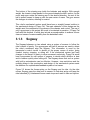
Segway ...................................................................................................... 13
Stray Pooch ............................................................................................... 14
Autonomous Robotics................................................................................ 15
Android Remote Control Applications ........................................................ 17
Location Detection ..................................................................................... 19
Strategic Components ...................................................................................... 20
3.3.1
Wireless Communications ......................................................................... 20
3.3.1.1
3.3.1.2
3.3.1.3
3.3.2
System Processing .................................................................................... 25
3.3.2.1
3.3.2.2
3.3.3
Microcontrollers .................................................................................. 25
FPGA ................................................................................................. 28
Motors and Actuators ................................................................................ 28
3.3.3.1
3.3.3.2
3.3.3.3
3.3.3.4
3.3.4
Wi-Fi................................................................................................... 21
ZigBee................................................................................................ 21
Bluetooth ............................................................................................ 22
DC Motors .......................................................................................... 28
AC Motor ............................................................................................ 29
Servo Motor ....................................................................................... 30
Linear Actuators ................................................................................. 30
Sound System Techniques ........................................................................ 30
3.3.4.1
3.3.4.2
MP3 Shield with 8 Ohm Speaker ....................................................... 30
Piezoelectric Sound Generator .......................................................... 31
ii
3.3.4.3
Electronic Dog Whistle Circuit ............................................................ 32
3.3.4.4 Sound Subsystem .................................................................................. 33
3.3.5
Battery ....................................................................................................... 38
3.3.5.1
3.3.5.2
3.3.5.3
3.3.6
3.3.7
Motion Detection ........................................................................................ 41
Location Detection ..................................................................................... 43
3.3.7.1
3.3.7.2
3.3.7.3
3.4
Global Positioning System ................................................................. 43
Wi-Fi Positioning Systems ................................................................. 46
Multilateration ..................................................................................... 46
Possible Architectures and Diagrams .............................................................. 47
3.4.1
Hardware Block Diagrams ......................................................................... 47
3.4.1.1
3.4.1.2
3.4.1.3
3.4.2
3.4.3
4
Collar Battery ..................................................................................... 39
Puppy Pal Battery .............................................................................. 39
State of Charge .................................................................................. 41
Ball Block Diagram ............................................................................. 47
Base Charging Station ....................................................................... 48
Collar.................................................................................................. 49
Remote Control Diagram ........................................................................... 50
Software Block Diagram ............................................................................ 51
Project Hardware and Software Design ................................................................. 53
4.1 Initial Design Architecture and Diagrams ............................................................. 53
4.1.1
4.1.2
4.1.3
4.2
Mechanical Subsystem .................................................................................... 59
4.2.1
4.2.2
4.2.3
4.3
Rotational Motion ....................................................................................... 53
Mobile Center of Mass ............................................................................... 55
Hybrid ........................................................................................................ 58
Design ....................................................................................................... 59
Motors........................................................................................................ 61
Enclosure................................................................................................... 63
Motor Control Subsystem ................................................................................. 65
4.3.1
4.3.2
Design ....................................................................................................... 65
Hardware ................................................................................................... 65
4.3.2.1
4.3.2.2
4.3.2.3
4.4
Gyroscopes ........................................................................................ 66
Accelerometers .................................................................................. 67
Encoders ............................................................................................ 69
Microcontroller.................................................................................................. 70
4.4.1
4.4.2
Pin Settings ............................................................................................... 71
Algorithms.................................................................................................. 71
4.5 Remote Control Mode .......................................................................................... 72
4.5.1
4.5.2
Bluetooth Module Hardware ...................................................................... 72
Android Device .......................................................................................... 75
iii
4.5.3
4.5.4
4.5.5
4.6
Motion Detection Subsystem............................................................................ 78
4.6.1
4.6.2
4.7
Collar ......................................................................................................... 78
Base Charging Station ............................................................................... 79
Power Systems ................................................................................................ 79
4.7.1
4.7.2
4.7.3
4.9
Android Application .................................................................................... 76
Algorithm ................................................................................................... 76
Detailed HC-05 Schematic ........................................................................ 77
Collar ......................................................................................................... 79
Base Charging Station ............................................................................... 80
Ball ............................................................................................................ 80
Ball Schematic ................................................................................................. 82
5 Design Summary of Hardware and Software ............................................................. 84
5.1 System Overview ................................................................................................. 84
5.2 Mechanical Housing Design Overview ............................................................. 85
5.3 Software Overview............................................................................................... 86
5.3.1
5.3.2
5.3.3
5.3.4
5.3.5
5.3.6
6
Android Device .......................................................................................... 90
Collar ......................................................................................................... 92
Messaging System .................................................................................... 93
Bluetooth Communications ........................................................................ 97
Modes ........................................................................................................ 97
Environment and Coding Standards .......................................................... 98
Prototype Construction and Coding ..................................................................... 100
6.1
Parts and Acquisition ..................................................................................... 100
6.1.1
6.1.2
6.1.3
Mechanical Subsystem ............................................................................ 100
Collar Subsystem .................................................................................... 101
Base Charging Station ............................................................................. 101
6.2 PCB Vendor and Assembly ............................................................................ 102
6.3 Final Coding Plan .............................................................................................. 104
7
Project Prototype Testing ..................................................................................... 107
7.1 Hardware Test Environment .............................................................................. 107
7.2 Software Specific Testing .................................................................................. 107
7.2.1
7.2.2
7.2.3
7.2.4
7.3
Puppy Pal Software ................................................................................. 107
Android Software ..................................................................................... 108
Collar Software ........................................................................................ 109
Bluetooth Software .................................................................................. 109
Hardware Specific Testing ............................................................................. 110
7.3.1
7.3.2
Speed Test .............................................................................................. 110
Remote Control Test ............................................................................... 111
7.3.2.1
7.3.2.2
Android/Bluetooth Connectivity Testing ............................................ 111
Bluetooth Range Test ....................................................................... 111
iv
7.3.2.3
7.3.2.4
7.3.2.5
7.3.3
7.3.4
7.3.5
7.3.6
7.3.7
7.3.8
7.3.9
Button Control Testing ...................................................................... 113
Tilt Control Testing ............................................................................ 114
Timing Response Test ...................................................................... 114
Autonomous Movement Test ................................................................... 114
Durability Tests ........................................................................................ 115
Motion Detection Test .............................................................................. 116
Wireless Charging Test ........................................................................... 116
Battery Life Test ...................................................................................... 117
Dog Interaction Test ................................................................................ 117
State of Charge Test ............................................................................... 118
8 Administrative Content ............................................................................................. 120
8.1
8.2
8.3
8.4
8.5
Budget ............................................................................................................ 120
Finances ........................................................................................................ 121
Milestones ...................................................................................................... 121
Decision Making Process ............................................................................... 122
Group Responsibilities ................................................................................... 122
Appendices ................................................................................................................. 124
Appendix A - Copyright Permissions ....................................................................... 124
Appendix B - References ......................................................................................... 125
v
1 Executive Summary
Puppy Pal’s express purpose is to entertain the owner’s dog autonomously. This
will be accomplished by designing a device that accurately simulates the
movements and sounds of a real animal. This main device will be spherical, and
will be referred to as the Ball. The reason for choosing a ball over conventional
four-wheeled designs is durability, a fully enclosed ball allows no external
components, which could easily be chewed off by a persistent dog. The ball will
be the only device interacting directly with the dog, and all other devices will
support the function of the ball. When animals play, their movements are
sporadic and they audibly communicate. This device’s autonomous guidance
system will mimic these actions using a location detection system and
pseudorandom motion sequences, and an audio subsystem will generate
intermittent animal sounds. The ball should not wander aimlessly into potentially
unsafe areas, so a user definable play area will be created using a base station
and the location detection system. The base station will also act as a wireless
charger, and will be referred to as the Base Charging Station. In order to avoid
this toy becoming a nuisance, the device should be able to intelligently adjust its
state when the dog is awake and ready to play, and when the dog is sleeping
and doesn’t want to play. This function is very important to avoid exhausting and
annoying the dog, and will be implemented in two subsystems. The first system
will be a collar attachment worn by the dog, which will determine when the dog is
moving, and signal the main device. This device will be simply referred to as the
Collar. The second system will be a proximity sensor located on the Base
Charging Station, and will be used to determine when the dog has entered the
play area. Both devices must be triggered before the ball begins moving,
because the dog should be allowed to sleep without being disturbed while in the
play area. This requires that the motion detection systems work together to
determine when the dog has gone to sleep, which will be defined by a sharp
decrease in movement, whether or not the proximity sensor detects the dog in
the play area. The sleep function will also allow an extension of battery life.
Puppy Pal should be capable of sustaining play intermittently for an entire work
day, including a one hour commute to work, eight hours at work, and a one hour
commute home. This system, the ball in particular, must be extremely durable, as
it will be exposed to outdoor weather, knocked about during play, and even
chewed on if the dog manages to catch it. The Base Charging Station and Collar
will also be exposed to elements and potential chewing, and must be designed
with matching durability. In addition to the autonomous mode described above,
Puppy Pal will have a user interaction mode, controlled by an Android
application. This function will allow the owner to play with their dog in a more
traditional sense while not requiring any additional equipment for those already
having an Android phone, capable of Bluetooth communication. This application
will allow users to control the settings of the device, and will act as a remote
control, allowing the device to operate in an area governed only by the range of
the Bluetooth communication equipment on the two devices.
1
2 Project Description
2.1 Project Motivation
Dogs provide hours of entertainment and years of loyal companionship to their
owners, but all too often have the undesirable habits of rummaging through the
trash, digging holes, and chewing on household items. These habits are
inconvenient to the owner and can have serious health consequences for dogs,
since much of what they eat in the trash can be unhealthy and even toxic. Many
owners don't realize that the root cause of this behavior is simply boredom.
Boredom is easily prevented, but often occurs while the owner is away and thus
can become a difficult problem to mitigate. Many people have tried to give their
dog a bone or chew toy, but these quickly become uninteresting because of the
monotony and lack of feedback. These problems have been addressed by
squeaking toys, scented and flavored and countless others, but all fall short when
it comes to long term distraction. After struggling to find something capable of
long term distraction, it was concluded that only other living beings provided
sufficient entertainment. Dogs will chase squirrels, lizards and even each other,
but this often can't be accommodated in an urban household, so what better way
to distract them that with a toy built to mimic this behavior.
2.2 Goals and Objectives
The overall goal of this project is to provide all day entertainment for dogs to
avoid the destructive behaviors that boredom causes. This requires that the
device be capable of capturing the attention of the dog, and retaining that
attention until the dog is tired enough to rest. The best way for this device to
capture and retain the dog's attention is to simulate something that is already
instinctually interesting to all dogs, another animal. The simple solution of leaving
another animal for the dog to play with overlooks the tendency for the animals to
play destructively together, therefore, the best solution is to simulate an animal
that will only play in a safe and non-destructive manner. In order to effectively
simulate an animal, this device should be capable of impulsive and apparently
spontaneous motion, suggesting the need for a lightweight design and a motor
capable of providing quick bursts of movement. This product must be able to
handle the wear and tear of everyday play while still being visually stimulating,
which will be accomplished through enclosing all parts within a hard plastic
sphere which will be masked with a replaceable fabric cover. The sphere is
important because there are virtually no places that can be chewed on or torn off.
The all-day duration requires a sleep function that takes advantage of the time
when the dog is napping, allowing the dog an undisturbed rest while monitoring
the dog to allow for restoration of entertainment when the dog has woken up.
2
2.3 Project Specifications and Requirements
2.3.1
Durability
Durability plays a huge role in terms of overall specifications of the device, with
the project being produced to interact with household pets, specifically more with
dogs, the device was primarily designed to be highly durable against a wide
variety of situations that may threaten the internal electrical structure. Since dogs
have a habit of salivating on their toys, the device has a spherical enclosure that
will resist any significant amount of saliva from the dog in seeping through into
the internal electronic hardware of the system. Many dogs are known to play
rough when they are put into a playful mood, they can potentially often tear and
throw around their toys that can eventually cause destruction over a period of
time, especially if there is some sort of fragile circuitry involved inside of the
device. The device will be durable enough to withstand approximately maximum
impulse forces that the dog may deliver to the system and has the required
protocol for the hardware inside to stay protected in order for the device to
operate to optimal standards. In addition, the enclosure was that used to meet
the requirements to be made from a material where it will be highly difficult for a
dog to chew up and expose the electrical circuit. There are a wide range of
materials that can potentially be used that may protect against the issues
previously stated. Specifically, a material that has a combination of requirements
in terms of being highly durable to the dog's habits, a low weight, and to have a
feasible rolling resistance to provide adequate mobility on carpet, tile, or wooden
surfaces would be the most optimal choice for a plastic enclosure. Table 2.1
provides informational specifications on different types of plastics that can be
used as an enclosure for the device.
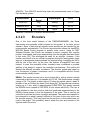
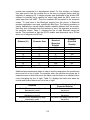
Plastic Type
Water
Absorption in
24 hours (%)
Tensile
Strength
(PSI)
IZOD
Impact
(ft-lbs/in)
Compression
Strength
(PSI)
Acrylonitrile
Butadiene
Styrene (ABS)
0.3
6500
7.7
6750
Polycarbonate
0.2
10,500
12.0 – 16.0
11,000
Acrylic
0.2
10,000
0.4
17,000
Table 2.1 Plastic specifications [1] [2]
As shown in the Table 2.3.1, all the elements are approximately equal in terms of
water absorption. Which the numerical range of 0.2 to 0.3 percent would be a
logical value, because the device is not intended to be exposed to any sort of
liquid for a long periods of time. Ideally, the device is expected to interact with a
low volume of liquids, such as saliva, throughout the day. Tensile Strength
(material breaking under tension) may be neglected depending on the dog, due
3
to the enclosure being spherical and with dogs having limited physical
capabilities in pulling on the material, but can be looked at as a guideline in
making a final decision on choosing an enclosure. IZOD impact (amount of
energy a material can absorb before it breaks) and compression strength
(material breaking under compression) are significant specs to look at because
the device will primarily be in situations where the material is compressed and
additionally required to resist impact from a dog or if the device hits a wall or falls
down some stairs. The device can potentially be put in a position where the dog
is laying on it, under these circumstances, the most reliable enclosure would
have to be determined based on the best compression strength with respect to
the average maximum weight of all household species of dogs.
2.3.2
Mobility
Movement inside a small space is a key priority. As mentioned in the section
above, if the dog gets a hold on to the device, it will be easier for the animal to
destroy. The primary goal in terms of mobility is not necessarily in terms of high
speed or quickness, but more along the lines of the system evading or engaging
the dog. The purpose of evading the dog will give the device a lower chance of
the dog destroying it and also it will keep the dog engaged and occupied.
The velocity of the system would be significant enough to evade the dog in a
small area such as a room in a house, thus the motors would provide enough
torque to cause rotational movement of the spherical enclosure and cause
significant translational movement of the center of mass of the device at this
suggested velocity. Theoretically, that is neglecting any internal power losses, to
determine an optimal torque range to cause the device to move will require many
mechanical equations.
Ideally, the suggested velocity can be used to conclude how much current will be
needed to drive the motors. The device will primarily be used in a household or
an apartment, it will be designed in order to move swiftly and thoroughly across
carpet, tile, or a wooden surface of some sort. Depending on the material of the
floor, the speed of the device will vary, especially on carpet where the coefficient
of friction and rolling resistance will be significantly higher in comparison to the
tile and wooden flooring. For optimal mobility, it is safe to choose the material
and torque needed, assuming it will be designed to be used on carpet.
4
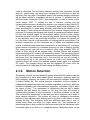
Figure 2.1 Free-body diagram of device
2.3.3
Autonomous Movement
Autonomous movement is critical to the Puppy Pal. It is a key feature that
separates it from other similar devices like the Sphero. The point of having
autonomous movement capabilities is to simulate human movement while no
human is present. This keeps the dog entertained even while no one is present.
The best way to simulate this is to allow the users to program their own modes
into the Puppy Pal. This is done through the Android device. Users should be
able to draw a path in the Android program and send it to the device through a
sequence of messages. The embedded software should be able to hold a list of
these predefined paths, and when the system is set into autonomous mode,
either a specific path is run or all the paths are cycled through at a rate that is set
by the user. There should also be a “random” mode that makes random changes
to the systems speed and direction in predefined intervals of time.
All of these modes should be able to be commanded into by sending a specific
message from the Android device. The user should also be able to send a
message that lets the system know which autonomous settings should be set
next time the system is to go into autonomous mode, either again by the user or
by the dog’s collar system setting it off. The movement of the device is to stay
within a certain limit of its surroundings. This plane is known as the “play area.”
When the system is running in a random autonomous mode, it should not go
outside the boundaries of the play area.
5
2.3.4
Remote Control
A secondary mode, when the system is not autonomous, will be under user
control. This will provide the user a manual override, in terms of controlling the
device. The system will need to be interfaced wirelessly to an Android device
either by developing a simple application for the user to use or using some type
of serial interfacing software to send data to the MCU. The Android device will
retrieve inputs from the user. The goal of the remote control option is to give the
personnel a simple way of controlling the system by sending commands via a
wireless signal, which will be translated in to instructions to the microcontroller to
update how the motors in the system will operate. The system will need
hardware to accept the user signal and then transitioned into the system
processor. Since this device is intended to function in a house, an RF signal that
can be implemented in short distances can be used, such as Bluetooth. Using
Bluetooth will a simple way to interface an Android device to the main system. In
a basic perspective, the user input will designate the android device to send out a
limited number of signals: a signal to turn on device, a data signal to move
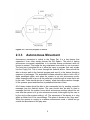
forward, a data signal to move backwards, and two signals that determine right or
left turns. Figure 2.2 illustrates a simple block diagram of remote control
application of the device.
Figure 2.2 Simple Block diagram illustrating RC control for device
2.3.5
Wireless Charging
Puppy Pal requires wireless charging in order to allow for a fully enclosed,
physically secure device with no external components or connections which
6
could be destroyed. The key factors affecting design of this subsystem are size
and cost, power rating, and range from charging coil to receiving coil and the
efficiency over the range. Components used in the wireless charging subsystem
will be either certified or compatible with the Qi Version 1.1 standard from the
Wireless Power Consortium (WPC), where applicable, in order to create a more
robust design. WPC 1.1 defines the type of inductive coupling and the
communications protocol, allowing the receiver to be charged by any other WPC
1.1 certified charger, and selection of components which were designed to the
same specifications, to obtain better efficiency and minimize the chance of error
in the design. Power rating and efficiency in the wireless charging module are
important for lowering the charging time as well as conserving household power,
but will have minimal impact on the system’s battery life for a given charge,
therefore size and cost will be the major driving factors. Size of the receiving coil
is very important due to the positioning constraints of a sphere, the smaller the
coil, the closer it can be to the transmitter coil, making the link more efficient. The
required components for this subsystem are a reliable and regulated power
source, a wireless power transmitter connected to a transmitting coil, a wireless
power receiver connected to a matched receiving coil and a charging module.
The power source used will be a household outlet using standard 120V AC
power at 60Hz, which will be stepped down, rectified, filtered, and regulated
before being fed as DC power to the transmitting device. The transmitting device
will convert a DC power source into a wireless power signal that can be efficiently
transferred from the transmitting coil to the receiving coil and will provide a
communications link to the receiving device for control and monitoring. The
receiving device will convert the received wireless power signal to a regulated
DC output. The charging device will use the regulated DC output from the
receiving device to safely and efficiently charge the battery system.
2.3.6
Motion Detection
The primary need for a motion detection system arises from the need to keep the
dog occupied at all times while awake without becoming a nuisance when the
dog is sleeping, however, this system will also enable an intelligent sleep mode
to extend battery life. The motion detection subsystem must be capable of
independently determining when dog is awake regardless of proximity, within the
limitations imposed by the communication subsystem, and when a dog is within
the region of play. The requirement of determining that the dog is awake
suggests that this device be located on the dog, and thus will require a
communications system to relay information to the main processor on the ball.
This device will be attached as a collar and must be of minimum size in order to
avoid causing discomfort. This system will have to intelligently discriminate
between a dog adjusting while sleeping and a dog that is fully awake, to avoid
irritating the dog. This subsystem must also determine when play is over, to
enable sleep mode and allow for longer battery life. The requirement for
determining when a dog is within the play area means that this subsystem could
be located either on the ball or on a separate device. Placing this device on the
7
ball imposes complications because the ball is not always located at the center of
the play area and is not always oriented the same way, however, placing this
system on the charging system can eliminate both of these issues. This now
means that the charging station will also require a communications subsystem to
relay information to the main processor on the ball. Since this device is intended
for use both indoor and outdoor, any sensors, particularly infrared or optical
sensors, must be capable of properly functioning in full view of the sun. Factors
important in choosing components for the base charging station’s motion
detection subsystem will be the range of detection, the method of detection and
experimental effectiveness, and its cost. For the final project, the only motion
detection system implemented was a collar containing an accelerometer which
was used to determine if the dog was moving and communicate this data to the
ball.
2.3.7
Sound Projection
Once again as stated previously, a specification of the device is to keep the dog
engaged; a way of doing that is implementing a sound projecting subsystem to
attract the animal to the device. A simple way of looking at it is, if the dog is at a
far distance from the device, the system processor will turn the output connected
to the sound projection subsystem on to play a brief sound clip to grab the
attention of the dog.
The sound system will be triggered by a motion sensing system that will measure
the activity of the dog, for example if the dog has a consistency of movement and
is appeared to be active, the sound will be activated to lure the dog towards the
device. However, if the sensor reading displays inactivity it will assume the dog is
laying down or sleeping which results in the sound clip not being played. The
sound system can be either a small speaker that can have specific sounds
downloaded into it or a piezoelectric sound generator. As shown on the block
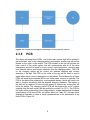
diagram in Figure 2.3, the MCU output pin is connected to the input of the
speaker or sound projection device; the microcontroller output is triggered high if
the motion sensor reads in a threshold value that represents consistent
movement by the dog. A high output voltage turns on the sound generating
device to attract the dog.
8
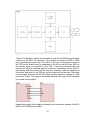
Figure 2.3 Simple Block diagram illustrating sound projection control
2.3.8
PCB
The device will need three PCB’s; one for the main system that will be placed in
the actual ball, one for the charging station, and another smaller one that will be
placed on the collar of the animal. The PCB located in the ball will provide the
main control of the entire system that will communicate with all of the other
subsystems and will be used for motor control, sound projection, receiving data
from Android device, and location detection from the charging station. The PCB
on the charging station will be control the wireless charging and location
detection of the ball. The PCB on the collar of the dog will be used to send a
signal when there is motion detected from the animal. The hardware for all three
PCBs will need three separate MCUs and three power sources to operate. The
PCB in the ball will be powered by a rechargeable battery, which will need to be
able to function coherently with the wireless charging hardware. The battery in
the ball will be required to have enough power to operate two motors that will
move the device. The charging station PCB will be powered by an AC voltage
supplied from the wall socket (will be rectified to around 5 to 12 V). The PCB on
the collar will be powered by a low voltage battery, a table displaying all the basic
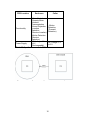
specifications of all three PCB’s are shown below on Table 2.2. A simple block
diagram is illustrated to show a visual representations of the placements of the
three PCB in Figure 2.4.
9
PCB Location
Enclosure
-Motor Control
-Operate Motor
-Android
Communication
-Sound Projection
Functionality
-Location
Detection
(Receive Location)
-Motion Detection
(Receive
Detection)
DC Voltage -12 to
Power Supply
24 V
(Rechargeable)
Table 2.2 Specifications on each PCB.
Collar
- Motion
Detection
(Transmit
Detection)
DC Voltage- 3.3
to 5 V
Figure 2.4 Block Diagram illustrating PCB locations of entire system
10
3 Research Related to Project Definition
This project’s design and construction demanded specialized knowledge and
experience. In order to build the best possible toy, the group’s body of knowledge
had to grow. Different techniques were studied and compared to decide what
methods would work best in the design of Puppy Pal.
3.1 Existing Similar Projects and Products
To point research in the right direction, projects similar to the initial concept of
Puppy Pal had to be studied. These were used to learn what modes of
transportation and control were used, what had been successful, and what could
possibly be accomplished within the required timeframe. The most important
knowledge gained was the scale of the project; the project’s objectives could be
met.
3.1.1
Sphero
Sphero is a robotic ball toy. Owners control the toy’s motion and the LED color
displayed with a smartphone application. Sphero uses Bluetooth communication
to receive its commands. It can also charge wirelessly. To track movement, a
three-axis accelerometer and a gyroscope were installed.
In addition to the basic control app, Sphero’s creators developed a series of
programming environments to encourage Sphero owners to be creative and
make their own apps. The apps range from setting a path for Sphero to follow to
augmented reality racing and zombie fighting games.
Puppy Pal recreated the spherical shape, wireless charging, and Bluetooth
communication features Sphero has. The great variety of apps developed for
Sphero shows that there are many applications for this type of toy. Making Puppy
Pal autonomous was not so seem so far-fetched.
In Figure 3.1, the insides of Sphero are displayed. This gives insight to the
structure of Sphero. The wheels (part B) drive the ball to roll. The top slip bearing
(part C) braces the structure, keeps the wheels from slipping, and helps to keep
the internal structure parallel to the ground. This mechanical design is similar to
that used in Puppy Pal.
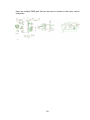
11
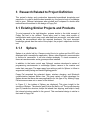
Figure 3.1 shows the inside of Sphero and the assembled Sphero in its charging
dock. Permission Pending.
Sphero’s Android app interfaces are built off of a development kit provided by
Orbotix. The development kit provides many Bluetooth routines for sending
commands compatible with the Sphero. User interfaces are completely up to the
developer, however. There have been numerous designs for controlling the
Sphero from a cell phone, most modeled off of old video game and RC car
controllers. One very popular approach is to have the forward/backward and
left/right control independent of each other. Probably the most used method of
control is to provide an object to move around across a two dimensional plane.
Moving the object directly up the y-axis would make the Sphero go forward, and
moving the object into quadrant II would make the Sphero go left, and so on. This
approach proves to be the most intuitive and easiest to use because its simple
design allows the use of one finger to operate the toy’s movement. The first
method is the GUI that Puppy Pal’s Android software mimics. Aside from
movement, apps also have the ability to control the LEDs inside the Sphero.
Puppy Pal only has LEDS to indicate whether or not there is power and if the
Bluetooth modules have connected to each other and/or a cell phone.
3.1.2
Remote Controlled Basketball Robot
In this project, a basketball moves along the ground based on input from a twochannel radio and receiver. Inside of the basketball, a hamster ball holds the
chassis. The sides of the chassis are attached to the outside of the ball. This
holds the chassis in the middle of the ball. A drive motor, servo, and steering arm
are used for drive and steering. A gyroscope was also included.
12
The bottom of the steering arm holds the batteries and weights. With enough
weight, the chassis is kept parallel to the ground despite the ball’s motion. As the
motor and servo rotate the steering arm in the desired direction, the rest of the
ball is pulled forward to keep up with the new center of mass. The gyro senses
the changes in rotation, allowing for control.
This robot’s mechanical system would have been a straight forward solution to
the mechanical design of Puppy Pal. The main obstacles of this design are the
weight used, the construction or purchase of the chassis, and control. The use of
only a gyroscope in this project left much to be desired in precision. If Puppy Pal
had used this method, it would also include an accelerometer to achieve a more
clear-cut sense of maneuverability than the basketball robot.
3.1.3
Segway
The Segway balances on two wheels using a system of sensors to follow the
rider’s center of gravity. Five gyroscopes and two tilt sensors are used to detect
the rider’s movement atop the Segway. This information is used by the
transporter’s control circuits to decide on the proper course of action: going
forward, turning, stopping, or sitting still. If the mechanical system had used
changes in the center of gravity to drive movement exclusively, Puppy Pal would
have incorporated its own system of sensors to decide which direction is best
and to balance quickly when sitting still. The Segway shows that such a system
with built-in redundancies can be effective. However, size restrictions and the
multiple delays in the construction and design of the mechanical system made
the addition of a sophisticated feedback system a lost cause.
Figure 3.2 shows the forces acting on the Segway and its rider. As the rider
moves, Segway uses the data from its sensors to find what action will keep the
rider balanced [3]. Unbalanced forces create toque and result in falls and injuries.
13
Figure 3.2 The balance of the forces acting on a Segway and its rider when
stationary, accelerating, cruising, and decelerating. Reprinted with permission
from Brian Hughes.
3.1.4
Stray Pooch
Stray Pooch is a senior design project that was built by students from Wichita
State University in 2011. This project’s goal, to be an interactive dog toy, is
similar to Puppy Pal. Their robot was built using a large hamster ball. The
mechanical system consists of two motors connected to a gearbox. Shafts are
connected to the motors and the sides of the ball. As the motors rotate, the sides
of the ball rotate and drive the ball forward. A similar system was used in Puppy
Pal’s mechanical system. Unlike Stray Pooch, the shafts were instead attached
to wheels that were controlled by their own motors inside of the gearbox instead
of being attached to the ball itself. The framework inside of the ball was made out
of wood and aluminum. Combined with the electronics, the frame was too heavy
to work properly; the center of the frame dragged along the bottom of the ball,
slowing down the robot. This showed that weight had to be watched closely when
constructing the mechanical portion of Puppy Pal. In their follow-up experiments,
the Wichita group rebuilt the frame with aluminum. Aluminum is much lighter than
wood, so the mechanical system worked more efficiently when the change was
made.
This group used an Arduino to control Stray Pooch. Although there are many
tutorials available for Arduino applications, the group’s lack of experience made
the coding part of the project very difficult. The Puppy Pal group members
14
combated the challenge of inexperience with teamwork and the agreement that
there was always more to learn. For wireless communication, Stray Pooch used
XBee modules. They communicate with other Arduino devices that contain an
XBee module in serial. Their method was not applied to the Puppy Pal’s wireless
communication system.
3.2 Relevant Technologies
3.2.1
Autonomous Robotics
There are plenty autonomous robotic systems in use today. Many are far more
sophisticated than the Puppy Pal device will ever need to be, but there are plenty
of ideas to take from these robots that can be integrated into the project. A
popular autonomous robotic system is iRobot’s Roomba, which is designed to
clean a room by itself and find a path back to its “home base.” There are a
number of sensors on the device to help it perform this goal, some of which are
an infrared receiver, bumpers on either side of the front, and a number of “cliff
sensors,” which are actually just more IRRs pointing down and checking the time
difference between the signals bouncing back. The Roomba has a fairly trivial
cleaning process. It typically starts out doing circles until it hits something, which
it assumes is a wall, and tries to follow its contour. By making slight adjustments
either left or right, if it finds that it has hit a wall after a few turns, it makes a major
turn, usually around 180 degrees, and goes in a straight line until it hits another
object, and repeats the process of trying to follow its contour. It’s a fairly simple
loop that utilizes all available sensors on the device. Where the true brains
comes into this product is its ability to find its way to its charging station. This is
something that the Puppy Pal tries to directly mimic. From a top down
perspective, the Roomba is circular with a “front” and “back” designated by
bumpers on the left and right. There are four infrared sensors on the front, back,
left and right sides of the device. The Roomba home base also has an infrared
emitter on it and when the Roomba needs to get back, it uses time difference of
arrival (TDOA) to know which way to turn, takes a little move forward, and then
does the same thing over again. Using this technique, along with the bumpers
and wall detection, the Roomba does some crude path finding back to its
charging station. There’s a lot to be learned from this example, but the Roomba’s
physical dimensions are much greater than that of the Puppy Pal device. In other
words, TDOA is significant with the Roomba whereas TDOA on the Puppy Pal
would provide almost no difference, and the small differences would have to be
accounted as error because of their sporadic changes.
There are other autonomous cleaning robots that achieve mostly the same effect
which include the Neato XV-12 and Mint Plus. Aside from different detection
features and shapes, these devices act in much of the same way as the
Roomba. Urbie, the Urban Robot from NASA could also provide a lot of inside to
the Puppy Pal because of its ability to maneuver in any kind of environment. The
15
design of Urbie is much more involved than the Roomba because it is specifically
designed to go over rough terrains and even up and down small steps. Another
unique feature of Urbie is that it contains two cameras to provide feedback of its
surroundings. This also helps create a stereoscopic view of it location to help it
avoid obstacles in its path. Because of Urbie’s “car-like” appearance, many
mechanical arms with capabilities of 360 degree rotation project from the top of
the robot to help it flip upright in the case that it gets turned over. Although not in
the same sense as Urbie, the Puppy Pal’s inside can become turned over,
however because of its enclosure no mechanical arms would aid the device in
turning over. Instead the device naturally turns back over upon movement after it
has become flipped. Moreover, it is not unnatural for the device to periodically
spin around while inside its spherical housing.
A far newer and more advanced robot from NASA is the Mars rover Curiosity.
Much like the Puppy Pal, the mars rover is controlled as well as autonomous
when need be. This implies that it also has a messaging system, albeit much
more sophisticated, much like the Puppy Pal. The autonomous capabilities are
second hand compared to being controlled from Earth. Because of its extreme
distance from its controllers, Curiosity sends data through ultra-high frequencies
around 400 MHz. Occasionally the rover sends data directly to earth at a rate
between 3.5 Kbits to 12 kbits. More often than not there is an orbiter that acts as
an intermediary between the two. It is in scope of the rover for about eight
minutes, and in that time sends about 60 Mbits of data.
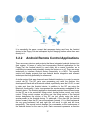
Puppy Pal would not be capable of making use of all that data, but using an
orbiter as an intermediate object did give new ideas to the way that Puppy Pal
would be controlled. By having the charging station have its own processor and
Bluetooth module, it could pick up on any Bluetooth messages being sent out,
namely any message commanding the wheel speeds. This would allow the base
station to keep a decent track of where the Puppy Pal is at any time, and allow it
to navigate the device back to a close range of the charging station. From there
more accurate device could allow precision docking to begin charging. Figure 3.3
shows the similarities between the data flow of the orbital and the Puppy Pal
device, assuming this paradigm was chosen.
16
Figure 3.3 Similarity between Curiosity and Puppy Pal’s communications
It is essentially the same, except that messages being sent from the Android
device to the Puppy Pal are intercepted by the charging station rather than sent
directly to it.
3.2.2
Android Remote Control Applications
There are many devices and projects that have integrated android devices into
their system. In terms of using and incorporating Android application for the
Puppy Pal, the Android device is used solely as a remote controller, as in
controlling movement and potentially turning the device on or off. There are many
techniques to interface Android device connectivity to a MCU. This specific
section will display projects that use Android device integration and relevant
techniques that may potentially be referenced.
A similar project that was observed used Android interfacing to control a remote
control car [4]. The RC car’s core processing unit uses the Arduino Uno
development board with a Bluetooth module, specifically uses the HC-06, to read
in data sent from the Android device. In addition to the RC car using the
Bluetooth functionality, it also incorporates the accelerometer embedded in the
Android device. The Android application developed provided three different ways
for the RC car to be controlled: tilting control, normal button control, and touch
control. Tilting control requires no button use, the tilting motion of the Android
device designates the motion of the RC car just purely using the built-in
accelerometer in the Android device. To elaborate, if the user tilts the Android
device forward, then the RC car will accelerate forward, if it is tilted backwards
the car goes backward, left and right tilts will result in right and left turns
respectfully. The normal control displays five commands on the touchscreen of
the Android device for the user to push. Each command represents a direction
17
the RC car can move. The five display commands represent the direction of
motion, which are: forward, backwards, left, right, and OFF. Touch control
displays a reticle in the middle of the display on the Android device, this reticle is
representative of the RC car. If the user wants to move the RC car using touch
control, the user will have to drag the reticle in the direction of desired movement
of the RC car. Figure 3.4 illustrates the three control options.
Figure 3.4 Illustration of three Android control methods: A) Tilt, B) Button, C)
Touch.
The RC car project uses the CxemCar 1.0 Android application developed in the
Eclipse IDE. The version of the Android device must be greater than 3.0 in order
for the application to control the motors. The Android device is configured to the
Bluetooth module on the car by connecting and searching for the module in the
Bluetooth settings on the Android device. The CxemCar application uses the
MAC address of the Bluetooth module to directly connect to the RC car, which
finalizes a wireless serial connection between the two hardware devices, and
data can be sent using the UART functionality on the Arduino Uno. The CxemCar
application has many settings that can be configured. The application can edit
the output characters representing a specific direction of motion the user can
send to the Bluetooth module, changing the accelerometer sensitivity from the
Android device, editing the maximum/minimum values on right/left PWM values,
and other settings that can be configured.
Another similar project designs a home automation system using Bluetooth [5].
The basic idea of the system is to control devices such as lights, air conditioning,
fans, and other around the home products that are limited to an ON/OFF
functionality using a mobile device. The project reads in data from a HC-05
Bluetooth module. Unlike the RC car project as previously stated, the home
automation system uses an Android application called BlueTerm, which is an
emulator for serial devices that use Bluetooth to communicate between the
system and the Android device. A user can use BlueTerm to directly send data to
the module for the system processor to read in. The items that the user wants to
18
control will be connected from the PCB to the relays of those items. Each item
that the user wants to control, specified in the MCU coding, will have a specific
output pin and an assigned ASCII character affiliated with it to either turn it on or
off. The BlueTerm application allows the user to send the specific ASCII
character directly to the MCU in order to control the connected device. This
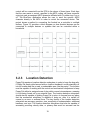
project shows a method in connecting the Android as a controller to multiple
devices. Figure 3.5 provides a block diagram on how Android devices can be
connected to multiple devices or systems that can be controlled within a
household.
Figure 3.5 Block Diagram illustrating Android control over multiple systems
3.2.3
Location Detection
Puppy Pal requires a location detection subsystem in order to keep the dog safe,
if Puppy Pal simply rolled around with no location feedback it could potentially roll
into an unsafe area like a road, or undesirable area, like the pantry. The location
must be capable of working with the control and mechanical subsystems to keep
Puppy Pal within its assigned area of play within normal circumstances, meaning
it is not being forced out by an external force. The location detection subsystem
should also be capable of guiding Puppy Pal to return to its area from any place
that the mechanical subsystem is capable of doing so, after it is carried off
course by an error or external force. The key factors of the location detection
subsystem are accuracy, precision, size, complexity of implementation, additional
hardware, and cost. The location detection subsystem must also be capable of
accurately providing velocity data, or primary data must be accurate and be
19
updated frequently enough that velocity can be derived from the position data
source. This subsystem must be able to provide location measurements accurate
and precise enough to keep the device within a defined radius of the charging
station. The location subsystem must be capable of operating inside a building
without a clear view of the sky as well as outside without Wi-Fi access. In order
to achieve an accurate guidance system, the data produced by the location
detection system must be simple enough to be processed in time to accept the
next batch of data and for the data to still be accurate, or have a method for
accounting for the distance travelled during processing time. In the interest of
minimizing the complexity of integrating the location detection subsystem, a fully
functional module would be ideal. Possible technologies to be researched and
considered are a Global Navigation Satellite System (GNSS) such as the Global
Positioning System (GPS) in the United States, Wi-Fi Position Systems (WPS)
for use of the device in buildings or areas without a clear view of the sky, an
Inertial Measurement Unit (IMU) with a software implementation of a Kalman
Filter, and multilateration systems using electromagnetic, ultrasonic, or infrared
sensors. In addition to these standalone systems, hybrids and augmentation
systems will be considered. In the end, however, due to technological and
budgetary constraints, all location detection systems were abandonded in favor
of an open loop path selection system.
3.3 Strategic Components
3.3.1
Wireless Communications
There are two wireless communication systems that is implemented into the
entire system. For example, there is a method of wirelessly communicating
between the ball and the Android device, and the ball and the dog collar. Ideally,
the distance between the collar and ball may vary. Since there are three different
wireless applications that will be implemented in the system, potentially there can
be multiple different components of wireless hardware modules that may be
integrated into the system depending on functionality. For example, a GPS
module can be used for location detecting, a Bluetooth module for an Android
serial connection, and ZigBee hardware for reading input from accelerometer
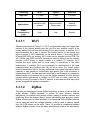
then sending data to the MCU. Table 3.1 compares simple characteristics
between Wi-Fi, Bluetooth, and ZigBee technologies [6].
20
Technology
Wi-Fi
ZigBee
Bluetooth
Data Rate
2-11 Mbs
1 Mbs
0.25 Mbs
Range
100 m
10-100 m
10-30 m
Large data
transfer at high
speeds
Remote control,
Sensor data
Android
connectivity
Applications
Power
Consumption/
High
Low
Cost
Table 3.1 Wireless Communication Comparisons.
3.3.1.1
Medium
Wi-Fi
Observing the data from Table 3.3.1, Wi-Fi can potentially supply the largest data
transfer at the highest speeds and can give the user wireless control of the
system without the user and device being in the same vicinity. In addition, Wi-Fi
would potentially be a way to connect the Android device to the system and
retrieve access to GPS capabilities on the mobile device. If the using Atmel’s
ATmega328P MCU, an Arduino Wi-Fi shield can be plugged into the PCB. The
Wi-Fi shield uses WEP and WPA 2 encryption security protocol and the Arduino
provides a Wi-Fi library to simply connect to a network [7]. However, Wi-Fi
requires the most power and is more costly in comparison to the other
technologies. If possible, Wi-Fi may potentially be implemented in the base
charging station, as providing power will not be an issue. The overall system
does not necessarily need to run any applications that require large data transfer
capability or data transfer at a significantly high speed. Due to the complexity of
implementing Wi-Fi, the best approach would be to use Bluetooth to integrate an
Android device to the system and to use the ZigBee standard for other wireless
communication applications. In addition for Wi-Fi was not used, would be the
difficulty in trying to connect to the UCF network. It was observed that many other
groups struggled with getting a conncetion.
3.3.1.2
ZigBee
The clear cut advantages of using ZigBee technology is that it is low cost and it is
power efficient. ZigBee hardware is perfect for short distance wireless
applications, for example using remote control, reading in wireless sensors, and
monitoring. Since the system doesn’t require transferring large amounts of data,
ZigBee modules are an ideal candidate to be interfaced. Since ZigBee products
can be used with small low voltage batteries, it can be used to transmit signals
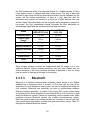
from the PCB located on the collar. Table 3.2 provides a comparison between
different ZigBee modules. From the basic specifications listed on the table below,
21
the Digi International looks to be the ideal choice for a ZigBee module; it has a
lower supply current to transmit and lower output power. The lack of data rate
and line of sight range on the Digi International module can be neglected, as the
system will not require transmission of data at a high data rate and the
transmitter and receiver will operate at a close line of sight distance from one
another ideally. Since the battery on the dog collar will be designed to operate on
low power, the Digi International module illustrates the best alternative on
transmitting a signal after the accelerometer has been activated.
Brand
Digi International
(XB24-Z7PIT-004)
Atmel (ATZB-RF233-1-CR)
Frequency Band
2.4 GHz
2.4 GHz
Line of Sight
Range
120 m
1.96 km
Data Rate
250 kbps
2 Mbps
Supply Current-Tx
35 mA
157 mA
Supply Current-Rx
38 mA
7.5 mA
Supply Voltage
2.1 – 3.6 V
3V
Output Power
1mW
112 mW
Price
17.00
19.68
Table 3.2 ZigBee/802.15.4 module specifications.
Since multiple wireless modules are implemented and the design is a 6 inch
spherical platform, Zigbee wireless technology was not used. Zigbee was not
chosen because of the many modules observed it appeared to use too many
pins and some of them were too large for the design.
3.3.1.3
Bluetooth
Bluetooth is a wireless communication standard, which similar to the ZigBee
standard has a frequency band of around 2.4 GHz that can be used as an
application for short distances, lower power, and can be implemented using low
cost modules. Bluetooth can potentially be used to communicate between
different hardware wirelessly, in relation to the Puppy Pal, system control using
an Android device. Even though the Android device will be in a visual line of sight
within the Bluetooth module, it does not necessarily need to operate under those
conditions because Bluetooth devices use a radio communications system.
Bluetooth communications are usually divided into 3 classes in that all have their
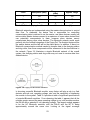
own specifications with respect to power and data transmission range. Table 3.3
displays the different Bluetooth classes.
22
Class
Max power (mW)
Max power
(dBm)
Approx. range
1
100
20
100
2
2.5
4
10
3
1
0
1
Table 3.3 Table displaying the different classes of Bluetooth devices [8].
Bluetooth networks are implemented using the master-slave structure to control
data flow. To elaborate, the device that is responsible for controlling
communication data is referred to as the master, and slave devices usually just
retrieve data. Master devices connect to a maximum of seven slave devices and
can potentially communicate to them, however slave devices cannot
communicate among other slave devices. The Bluetooth network would mesh
perfectly into the Android integration of the Puppy Pal. The Android device will be
the master device and the ball will be the slave device. In addition, if there is a
Bluetooth communication method needed to transfer data to the charging station
and dog collar, then those components will be referenced to be slave devices in
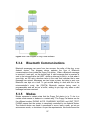
the network. Figure 3.6 illustrates a simple Bluetooth network of the overall
system; the charging station and dog collar may not need to receive data from
Android device.
Figure 3.6 Puppy Pal Bluetooth Network
In choosing a specific Bluetooth module, many factors will play a role in a final
decision such as cost, operating voltage, size, and the complexity of interfacing
the module to the system. Table 3.4 provides a table of significant specifications
of potential Bluetooth modules. From observing the table, it appears that all the
modules require around the same operating voltage to run, with modules such as
the RN-42 with a potential 6 volt operating voltage. The largest module appears
to be the HC Bluetooth modules, with the RN-42 and the WT11i being
approximately around the same size. Looking at the signal coverage
23
specification, once again the HC module has the lowest standard in comparison
of the other two modules with 30 feet, the RN-42 ranging from 50 to 60 feet, and
the WT11i with a significant line of sight range of 328 to 984 feet. The max data
rate value for all three potential Bluetooth modules are around the same of
around 2 to 3 Mbps, with the HC module with the lowest potential data rate. The
HC-05 module will cost the least amount, with the RN-42 and WT11i costing in
the 30 dollar range. With all the specifications looked at, the HC module would be
the ideal choice of hardware in integrating Bluetooth communication into the
system. It would fit in perfect with the system because the 30 feet signal
coverage is an acceptable range for the Puppy Pal; the project will operate in a
house or room with the user controlling it near the ball, so a 30 feet range is more
than acceptable. In addition, the HC module can connect to the Android device in
a simple way by locating the module from the Android and entering a given
password to connect. The HC module is larger in size in comparison to the other
two, but can be negated due to the the price of the HC module being much lower.
Bluetooth
Module
Operating
voltage
HC (06, 05)
RN-42
Bluegiga WT11i
3.3 V
3.3 to 6 V
2.7 to 3.6 V
Size
4.3 x 1.6 x 0.7 cm
38 x 17 mm
35.75 x 14.5 x 2.6
mm
Baud rate
9600
9600
Signal coverage
30 ft.
50 to 60 ft.
328 -984 ft.
(L.O.S.)
Max Data Rate
2.1 Mbps
3 Mbps
2-3 Mbps
Price
10.00
35.00 to 40.00
30.00
Simple (Password
connectivity)
Mildly complex
(requires
programming)
Mildly complex
(can be integrated
with the
ATmega328p)
Interfacing
Complexity
Table 3.4 Bluetooth module comparison
The HC-05 was chosen for wireless communication hardware due to the size,
many open source references, and simplicity. In addition, connecting to the
module from the Android device will be treated as connecting to any other
external device, such as an ear piece for example. Just enter a pin code from the
mobile device and then it will auto connect to the Puppy Pal.
24
3.3.2
3.3.2.1
System Processing
Microcontrollers
MSP430 Launchpad: The MSP430 from Texas Instruments value line is a
fantastic processor for the price. When you order the package you get two
microprocessors: the msp430G2553IN20 and msp430G2452IN20. They’re both
identical other than the internal clock speeds, but on the development board you
defunct both by soldering the external 32.768kHz crystal onto it. The tools that
are available make downloading code onto the chip very easy. The development
board’s only interface is USB, which provides power and a tunnel to the
processors flash memory to burn code in. Some of its more important technical
specs are 16kB flash memory, 512B of RAM, interruptible GPIOs, 16-bit timer, 8channel 10-bit ADC, and support for USCI, I2C and UART serial
communications. There are also plenty of booster packs that give the processor
some extended features. The processor runs on 3.3 volts and also has
configurable low power modes, which would be perfect for our application. The
real flaw of this processor is its code space. The processor is part of TIs value
line for a reason: it’s for hobbyists to tinker around with. There is a code
expectancy of at least five times the amount available, so that immediately put
this one out of possibilities. Aside from that, there is only one serial
communication line. Although this could be dealt with by a little extra effort,
coding would be much easier with multiple UART lines, because there will be
multiple UART signals coming in at any time. By having only one data line for
this, messages would have to have extra details encoded in them, which would in
turn have to be decoded on the processor level. Speed is absolutely critical for
the Puppy Pal device, so it cannot afford the extra cycles this decoding would
bring along. Another area where the MSP430 shines is its community support.
Virtually every question about the processor has been asked and answered by
TI, and if not on some online forum. There are open source alternatives to Code
Composer Studio as well. GCC has a package that supports compiling, linking,
and loading of MSP430 programs through the USB interface. There are also
plenty of command line tools that allow memory and register dumps of running
programs. GCC also provides a C++ compiler, but the limited code space on the
chip makes this option impractical. Below is a summary of the pros and cons of
the MSP430 Launchpad. Table 3.5 shows a summary of the pros and cons of the
MSP430.
Pros
Cheap, great community support, open source alternatives to all software
Cons Slow speeds, limit flash and RAM memory, C++ isn’t practical, limited
serial communications
Table 3.5 Summary of MSP430 pros and cons
25
ATmega328P: The ATmega328P comes from Atmel corporation and has many
useful features for the Puppy Pal device. As far as its physical size, the
processor is quite small, with dimensions of about a square half-inch. It has 24
GPIO pins, and 8 more dedicated to specific features, two being a two-line UART
interface. One of its best features is that it runs on 1.5 - 5.5 volts. This comes in
perfect for low power modes which the Puppy Pal device heavily takes
advantage of. All 24 of the GPIO pins are interruptible which is nice, but a bit
overkill. It has 30kB of flash memory, 2kB SRAM and 1024B of EEPROM. Much
like the MSP430, the memory statistics just aren’t enough for our code.
Furthermore, the community support and 3rd party tools are slim to none with
this device. With the time constraints we are facing, the overhead of not being
able to find exactly what we need in the case of an emergency turned this part
away. Last, and probably most detrimental, is that the processor is part of the
AVR 8-bit series. Because Puppy Pal is going to be very math intensive, 8-bits
for calculations would not cut it. Although clever techniques allow complex
computations to be done with 8-bit devices, there were better processors for
similar prices out there. Table 3.6 shows a summary of the pros and cons of the
ATmega328P.
Pros
Cheap, plenty of interruptible pins, operating voltage of as low as 1.5V
Cons Slow speeds, 30kB flash, 2kB RAM, poor community support, only 8-bit
Table 3.6 Summary of ATmega328P pros and cons
LPC2148: The last microcontroller we considered was the LPC2148 by Philips.
This is as beefy as a processor can get for small embedded system. It’s part of
the ARM architecture suite, and offers a 32-bit RISC instructions set. The chip is
physically small and powerful, with tons of features including but not limited to
512kB of flash, 32kB of RAM, 2 10-but ADCs with 14 channels a piece, a full
speed USB 2.0 Speed Device Controller, 2 UART, I2C and SPI interfaces, a
PWM unit, and a 60mHz processor with an on-board crystal oscillator to top it all
off. All of these features are perfect for the Puppy Pal device: plenty of code size,
plenty of RAM, two UART channels, and a PWM unit. The PWM unit comes in
especially handy because of the constant change to our duty cycle to get the
wheels to spin at certain rates. Aside from the Hardware, there is decent
community support and a very detailed users guide that goes over all of the
features the Puppy Pal device will use. It comes standard with a C and C++
compiler, and because of the flash size, for the software running on the device
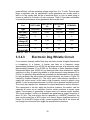
many useful features of the C++ language can be taken advantage of, like
operator overloading and virtual function tables. The processors main interface to
embed code is through I2C. There are also no development tools available that
make the process of writing, compiler and loading easy. This is also a processor
for very large-end embedded systems. In other words, there are many
peripherals this processor is designed to handle, like external memory and
network interfaces. Though it doesn’t really harm anything on the Puppy Pal
device, it would be that much more overhead to disable all the features that
26
weren’t go to be used. This package is nearly flawless other than that, and the
only reason it was not chosen is because it was unfamiliar territory compared to
the last option. Table 3.7 shows a summary of the pros and cons of the
LPC2148.
Pros
Cheap, 512kB flash, PWN unit, C++ support, 60mHz
Cons Unfamiliar territory, extra unneeded peripherals
Table 3.7 Summary of LPC2148 pros and cons
TMS320F28069MPN: TI has quite a few options for microprocessors. Even more
so, there different lines of processors have different options you can filter out to
get exactly what you’re looking for. In doing so, the TMS320F28069MPN from
the C2000 series was found. For roughly the same price as the LPC2148, this
32-bit processor comes with a 90Mhz master clock frequency which will come in
very handy for transferring, receiving and decoding messages. There is also
Control Law Accelerator that supports 32-bit floating point operations that are
done independently of the main CPU. In addition to those features it contains
256kB of flash, 96kB of RAM and 2kB of OTP ROM. This processor runs on 3.3V
and comes with two different types of low power modes that can be used for
when the Puppy Pal device is in either its charging or waiting state. Some other
useful features are a Peripheral Interrupt Expansion block that supports
interrupts on all peripherals, 3 32-bit timers, 8 pulse width modulation units, 16
channels of 12-bit ADC with a conversion time if 286 nanoseconds, 2 UART and
SPI modules, and 40 GPIO pins with input filtering. Aside from reliability, Texas
Instruments products are also known for their great documentation and
community support. The C2000 series is no exception. Their website is full of
example code and schematics to ease the processes of design for common
products. One of the nicest features of the C2000 series is the inclusion of the
instaSPIN modules. This is a library of products that aid in embedded system
motor controlling. The software is specifically for controlling devices from a
computer and not to be run directly on the embedded system so it cannot be
used for the final product, but it will be incredibly helpful for the early stages of
development when simple testing of the two motors needs to be done. There are
plenty of breakout boards for this chip as well. The development platform most
commonly used for this product is Code Composer Studio. It has version for both
Windows and Linux and interfaces nicely with development board. It handles all
compiling, linking and downloading of code to the board. It has full support for
C++, and because of the code space on the chip all of its features can be
utilized. Much like the LPC2148, the chip also comes with a lot of extra
peripherals that will not be used. For instance, the I2C interface will have no use
and just be an extra pin on the board, but this is much like 35 of 40 other GPIOs
that will not be used. This is a true embedded processor, so the hassle of disable
features in code is not a problem; if they’re not needed they will just not be used,
unlike in the Philips alternative. Table 3.8 shows a summary of the pros and cons
of the TMS320F28069MPN.
27
Pros
Cheap, 256kB flash, 96kB ROM, PWN units, full and code-efficient C++
support, 90mHz, great community support, familiar territory for all
members, 2 UART lines, instaSPIN technology
Cons Extra unneeded peripherals
Table 3.8 Summary of TMS320F28069MPN pros and cons
3.3.2.2
FPGA
FPGAs are another alternative to a pure microcontroller project. Although FPGAs
are not typically used for projects like this, they do carry some advantages to
them that would prove to be useful for the Puppy Pal device. For one, FPGAs
focus on concurrency. This would give us much more precision on our ISRs
because we could get into detail about how long they should take. With that
being said however, the code design currently only has one statement executing
in our ISR so this doesn’t help us out much. Secondly, FPGAs are extremely
flexible, but this comes at a hefty cost. You have the unique ability to create
virtually any platform you want with these devices, but the overhead of having to
create them is not worth it for this project. When talking about microcontrollers,
the hard part of choosing a chip is sorting through all of the different options that
each provides. The ability to add and remove features as needed provides a
huge advantage when working with FPGA. Unfortunately, you must use a HDL to
go about doing this. Another consequence of FPGAs is that they consume much
more power than microcontrollers, and there are typically no optional low power
modes to choose from. Furthermore, FPGAs do not handle serial
communications as well as microcontrollers. Serial communications is one of the
most vital operations of the Puppy Pal and could not function without it. FPGAs
are a great option for many projects, but in the case of small embedded systems
the overhead they come with is not worth the risk.
3.3.3
Motors and Actuators
Mobility and maneuverability are two of Puppy Pal’s features. Motors are
required to initiate movement and to choose the direction the device will go. The
types of motors chosen will meet the needs of the mechanical design without
hindering speed, steering, or power. The actuators used would also meet these
criteria.
3.3.3.1
DC Motors
28
A DC power supply is the most practical source for this project. This means the
use of DC motors are preferable to AC. They use less power and would not
require the project to be connected to a power outlet at all times.
Brush DC Motor: A brush DC motor is cheap and simple. The simplicity almost
makes a control system redundant. Since the design of an accurate control
system is one of the goals of this project, a brush motor would allow the design of
a modest feedback and control system. However, a feedback system was
abandoned to make time to actually build and test the mechanical system. A
brush DC motor is likely to wear out over time. Although it is unlikely to be used
so often that this problem arises before the end of the prototype period, the 3V
motors used while testing the motor driver stopped operating at peak
performance only 2 weeks before the final deadline. The test motors were
replaced with the 6V motors intended for long-term use at this point. It was also
very likely that the parts used would be second-hand, so the chance of worn-out
brushes was a distinct possibility. These second-hand motors were used in the
construction in testing process instead of the final model to get the most use out
of the cheaper parts. Brushed motors also come with the danger of sparks and
electrical noise. Another issue was the heat of the motor after prolonged use.
The enclosure did not allow the efficient escape of heat from inside of Puppy Pal.
This could have resulted in the device not operating correctly or components
overheating. A temperature sensor could have been included in the to counteract
this issue. A certain temperature would tell Puppy Pal to go into standby mode
and wait for the temperature to drop before becoming active again. After several
tests, a temperature sensor was considered redundant because the overheating
of the motors could be observed with a multimeter and from the distinct smell of
burning plastic.
Brushless DC Motor: The more expensive brushless DC motor would be a
better choice in this project. There wouldn’t be the required maintenance of
brushes involved. The lack of brushes also eliminates the risk of sparking,
although electrical noise would still be an issue to contend with. The nature of
this type of motor allows precise control over speed. Precision would require the
design of a complex feedback control system.
3.3.3.2
AC Motor
An AC motor is driven by an AC power source. Puppy Pal uses DC batteries.
Using AC motors would have meant the addition of an AC power supply. The AC
power supply most readily available was a wall outlet. This would mean keeping
Puppy Pal connected to a wall outlet. This signal would then need to go through
a step down transformer to power the motor. Although the circuit design would be
simple, a wire coming out of the toy is cumbersome; the wire limits Puppy Pal’s
range of motion and its overall autonomy. The wire is also another object a dog
could decide to play with, which could result in serious injury. To avoid such
complications and dangers, AC motors were not be part of this project.
29
3.3.3.3
Servo Motor
Servo motors are used to guide rotational motion. They are typically packaged
with a control circuit and a motor. This could have allowed for simple
incorporation into the design of Puppy Pal. However, the mechanical system
used did not require a servo motor for steering or leave enough physical space
inside of the enclosure for the entire package.
3.3.3.4
Linear Actuators
A pair of linear actuators could have been used in the mechanical system.
Weights attached to the actuators would move along with them depending on the
direction chosen. As the actuator shifts in one direction, the center of gravity
changes and Puppy Pal goes in this new direction. The issue with this motor was
the location of the actuators and the complicated nature of the control system
that would have to be designed. There is also the problem of how mounting the
actuators and preventing them from colliding with each other and other parts.
3.3.4
Sound System Techniques
Sound projection hardware will need to output a sound wave that will potentially
lure the dog towards the system. The method on how the sound will be played
will be dependent on many factors that may be technical or not. A non-technical
factor that may be used in determining a way to choose a method will be space,
some sound projecting methods require a significant amount of circuitry, and it
would be in the project’s best interest to stay away from implementing a method
that will require a large amount of space. In addition, a technical factor that may
play a role in choosing a method will be how much current the hardware will draw
to the system. A low impedance sound system may draw too much current for
the hardware to be implemented with the MCU. To conclude, a method that
requires the least amount of space in hardware and draw the least amount of
current will be the best approach in choosing hardware in integrating a sound
system.
3.3.4.1
MP3 Shield with 8 Ohm Speaker
Connecting an 8 ohm speaker directly to an output pin from the MCU could draw
too much current to the system, under extreme conditions potentially destroying
the pin and adding a resistor above 120 Ohms will not output a high quality
sound from the speaker. An MP3 shield of some sort can be used with a small
eight ohm speaker to output sound from the Puppy Pal. If using an ATmega328P
30
MCU, the Arduino MP3 shield can be potentially be used. The shield has an
UART interface with an audio amplifier embedded on the board to drive a 3 watt
speaker, and a volume control functionality. The shield reads in an audio file from
an SD card or USB flash drive in MP3 or WAV format. If the user does not want
an external storage device connected at all times, there is a built in SPI flash
memory to save audio files from the SD card/flash drive to the shield [9]. Figure
3.7 illustrates a block diagram of integrating a sound system using an MP3
shield. The shield is programmed from the main MCU, so control functionalities
and input/output pins are set through the Arduino IDE software. The benefits of
using this design will give the user a choice of what sound is being played from
the device and multiple sounds can be played. The cons of implementing this
system is, in comparison to using a piezoelectric transducer, it would be more a
more expensive alternative. In addition, this method would require far more
space, as the Puppy Pal will be designed to be in a small 6 inch spherical
enclosure. Also, multiple audio files are not needed, since the device will be
designated to be used with dogs, a short sound clip or a basic impulse sound
would suffice under ideal circumstances in sound system applications.
Figure 3.7 Block diagram of sound system using MP3 shield
3.3.4.2
Piezoelectric Sound Generator
Piezoelectric sound generators can be potentially implemented into the system,
more specifically inside the ball. Piezoelectric sound generators output a sound
that can be in a minimal frequency range, such as warning signals or
beeping/buzzing sounds heard in many household appliances. They range from
having a petit sound output to a rough noisy sound output. There are two types of
piezoelectric sound generators that can be looked at: piezoelectric transducers
and piezoelectric buzzers. Piezoelectric transducers are implemented with an
oscillating circuit and as for buzzers are designed to have an internal oscillating
circuit embedded within the component [10]. Piezoelectric sound generating
circuits are completely dynamic and robust, which will be useful since the device
will be designed for a high durability factor. In addition they are fairly cost and
31
power efficient, with an operating voltage range from 3 to 12 volts. The size also
plays a significant role, as piezoelectric sound generators are usually small to
add on to the system and will be a beneficial factor to look at when trying to
choose a method to fit inside a 6 inch enclosure. Table 3.9 provides information
on potential piezoelectric sound generators that may be used.
CSPT23C09- CSPB15A053.2
4.0
Part
CSPT11A05
Type
Transducer
Transducer
Buzzer
Buzzer
Size (mm)
11x9x1.7
23x22
11x9.5x8
40x20
Rated
5
9
5
Voltage (V)
Operating
1-20
1-30
3-16
Voltage (V)
Max Rated
1
5
8
Current (mA)
Sound
73
102
85
Output (dB)
Table 3.9 Table of Piezoelectric sound generator specifications
3.3.4.3
CPB40A09
9
3-20
50
100
Electronic Dog Whistle Circuit
It is a common concept studied that dogs can hear sounds at higher frequencies
in comparison to a human. A human can hear at a frequency range
approximately between 64 to 23,000 Hz and dogs can hear at a frequency range
approximately between 67 to 45,000 Hz. So basing of those frequency ranges,
frequencies higher than 23,000 Hz can barely be heard from humans but can be
sensitive to a dog. A typical dog whistle is in the frequency range between 20 to
54 kHz. An electronic dog whistle can potentially be implemented into the system
by using a design that can provide the higher frequency, as shown in Figure 3.8
created by Popescu Marian [11]. The circuit uses a piezoelectric transducer to
supply the output sound, in this case a high frequency sound to imitate a dog
whistle. It uses a transducer because it is driven by an external oscillating circuit.
The circuit also requires four transistors for signal amplification and six inverters.
The components to the left, which are the three inverters, the resistor, and the
capacitor all serve as an oscillation function which produces a square wave
signal. The purpose of generating a square wave is to reduce current needed.
The circuit requires 9 volts to be powered and generates an output frequency of
about 21 kHz. The push button can be replaced by a MOSFET transistor; the
gate can be hooked up to MCU output so it doesn’t draw a significant amount of
current. So if the MCU output is high, current supplied from the 9 volt source will
run through the circuit and then trigger the piezoelectric transducer.
32
Figure 3.8 Electronic Whistle Dog Schematic
Another potential dog whistle circuit can be implemented using a 555 timer and
an 82 dB piezoelectric transducer like the circuit designed by Tomaz Lazar, as
displayed in Figure 3.9 [12]. The circuit is a basic design and requires a low
number of components. The circuit is powered by a 9 volt source and generated
frequency is dependent on the values of the potentiometer that will be used. The
potentiometer reflects on pitch frequency; a lower resistance generates a higher
frequency and a higher resistance generates a lower frequency. If a dog whistle
is implemented on to the system, this design would appear to provide the best
approach. The design does not take up as much space as the design above and
also does not require a significant amount of hardware. Similar to the previous
design, a transistor can replace the mechanical button, where the gate of the
transistor is connected to the MCU with the source and drain being connected to
be between the voltage source and 555 timer. A note to conclude on is that the
dog will not automatically react to a dog whistle, it will need to be trained to react
to the sound, if not trained the dog will most likely not react. This concept will
probably be accurate for most sounds that may be chosen.
3.3.4.4 Sound Subsystem
The sound subsystem will provide a sound output to gain the attention of the dog.
To operate a sound output, a system will need to be connected to the MCU to
trigger the sound subsystem to turn on. The approach to designing the sound
system will use the 555 timer with a piezoelectric sound generator, more
specifically a piezoelectric transducer or buzzer. The performance of the
transducer will be dependent on the potentiometer value, testing for optimal
conditions will provide the best resistor value. The sound subsystem will require
low power applications to limit a high current value from entering the MCU output
pin.
33
The design will primarily focus around the 555 timer and the piezoelectric sound
generator. The design does not require a ton of hardware components, other
than a couple of resistors, capacitors, and is power supply. The system is
powered by a 9 volt battery which can be gained from the 12 volt battery using a
voltage regulator. Since the project will use a 5 volt output from the MCU pin, a
op-amp will be interfaced as a switching function. The op-amp will provide
amplification of the MCU output voltage to be used to turn on the sound system.
Table 3.10 displays a table providing the hardware components that will be
needed.
Component
Value/Type
Quantity
Op-Amp
Low Power
1
Resistor(s) (Ohms)
4 k, 1k, 800 , 1000, 2
Capacitor(s)
10 nF, 10 uF
2
555 Timer
NE555
1
12V Power Supply
DC Power
1
Potentiometer
Will vary
1
Piezoelectric Buzzer
82 dB (5-9 volts)
1
Table 3.10 Table of sound system required hardware.
As displayed in the schematic in Figure 3.9 located in section 3.3.4.1, the design
uses a mechanical switch to turn on the system, since the Puppy Pal will be
using a MCU for turning on the sound subsystem design, an op-amp will be
used. An op-amp will be used for many reasons, one reason is for low current
applications. It is an important protocol that the MCU will not be introduced to a
dangerous amount of current. This is possible because a typical op-amp has a
high input impedance. Figure 3.9 illustrates the design of the switch that will need
to be used to turn on the sound system. The Vcc pin will be connected to the
main power source, in this case the positive 12 volts to +Vcc and negative 12
Volts to -Vcc. When the LOW voltage is amplified (when the MCU output voltage
is 0 volts), an extremely low voltage that is negligible will be at the output of the
op-amp, which will be too low to turn on the sound subsystem. More specifically
the op-amp will be configured in the non-inverting amplifying mode. To amplify
the 5 volt input to around 9 volts to trigger the sound system, the op-amp
switching circuit will need to be configured a specific way. To configure the
circuit, it is important to choose the correct values of resistors to output a 9 volt
nominal voltage to turn on the 555 timer. The range of around 9-12 volts is
needed for optimal operation. When the op-circuit is configured in the noninverting mode, the following equation can be used to determine the ratio of
resistors.
(
)
34
(
)
Figure 3.9 Multisim schematic displaying the switch that will turn on the sound
projection hardware.
Table 3.11 provides simulation results of load current, load voltage, and input
current when the input voltage is either HIGH (5 V) or LOW (0 V). For this
simulation, the load resistance of 500 Ohms is used, it is noted that load
impedance will change depending on what type of components are being used,
so the input resistors will be chosen accordingly.
Voltage from
MCU
Load Current
Load Voltage
MCU Current
HIGH
17.836 mA
9V
0A
LOW
0A
0V
0A
Table 3.11 Switch simulation results
From simulation results, it can be observed that using an op-amp as an ON/OFF
switching application behaves almost identically as a mechanical switch, as a
switching function is purely dependent on the output voltage from the MCU. In
the simplest description, if the Puppy Pal is in autonomous mode the motion
detection system that is measuring the dog’s movement will trigger the noninverting terminal to be high, which is 5 volts. If the Puppy Pal is in remote control
mode, the non-inverting input voltage will be triggered by the user. For example,
the user will send a specific character from the phone to the MCU. Then the
MCU will set the pin connected to the pin of the non-inverting terminal to the
HIGH voltage.
35
The schematic below in Figure displays the dog whistle circuit using the switch
developed in the previous section instead of the mechanical push button. The
important components that should be observed are whether the MCU output is
either HIGH or LOW, the configuration value of the 4700 Ohm potentiometer, and
how much current will be delivered to the MCU pin. Basically how the circuit
functions is if the MCU output is LOW (0 volts), a negligible low voltage will be
fed into the 555 timer, and will not cause any sort of oscillation to generate a
square wave to output an adequate frequency. However if MCU output is HIGH
(5 volts), the 5 volts will be amplified to generate a 9 volt input to the sound
subsystem, which is the nominal value of operation. In theory, this will cause a
high frequency signal to be generated at the output across the load, the 1000
Ohm resistor. The 1000 Ohm resistor represents the load of an 82 dB
piezoelectric buzzer.
Figure 3.10 Schematic of dog whistle circuit.
The aim will be to get an output frequency on 30 to 50 kHz, since those are the
typical ranges for dog whistles. Table 3.12 displays the dog whistle circuit
simulation results under different potentiometer values. It can be observed from
the table, that the lower the potentiometer value the higher the frequency,
however other parameters may be significant in choosing the correct value like
as in the ratings of the 82 dB piezoelectric buzzer. Since an op-amp will be used
as the switching function, due to the high input impedance, a dangerous amount
of current will not be able to come into contact with the MCU output pin.
36
Potentiometer
MCU Voltage Output
Value
(4700 (HIGH-5
V, Frequency
Ohm)
LOW- 0 V)
(Hz)
100 %
HIGH
8645.13
80 %
HIGH
9571.39
70 %
HIGH
10309.2
60 %
HIGH
11173.18
50 %
HIGH
12048.19
40 %
HIGH
13073
30 %
HIGH
13922.14
20%
HIGH
15765.41
10%
HIGH
17866.71
0%
HIGH
19490.89
0%
LOW
0.00
Table 3.12 Dog whistle circuit simulation results
Figure 3.11 illustrates a frequency plot with respect to the potentiometer value.
Observing the data from the table above, it is noted that the plot based off the
assumptions that the value from the potentiometer value is inversely proportional
to the output frequency. When the MCU voltage is LOW, the circuit will never
generate a frequency even if the potentiometer is configured for optimal results.
Figure 3.11 Dog whistle circuit simulation results
The sound system test will test different aspects of the design that was described
in previous sections, such as input current, output current, and output frequency
37
at an optimal potentiometer value. Multiple potentiometer values will be tested in
order to determine optimal sound output as well.
The switch test will test if the switch design using a non-inverting op-amp will
function correctly. To test there will be two different sources that will be used for
the 5 volt turn on voltage, one will be from a DC power supply and the other will
be from the MCU output pin. A 12 volt battery or 12 volts from the DC power
supply will be used for Vcc pins on the op-amp. To confirm if the switch is
functioning correctly, when a 5 volt is applied at the input there will be a 9 volt
output. Table 3.13 displays the results of the switch test.
Voltage
Vout (Simulation)
Vout (Expected)
5 V (Power
Supply)
9V
8.93 V
5 V (MCU)
9V
8.84 V
0V
0V
0.033 mV
Table 3.13 Switch test results
Testing will be done to configure the best resistor value that will be used to
provide the most optimal frequency. The frequency that would be ideal would be
around 20 to 22 kHz. To test the circuit, select a specific resistor value that
represents the potentiometer on the schematic, set the input to 5 volts, and then
measure the output signal using an oscilloscope. The potentiometer-frequency
test results are displayed below. Using test results will provide the most adequate
resistor to be selected. Table 3.14 shows the expectations for the test results.
Potentiometer
Value (%)
Output
Frequency
(kHz)(Expected)
Table 3.14
3.3.5
0
10
20
30
40
50
60
70
80
90 100
25
23
21
20
19
18
16
15
13
11
10
Battery
Two battery packs were required for this project, one to power the collar worn by
the dog and one to power Puppy Pal. Both batteries have size constraints
imposed by the mechanical housing of their respective systems, and both had to
handle impacts caused by play safely and without failure or disconnecting. The
batteries were chosen to be of similar nominal voltage to the subsystem with the
highest power requirement in order to minimize losses encountered by voltage
regulation.
38
3.3.5.1
Collar Battery
The primary driving factors for selecting the collar battery are a voltage within the
range of 1.9V and 3.9V, safety, wide availability, cost, capacity, self-discharge
current, and size. The dog collar will use primary (non-rechargeable) batteries
because the collar should not have to be regularly removed to recharge, should
have no external openings to promote a water resistant design, and a wireless
charging system would be too large. Typical dog collars measure approximately
1 inch (25mm) wide, and in the interest of comfort and aesthetics the enclosure
should be of similar width. The batteries will have to be situated side by side
within an enclosure and will require connectors, so the width of one battery
should be under 12mm. AAA batteries have a maximum diameter of 10.5mm
which AA batteries measure to 14.5mm, and when the extra size of an enclosure
is added, the AA batteries are too large. For this design, two Duracell Coppertop
AAA batteries will be used, however, they may be replaced with any similar AAA
battery operating at a nominal 1.5V per cell. In interest of safety, these batteries
will be monitored by a temperature sensor and voltage sensor to ensure no
thresholds are exceeded.
3.3.5.2
Puppy Pal Battery
The most important parameters for the selection of Puppy Pal’s battery are
nominal voltage, safety, size, weight, cost, peak current, charging complexity,
and capacity. The table shown in Figure 3.12 was found to be helpful in selecting
the proper battery chemistry for this design, based on the most important design
criteria. The nominal voltage of this system will be 12V, which fits well with nickel
metal hydride (NiMH), nickel cadmium (NiCd), and lead acid batteries which all
have cell voltages that can be combined in series to provide a nominal 12V,
however, a voltage regulator could be used to obtain the needed voltage if the
benefits of another chemistry outweigh the drawbacks of adding a regulator. It is
possible that a regulator may still be required due to the change in voltage that
batteries experience under changing load conditions. Lithium based chemistries,
particularly lithium-ioin and lithium-ion polymer, have the highest energy density,
but NiMH is also likely to be high enough for this project with respect to both
energy to mass and energy to volume, making NiMH the simplest choice if it
meets the battery life requirements. The energy densities of lithium based
chemistries are greater in terms of volume and approximately double with
respect to mass, making them a viable option if more power is needed. Issues
with using any lithium based battery chemistry are that shipping regulations exist
and become more problematic when using larger batteries. The primary downfall
of NiMH batteries is that they have a higher self-discharge rate than many other
chemistries and performance will degrade without maintenance, which could
cause potential problems if the device is permanently sealed. NiMH and all
lithium based chemistries require specialized circuits to charge and lithium based
also require a specialized protection circuit to keep voltage and current within
39
safe levels. The price of these batteries vary greatly depending on chemistry,
capacity, and maximum charge and discharge ratings. In general, lithium based
chemistries are most expensive per amp-hour followed by NiMH, NiCd and lead
acid [13]. A NiMH battery will be used in the design stage with the option to
switch to a higher density and higher cost lithium based chemistry with a voltage
regulator if the need arises.
Figure 3.12 Batter chemistry comparison, showing benefits and drawbacks of
common battery chemistries, from Battery University [13] (permission requested).
40
3.3.5.3
State of Charge
One of Puppy Pal’s initial features is the ability to return to its charging station
when power is low. To do so, the state of charge in its battery had to be
measured. This value would be used by the microcontroller to decide when to
return to the base and charge. A great challenge was accurately measuring the
state of charge. Determining the amount of charge left while the battery is
discharging is, at best, an estimate. In general, a battery’s maximum charge
decreases with age. As a result, what was considered an 80% charge when the
battery was new could be considered a 100% charge after a year of use or idle
storage. If this feature had come to fruition, the group would have to take this
possibility into account, possibly going through recalibration each time the battery
is charged. Different methods can be used together to find the approximate
battery life. For NiMH batteries, measuring current and integrating it is a valid
option [14]. The downside of this method is that current is not drained at a
constant rate while Puppy Pal is active. The motors driving the toy will not always
consume current at the same rate. Although pulse width modulation can change
the draw of current from a constantly fluctuating amount into a nearly constant
signal, the actual use of Puppy Pal will not be the same each day. In addition,
this method works best when the battery has been charged completely after
having been fully drained. If the amount of current used to charge the battery to
100% is known, then the amount of current needed to drain the battery can be
estimated. To do so, a current sensor would have beed needed to measure the
current going into and leaving Puppy Pal’s battery pack during charging and
discharging, respectively. Before a specific sensor can be selected, the range of
current of the battery pack would have to be determined.
3.3.6
Motion Detection
The motion detection subsystem will be composed of two individual subsystems,
one for determining when the dog is awake and one for determining when the
dog is within Puppy Pal’s area of play. The two independent subsystems will
provide the ball with individual signals and will allow decisions to be made based
on whether the dog is awake, in the play area, or both.
The subsystem for determining when a dog is within the range of play will be
located on the base charging station, because it is defined as the center of the
area of play. Many methods exist for sensing the proximity of an object, and
examples can be seen every day when walking past an automatic light. Systems
of this type often use Passive Infrared (PIR) sensors to detect the thermal
radiation produced by all objects at temperatures greater than zero Kelvin. These
systems are capable of determining when an object in a specific range of
temperatures moves through the field of view, by measuring the difference and
rate of change between the current Infrared (IR) radiation level and a previous
level [16]. Increasing the number of locations the IR radiation level is measured is
41
similar to increasing the number of pixels on a screen, and will result in a more
sensitive system. Since this type of system is designed filter out average
temperature, and detect rapid changes in IR radiation levels, it is capable of
functioning in full view of the sun as well as indoors [16]. Other systems of similar
nature such as sonar, using ultrasonic sound in place of IR radiation and radar,
using radio frequency electromagnetic radiation in place of IR radiation, also
function similarly. The drawbacks of using sonar and radar devices is that they
are typically active systems because there is no easily discernible sound or radio
signal that is unique to all objects that must be detected, as is the case in IR
applications. Active systems will require more power in general because the
detected signal must also be transmitted, as opposed to passive, in which the
signal must only be detected. In addition to the drawbacks of active systems,
dogs can hear higher frequency tones than humans, and could potentially hear
the ultrasonic sensor, which may be stressful or an annoyance. For these
reasons, this design will attempt to use a PIR sensor as the proximity sensor.
The simplest choice for a wearable motion detection system is an accelerometer.
An accelerometer can translate mechanical movement into an electrical signal
proportional to the strength of the motion. This electrical signal can be
communicated to external devices in many ways, but the most common are as
an analog voltage, or a serial communication protocol where the value of each
byte is proportional to a sample of the analog voltage produced. Depending on
the communications system used, one method may be more useful than another,
and will be a factor in choosing the accelerometer used in the prototype. The
requirement that this subsystem be capable of differentiating between a dog that
is sleeping and a dog that is awake poses a problem because dogs, like people,
tend to toss and turn while they are sleeping. During motions like this, it is difficult
to establish a threshold that can determine a difference between waking motion
and sleeping motion. One option for determining the difference could be to
impose a time and magnitude constraint, so that a temporary movement would
not disturb the system. Issues could arise with different dogs making varying
levels while sleeping and while awake, for instance old dogs wake up and slowly
rise, where a puppy may jump up from sleep just to curl right back up a few feet
away. The best way to account for these differences is by integrating the
acceleration data twice, to produce position data [17]. Many dogs make varying
levels of motion while sleeping, but no normal dogs move quickly across a room
while sleeping. Using the position signal will still require the use of a magnitude
and time signal in order to account for accumulating errors that lead to drift, due
to noise from the accelerometer and sampling process being compounded during
integration. Drift due to accumulation errors during integration also necessitates
that this measurement of position should only be stored for comparison for short
periods of time and then discarded. Software solutions to minimize this error
accumulation exist, but over an extended period of time even the smallest errors
grow quickly due to the integration [17]. In order to save power, integration only
needs to occur when uncertainty occurs, when there is no large acceleration, no
42
movement is occurring, but when a large acceleration occurs, integration to
position will provide more clarity.
3.3.7
3.3.7.1
Location Detection
Global Positioning System
Use of Global Positioning System (GPS) has the advantage of being available
anywhere in the world, with reasonable accuracy and high reliability. The GPS
Standard Positioning Service, meaning no augmentation has been used,
specifies that the worst case accuracy is 7.8 meters with 95% confidence [18].
The major disadvantage of GPS is that performance degrades as less of the sky
is viewable, meaning performance in buildings or around tall buildings suffers.
GPS requires a small amount of additional hardware, which will is available as a
single module. GPS systems use a common standard for providing data, defined
by the National Marine Electronics Association (NMEA) in the NMEA 0183
standard. This standard implements communication between a receiver and a
satellite using a string of data, called a sentence, sent using ASCII characters at
4800 bits per second, containing no more than 82 characters, and ending with a
checksum for data verification. The format of the sentence a starting character
($), followed by a 5 character identifier string beginning with the letters GP for
standard strings and P for proprietary strings followed by the message type for
the remaining characters and ending with a comma. The actual message begins
after this comma and contains data separated by commas. The last data field is
followed by an optional checksum field containing an asterisk and a two digit
hexadecimal checksum value, but the final character is always the new line
character. This design will require 3 parameters from the GPS system: position,
time, and velocity. Position and time will be taken from the $GPGGA string, and
velocity will be taken from $GPVTG string. The format for the time field is hours,
minutes and seconds concatenated as a single number and the time zone is
UTC. The format of the position field will be two values for latitude, degrees and
minutes concatenated to a single five digit value with three decimal points of
precision and a single character for north (N) or south (S), and a similar bit field
with north and south replaced by east and west for longitude. The format of the
velocity field will be a speed field in kilometers per hour and a direction field
measured in degrees relative to true north [19].
The GPS system can become less accurate when it is not in clear view of the
sky. In order to achieve the most accurate position and velocity data possible,
several systems for improving GPS accuracy through augmentation have been
developed. The main system applicable to this project is the Wide Area
Augmentation System, developed by the FAA and made available to North
America. WAAS uses ground based reference stations to make corrections
which can be used by WAAS enabled receivers to obtain more accurate position
data. The WAAS specification declares that the 95% horizontal and vertical error
43
will not exceed 7.6 meters at any location [20]. Testing of this system shows that
this specification is well exceeded in most locations, specifically, that the
maximum 95% horizontal error was .922 meters with LPV being available a
minimum of 96.23% of the time [21]. This project will benefit greatly from the use
of a GPS module capable of using the WAAS system when in North America,
and could be modified to use other Augmentation systems in other parts of the
world. Differential GPS (DGPS) could also provide an improvement in accuracy,
and can be mimicked by measuring the difference between a current signal and
a stored signal, but true DGPS would require additional equipment and could
quickly become too costly. It can be expected that if the stored signal is updated
on a daily basis, which it will be, this system may see some improvement due to
the cancellation of spatially correlated position errors. Assisted GPS (AGPS) can
also be used as an augmentation system if it is found that the Time to First Fix
(TTFF) is too long, but will require additional hardware and internet or cellular
access to provide any improvement. An Inertial Measurement Unit (IMU), a
device capable of measuring accelerations and orientations to determine precise
movements, could be used in addition with the GPS system to provide more
accurate position data using a Kalman Filter, allowing for more precise positions
at the cost of an IMU. The reason that an IMU is not considered a practical option
for a standalone system is due to the tendency to drift over time. A use of one or
more of these augmentation systems could improve the accuracy over GPS
drastically, and modules capable of integrating multiple augmentation methods
will be evaluated based on overall accuracy and cost.
In the interest of a system that works with an acceptable degree of accuracy
everywhere in the United States of America, GPS will be used as the primary
location detection system. The location detection subsystem for Puppy Pal will be
implemented using GPS augmented with WAAS to improve accuracy, meaning
that the selected GPS system must be WAAS capable. The possibility of using
Wi-Fi based augmentation will also be considered as a way to improve accuracy
and TTFF indoors and in urban environments if GPS is found to be insufficient,
meaning that the selected GPS system should also be A-GPS capable. A final
method of augmentation that the module should be equipped for is the use of an
Inertial Measurement Unit (IMU). In the interest of simplicity, a fully functional
GPS module will be used, which will communicate serially with the main
microcontroller on the ball. The NMEA specification dictates EIA-422 (RS-422) at
a rate of 4800 bits per second, with 8 bits of data, no parity bits and one stop bit
as the standard for serial communication. This type of communication is
compatible with the UART of the main processor but may require the use of a
level shifter to match the digital input and output voltages of the separate
devices. The location detection subsystem must be able to determine the
location of two objects, the stationary base charging station, and the moving ball.
This could be accomplished using two GPS units, which has the advantage of
determining when the base charging station is moved during play and may
cancel correlated errors similar to DGPS systems, but would double the cost of a
GPS system and place a much larger requirement on the communication link.
44
Another option for determining the location of both systems is to require that the
ball be placed on the charging station when the base charging station is moved,
allowing a single GPS receiver on the ball to determine and store the location of
the base charging station for use during the upcoming use. The advantages of a
single GPS receiver are that quicker calculations may be made because the
position of the base charging station does not need to be transmitted, it can
simply be read from memory for comparisons, but also this greatly reduces the
complexity. Since the base charging station is not expected to move on a regular
basis, a single GPS design will be used, allowing a simpler design at the cost of
requiring a short location storage period when desired play area is moved. When
designing the PCB layout, care must be taken in the positioning of the GPS and
any IMU or accelerometer, and all instructions and suggestions in the devices
datasheet will be followed. Nearly all GPS modules are required to be facing
upwards and may have other requirements that should be considered early in the
PCB layout design stage. IMUs and accelerometers have special requirements of
placement with respect to hardware mounting locations to minimize unnecessary
vibration, and all specifications and suggestions in the device’s datasheet will be
followed. The GPS chosen for this design is the Maestro A2100-B, for its WAAS
support, A-GPS support, and accelerometer support primarily, but the device was
also found to have typical power requirements, typical standalone GPS
specifications, and a reasonable cost. In addition, if the accelerometer based
augmentation is chosen, firmware support for the KXSD9 accelerometer exists
and will be used. This device will require an external antenna, which has been
chosen to be an active antenna, requiring a maximum 5V supply voltage,
maximum 50mA supply current, maximum 1.5dB noise figure, and a gain
between 15dB and 20dB including cable losses. The SL1206 antenna from
Sarantel is expected to meet these requirements including cable losses.
In Table 3.15, multiple GPS modules are compared. Although the VPN1513 has
many impressive features, it is too expensive and lies outside of the scope of the
project.
GPS
Module
WAAS?
AGPS?
Power
Demands
(volts)
Price
Special Features?
Maestro
A2100-B
Yes
Yes
1.7 – 1.9
$17.57
Accelerometer support
Yes
Yes, for
a trial
period
1.8
$13.76
No
$44.99
Can track up to 20
satellites at a time;
carries rechargeable
battery; on-board 3.3V
regulator
Jupiter
SE880
VPN1513
GPS
Receiver
Yes
No
3.3
Table 3.15 Comparison of various GPS modules.
45
Unfortunately, no GPS modules were available within our budgetary
requirements which could provide accurate enough position and heading data.
Additionally, GPS cannot determine heading direction of a stationary object,
which is necessary for accurate movement.
3.3.7.2
Wi-Fi Positioning Systems
Wi-Fi Positioning Systems (WPS) have the advantage of working very well in
urban environments with a high density of publicly broadcasted Wi-Fi access
points. WPS works by using the Received Signal Strength Indicator (RSSI) as
specified in IEEE 802.11 standard. WPS has the drawback of requiring access to
a publicly broadcasting Wi-Fi access point which has had its approximate
position previously mapped, many of which are mapped and can be accessed via
Google location based services. A WPS module would require additional
hardware including a minimum of a Wi-Fi receiver and Antenna, but would
benefit by adding a Wi-Fi transceiver in order to allow AGPS augmentation of the
GPS module.
3.3.7.3
Multilateration
Multilateration uses the differences in Time Distance of Arrival (TDOA) to
determine of multiple signals from separate but synchronized sources, called
base stations, of known location to calculate the location of the receiving device.
This is essentially how GPS works, however, errors caused by ionosphere delay
and other atmospheric effects are eliminated by using base stations on earth.
Four base stations are required to obtain three TDOA values which can be used
to calculate the receiver’s three dimensional location, however using base
stations transmitting a signal from a known height and a receiver which is always
on the ground, the two dimensional position on the ground could be calculated
using three base stations. Many different types of signals can be used, however,
radio frequency (RF), infrared (IR), ultrasonic are the most common. Issues with
using RF and IR signals are that when using base stations in proximity, errors in
synchronization between stations and errors in the receiver’s timing system could
be large for the low cost components this design requires. The ultrasonic signals
provide a larger TDOA for the same proximity of base stations due to the speed
of sound being much lower than the speed of light, making the errors in timing
and synchronization much less significant, and could provide more accurate
data. Possible issues that may be encountered with an ultrasonic are the limited
range would cause failure of the system when the ball is taken out of the sensor’s
range and the possibility that although humans won’t hear the ultrasonic sensor,
a dog may. Dogs are capable of hearing much higher frequencies, and while this
does not eliminate this option, it will impose further requirements which may not
be met by existing modules. While the multilateration methods discussed,
excluding GPS, may be inadequate for the main location detection system’s
46
requirements, the improved close range accuracy of ultrasonic sensors could be
very beneficial in close range. This could be used in conjunction with other
location systems, such as GPS, to allow precise location detection when in close
proximity to the base station, allowing the system to become accurate enough for
the device to guide itself back onto the charger.
3.4 Possible Architectures and Diagrams
3.4.1
3.4.1.1
Hardware Block Diagrams
Ball Block Diagram
As discussed in previous sections there are three core systems in the overall
project: the ball, the charging station, and the collar the dog will be wearing.
Figure 3.13 displays the hardware block diagram inside of the ball and the
connections to different hardware. The main power supply in the ball is a 12 volt
battery, the MCU in the ball is powered by a regulated 5 volts, the Bluetooth
module is powered by a 3.3 regulated voltage, and the motor control can push a
max of 12 volts with the 5 volts output triggering the voltage amplification. For the
wireless charging application to operate, a wireless power receiver and battery
charger will need to be implemented. The wireless power receiver will input the
power from the charging station, then the power obtained will be used to charge
the 12 volt battery. One note in addition to the diagram displayed below is to
acknowledge that the charging station and dog collar will not be a part of the
circuitry inside the ball. As those are completely different and separate systems
from the ball.
47
Figure 3.13 Hardware Block Diagram of hardware inside the ball.
3.4.1.2
Base Charging Station
The charging station provides several features necessary for the function of
Puppy Pal. The primary function is to provide the transmitter for wireless
charging, however, it will also provide a reference point for defining the play area
and contain a motion sensor. The base charging station will take power from a
household outlet and convert this to DC power used by the wireless power
system to charge Puppy Pal. The basic functionality of this device and flow of
signals is described in Figure 3.14.
48
Figure 3.14 Block diagram showing the flow of control, data, and power in the
Base Charging Station.
3.4.1.3
Collar
The need for a collar arises from the requirement that this device stop the dog’s
destructive behaviors. The collar will sense when the dog is awake and moving,
and communicate the need for a distraction to Puppy Pal. This collar must be low
power, to promote a long battery life, using only two AAA batteries. The approach
to obtaining the lowest power will be to leave an accelerometer on and provide
an interrupt to the communication and processing system when the threshold for
movement has been met. This movement data will then be processed, and if it is
determined that the dog is awake, a single message is transmitted to wake
Puppy Pal, if not, the device will return to sleep mode. The basic functionality of
this device and flow of signals is described in Figure 3.15.
49
Figure 3.15 Block diagram showing the flow of control, data, and power in the
Collar.
3.4.2
Remote Control Diagram
Figure 3.16 displays a diagram visualizing the process of determining the
direction of movement of the main system. From observing the diagram, when
the device is set to remote control mode, it is seen that the signal sent out of the
Android device works directly with the motor control(s). How the motor control
operates is dependent on what character the MCU reads in from the UART. The
character will be sent from the Android device and received from the Bluetooth
module interfaced to the MCU, and the characters read in will determine the
direction of movement. It is important to set each command to a different
character. If there are two characters set to two separate actions, it may cause
problems when the control unit is reading in information. For example, if turning
right and changing modes are set to the same character, when the user sends
the command to turn right there is a high chance the system will not obey and
change the mode of the system. This algorithm is implemented for other user
control methods as well. If an analog control wants to be used, specific signals
will represent specific actions.
50
Figure 3.16 Diagram displaying how the remote control mode will be
implemented.
3.4.3
Software Block Diagram
Figure 3.17 shows a block diagram of the Puppy Pal software. The diagram
shows a simplified overview of major data flow between the different subsystems
of the software. As show, information eventually gets to the hardware abstraction
layer, the HardwareInterface.
51
Figure 3.17 Block diagram of Puppy Pal software
52
4 Project Hardware and Software Design
4.1 Initial Design Architecture and Diagrams
The traditional design of a mobile device is the chassis and wheels design. For
this device, the traditional design has too many external components that could
be easily chewed off by a curious dog. In order to maximize the durability of this
device, all components had to be encapsulated in a rugged shell, allowing no
point for a dog’s teeth to grip. This greatly increases durability, but posed more
obstacles in terms of mechanical design. The mechanical system attempts to
maximize acceleration, deceleration and steering ability and top speed, while
minimizing the potential for loss of control.
4.1.1
Rotational Motion
The basic premise of this design is Newton’s third law of motion: every action has
an equal and opposite reaction. In this system, a pair of motors causes the
exterior shell to rotate with respect to the interior components, producing a
motion. The reason for two motors, is steering. One motor will provide the
forward motion, the more powerful motor, and one will provide angular steering
by spinning the device about its vertical axis. This design can be seen in the set
of two dimensional renderings in Figure 4.1, Figure 4.2, and Figure 4.3. The
connections mechanically supporting the internal devices come in two forms,
bumpers and joints. The joints, which are only used to support the axle, will be
firmly attached and should not slide, twist or move in any way from their initial
position during operation. The bumpers will be low friction joints which are only
used to support the weight of the device and aid the main axle support. The first
motor, which needs to be more powerful, will be the main motor which will
provide motion in either forwards or backwards in a path directed orthogonal to
its axis, which is the axis the axle lies in, and the vertical axis, the axis in which
the shaft of the steering motor lies. The direction cannot be changed by the main
motor, but as the second motor, the steering motor, rotates quickly, the outer
shell, which is firmly jointed to the axis, will rotate with respect to the internal
components. The inertia of the internal components will cause the device to also
rotate with respect to the ground, although to a lesser degree. This design’s
acceleration and deceleration is limited by the torque which can be produced
without causing the counterweight, the weight of the internal devices, to rotate
more than a quarter turn in either direction.
53
Figure 4.1 Front view of the mechanical design powered by rotational motion
showing how components interact.
Figure 4.2 Top view of the mechanical design powered by rotational motion
showing how components interact.
54
Figure 4.3 Right side view of the mechanical design powered by rotational
motion showing how components interact.
4.1.2
Mobile Center of Mass
The basic premise for this design is that gravity creates a force on an object, and
a force applied at a distance away from the center of mass will create a torque.
This torque will create motion in the direction of the two dimensional projection of
the center of mass, allowing the device to move in two dimensions. An easy way
to visualize this design is the familiar image of a hamster running inside a
hamster wheel producing rotation in one direction. This idea can be extended to
a hamster running in a ball, by running in varying directions, rotations in varying
directions can now produce motion in two dimensions. In this design, the hamster
is mimicked by a pair of motors. In order to move the center of mass in two
dimensions, this design will require two motors and a control system. One motor
will act to change the angle of the center of mass with respect to the vertical axis
and one will work to change the azimuthal angle of the center of mass. The
torque created by this design will be proportional to the two dimensional
projection of the distance from the center of mass to the center of rotation, the
mass, and the acceleration of the object caused by gravity. The acceleration (a)
will be proportional to the quotient of the torque produced (T) and the radius of
the shell (rshell) and will be in the direction of the two dimensional projection of the
center of mass.
55
√
(
)
This design minimizes instability issues, however, the acceleration is limited by
the force of gravity and the distance the center of mass can be located from the
center of rotation, where other designs are capable accelerating and decelerating
at rates only limited by the components used. Two dimensional drawings can be
seen in Figures 4.4, the front, Figure 4.5, the top, and Figure 4.6, the right side,
to give a sense of how the pair of motors will work together to move the center of
mass and how components will fit together.
Figure 4.4 Front view of the mechanical design powered by shifting the position
of the center of mass, showing how components interact.
Figure 4.5 Top view of the mechanical design powered by shifting the position of
the center of mass, showing how components interact.
56
Figure 4.6 Right side view of the mechanical design powered by shifting the
position of the center of mass, showing how components interact.
Another way to implement this design is to place the two motors in a parallel
direction, on opposite hemispheres positioned symmetrically with respect to the
direction of motion, with the average angular acceleration (α) of the two motors
being proportional to the forward linear acceleration, and the difference between
the double integral of the angular accelerations with respect to the time the
acceleration difference occurred being proportional to the steering angle
assuming a starting angle of zero. The rate at which the device turns will also be
inversely proportional to the distance perpendicular to the direction of motion
between the two motors (dx).
∬
Possible issues with this design could be encountered when steering too quickly.
In particular, a temporary loss of control could occur if the device rotates far
enough that the rotation from momentum is great enough to cause the device to
rotate on an axis skew to the axis of the motor rotation.
Another possible implementation could be to place the two motors perpendicular
to one another, both placed at the center of the device as seen from their
perspective. The acceleration produced by the two motors would be found
through vector addition, with the individual accelerations produced by the
57
separate motors acting as perpendicular vectors to create the overall velocity
vector. The magnitude would be found by taking the Euclidian norm of the two
angular acceleration of the motors (α) and the angle of steering would be found
by taking the inverse tangent of the quotient of the double integral of two angular
accelerations with respect to time and substituting the time which the
acceleration occurred for.
√
∬
All of the designs mentioned in this section may have a stationary center,
meaning that the center makes no more than a quarter of a rotation from its
equilibrium position, or a free rotating center. The advantage to the free rotating
center is that it allows for faster acceleration. Downfalls include an added
requirement of a specialized antenna for the GPS, since GPS requires the
clearest possible view of the sky, and a rotating center will not always face the
sky, also the center of mass must be located very near to the center of rotation in
order to minimize vibration. The stationary center, however, would actually
benefit from a center of mass located far from the center, to allow for a greater
torque to be applied without rotation. The stationary center also offers a greater
final velocity of approximately double because the rotation is with reference to
zero rotation, as opposed to the rotating center, which is with reference to a
rotation in the opposite direction. Benefits from the stationary center also include
greatly improved simplicity and functionality of the GPS location system which
benefits from an antenna which has performance related to how clear view of the
sky its view of the sky is. With the stationary center, the GPS antenna can be
mounted on the highest sky facing part of the device, allowing the antenna to
always have the best possible view of the sky for maximum accuracy.
4.1.3
Hybrid
Another possible mechanical design could be to create a system that takes
advantage of the benefits of both systems. Since the rotational system allows for
the greatest acceleration, a powerful motor could provide a linear driving force,
while a smaller motor could move the center of mass in a direction perpendicular
to the direction of motion to allow for steering. This would require that the center
be stationary to allow the center of mass movement system to work and would
only allow for powerful motion in one direction that could not be adjusted when
the device is stationary. The stationary center also means that this design will
benefit from the simplified design and improved performance of the GPS location
detection subsystem. To mitigate this issue the device could benefit from using
three motors, the additional motor being an azimuthal steering motor, allowing
the device to make more abrupt turns at slow or zero speed and make turns at
higher speed while still remaining stable.
58
4.2 Mechanical Subsystem
Puppy Pal is a mobile robot. Its spherical shape presented a less traditional
challenge for design. A chassis with wheels and motors did not suffice. For this
project, the mechanical system’s design considered the use of wheels to spin the
surface of the ball and the different ways shifting the center of mass can drive the
ball’s movement. The device needed to be able to accelerate and decelerate
quickly, maintain a constant speed, and stay balanced while stationary and along
a straight path.
4.2.1
Design
In this section, the mechanical designs considered for the project are discussed.
Their merits and faults will be explored, along with their possible interactions with
other subsystems. The design most appropriate was be chosen based on the
cost, feasibility, and difficulty involved in building and controlling it during the
prototype phase of the project.
Counterweight Design: The counterweight design uses changes in the center
of gravity to drive the device’s motion. A pair of motors is used to move the
weight in the desired direction. The servo motor steers the ball and the drive
motor pushes the ball in that direction. While the weight tries to move forward,
the framework attached to it and the inside of Puppy Pal are pulled along. The
entire system tries to balance where the weight lies. The entire system may rock
in place until the counterweight has stopped completely. This rocking may
confuse the control system into believe the system is still in motion. To
counteract this, sensors detect this rotational motion and inform the controller to
react accordingly.
Rotating Wheel Design: The rotating wheel design relies on the interaction
between the spherical enclosure and a wheel inside of it. A motor moves the
wheel forward or backward. This drives Puppy Pal forward. A servo motor rotates
the wheel for steering. To create more torque, weights are attached to the wheel.
If the wheel climbs along the inside surface of the ball, the center of gravity
forces the entire ball to go forward. Such a system is simple and allows for clear
instructions that do not require a good deal of clock time for decisions to be
made; Puppy Pal reacts to its control commands quickly. The control system for
this subsystem has to take into account the orientation of the wheel and how
quickly the ball moves. The difficulty in this design is the wheel moving along the
inner surface of Puppy Pal. The armature supporting the wheel, weights, and
motors needs the range of motion to face any direction and move forward. This
might bring the platform that houses the PCB with it. For this issue, the platform
needs to be able to rotate slightly with the rotation of the steering arm.
59
Dual Wheel Design: The use of two wheels is the conservative choice. Already
proven effective in the Sphero project discussed in section 3.1.1, this design
uses two wheels to drive Puppy Pal and choose the direction of motion.
Depending on the proposed direction, the wheels rotate in opposing directions to
force the ball to turn the required amount and continue its heading. Another
solution to this obstacle is the wheels rotating in the same direction but at
different frequencies. A feedback control system with gyroscopes and
accelerometers would need to be incorporated into the design to steer effectively.
The dual wheel design has the risk of slipping. To keep the wheels in place at the
bottom of the device, a bearing, much like the one used in the Sphero project,
could be included to brace the entire system. In addition, bumpers along the
bottom of the inner surface can help keep the wheel in place by pushing it back
to the center when it strays.
Linearly Shifted Weight Design: The mechanical system in this design also
uses the change in the center of gravity to drive motion. Within the spherical
enclosure, three linear actuators are arranged orthogonally. They are braced and
attached to the enclosure. Along the movable ends of the actuators, weights are
arranged. These weights are forced outward to create torque. The actuator
parallel to the ground and facing the correct direction pushes the weight forward.
As the ball rolls, the actuator pulls the weight back. When another actuator is
parallel to the ground and facing the correct direction, its weight will be pushed.
This repeats to drive simple forward motion. One of the problems with this design
is control. The decision of which actuator should extend and which should retract
its weight requires the use of accelerometers to find their respective orientations.
Steering is another obstacle. In order to move in the desired direction, two
actuators have to be activated. They do not extend completely, only the amount
needed to head in the right direction. An algorithm that considers the current
speed, heading, and how far each actuator is extended has to then calculate
where the actuators have to move their weights to. This is complicated. Instead
of nearly instantaneous steering, Puppy Pal would spend much of its time
figuring out which actuators to use before actually moving. By the time it takes
action, the previous data is no longer relevant and Puppy Pal is going the wrong
way. Another issue is the location of the PCB. The actuators do not leave enough
room to build a platform. If space for a platform is found, it would then be at risk
of being struck by the end of an actuator during extension.
Each design has merits and drawbacks, organized into Table 4.1. The design
initially chosen was the rotating wheel. The use of a servo motor makes steering
a function exclusively connected to the servo; the other motor just works to drive
the wheel forward and backward. The design that was actually used for this
project is the dual wheel. It allows for simple commands in the code. This
design’s method of driving the system is most familiar to the group, and allowed
the greatest amount of flexibility as the project was constructed. The motors are
controlled separately within the code allowing for steering and spinning in place.
60
Pros
Counterweight
Rotating Wheel
Dual Wheel
Linearly Shifted
Weights
Simple
Proven effective in
other projects
Cheap
Precise steering
Moderate torque
Precise steering
High torque
Compact
Reliable
Unique
Cons
Unreliable braking
Hard to control
steering arm
Wheel slipping
Cumbersome
steering arm
Waiting for servo
might be slow
Wheels slipping
Boring
Could destroy the
PCB and
components on
impact
Actuators might
collide
Complicated
mechanical design
Table 4.1 Comparison of different mechanical systems.
4.2.2
Motors
The rotating wheel design called for the use of a servo motor and a brushless DC
motor. This section will discuss the different products that could have met the
needs of this design. The servo needs enough torque to turn the steering arm in
the correct direction quickly, to allow for enough control to stop turning
immediately, and to be small enough to not intrude on the platform holding the
PCB or the wheel. The DC motor had to be small enough to fit inside the ball but
still be able to drive the toy.
Table 4.2 compares the features of several servo motors. The RF-020TH is the
fastest servo, but has the lowest torque. The HS-55 sub-micro servo has more
torque, but is not as impressive as the other two servos. The 9g continuous
rotation micro servo is lacking in torque and has a reasonable amount of speed.
61
The HS-422 servo motor is the best choice. The price is reasonable, it has plenty
of torque, speed on par with the other two servos, and commonly found operating
voltage. The only issue would be the size. If the plastic enclosure used is smaller
than planned, then the servo could be too big. If this is the case, the 9g micro
servo would be the back-up.
Operating
Voltage
(volts)
9g
Continuous
Rotation
Micro Servo
HS-422
Servo
Motor
RF-020TH
Operating
Current
(amperes)
Speed
(rpm)
Torque
(oz . in)
Price
4.8 – 6
Not Given
83.3
18.9
$4.99
4.8 – 6
0.150
62.5
57
$9.99
2–5
0.184
9580
0.222
$1.29
16.66
$9.99
HS-55 Sub4.8 – 6
0.150
71.4
Micro
Table 4.2 Comparison of different servo motors.
Table 4.3 compares the features of several brushless DC motors. The RC260RA-2670 motor has the most torque and the highest speed. Its operating
voltage range is within that of the HS-422 servo motor, making it possible to use
the same voltage regulator for both motors. It is small enough to fit comfortably
inside of Puppy Pal and not get in the way of the servo motor. The addition of a
gearbox would decrease the speed of the motor, but step up the torque. The
main drawback of this motor is its operating current. The current it draws is
almost ten times greater than that of its counterparts. Such a difference in power
is not worth the greater torque or speed. The RP6858 has an acceptable speed
and operating current. Although it is larger than the other motors, it would still fit
inside of Puppy Pal. Its supply voltage can be varied during the testing stage.
12V motors were chosen initially, but 6V motors were used in the final prototype.
62
RC260RA2670
RF-500TB18280-R
ST13012240-38
Operating
Voltage
(volts)
Operating
Current
(amperes)
Speed
(rpm)
Torque
(oz . in)
Price
3–6
1.43
15290
0.303
$2.75
1–3
0.175
2700
0.186
$2.25
1.5 – 3
0.170
3588
0.103
$2.49
Not Given
$5.95
2500 (6V)
5430 (12V)
Table 4.3 Comparison of different DC motors.
RP6858
4.2.3
6 – 24
0.180
Enclosure
Puppy Pal required for a ball that could hold the mechanical system and not hurt
a dog’s teeth during playtime. The enclosure had to be thick and hard enough to
keep the dog from breaking into the ball and destroying the entire toy. The
enclosure had a six inch diameter to accommodate the entire mechanical
system. The ball was originally salvaged from existing toys, but eventually was
custom ordered. The toy used was a hamster ball. It could be taken apart and
any pet store has a large selection, both online and on location, for less than $15.
A custom order from California Quality Plastics could have cost at least $50.
Although this material would be of the highest quality, the project would be more
difficult to construct with this product. In addition, the construction process could
have been delayed waiting for the enclosure to arrive.
The hamster ball shown in Figure 4.7, the Kritter Krawler, has a seven inch
diameter. Part (A) is one of the screws that hold the two hemispheres together.
Before the dog interaction tests began, these screws would need to be covered
up. The dog could hurt its teeth when trying to gnaw on this part of the ball. Part
(B) marks a slit in the ball that acts as an air hole for an animal inside the toy.
These slits could have acted as an escape for heat. The motors were at risk of
overheating, and the air holes only helped with reducing this possibility.
Unfortunately, the slits were another obstacle to dog safety. The slits were large
enough for a dog to wedge its teeth inside. With enough strength and leverage, a
dog could force open part of the ball, exposing Puppy Pal’s innards. It was also
possible for a dog to get a tooth stuck, putting the dog at risk of injury. To combat
these hazards, the slits would have been covered with Velcro pads. The pads
block the openings and make it possible to attach Puppy Pal’s fabric skin. The
skin covers the screws, the slits, and the plastic. The fabric could have protected
the dog from hurting itself and Puppy Pal from being destroyed by an especially
curious dog.
63
Figure 4.7 Hamster ball with parts labeled.
An alternative to the hamster ball and a custom order was a simple plastic globe
offered by 1000bulbs.com. This company offers an acrylic ball with a six inch
diameter and a 3.25 inch wide opening for $5.95. The wide opening allows for
tinkering while the internal structure is being assembled. Unfortunately, the
manufacturers do not provide a method for closing the hole once construction is
done. The other end of the hub that holds the framework’s axle in place may
have been attached to a piece of plastic purchased separately to cover up the
hole.
The cumbersome customization that came with the plastic globes was outside of
the scope of this project. The hamster ball was a simple solution to the enclosure
problem. It is tough, sturdy, easy to take apart, and could be purchased in person
instead of delivered. In addition, the fabric cover would help protect the dog from
hurting itself when playing with the toy.
The ball selected in the end was a simple 6.25 inch plastic globe ordered from
Amazon.com. The ball was light, but strong enough for interaction with a dog.
Unfortunately, when the mechanical system started running, the wheels got stuck
in the slit between the two hemispheres. The wheels stalled in place until there
was enough force for the ball to burst open the mechanical system began
running outside of the ball. When this problem became apparent, there was not
enough time left to find a solution before the deadline.
64
4.3 Motor Control Subsystem
4.3.1
Design
The mechanical subsystem asked for the design of a motor control system that
uses feedback from various sensors and driver control circuits to properly
maneuver Puppy Pal. The control system would have consisted of gyroscopes,
accelerometers, and encoders. The data collected would be fed to a
microcontroller and decide how Puppy Pal should behave in order to follow
commands quickly and stay swift and balanced along the way. The flow of
information is shown in Figure 4.8 below. In this block diagram, the controller
receives data that describes the behavior of the motors and the ball as a whole.
The accelerometer measures how quickly Puppy Pal is accelerating in any
direction. The gyroscope measures the speed of angular rotation of the PCB the
sensor is mounted on to. The encoder finds the angular position and speed of the
motor it is associated with.
Gyroscope
Ball’s Angular Rotaton
Motors’ Angular
Positions
Microcontroller
Ball Speed
Accelerometer
Commands
Encoders
DC Motors
Figure 4.8 Block diagram depicting the flow of data in the motor control system.
4.3.2
Hardware
The parts discussed in this section are considered based on how they could have
been incorporated into Puppy Pal’s control system. Extra components that would
65
be needed for proper integration are also discussed, but only in the context of the
device they would be associated with.
4.3.2.1
Gyroscopes
The gyroscope considered for this project were small enough to fit on the PCB,
sensitive enough to sense the slightest change in stability, and able to
communicate with the motor controller seamlessly. This type of sensor tends to
constantly measure and update angular acceleration. When converted into a
digital signal, much of the output’s information is lost. The loss of this data can
result in incomplete information being sent to the controller.
LPY550AL: The LPY550AL has been discontinued to make way for newer
products. As a result, suppliers have put the device on clearance, reducing the
cost of the sensor from $19.95 to $11.95. The price drop made this sensor a
sensible candidate for Puppy Pal’s feedback control system. This gyroscope
measures the angular rate along the x- and y- axes. There are output pins for
each axis. It requires a power supply between 2.7 and 3.6V. This range requires
the use of a voltage regulator for integration with the rest of the project. The
breakout board that comes with this product includes a voltage regulator that
works with inputs up to 16V. The output is analog, and there is the option to use
an amplified signal. The gyroscope is very sensitive. The amplified output signal
can be used to detect movement up to 500°/s. The unamplified output signal can
be used to detect movement up to 2000°/s. Both signals have an amplitude of
1V. In order to feed information to the microcontroller, these signals need to be
converted to a digital signal. The analog-to-digital converter of the microcontroller
could have been used or another one would have been added to the circuit. This
sensor is very sensitive and allows for precise detection. However, this level of
sensitivity would be too great for Puppy Pal; the gyroscope is meant for balance,
not exact location detection. The toy was unlikely to rotate so quickly, making this
device too specialized for the project.
L3GD20H: This sensor is what the LPY550AL is being replaced with once it is
out of stock. A single chip is available for $19.95, the original price of the
LYP550AL. The L3D20H measures the angular rate of change along three axes.
The chip would be placed such that the y-axis lies parallel to the part of the
platform that is attached to the plastic enclosure. The y-axis output signal would
measure angular motion as the ball tilts forward and backward. The x-axis output
signal would measure angular motion as the ball wobbles side-to-side. The z-axis
would have detected angular motion as Puppy Pal turned in any direction. The
gyroscope’s sensitivity can be set to measure angular rates up to ±245°/s,
±500°/s, or ±2000°/s. This versatility could have given the project the option to
start with less sensitivity and gradually increase the setting as needed. The
sensor’s data is outputted as a digital signal. This makes the use of an analog-todigital converter redundant when connecting the gyroscope to the
microcontroller. What must be considered instead is the meaning of the signal
66
and how that could be conveyed. The signal is sent out with the serial
communication techniques I2C and SPI. Another benefit of digital output is noise
reduction. The supply voltage is between 2.2 and 3.6V. A voltage regulator would
be needed. The breakout board that carries the L3GD20H has a voltage
regulator with output 3.3V and input between 2.5 and 5.5V. Instead of being
connected to Puppy Pal’s power supply, this regulator would have been
connected to the regulator that feeds into the microcontroller, which fit within the
required range. Another feature of this device is temperature sensing. The output
of the sensor is one of the digital signals that can be read via serial
communication. The temperature sensor could tell the microcontroller when it is
too hot inside of the ball to continue to work efficiently and effectively The
L3GD20H was a valuable choice for its variable sensitivity, the ability to detect
angular movement on three axes, and the digital output signal it provides. It also
makes the addition of a separate temperature sensor redundant.
Hovis Gyro / Accelerometer Sensor: This device has a three axes gyroscope
and three axes accelerometer. The price is $30.00, which would be acceptable if
this device took the role of an accelerometer as well. The gyroscope has a range
of ±2000°/s. The accelerometer has a range of ±16g. The gyroscope is not
sensitive enough to measure the small angular rotation that Puppy Pal
experienced accurately. The accelerometer’s range is enough to detect the
shaking of a dog, but not sensitive enough to detect smaller accelerations. The
output is a digital signal. The device communicates with the microcontroller via
I2C. The operating voltage is between 2.1V and 3.6V. The Hovis is not sensitive
enough to measure the smaller rotations or accelerations.
Table 4.4 compares the features of the gyroscopes. The Hovis was not sensitive
enough to measure the smaller rotations of Puppy Pal. The LPY550AL was not
sensitive enough either. The gyroscope that would have worked best in this
project is L3GD20H.
Gyroscope
Measurement
Range (°/s)
Output Signal
Price
LPY550AL
500 / 2000
Analog
$11.95
L3GD20H
245 / 500 / 2000
Analog
$19.95
Hovis Gyro /
2000
Digital
Accelerometer
16g
Table 4.4 Comparison of different gyroscopes.
4.3.2.2
$30.00
Accelerometers
If an accelerometer were used, it would measure Puppy Pal’s acceleration in any
direction. The plane parallel to the ground is the main concern in this subsystem,
so a sensor that only measures acceleration along the x- and y-axis would have
67
been acceptable. The z-axis information would help with telling when Puppy Pal
is picked up or dropped. This data would have acted as an alert for the motor
control system to halt operations while the toy is airborne.
ADXL335: This triple axis accelerometer and its breakout board are available for
$14.95. The sensor can measure acceleration up to 3g, or 29.43 m/s 2. Although
this would be enough to measure the normal operation of the ball, it would have
been lacking when considering the centripetal force of a shaking dog. According
to [22], dogs can experience accelerations up to 20g when shaking themselves
dry. It is unlikely for a dog to be able to shake with such vigor while holding
Puppy Pal, but the possibility had to still be considered. The sensor can handle a
shock of 10,000g and continue to function properly. The great acceleration would
be measured as a shock. Another accelerometer that can measure such
accelerations could have been added as well. The ADXL335 can be powered
with 1.8 to 3.6V. The breakout board does not include a voltage regulator,
requiring the addition of a regulator to the project to power the sensor. The output
of the sensor is an analog signal for each axis. The bandwidth of each signal can
be changed with a capacitor. To change the bandwidth, the 32 kΩ output
impedance of the pin has to be taken into account. The option to change the
bandwidth makes the ADXL335 compatible with any microcontroller. For
monitoring the expected behavior of the ball, this accelerometer was a viable
option.
MMA3201KEG: This accelerometer can be sampled from Freescale
Semiconductor for free. It can measure acceleration in the x- and y-axis
directions within the ±40g range. This range is wide enough to sense when a dog
is shaking the Puppy Pal as hard as it can. The output signals are analog and
vary based on their respective accelerations. These signals would have needed
to be converted into a usable digital signal. Although this device can measure
more than other accelerometers considered, the range was too great for
analyzing the lower accelerations Puppy Pal goes through when not being
handled harshly. This accelerometer was not be used.
LIS331HH: This accelerometer is $27.95 from Sparkfun. The sensor measures
acceleration along three perpendicular axes. The measurement range can be set
to ±6g, ±12g, or ±24g. It would have been possible to have one LIS331HH for
normal motion at 6g and another accelerometer set to 24g to properly measure
the acceleration of a shaking dog that is holding onto Puppy Pal. The sensor can
be powered with 3V. The output is digital. The LIS331HH can send this 16 bit
signal to a control with I2C or SPI, making it easy to connect to the controller.
The features of the three accelerometers are collected in Table 4.5 below.
MMA3201KEG can only measure in two directions and is not sensitive enough
for this project. The LIS331HH is versatile, giving three ranges of measurement
to choose from. It can send data to a microcontroller more clearly and efficiently
than the other accelerometers. However, it is nearly twice the price of the
68
ADXL335. The ADXL335 would have been the accelerometer used in Puppy
Pal’s feedback system.
Accelerometer
Measurement
Range
Output Signal
Price
ADXL335
±3g
Analog
$14.95
MMA3201KEG
±40g
Analog
$9.18
LIS331HH
±6g, 12g, 24g
Digital
$27.95
Table 4.5 Comparison of different accelerometers.
4.3.2.3
Encoders
One of the most useful features of the TMS320F28069MPN, the Texas
Instruments microcontroller initially chosen for this project, is its motor control
software. Some of data that an encoder would provide can be collected by the
microcontroller automatically. The Piccolo microcontroller utilizes the InstaSPINMOTION Speed Control program to simplify motor control. Using its FAST
Software Encoder, the Piccolo can estimate a motor’s magnetic flux, angular
position, shaft speed, and torque automatically once the program has been tuned
to that motor [23]. This eliminated the need for an encoder. However, if this
solution was found to be too difficult to program during the testing phase; there
was not a development board available for practice before interfacing the MCU
with the rest of the robot. At this point, the Arduino ATmega2560 was used
instead. In case this possibility arose, encoders were considered a possible
addition to the design to improve the controller’s performance. This section will
discuss the different encoders considered. The encoder picked was based on
cost, the amount of power it consumes, and if it is compatible with the Piccolo
microcontroller initially chosen.
RE08A: This simple encoder has a circuit board with a pull-up resistor already
connected to the output pin. It is available for $12.49. This device needs a supply
voltage of 5V. The output is either high at 5V when the optical sensor’s beam is
blocked or low at 0V when the beam is left alone [24]. The encoder can measure
rotation up to 1 kHz, which is approximately 60,000 RPM. This greatly exceeds
the RP6858 motor’s speed of 5430 RPM. A rotor comes with the kit. The rotor is
to be attached to the drive motor’s shaft and positioned perpendicularly to the
RE08A’s optical sensor to find the frequency of the motor. This is used by the
controller to calculate the motor’s position and speed. The motor was expected to
be connected to a wheel, making it difficult to find room for the rotor and to use
the encoder properly. This issue could not be resolved, so this method was not
used in the project. One possibility was to attach the rotor and encoder to the
opposite end of the motor.
69
COM-09117: This encoder is available for $2.95. Its output is a digital signal in
gray code. This prevents any gaps in measurements from showing up and
feeding false data to the microcontroller. The rotary encoder is used to measure
the position and speed of a motor. If a knob is attached and the specific program
is written, the encoder can instead dictate how the motor shall behave. This
could have been used to test the motor’s functionality and as practice for
controlling a motor.
Neither encoder would have been particularly helpful in the control system.
Although their use could have been part of an interesting side project or test, they
were not be part of Puppy Pal.
4.4 Microcontroller
The microcontroller being used is the TMS320F28069MPN of the C2000 series
from Texas Instruments. Table 4.6 below shows some of its more important
features.
Clock Frequency (MHz)
90
RAM (KB)
96
Flash (KB)
256
PWM Channels
17
UART Channels
2
GPIO Pins
40
Table 4.6 Useful features of the TMS320F28069MPN microcontroller
The processor was as customized as possible and has all the features that the
Puppy pal device could use and more. The clock frequency is plenty high and
even rivals competitors’ like the Sphero and Roomba. There is more than enough
flash space to hold anything that will be coded in C++ and will allow the
advantage of the languages more useful features like operator overloading,
virtual functions, and a small derivative of the Standard Template Library. The
STL will come in particularly useful because of all the math and sorting
algorithms that it supplies. Pulse Width Modulation will be used exclusively by the
motors, and the separate channels allow independent PWM units to act on each
individual motor controller. Separate serial communication ports also becomes
very useful because there are two wireless communication devices attached to
the Puppy Pal. Each triggers a separate interrupt service routine which can be
run independently of each other because of the two available channels. There
are also a number of GPIO pins that allow any external devices to be connected
70
to the Puppy Pal that is deemed useful. One of these items will be LEDs to
provide basic feedback when debugging and running.
4.4.1
Pin Settings
The only pins being used that are critical to the Puppy Pal device are the UART
(SCI) pins for communication with the Bluetooth and GPS receivers. UART on
the C2000 series microcontrollers is done with separate pins for transfer and
receiving. For receiving, pins 45 and 40, representing SCI-A and SCI-B, will be
used for Bluetooth and GPS, respectively. These are tied to control registers
SCIRXDA and SCIRXDB in the code. Occasionally a message will need to be
sent out to a Bluetooth device. In this case, pin 59 will be used, which is
controlled by the SCIRXDB register. A red LED will be attached to pin 66
(GPIO3), which will be used primarily for errors outputs in unit test and debug
modes. Similarly, pin 7 (GPIO4) will have a green LED attached to it which will
signify a pass or successful operation in unit test and debug modes, respectively.
PWM channels EPWM4A and EPWM5A will be used for motor separate motor
control and are tied to pins 46 and 43, respectively.
4.4.2
Algorithms
There will be many algorithms used over and over again, the most common
being the handling of a new message. At arrival time of a new message, the two
bytes will be sent into the MessageFactory class, where the first four bits are
extracted. The MessageFactory will return a new message of the appropriate
type. This new message will then have its unpack() member function called with
the two bytes of message data as the argument. This algorithm is defined to
parse the bits of the message data and set the value of the corresponding public
member variable of the message. Now that all the data in the message is filled
out, the messages run() member function can be called, which will perform
whatever the messages intent is.
Each mode has a corresponding run() member function that provides the main
loop of the system. The one caveat is that each run() implementation must call
it’s check_message() member function at the beginning of it’s loop. This ensures
that new messages are handled as soon as possible after their arrival. The
check_message() routine is simple: it provokes the HardwareInterface class to
check if a new message is indeed available. If no new message is available the
routine ends execution. Otherwise, The MessageHandler’s handle_message()
member function is called, and the message is handled. Depending on the type
of message, the current execution is either continued or changed.
Mode changes are a constant operation in the systems lifetime. Because each
mode knows how to run itself, when a mode change occurs, the ModeMachine
simply sets it’s previous_mode_ private member variable to current_mode_ and
71
its current_mode_ private member variable to the mode that the system is to
change into. From here, run on the current_mode_ can simply be called to start
that mode. In the event that an error occurs, the current_mode_ is set back to
previous_mode_ so the system can continue to function.
4.5 Remote Control Mode
As mentioned before to connect to an Android device from the Puppy Pal, the
best approach would be to use a Bluetooth network. For specific applications in
related to the project, Bluetooth provides the most cost effective and simple
interfacing procedures to connect. A possibility of using Bluetooth to connect to
the charging station and dog collar may be potentially implemented, however as
of now the Bluetooth module will be specifically used to connect the Android
device to the MCU on the ball, which will use the UART functionality to read input
from the user via Android application.
Other than Bluetooth being more cost effective on a hardware level, it provides
the simplest way to integrate on the system. Most Android phones have
Bluetooth connectivity, so the system will be designed where all the user has to
do is download the application to their phone. Ideally all the user will have to do
is connect to the Puppy Pal which will be exactly like how the Android device
would connect to any other Bluetooth friendly devices.
4.5.1
Bluetooth Module Hardware
The Bluetooth module that was used to interface the Android device with the
MCU on the ball will be the HC-05. The module is a small hardware with the size
dimensions of 12.7 x 27 mm and in addition a very simple to use connectivity
protocol. The module can use Bluetooth V2.0+EDR with an enhanced data rate
of 3 Mbps, with a baseband of 2.4 GHz. Some of the hardware features include a
UART interface, programmed input/output control, a minimum operating voltage
of 1.8 volts with a nominal operating voltage of 3.3 volts, an I/O voltage of 1.8 to
3.6 volts, a programmable baud rate, and a built in antenna [25]. The HC-05 was
configured to be either a slave or master device, in terms of interfacing to the
Puppy Pal, the module was configured to be a slave device since the Android will
be sending out instructions to the ball’s MCU and not vice versa. The baud rate
that was used is 9600. The HC-05 module has a digital signal processor
embedded in the module, with a built in antenna, RAM, and I/O ports. Figure 4.9
displays a block diagram of the HC-05 module.
72
Figure 4.9 Block diagram of HC-05 Bluetooth module
Figure 4.10 displays a simple block diagram of how the HC-05 Bluetooth module
connects to the MCU. As observed, it is a simple as setting the GND to GND
pins, connecting the power pin of the MCU to the Vcc on the module, however
the TXD on the module must be connected to the RX on the MCU and RXD on
the module must be connected to the TXD. It must be connected this way
because the MCU is receiving what the module is transmitting and the MCU is
transmitting what the module will be receiving, however under the applications
the project was used for, the RXD pin on the module will not be used. According
to most specs observed, the HC-05 module actually worked in a range of a little
more than 30 feet. This range is acceptable because the Puppy Pal is designed
to be used in a household.
Figure 4.10 Simple block diagram illustrating the connectivity between the MCU
and the HC-05 Bluetooth module.
73
For prototyping and testing, a module that is already soldered was used, as it
was a simplified method to connect to the device and observe if the module is
receiving the information from the Android device. When the module was
integrated onto the PCB, a non-soldered HC-05 was used to solder the
connections on to the assigned pins, as it is more effective in looking more
presentable and it conserves a little more space. The HC-05 module actually is
directly connected to the board instead of having an abundant amount of wiring
polluting inside the Puppy Pal’s infrastructure.
The HC-05 is configured to be interfaced to the system, in order to configure
certain modes, the module uses AT Commands. To configure AT commands, the
device was needed to communicate via serial connections with the MCU and a
computer using a serial communication software such as HyperTerminal. Since
the Arduino UNO was used for prototyping and testing, configuring the module in
the Arduino IDE was used. The Arduino IDE comes with an embedded serial
UART functionality. The AT commands will be used to primarily to display the
specifications of the device and to change the specifications, if it is needed.
Table 4.7 provides simple AT commands that were used to set and/or check
certain specs. An AT command that was very significant is finding the MAC
address of the module, the MAC address is needed to interface precisely to the
Android application. Another AT command that was needed is determining the
baud rate or changing the baud rate. This is needed to interface with the
microcontroller, and a baud rate of 9600 was used, which is usually a typical
baud rate that is used for MCU applications. In addition, to retrieve some sort of
connectivity to the Bluetooth module from the Android device, the mobile Android
device needed the password and name of the Bluetooth module. As there is an
AT command to get the password and name of the module. An AT command is
needed to check if the device is configured as a slave or a master device. Also
an AT command to change the device to a slave if it is originally configured as a
master device may be needed. If the module may somehow get corrupted and
will need to reset to its default setting, an AT command restoring to the original
setting may be potentially needed. When the module is configured to reset, it
sets the pin code back to “1234” and baud rate back to 38400 bps. Under some
system debugging circumstances, the firmware version may be needed to view if
the Android device will be able to connect to the module. To check the state of
the module is a significant aspect of making sure configuring to the Android
device is done correctly.
74
Command (USER)
AT+ADDR
Response
(From HC-05)
+ADDR:< address of the
module>
OK
Functionality
To retrieve the address
of the Bluetooth Module
AT+UART=<9600, 1,2>
OK
Set baud rate to 9600
AT+UART?
+UART =<baud
rate>,<stop bit>,
<parity>
OK
Check baud rate, stop
bit, and parity
AT+PSWD=<pin set>
OK
AT+PSWD?
+PSWD : <default pin>
OK
AT+NAME=<set name>
OK
AT+ROLE=<0 or 1>
OK
AT+ROLE?
+ROLE:<0 or 1>
OK
AR+ORGL
OK
AT+VERSION
+VERSION :<firmware
version>
OK
Set the pin code for
module
Check the default pin
code of module
Set the name of the
module
Set module to slave or
master (0-slave, 1master)
Check if the module is
slave or master device
Sets module back to
default state
Checks the firmware
version of module
Checks the state of
device ( different states
are provided below)
Table 4.7 Table listing relevant AT commands for the HC-05 Bluetooth Module.
(Data gathered from electronicaestudio.com)
AT+STATE?
+ STATE:<state>
The state the Bluetooth module are determined by the following potential
responses: INITIALIZED, READY, PAIRABLE, PAIRED, INQUIRING,
CONNECTING, CONNECTED, DISCONNECTED, and NUKNOW. The state of
the device is significant, so it was a good exercise and precaution to use the AT
command to check the state of the module before attempting to connect to the
MCU or the Android device to reduce the chance of additional debugging.
4.5.2
Android Device
The Android device that was used as a remote controller is the Motorola Atrix
HD, which is a smartphone that has Bluetooth connectivity and running the
Android OS, also has an embedded accelerometer which may be potentially
75
used for a tilt control application for the Puppy Pal. Additional specs to look at,
the user interface is a multi-touch touchscreen with a Qualcomm Snapdragon,
dual core, 1500 MHz processor. The mobile device also has access to BlueTerm
a Bluetooth emulator that was used to send data to the Bluetooth module and
can be downloaded at the Google Play Store. BlueTerm was used for testing
purposes and is used to test if the Android device is transmitting data to the
module and also to check if the module is receiving the data. Figure 4.11
illustrates a simple block diagram showing how the Android device is able to
have control of the MCU. As observed from the figure below, there are a multiple
of processes to go through for the data from the Motorola to reach the MCU.
First, an Android application was developed to have access to the Bluetooth
functionality of the Atrix. The application provides a way for the user to input
control instructions in the form of an ASCII character. The data transmitted will be
headed to the HC-05 Bluetooth module, when then it will trigger the MCU to
initiate a serial read instruction, where depending on the ASII character received,
it will designate a particular action programmed for the Puppy Pal to obey.
Figure 4.11 Block diagram displaying RC control using Motorola Atrix HD.
4.5.3
Android Application
There are many ways to develop an Android application. One way is to use the
Eclipse IDE, this particular workspace is programmed in Java. The Eclipse IDE
are created by an open source community so many tutorials and potential
reference designs may be used. However, due to the learning curve that comes
with learning Java, another technique to develop an Android application may be
used. The MIT App Inventor provides a simple way to develop an Android
application with little to no background in programming. The way the program
works is that it is assembled on a webpage with no coding required. The software
uses simple to understand logic blocks that the potential developer will just drag
and drop with respect to requested motion.
4.5.4
Algorithm
The algorithm when the Puppy Pal is in remote control mode is basically each
motion or action is represented by 4 byte messaging command. The user uses a
slider, which will send a specific mode message that will be read by the Bluetooth
module. The system will react depending on which message is sent. There will
be buttons or slider commands representing the following actions: turning the
system on, turning the system off, moving the system left, moving the system
76
right, and giving the user the ability to configure a play radius. The path selection
is dependent on the configurations from the user from the mobile application. In
addition, the user can control the speed of the Puppy Pal using the two sliders
located on the interface of the Android application. Under the most optimal
conditions, the play speed will have a maxim of 255 and a minimum of 0, which
are the ranges of the pulse width modulation on the Atmega2560. So when the
user moves the slider it will change the motor speed depending on the slider
configuration.
4.5.5
Detailed HC-05 Schematic
Figure 4.5.5 illustrates a more detailed schematic of the connections between the
MCU and HC-05 Bluetooth module. As observed from the schematic, it is seen
that only five pins are needed to operate the module. Those five pins are: GND
(pins 13, 14 and 22), 3.3 operating voltage (pin 12), RESET (pin 13), UART-TX
(pin 1), and UART-RX (pin 2). There are two methods of connecting the HC-05 to
the MCU; one way is using a 5 volt level and the other way is using 3.3 volt level.
The 5 volt level connection requires far more components such as a two- level
transistor circuit connected to the UART-TX pin, with the first level using positive
5 volts and the second level using negative 5 volts. The 5 volt connection
benefits the design because the output voltage from the MCU is 5 V. However
using the 3.3 volt level would be the most beneficial as it requires less circuitry
and is less complex. To obtain the 3.3 volt operating voltage of the HC-05, a
voltage divider was connected between 3.3 V node and 5 V supply voltage from
the MCU. Figure 4.12 illustrates a schematic diagram of the connections
between the HC-05 and the MCU.
Figure 4.12 Schematic displaying HC-05 and MCU connection
77
4.6 Motion Detection Subsystem
4.6.1
Collar
The collar will be attached to the dog’s collar and will function as the sensor for
determining whether the dog is awake or sleeping based on input from an
accelerometer. The basic functionality of this system was described in Figure 3,
and the implementation of this block diagram is described by the schematic in
Figure 13. The two AA batteries in series provide approximately 3V but will vary
with the current being drawn and decrease over time. The processing will be
done by an Atmega328, communication done by an HC-05 and the
accelerometer will be an ADXL 350. Since this supply voltage falls within the
range of the accelerometer (ADXL350) and the sum of the two maximum
required currents fall well below the maximum current the step down converter
can supply, both devices may be powered by the single regulator. In order to
obtain the velocity signal from the accelerometer, numerical integration of the
acceleration signal can be performed in software. Integration errors will not be an
issue since the total time the position will be measured will be relatively short,
and integration errors are only an issue with increasingly longer times. In the
interest of future improvements to the prototype, the antenna has been wired to a
SMA connector allowing multiple antenna types to be tested, and all unused pins
on the Bluetooth SoC have been wired to external sockets via a busses (blue
lines). When mounting the accelerometer on the PCB, special care must be
taken to minimize unnecessary vibration. Any vibration that is not part of the
dog’s motion is unwanted noise and could produce false interrupts from the
accelerometer to the Bluetooth SoC, wasting power and reducing battery life.
Minimization of these vibrations can be accomplished by additional screw
mounts, as well as intelligent placement of the device with respect to the
mounting locations. Suggestions for PCB placement are found in the datasheet
of the devices as well as other online sources, and all instructions and
suggestions found in the devices datasheet will be considered early in the PCB
layout stage and explicitly followed. Figure 3.13 illustrates
78
Figure 4.13 Detailed schematic of the circuit in the collar.
4.6.2
Base Charging Station
The base charging station’s primary functions are to allow wireless charging of
the ball, provide housing for the motion sensor, and act as the center of the play
area. The basic functionality of the base charging station was shown in Figure
3.12, and the implementation of this block diagram is shown in the schematic of
Figure 4.14. The power for this device is supplied by a 120V household AC
power socket, and transmitted wirelessly to the ball through a WPC certified
transmitter and receiver.
4.7 Power Systems
4.7.1
Collar
The components on the collar all have similar voltage requirements and total
current requirements which can all be met by a single power source, a pair of AA
batteries, will power the accelerometer, processor, and Bluetooth systems. The
expected maximum load falls well below that maximum supply power for two
series AA batteries, and the batteries can be expected to last sufficiently long.
AA and AAA batteries are the only two batteries being considered in detain for
the collar because of their widespread availability and low cost. Typical AA and
AAA batteries of common chemistries produce 1.5V per cell and can be
connected in series to meet these input voltage specification, but the size and
chemistry will affect battery life, cost, and size. Using the minimum voltage at
which the device can function, 1.9V, and the service hour calculation curves for
Duracell Coppertop AA [26] and AAA [27] batteries the expected battery life for
79
the collar can be calculated. Since the 1.9V is split across two cells, the average
cell voltage must be greater than .95V. Interpolating the curve data it can be
seen that the typical battery life of a pair of AAA battery would be approximately
1000 hours. Approximation of a pair of AA batteries is more difficult because
lowest current measurement is at 5mA, however, by extrapolating from the given
data, lifetime can be expected to be greater than 1000 hours and may approach
1500 hours.
4.7.2
Base Charging Station
The power for the base charging station will be derived directly from a household
power outlet, carrying 120V AC power. This power will be stepped down using a
transformer, rectified using a diode bridge, smoothed and filtered using a large
capacitance and finally regulated to an appropriate voltage to be used by the
components. The components to be powered include the wireless power
transmitter, the motion detection subsystem, and the communications
subsystem.
All components involved in the power supply must be designed to meet the
maximum power requirements of the sum of all components being supplied and
an additional safety margin. The wireless power transmitter will be the most
significant load, and can be expected to draw a maximum of 2 amps at 3.3V.
Other components will account for an approximate 100mA and the safety margin
will be to round up to the nearest amp, making the nominal power requirement
3A at 3.3V or 9.9W, which will also be rounded up to 10W.
4.7.3
Ball
The power requirements for the ball are difficult to estimate because of the wide
variability in power consumption of the motors. The motors selected for this
project have a 200mA no load current consumption at 12V, however, testing has
shown even at only 6V the current consumption can spike to 1A stall current. The
expected peak torque requirement for our mechanical systems is approximately
the torque produced by the 6V 1A stall current, with the typical operating power
requirement being a large portion of the peak power requirement due to frequent
accelerations, decelerations and sharp turns. Assuming a constant power
efficiency over voltage and load, it can be expected that the current required to
produce this same torque at 12V would be approximately 500mA, making the
total current required by the two motors 1000mA. For the power system design, it
will be assumed that this power is the maximum required by the main driving
motor. The total requirements from the processor, communication, sensors, and
control systems will be no more than 200mA peak when all systems are active
and 100mA typical at an operating voltage of an average of 3V during normal
active operation. The total power requirement can be calculated and converted to
a current requirement from the 12V supply battery as follows.
80
This is a very rough estimate and will require verification in the testing stage. In
order to accommodate the potential errors due to estimation, a large safety
margin will be employed. A minimum of double the expected continuous active
current, 2.5A continuous will be required when selecting the battery and power
supply components, and 2A continuous for all components in the direct power
flow line to the motor control. This safety margin should minimize the potential
need for future redesign and minimize the potential for failure. The peak current
requirements for this device should be a minimum of double the components
required continuous current, mainly due to the observation that the motors
appear to be operating at half of their maximum operating power and to account
for the possibility that an operation requiring full power may occur, and should not
cause failure of any individual component. Possible times that maximum motor
power may be required are a mechanism for dislodging the device when it is
found to be stuck.
In addition to the active mode, lower power modes will also be used, when the
device is awake, but motionless, meaning that no power is being drawn by the
motors. To calculate the expected battery life of this system, we must also know
how much time this device will be used. Since this device is intended to operate
during the time the owner is travelling to and from work as well as the time the
owner is at work, the expected daily operation time is 10 hours. It is widely known
that dogs take frequent naps and have sleep patterns that differ greatly from
humans. The amount of time a dog sleeps daily varies greatly with age, breed,
and most importantly, with the level of excitement of the environment, however
the typical dog will spend about 14 hours every day sleeping [28]. Since dogs will
sleep most of the time that the owner is asleep, it can be expected that 8 of these
14 hours every day are at night, when the device is inactive. During the time the
owner is away, the excitement level of the house decreases greatly and the dog
will tend sleep more. It will be assumed that the dog spends about 4 of the ten
hours sleeping. In addition to the time spent sleeping, the dog will spend a large
portion of its time outside of the play area, leaving the device in an awake but
motionless state. If it is assumed that the dog will spend no more than 4 of the 6
waking hours in the play area, the energy capacity requirement of the batter can
be calculated as follows.
(
)
This capacity is a rough estimate and the actual required capacity will vary
greatly depending on the dog’s activity level and level of interest in this device.
The battery should be designed to survive the longer days and will degrade in
capacity over time, so with this need to continue performing at a high level for a
long period of time, the desired capacity should be about 5000mAh.
81
In addition to the electrical power requirements of the battery, the battery must
also fit within the enclosure, along with the two motors, mechanical supports,
PCB and all connected components, and any additional materials. The battery
will be one of the largest and heaviest components, and can be situated in the
center of the sphere if necessary to ease the size requirements. With the
expected exterior diameter of the mechanical enclosure to be 6 inches, the
maximum usable diameter can be expected to be approximately 5.5 inches.
Using these size limitations battery size constraints can be calculated. If the
length, width, and height of the battery pack are treated as mutually
perpendicular vectors, the requirements for size can be described by the
equation that follows.
√
This leaves a large amount of freedom in choosing a battery, but will be
simplified by the standard diameter of the cells used to make up the battery
which gives rise to few discrete heights, lengths and widths, depending on how
the individual cells are arranged.
In order to prevent Puppy Pal from dying when it’s supposed to be active, the
state of charge of the battery had to be monitored. The state of charge would
have been estimated by integrating the current flowing through the battery pack
while charging and discharging. This value would have been measured with a
current sensor. The sensor was picked initially based on the cost, current it is
capable of measuring, and how the output can be connected to the
microcontroller for analysis.
The current sensor ACS712 is available for $9.95. Its output is reflective of the
current’s behavior. A sinusoidal current results in a sinusoidal output. A DC input
results in a DC output. The DC signal was used in this project. The sensor has
sensitivity between 66 and 185 mV/A depending on the specific part. Only
current up to 5A can be measured. To find precise values, the output signal
needs to be amplified. The ACS714 can be purchased for $9.95 It has a
sensitivity of 185 mV/A. This sensor is almost identical to the ACS712. Either
could be purchased with the same effectiveness in analyzing the state of charge.
Based on testing, the behavior of the output would have told Puppy Pal to start,
continue to, or stop charging.
4.9 Ball Schematic
The design of the ball will be structured around the C2000 family of MCUs from
Texas Instruments. There are two UART ports, which are 2 RXD and 2 TXD pins
that can be used for the two separate wireless modules. Figure 4.14 illustrates a
detailed schematic of the core design that will be used for the ball. In addition,
82
there are multiple PWM pins that can be used to connect to the motor control
subsystem.
Figure 4.14 Ball MCU schematic
83
5 Design Summary of Hardware and Software
5.1 System Overview
As mentioned before, the system has two main modes; autonomous mode,
which operates the motors in the ball automatically and remote control mode,
which provides the user with an override to control the motors and other features
in the ball manually. In remote control mode, the user is in full control of the
mobility, triggering the sound subsystem, and turning the Puppy Pal on or off.
Control of the Puppy Pal is dependent on many factors. When the ball is under
remote control and the user becomes unavailable, the system is triggered to
autonomous mode. The system will be designed assuming the control is primarily
to be in autonomous mode most of the time. When it is not being control
manually or in autonomous mode, it is in sleep mode. When in autonomous
mode, the system checks if there is a substantial amount of battery left. If the
system needs to recharge, it departs to the charging station then enters a low
power sleep mode until the battery is recharged to a specific amount. If the
battery is charged to the point where the system can function properly, then the
system checks if the motion from the dog has been detected. If the system does
detect motion over the threshold value, it will operate the motors, if not, the
system will enter sleep mode to conserve power. Figure 5.1 illustrates a flow
chart of the system overview the Puppy Pal.
Figure 5.1 System overview flowchart.
84
5.2 Mechanical Housing Design Overview
Three mechanical housings will be used in the total system comprising Puppy
Pal. All three of these devices will be subject to harsh conditions, including
moisture, dirt, dust, and even regular chewing. These housings will also contain
sensitive electronics which must not come into contact with any of these
elements, despite the efforts of a curious dog.
The housing and cable connections for the base charging station are important
because this is the portion of the system which is connected to the high power
household outlet. The dog must never have any opportunity to come into contact
with these wires under any condition, therefore, the power will be immediately
stepped down to a lower voltage, which would be nonthreatening to a dog’s
safety, for cable connection to the actual device. Despite the precautions taken to
ensure safety, in the event that the dog tries to chew the cord, additional
measures should still be taken to ensure that the dog doesn’t have the access to
the cord. Since dogs tend to be curious and investigate by chewing, this cable
should be protected by a durable and difficult to dislodge cable cover, minimizing
the potential for damage to the system. The actual mechanical housing for the
base charging station should also be difficult for the dog to grip, by using hard,
smooth materials and soft edges. The material must not interfere to any
significant extern with the wireless power transfer from the base charging station
to the ball, meaning that the enclosure cannot be metal. The previous design
requirements suggest a durable plastic would suffice, and also be readily
available in multiple shapes and sizes. The electronics should be located off of
the ground to avoid standing water that may occur during rains. The housing
should also have a mechanism for securing the position of the ball in a manner
that maximizes the efficiency of the wireless power transfer. The housing must
also house the proximity detecting subsystem. This will require a slightly taller
portion of the system in order to see over obstacles on the floor, and may still be
situated inside a plastic enclosure with suitable transparency to infrared light.
The housing for Puppy Pal is also very important because it is actually intended
to be used both inside and outside, knocked around, and chewed on by a dog.
Some dogs have extremely powerful jaws, capable of bite forces of over 4000
Newtons (900 pounds) at the molars and over 1000 (225 pounds) Newton at the
Canines [29]. Bite forces in this range are very capable of breaking plastic
enclosures. Large dogs have snout lengths of approximately 6 inches, and can
open their moth approximately 75 degrees, allowing them to grip a ball of about
7.5 inches in diameter in the very tip of their mouth. This will allow large dogs to
pick the ball up, however, at the tip of the snout, the bite force is diminished as
seen by the trend from molar bite force to canine bite force. By using a ball with a
diameter of 6 inches, the forces that the ball will be subjected to can be greatly
decreased, therefore increasing the durability of the ball. This design must also
be of withstanding the elements, regular chewing, and forceful impacts caused
by rough play. Ideally this device would be placed inside a fully enclosed plastic
85
ball, however this causes difficulties with maintenance and may not be feasible.
Other options include a ball that screws together with watertight sealing tape
wrapped around the threads, or a fluid seal such as silicone or certain types of
glue. Since this device is meant to simulate a living animal with which the dog
can play, the ball’s mechanical housing will be covered in fabric mask. The fabric
mask will not be nearly as durable, and will need to be replaceable. This mask
can be designed to look like a number of animals which will work to spark the
dog’s interest and will provide something to grab and play with, simulating the
feelings a dog typically experiences when nipping at a play mate. Masks will
have an opening, in which, the ball will rest and a strong Velcro strip to secure
the ball inside. It is anticipated that this fabric cover may have an effect on the
mechanical responses, but this will be minimized and accounted for during
testing, and is not expected to pose a problem.
The housing for the collar requires a watertight seal, and a compartment which
can be opened to change the batteries, eliminating the possibility of a fully
enclosed device. The method for sealing this device will be a watertight gasket
around the battery compartment, in addition to fluid seals around the battery
compartment, providing two levels of redundancy to minimize the possibility of
failure. This device must also be small enough to fit on a typical dog collar,
without causing any kind of discomfort. A typical dog collar measures 1 inch
wide, and the device should be designed to be of similar width. The length,
effectively the circumference of the dog’s neck, varies widely from breed to
breed, and can range from 6 to 40 inches. The curvature of the collar when worn
will be the limiting factor for the collar, though the smallest dogs could potentially
wear the device attached to a harness. The limit for the height of the device is the
most undefined, however the height must be minimized to avoid the dog
knocking into things it otherwise wouldn’t. The device should be designed to
provide no discomfort to small dogs, but also withstand being laid on by the
heaviest dogs, meaning the package must be very durable. This mechanical
housing must have a secure method for mounting the PCB in order to minimize
unnecessary vibrations which will add noise to the accelerometer and potentially
cause false triggers which lower battery life.
5.3 Software Overview
The Software Overview section of this documentation provides an insight into the
brains behind the Puppy Pal, collar and Android devices. All classes talked about
are described in detail, but it is not necessarily true that all classes are
mentioned. There are many instances of a base class being inherited by many
other classes that would be redundant to talk about. All classes are shown in the
class diagram however. The first section of the software overview will explain the
software on the Puppy Pal device, whose class diagram is in Figure 5.2.
86
Figure 5.2 Puppy Pal software class diagram
Hardware Interface: The HardwareInterface class provides an easy-to-use
means of accessing the hardware of the microcontroller. From a user's
standpoint, this makes the code easier to use and read. From a performance
standpoint, the code will be less prone to error and easier to trace problems
because of the overall modular effect this puts on the code. The class
implements the Singleton design pattern to ensure that two or more areas of
code are never trying to access the same data with different objects. The class’s
public data members are shown in the class diagram (Figure FIG#) and of the
most important of the list is the private static interrupt member function
uart_interrupt(), which is the interrupt service routine for UART (SCI) data
transmissions. A private member boolean value will be set upon the execution of
the this ISR, which is checked in each modes (see Mode class) at the beginning
of its execution loop. This is the basis of the messaging system, which controls
the actual functionality of the system.
Message: The messaging system is unknown at the communication level of our
system. A sequence of bits is sent over Bluetooth and a serial communication
connection, but until the bits are decoded they are meaningless. The Message
base class provides an abstraction of these bits into a concrete data type that
knows how to handle itself. The class definition provides three abstract member
functions that are to be defined by all inherent classes. The first, pack, takes a
sequence of bytes and the number of bytes as arguments, and fills out the the
class that it is called upon based on the information in the bytes. The second,
87
unpack, is similar, just in the reverse order. The third, run, actually executes what
the message is intended to do. For instance, if a message is received to change
the mode, the messages run member function should get the ModeMachine (see
ModeMachine class) instance, and set the current mode to the one that was
transmitted in the message. The advantage to this design is clarity: assuming the
pack function is implemented correctly, the class will contain all the correctly filled
out data fields to implement its job. There are many other classes that inherit this
base class, but it’s not necessary to go into detail about them.
Message Factory: MessageFactory is a simple class that holds all the available
message types. There only needs to be one instance of this class, so it
implements the Singleton design pattern. All messages are associated with a
number, and by calling this class’s main member function, generate_message,
you will get a new message of the type that corresponds to the integer value
passed to it. This class isn’t a factory in the classical sense of the pattern, but it
does provide an easy way to generate messages, which will clean up code and
make it easier to read and use.
Message Handler: MessageHandler is a simple class solely devoted to servicing
new messages that come into the system. It has only one public member
function: handle_message. Other than being intuitive to think about, this class
cleans up code by encapsulating redundant commands that will be implemented
in every mode’s main functionality.
Mode: Modes define a major state that the system can be in (See Modes section
of software overview). To be in a certain mode means that you are telling the
system to behave in certain way, and the Mode base class is the basis for all of
them. For all intents and purposes, this is essentially the main loop of the system.
With that being said, it is important that they have graceful exits to avoid
unrecoverable system errors.
Mode Machine: The ModeMachine acts as a parent object to the system. It has
a simple task of switching to and running modes. Mode change messages come
from two sources: the collar device or an Android device. The collar can only
send two mode change messages, namely AUTO and WAITING (see Modes
section of Software Overview). The Android device has the unique ability to send
the device into any mode of its choosing. On one hand, this allows the user to
choose if he wants to control Puppy Pal or wants the device to run on its own. On
the other hand, from a developer's standpoint, we can quickly test many aspects
of the systems design, including message sending and mode changes. This
greatly eases the debugging and testing portions of the development of the
system. Upon a mode change, the previous mode of the system will be stored. In
the case of an error occurring during a mode change, the previous mode will be
reset and run. Changing modes is the most critical aspect of the system, and
therefore, when errors occur, they must be handled in the most graceful way
88
possible. If a drastic mode change error occurs that does not allow us to recover,
the system must do a hard reset.
Path Running: When the system is in autonomous mode, it will be running a
predefined set of wheel commands. PathRunner holds all of these wheel
commands in an indexable vector. Of its more important member functions,
run_path, which will be overloaded to take an integer index or an actual Path
object, will be the most used. The class also contains a flag that allows for
sporadic or regular interval changes in the currently running path. This is passed
in by the Mode change message that tells the system to go into autonomous
mode (See Messaging System section of Software Overview).
Motor Control: We will primarily be using a set of libraries called instaSPIN from
Texas Instruments to control the motors for testing purposes in the development
stages of the project. Aside from InstaSpin, this class will interface heavily with
the HardwareInterface class and will only be used when in the AUTO or PHONE
modes. MotorControl will basically be an abstraction to the users for basic motor
commands like still turning left and right, move forward at a certain speed, and
turning, which is basically changing the wheel speeds independently to create a
slight offset.
Motor: The Motor class will provide an software abstraction interface for a
physical motor. Since motors are technically controlled by a PWM control line on
the microcontroller, the Motor class will hold this information, as well as its
current PWM voltage, which will also provide a rough estimate of the speed of
the wheel is moving. The MotorController will be composed of, in the case of the
Puppy Pal, two motor objects to command.
UnitTester: Testing will be done through a special class designed solely for
running all available unit tests. The class will be static and only compiled into the
program when UNIT_TEST is defined. The class consists of only static member
functions, each of which has a special define that should be set if that unit test is
to be run. When unit testing is enabled, the UnitTester class will take over the
main functionality of the program. After the unit test has completed, the system
resumes its norming operation by instructing the system to go into WAITING
mode (see modes section of Software Overview). From here, the system waits
for input from either the collar device or an Android device.
89
Class Name
Brief Description
Special Attributes
Provide an abstraction between
HardwareInterface microcontroller hardware and
programmer
Singleton
Static interrupt
member function
Message
Base class for all messages sent and
received by system.
Abstract base class
MessageFactory
Generates messages based on
message type number.
Singleton
MessageHandler
Gets, unpacks and runs messages
when they arrive.
None
Mode
Generates messages based on
message type number.
Base class
ModeMachine
Handles switching between system
modes
Singleton
PathRunner
Handles running paths when in
autonomous mode.
None
MotorController
Interface to all motor commands.
None
Motor
Controls a single motor
None
Holds and runs all unit tests
Static
Only run in unit test
mode
UnitTester
Table 5.1 Summary of Puppy Pal software main classes
5.3.1
Android Device
Next, the Android device software for controlling the Puppy Pal. The
requirements state that a path shall be able to be drawn for for the Puppy Pal to
follow, as well as be able to freely control the device without the aid of predefined
paths. There are two major options when it comes to graphics in Android
programming: android.Graphics and OpenGL, or, more specifically, OpenGL ES,
the embedded systems derivative. OpenGL is a proper graphics library with
almost endless amounts of options to configure. The controller is really simple
however, and only a simple path needs to be drawn at a time, so Androids built in
graphics libraries will be sufficient. The class diagram for the application is show
in Figure 5.3.
90
Figure 5.3 Android software class diagram
Message Factory: This class is essentially identical to the MessageFactory
class inside the Puppy Pal device. Messages must be consistent no matter the
source that they come from. This also becomes important because the android
device is the main source of sending debugging information and just testing the
system out as a whole.
Path Drawer: To provide a nice user interface, the user will be able to draw
paths for the Puppy Pal device to save off and run later. This class will handle all
of the drawing and creation of path data to be sent off to the Bluetooth module to
be stored on the Puppy Pal device. Paths will have a limited size and be sent in a
special way: first the Android device will issue a command to change to
LEARN_PATH mode. Then a path start message will be sent and stored. When
the device acknowledges the message and sees that it is ok, it sends back a
message informing the Android device to send the next message. If the message
fails a message is sent back to alert the Android device that an error occurred
and the message needs to be resent. Finally a trailer message followed by a
Mode change message to go into the previous mode finishes the transmission
sequence.
Device Controller: This class is very similar to the PathDrawer class except that
the finger movements will not be drawn, and the messages are blasted from the
phone to the Puppy Pal device. This is the main class that makes the device roll
from the user controlled point of view. Because we want the device to respond as
quickly as possible, the messages are sent in a very “UDP” like fashion. In the
case that a bad message is interpreted by the Bluetooth receiver, it will simply be
disregarded and prepare for the next message to arrive. This is the main class
91
and its GUI interface is the first thing that the user is greeted with upon opening
the application. All other functionality (GUI interfaces) will be held in menus.
Bluetooth Module: Bluetooth data can be accessed through a number of
Bluetooth libraries made available in the Android APIs. This data is encapsulated
into a class to make sure that sending and retrieving Bluetooth data is abstracted
to the point of knowing about System messages and the errors they can contain.
Messages will eventually get to the point where they are handled the same way
as on the Puppy Pal device.
TestGUI: This class provides a simple view of the output of unit tests on the
Puppy Pal device. It is arranged into an Nx2 table, where N is the number of
tests. The first column is the test name and the second column is the text “Pass”
or “Fail.” Tests on the Puppy Pal can also send extra information about the test.
By clicking the name of the test a second menu pops up and displays the
information. This is done mostly for clarity, because more test do not have extra
information than do.
Class Name
Brief Description
Special Attributes
MessageFactory
Generates messages based on message type
number.
Singleton
PathDrawer
Draws the path that a user is dragging with his
finger.
None
DeviceController
Controls the Puppy Pal device from the Android
Phone
None
BluetoothModule
Handles sending and receiving Bluetooth
Messages
None
TestGUI
Shows Puppy Pal’s unit test output
None
Table 5.2 Summary of Android software main classes
5.3.2
Collar
Because the collar is such a simple device, the software will be written in pure C.
The only task this device has is to check the accelerometer within the collar and
send a message, which will always be the same, to the Puppy Pal device. All
other processing from this point in time is being done on the Puppy Pal. A few
helper functions are created to interface directly with the hardware and make the
code cleaner and easier to read.
92
5.3.3
Messaging System
Bluetooth message are two bytes wide, with the first four bits indicating the
message type, and the last twelve bits being the payload. The general form is
shown in figure 5.4. Message correctness is very important. When messages
arrive in the microcontroller, they will be sent straight to a message handler that
unpacks its data and handles it appropriately. There are many messages coming
from different sources that may arrive at the same time, and so bad messages
can happen at any time. However, the execution of code inside the
microcontroller is very time sensitive and cannot waste clock cycles handling bad
messages, so it is critical that when messages come in they are valid and able to
be processed. Parity bits will be used to assure message integrity. When bad
messages arrive, a signal will be sent back to the sender and inform it that the
message needs to be sent again. This happens for both the Bluetooth and the
UART communication between the Bluetooth device and microcontroller.
Because of the small amount of information we are sending at a time, a baud
rate of 9600 will be used. This speed is plenty fast, but also slow enough to have
minimal errors during transfer. Specific system message are shown in the
diagrams below, with the message type bit layout and description preceding the
payload layout.
Figure 5.4 Generic message layout
Wakeup: The system has two major states that it can be in: active or non-active.
The transition from non-active to active can happen by a user sending this
message from an Android device, or the collar of the dog broadcasting this
message because it knows the dog wants to play. If the system is in an active
state and this message is received, it is ignored to prevent unnecessary
computations while the device is running. The first two bits of the payload
represent the sender of the message. Possible combinations are 00 for the
phone and 11 for the collar. Bits 9 - 0 are unused. Figure 5.5 shows the bit layout
for this message.
Figure 5.5 Bit layout of wakeup message
Shutdown: The opposite of the wakeup message. This instructs the the system
to go into its lowest power state and wait for other input. If no input comes, the
93
system assumes the dog is done playing and sets itself into RETURN_BASE
mode. The only thing that matters about this payload is the message type. In
other words, the payload is empty. Figure 5.6 shows the bit layout for this
message.
Figure 5.6 Bit layout of shutdown message
Startcharge: This message instructs the system to go into a low power mode
and begin wireless charging. The difference between this message and the
shutdown message is that this is that this message only waits for input from
either an Android device or the dogs collar. The system will never instruct to go
anywhere because it is already at its charging station. There are no significant
bits in the payload. Figure 5.7 shows the bit layout for this message.
Figure 5.7 Bit layout of startcharge message
Beginauto: As per the requirements, the system has two major modes it can be
in while running autonomously: RANDOM and PATH. The beginauto message
simply instructs the system to first go into autonomous mode, and then one of
these submodes. This message can only be sent by an Android device. The first
two bits of the payload indicate which autonomous sub-mode to put the system
into. These can be either 00 for RANDOM or 11 for PATH. Assuming it is path
mode, the next two bits specify how the paths should execute. These can be 00
for a single path to run, 01 for all paths to run sequentially, and 10 for all paths to
run in a random order. Finally, assuming that 01 or 10 was specified for bits 9 - 8,
bits 7 - 3 indicate the time, in seconds, each path should be run before switching
to the next path. This allows a range of 0 to about 30 seconds for each path, but
a minimum time of 5 seconds is required for this value. Anything less than 5 is
defaulted to 15 seconds. Figure 5.8 shows the bit layout for this message.
Figure 5.8 Bit layout of beginauto message
Learnpath: A user can specify custom paths via the Android device. When the
path has been finalized and is ready to be sent to the Puppy Pal device, the
Android system first sends this message, indicating that the system should get
94
ready to receive a set of WHEEL_CMD messages (see wheelcmd section of
Messaging System) to save and store in a given index. The significant bits of this
message are 11 - 9, which represent an integer index to store the path inside the
Puppy Pal device. Figure 5.9 shows the bit layout for this message.
Figure 5.9 Bit layout of learnpath message
Changepath: If the system is in autonomous mode, change the currently running
path to whatever path exists at the given index. Much like the learn path
message format, bits 11 - 9 of this message indicate an integer index to find the
path to run. Bits 8 - 0 are unused. Figure 5.10 shows the bit layout for this
message.
Figure 5.10 Bit layout of changepath message
Wheelcmd: Arguable the most important data an Android device can send, this
message indicates how to change the speeds of the wheels while the device is in
PHONE mode (see Modes section of software overview). When the phone is
sending a pre-planned path to the Puppy Pal, it is also just sending a sequence
of wheel commands for the software to store as a list. Bits 11 - 6 represent a
signed right wheel speed, and bits 5 - 0 represent a signed left wheel speed.
Figure 5.11 shows the bit layout for this message.
Figure 5.11 Bit layout of wheelcmd message
utmessage: This message is used for communicating unit test information
between the Puppy Pal device and the Android software. Each unit test in the
unit test software is assigned a test ID which is represented in the payload as bits
11 - 7. Bit 6 represents a 1 for pass and 0 for failure. Bits 5 - 0 are extra
information that the test might want to convey. It is left up to the specific unit test
to decode this section of the payload. This also implies that the Android software
must have knowledge of the unit tests so it may decode the extra information on
the phones end. Figure 5.12 shows the bit layout for this message.
95
Figure 5.12 Bit layout of utmessage message
Message Type
Brief Description
0000
Wake the system up from its low power, “sleep” state.
0001
Go into low power mode. The system is not functioning.
0010
Interrupt the system and tell it to start charging.
0011
Set system mode to autonomous movement.
0100
Set system mode to learn a path.
0101
Change the currently running path.
0110
Change wheel speeds.
Table 5.3 Summary of system messages
The overview of the Dog Collar system is shown below in the following flow chart.
It is a visual of the algorithm used to send the device into Autonomous mode. In
a brief explanation it just states if a ADXL 345 threshold has been met, it sends
the Puppy Pal to move, if not it sends the Puppy Pal to waiting.
96
Figure 5.13 Flow Diagram of Dog Collar software
5.3.4
Bluetooth Communications
Bluetooth messages can come from two sources: the collar of the dog, or an
Android device. The diagram above explains the flow of Bluetooth
communications from inside the Puppy Pal device. When a Bluetooth message
is received, it sets pin1 on the device high. A valid message that is received is
sent to the microcontroller via UART, which an interrupt is tied to, so that when it
goes high, an ISR sets a boolean value in the code that indicates that a new
message has arrived. Messages are two bytes a piece, but data is sent over
Bluetooth one byte at a time. To get around having to deal with this in the
microcontroller’s code, the (PART#) Bluetooth receiver being used is
programmable and will act as a buffer, setting its pin high only when a valid
message has been received.
5.3.5
Modes
Modes represent a certain state that the Puppy Pal device is in. To be in a
certain mode means to behave in a certain way. The Puppy Pal device can be
five different modes: PHONE, AUTO, CHARGING, WAITING, and UNIT_TEST.
PHONE means that the system is completely controlled by an Android device.
The Android device can send it commands to move, learn a path, go into an
autonomous mode, or shutdown. As per the requirements, this mode cannot be
97
interrupted by other components of the system, such as the dog’s collar. It may
help to think of this mode as the master, and all other modes are slaves. AUTO
mode means that the system is running autonomously, how it runs autonomously
is still up to the user, however. There is a choice of running randomly, a single
path, or all paths. When running randomly, the device makes sporadic turns in all
directions in random intervals of time. When running a single path, the device will
follow a user defined set of coordinates until the device is low of battery, the dog
leaves the play area, or the system is interrupted by a message sent from an
Android device. The last of the autonomous modes is to run all the paths. This
can be done in two ways: randomly choosing a path, or running paths in order. In
both of these choices, the user sets a time delay designating the amount of time,
in seconds, to run a path before changing to the next. CHARGING mode is
simple: the system is in it’s lowest power state, and assumed to be on it’s
wireless charging station. The system waits for messages to come in, and any
message that is received other than START_CHARGE (See Messaging System
of Software Overview) will put the system into some active state. The system can
be interrupted by an Android device or the collar device. WAITING mode is quite
similar to CHARGING, except that the system is not in a lower power state to
begin with. It is assumed that if you’re in this mode, either the collar or the
Android device will be giving the system input. UNIT_TEST is a special mode
that is only available when the system is compiled with unit testing enable.
During UNIT_TEST mode, no external input can be received unless it is required
by a test. All enabled unit tests will run, and unless a critical system error occurs,
the system will resume normal operation upon completion. During tests, the
device will broadcast messages that can be picked up on an Android device. The
first message indicates that testing will be begin, and sends the Android device
into a “test output” screen. From there, the messages are decoded and displayed
on the Android device, and indicate a pass or fail for a given test.
5.3.6
Environment and Coding Standards
Development will be done on a PC running Windows. Compilation and loading of
the code into flash will be handled by Code Composer Studio v5. Version control
will be done with Git. There will be a main branch, and new features will all fork
the main branch, be implemented, and then merged to minimize conflicts. Code
documentation will be done by Doxygen with its default tags. All classes and
member functions should provide a brief explanation of what its purpose as well
as an explanation for all arguments and its return value. A detailed explanation
can be added under the brief one if necessary. A small set of coding standards is
shown in the table below.
98
Object
Description
Example
class name
camel casing, starting with capital class MyClass { };
letter
member
function
all lowercase, words separated by void member_function(int x);
underscore
private
member
variable
all lowercase, words separated by int
underscore with trailing underscore
private_member_variable_;
public member all lowercase, words separated by int public_member_variable;
variable
underscore
Table 5.4 Table of coding standards
99
6 Prototype Construction and Coding
6.1 Parts and Acquisition
Each of the subsystems that made up Puppy Pal consisted of various parts and
components that needed to be collected before they could be combined. The list
of materials for the project was organized by subsystem. Where the parts were
meant to be ordered from will also be identified.
6.1.1
Mechanical Subsystem
The mechanical system consists of the framework, motors, sensors, and
controller. The chassis for a spherical robot is not readily available for purchase,
so the framework inside of the enclosure was constructed by the group and an
outside party. There are multiple metal shops in Orlando that were considered for
building the framework. The financial cost of having the frame custom built was
not worth the time and effort that was spent being assembled by the group, none
of whom had any experience metalworking. The ends of the axle were to be
welded to hubs attached to opposite ends of the ball. Along the axle, a platform
was going to house the PCB. Leading from the platform, a steering arm extended
to the bottom of the ball. A servo would have been attached here to guide the
arm. At the end of the arm laid the drive motor, the wheel, the batteries, and the
charging circuit. The motor and the wheel were going to be used to drive Puppy
Pal’s motion. The batteries needed to be at the bottom to pull the center of mass
further below the center of the ball and in order for inductive charging to occur.
The wireless power receiver was also be part of the assembly.
The center of the structure actually constructed was a cube made of aluminum
made by a metalshop. This cube had screws extending from five of its sides.
Along these screws, springs were placed. On top of the springs, plastic bumpers
were left. Together, the cube, springs, and bumpers acted as a bumper system.
As the ball rolled, the bumpers prevented the internal structure from striking the
sides of the ball and anything from hitting the PCB. The springs gave the
bumpers flexibility for varying amounts of force.
The drive motor originally purchased was the RP6858. It was purchased in the
Winter Park hobby shop, Skycraft Parts & Surplus. There was not a practical way
to attach the motor to a shaft and wheels, so a gearbox was incorporated into the
design. The servo was the HS-422 Servo Motor. It only needs 6V of power and
was slower than the drive motor. The part was going to be ordered from
RobotShop Distribution Inc. The wireless power receiver is BQ51013B. It was
sampled from Texas Instruments. The 6V voltage regulator purchased was TI’s
TLV431x. It is adjustable between 1.24 and 6V. The original mechanical
100
subsystem required two of this regulator: one to power the servo at 6V and one
to power the gyroscope, accelerometer, and microcontroller at 3.3V.
The gyroscope was the L3GD20H. It was available from Pololu Robotics &
Electronics. The accelerometer was the ADXL335 from SparkFun Electronics.
These suppliers do not provide free samples, so only two of each sensor were to
be purchased. An encoder was not included in the parts list because of the
Piccolo microcontroller’s software making it possible to estimate speed and
angular position without feedback. The TMS320F28069MPN microcontroller was
going to be sampled from Texas Instruments if no cap on sampling was applied
to the group’s account.
6.1.2
Collar Subsystem
The collar subsystem consists of a Bluetooth chip, an accelerometer, a voltage
regulator, and the ATmega328p microcontroller. The HC-05 was used to transmit
messages to the ball . The HC-05 was bought on ebay for five dollars. The
accelerometer was the ADXL345 from SparkFun Electronics. A pair of the sensor
was sampled from this supplier. The HC-05 and ADXL345 could both be
powered with 3.3V. The voltage regulator to be connected to the devices was the
LM7805. This part is available for sampling from TI as well. The table below
displays the BOM for the dog collar subsystem.
Table 6.1 Bill of Materials for Dog Collar
6.1.3
Base Charging Station
The charging station consisted of a transformer, basic electronic components, a
regulator, a wireless power transmitter, PIR sensors, and a Bluetooth SoC. The
120V / 12V transformer, Y8848-AL, was be sampled from Coilcraft, Inc. Resistor,
capacitors, and inductors were purchased along with the PCB. Another CC2541
Bluetooth SoC was purchased from TI for this system.
101
6.2 PCB Vendor and Assembly
There were two PCBs designed; one for the ball and one for the collar. Since
ideally each PCB will be generally be small in comparison to most designs, all
three designs will be attempted to put on one board. No conductive connections
between the two separate designs were made in order to remove disturbances.
Once the PCB arrived, it was separated into the three separate components. The
PCB for the ball was approximately not larger than 5 inches in length and width
to fit inside the 6 inch radius plastic enclosure. The PCB located on the collar is
around 1 inches in length and 0.5 inches in width so it was able fit inside a small
enclosure to be easily attachable to a dog’s collar.
The PCB vendor that is chosen is using Advanced Circuit at 4pcb.com. This
specific vendor has special discounts for college students and offers a fast
delivery options if needed. One of the specials offered for students is a 2-layer
PCB design for 33 dollars each up to 60 square inches. This should be enough to
include all three PCB designs on one board.
Since the majority of the components used are small, surface mount
components. It was needed to be assembled professionally. Many options were
available, such as getting assistance from the UCF Radio Club. The UCF Radio
Club will be able to give assistance by either giving donations to club for
assembly or providing tutorials on how mount the parts. Another option is to find
a local pick and place to assemble the board, by providing the recommended
files and components to assembler services. The dog collar PCB was hand
soldered from a personal acquaintance from the one the group members and the
ball PCB was sent to QMS. The figure’s below show the PCB layouts for the ball
and the dog collar.
102
Figure 6.1 Ball PCB
Figure 6.2 Dog Collar PCB
103
6.3 Final Coding Plan
The Software Overview section of this document explains in detail what individual
classes are accomplishing, and gives a brief look into the system’s different
modes and message types. This section of the document will sum all of this up
and explain what the software is doing from a simplified, top-down approach.The
Puppy Pal’s general flow of the software is simple: run a current mode and
always check for new messages on every iteration of that mode. If a new
message arrives, handle it, otherwise, continue running the current mode. From
a starting point of the system being “asleep,” that is, in its lowest power state
simply waiting for messages instructing it what to do, figure 6.1 illustrates the flow
of execution to the time a shutdown message is received.
Figure 6.3 Flow diagram for Puppy Pal software
104
Although the shutdown message is a Mode message, and therefore has a
corresponding run member function (it instructs the system to change into a low
power mode and loops over new message arrivals) it is more intuitive to think of
it as its own separate messages that simply ends execution. As shown in the
figure, there are really four types of messages that can be received: wakeup,
mode change, wheel command, and shutdown. Other messages that may arrive
are specific to a mode that the system will be running in.
The Android application has a usage flow that is completely controlled by the
user. The user has two options when presented with the main screen of the
application. The first goes into a “control mode,” where the user can command
the Puppy Pal device by moving a circle around the screen. The circle represents
a joystick, in that if you move the device forward and slightly to the left, the
device will move forward and slightly to the left. The user may also choose to
create a path for the Puppy Pal device to remember. In this mode, you are
presented with a blank screen representing the play area the device functions in.
The user can drag his finger to create a path, and assuming that the path is valid
(see Android Application Requirements section of this document) and the user is
happy with is path, he can send it to the device for it to remember and run at a
later time. Figure 6.2 shows an overview of these processes.
Figure 6.4 Flow diagram for Android software
105
The collar system has only one function: broadcast a message after a certain
threshold of acceleration is detected in the accelerometer. Although the collar is
two separate components, it is intuitive to think of it as a single unit. Figure 6.3
shows the data flow. Because the system is so simple, Figure 6.3 is very
accurate to the flow of execution in the actual code.
Figure 6.5 Flow diagram of collar software
106
7 Project Prototype Testing
Puppy Pal is the accumulation of various subsystems working together in order
to play with a dog with both human inputs and autonomous control. Each
subsystem was tested as it was constructed, completed, and combined with
other subsystems. These tests will be as minute as measuring a single
accelerometer’s output and as massive as observing how a dog reacts to the toy.
Testing was not the last stage of the project but a constantly ongoing part of the
process.
7.1 Hardware Test Environment
The testing process took place indoors. The electronic components of Puppy Pal
were be examined in the Senior Design Lab in UCF’s Engineering I building room
456. Multimeters, oscilloscopes, function generators, and power supplies are
open to groups for the entire semester. Tests of Puppy Pal’s mobility were
planned for outdoor and indoor trials to have a variety of surfaces. A video
camera was be used to film testing. This film can be examined later. Pictures
were taken throughout the process to document progress.
7.2 Software Specific Testing
7.2.1
Puppy Pal Software
There will be three modes that the software for the Puppy Pal device can be build
in: RELEASE, DEBUG, and UNIT_TEST. UNIT_TEST simply unlocks the self
test of the device and sets the main function to perform a set of unit tests that
each module of the program has. Tests light a green LED for pass and blink a
red LED for a failure, each for three seconds. In addition to blinking LEDs,
messages will be sent from the Puppy Pal device to an Android device to display
a specific test name and the text “Pass” or “Fail,” to make testing information
more human readable.
Hardware Interface Test (TestID: 00000): The HardwareInterface class is
arguably the most important of all the classes. Eventually everything that the
Puppy Pal does uses the hardware of the device. The test for this class shall
exercise toggling the output voltage to all GPIOs. An oscilloscope will be used to
test the output voltages on all the pins. There are also two PWM units that will be
used to control the motors. An oscilloscope will be used to assure that the output
pins are oscillating at the correct duty cycle. Faked bytes will be filled into the
UART send and receive byte registers, and the data shall be written and read
and confirmed that the data is correct.
107
Message Factory Test (TestID: 00001): Messages that arrive contain the
message type as the first four bits. The bytes of a new message shall be sent to
the MessageFactory and the message factory shall return a message of the
correct type. Messages also need to be registered into the factory before they
can be generated. To assure this is working, after each messages and their
corresponding generate functions are placed in the factory, the size of the list
containing the registered messages should equal to the number of messages
that are registered.
Moding Test (TestID: 00010): Being able to change modes allows the system to
behave in a certain way. The test for this class will be very involved because
each mode has so many different sub-options. First and foremost, the test shall
change to every mode registered and verify that the current modes run function
is running. For each mode, the ModeMachines get_current_mode() member
function shall be used to get the currently running mode and check that it is equal
to the actual mode that is running. After each mode change, the member function
get_last_mode() shall be invoked to assure that the last mode is indeed the
previously run mode. Each mode’s run() member function shall be called to
assure that each mode is running correctly.
Message Test (TestID: 00011): Each message plays a vital role in the system as
a whole. If messages are not functioning correctly, the system essentially does
not perform correctly. To test them, two bytes of a fake message of value
0xFFFF shall be created and sent to the current messages unpack() member
function to assure all data members of the message are equal to some sequence
of ones. Then two empty bytes shall be created and the messages pack()
member function shall be called to assure that the bytes are equal to 0xFF. Then
the messages run() member function shall be called to assure that the routine
runs during program execution.
Movement Test (TestID: 00100): The Puppy Pal device shall be able to move
forward, backward, turn left and right while doing so, and do a 360 degree turn
while stationary. This test shall first test that it moves forward by moving five feet
forward, then backward by moving five feet backward to its original location. The
test shall assert that the device can turn left and right by performing a circle of an
approximate circumference of fifteen feet first turning right, then left. Next the test
shall assert that the device turns in 360 degrees while staying stationary.
7.2.2
Android Software
The Android can be tested on a PC using the Android integrated testing
framework. With the addition of a USB Bluetooth module, every aspect of the
application can be simulated. Assuming all Android tests pass, the application
will be able to open and control the device without error.
108
Path Draw Test: A major aspect of the Android software is to be able to draw a
path for the device to follow. To test this, a user shall stress test the drawing
abilities of the application, making sure that no skips or offset paths occur. Two
buttons will be available, and the test shall assert that pressing the “cancel”
button discards the current path, and that pressing the “accept” button saves the
current path and converts it into a message. The path must also be closed by the
time it has finished. The test shall assert that unclosed paths are disregarded. If a
path is closed, but has too much extra path past the point of closure, the path
shall be taken up to the point of closure and no further. The test shall assert that
extra path lengths are disregarded in this case.
Message Test: The messaging system on the Android and Puppy Pal devices
are one in the same. Therefore, the testing will be the same. All messages shall
exercise their unpack(), pack() and run() member functions.
Device Controller Test: To control the device, the user shall be able to drag a
circle a distance away from an origin on a plane much like an x-y plot. This test
shall assert that the object being moved around the screen moves smoothly and
the data feedback is accurate to within 1 unit of the plot. The test shall assert that
any value chosen by the user that is between two integer values on the plot is
rounded down to the nearest integer.
Automatic Bluetooth Detection Test: While the Puppy Pal device is in its
waiting, charging and autonomous modes, it shall be able to connect to an
Android device. The Android device upon startup shall automatically connect to
the Puppy Pal device, assuming that the device is on, functioning correctly, and
in a proper state for Bluetooth commands.
7.2.3
Collar Software
Motion Test: The test shall assert that the collar system is only alerted when
there is movement of more than 2g on the accelerometer. The test shall also
assert that if values are greater than the movement threshold for 5 seconds, the
collar broadcast a Bluetooth message indicating that the dog is ready to play.
Message Test: Only one type of message is sent from the collar to the Puppy
Pal device, and the collar never receives messages. This test shall assert that
the message being sent from the puppy pal device is of the correct message
type. The test shall assert that of 20 messages that are sent, all 19 of those 20
should contain correct data by the time it is received on the Puppy Pal device.
7.2.4
Bluetooth Software
Bluetooth Name Test: The Bluetooth receiver/transmitter on the Puppy Pal
device shall be named “PuppyPal,” the bluetooth device on the collar shall be
109
named “PuppyPalCollar,” and the phone shall broadcast under the name
“PuppyPalController.” Each device shall be able to identify the other two devices
and connect to them.
Valid Message Test: The bluetooth receiver/transmitter on the Puppy Pal device
shall receive two bytes before it assumes a complete message has arrived. The
device shall check the received two bytes for their integrity by asserting that the
first four bits are a valid message index.
UART Communication Test: The bluetooth receiver/transmitter of the Puppy
Pal device shall send received messages to the main processor via UART
communications. To test this, the processors shall send fake messages to the
Bluetooth receiver, telling it to create a valid message and send it back, with all
data fields equal to 0XFFFF. The message shall be acknowledged and checked
for correct values. If messages are not correct, and error will be alerted,
otherwise, the test is considered a pass.
Bluetooth Message Integrity Test: A baud rate of 9600 will be used to ensure
that message are sent quick enough with minimal error is receiving. This test will
stress test the sending capabilities. The test shall send 50 Bluetooth messages
and assert that 96% of the messages, 48, have arrived correctly.
7.3 Hardware Specific Testing
In this section, examination of the different features and subsystems of Puppy
Pal is discussed. These tests measure how closely the project has came to the
initial goals. Testing shows if different parts behave as expected. They brought
insight to the project, demonstrating the progress made.
7.3.1
Speed Test
Different types of surfaces were going to be used to see how quickly Puppy Pal
can accelerate to top speed and to find what that speed is. A straight distance of
30 feet was to be set on the different surfaces. Two different stop watches were
planned to keep track of the time from the start to the end of the track. The
average time was going to be entered into Table 7.1. An average speed in feet
per second was going to be calculated with the data in Table 7.1 for each
surface.
To measure the effect of the materials on Puppy Pal without the motors, the
device was going to be rolled down a ramp with different materials on it. The
ramp would have the same elevation throughout as a control. The different
materials would have been draped over the ramp, where applicable. The times of
descent would be recorded in Table 7.1 as well, with the distinction of being a
ramp rolling test. These trials would have given more insight into the amount of
110
friction Puppy Pal faces against different surfaces. In addition, the ramp would
have also been used to measure how quickly the device can go up. The toy
would start 10 feet away from the ramp. It would accelerate and then climb the
slope. The same angle would have been used for all materials and the ground
used for the initial acceleration would also stay consistent.
A similar exam would have found the angle at which Puppy Pal can no longer
climb. The ramp constructed would have a variable angle that can be changed as
the tests continue. Starting from 15°, the angle was going to be changed by 15°
after five trials of trying to ascend the ramp. One of the testers would stand
behind the ramp to catch Puppy Pal if it falls off the ramp. Whether or not the
device made it up the ramp and the time it takes to do so was to be recorded in
Table 7.2.
7.3.2
Remote Control Test
The remote control tests the parameters that are involved when the Puppy Pal is
put into remote control mode. Most tests revolve around the Bluetooth module
and Android application. The tests involves Bluetooth range testing, Android
response testing, button control testing, tilt control testing, and other testing
procedures. Since there will be no speed control the user will have access to,
speed tests or mobility tests will not need to be conducted when the system is
under remote control mode. The user will not be able to configure mechanical
aspects of the system, other than movement.
7.3.2.1 Android/Bluetooth Connectivity Testing
Android/Bluetooth connectivity testing is based on if HC-05 module is reading in
the data from the Android device. Testing procedures requires a development
board with UART connectivity, in this case the Arduino UNO, a computer to
display serial read results and a Bluetooth serial emulator on the Android device
to send data, in this case BlueTerm. To test the response of the Android device,
the user sends a command, specifically an ASCII character from BlueTerm, if the
Android response is correct, the character is displayed to the screen through the
UART serial connection via USB between the computer and the Arduino UNO.
Multiple characters will be tested to make sure the Android device will be able to
send any ASCII character.
7.3.2.2 Bluetooth Range Test
The Bluetooth range tests the range that the user is be able to control the device
from. According to the specifications of the HC-05 module, it is stated that it has
a line of sight range of 30 feet, which is dependent on the envrionment the
module will be in. Range testing is testing the line of sight range and range when
there are obstacles corrupting the line of sight. To test the Bluetooth Module, the
111
module was connected to a development board. For this situation, an Arduino
Uno was used to test the module due to the easy to program feature and the
simplicity of assigning I/O. A simple program was developed in the Arduino IDE
software to basically set a specific pin output high when the MCU reads in a
serial input from the UART. Then the character will be printed to the computer
screen. To send data to the Bluetooth module from the phone, a Bluetooth
emulator application was used, specfifically BlueTerm. The testing procedure is
simple, basically the userwill intially stands a specific distance from the module,
then they sent a character from the emulator to see if the character is printed to
the computer screen. Table 7.1 displays the line of sight Bluetooth range test
results. The hypothesis is that the HC-05 module was responsive up to 25 feet
and is out of range around 30 feet.
Character
Received
Distance (ft.)
Character Sent
(Expected
Results)
1
“1”
“1”
5
“A”
“A”
10
“b”
“b”
15
“4”
“4”
20
“3”
“3”
25
“y”
“y”
30
“l”
N/A
35
“L”
N/A
40
“9”
N/A
Table 7.1 Line of sight Bluetooth range test results
In range?
(Expected
Results)
Yes
Yes
Yes
Yes
Yes
Yes
No
No
No
Additional procedures were taken in order to test the range when the module and
phone are not in line of sight. For example, when the module and phone are in
separate rooms or when they are in the same room but there is an obstacle like a
couch disrupting the line of sight. Table 7.2 displays test data from when the
module and Android device are not in line of sight.
Is the module responding?
(Expected Results)
Module/Phone separated by small
Yes, Module is receiving data from
disturbance (cloth)
the phone
Module/Phone separated by medium
Yes, Module is receiving data from
disturbance (couch)
the phone
Module/Phone separated by large
No, data is not being received from
disturbance (wall)
the phone
Table 7.2 Obstacle disturbance range test results.
Situation
112
7.3.2.3 Button Control Testing
The Android application used for the Puppy Pal will provide two different ways to
control the project. One way is button control, which the user will control the
project from the touchscreen functionality from the Android device. The button
control interface displays four buttons on the touch screen of the Android device,
which correlates to the four directions of movement. Button control testing
requires a test board with a UART serial communication functionality, a HC-05
Bluetooth module, and four LEDs that represents the four different directions of
movement. A visual block diagram of how to set up the test procedure is shown
in Figure 7.1. Each LED represents one movement such as, forward, backward,
left, and right. To confirm the buttons are functioning correctly, is dependent on
which LED turns on. If the user pushes a specific directional button, then the LED
represented by that direction that turns on. Once the user lets go of the button,
the LED turns off. For remote control testing, the green LED represents forward
motion, the blue LED represents backwards motion, the red LED will represent a
right turn, and the yellow LED will be representing for a left turn command.
Figure 7.1 Android RC test procedure for button and tilt control.
If all components are working correctly, when the user pushed the forward
command, the green LED turned on, for reverse the blue LED turned on, for a
right turn the red LED turned on, and for a left turn the yellow LED turned on.
113
7.3.2.4 Tilt Control Testing
Tilt control testing was conducted in a similar fashion as in the button control test,
the major difference is that the accelerometer function of the Android device was
tested to send out movement commands. Direction of tilting represents the
command that is sent, for example if the system is functioning correctly and the
user tilts the Android device forward, it correlates to a forward movement
command. The same test procedure used in the button control testing can be
used.
If the tilt control is functioning ideally, when the user tilts the Android device
forward, the green LED turns on. For a reverse tilting motion, the blue LED turns
on. For a tilting motion from 30 to 90 degrees to the right, turns the red LED on,
and for a left tilting motion the yellow LED turns on.
7.3.2.5 Timing Response Test
It is important to test the timing in remote control mode between when the
command for the motion is sent and when the ball starts moving. Since timing
was too difficult to actually measure, the testing is purely observational. Too
much of a delay is not acceptable, because if there is a significant delay between
command and action, it is harder to control the ball. Under the most optimized
situation, when the user sends a command using button control a delay of 500 to
1000 milliseconds is expected. To confirm if timing response is adequate, when
the user sends a command it appears to the human eye that the device starts
moving once the button is pushed. In addition, it is expected that when the ball is
being control from tilt control there will be a little more delay in comparison to the
button control.
7.3.3
Autonomous Movement Test
After assembly has been completed, the autonomous mode will be tested. The
test will be video recorded. After setting the play area and placing Puppy Pal in
the base charging station, one of the testers will enter the play area wearing the
collar. Puppy Pal should sound its buzzer. The tester will calmly walk the
perimeter of the play area, which will be marked with cones. After a lap, the
tester will skip around the perimeter. Puppy Pal should start to chase the tester.
Then the tester will jog across the play area and be followed. The tester will sit
down. Puppy Pal will buzz at and move around the tester. Eventually, Puppy Pal
will stop and return to the base charging station. The video will be used to
determine Puppy Pal’s reaction time to stimuli.
114
7.3.4
Durability Tests
Puppy Pal was expected to withstand the abuse of a highly destructive dog. Its
physical limits had to be found before the device could be considered ready to
interact with an animal. The features that were to be determined were the heights
from which Puppy Pal could be dropped, the amount of time it could be shaken
vigorously, and how easily the plastic enclosure could be opened.
Dogs were expected to pick up and toss Puppy Pal around. This action would
have been imitated. A tape measure was to be placed along the wall. Starting
from one foot, the toy was going to be dropped. Before the internal structure of
Puppy Pal is inserted, the empty ball was to be dropped, not thrown down. If the
toy didn’t burst open on impact, the trial was considered a success. The ball
would have been inspected closely to determine if any damage had occurred.
The height would increase by one foot until seven feet was reached. Seven feet
was the limit because a tall dog is unlikely to throw a ball higher than six feet; the
extra foot accounted for this uncertainty. Three sets of trials were going to be
done for each elevation before moving on to the next height. The results would
have been recorded in Table 7.5. The test were going to first be done with a
carpeted floor, then repeated with tile.
The drop test was going to be repeated when the project was completely built. If
there were a height at which most of the trials were a failure in the first drop test,
this would have become the new maximum height. After hitting the floor, the cell
phone connected to Puppy Pal would tell the toy to move. If it behaved normally,
the trial was a success. Table 7.3 would be used again for this experiment. Each
trial would be video recorded for future review.
To model the shaking of the toy, testers would have picked up Puppy Pal and
shaken it for ten second intervals. After a minute of shaking, the toy would be
placed on the ground and the remote control tested. Puppy Pal’s functioning
normally would have been recorded as a success in Table 7.6. This would be
repeated ten times or until a failure occurs.
An alternative to shaking the ball by hand was to use a machine. A machine
designed to shake objects would be more likely to have a controlled amount of
movement, acting as a control for the experiment. The testers would strap Puppy
Pal into a body vibration machine. Once secure, the frequency and speed would
be set. For this test, the speed would be constant. The ball was going to vibrate
at each frequency for five minutes. A success was defined as Puppy Pal
behaving normally when given instructions once placed onto the ground. Table
7.5 below would have been used to hold the results.
115
7.3.5
Motion Detection Test
The motion detection test will determine the functionality of the motion detection
system. There will be two separate tests, one determining the functionality of the
proximity sensors on the Base Charging Station, and one determining the
functionality of the motion detector on the Collar. In addition to the two individual
tests, one final test will be conducted once the entire system has been built.
The method for testing the collar will include tests simulating the motion of a dog
adjusting during sleep, a dog waking up and moving, and a dog returning to
sleep. The test of the dog adjusting during sleep should trigger an interrupt from
the accelerometer waking the Bluetooth SoC to process the data and result in the
device returning to sleep without transmitting. The test of the dog waking up and
moving should result in an interrupt from the accelerometer waking the Bluetooth
SoC to process the data and result in the device transmitting the motion detected
signal to the ball for further action. The test of the dog going to sleep should
result in the collar determining that motion is no longer occurring over the
specified time interval and transmitting the play ended signal to the ball and the
collar returning to sleep.
7.3.6
Wireless Charging Test
The first test for wireless charging will be a very simple test, only requiring the
wireless transmitter module, the wireless receiver module, and a LED with a
series resistor to dissipate the extra power. For the first test, the transmitter coil
and the receiver coil will be placed on opposite sides of a piece of cardboard and
the test will be considered a success if the LED lights up. The next wireless
charging test will require two multimeters with two inputs each. One input of each
will be a current probe wired in series with the power flow on the supply voltage
side and one will be a voltage probe wired in parallel between the power supply
and a ground connection. Efficiency will be tested over a number of ranges
between the transmitting and receiving coils and various materials, most
importantly the possible materials that the ball may be constructed from, will be
placed between the coils to determine the effects on efficiency. For the final test,
once the entire device has been assembles, the modules will be integrated into
the final device and will require that some additions be made to the design to
facilitate the testing process. The voltage probe will be easy to connect, as the
only requirement is a pad or pin connected to the positive supply voltage and a
pin connected to ground. The current probe will require a place on the circuit
board where the flow of current can be broken and re-routed through the current
probe. This will likely be a pair of pins connected in series with the power
supply’s current flow and located on the surface of the PCB, that are normally
shorted, with a removable jumper that allows the insertion of a current probe
directly in series with the power supply current. Multiple pairs of pins may be
116
wired in order to determine the efficiency of individual components, with the most
important locations being the very beginning of the current flow at the output of
the outlet, used to measure total efficiency of the power transfer, and one located
directly at the input of the power transmitter, to measure only the efficiency of the
wireless power transfer. The measured supply current and supply voltage will be
multiplied together to calculate the total power supplied and the total power
flowing into the system. This process will be repeated on the supply side, with
one pair of pins located as directly at the receiver’s regulated power output. As
many test points as possible on the PCB will allow more efficient analysis if a
problem is found and may allow problematic systems or components to be
directly located. There is no definitive threshold for a successful test, but rather a
continuous spectrum with ever higher efficiency with minimal redesign being the
primary goal of this series of tests.
7.3.7
Battery Life Test
The first step for determining battery lifetime is to determine the power
consumption of each subsystem. Frequency and duration of operation can be
approximated to determine an overall average power consumption value, which
can be used in conjunction with the required battery life time to provide a
minimum energy capacity estimate for the battery, which much greater certainty
than the previous calculation made in section 4.8.3. These tests can be
performed using bench equipment, such as multimeters and power supplies to
allow for the best selection of a final battery. Once the battery is decided upon
and purchased, battery life tests will occur periodically as development
progresses, with the first test being simply verification of lifetime with only a
simple motor control system and motors connected, and the last test being
performed once all systems have been integrated and all designs adjusted to
work properly. The periodic tests will give insight into changes that may have
occurred since the initial bench testing, or problems that may arise and provide
possible solutions that would otherwise require more intensive testing at the end
to resolve. As stated previously, the expected battery life time is to be 10 hours
assuming normal usage. Normal usage is described and used in the design
calculations in section 4.8.3, but will be much more accurately determined when
the dog interaction test is performed. A successful test will be a device with
consistent battery lifetimes of greater than 10 hours, however, the success
measure for this test is a continuous spectrum with greater values being better.
Maximizing battery lifetime without increasing final cost is the true goal of this
test.
7.3.8
Dog Interaction Test
The dog interaction test will serve multiple purposes, including determining what
normal usages for this toy may include, and determining how well the device is
performing its function. This will likely be the very last test performed and will
117
serve to determine what adjustments need to be made in terms of sounds,
motions, and exterior appearance. This information can be used to make
adjustments to the autonomous motion control system, to correct for any
behavior that the dog may be intimidated by or behavior that may cause the dog
to lose interest. The only possible required equipment for this test is a video and
audio recording device, to determine how the dog interacts with the device
without people around. In addition to the tests that will be performed in
autonomous mode, tests should also be done with the user input mode to
determine how well the autonomous mode compares to the human control mode,
and what noticeable difference is seen between the two.
7.3.9
State of Charge Test
In order to properly monitor Puppy Pal’s state of charge, its battery’s capabilities
needed to be studied. The battery pack would power a circuit designed to
specifically drain the battery. The current sensor would measure the current
flowing through the battery pack. The sensor would send its data to a
microcontroller connected to a computer. The circuit would run until the battery
dies. The current behavior was to be stored for analysis in MATLab. The group’s
hypothesis was that when the current changed suddenly, the battery entered a
low-power state. The opposite was assumed when the battery was close to being
fully charged. The battery’s measured current voltage information was going to
be graphed on a single plot to look for a pattern. In addition, the integration of the
current signal would also be saved. This data would show whether or not
measuring and integrating current was an effective method for measuring Puppy
Pal’s state of charge.
Figure 7.3 is a block diagram representing the power drain portion of the State of
Charge Test. The battery pack is the power supply. Current is flowing from it into
the current sensor and throughout the draining circuit. Figure 7.4 is a block
diagram representing the charging portion of the State of Charge Test. The main
difference in this circuit is the addition of an AC source and transformer. The AC
source’s signal goes through the transformer and filter, becoming a DC signal.
The DC signal is sent to the battery pack wirelessly to charge it. The current
sensor and computer have the same roles. The draining circuit is now the load.
This experiment would provide enough information to accurately predict the
charging and discharging of Puppy Pal and alert the system when it was time to
return to the base charging station. If this did not turn out to be the case, then the
State of Charge Test would be redesigned or repeated.
118
Computer
Microcontroller
Current and Voltage
Measurements
Battery Pack
Current
Sensor
Draining
Circuit
Figure 7.3 Block diagram depicting the structure and flow of current and data for
the discharging stage of the State of Charge Test.
AC Power
Supply
Computer
Microcontroller
Transformer
and Filter
Current and Voltage
Measurements
Battery Pack
Current
Sensor
Load
Figure 7.4 Block diagram depicting the structure and flow of current and data for
the charging portion of the State of Charge Test.
119
8 Administrative Content
8.1 Budget
Cost efficiency is the key and the budget was planned to be kept significantly
small, as not one component was over $100.00 except for the ball PCB which
came out to 316.00. The majority of budget comes from the rechargeable
battery,shipping costs and PCB fabrication process. Table 8.1 displays a budget
list for the Puppy Pal.
Component
Quantity
Price
Ball Enclosure
1
10.99
Arduino Mega 2560
1
15.00
Bluetooth Module(s)
5
20.00
DC Motors
2
10.00
Android Device
1
Owned
PCB Ball
1
316.00
PCB Dog Collar
1
50.00
Accelerometer
1
5.00
Gear Box
2
12.00
1
30.00
Misc. Electrical Parts
1
20.00
12 V Battery
1
40.00
Dog Collar Battery
1
20.00
Total
19
548.99
Misc.
Parts
Mechanical
Table 8.1 Budget Table
120
8.2 Finances
Boeing is financing up to $197.00 of the project’s budget and the rest of the
finances werepaid within the group. The PCB fabrication of the ball was
purchased with the Boeing funding. The rest of the components such as ICs,
miscellaneous electrical components, and non-expensive wireless modules were
funded by the group. Strict records of purchases will be kept throughout the
process. All group members should receive a copy of the order confirmation via
email. Boeing funded 197.00 worth the project and 351.00 were spent out of
pocket.
8.3 Milestones
The construction and testing phases of the project was 10 weeks long, from May
12 to July 24. Table 8.2 provides a week-by-week breakdown of the entire
process. It includes the activities to be completed and their respective deadlines.
As the project continued, the milestones were updated with new tasks and
deadlines for specific group members.
May 12 – 18
May 19 – 25
May 26 – June 1
June 2 – 8
June 9 – 15
June 16 – 22
June 23 – 29
June 30 – July 6
July 7 – 13
July 14 – 24
Table 8.1 Milestones
Tasks and Deadlines
Start receiving previously ordered parts.
Begin assembly of mechanical system.
Discuss any new ideas for the project; make
changes accordingly.
Begin coding for the microcontroller.
As parts arrive, test them. If they do not work as
expected, contact the companies for replacements.
Begin coding for the app.
Test the designed circuits with breadboards and
microcontroller launch pad.
Deadline: If the mechanical system does not work,
fix it or find a new system.
Deadline: Complete microcontroller coding.
Deadline: Order the PCB.
Deadline: Complete app coding.
Test the Bluetooth pairing between the different
subsystems.
Deadline: Solder parts onto PCB.
Deadline: Assemble all subsystems.
Deadline: Interface of all subsystems.
Go through performance tests.
Deadline: Artistic detailing.
121
8.4 Decision Making Process
Throughout the prototype construction and testing stages, previous design
choices were revised. Some parts did not work; others were too difficult to
assemble; deadlines arrived too quickly for some tasks to be completed. When
problems arose, the group member who found it made the rest of the group
aware of the problem. He would work alone on the issue for two days. If the
problem had not been resolved, at least one other group member started to work
on it as well. After three days, the entire team considered the problem for two
days. If no solution had been found, the group took a day off from thinking about
this component and concentrated on other parts of the project. Then the team
discussed the issue. If the problem was delaying a vital subsystem’s assembly,
the group decided to continue trying to fix it, to wait two more days before
resuming work on the subsystem, or to abandon that part of the project entirely.
The first two choices required a majority vote. If no agreement could be made,
the project leader would flip a coin. If heads, the group continues to find a
solution. If tails, the group shelved the issue.
The third option demanded a unanimous decision and a meeting with Dr. Richie.
The elimination of a part of the project would change the scope of the project,
something that had to be discussed with Dr. Richie, and could have potentially
left a group member with nothing to present at the end of the semester. The
unanimous decision gave the decision more weight and made it difficult to cut out
parts of the project some may have considered important. The meeting with Dr.
Richie would provide the insight of an objective party that could inform the
group’s decision. This procedure made it so that no one felt as though his part of
the project was unimportant or that his opinion didn’t matter to the rest of the
group.
8.5 Group Responsibilities
Each member of the group had a primary responsibility and additional
responsibilities that were worked on with the other members of the group. The
table 8.3 below displays the group responsibilities.
122
Marshall
Smith
Mechanical
Design
Cameron
Riesen
x
Afzal Shafi
Anson
Contreras
x
●
●
Motor Control
x
Android
Application
●
x
Communication
x
●
Location
Detection
Motion/Proximity
Sensing
x
●
●
x
PCB
x
Power System
●
Embedded
Software
● - Key
Responsibility
X
●
X
●
x–
Contribution
Table 8.2 Group responsibilities
123
Appendices
Appendix A - Copyright Permissions
Texas
Instruments
authorization
http://www.ti.com/corp/docs/legal/copyright.shtml
“TI grants permission to download, print copies, store downloaded files on a
computer and reference this information in your documents only for your
personal and non-commercial use. But remember, TI retains its copyright in all of
this information. This means that you may not further display, reproduce, or
distribute this information without permission from Texas Instruments. This also
means you may not, without our permission, "mirror" this information on your own
server, or modify or re-use this information on another system.
TI further grants permission to non-profit, educational institutions (specifically K12, universities and community colleges) to download, reproduce, display and
distribute the information on these pages solely for use in the classroom. This
permission is conditioned on not modifying the information, retaining all copyright
notices and including on all reproduced information the following credit line:
"Courtesy of Texas Instruments". Please send us a note describing your use of
this information under the permission granted in this paragraph. Send the note
and describe the use according to the request for permission explained below.”
Permission to use Figure 3.1.3
124
Permission to use Figure 3.3.4.1a
Permission to use Figure 3.3.5.2 (Pending)
Appendix B - References
[1]
“Plastic
Properties
Table”.
Internet:
http://www.curbellplastics.com/technical-resources/plastics-propertiestable.asp?cols=2&compare&direction=desc, [March 2014].
125
[2]
“Plastics
Comparison
Table”.
Internet:
http://www.curbellplastics.com/technical-resources/plastics-propertiestable.asp?cols=2&compare&direction=desc, [March 2014].
[3]
B. Hughes. (2009, May 30). The Unique Physics of the Segway PT
Balanced
at
All
Times
[Online].
Available:
http://www.draft.org/Portals/0/pdf%20files/Physics%20of%20Segways.pdf
[4]
“Simple RC car for beginners (Android control over Bluetooth)”. Internet:
http://www.instructables.com/id/Simple-RC-car-for-beginners-Androidcontrol-over-/?ALLSTEPS, [April 2014].
[5]
“Home
Automation
using
Bluetooth”.
http://www.instructables.com/id/Home-Automation-usingBluetooth/?ALLSTEPS, [April 2014].
[6]
G.S Bickel. “Inter/Intra-Vehicle Wireless Communication”. Internet:
http://www1.cse.wustl.edu/~jain/cse574-06/ftp/vehicular_wireless/, [April
2014]
[7]
M. Brain, T.V. Wilson, B. Johnson. “How WiFi Works”. Internet:
http://computer.howstuffworks.com/wireless-network1.htm, [March 2014].
[8]
“Bluetooth Basics”. Internet:https://learn.sparkfun.com/tutorials/bluetoothbasics/how-bluetooth-works, [March 2014].
[9]
M.
Rawashdeh.
“Arduino
MP3
Shield”.
Internet:
http://www.instructables.com/id/Arduino-MP3-Shield/, [March 2014].
[10]
“Piezoelectric
Sound
Generators”.
Internet:
http://www.endrich.com/en/55515/piezoelectric+sound+generators+, [April
2014].
[11]
P.
Marian.
“Electronic
Dog
Whistle
Circuit”.
http://www.electroschematics.com/594/electronic-dog-whistle/,
2014].
[12]
T.
Lazar.
“Ultrasonic
Dog
Whistle”.
Internet:
zen22142.zen.co.uk/Circuits/Misc/whistle.htm, [April 2014].
[13]
Battery University. What’s The Best Battery [Online]. Available:
http://batteryuniversity.com/learn/article/whats_the_best_battery
[14]
O. Barvarisi et al., “State of Charge Estimator for NiMH Batteries,” Conf.
on Decision and Control, Las Vegas, NV, 2002, pp. 1739-1744.
126
Internet:
Internet:
[April
http://www
[15]
Digikey. (2012, 06 28). Sensing Motion With Passive Infrared (PIR)
Sensors
[Online].
Available:
http://www.digikey.com/en/articles/techzone/2012/jun/sensing-motionwith-passive-infrared-pir-sensors
[16]
GloLab. How Infrared Motion Detector Components Work. [Online].
Available:
http://www.glolab.com/pirparts/infrared.html
[17]
Freescale Semiconductor. (2007, 02). Implementing Positioning
Algorithms
Using
Accelerometers
[Online].
Available:
http://cache.freescale.com/files/sensors/doc/app_note/AN3397.pdf
[18]
NOAA. (2014, 03 17). GPS Accuracy [Online].
http://www.gps.gov/systems/gps/performance/accuracy/
Available:
[19]
D.
DePriest.
NMEA
Data
http://www.gpsinformation.org/dale/nmea.htm
Available:
[20]
FAA. (2001, 08 13). U.S. DEPARTMENT OF TRANSPORTATION
FEDERAL AVIATION ADMINISTRATION SPECIFICATION FOR THE
WIDE AREA AUGMENTATION SYSTEM (WAAS) [Online]. Available:
http://www.faa.gov/about/office_org/headquarters_offices/ato/service_unit
s/techops/navservices/gnss/library/documents/media/waas/2892bC2a.pdf
[21]
FAA. (2006, 06). Wide-Area Augmentation System Performance Analysis
Report
[Online].
Available:
http://www.nstb.tc.faa.gov/REPORTS/waaspan17.pdf
[22]
A.K. Dickerson et al., “Wet mammals shake at tuned frequencies to dry,”
J. Roy. Soc. Interface, vol. 9, no. 77, pp. 3208-3218, Dec, 2012.
[23]
TMS320F280xM InstaSPINTM-MOTION User’s Guide, Texas Instruments
Inc., Dallas, TX, 2014.
[24]
RE08A Rotary Encoder Kit User’s Manual, Cytron Technologies, Johor,
Malaysia, 2009.
E.
D.
Marchi.
“HC-05
Bluetooth”.
Internet:
https://mbed.org/users/edodm85/notebook/HC-05-bluetooth/, [April 2014].
[25]
[26]
[Online].
Duracell.
AA
Coppertop
Datasheet
[Online].
Available:
http://ww2.duracell.com/media/enUS/pdf/gtcl/Product_Data_Sheet/NA_DATASHEETS/MN1500_US_CT.pdf
127
[27]
Duracell.
AAA
Coppertop
Datasheet
[Online].
Available:
http://ww2.duracell.com/media/enUS/pdf/gtcl/Product_Data_Sheet/NA_DATASHEETS/MN2400_US_CT.pdf
[28]
G. Hickman. (2012, 08 17). How Long Do Dogs Sleep on Average
[Online]. Available: http://www.petsadviser.com/behaviors/how-long-dogssleep-average/
[29]
J. L. Ellis et al. (2009, 02 23). Cranial Dimensions and the Forces of Biting
in
the
Domestic
Dog
[Online].
Available:
http://onlinelibrary.wiley.com/enhanced/doi/10.1111/j.14697580.2008.01042.x/
128