1
Easy to Use
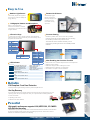
Ambient Light Sensor
Rotate with G-Sensor
Automatically toggles
between portrait and
landscape display mode
providing the most
comfortable viewing
experience.
Automatically adjusts the brightness
of the screen for optimum visibility and
energy efficiency.
1.3 Megapixel Camera and Microphone
Built-in 1.3 megapixel video
intercom device allows for real-time
communication. The webcam works in
low light situations.
8 Function Keys
G-sensor Setting
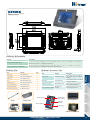
F1~F8 function keys help to simplify frequently used applications
with the pressing of a single shortcut key. The Function Keys can be
programed with a ODM case.
Disabled by default, the G-sensor can be set-up in BIOS.
Key
The automatic screen rotation sensitivity can be
enhanced by enabling G-sensor with a ODM provided
software.
Functions
Volume ON/OFF
Fn+F3
Volume Up
Fn+F4
Volume Down
Fn+F5
Auto Dimming
Fn+F6
Brightness Up
Fn+F7
Brightness Down
Fn+F8
LCD ON/OFF
Key
Description
SAS(Fn)
Secure Attention Sequence
(Alt+Ctrl+Del)
Key
Functions
Arrow Up
Up
Arrow Down
Down
Arrow Right
Right
Arrow Left
Left
Enter Key
Enter
Fn+Arrow Up
Page Up
Fn+Arrow Down Page Down
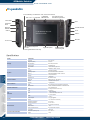
Indicator 1
AC POWER IN/BATTERY ON
(Only Battery with AC Power)
Battery mode: Red LED On
Battery mode and low power:
Red LED Flash
Indicator 2
Wireless/Bluetooth
Enable: LED on;Disable: LED off
Indicator 3
HD
Enable: LED on;Disable: LED off
Indicator 4
3.75G
Enable: LED on;Disable: LED off
End
Fn+Arrow Left
Home
(Battery and AC Power in)
Battery charge mode:
Green LED Flash
Battery charge mode and full
Battery: Green LED on
After Enabling the G-sensor Function
1. Please make sure to install the Graphics Driver before adjustment
2. Enable G-sensor in BIOS
3. Calibration will appear after enabling the G-sensor.
4. ICEROCK has to be laid down on a flat surface.
5. Press Enter to complete G-Sensor Calibration
IEIMobile
Introduction
LED Indicator
Fn+Arrow Right
Reliable
Tablet PC
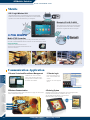
IP62 Compliant Front Panel Protection
Provides protection against damage caused by accidental spills and dust.
One Key Recovery
IEI’s useful One Key Recovery solution includes exclusive technology to backup and recover your
operating system with just one simple click when your computer faces the following situations:
● Severe virus attack
● Operating system crash
IEI Recovery Kit
● Natural or man-made disasters
Powerful
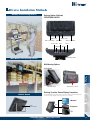
High graphic performance supports H.264, MPEG1/2/4, VC-1/WMV9
high definition decoding
The ICEROCK is powered by an Intel® Atom™ Z530P with full hardware acceleration which eliminates
the need for software decoding and the risk of overloading the processor. With low CPU resource
utilization, the ICEROCK is optimized for multitasking.
COMP-MALL GmbH - www.comp-mall.de
Industrial PDA
(EDA)
Sleep
Fn+F2
Automotive PC
Fn+F1
Use the function key to select BIOS SET UP. Pressing
F4 will take you back to the previous menu.
18