1
Step6
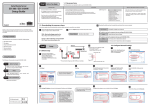
Transfer Patterns
To reset to the factory default setting
1. Remove the AC plug from the electric outlet ①.
A
2. Push and hold the push switch while re-inserting the AC plug into the electric outlet ②.
Continue holding.
3. The "STATUS" LED (Orange) will
light when the factory default
configuration settings have been
restored. Release the push switch.
To transfer a pattern, choose the pattern that you want to send to
the sewing machine, then drag and drop it into the network drive
shortcut on the desktop.
USA : silex technology america, Inc.
E-mail : [email protected]
URL : http://www.silexamerica.com/
Phone : 1-866-765-8761
Power Supply
①
②
Push switch
②
- For User Registration
- Customer Support
StitchLink
Drag Memory_Card onto the desktop. This creates a shortcut to
the network drive to be used for transferring patterns onto the
Memory Card.
Make sure to fill out the User Registration via our web page after completing setup.
User Registration is recommended in order to provide you better product support and
service.
http://www.silex.jp/register/
4. Unplug the AC plug and re-insert the
AC plug into the electric outlet.
Open My Computer from the desktop or from the Start menu.
User Registration
Electric outlet



![WA03380XA_A2_1_deu [Converted]](http://vs1.manualzilla.com/store/data/006781415_1-0a20a0cc41e52d67ac4cbe3b1d41e7f0-150x150.png)