1
DMX Functions
Enter MENU mode, select DMX Functions, press ENTER button to confirm, use UP
and DOWN button to select DMX Address or View DMX Value.
DMX Address
Select DMX Address, press ENTER button to confirm, the present address will blink
on the display, use UP and DOWN button to adjust the address from 1 to 512, press
ENTER button to store. Press MENU button back to the last menu or let the unit idle
one minute to exit menu mode.
View DMX Value
Select View DMX Value, press ENTER button to confirm. Channel function and its
value will show on the display, use UP and DOWN button to view other DMX value.
Press MENU button back to the last menu or let the unit idle one minute to exit menu
mode.
Fixture Setting
Enter MENU mode, select Fixture Setting, press ENTER button to confirm,
then use
UP and DOWN button to select Pan Inverse, Tile Inverse, P/T Feedback, BL.O. P/T
Moving, White Balance, Cooling Mode or Dimmer Curve.
Pan Inverse
Select Pan Inverse, press ENTER button to confirm, present mode will blink on the
display, use UP and DOWN button to select No (normal) or Yes (pan inverse), press
ENTER button to store. Press MENU button back to the last menu or let the unit idle
one minute to exit menu mode.
Tilt Inverse
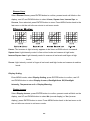
Select Tilt Inverse, press ENTER button to confirm, present mode will blink on the
display, use UP and DOWN button to select No (normal) or Yes (tilt inverse), press
7A