1
Single Shade Filters: Shade is fixed; no adjustment.
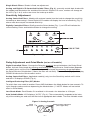
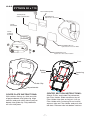
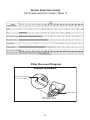
Analog and Digital LCD Controlled Variable Filters (Fig. 2): manually control dark shade with
the shade knob located on the outside of the helmet. Digital LCD users, number will change on
the LCD (Fig. 3 & 4) as the user turns the knob up or down.
Sensitivity Adjustment
Analog Controlled Filters: Models with external control turn the knob to change the sensitivity,
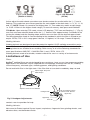
increasing or decreasing it. Some Digital LCD models will display the level of sensitivity (Fig. 3),
where more bars equals increased sensitivity.
Digitally Controlled Filters: Briefly press the Select button (Fig. 1), an LED will indicate the
current setting. Press and hold the button to change the setting.
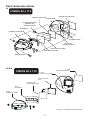
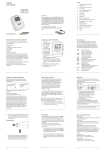
Figure 1: Digital Controls
Delay Adjustment and Grind Mode (not on all models)
Digital Controlled Filters: Change the Delay by pressing; do not hold down, the Delay/Grind
button. Activate Grind mode by pressing and holding the Delay/Grind or Grind button (depends
on model) down until the filter flashes. Deactivate Grind mode by pressing, do not hold down,
the Delay/Grind or Grind button (**Note: the filter will not flash). Some models (Fig 3), will display
GRIND to indicate the Grind mode is active.
Analog Controlled Filters: Applicable model(s) only, turn the Sensitivity switch until it clicks
and the LCD displays GRIND (Fig. 4).
Intelligent Darkening Filter (IDF) Modes
To switch from one mode to another Press AND Hold down the Mode button for two seconds. To
cycle through modes continue depressing the Mode button. (***NOTE: Modes will not switch
when in Grind Mode)
Low Shade Mode: Dark Shades 5-8 available in this mode. Arc detection to 10 Amps.
Auto-Variable Mode: LCD displays “AUTO” (Fig. 4). Filter automatically responds to the intensity of the welding arc and sets the filter to the appropriate dark shade. The Auto-Variable mode
Figure 2: Analog Controls
Shade
Adjusment
-2-
Sensitivity Adjustment
(where applicable)