1
that can be applied to any object that is a member of the
Has_text class. This class includes labels, as they are capable
of displaying text.
We therefore define the static title label as follows.
title :: Component
title = mkLabel [text “Time Elapsed:”]
In FranTk, we extend basic configuration with dynamic
configuration options. Instead of taking a static value a widget can
be given a dynamic behavior value. This approach is the key to
the declarative nature of FranTk. Rather than having to carry out
imperative updates to change a component’s appearance, we can
define, using a behavior, what it will look like for all time. Given
a behavioral model of an application, we can therefore define the
appearance of the interface simply as a function of the
application's state.
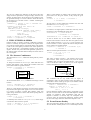
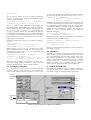
Figure 3 – An interactive example
Consider the interface shown in Figure 3. It shows a simplified
version of the tactical data entry widget from the ATC system,
which allows the controller to tell the aircraft to change flight
level. The proposed level can each be altered, by either typing a
value or using the slider. If an invalid value is typed into the text
field, it will have no effect. Once the level has been set the
controller presses send to fire off the message. The entry and scale
widgets must maintain a consistent view of one underlying value.
The send button will have to sample it to generate a value. We
therefore have multiple views of some data.
We can define the timer label as follows.
timevalue :: Component
timevalue = do
time <- timeTick 1
mkLabel [textB (lift1 show time)]
4.1 Representing State in FranTk
textB ::Has_text w=>Behavior String->Conf w
timeTick :: Time -> GUI (Behavior Time)
lift1 :: (a -> b) ->Behavior a->Behavior b
To represent the state in the example we use a BVar. A value of
type BVar a represents some abstract mutable state of type a.
data BVar a
The function timeTick creates a behavior that represents the
time, and changes at a given frequency. In our example, the time
value changes every second. The function lift1 maps a function
over a behavior, to yield a new behavior. This shows the benefit
of the GUI representation of a Component. We can create some
local state for a component while still thinking of it as a value.
We can create a new BVar within the GUI or the IO monad.
Most commonly we use them within the GUI monad.
newBVar :: a -> IO (BVar a)
mkBVar :: a -> GUI (BVar a)
It is possible to get a behavior from a BVar.
bvarBehavior :: BVar a -> Behavior a
3.3 Rendering Components
When we have defined an interface in terms of a Window
Component, to render it onto the screen we use render. This
will perform the action necessary to produce the window widget
behavior, and then display it.
render :: WComponent -> GUI ()
The behavior therefore represents the flight level value at any give
point in time.
It is possible to get an event from a BVar
bvarEvent :: BVar a -> Event a
Finally, to run the GUI actions that we have produced we use
start. This runs the action and then starts up the tcl-tk event loop.
This event loop will run until the graphical user interface quits, at
which point it will return.
start :: GUI () -> IO ()
The event from a BVar generates an occurrence every time the
value of the BVar is updated.
In our example we would therefore represent the state of the flight
level editor as a value of type BVar Int.
The use of BVars is therefore a fundamental and important feature
of FranTk. They provide us with a mechanism to represent state,
but to use it in a functional style.
As start and render are often used together there is a
composite function display.
display :: WComponent -> IO ()
display = start . render
4.2 Using State in FranTk
What can we do with a behavior? We can tell the slider and edit
widget to display the behavior values that we get from the BVar.
To test the timer component on its own, we would place it in a
window, and so define main as follows.
main :: IO ()
main = display (mkWindow [] timer)
We can tell the slider to use the value of the BVar with
scaleValB. This sets the value of the slider to that of an integer
behavior. (We will fill in the rest of the definition later.)
scale :: BVar Int -> Component
mkWindow :: [Conf Window] -> Component
-> WComponent
scale bv =
mkHScale
[scaleValB (bvarBehavior bv)] (...)
4. AN INTERACTIVE EXAMPLE
So far we’ve dealt with an interface with a dynamic appearance
but with no interaction. This section demonstrates how interaction
is handled in FranTk.
scaleValB :: Behavior Int -> Conf w
4