1
Paid Mode
This mode is the full-featured version of Eudora without advertisements. Only after the payment process
has been completed will Eudora provide a registration code that is used to activate the full-featured
version of Eudora without advertisements.
Light Mode
From the Sponsored mode, users have the option to switch to Light mode. The Light mode does not
include any advertisements, however this mode does not include all features as in the Sponsored and Paid
modes.
POP and IMAP Servers
There are two primary configurations for incoming mail that you can choose when setting up Eudora:
Post Office Protocol (POP) and Internet Message Access Protocol (IMAP).
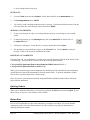
In the POP configuration, mail from the server is downloaded to your computer, and is appended to your
default Inbox. Mail is then deleted from the POP server. Mail processing is done locally on your PC.
If you are migrating from an earlier version of Eudora, you should continue using the POP configuration
in Eudora to process your incoming messages. This will allow you to continue using the mail folders that
you have saved locally on your PC in Eudora.
If you are using Eudora for the first time, or are migrating from another mail program such as Pine, we
recommend that you use the IMAP configuration. You may check this setting in Eudora by selecting the
Tools menu, clicking Options, and then clicking Incoming Mail. See the section, Configuring Eudora
(page 5).
Using IMAP configuration will leave e-mail on your server. You will use Eudora to manipulate your
remote inbox and folders off the mail server. Messages on the server can be marked as deleted but they
will remain on the server until you purge your deleted messages.
If you check e-mail from multiple computers, e.g. school/work and home, you should use the IMAP
configuration. Your IMAP mailboxes will be synchronized across multiple computers so your message
status flags, e.g. new, read, replied, forwarded, etc. will be the same when you check mail from the
different computers. If you check e-mail from only one computer, you may use either POP or IMAP
configuration.
This document is written for the IMAP configuration unless otherwise specified.
Requirements
To run Eudora you need a PC running Windows 95/98/ME/NT/2000. It is recommended that you have
the latest service pack for each operating system. Eudora can be installed with about 12MB free hard disk
space. Depending on the amount of mail and/or attachments you receive, it might require more hard disk
space. You also need a UH username and your PC must be connected to the Internet.
Note: For administrative computers, Windows ME is not recommended and is supported on a limited
“best effort” basis. This operating system is mainly for home users.
Page 2
Getting Started with Eudora 5.1 Win95/98/ME/NT/ 2000 WIN9X003