1
®
iPlayer 2
®
USER GUIDE
FOR THE iPLAYER 2 LIGHTING SHOW STORAGE AND PLAYBACK SYSTEM
©2001-2002 Color Kinetics Incorporated. All rights reserved. Chromacore, Color Kinetics, the Color
Kinetics logo, ColorBlast, ColorPlay, ColorScape, iColor, iPlayer, QuickPlay, and Smartjuice are registered
trademarks, and ColorBurst and iColor Cove are trademarks of Color Kinetics Incorporated.
All other brand or product names are trademarks or registered trademarks of their respective owners.
Specifications are subject to change without notice.
Printed in the U.S.A.
PUB-000058-00 Rev 01
Contents
Chapter 1
Introduction ..................................................................1
iPlayer 2 .............................................................................. 1
About This Guide ................................................................... 2
QuickPlay® Software .............................................................. 2
Chapter 2
Installation ....................................................................3
Installing iPlayer 2 Device Drivers .............................................. 3
Installing iPlayer 2 Drivers for Windows ...................................... 4
Installing iPlayer 2 Drivers for Mac OS X .................................... 6
Chapter 3
Using iPlayer 2 ...........................................................7
Setting up iPlayer 2 in Program Mode ........................................ 7
Programming ................................................................... 8
Setting up iPlayer 2 in Playback Mode ....................................... 8
Playing Shows with iPlayer 2 .............................................. 9
Chapter 4
External Control .......................................................11
Color Kinetics Controller Keypad ............................................ 11
Using the RS232 Serial Connection ......................................... 12
Using the Contact Closure Switch ........................................... 12
iii
CONTENTS
Appendix A
Capacity .......................................................................13
iPlayer 2 Capacity ............................................................... 13
Appendix B
iPlayer 2 Pinouts .....................................................15
Power: BNC ....................................................................... 15
Serial Port: DB9F ................................................................. 16
DMX: RJ45-8 ....................................................................... 17
Expansion: 26-Pin Dual Row .100" Header .............................. 18
iv
CHAPTER 1
INTRODUCTION
iPlayer 2
iPlayer® 2 is a multi-show storage and playback device used to
control Color Kinetics® lights.
iPlayer 2 stores multiple shows designed with Color Kinetics
ColorPlay® software. It can control a full DMX512 universe (512
addresses, or 170 individually addressed Color Kinetics lights).
iPlayer 2 Package Contents
• iPlayer 2 controller device
• iPlayer 2 Installation CD ROM
• USB cable
• RJ45 (CAT 5) data cable
• User Guide
• Product warranty and registration postcards
1
CHAPTER 1
About This Guide
This guide provides instructions on the installation, set up, and
operation of the iPlayer 2.
QuickPlay® Software
iPlayer 2 comes packaged with QuickPlay® software for Windows.
You use QuickPlay to control iPlayer 2 from your PC. QuickPlay
offers Live Play and Program features. Using the Live Play feature,
you can stream DMX data from your computer to light fixtures, using
predefined color effects or a DMX file you have created previously.
Using Program mode, you can download light shows to iPlayer 2
and assign triggers to each show.
Refer to the QuickPlay Online Help system for complete information
about using QuickPlay.
2
CHAPTER 2
INSTALLATION
Installing iPlayer 2 Device Drivers
Before you install the iPlayer drivers, close all running
applications, disable virus protection, and ensure your
computer has enough memory and free disk space.
System Requirements
Windows
Macintosh
• Windows 98 2nd edition, ME, 2000, XP
• 128 MB RAM
• 35 MB free disk space
• MacOS 10.1.3 or greater
• 128 MB RAM
• 5 MB free disk space
3
CHAPTER 2
Installing iPlayer 2 Drivers for Windows
The following instructions will guide you through the task of
installing the iPlayer 2 Pre-Config drivers and the DMX
Interface drivers. Driver installation varies from system to
system, therefore you may see subtle differences in your
installation.
Follow the instructions to install the drivers for your iPlayer 2.
Note: Do not click CANCEL or SKIP at any time during the
installation. Doing so will prevent your driver from being
properly installed on your computer.
To install iPlayer 2 Drivers for Windows
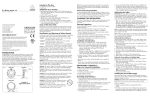
1. Insert the iPlayer 2 Installation CD into the CD-ROM drive.
2. Using the USB cable, connect iPlayer 2 to any USB port on your
computer. Both the Power and Program lights on iPlayer 2 will
light, indicating that the device is in Program Mode.
EXPANSION
DMX
SERIAL
iPlayer 2
®
ITEM# 103-000007-00
Playback
Program
USB
CPU
POWER
Power
www.colorkinetics.com
FOR USE UNDER U.S. PATENTS 6,016,038 AND 6,150,774
OTHER PATENTS PENDING
Assembled in the USA.
To computer's USB port
3. After you attach the iPlayer 2 to your computer, Windows will
detect new hardware and launch the NEW HARDWARE WIZARD.
4
INSTALLATION
4. Select the recommended option to have wizard search for and
install the best driver for your device and click NEXT.
5. Windows will search for the driver software. Select CD-ROM DRIVE if
prompted and click NEXT.
Note: Windows XP will prompt you to select the best
match from a list of drivers. After selecting the driver and
clicking next, you will receive a warning that the drivers
are not signed. Click continue anyway.
6. When Windows completes the driver installation, click FINISH. The
NEW HARDWARE WIZARD then guides you through the installation of
the DMX Interface drivers following the steps above.
5
CHAPTER 2
Installing iPlayer 2 Drivers for Mac OS X
The following instructions will guide you through the task of
installing the iPlayer 2.
Do not connect the iPlayer 2 to the computer until after you
have completed the following steps.
To install iPlayer 2 Drivers for Mackintosh OS X
1. Insert the iPlayer 2 CD into the CD-ROM drive.
2. Double click Install CK Drivers.pkg on the ColorPlay CD.
3. You will be prompted for an Administrator password to continue.
Enter your user NAME and PASSWORD and click OK.
4. The COLOR KINETICS DEVICE DRIVERS information screen will appear.
Click CONTINUE to proceed with the installation.
5. After reading the SOFTWARE LICENSE AGREEMENT click CONTINUE. You will
be prompted to agree to the terms of the software license
agreement. Click AGREE to continue.
6. From the SELECT A DESTINATION screen, select the hard drive where
Mac OS X is installed and click CONTINUE.
7. Click INSTALL from the EASY INSTALL screen. Before the installation
begins, you will receive the prompt: “Installing this software
requires you to restart your computer when the installation is
done. Are you sure you want to install the software now?” Click
CONTINUE INSTALLATION.
8. When the installation is complete, click RESTART.
9. Attach the iPlayer 2 to any USB port on your Mac, and access it
with software such as ColorPlay.
6
CHAPTER 3
USING IPLAYER 2
iPlayer 2 has two operating functions: recording light shows and
playing back the stored shows. These two operations are called
Program Mode and Playback Mode, respectively. iPlayer 2 cannot
operate both Program Mode and Playback Mode simultaneously
because each mode requires a unique physical set up of iPlayer 2.
The remainder of this chapter explains the operation of iPlayer 2 in
detail.
Setting up iPlayer 2 in Program Mode
1. Connect the iPlayer 2 to the USB port on your computer using the
provided USB cable.
2. Ensure that both the Power and Program indicator lights on
iPlayer 2 are lit, indicating that the device is in Program Mode.
In this configuration, iPlayer 2 is being powered from the
computer, so no external power source is required.
Note: The first time you connect iPlayer 2 to your
computer, you will be prompted to install the iPlayer 2
device drivers. These drivers are located on the iPlayer 2
Installation CD ROM. Refer to Chapter 2 for the device
driver installation instructions.
7
CHAPTER 3
Switching from Playback to Program Mode
1. Disconnect the BNC power supply and the RJ45 data supply from
iPlayer 2.
2. Connect the iPlayer 2 to the USB port on your computer using the
provided USB cable.
Note: iPlayer 2 will not function properly if it is
connected in Program and Playback Modes
simultaneously.
Programming
Once iPlayer 2 is in Program Mode, it is ready to record DMX files
or shows designed in ColorPlay. Refer to the ColorPlay User Guide
for instructions on how to download shows and assign triggers.
Refer to Appendix A for a general guideline of iPlayer 2 Capacity
constraints.
Setting up iPlayer 2 in Playback Mode
1. Disconnect iPlayer 2 from the computer by disconnecting the USB
cable from either iPlayer 2 or the computer.
2. Connect iPlayer 2 to the Color Kinetics lights, directly or via a
data supply.
Using an RJ45 (CAT 5) data cable, connect the DMX port on
iPlayer 2 to the Data In port on the lights, or the power/data
supply or power/data adapter powering the lights in the
installation.
Note: Refer to the User Guide for your fixtures to
determine the data connection for you lights.
3. Connect iPlayer 2 to a Color Kinetics 24 VDC power supply.
8
USING IPLAYER 2
Using the BNC port on iPlayer 2, connect a power cable to the
power/data supply or C-Series power supply that powers the
lights.
A separate BNC to flying lead power cable may be required
depending on which Color Kinetics power supply is used in the
installation.
4. After connecting iPlayer 2 to the lights and power supply, ensure
that the Power and Playback lights on iPlayer 2 are lit, indicating
that the device is in Playback Mode.
Playing Shows with iPlayer 2
After you download shows in Program Mode then switch to
Playback Mode, iPlayer 2 automatically begins playing the default
show, assigned to Trigger 1.
Switching Shows
To switch to another show, use an external switching interface such
as Color Kinetics Controller Keypad or use ColorPlay to assign a
new show to Trigger 1. Refer to Chapter 4 for additional
information on iPlayer 2-to-external control interface options.
9
CHAPTER 3
10
CHAPTER 4
EXTERNAL CONTROL
iPlayer 2 is designed with a large memory capacity and the ability
to store multiple shows, which is ideal for use with an external
controller interface to provide easy access to multiple shows. iPlayer
2 offer three options for setting up external control interfaces to
trigger multiple shows.
Color Kinetics Controller Keypad
Color Kinetics offers an accessory Controller Keypad, which is a
single-gang wall mounted architectural control device. Controller
Keypad has eight show buttons to trigger up to eight different shows
stored on iPlayer 2. It also has dimmer controls, and a master OFF
switch. This keypad is connected to the iPlayer to through the RS232
serial port. Controller Keypad comes with the specified serial cable
and installation instructions.
11
CHAPTER 4
Using the RS232 Serial Connection
iPlayer 2 is capable of interfacing through the serial port with many
popular third-party architectural controllers, such as controllers from
Lutron and Vantage. For a complete listing of the compatible
architectural controller and technical instructions for setting the
appropriate RS232 serial strings, refer to Color Kinetics’ website
www.colorkinetics.com\Professional Lighting Support\Applications
Notes.
Using the Contact Closure Switch
iPlayer 2 accepts input from any standard dry contract closure
switch. This requires a ribbon cable with a 26-pin dual row 0.100inch header, which connects to the Expansion port on iPlayer 2.
Appendix A has a diagram of the pin-outs of the Expansion port.
Refer to Color Kinetics’ website www.colorkinetics.com\Professional
Lighting Support\Applications Notes for the technical instructions to
develop the appropriate connection.
12
APPENDIX A
CAPACITY
iPlayer 2 Capacity
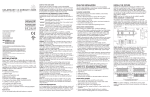
iPlayer 2 can store up to 16MB of DMX data, which can be one
large show or several smaller ones. The following graph shows the
range of show sizes that will fit on iPlayer 2, for shows at 40 frames
per second. (40 fps is sufficient for most light shows. Higher frame
rates require more memory, and therefore reduce the maximum time
that can fit on iPlayer 2.)
iPlayer 2 capacity at 40 frames per second
14
Total show time (hours)
12
10
8
6
4
2
0
0
20
40
60
80
100
120
140
160
180
Number of individually addressed Color Kinetics lights
(Maximum compression)
(Minimum compression)
Note: The amount of compression varies according to the
effects used in your show. Most shows will fall somewhere
between the maximum and minimum compression shown
on this graph.
13
CHAPTER
14
APPENDIX B
IPLAYER
2 PINOUTS
iPlayer 2 ships with all power and data cables necessary for
standard installation. The following information might be useful if
your installation requires adapters or custom cables.
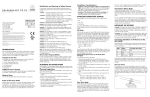
Power: BNC
+24V DC
Ground
15
CHAPTER
Serial Port: DB9F
Serial port pinouts
16
1
No connection
2
TxD
3
RxD
4
+5V DC (when jumper JP1 is installed)
5
Ground
6
No connection
7
No connection
8
No connection
9
No connection
IPLAYER 2 PINOUTS
DMX: RJ45-8
1
8
DMX pinouts
1
Data out -
2
Data out +
3
Ground
4
Data in -
5
Data in +
6
Ground
7
No connection
8
No connection
17
CHAPTER
Expansion: 26-Pin Dual Row .100" Header
25
26
1
2
Expansion port pinouts
1 Ground
2 Ground
3 Ground
4 Ground
5 Switch 1
6 Switch 2
7 Switch 3
8 Switch 4
9 Switch 5
10 Switch 6
11 Switch 7
12 Switch 8
13 +3.3V DC
14 +3.3V DC
15 Ground
16 Ground
17 Switch Off
18 Switch Up
19 Switch Down
20 Switch 12
21 Spare 1
22 Spare 2
23 Spare 3
24 +5V DC
25 Ground
26 Ground
Switch inputs are intended for dry contact closures. They are
internally pulled high, and should be momentarily shorted to ground
to signal a change.
WARNING: Do not apply voltage to the switch inputs.
18
Index
pinouts 15
C
capacity 13
DMX data 13
frame rate 13
storage size 13
compression 13
contact closure switch 12
contact closure switches
wiring 18
controller keypad 11
D
DMX
data 13
interface drivers 4
DMX port 17
downloading shows 7
E
expansion port 18
external control
contact closure switch 12
controller keypad 11
RS232 serial connection 12
I
installation 4
installing
iPlayer 2 drivers for Machintosh 6
iPlayer 2 drivers for Windows 4
system requirements 3
iPlayer 2
capacity 13
downloading shows 7
installation 4
overview 1
M
memory 13
O
overview 1
P
pinouts 15
BNC 15
expansion 17
RJ45-8 17
serial port 16
playback mode
playing shows 9
switching shows 9
power 11, 15
program mode
download 8
Q
QuickPlay 2
online help 2
overview 2
R
RS232 serial connection 12
S
serial port 16
set up
playback mode 8
program mode 7
show size 13
software
system requirements 3
19
INDEX
system requirements 3
U
USB cable 4
W
wiring 15
20