1
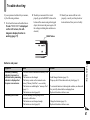
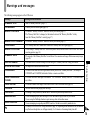
Symptom
Cause
Solution
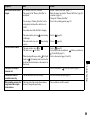
Your camera cannot record
images.
• No “Memory Stick Duo” is inserted.
• The capacity of the “Memory Stick Duo” is
insufficient.
p Insert a “Memory Stick Duo” (page 17).
p Delete the images saved in the “Memory Stick Duo” (page 50),
or format it (page 51).
p Change the “Memory Stick Duo.”
p Set it to the recording position (page 83).
• You are using a “Memory Stick Duo” with a
write-protect switch, and the switch is set to
LOCK.
• You cannot shoot while the flash is charging.
• The mode switch is not set to
a still image.
• The mode switch is not set to
a movie.
—
when shooting p Set it to
(page 20).
p Set it to
(page 46).
when shooting
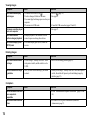
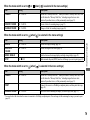
The flash does not work.
p Set it to
(page 20).
p Set the flash to auto (no indicator),
(Red-eye reduction) or
(Forced flash) (page 23).
• When shooting still images, either
(Twilight p Set it to other modes (pages 18 and 29).
mode) or
(Vivid nature mode) is selected for
the Scene Selection function, or the camera is in
Burst mode.
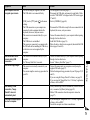
The eyes of the subject
come out red.
—
p Set the flash mode to
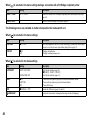
The date and time are
recorded incorrectly.
• The date and time are not set correctly.
p Set the correct date and time (page 15).
When shooting a movie, the
image looks like a singleframe advance.
• The image looks like a single-frame advance
because of image data processing.
p The recorded movie will be normal.
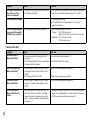
• The mode switch is set to
or
(No flash).
• The flash is set to
.
Troubleshooting
(Red-eye reduction) (page 23).
69