1
4.3 DEFINING ZONE TYPES, NAMES, CHIME ZONES & PARTITION
This mode allows you to assign one of 15 zone types to
each of the system's 30 (wireless & wired) zones. You can
define zones as KEY ZONES, to enable arming/disarming
of the system by PowerCode transmitters (see appendix
D14). In addition, it also allows you to assign a name and
partition number (up to three) to each zone and determine
whether the zone will operate as a chime zone. When a
chime zone is triggered, chime melody or zone name is
heard (there are 3 selectable chime modes - Melody chime,
Zone Name Chime or Chime Off).
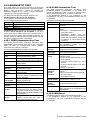
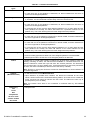
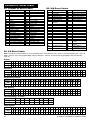
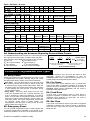
A list of factory defaults is printed in table 1. You may fill
out the blank columns even before you start and proceed
to program according to your own list.
Remember!
A delay zone is also a perimeter zone by definition.
Zone types are fully explained in Appendix D.
Note: Custom Zone Name text can be changed through
the DEFINE VOICE menu.
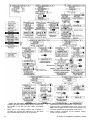
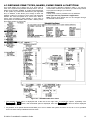
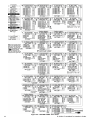
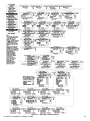
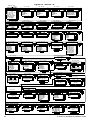
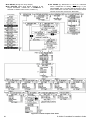
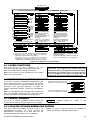
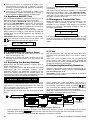
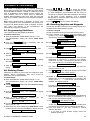
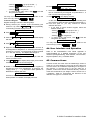
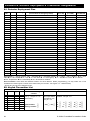
Figure 4.3 - DEFINE ZONES Flow Chart
*
The currently saved option is displayed with a dark box at the right side. To review the options, repeatedly click
or
button, until the desired option is displayed, then click
(a dark box will be displayed
at the right side).
** Key ON/OFF is an optional function that enables you to arm or disarm the system via zones 21-28, 29 or 21-29, provided
that "non-alarm" was pre-defined for these zones.
D-302541 PowerMaxPro Installer's Guide
13