1
General Features
Count Up or Down. The system can be programmed to run a timer that counts up
or down. Maximum time is 95 minutes.
Specifications:
Power
100-240VAC
Count Below Zero. The system will continue counting below zero when in
countdown up to a maximum of –9:55
Signals
2xXLR out carrying data and 12V
Colour Changes. The system can be programmed to change the colour of the
remote display at pre-determined times during a timer preset. This provides a means
of emphasising elapsed or remaining times. The remote displays can change from
green to amber to red for remaining times. Selecting the Direct buttons during a preset
will remove the automatic time changes to manual or direct control.
Presets. 4 preset buttons allow times to be stored in both count up and count down
mode. The presets must be used for count down modes. The button marked Up/Dn
will glow when in count down mode and is only selectable in program mode.
Dimensions mm (inch)
DxWxH
110 (4 ¼”)x165 (6 ½”)x185(2¼”)
Weight
880g(31oz)
Note XLR cable is not supplied as standard.
Note: The twin LED colon between the hours and minutes digits on the remote
displays is coloured red when the digits are either amber or green, and green when
the digits turn red.
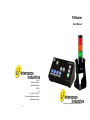
Combi-Lamp and Combi-Tower. In addition to the numerical remote displays, tricoloured ‘Intelligent Lamps’ can be used to simply display the colour changes to
further emphasise the stages of the elapsed or remaining time. The lamps will change
colour in the same way as the numerical remote displays, according to the
programming of the Preset that is running.
Pause Mode. The unit can be paused at any time using the Pause button. This is
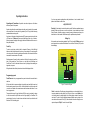
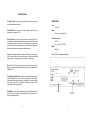
AC Power in
XLR Outputs for
Numeric Displays
seen as a quick flash on both the remote displays and/or Combi-Lamps/Towers to
show the time has been paused.
6
7