1
DriveControl DC-EC100
Initial startup and operation
Initial startup
Initial startup and operation
Inspections before initial
startup
¾ Ensure that all bolts are tightened according to the specifications.
¾ Ensure that no additional dangerous areas arise due to interfaces to other
components.
¾ Ensure that the wiring is in accordance with the specification and legal
directives.
¾ Check all protection devices.
¾ Ensure that no bystanders are in dangerous areas around the conveyor.
Operation
Damage to the DriveControl or the motor of the
RollerDrive due to induction
¾ Do not push items along the roller conveyor by hand.
¾ Do not spin the RollerDrive manually.
Inspections before every
startup
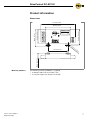
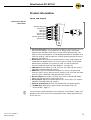
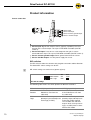
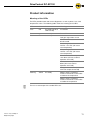
¾ Check the position of the DIP switches (see "DIP switches", page 10).
¾ Check the speed settings at the speed potentiometer. It is recommended to
run the RollerDrive at maximum speed.
¾ Check the DriveControl for visible damage.
¾ Check all protection devices.
¾ Ensure that no bystanders are in dangerous areas around the conveyor.
¾ Clearly specify and monitor the way goods are placed on the conveyor.
Changing settings
¾ To reduce the speed manually, turn the potentiometer counterclockwise with
a small screwdriver.
¾ To increase the speed manually, turn the potentiometer clockwise with a
small screwdriver.
¾ To set the DIP switches, carefully use a small screwdriver.
Version 1.0 (11/2007) en
Original language
19