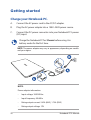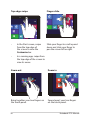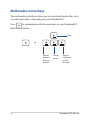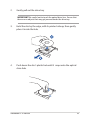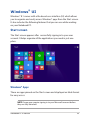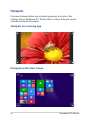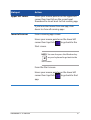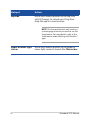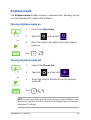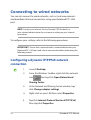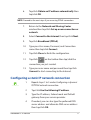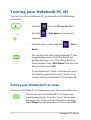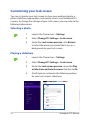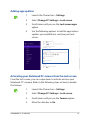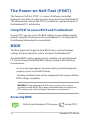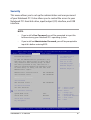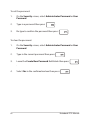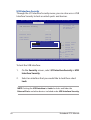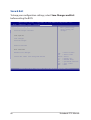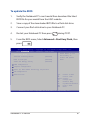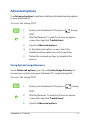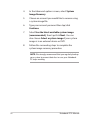
1
E9042 First Edition March 2014 Notebook PC E-Manual COPYRIGHT INFORMATION No part of this manual, including the products and software described in it, may be reproduced, transmitted, transcribed, stored in a retrieval system, or translated into any language in any form or by any means, except documentation kept by the purchaser for backup purposes, without the express written permission of ASUSTeK COMPUTER INC. (“ASUS”). ASUS PROVIDES THIS MANUAL “AS IS” WITHOUT WARRANTY OF ANY KIND, EITHER EXPRESS OR IMPLIED, INCLUDING BUT NOT LIMITED TO THE IMPLIED WARRANTIES OR CONDITIONS OF MERCHANTABILITY OR FITNESS FOR A PARTICULAR PURPOSE. IN NO EVENT SHALL ASUS, ITS DIRECTORS, OFFICERS, EMPLOYEES OR AGENTS BE LIABLE FOR ANY INDIRECT, SPECIAL, INCIDENTAL, OR CONSEQUENTIAL DAMAGES (INCLUDING DAMAGES FOR LOSS OF PROFITS, LOSS OF BUSINESS, LOSS OF USE OR DATA, INTERRUPTION OF BUSINESS AND THE LIKE), EVEN IF ASUS HAS BEEN ADVISED OF THE POSSIBILITY OF SUCH DAMAGES ARISING FROM ANY DEFECT OR ERROR IN THIS MANUAL OR PRODUCT. Products and corporate names appearing in this manual may or may not be registered trademarks or copyrights of their respective companies, and are used only for identification or explanation and to the owners’ benefit, without intent to infringe. SPECIFICATIONS AND INFORMATION CONTAINED IN THIS MANUAL ARE FURNISHED FOR INFORMATIONAL USE ONLY, AND ARE SUBJECT TO CHANGE AT ANY TIME WITHOUT NOTICE, AND SHOULD NOT BE CONSTRUED AS A COMMITMENT BY ASUS. ASUS ASSUMES NO RESPONSIBILITY OR LIABILITY FOR ANY ERRORS OR INACCURACIES THAT MAY APPEAR IN THIS MANUAL, INCLUDING THE PRODUCTS AND SOFTWARE DESCRIBED IN IT. Copyright © 2014 ASUSTeK COMPUTER INC. All Rights Reserved. LIMITATION OF LIABILITY Circumstances may arise where because of a default on ASUS’ part or other liability, you are entitled to recover damages from ASUS. In each such instance, regardless of the basis on which you are entitled to claim damages from ASUS, ASUS is liable for no more than damages for bodily injury (including death) and damage to real property and tangible personal property; or any other actual and direct damages resulted from omission or failure of performing legal duties under this Warranty Statement, up to the listed contract price of each product. ASUS will only be responsible for or indemnify you for loss, damages or claims based in contract, tort or infringement under this Warranty Statement. This limit also applies to ASUS’ suppliers and its reseller. It is the maximum for which ASUS, its suppliers, and your reseller are collectively responsible. UNDER NO CIRCUMSTANCES IS ASUS LIABLE FOR ANY OF THE FOLLOWING: (1) THIRD-PARTY CLAIMS AGAINST YOU FOR DAMAGES; (2) LOSS OF, OR DAMAGE TO, YOUR RECORDS OR DATA; OR (3) SPECIAL, INCIDENTAL, OR INDIRECT DAMAGES OR FOR ANY ECONOMIC CONSEQUENTIAL DAMAGES (INCLUDING LOST PROFITS OR SAVINGS), EVEN IF ASUS, ITS SUPPLIERS OR YOUR RESELLER IS INFORMED OF THEIR POSSIBILITY. SERVICE AND SUPPORT Visit our multi-language web site at http://support.asus.com 2 Notebook PC E-Manual Table of Contents About this manual......................................................................................................7 Conventions used in this manual.............................................................................. 8 Icons..................................................................................................................................... 8 Typography........................................................................................................................ 8 Safety precautions......................................................................................................9 Using your Notebook PC............................................................................................... 9 Caring for your Notebook PC...................................................................................... 10 Proper disposal................................................................................................................. 11 Chapter 1: Hardware Setup Getting to know your Notebook PC....................................................................14 Top View.............................................................................................................................. 14 Bottom................................................................................................................................. 18 Right Side........................................................................................................................... 19 Left Side.............................................................................................................................. 21 Front Side........................................................................................................................... 23 Chapter 2: Using your Notebook PC Getting started............................................................................................................26 Charge your Notebook PC............................................................................................ 26 Lift to open the display panel..................................................................................... 28 Press the power button................................................................................................. 28 Gestures for the touch screen panel* and touchpad....................................29 Using touch screen panel gestures*......................................................................... 29 Using touchpad gestures............................................................................................. 33 Using the keyboard....................................................................................................40 Function keys.................................................................................................................... 40 Windows® 8.1 keys.......................................................................................................... 41 Function keys for ASUS Apps...................................................................................... 41 Multimedia control keys............................................................................................... 42 Numeric keypad............................................................................................................... 43 Using the optical drive..............................................................................................44 Notebook PC E-Manual 3 Chapter 3: Working with Windows® 8.1 Starting for the first time..........................................................................................48 Windows® UI..................................................................................................................49 Start screen........................................................................................................................ 49 Hotspots.............................................................................................................................. 50 Start button....................................................................................................................... 53 Customizing your Start screen.................................................................................... 55 Working with Windows® apps................................................................................56 Launching apps................................................................................................................ 56 Customizing apps............................................................................................................ 56 Accessing the Apps screen........................................................................................... 58 Charms bar......................................................................................................................... 60 Snap feature...................................................................................................................... 63 Other keyboard shortcuts.......................................................................................65 Connecting to wireless networks.........................................................................67 Wi-Fi...................................................................................................................................... 67 Bluetooth ........................................................................................................................... 68 Airplane mode.................................................................................................................. 69 Connecting to wired networks..............................................................................70 Configuring a dynamic IP/PPPoE network connection..................................... 70 Configuring a static IP network connection.......................................................... 71 Turning your Notebook PC off...............................................................................72 Putting your Notebook PC to sleep.......................................................................... 72 Windows® 8.1 lock screen.........................................................................................73 To proceed from the lock screen................................................................................ 73 Customizing your lock screen..................................................................................... 74 4 Notebook PC E-Manual Chapter 4: Power-on Self-Test (POST) The Power-on Self-Test (POST)..............................................................................78 Using POST to access BIOS and Troubleshoot...................................................... 78 BIOS.................................................................................................................................78 Accessing BIOS................................................................................................................. 78 BIOS Settings..................................................................................................................... 79 Troubleshoot................................................................................................................89 Refresh your PC................................................................................................................ 89 Reset your PC.................................................................................................................... 90 Advanced options........................................................................................................... 91 Appendices DVD-ROM Drive Information (on selected models)............................................ 94 Blu-ray ROM Drive Information (on selected models)....................................... 96 Internal Modem Compliancy...................................................................................... 96 Overview............................................................................................................................. 97 Network Compatibility Declaration.......................................................................... 97 Non-Voice Equipment ................................................................................................... 97 Federal Communications Commission Interference Statement.................... 99 FCC Radio Frequency (RF) Exposure Caution Statement.................................. 100 Declaration of Conformity (R&TTE directive 1999/5/EC)................................... 101 CE Marking......................................................................................................................... 101 IC Radiation Exposure Statement for Canada....................................................... 102 Déclaration d’Industrie Canada relative à l’exposition aux ondes radio .... 103 Wireless Operation Channel for Different Domains............................................ 104 France Restricted Wireless Frequency Bands........................................................ 104 UL Safety Notices............................................................................................................. 106 Power Safety Requirement........................................................................................... 107 TV Notices.......................................................................................................................... 107 REACH.................................................................................................................................. 107 Notebook PC E-Manual 5 Macrovision Corporation Product Notice............................................................... 107 Prevention of Hearing Loss.......................................................................................... 107 Nordic Lithium Cautions (for lithium-ion batteries)............................................ 108 Optical Drive Safety Information............................................................................... 109 CTR 21 Approval (for Notebook PC with built-in Modem)............................... 110 ENERGY STAR complied product............................................................................... 112 European Union Eco-label............................................................................................ 112 Global Environmental Regulation Compliance and Declaration................... 113 ASUS Recycling/Takeback Services........................................................................... 113 Rechargeable Battery Recycling Service in North America............................. 113 Regional notice for Singapore.................................................................................... 114 Regional notice for India............................................................................................... 114 Notices for removeable batteries.............................................................................. 114 Avis concernant les batteries remplaçables.......................................................... 114 6 Notebook PC E-Manual About this manual This manual provides information about the hardware and software features of your Notebook PC, organized through the following chapters: Chapter 1: Hardware Setup This chapter details the hardware components of your Notebook PC. Chapter 2: Using your Notebook PC This chapter shows you how to use the different parts of your Notebook PC. Chapter 3: Working with Windows® 8.1 This chapter provides an overview of using Windows® 8.1 in your Notebook PC. Chapter 4: Power-on Self-test (POST) This chapter shows you how to use POST to change the settings of your Notebook PC. Appendices This section includes notices and safety statements for your Notebook PC. Notebook PC E-Manual 7 Conventions used in this manual To highlight key information in this manual, some text are presented as follows: IMPORTANT! This message contains vital information that must be followed to complete a task. NOTE: This message contains additional information and tips that can help complete tasks. WARNING! This message contains important information that must be followed to keep you safe while performing tasks and prevent damage to your Notebook PC's data and components. Icons The icons below indicate the devices you can use for completing a series of tasks or procedures on your Notebook PC. = Use the touch screen panel. = Use the touchpad. = Use the keyboard. Typography Bold = This indicates a menu or an item that must be selected. Italic = This indicates sections that you can refer to in this manual. 8 Notebook PC E-Manual Safety precautions Using your Notebook PC This Notebook PC should only be used in environments with ambient temperatures between 5°C (41°F) and 35°C (95°F). Refer to the rating label on the bottom of your Notebook PC and ensure that your power adapter complies with this rating. Do not leave your Notebook PC on your lap or near any part of your body to prevent discomfort or injury from heat exposure. Do not use damaged power cords, accessories, and other peripherals with your Notebook PC. While powered on, ensure that you do not carry or cover your Notebook PC with any materials that can reduce air circulation. Do not place your Notebook PC on uneven or unstable work surfaces. You can send your Notebook PC through x-ray machines (used on items placed on conveyor belts), but do not expose them to magnetic detectors and wands. Contact your airline provider to learn about related inflight services that can be used and restrictions that must be followed when using your Notebook PC in-flight. Notebook PC E-Manual 9 Caring for your Notebook PC Disconnect the AC power and remove the battery pack (if applicable) before cleaning your Notebook PC. Use a clean cellulose sponge or chamois cloth dampened with a solution of nonabrasive detergent and a few drops of warm water. Remove any extra moisture from your Notebook PC using a dry cloth. Do not use strong solvents such as thinners, benzene, or other chemicals on or near your Notebook PC. Do not place objects on top of your Notebook PC. Do not expose your Notebook PC to strong magnetic or electrical fields. Do not use or expose your Notebook PC near liquids, rain, or moisture. Do not expose your Notebook PC to dusty environments. Do not use your Notebook PC near gas leaks. 10 Notebook PC E-Manual Proper disposal Do not throw your Notebook PC in municipal waste. This product has been designed to enable proper reuse of parts and recycling. The symbol of the crossed out wheeled bin indicates that the product (electrical, electronic equipment and mercurycontaining button cell battery) should not be placed in municipal waste. Check local regulations for disposal of electronic products. Do not throw the battery in municipal waste. The symbol of the crossed out wheeled bin indicates that the battery should not be placed in municipal waste. Notebook PC E-Manual 11 12 Notebook PC E-Manual Chapter 1: Hardware Setup Notebook PC E-Manual 13 Getting to know your Notebook PC Top View NOTE: The keyboard's layout may vary per region or country. 14 Notebook PC E-Manual Camera The built-in camera allows you to take pictures or record videos using your Notebook PC. Camera indicator The camera indicator lights up when the built-in camera is in use. Microphone The built-in microphone can be used for video conferencing, voice narrations, or simple audio recording. Display panel This high-definition display panel provides excellent viewing features for photos, videos, and other multimedia files on your Notebook PC. Touch screen panel* This high-definition touch screen panel provides excellent viewing features for photos, videos, and other multimedia files on your Notebook PC. It also allows you to operate it using touch screen gestures. NOTE: For more details, refer to the Using touch screen panel gestures section in this manual. Power button Press the power button to turn your Notebook PC on or off. You can also use the power button to put your Notebook PC to sleep or hibernate mode and wake it up from sleep or hibernate mode. In the event that your Notebook PC becomes unresponsive, press and hold the power button for about four (4) seconds until your Notebook PC shuts down. * on selected models only Notebook PC E-Manual 15 Keyboard The keyboard provides full-sized QWERTY keys with a comfortable travel depth for typing. It also enables you to use the function keys, allows quick access to Windows®, and controls other multimedia functions. NOTE: The keyboard layout differs by model or territory. Numeric keypad* The numeric keypad toggles between these two functions: for numeric input and as pointer direction keys. NOTE: For more details, refer to the Numeric keypad (on selected models) section in this manual. Touchpad The touchpad allows the use of multi-gestures to navigate onscreen, providing an intuitive user experience. It also simulates the functions of a regular mouse. NOTE: For more details, refer to the Gestures for the touchpad section in this manual. Status indicators The status indicators help identify the current hardware status of your Notebook PC. * on selected models only 16 Notebook PC E-Manual Power indicator The power indicator lights up when the Notebook PC is turned on and blinks slowly when the Notebook PC is in sleep mode. Two-color battery charge indicator The two-color LED provides a visual indication of the battery’s charge status. Refer to the following table for details: Color Status Solid Green The Notebook PC is plugged to a power source and the battery power is between 95% and 100%. Solid Orange The Notebook PC is plugged to a power source, charging its battery, and the battery power is less than 95%. Blinking Orange The Notebook PC is running on battery mode and the battery power is less than 10%. Lights off The Notebook PC is running on battery mode and the battery power is between 10% to 100%. Notebook PC E-Manual 17 Bottom NOTE: The bottom side may vary in appearance depending on model. WARNING! The bottom of the Notebook PC can get warm to hot while in use or while charging the battery pack. When working on your Notebook PC, do not place it on surfaces that can block the vents. IMPORTANT! Battery time varies by usage and by the specifications for this Notebook PC. The battery pack cannot be disassembled. Air vents The air vents allow cool air to enter and warm air to exit the Notebook PC. WARNING! Ensure that paper, books, clothing, cables, or other objects do not block any of the air vents or else overheating may occur. 18 Notebook PC E-Manual Right Side Optical disc drive Your Notebook PC’s optical drive may support several disc formats such as CDs, DVDs, Blu-ray discs (on selected models) recordable discs, or rewritable discs. Optical disc drive electronic eject button Press this button to eject the optical drive tray. Notebook PC E-Manual 19 Optical disc drive manual eject hole The manual eject hole is used to eject the drive tray in case the electronic eject button does not work. WARNING! Use the manual eject hole only when the electronic eject button does not work. NOTE: For more details, refer to the Using the optical drive section in this manual. Power (DC) input port Insert the bundled power adapter into this port to charge the battery pack and supply power to your Notebook PC. WARNING! The adapter may become warm to hot while in use. Do not cover the adapter and keep it away from your body while it is connected to a power source. IMPORTANT! Use only the bundled power adapter to charge the battery pack and supply power to your Notebook PC. 20 Notebook PC E-Manual Left Side Kensington® security slot The Kensington® security slot allows you to secure your Notebook PC using Kensington® compatible Notebook PC security products. Air vents The air vents allow cool air to enter and warm air to exit the Notebook PC. WARNING! Ensure that paper, books, clothing, cables, or other objects do not block any of the air vents or else overheating may occur. LAN port Insert the network cable into this port to connect to a local area network (LAN). VGA port This port allows you to connect your Notebook PC to an external display. Notebook PC E-Manual 21 HDMI port This port is for a High-Definition Multimedia Interface (HDMI) connector and is HDCP compliant for HD DVD, Blu-ray, and other protected content playback. USB 3.0 port The Universal Serial Bus 3.0 (USB 3.0) port provides a transfer rate of up to 5 Gbit/s and is backward compatible to USB 2.0. USB 2.0 port This USB (Universal Serial Bus) ports is compatible with USB 2.0 or USB 1.1 devices such as keyboards, pointing devices, flash disk drives, external HDDs, speakers, cameras and printers. USB 2.0 port* This USB (Universal Serial Bus) port is compatible with USB 2.0 or USB 1.1 devices such as keyboards, pointing devices, flash disk drives, external HDDs, speakers, cameras and printers. Headphone output/microphone input combo jack port This port allows you to connect your Notebook PC to amplified speakers or headphones. You can also use this port to connect your Notebook PC to an external microphone. *on selected models only 22 Notebook PC E-Manual Front Side Status indicators The status indicators help identify the current hardware status of your Notebook PC. NOTE: For more details, refer to the Top View section in this manual. Memory card reader This built-in memory card reader supports SD and SDHC card formats. Notebook PC E-Manual 23 24 Notebook PC E-Manual Chapter 2: Using your Notebook PC Notebook PC E-Manual 25 Getting started Charge your Notebook PC. A. Connect the AC power cord to the AC/DC adapter. B. Plug the AC power adapter into a 100V~240V power source. C. Connect the DC power connector into your Notebook PC’s power (DC) input. Charge the Notebook PC for 3 hours before using it in battery mode for the first time. NOTE: The power adapter may vary in appearance, depending on models and your region. NOTE: Power adapter information: 26 • Input voltage: 100-240Vac • Input frequency: 50-60Hz • Rating output current: 3.42A (65W), 1.75A (33W) • Rating output voltage: 19V Notebook PC E-Manual IMPORTANT! • Locate the input/output rating label on your Notebook PC and ensure that it matches the input/output rating information on your power adapter. Some Notebook PC models may have multiple rating output currents based on the available SKU. • Ensure that your Notebook PC is connected to the power adapter before turning it on for the first time. We strongly recommend that you use a grounded wall socket while using your Notebook PC on power adapter mode. • The socket outlet must be easily accessible and near your Notebook PC. • To disconnect your Notebook PC from its main power supply, unplug your Notebook PC from the power socket. WARNING! Read the following precautions for your Notebook PC’s battery. • Only ASUS-authorized technicians should remove the battery inside the device. • The battery used in this device may present a risk of fire or chemical burn if removed or disassembled. • Follow the warning labels for your personal safety. • Risk of explosion if battery is replaced by an incorrect type. • Do not dispose of in fire. • Never attempt to short-circuit your Notebook PC’s battery. • Never attempt to dissamble and reassemble the battery. • Discontinue usage if leakage is found. • The battery and its components must be recycled or disposed of properly. • Keep the battery and other small components away from children. Notebook PC E-Manual 27 Lift to open the display panel. Press the power button. 28 Notebook PC E-Manual Gestures for the touch screen panel* and touchpad Gestures allow you to launch programs and access the settings of your Notebook PC. Refer to the following illustrations when using hand gestures on your touch screen panel* and touchpad. NOTE: The following screenshots are for reference only. The touch screen panel’s appearance may vary depending on model. Using touch screen panel gestures* The gestures allow you to launch programs and access the settings of your Notebook PC. Functions can be activated using the following hand gestures on your Notebook PC’s touch screen panel. Left edge swipe Right edge swipe Swipe from the left edge of the screen to shuffle your running apps. Swipe from the right edge of the screen to launch the Charms bar. * on selected models only Notebook PC E-Manual 29 Top edge swipe Finger slide • In the Start screen, swipe from the top edge of the screen to view the Customize bar. Slide your finger to scroll up and down and slide your finger to pan the screen left or right. • In a running app, swipe from the top edge of the screen to view its menu. Zoom out Zoom in Bring together your two fingers on the touch panel. Spread apart your two fingers on the touch panel. 30 Notebook PC E-Manual Tap/Double tap Tap/click and hold • Tap an app to launch it. • • On Desktop mode, doubletap an item to launch it. To move an app, tap and hold the app tile and drag it to a new location. • To close an app, tap and hold the top side of the running app and drag it down to the bottom of the screen to close it. Notebook PC E-Manual 31 Swipe up Swipe down Swipe up from the Start screen to launch the Apps screen. Swipe down from the Apps screen to return to the Start screen. 32 Notebook PC E-Manual Using touchpad gestures Moving the pointer You can tap/click or click anywhere on the touchpad to activate its pointer, then slide your finger on the touchpad to move the pointer onscreen. Slide horizontally Slide vertically Slide diagonally Notebook PC E-Manual 33 One-finger gestures Tap/click/Double tap/click • In the Start screen, tap/click an app to launch it. • In Desktop mode, double-tap/click an application to launch it. Drag and drop Double-tap/click an item, then slide the same finger without lifting it off the touchpad. To drop the item to its new location, lift your finger from the touchpad. 34 Notebook PC E-Manual Left-click Right-click • In the Start screen, click an app to launch it. • • In Desktop mode, doubleclick an application to launch it. In the Start screen, click an app to select it and launch the settings bar. You can also press this button to launch the All Apps bar. • In Desktop mode, use this button to open the rightclick menu. NOTE: The areas inside the dotted line represent the locations of the left mouse button and the right mouse button on the touchpad. Notebook PC E-Manual 35 Top edge swipe • In the Start screen, swipe from the top edge to launch the All Apps bar. • In a running app, swipe from the top edge to view its menu. Left edge swipe Right edge swipe Swipe from the left edge to shuffle Swipe the right edge to launch your running apps. the Charms bar. 36 Notebook PC E-Manual Two-finger gestures Tap/click Rotate Tap/click two fingers on the touchpad to simulate the rightclick function. To rotate an image, place two fingers on the touchpad then turn one finger clockwise or counterclockwise while the other stays still. Two-finger scroll (up/down) Two-finger scroll (left/right) Slide two fingers to scroll up or down. Slide two fingers to scroll left or right. Notebook PC E-Manual 37 Zoom out Zoom in Bring together your two fingers on Spread apart your two fingers on the touchpad. the touchpad. Drag and drop Select an item then press and hold the left button. Using your other finger, slide down the touchpad to drag and drop the item to a new location. 38 Notebook PC E-Manual Three-finger gestures Swipe up Swipe down Swipe three fingers upward to show all running applications. Swipe three fingers downward to show the Desktop mode. Notebook PC E-Manual 39 Using the keyboard Function keys The function keys on your Notebook PC’s keyboard can trigger the following commands: Puts the Notebook PC into Sleep mode Turns Airplane mode on or off NOTE: When enabled, the Airplane mode disables all wireless connectivity. Decreases display brightness Increases display brightness Turns the display panel off Activates the second screen NOTE: Ensure that the second display is connected to your Notebook PC. Enables or disables the touchpad Turns the speaker on or off 40 Notebook PC E-Manual Turns the speaker volume down Turns the speaker volume up Windows® 8.1 keys There are two special Windows® keys on your Notebook PC’s keyboard used as below: Press this key to go back to the Start screen. If you are already in the Start screen, press this key to go back to the last app you opened. Press this key to simulate the right-click functions. Function keys for ASUS Apps Your Notebook PC also comes with a special set of function keys that can be used to launch ASUS apps. Toggles the ASUS Splendid Video Enhancement Technology app to switch between these display color enhancement modes: Gamma Correction, Vivid Mode, Theater Mode, Soft Mode, My Profile, and Normal. Notebook PC E-Manual 41 Multimedia control keys The multimedia control keys allow you to control multimedia files, such as audios and videos, when played in your Notebook PC. Press in combination with the arrow keys on your Notebook PC, illustrated as below. Stop Skip to previous track or rewind 42 Play or pause Skip to next track or fast forward Notebook PC E-Manual Numeric keypad NOTE: The numeric keypad layout may differ by model or territory but the usage procedures remain the same. A numeric keypad is available on selected Notebook PC models. You can use this keypad for numeric input or as pointer direction keys. Press to toggle between using the keypad as number keys or as pointer direction keys. Notebook PC E-Manual 43 Using the optical drive NOTE: • The actual location of the electronic eject button may vary depending on your Notebook PC model. • The actual appearance of the Notebook PC optical drive may also vary depending on model but usage procedures remaing the same. Inserting an optical disc 1. 44 While the Notebook PC is on, press the electronic eject button to partially eject the optical drive tray. Notebook PC E-Manual 2. Gently pull out the drive tray. IMPORTANT! Be careful not to touch the optical drive lens. Ensure that there are no objects that may get jammed under the drive tray. 3. Hold the disc by the edge, with its printed side up, then gently place it inside the hub. 4. Push down the disc’s plastic hub until it snaps onto the optical drive hub. Notebook PC E-Manual 45 5. Push the drive tray gently to close the optical drive. NOTE: While data is being read, it is normal to hear some spinning and vibrating in the optical drive. Using the manual eject hole The manual eject hole is located on the optical drive door and is used to eject the optical drive tray in case the electronic eject button does not work. To manually eject the optical drive tray, insert a straightened paper clip into the manual eject hole until the drive tray opens. WARNING! Use the manual eject hole only when the electronic eject button does not work. 46 Notebook PC E-Manual Chapter 3: Working with Windows® 8.1 Notebook PC E-Manual 47 Starting for the first time When you start your computer for the first time, a series of screens appear to guide you in configuring your Windows® 8.1 operating system. To start your Notebook PC for the first time: 1. Press the power button on your Notebook PC. Wait for a few minutes until the setup screen appears. 2. From the setup screen, pick a language to use on your Notebook PC. 3. Carefully read the License Terms. Select I accept. 4. Follow the onscreen instructions to configure the following basic items: • Personalize • Get online • Settings • Your account 5. After configuring the basic items, Windows® 8.1 proceeds to install your apps and preferred settings. Ensure that your Notebook PC is kept powered on during the setup process. 6. Once the setup process is complete, the Start screen appears. 48 Notebook PC E-Manual Windows® UI Windows® 8.1 comes with a tile-based user interface (UI) which allows you to organize and easily access Windows® apps from the Start screen. It also includes the following features that you can use while working on your Notebook PC. Start screen The Start screen appears after successfully signing in to your user account. It helps organize all the applications you need in just one place. Windows® Apps These are apps pinned on the Start screen and displayed on tiled-format for easy access. NOTE: Some apps require signing in to your Microsoft account before they are fully launched. Notebook PC E-Manual 49 Hotspots Onscreen hotspots allow you to launch programs and access the settings of your Notebook PC. The functions in these hotspots can be activated using the touchpad. Hotspots on a running app Hotspots on the Start screen 50 Notebook PC E-Manual Hotspot Action upper left corner Hover your mouse pointer on the upper left corner then tap/click on the recent app’s thumbnail to revert back to that running app. If you launched more than one app, slide down to show all running apps. lower left corner From a running app screen: Hover your mouse pointer on the lower left corner then tap/click to go back to the Start screen. NOTE: You can also press the Windows key on your keyboard to go back to the Start screen. From the Start screen: Hover your mouse pointer on the lower left corner then tap/click to go back to that app. Notebook PC E-Manual 51 Hotspot Action top side Hover your mouse pointer on the top side until it changes to a hand icon. Drag then drop the app to a new location. NOTE: This hotspot function only works on a running app or when you want to use the Snap feature. For more details, refer to the Snap feature under Working with Windows® apps. upper or lower right corner 52 Hover your mouse pointer on the upper or lower right corner to launch the Charms bar. Notebook PC E-Manual Start button Windows® 8.1 features the Start button which allows you to switch between the two most recent apps that you opened. The Start button may be accessed from the Start screen, while on Desktop mode, and on any app that is currently open onscreen. Start button on the Start screen NOTE: The actual color of your Start button varies depending on the display settings you chose for your Start screen. Hover your mouse pointer over the left corner of your Start screen or any opened app to call out the Start button. Notebook PC E-Manual 53 Start button on Desktop mode Context menu The context menu appears as a box filled with quick access to some of the programs inside Windows® 8.1 when you right-click on the Start button. The context menu also includes the following shut down options for your Notebook PC: sign out, sleep, shut down, restart. 54 Notebook PC E-Manual Customizing your Start screen Windows® 8.1 also enables you to customize your Start screen, allowing you to boot directly to the Desktop mode and customize the arrangement of your apps onscreen. To customize the settings of your Start screen: * or 1. Launch the Desktop. 2. Right-click anywhere on the taskbar, except on the Start button, to launch the pop-up window. 3.Click Properties then select the Navigation tab to tick the Navigation and Start screen options you want to use. 4.Tap/click Apply to save the new settings then exit. *on selected models only Notebook PC E-Manual 55 Working with Windows® apps Use your Notebook PC’s touch screen panel*, touchpad, or keyboard to launch, customize, and close apps. Launching apps * Tap an app to launch it. Position your mouse pointer over the app then left-click or tap once to launch it. Press twice then use the arrow keys to browse through the apps. Press to launch an app. Customizing apps You can move, resize, unpin, or close apps from the Start screen using the following steps: Moving apps Tap and hold the app tile then drag it to a new location. * Double-tap on the app then drag and drop the app to a new location. *on selected models only 56 Notebook PC E-Manual Resizing apps Tap and hold the app to activate the Customize bar then * tap and select an app tile size. Right-click on the app to activate the Customize bar, then tap/click and select an app tile size. Unpinning apps Tap and hold the app to activate the Customize bar, then * tap to unpin an app. Right-click on the app to activate the Customize bar then tap/click . Closing apps * Tap and hold the top side of the running app then drag it down to the bottom of the screen to close it. 1. Move your mouse pointer on the top side of the launched app then wait for the pointer to change to a hand icon. 2. Drag then drop the app to the bottom of the screen to close it. From the running app’s screen, press . *on selected models only Notebook PC E-Manual 57 Accessing the Apps screen Aside from the apps already pinned on your Start screen, you can also open other applications through the Apps screen. NOTE: Actual apps shown onscreen may vary per model. The following screenshot is for reference only. Launching the Apps screen Launch the Apps screen using your Notebook PC's touch screen panel*, touchpad, or keyboard. * Swipe up on the Start screen. On the Start screen, click the From the Start screen, Press button. then press *on selected models only 58 Notebook PC E-Manual . Pinning more apps on the Start screen You can pin more apps on the Start screen using your touch screen panel* or touchpad. * 1. Launch the All Apps screen. 2. Tap and hold an app you want to pin on the Start screen to activate the Customize bar. 3. (optional) Once the Customize bar is enabled, you may tap more apps to pin on the Start screen. 4.Tap to pin the selected apps on the Start screen. * 1. Launch the All Apps screen 2. Right-click on the apps that you want to add on the Start screen. 3. Tap/click on the icon to pin the selected apps on the Start screen. *on selected models only Notebook PC E-Manual 59 Charms bar The Charms bar is a toolbar that can be triggered on the right side of your screen. It consists of several tools that allow you to share applications and provide quick access for customizing the settings of your Notebook PC. Charms bar 60 Notebook PC E-Manual Launching the Charms bar NOTE: When called out, the Charms bar initially appears as a set of white icons. The image above shows how the Charms bar looks like once activated. Use your Notebook PC’s touch screen panel*, touchpad, or keyboard to launch the Charms bar. * Swipe from the right edge of the screen to launch the charms bar. Move your mouse pointer on the upper or lower right corner of the screen. Press *on selected models only Notebook PC E-Manual 61 Inside the Charms bar Search This charm allows you to look for files, applications, or programs in your Notebook PC. Share This charm allows you to share applications via social networking sites or email. Start This charm reverts the display back to the Start screen. From the Start screen, you can also use this to revert back to a recently opened app. Devices This charm allows you to access and share files with the devices attached to your Notebook PC such as an external display or printer. Settings This charm allows you to access the PC settings of your Notebook PC. 62 Notebook PC E-Manual Snap feature The Snap feature displays two apps side-by-side, allowing you to work or switch between apps. IMPORTANT! Ensure that your Notebook PC’s screen resolution is set to 1366 x 768 pixels or higher before using the Snap feature. Snap bar Notebook PC E-Manual 63 Using Snap Use your Notebook PC’s touch screen panel*, touchpad, or keyboard to activate and use Snap. * 1. Launch the app you wish to snap. 2. Tap and hold the app’s topmost part then drag it to the left or right side of the screen until the snap bar appears. 3. Launch another app. 1. Launch the app you wish to snap. 2. Hover the mouse point on the top side of your screen. 3. Once the pointer changes to a hand icon, drag then drop the app to the left or right side of the display panel. 4. Launch another app. 1. Launch the app you wish to snap. 2.Press and the left or right arrow key to snap the app to the left or right pane. 3. Launch another app. This app is automatically placed in the empty pane. *on selected models only 64 Notebook PC E-Manual Other keyboard shortcuts Using the keyboard, you can also use the following shortcuts to help you launch applications and navigate Windows® 8.1. \ Switches between the Start screen and the last running app Launches the desktop Launches the This PC window on Desktop mode Opens the File option from the Search charm Opens the Share charm Opens the Settings charm Opens the Devices charm Activates the Lock screen Minimizes all currently active windows Notebook PC E-Manual 65 Launches the Project pane Opens the Everywhere option from the Search charm Opens the Run window Opens Ease of Access Center Opens the Settings option under the Search charm Opens the context menu of the Start button Launches the magnifier icon and zooms in your screen Zooms out your screen Opens the Narrator Settings 66 Notebook PC E-Manual Connecting to wireless networks Wi-Fi Access emails, surf the Internet, and share applications via social networking sites using your Notebook PC’s Wi-Fi connection. IMPORTANT! The Airplane mode disables this feature. Ensure that Airplane mode is turned off before enabling the Wi-Fi connection of your Notebook PC. Enabling Wi-Fi Activate Wi-Fi in your Notebook PC using the following steps on your touch screen panel or touchpad. 1. Launch the Charms bar. 2.Tap/click 3. and tap/click . Select an access point from the list of available Wi-Fi connections. 4.Tap/click Connect to start the network connection. NOTE: You may be prompted to enter a security key to activate the Wi-Fi connection. 5. If you want to enable sharing between your Notebook PC and other wireless-enabled systems, tap/click Yes. Tap/click No if you do not want to enable the sharing function. Notebook PC E-Manual 67 Bluetooth Use Bluetooth to facilitate wireless data transfers with other Bluetoothenabled devices. IMPORTANT! The Airplane mode disables this feature. Ensure that Airplane mode is turned off before enabling the Bluetooth connection of your Notebook PC. Pairing with other Bluetooth-enabled devices You need to pair your Notebook PC with other Bluetooth-enabled devices to enable data transfers. To do this, use your touchpad as follows: 1. Launch the Charms bar. 2.Tap/click then tap/click Change PC Settings. 3.Under PC Settings, select Devices then tap/click Add a Device to search for Bluetooth-enabled devices. 4. Select a device from the list. Compare the passcode on your Notebook PC with the passcode sent to your chosen device. If they are the same, tap/click Yes to successfully pair your Notebook PC with the device. NOTE: For some bluetooth-enabled devices, you may be prompted to key in the passcode of your Notebook PC. 68 Notebook PC E-Manual Airplane mode The Airplane mode disables wireless communication, allowing you to use your Notebook PC safely while in-flight. Turning Airplane mode on 1. Launch the Charms bar. * 2.Tap/click or 3. and tap/click . Move the slider to the right to turn the Airplane mode on. . Press Turning Airplane mode off 1. Launch the Charms bar. * 2.Tap/click or 3. Press and tap/click . Move the slider to the left to turn the Airplane mode off. . NOTE: Contact your airline provider to learn about related inflight services that can be used and restrictions that must be followed when using your Notebook PC in-flight. Notebook PC E-Manual 69 Connecting to wired networks You can also connect to wired networks, such as local area networks and broadband Internet connection, using your Notebook PC’s LAN port. NOTE: Contact your Internet Service Provider (ISP) for details or your network administrator for assistance in setting up your Internet connection. To configure your settings, refer to the following procedures. IMPORTANT! Ensure that a network cable is connected between your Notebook PC’s LAN port and a local area network before performing the following actions. Configuring a dynamic IP/PPPoE network connection 1. Launch Desktop. 2. From the Windows® taskbar, right-click the network icon then tap/click Open Network and Sharing Center. 3. In the Network and Sharing Center window, tap/ click Change adapter settings. 4. Right-click on your LAN then select Properties. 5.Tap/click Internet Protocol Version 4(TCP/IPv4) then tap/click Properties. 70 Notebook PC E-Manual 6.Tap/click Obtain an IP address automatically then tap/click OK. NOTE: Proceed to the next steps if you are using PPPoE connection. Return to the Network and Sharing Center window then tap/click Set up a new connection or network. 7. 8.Select Connect to the Internet then tap/click Next. 9.Tap/click Broadband (PPPoE). 10. Type your User name, Password, and Connection name then tap/click Connect. 11.Tap/click Close to finish the configuration. 12.Tap/click on the taskbar then tap/click the connection you just created. 13. Type your user name and password then tap/click Connect to start connecting to the Internet. Configuring a static IP network connection 1. Repeat steps 1 to 5 under Configuring a dynamic IP/PPPoE network connection. 2Tap/click Use the following IP address. 3. Type the IP address, Subnet mask and Default gateway from your service provider. 4. If needed, you can also type the preferred DNS server address and alternate DNS server address then tap/click OK. Notebook PC E-Manual 71 Turning your Notebook PC off You can turn off your Notebook PC by doing either of the following procedures: * • or Tap/click from the Charms bar then tap/click > Shut down to do a normal shutdown. • From the log-in screen, tap/click > Shut down. • You can also shut down your Notebook PC Duet using Desktop mode. To do this, launch the desktop then press alt + f4 to launch the Shut Down window. Select Shut Down from the dropdown list then select OK. • If your Notebook PC Duet is unresponsive, press and hold the power button for at least four (4) seconds until your Notebook PC Duet turns off. Putting your Notebook PC to sleep To put your Notebook PC on Sleep mode, press the power button once. You can also put your Notebook PC to sleep mode using Desktop mode. To do this, launch the desktop then press alt + f4 to launch the Shut Down window. Select Sleep from the drop-down list then select OK. 72 Notebook PC E-Manual Windows® 8.1 lock screen The Windows® 8.1 lock screen appears when you wake your Notebook PC from sleep or hibernate mode. It also appears when you lock or unlock Windows® 8.1. The lock screen can be customized to regulate access to your operating system. You can change its background display and access some of your apps while your Notebook PC is still locked. To proceed from the lock screen * 1. Tap/click on the touchpad or press any key on your Notebook PC's keyboard. 2. (optional) If your account is password-protected, you need to key in the password to continue to the Start screen. or *on selected models only Notebook PC E-Manual 73 Customizing your lock screen You can customize your lock screen to show your preferred photo, a photo slideshow, app updates, and quickly access your Notebook PC’s camera. To change the settings of your lock screen, you may refer to the following information: Selecting a photo 1. Launch the Charms bar > Settings. 2.Select Change PC Settings > Lock screen. 3. Under the Lock screen preview, click Browse to select the photo you would like to use as a background on your lock screen. Playing a slideshow 1. Launch the Charms bar > Settings. 2.Select Change PC Settings > Lock screen. 74 3. Under the Lock screen preview, move the Play a slide show on the lock screen slide bar to On. 4. Scroll down to customize the following options for your lock screen’s slideshow: Notebook PC E-Manual Adding app updates 1. Launch the Charms bar > Settings. 2.Select Change PC Settings > Lock screen. 3. Scroll down until you see the Lock screen apps option. 4. Use the following options to add the apps whose updates you would like to see from your lock screen: Activating your Notebook PC camera from the lock screen From the lock screen, you can swipe down to activate and use your Notebook PC's camera. Refer to the following steps on how to enable this feature: 1. Launch the Charms bar > Settings. 2.Select Change PC Settings > Lock screen. 3. Scroll down until you see the Camera option. 4. Move the slide bar to On. Notebook PC E-Manual 75 76 Notebook PC E-Manual Chapter 4: Power-on Self-Test (POST) Notebook PC E-Manual 77 The Power-on Self-Test (POST) The Power-on Self-Test (POST) is a series of software-controlled diagnostic tests that run when you turn on or restart your Notebook PC. The software that controls the POST is installed as a permanent part of the Notebook PC’s architecture. Using POST to access BIOS and Troubleshoot During POST, you can access the BIOS settings or run troubleshooting options using the function keys of your Notebook PC. You may refer to the following information for more details. BIOS The Basic Input and Output System (BIOS) stores system hardware settings that are needed for system startup in the Notebook PC. The default BIOS settings apply to most conditions of your Notebook PC. Do not change the default BIOS settings except in the following circumstances: • An error message appears onscreen during system bootup and requests you to run the BIOS Setup. • You have installed a new system component that requires further BIOS settings or updates. WARNING: Using inappropriate BIOS settings may result to system instability or boot failure. We strongly recommend that you change the BIOS settings only with the help of a trained service personnel. Accessing BIOS Restart your Notebook PC then press 78 during POST. Notebook PC E-Manual BIOS Settings NOTE: The BIOS screens in this section are for reference only. The actual screens may differ by model and territory. Boot This menu allows you to set your boot option priorities. You may refer to the following procedures when setting your boot priority. 1. Main On the Boot screen, select Boot Option #1. Aptio Setup Utility - Copyright (C) 2012 American Megatrends, Inc. Advanced Boot Security Save & Exit Boot Configuration Fast Boot [Enabled] Launch CSM [Disabled] Sets the system boot order Driver Option Priorities Boot Option Priorities Boot Option #1 Add New Boot Option Delete Boot Option [Windows Boot Manager] →← : : ↑↓ Enter: +/— : F1 : F9 : F10 : ESC : Select Screen Select Item Select Change Opt. General Help Optimized Defaults Save & Exit Exit Version 2.15.1226. Copyright (C) 2012 American Megatrends, Inc. Notebook PC E-Manual 79 2.Press Main and select a device as the Boot Option #1. Aptio Setup Utility - Copyright (C) 2012 American Megatrends, Inc. Advanced Boot Security Save & Exit Boot Configuration Fast Boot [Enabled] Launch CSM [Disabled] Sets the system boot order Driver Option Priorities Boot Option Priorities Boot Option #1 Boot Option #1 Windows Boot [Windows Boot Manager Manager] Disabled Add New Boot Option Delete Boot Option →← : : ↑↓ Enter: +/— : F1 : F9 : F10 : ESC : Select Screen Select Item Select Change Opt. General Help Optimized Defaults Save & Exit Exit Version 2.15.1226. Copyright (C) 2012 American Megatrends, Inc. 80 Notebook PC E-Manual Security This menu allows you to set up the administrator and user password of your Notebook PC. It also allows you to control the access to your Notebook PC’s hard disk drive, input/output (I/O) interface, and USB interface. NOTE: Main • If you install a User Password, you will be prompted to input this before entering your Notebook PC's operating system. • If you install an Administrator Password, you will be prompted to input this before entering BIOS. Aptio Setup Utility - Copyright (C) 2012 American Megatrends, Inc. Advanced Boot Security Save & Exit Password Description If ONLY the Administrator’s password is set, then this only limits access to Setup and is only asked for when entering Setup. If ONLY the user’s password is set, then this is a power on password and must be entered to boot or enter Setup. In Setup, the User will have Administrator rights. Administrator Password Status NOT INSTALLED User Password Status NOT INSTALLED Set Administrator Password. The password length must be in the following range: Minimum length 3 Maximum length 20 Administrator Password User Password HDD Password Status : NOT INSTALLED Set Master Password Set User Password I/O Interface Security System Mode state User Secure Boot state Enabled Secure Boot Control [Enabled] Key Management →← : : ↑↓ Enter: +/— : F1 : F9 : F10 : ESC : Select Screen Select Item Select Change Opt. General Help Optimized Defaults Save & Exit Exit Version 2.15.1226. Copyright (C) 2012 American Megatrends, Inc. Notebook PC E-Manual 81 To set the password: 1. On the Security screen, select Administrator Password or User Password. 2. Type in a password then press 3. Re-type to confirm the password then press . . To clear the password: 1. On the Security screen, select Administrator Password or User Password. 2. Type in the current password then press 3. Leave the Create New Password field blank then press . . 4.Select Yes in the confirmation box then press 82 . Notebook PC E-Manual I/O Interface Security In the Security menu, you can access I/O Interface Security to lock or unlock some interface functions of your Notebook PC. Aptio Setup Utility - Copyright (C) 2012 American Megatrends, Inc. Security I/O Interface Security LAN Network Interface [UnLock] Wireless Network Interface [UnLock] HD AUDIO Interface [UnLock] If Locked, LAN controller will be disabled. USB Interface Security Lock LAN Network Interface UnLock →← : Select Screen : Select Item ↑↓ Enter: Select +/— : Change Opt. F1 : General Help F9 : Optimized Defaults F10 : Save & Exit ESC : Exit Version 2.15.1226. Copyright (C) 2012 American Megatrends, Inc. To lock an interface: 1. On the Security screen, select I/O Interface Security. 2. Select an interface you would like to lock then press . 3.Select Lock. Notebook PC E-Manual 83 USB Interface Security Through the I/O Interface Security menu, you can also access USB Interface Security to lock or unlock ports and devices. Aptio Setup Utility - Copyright (C) 2012 American Megatrends, Inc. Security USB Interface Security USB Interface [UnLock] External Ports [UnLock] CMOS Camera [UnLock] Card Reader Lock [UnLock] USB Interface UnLock If Locked, all USB device will be disabled →← : Select Screen : Select Item ↑↓ Enter: Select +/— : Change Opt. F1 : General Help F9 : Optimized Defaults F10 : Save & Exit ESC : Exit Version 2.15.1226. Copyright (C) 2012 American Megatrends, Inc. To lock the USB interface: 1. On the Security screen, select I/O Interface Security > USB Interface Security. 2. Select an interface that you would like to lock then select Lock. NOTE: Setting the USB Interface to Lock also locks and hides the External Ports and other devices included under USB Interface Security. 84 Notebook PC E-Manual Set Master Password In the Security menu, you can use Set Master Password to set up a password-enabled access to your hard disk drive. Aptio Setup Utility - Copyright (C) 2012 American Megatrends, Inc. Main Setup Advanced Security(C) Save Exit Aptio UtilityBoot - Copyright 2011 &American Megatrends, Inc. Password Description Set HDD Master Password. If ONLY the Administrator’s password is set,then this only limits access to Setup and is only asked for when entering Setup. If ONLY the user’s password is set, then this is a power on password and must be entered to boot or enter Setup. In Setup, the User will have Administrator rights. Administrator Password Status NOT INSTALLED User Password Status NOT INSTALLED Administrator Password User Password HDD Password Status : NOT INSTALLED Set Master Password Set User Password I/O Interface Security ***Advisable to Power Cycle System after Setting Hard Disk Passwords*** →← : Select Screen : Select Item ↑↓ Enter: Select +/— : Change Opt. F1 : General Help F9 : Optimized Defaults F10 : Save & Exit ESC : Exit Version 2.15.1226. Copyright (C) 2012 American Megatrends, Inc. To set the HDD password: 1. On the Security screen, select Set Master Password. 2. Type in a password then press 3. Re-type to confirm the password then press . . 4.Select Set User Password then repeat the previous steps to set up the user password. Notebook PC E-Manual 85 Save & Exit To keep your configuration settings, select Save Changes and Exit before exiting the BIOS. Main Aptio Setup Utility - Copyright (C) 2012 American Megatrends, Inc. Advanced Boot Security Save & Exit Save Changes and Exit Discard Changes and Exit Exit system setup after saving the changes. Save Options Save Changes Discard Changes Restore Defaults Boot Override Windows Boot Manager Launch EFI Shell from filesystem device →← : : ↑↓ Enter: +/— : F1 : F9 : F10 : ESC : Select Screen Select Item Select Change Opt. General Help Optimized Defaults Save & Exit Exit Version 2.15.1226. Copyright (C) 2012 American Megatrends, Inc. 86 Notebook PC E-Manual To update the BIOS: 1. Verify the Notebook PC’s exact model then download the latest BIOS file for your model from the ASUS website. 2. Save a copy of the downloaded BIOS file to a flash disk drive. 3. Connect your flash disk drive to your Notebook PC. 4. Restart your Notebook PC then press 5. during POST. From the BIOS menu, Select Advanced > Start Easy Flash, then press . Aptio Setup Utility - Copyright (C) 2012 American Megatrends, Inc. Aptio Setup Utility - Copyright (C) 2011 American Megatrends, Inc. Main Advanced Boot Security Save & Exit Start Easy Flash Internal Pointing Device [Enabled] Wake on Lid Open [Enabled] Power Off Energy Saving [Enabled] Press Enter to run the utility to select and update BIOS. SATA Configuration Graphics Configuration Intel (R) Anti-Theft Technology Corporation USB Configuration Network Stack →← : : ↑↓ Enter: +/— : F1 : F9 : F10 : ESC : Select Screen Select Item Select Change Opt. General Help Optimized Defaults Save & Exit Exit Version 2.15.1226. Copyright (C) 2012 American Megatrends, Inc. Notebook PC E-Manual 87 6. Locate your downloaded BIOS file in the flash disk drive then press . ASUSTek Easy Flash Utility FLASH TYPE: MXIC 25L Series New BIOS Current BIOS Platform: X751 Platform: Unknown Version: 101 Version: Unknown Build Date: Oct 26 2012 Build Date: Unknown Build Time: 11:51:05 Build Time: Unknown FSO FS1 0 EFI <DIR> FS2 FS3 FS4 [←→]: Switch [↑↓]: Choose [q]: Exit [Enter]: Enter/Execute 7. 88 After the BIOS update process, select Exit > Restore Defaults to restore the system to its default settings. Notebook PC E-Manual Troubleshoot By pressing during POST, you can access Windows® 8.1 troubleshoot options which includes the following: • Refresh your PC • Reset your PC • Advanced options Refresh your PC Use Refresh your PC if you want to refresh your system without losing your current files and applications. To access this during POST: 1. Restart your Notebook PC then press 2. POST. Wait for Windows® to load the Choose an option screen then tap/click Troubleshoot. during 3.Tap/click Refresh your PC. 4. In the Refresh your PC screen, read the bullet points to learn more about using this option then tap/click Next. 5. Tap/click the account you would like to refresh. 6. Type your account password then tap/click Continue. 7.Tap/click Refresh. IMPORTANT! Ensure that your Notebook PC is plugged in to a power source before refreshing your system. Notebook PC E-Manual 89 Reset your PC IMPORTANT! Back up all your data before performing this option. Use Reset your PC to restore your Notebook PC to its default settings. To access this during POST: 1. Restart your Notebook PC then press during POST. 2. Wait for Windows® to load the Choose an option screen then tap/click Troubleshoot. 3.Tap/click Reset your PC. 4. In the Reset your PC screen, read the bullet points to learn more about using this option then tap/click Next. 5. Tap/click your preferred reset option: Just remove my files or Fully clean the drive. 6. Tap/click Reset. IMPORTANT! Ensure that your Notebook PC is plugged in to a power source before resetting your system. 90 Notebook PC E-Manual Advanced options Use Advanced options to perform additional troubleshooting options in your Notebook PC. To access this during POST: 1. Restart your Notebook PC then press during 2. POST. Wait for Windows® to load the Choose an option screen then tap/click Troubleshoot. 3.Tap/click Advanced options. 4. In the Advanced options screen, select the troubleshooting option you wish to perform. 5. Follow the succeeding steps to complete the process. Using System Image Recovery Under Advanced options, you can use System Image Recovery to recover your system using your Notebook PC’s original image file. To access this during POST: 1. Restart your Notebook PC then press during POST. 2. Wait for Windows® to load the Choose an option screen then tap/click Troubleshoot. 3.Tap/click Advanced options. Notebook PC E-Manual 91 4. In the Advanced options screen, select System Image Recovery. 5. Choose an account you would like to recover using a system image file. 6. Type your account password then tap/click Continue. 7.Select Use the latest available system image (recommended), then tap/click Next. You can also choose Select a system image if your system image is in an external device or DVD. 8. Follow the succeeding steps to complete the system image recovery procedure. NOTE: We strongly recommend that you regularly backup your system to prevent data loss in case your Notebook PC stops working. 92 Notebook PC E-Manual Appendices Notebook PC E-Manual 93 DVD-ROM Drive Information (on selected models) The DVD-ROM drive allows you to view and create your own CDs and DVDs. You can purchase an optional DVD viewer software to view DVD titles. Regional Playback Information Playback of DVD movie titles involves decoding MPEG2 video, digital AC3 audio and decryption of CSS protected content. CSS (sometimes called copy guard) is the name given to the content protection scheme adopted by the motion picture industry to satisfy a need to protect against unlawful content duplication. Although the design rules imposed on CSS licensors are many, one rule that is most relevant is playback restrictions on regionalized content. In order to facilitate geographically staggered movie releases, DVD video titles are released for specific geographic regions as defined in “Region Definitions” below. Copyright laws require that all DVD movies be limited to a particular region (usually coded to the region at which it is sold). While DVD movie content may be released for multiple regions, CSS design rules require that any system capable of playing CSS encrypted content must only be capable of playing one region. IMPORTANT! The region setting may be changed up to five times using the viewer software, then it can only play DVD movies for the last region setting. Changing the region code after that will require factory resetting which is not covered by warranty. If resetting is desired, shipping and resetting costs will be at the expense of the user. 94 Notebook PC E-Manual Region Definitions Region 1 Canada, US, US Territories Region 2 Czech, Egypt, Finland, France, Germany, Gulf States, Hungary, Iceland, Iran, Iraq, Ireland, Italy, Japan, Netherlands, Norway, Poland, Portugal, Saudi Arabia, Scotland, South Africa, Spain, Sweden, Switzerland, Syria, Turkey, UK, Greece, Former Yugoslav Republics, Slovakia Region 3 Burma, Indonesia, South Korea, Malaysia, Philippines, Singapore, Taiwan, Thailand, Vietnam Region 4 Australia, Caribbean (Except US Territories), Central America, New Zealand, Pacific Islands, South America Region 5 CIS, India, Pakistan, Rest of Africa, Russia, North Korea Region 6 China Notebook PC E-Manual 95 Blu-ray ROM Drive Information (on selected models) The Blu-ray ROM Drive allows you to view high definition (HD) videos and other disc file formats such as DVDs and CDs. Region Definitions Region A North, Central and South American countries, and their territories; Taiwan, Hong Kong, Macao, Japan, Korea (South and North), South East Asian countries and their territories. Region B European, African, and South West Asian countries and their territories; Australia and New Zealand. Region C Central, South Asian, Eastern European countries and their territories; China and Mongolia. NOTE: Refer to Blu-ray Disc website at www.blu-raydisc.com/en/Technical/FAQs/BlurayDiscforVideo.aspx for more details. Internal Modem Compliancy The Notebook PC with internal modem model complies with JATE (Japan), FCC (US, Canada, Korea, Taiwan), and CTR21. The internal modem has been approved in accordance with Council Decision 98/482/EC for pan-European single terminal connection to the public switched telephone network (PSTN). However due to differences between the individual PSTNs provided in different countries, the approval does not, of itself, give an unconditional assurance of successful operation on every PSTN network termination point. In the event of problems you should contact your equipment supplier in the first instance. 96 Notebook PC E-Manual Overview On 4th August 1998 the European Council Decision regarding the CTR 21 has been published in the Official Journal of the EC. The CTR 21 applies to all non voice terminal equipment with DTMF-dialling which is intended to be connected to the analogue PSTN (Public Switched Telephone Network). CTR 21 (Common Technical Regulation) for the attachment requirements for connection to the analogue public switched telephone networks of terminal equipment (excluding terminal equipment supporting the voice telephony justified case service) in which network addressing, if provided, is by means of dual tone multi-frequency signalling. Network Compatibility Declaration Statement to be made by the manufacturer to the Notified Body and the vendor: “This declaration will indicate the networks with which the equipment is designed to work and any notified networks with which the equipment may have interworking difficulties.” Statement to be made by the manufacturer to the user: “This declaration will indicate the networks with which the equipment is designed to work and any notified networks with which the equipment may have inter-working difficulties. The manufacturer shall also associate a statement to make it clear where network compatibility is dependent on physical and software switch settings. It will also advise the user to contact the vendor if it is desired to use the equipment on another network.” Up to now the Notified Body of CETECOM issued several pan-European approvals using CTR 21. The results are Europe’s first modems which do not require regulatory approvals in each individual European country. Non-Voice Equipment Answering machines and loud-speaking telephones can be eligible as well as modems, fax machines, auto-dialers and alarm systems. Equipment in which the end-to-end quality of speech is controlled by regulations (e.g. handset telephones and in some countries also cordless telephones) is excluded. Notebook PC E-Manual 97 This table shows the countries currently under the CTR21 standard. Country Applied More Testing Austria1 Yes No Belgium Yes No Czech Republic No Not Applicable Denmark1 Yes Yes Finland Yes No France Yes No Germany Yes No Greece Yes No Hungary No Not Applicable Iceland Yes No Ireland Yes No Italy Still Pending Still Pending Israel No No Lichtenstein Yes No Luxemburg Yes No The Netherlands1 Yes Yes Norway Yes No Poland No Not Applicable Portugal No Not Applicable Spain No Not Applicable Sweden Yes No Switzerland Yes No United Kingdom Yes No 98 Notebook PC E-Manual This information was copied from CETECOM and is supplied without liability. For updates to this table, you may visit http://www.cetecom.de/technologies/ctr_21. html 1 National requirements will apply only if the equipment may use pulse dialling (manufacturers may state in the user guide that the equipment is only intended to support DTMF signalling, which would make any additional testing superfluous). In The Netherlands additional testing is required for series connection and caller ID facilities. Federal Communications Commission Interference Statement This device complies with FCC Rules Part 15. Operation is subject to the following two conditions: • This device may not cause harmful interference. • This device must accept any interference received, including interference that may cause undesired operation. This equipment has been tested and found to comply with the limits for a class B digital device, pursuant to Part 15 of the Federal Communications Commission (FCC) rules. These limits are designed to provide reasonable protection against harmful interference in a residential installation. This equipment generates, uses, and can radiate radio frequency energy and, if not installed and used in accordance with the instructions, may cause harmful interference to radio communications. However, there is no guarantee that interference will not occur in a particular installation. If this equipment does cause harmful interference to radio or television reception, which can be determined by turning the equipment off and on, the user is encouraged to try to correct the interference by one or more of the following measures: • Reorient or relocate the receiving antenna. • Increase the separation between the equipment and receiver. Notebook PC E-Manual 99 • Connect the equipment into an outlet on a circuit different from that to which the receiver is connected. • Consult the dealer or an experienced radio/TV technician for help. WARNING! The use of a shielded-type power cord is required in order to meet FCC emission limits and to prevent interference to the nearby radio and television reception. It is essential that only the supplied power cord be used. Use only shielded cables to connect I/O devices to this equipment. You are cautioned that changes or modifications not expressly approved by the party responsible for compliance could void your authority to operate the equipment. (Reprinted from the Code of Federal Regulations #47, part 15.193, 1993. Washington DC: Office of the Federal Register, National Archives and Records Administration, U.S. Government Printing Office.) FCC Radio Frequency (RF) Exposure Caution Statement WARNING! Any changes or modifications not expressly approved by the party responsible for compliance could void the user’s authority to operate this equipment. “The manufacture declares that this device is limited to Channels 1 through 11 in the 2.4GHz frequency by specified firmware controlled in the USA.” This equipment complies with FCC radiation exposure limits set forth for an uncontrolled environment. To maintain compliance with FCC RF exposure compliance requirements, please avoid direct contact to the transmitting antenna during transmitting. End users must follow the specific operating instructions for satisfying RF exposure compliance. 100 Notebook PC E-Manual Declaration of Conformity (R&TTE directive 1999/5/EC) The following items were completed and are considered relevant and sufficient: • Essential requirements as in [Article 3] • Protection requirements for health and safety as in [Article 3.1a] • Testing for electric safety according to [EN 60950] • Protection requirements for electromagnetic compatibility in [Article 3.1b] • Testing for electromagnetic compatibility in [EN 301 489-1] & [EN 301 48917] • Effective use of the radio spectrum as in [Article 3.2] • Radio test suites according to [EN 300 328-2] CE Marking CE marking for devices without wireless LAN/Bluetooth The shipped version of this device complies with the requirements of the EEC directives 2004/108/EC “Electromagnetic compatibility” and 2006/95/EC “Low voltage directive”. CE marking for devices with wireless LAN/ Bluetooth This equipment complies with the requirements of Directive 1999/5/EC of the European Parliament and Commission from 9 March, 1999 governing Radio and Telecommunications Equipment and mutual recognition of conformity. Notebook PC E-Manual 101 IC Radiation Exposure Statement for Canada This equipment complies with IC radiation exposure limits set forth for an uncontrolled environment. To maintain compliance with IC RF exposure compliance requirements, please avoid direct contact to the transmitting antenna during transmitting. End users must follow the specific operating instructions for satisfying RF exposure compliance. Operation is subject to the following two conditions: • This device may not cause interference and • This device must accept any interference, including interference that may cause undesired operation of the device. To prevent radio interference to the licensed service (i.e. co-channel Mobile Satellite systems) this device is intended to be operated indoors and away from windows to provide maximum shielding. Equipment (or its transmit antenna) that is installed outdoors is subject to licensing. This device complies with Industry Canada licence-exempt RSS standard(s). CAN ICES-3(B)/NMB-3(B) 102 Notebook PC E-Manual Déclaration d’Industrie Canada relative à l’exposition aux ondes radio Cet appareil est conforme aux limites d’exposition aux radiations d’Industrie Canada définies pour un environnement non-contrôlé. Pour maintenir la conformité avec les exigences d’exposition RF d’IC, veuillez éviter tout contact direct avec l’antenne pendant l’émission. Les utilisateurs finaux doivent suivre les instructions de fonctionnement spécifiques pour satisfaire la conformité aux expositions RF. Son utilisation est sujette aux deux conditions suivantes : • Cet appareil ne peut pas causer d’interférence, et • Cet appareil doit accepter toute interférence, y compris les interférences qui pourraient causer un fonctionnement non souhaité de l’appareil. Pour éviter les interférences radio avec le service sous licence (c’est à-dire le partage de canal avec les systèmes de téléphonie satellite), cet appareil est destiné à être utilisé en intérieur et loin des fenêtres pour fournir un blindage maximal. Tout appareil (ou son antenne d’émission) qui est installé en extérieur est sujet à cette licence. Le present appareil est conforme aux CNR d’Industrie Canada applicables aux appareils radio exempts de licence. CAN ICES-3(B)/NMB-3(B) Notebook PC E-Manual 103 Wireless Operation Channel for Different Domains N. America 2.412-2.462 GHz Ch01 through CH11 Japan 2.412-2.484 GHz Ch01 through Ch14 Europe ETSI 2.412-2.472 GHz Ch01 through Ch13 France Restricted Wireless Frequency Bands Some areas of France have a restricted frequency band. The worst case maximum authorized power indoors are: • 10mW for the entire 2.4 GHz band (2400 MHz–2483.5 MHz) • 100mW for frequencies between 2446.5 MHz and 2483.5 MHz NOTE: Channels 10 through 13 inclusive operate in the band 2446.6 MHz to 2483.5 MHz. There are few possibilities for outdoor use: on private property or on the private property of public persons, use is subject to a preliminary authorization procedure by the Ministry of Defense, with maximum authorized power of 100mW in the 2446.5–2483.5 MHz band. Use outdoors on public property is not permitted. In the departments listed below, for the entire 2.4 GHz band: • Maximum authorized power indoors is 100mW • Maximum authorized power outdoors is 10mW 104 Notebook PC E-Manual Departments in which the use of the 2400–2483.5 MHz band is permitted with an EIRP of less than 100mW indoors and less than 10mW outdoors: 01 Ain 02 Aisne 03 Allier 05 Hautes Alpes 08 Ardennes 09 Ariège 11 Aude 12 Aveyron 16 Charente 24 Dordogne 25 Doubs 26 Drôme 32 Gers 36 Indre 37 Indre et Loire 41 Loir et Cher 45 Loiret 50 Manche 55 Meuse 58 Nièvre 59 Nord 60 Oise 61 Orne 63 Puy du Dôme 64 Pyrénées Atlantique 66 Pyrénées Orientales 67 Bas Rhin 68 Haut Rhin 70 Haute Saône 71 Saône et Loire 75 Paris 82 Tarn et Garonne 84 Vaucluse 88 Vosges 89 Yonne 90 Territoire de Belfort 94 Val de Marne This requirement is likely to change over time, allowing you to use your wireless LAN card in more areas within France. Please check with ART for the latest information (www.arcep.fr) NOTE: Your WLAN Card transmits less than 100mW, but more than 10mW. Notebook PC E-Manual 105 UL Safety Notices Required for UL 1459 covering telecommunications (telephone) equipment intended to be electrically connected to a telecommunication network that has an operating voltage to ground that does not exceed 200V peak, 300V peak-to-peak, and 105V rms, and installed or used in accordance with the National Electrical Code (NFPA 70). When using the Notebook PC modem, basic safety precautions should always be followed to reduce the risk of fire, electric shock, and injury to persons, including the following: • DO NOT use the Notebook PC near water, for example, near a bath tub, wash bowl, kitchen sink or laundry tub, in a wet basement or near a swimming pool. • DO NOT use the Notebook PC during an electrical storm. There may be a remote risk of electric shock from lightning. • DO NOT use the Notebook PC in the vicinity of a gas leak. Required for UL 1642 covering primary (nonrechargeable) and secondary (rechargeable) lithium batteries for use as power sources in products. These batteries contain metallic lithium, or a lithium alloy, or a lithium ion, and may consist of a single electrochemical cell or two or more cells connected in series, parallel, or both, that convert chemical energy into electrical energy by an irreversible or reversible chemical reaction. • Do not dispose the Notebook PC battery pack in a fire, as they may explode. Check with local codes for possible special disposal instructions to reduce the risk of injury to persons due to fire or explosion. • Do not use power adapters or batteries from other devices to reduce the risk of injury to persons due to fire or explosion. Use only UL certified power adapters or batteries supplied by the manufacturer or authorized retailers. 106 Notebook PC E-Manual Power Safety Requirement Products with electrical current ratings up to 6A and weighing more than 3Kg must use approved power cords greater than or equal to: H05VV-F, 3G, 0.75mm2 or H05VV-F, 2G, 0.75mm2. TV Notices Note to CATV System Installer—Cable distribution system should be grounded (earthed) in accordance with ANSI/NFPA 70, the National Electrical Code (NEC), in particular Section 820.93, Grounding of Outer Conductive Shield of a Coaxial Cable – installation should include bonding the screen of the coaxial cable to the earth at the building entrance. REACH Complying with the REACH (Registration, Evaluation, Authorization, and Restriction of Chemicals) regulatory framework, we publish the chemical substances in our products at ASUS REACH website at http://csr.asus.com/english/ REACH.htm. Macrovision Corporation Product Notice This product incorporates copyright protection technology that is protected by method claims of certain U.S.A. patents and other intellectual property rights owned by Macrovision Corporation and other rights owners. Use of this copyright protection technology must be authorized by Macrovision Corporation, and is intended for home and other limited viewing uses only unless otherwise authorized by Macrovision Corporation . Reverse engineering or disassembly is prohibited. Prevention of Hearing Loss To prevent possible hearing damage, do not listen at high volume levels for long periods. Notebook PC E-Manual 107 Nordic Lithium Cautions (for lithium-ion batteries) CAUTION! Danger of explosion if battery is incorrectly replaced. Replace only with the same or equivalent type recommended by the manufacturer. Dispose of used batteries according to the manufacturer’s instructions. (English) ATTENZIONE! Rischio di esplosione della batteria se sostituita in modo errato. Sostituire la batteria con un una di tipo uguale o equivalente consigliata dalla fabbrica. Non disperdere le batterie nell’ambiente. (Italian) VORSICHT! Explosionsgefahr bei unsachgemäßen Austausch der Batterie. Ersatz nur durch denselben oder einem vom Hersteller empfohlenem ähnlichen Typ. Entsorgung gebrauchter Batterien nach Angaben des Herstellers. (German) ADVARSELI! Lithiumbatteri - Eksplosionsfare ved fejlagtig håndtering. Udskiftning må kun ske med batteri af samme fabrikat og type. Levér det brugte batteri tilbage til leverandøren. (Danish) VARNING! Explosionsfara vid felaktigt batteribyte. Använd samma batterityp eller en ekvivalent typ som rekommenderas av apparattillverkaren. Kassera använt batteri enligt fabrikantens instruktion. (Swedish) VAROITUS! Paristo voi räjähtää, jos se on virheellisesti asennettu. Vaihda paristo ainoastaan laitevalmistajan sousittelemaan tyyppiin. Hävitä käytetty paristo valmistagan ohjeiden mukaisesti. (Finnish) ATTENTION! Il y a danger d’explosion s’il y a remplacement incorrect de la batterie. Remplacer uniquement avec une batterie du mêre type ou d’un type équivalent recommandé par le constructeur. Mettre au rebut les batteries usagées conformément aux instructions du fabricant. (French) ADVARSEL! Eksplosjonsfare ved feilaktig skifte av batteri. Benytt samme batteritype eller en tilsvarende type anbefalt av apparatfabrikanten. Brukte batterier kasseres i henhold til fabrikantens instruksjoner. (Norwegian) (Japanese) ВНИМАНИЕ! При замене аккумулятора на аккумулятор иного типа возможно его возгорание. Утилизируйте аккумулятор в соответствии с инструкциями производителя. (Russian) 108 Notebook PC E-Manual Optical Drive Safety Information Laser Safety Information CD-ROM Drive Safety Warning CLASS 1 LASER PRODUCT WARNING! To prevent exposure to the optical drive’s laser, do not attempt to disassemble or repair the optical drive by yourself. For your safety, contact a professional technician for assistance. Service warning label WARNING! INVISIBLE LASER RADIATION WHEN OPEN. DO NOT STARE INTO BEAM OR VIEW DIRECTLY WITH OPTICAL INSTRUMENTS. CDRH Regulations The Center for Devices and Radiological Health (CDRH) of the U.S. Food and Drug Administration implemented regulations for laser products on August 2, 1976. These regulations apply to laser products manufactured from August 1, 1976. Compliance is mandatory for products marketed in the United States. WARNING! Use of controls or adjustments or performance of procedures other than those specified herein or in the laser product installation guide may result in hazardous radiation exposure. Coating Notice IMPORTANT! To provide electrical insulation and maintain electrical safety, a coating is applied to insulate the device except on the areas where the I/O ports are located. Notebook PC E-Manual 109 CTR 21 Approval (for Notebook PC with built-in Modem) Danish Dutch English Finnish French 110 Notebook PC E-Manual German Greek Italian Portuguese Spanish Swedish Notebook PC E-Manual 111 ENERGY STAR complied product ENERGY STAR is a joint program of the U.S. Environmental Protection Agency and the U.S. Department of Energy helping us all save money and protect the environment through energy efficient products and practices. All ASUS products with the ENERGY STAR logo comply with the ENERGY STAR standard, and the power management feature is enabled by default. The monitor and computer are automatically set to sleep after 10 and 30 minutes of user inactivity. To wake your computer, click the mouse or press any key on the keyboard. Please visit http://www.energy.gov/powermanagement for detail information on power management and its benefits to the environment. In addition, please visit http://www.energystar.gov for detail information on the ENERGY STAR joint program. NOTE: Energy Star is NOT supported on FreeDOS and Linux-based operating systems. European Union Eco-label This Notebook PC has been awarded the EU Flower label, which means that this product has the following characteristics: 1. Decreased energy consumption during use and stand-by modes. 2. Limited use of toxic heavy metals. 3. Limited use of substances harmful to the environment and health. 4. Reduction of the use of natural resources by encouraging recycling. 5. Designed for easy upgrades and longer lifetime through providing compatible spare parts such as batteries, power supplies, the keyboard, the memory, and if available the CD drive or DVD drive. 6. Reduced solid waste through takeback policy. For more information on the EU Flower label, please visit the European Union Ecolabel website at http://www.ecolabel.eu. 112 Notebook PC E-Manual Global Environmental Regulation Compliance and Declaration ASUS follows the green design concept to design and manufacture our products, and makes sure that each stage of the product life cycle of ASUS product is in line with global environmental regulations. In addition, ASUS disclose the relevant information based on regulation requirements. Please refer to http://csr.asus.com/english/Compliance.htm for information disclosure based on regulation requirements ASUS is complied with: Japan JIS-C-0950 Material Declarations EU REACH SVHC Korea RoHS Swiss Energy Laws ASUS Recycling/Takeback Services ASUS recycling and takeback programs come from our commitment to the highest standards for protecting our environment. We believe in providing solutions for you to be able to responsibly recycle our products, batteries, other components as well as the packaging materials. Please go to http://csr.asus.com/ english/Takeback.htm for detailed recycling information in different regions. Rechargeable Battery Recycling Service in North America For US and Canada customers, you can call 1-800-822-8837 (toll-free) for recycling information of your ASUS products’ rechargeable batteries. Notebook PC E-Manual 113 Regional notice for Singapore Complies with IDA Standards DB103778 This ASUS product complies with IDA Standards. Regional notice for India This product complies with the “India E-waste (Management and Handling)Rule 2011” and prohibits use of lead, mercury, hexavalent chromium, polybrominated biphenyls(PBBs) and polybrominated diphenyl ethers (PBDEs) in concentrations exceeding 0.1 % by weight in homogenous materials and 0.01 % by weight in homogenous materials for cadmium, except for the exemptions listed in Schedule-II of the Rule. Notices for removeable batteries • Risk of explosion if battery is replaced by an incorrect type. • The battery and its component must be recycled or disposed of properly. Avis concernant les batteries remplaçables • La batterie de l’ordinateur portable peut présenter un risque d’incendie ou de brûlure si celle-ci est retirée ou désassemblée. • La batterie et ses composants doivent être recyclés de façon appropriée. 114 Notebook PC E-Manual Notebook PC E-Manual 115 EC Declaration of Conformity We, the undersigned, Manufacturer: ASUSTeK COMPUTER INC. Address: 4F, No. 150, LI-TE Rd., PEITOU, TAIPEI 112, TAIWAN Authorized representative in Europe: ASUS COMPUTER GmbH Address, City: HARKORT STR. 21-23, 40880 RATINGEN Country: GERMANY declare the following apparatus: Product name : Notebook PC Model name : conform with the essential requirements of the following directives: 2004/108/EC-EMC Directive EN 55022:2010+AC:2011 EN 61000-3-2:2006+A2:2009 EN 55013:2001+A1:2003+A2:2006 EN 55024:2010 EN 61000-3-3:2008 EN 55020:2007+A11:2011 1999/5/EC-R&TTE Directive EN 300 328 V1.7.1(2006-10) EN 300 440-1 V1.6.1(2010-08) EN 300 440-2 V1.4.1(2010-08) EN 301 511 V9.0.2(2003-03) EN 301 908-1 V5.2.1(2011-05) EN 301 908-2 V5.2.1(2011-07) EN 301 893 V1.6.1(2011-11) EN 302 544-2 V1.1.1(2009-01) EN 302 623 V1.1.1(2009-01) EN 50360:2001 EN 62479:2010 EN 50385:2002 EN 62311:2008 EN 301 489-1 V1.9.2(2011-09) EN 301 489-3 V1.4.1(2002-08) EN 301 489-4 V1.4.1(2009-05) EN 301 489-7 V1.3.1(2005-11) EN 301 489-9 V1.4.1(2007-11) EN 301 489-17 V2.2.1(2012-09) EN 301 489-24 V1.5.1(2010-09) EN 302 326-2 V1.2.2(2007-06) EN 302 326-3 V1.3.1(2007-09) EN 301 357-2 V1.4.1(2008-11) EN 302 291-1 V1.1.1(2005-07) EN 302 291-2 V1.1.1(2005-07) 2006/95/EC-LVD Directive EN 60950-1 / A12:2011 EN 60065:2002 / A12:2011 2009/125/EC-ErP Directive Regulation (EC) No. 1275/2008 Regulation (EC) No. 278/2009 Regulation (EC) No. 642/2009 Regulation (EC) No. 617/2013 2011/65/EU-RoHS Directive Ver. 140331 CE marking (EC conformity marking) Position : CEO Name : Jerry Shen Declaration Date: 26/04/2014 Year to begin affixing CE marking: 2014 116 Signature : __________ Notebook PC E-Manual