1
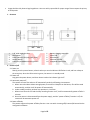
Usage should strictly observe legal regulations. Users are solely responsible for proper usage. Please respect the privacy of third parties. 1. Structure 1 2 3 4 5 140° wide angle glass lens Microphone Status indicator LED (red, green, blue) Shutter button Power-on/off &Mode switching button 6 7 8 9 10 Battery charging status LED Micro USB Reset button Micro SD card slot Integrated tripod socket 2. Power-on/off 2.1 Power-on Shortly press the power button, release it when you see the indicator LED flashes in red, and hear a beep at the same time, when the LED remains in green, the camera is in standby mode. 2.2 Power-off Long press the power button, and then release it when the indicator light is off. 2.3 Automatic power-off The camera will save files and turn off automatically under the following circumstances: a. When user take videos without enough power, there will be 3 beeps from the buzzer, files will be saved automatically, and then it will be power-off automatically. b. Under standby condition, without any operation in 3 minutes. c. When micro SD card is full and the loop recording function is off, it will be automatically power-off after 3 minutes. d. Once the camera is disconnected from the power supply, and the “power-off delay” function is off, the camera will be automatic power-off. 2.4 Power-off delay The camera supports the power-off delay function. User can switch it among off/10 second/30 second via the configuration software. Page 2 of 8