1
CONTENTS
Before use
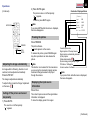
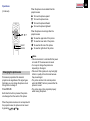
Part names and functions
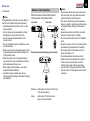
Control panel
1
SELECT/ADJUST
MENU
ENTER
INPUT
LAMP
Main unit
TEMP
2
2
3
4
5
6
7
8
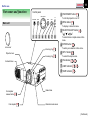
Zooming ring
21
Focusing ring
21
Foot adjuster
release button
INPUT button 21
To select the input source.
6
7
8
Exhaust holes
ENTER button 30
To enter your selection on the menu.
5
Projection lens
SELECT/ADJUST button 28
( / / / )
To select items or adjust values on the
menu.
4
Lens cover
MENU button 27
To display or close the menu.
3
1
ON/STANDBY button 21
To turn the projector on or off.
ON
ON/STANDBY
11
ON indicator 21
40
LAMP indicator 21
40
TEMP indicator 40
Intake holes
20
Foot adjuster
20
Infrared remote sensor
(Continued)