1
54
MAKING CONNECTIONS
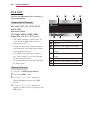
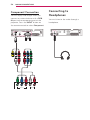
Component Connection
You can enjoy vivid images when you
connect an external device with a RGB
IN port to the component port of the
'&,1
projector. Press the INPUT button on
the remote control to select Component.
5*%,1
Y
PB
VIDEO OUT
PR
(L)
(R)
AUDIO OUT
Connecting to
Headphones
You can listen to the audio through a
headphone.
$9,1 &20321(17,1