1
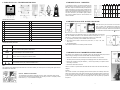
2. TANKALERT ECO OIL – FEATURES AND FUNCTIONS
Tank Capacity (Ltr.) Tank Height (cm)
Tank Width (cm)
Low
High Low
High Low
High
Default
Default
Default
Limit
Limit Limit
Limit Limit
Limit
5. TANKALERT ECO OIL - TANK SETUP
To calculate the volume in your tank the Tankalert Eco Oil
Monitor needs to know the shape of your tank. There are
three basic shapes as illustrated. Identify the shape that is
closest to the shape of your tank. Each Tankalert Eco Oil
Monitor is supplied with the default settings as shown. The
Tankalert Eco Oil Monitor must then be configured to your
own tank’s dimensions (see installation guide). Minimun
and maximum allowable values for tank dimensions are
shown in this table.
300
1000 10,000 50
100
300
N/A
N/A
N/A
300
1000 10,000
Tank
100
Width
300
50
50
Tank
Height
300
1000 10,000 50
50
Tank Tank
100
Width Height
300
Tankalert Eco Oil features
1
LCD Display
11 Error code information
2
MODE key
12 Power / data cable
3
DOWN key
13 Manufacturing information
4
ENTER key
14 Location feature (see STEP 3 of the installation guide)
5
UP key
15 USB connector
6
SETUP key
16 Mains power plug
7
Alarm Red LED
17 Transmitter
8
Wall mount feature
18 Self-tapping screws x 2
9
Beeper aperture
19 Weather seal (Gasket)
10 RESET access (pressing reset erases all historical data)
20 Transmitter oil level display
Tankalert Eco Oil Key Functions
MODE
When in Normal mode press MODE to move between the current and the historical information screens.
6. TANKALERT ECO OIL LEVEL ALARMS / INDICATIONS
When the level in your tank is below 12 cm from the top of the
tank, i.e. bottom of the Tankalert Eco Oil Probe, the main display will show ‘FULL’. This will occur when there are 10 bars
showing on the bar-graph. When the tank level falls to within 14
cm of the bottom of the tank the ‘bowser’
symbol will flash.
When the tank level is such that there is below 10% of the usable volume of oil left in the
tank, the CURRENT information screen alternates between showing the ‘Ltr.’ (or % or
DTE) and ‘Lo’. If the level then drops such that there is below 5% of usable oil left:
• ‘Lo’ is displayed constantly on the CURRENT information screens.
•
The buzzer sounds 5 times an hour at the top of the hour, i.e. 10:00, 11:00, 12:00,
13:00, 14:00…
• The RED light flashes.
This continues until there is an oil delivery and the level rises.
Press UP to move between screens when in NORMAL mode.
Use it to increase a setting when in SETUP mode.
ENTER
The ENTER key is used only in SETUP mode. It is used to save the setting shown on the display and then
move automatically to the next SETUP number.
Press DOWN to move betwenn screens when in NORMAL mode.
Use it to decrease a setting when in SETUP number.
SETUP
+
Press SETUP for 3 seconds to enter SETUP. When in SETUP, press SETUP to exit from SETUP mode.
When in NORMAL mode, by pressing together and releasing, the screen will flash the current tank configuration
for 20 seconds. Press any key to return to NORMAL mode.
7. TANKALERT ECO OIL TRANSMITTER BATTERY CHANGE
If the battery in the Tankalert Eco Oil Transmitter needs to be changed the display will provide advance warning by showing the ‘TANK LOW BATTERY’ text below the bargraph.
− Remove the Tankalert Eco Oil Transmitter from the tank and take it to a safe location.
− The battery can be accessed by removing the 4 self-tapping screws from the base of the unit.
− Remove the old battery noting the orientation (‘+’ mark facing outwards), and replace it with a
new battery, 3V CR2450.
− Re-locate the transmitter on the tank.
LED
The red light above the ENTER key flashes when there is an Alarm condition (see section 6) and on receiving an RF signal from the
Tankalert Eco Oil Transmitter.
There is no need to re-synchronise the transmitter with the monitor when the transmitter battery is
changed.
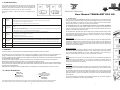
DISPLAY - SYMBOLS & INDICATORS
The Tankalert Eco Oil contains a display that conveys a variety of information during normal
use and during its initial setup and configuration for use with your oil tank. The display contains
three sections (1, 2, & 3) as indicated in the diagram.
Disposal
The crossed out dustbin on the packaging indicates that this product and its battery shall not be
treated as household waste. Proper disposal will help prevent potentially negative consequences
for the environment and human health. For more detailed information about recycling of this
product or battery, please contact your local Recycling centre or the shop where you purchased
the product.
2
7