1
PC Analysis Program Use
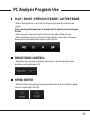
PLAY / PAUSE / PREVIOUS FRAME / LATTER FRAME
- When the play button is pressed, it will replay the video file listed on the
screen.
After selecting a file from the list, double click the file from the list to play
the file.
- When you press the pause button, the viewing video will be paused.
- When the previous frame or the latter frame button is pressed, it will move
backward or forward between frames within the file.
BRIGHTNESS CONTROL
- Brightness bar can give you better video analysis by changing the video
brightness while playing on PC.
SPEED METER
- While the file is being played, the speed meter will show the vehicle’s speed
that was collected by the GPS .
35