1
OPERATION
MAINTENANCE
CAUTION! Do not hold CD/DVD with finger
through the center ring while feeding into
the shredder. Serious injury may occur.
1) Hold the CD/DVD by the edge and feed one at a
Warning: Failure to properly maintain your shredder will void the warranty.
Paper shredders require regular oil lubrication for optimal performance and extended lifespan. We
recommend you oil your shredder once a month. Your basic vegetable or cooking oil (nothing flammable
or petroleum based) can be drizzled onto a few sheets of paper and fed into the shredder.
time, releasing when shredding begins.
2) Shredder will stop when the entire disc has been
destroyed.
DESTROYING CDs and DVDs
CLEANING:
• ALWAYS UNPLUG THE SHREDDER BEFORE CLEANING!
• Only clean the shredder by carefully wiping the unit with a dry soft cloth or towel.
• Do not clean or immerse shredder in water. Having the unit wet may result in damage or malfunction
to the electrical components. If the shredder happens to get wet, be sure to completely dry the unit
immediately with a cloth or towel.
• Never use anything flammable to clean the shredder. This may result in serious injury or damage to
the product.
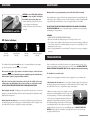
LED Status indicators:
Power On
(green light)
Paper Overload
(red light)
DO NOT SPRAY OR KEEP ANY AEROSOL PRODUCTS IN OR AROUND THE SHREDDER.
DO NOT USE CANNED AIR. Be sure to periodically empty the wastebasket to avoid overloading
and damaging the cutting mechanism.
Overheat
(red light)
Shredder Not Aligned
(red light)
This shredder will shred staples and small paper clips. It is recommended that you remove paper
clips whenever possible to extend the lifespan of your shredder.
Never shred large paper clips, window or insulated envelopes, continuous forms,
newsprint, transparencies, laminated documents, cardboard, any items with adhesives,
hard materials or plastic (except Credit Cards and CDs).
Only shred credit cards by feeding them vertically into the middle of the entry,
releasing when shredding begins. Never feed more than one credit card at a time.
DO NOT ACTIVATE REVERSE FUNCTION WHILE SHREDDING CREDIT CARDS.
Overfeeding the shredder: Shredding beyond the specified sheet capacity can result in extensive
damage to the shredder. Overfeeding will strain the machine and quickly wear and break the cutting
blades and internal components.
Overheating with extended use: In the event that the shredder has shred continuously beyond
the maximum running time and overheating, the unit will automatically shut off. If this happens, switch
the shredder Off for 30 minutes or longer before resuming normal operation.
TROUBLESHOOTING
If there is a problem with your shredder, check below for the symptoms and steps to resolve. If you
continue to have problems, contact customer support at our Service Center. DO NOT ATTEMPT TO
REPAIR BY OPENING THE SHREDDER HEAD. This will completely void the product warranty.
The shredder does not work at all.
a) Make sure the unit is plugged in and that the outlet it is plugged into is in good working order.
b) Overheating with extended use: In the event that the shredder has shred continuously beyond
the maximum running time and overheating, the unit will automatically shut off. If this happens, switch
the shredder Off for 30 minutes or longer before resuming normal operation.
c) Make sure the head unit portion of the shredder is correctly
seated onto the included wastebasket, with all the words and
icons facing towards you. The head unit is particularly designed
to work only with the integrated wastebasket. Shredders are
equipped with a safety interlocking mechanism, which prevents
the shredder from working when the head unit is lifted, removed,
or accidentally knocked over. On the back center edge of the
shredder head, next to the power cord, is a “curved flap-like shape” that MUST FIT OVER THE
OUTSIDE matching ridge of the wastebasket. The shredder will not function unless the head unit
is properly mounted as pictured.
CONTINUED NEXT PAGE