1
This remote control will be used on : BI-50-FLUSHMT-WHTGLS
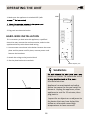
1. For remote to function make sure the heater is plugged-in
and mains power switch located on the bottom right hand
side is at position I.
2. When operating the remote make sure you point the
remote to the centre of the heater unit and make sure
each time you press the button the LED indicator located
on top right hand corner of the remote blinks. The buzzer
inside the unit will beep once; if the LED fails to blink
check the batteries. It takes some time for the receiver
to respond to the transmitter. Do not PRESS the buttons
more than once within two seconds for correct operation
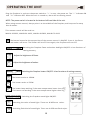
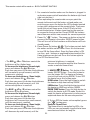
3. Power On “
“ button: The power-on button at top left
corner of the remote is the mains ON/OFF power button.
This will turn off all the functions and the heater will be in
standby mode.
4. Flame Power On button
: This button controls both
the amber and blue colour flame. Press this button once
to turn ON the flame effect. Once the flame effect is ON
use the + and – buttons as explained below to adjust the
flame brightness as desired. Press this button again to
turn OFF the flame effect.
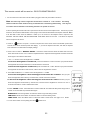
• The Red +5 or -5 buttons control the
brightness of the ] Amber fame.
To increase the brightness / flame height,
press and release the +5 button.
Each time you press this button the brightness
will increase by a small amount, until the
maximum is reached.
To decrease the brightness / flame height,
press and release the -5 button.
Each time you press this button the brightness
will decrease by small amount, until the
minimum brightness is reached.
minimum brightness is reached.
You can mix the amber and the blue flame to
create a realistic flame effect.
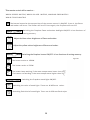
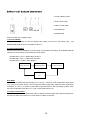
5. heATeR
button: This button is the
heater ON/OFF button. Press this button to
turn the heater ON. The heater will always
start at high heat setting 2000W. To turn OFF
the heater press this button again.
hIGh button: Press the high button to switch
the heater to high heat setting 2000W.
loW button: Press the high button to switch
the heater to LOW heat setting 1000W.
RooM TeMp button: Press the high button to
switch the heater to AUTO mode. Under this
mode the heater will operate in similar way as
explained above for the manual operation.
The blue
+5 or -5 buttons control the
brightness of the Blue fame.
To increase the brightness / flame height,
press and release the +5 button.
Each time you press this button the
brightness will increase by a small amount,
until the maximum is reached.
To decrease the brightness / flame height,
press and release the -5 button.
Each time you press this button the brightness
will decrease by small amount, until the
6. To turn OFF the heater unit completely press
the “
“ button once.
Realistic flame effect:
The flame effect is controlled by LEDs; the
LEDs are non-replaceable type but have been
manufactured to last for long life.
21