1
Wall mounting (optional)
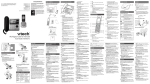
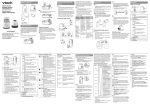
Your telephone comes ready for tabletop use.
To mount your telephone on the wall:
. Position the top hole at the back of the telephone base against the top mounting
stud on the wall plate.
2. Align the holes on the telephone base against the mounting studs on the wall
plate. Then slide the telephone base down until it locks into place.
Mounting studs
Telephone base
Handset overview
VOL /CID
MENU/SELECT
•
•
•
•
•
•
Review the caller
ID log when the
telephone is not in use.
Decrease the listening
volume during a call.
Scroll down while in
a menu.
Move the cursor to
the left when entering
numbers or names.
Show the menu.
Select an item or save
a setting while in a
menu.
VOL /
•
Review the directory
when the telephone is
not in use.
• Increase the listening
volume during a call.
• Scroll up while in a
menu.
• Move the cursor to the
right when entering
numbers or names.
REDIAL/PAUSE
MUTE/DELETE
•
•
•
•
Mute the microphone
during a call.
Delete digits or
characters while using
the dialing keys.
Silence the ringer
temporarily while the
handset is ringing.
Delete the displayed
entry while in the
directory, caller ID log
or redial list.
•
Press repeatedly to
review the redial list.
• Press and hold to
insert a dialing pause
while dialing or
entering numbers.
OFF/CANCEL
•
•
Hang up a call.
Silence the ringer
temporarily while the
handset is ringing.
• Press and hold to
erase the missed call
indicator while the
telephone is not in
use.
• Return to the previous
menu while in a menu.
• Press and hold to
return to idle mode
while in a menu.
• Delete digits while
predialing.
# (pound key)
/FLASH
•
•
Make or answer a call.
Answer another
incoming call during
a call.
1
•
Press repeatedly
to add or remove 1
in front of the caller
ID log entry before
dialing or saving it to
the directory.
Dialing keys
•
Enter numbers
or characters.
• Answer an incoming
call.
TONE
•
•
Switch to tone dialing
temporarily during
a call.
Press repeatedly to
show other dialing
options when
reviewing a caller ID
log entry.