1
Redial
Each handset stores the five most recently dialed numbers. When there are already
five entries, the oldest entry is deleted to make room for the new entry.
To review and dial a number from the redial list:
. Press REDIAL when the handset is not in use.
2. Press , or REDIAL repeatedly until the desired entry displays.
3. Press
to dial.
To delete a redial entry:
When the desired redial entry displays, press DELETE.
Multiple handset use
You can use both handsets at the same time on an outside call (for FS6214-2 only).
To share an outside call:
• When a handset is already on a call and you would like to join the call, press
on the other handset to join the call.
• To end the call, press OFF or place the handset in the telephone base or
charger. The call continues until both handsets hang up.
Chain dialing
Use this feature to initiate a dialing sequence from numbers stored in the directory,
caller ID log or redial list while you are on a call. Chain dialing can be useful if you
wish to access other numbers (such as bank account numbers or access codes)
from the directory, caller ID log or redial list.
To access a number in the directory, caller ID log or redial list while on a call:
. To enter the directory, press MENU twice.
-ORTo enter the caller ID log, press MENU then scroll to Caller ID log then
press SELECT.
-ORTo enter the redial list, press REDIAL.
2. Scroll to the desired entry.
3. Press SELECT to dial the displayed number.
Find handset
Use this feature to find all system handsets.
To start paging:
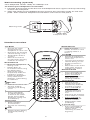
• Press /FIND HANDSET on the telephone base. All idle handsets ring and
display ** Paging **.
To end paging:
• Press /FIND HANDSET on the telephone base.
-OR• Press , OFF, MUTE or any dialing key on a handset.
Directory
Each handset can store up to 30 directory entries.
To add a directory entry:
. Enter the number (up to 30 digits) when the handset is not in use and then
press SELECT. Then go to Step 3.
2.
3.
4.
5.
-ORWhen the handset is not in use, press MENU then scroll to Directory and then press MENU twice.
Use the dialing keys to enter the number (up to 30 digits).
-ORCopy a number from the redial list by pressing REDIAL and then press , or
REDIAL repeatedly to select a number. Press SELECT to copy the number.
Press SELECT to move to the name.
Use the dialing keys to enter the name (up to 15 characters). Additional key
presses show other characters of that particular key.
Press SELECT to store the entry.
While entering names and numbers, you can:
• Press DELETE to backspace and erase a digit or character.
• Press and hold DELETE to erase the entire entry.
• Press or to move the cursor to the left or right.
• Press and hold PAUSE to insert a dialing pause (for entering numbers only).
• Press 0 to add a space (for entering names only).