1
Configuration and web interface
7.4
GOOSE
7.4.1
Default and custom GOOSE configuration
Default configuration
In the default configuration, the number of used GOOSE messages and the GOOSE dataset is
predefined.
The ISIO 200 subscribes to exactly one GOOSE message and publishes exactly one GOOSE
message.
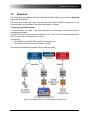
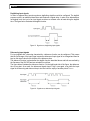
The dataset contains eight Boolean attributes (one for each binary input or output). Each of these
Boolean attributes is accompanied by its quality attribute (of type BitString[13]).
The following figure illustrates how such a dataset would be represented in the GOOSE Configuration
module of the OMICRON Test Universe software.
Figure 8:
Dataset layout for the default GOOSE configuration with typical object references
This applies for the subscribed and the published GOOSE as well. This default configuration is the
precondition for the operation of matched pairs (see section 7.4.2 on page 20) and for the availability
of the download functions for the current configuration.
Custom configuration
When a custom configuration is selected, a configuration file needs to be uploaded to the ISIO 200.
The corresponding controls are displayed as soon as the custom configuration is selected.
A custom GOOSE configuration needs to be set up with external tools. For the details of this custom
configuration process, see the sections 7.7 on page 21 and 7.8 on page 23.
The Subscription, Publishing, and Download page are not accessible any more when a custom
configuration is applied.
19