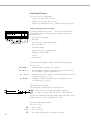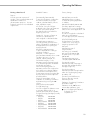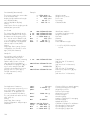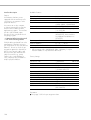
1
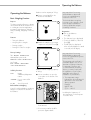
Operating the Balance
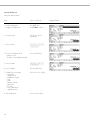
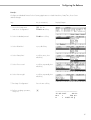
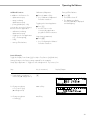
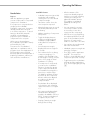
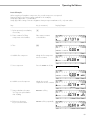
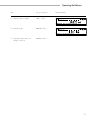
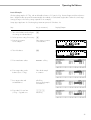
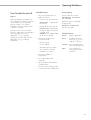
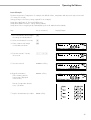
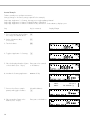
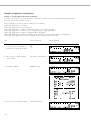
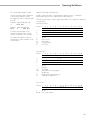
Example W2
Enter “ABC123” as sample ID
Note:
– The sample ID generally applies to one weighing operation only
– The ID is deleted after data output
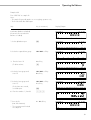
Step
Key (or instruction)
Initial status (balance unloaded)
(ID can also be entered while
balance is loaded)
Display/Output
d= 0.01g
100% A
Max4200 g
0%
F
S
000 g
aH
L
sS
T
Cal
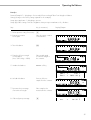
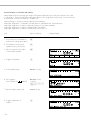
1. Select alphabetic input
a
d= 0.01g
100% A
Max4200 g
0%
OOO
F
S
H
aL
sS
T
ABCDEFGHIJKLMNOPQRSTUVWXYZ/=-?:#*"&U
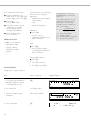
2. Select the required letter group
ABCDEF soft key
d= 0.01g
100% A
Max4200 g
0%
aH
L
sS
F
S
OOO
T
A
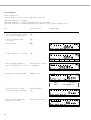
3. Enter the letter “A”
(To delete a letter:
A soft key
c)
B
Max4200 g
0%
C
D
E
F
d= 0.01g
100% A
A
F
S
H
aL
sS
T
ABCDEFGHIJKLMNOPQRSTUVWXYZ/=-?:#*"&U
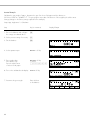
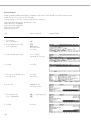
4. Select the letter group and
enter “B”
ABCDEF soft key
B soft key
Max4200 g
0%
d= 0.01g
100% A
aH
L
sS
F
S
AB
T
ABCDEFGHIJKLMNOPQRSTUVWXYZ/=-?:#*"&U
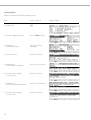
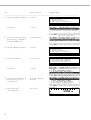
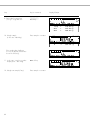
5. Select the letter group and
enter “C”
(If only letters are entered,
conclude input:
ABCDEF soft key
C soft key
F
S
d= 0.01g
100% A
ABC
H
aL
sS
T
a)
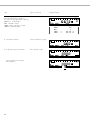
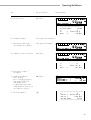
6. Enter the numbers 1, 2 and 3
123
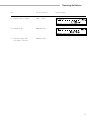
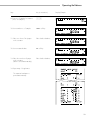
7. Store the ID
(max. 20 characters)
S ID soft key
– The next printout will include
the sample ID
Max4200 g
0%
ABCDEFGHIJKLMNOPQRSTUVWXYZ/=-?:#*"&U
Max4200 g
0%
F
S
d= 0.01g
100% A
000 g
aH
L
sS
T
Cal
39