1
Chapter 2
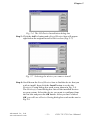
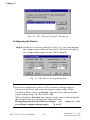
Fig. 2-13 Analog Output tab on the Device Test dialog box
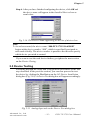
Testing Digital Input Function
Click the Digital Input tab to show forth the Digital Input test panel
as seen below. Through the color of the lamps, users can easily discern
whether the status of each digital input channel is either high or low.
Fig. 2-14 Digital Input tab on the Device Test dialog box
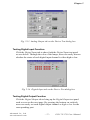
Testing Digital Output Function
Click the Digital Output tab to bring up the Digital Output test panel
such as seen on the next page. By pressing the buttons on each tab,
users can easily set each digital output channel as high or low for the
corresponding port.
Advantech Co., Ltd.
www.advantech.com
– 17 –
PCI-1711/1731 User’s Manual