1
User Manual for Multi Media Mini Projector
power adpators with different specifications.
Trouble Shooting
This part is to introduce some solutions to common
problems, if any malfunction occurs, please check
the following first.If it still can not be obviated,
please contact the dealer or authorized service
center in time, do not dissamble or attempt to repair
it by yourself .
The following are some common problems and
solutions for reference:
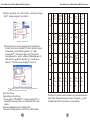
1 Projector can not power on
The battery has run out. Please recharge it with
correct DC adpator before operate.
Fails to press POWER button.The power
button is a precision component, press it carefully.
2Image blurring
Focus is not well adjusted. Adjust the gear of the
lens to a proper position.
The light source of the projector is too close or too
far from the projection plane. The best distance is
between 200MM-2000MM
3No sound
Volume is setted MUTE or volume is setted
too low.
4 Remote control has no function
Check if the insulation sheet in the remote control
is taken off, or the battery in the remote control
has run out, replace with new button cell batteries
to try
5 Fails to connect with PC
Poor contact or the USB cable is with quality
problems. Make sure the connection with USB
cable is perfect and USB cable itself is of good
quality.
17
User Manual for Multi Media Mini Projector
8
Use this unit for its intended use as described in
this user manual
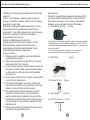
Maintenance and precaution
1.Please clean the unit with a soft dry chiffon.
2.Do not touch the light engine lens directly with
hands or sharp items, do not spray any cleanser
directly on the light engine lens.
3.Do not place any objects on the unit or press it
hard.
4.Never block the air outlet of the unit with materials
such as cloth while the unit is working.(air outlet
as shown in Figure )
Features Overview
Support photo format: JPG BMP
Support video format: AVI MOV MP4
Support music format: MP3 WMA
Support text format:TXT
Support calendar/ clock display
Support USB, projection synchronizes with PC
screen
Support basic setup
Support OTG, data transmission from PC through
USB
Support remote control
Product Specifications
Product dimension:130*55*22 MM;
Resolution:640*RGB*480;
Brightness: 12 cd/m2 (projection distance: 1000
MM);
Contrast:80:1;
Display technology:LCoS(Liquid Crystal on Silicon)
Backlight type: LED;
Min projection distance: 210MM(5.6 inches)
Max projection distance: 2500MM(72 inches)
2