1
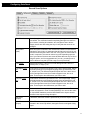
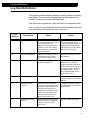
Log Item Definitions
Error
Number
Description
Detail
Action
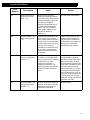
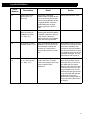
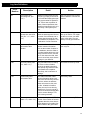
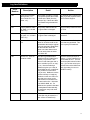
58
Bad Table Number (got
<1>, expected <2>)
Each table has a list of records.
This record was found in the list
for a certain table, but when it
was read, it claimed to be from
another table. Not good.
Recovering by TAGS might
confuse 4D, if this record really
is for the file in question, and
simply has a bad table number
in it. If there’s only one of these,
then you should probably delete
the record and re-enter it. If
there is a rash of these, then
you probably have some general damage that Recover by
TAGS would clean up.
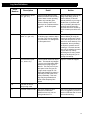
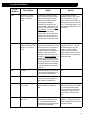
59
Record begins beyond
EOF (record: <1>, offset: <2>)
The record is off the end of the
file. 4D has been known to crash
trying to read these types of
records.
Try deleting the record. If that
fails, you’re only hope of ridding
yourself of this record is via
Recover by TAGS.
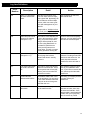
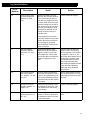
60
Cannot read record
data (record: <1>, offset: <2>)
The record could not be read
from disk. Check previous item
to discern why.
You will most likly have to
delete this record. If deleting
doesn’t work, then you’re going
to have to recover by TAGS.
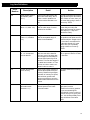
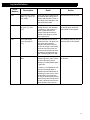
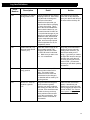
61
Record extends
beyond EOF (record:
<1>, rec end: <2>)
The record goes beyond the end
of the file. Either the file has
been truncated or the record is
damaged and claims to be too
long.
If the record appears to be
damaged, then delete it. If the
file is truncated, go to backup.
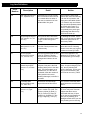
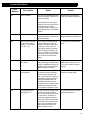
62
Record field headers
extend beyond EOF
(record: <1>, nFields:
<2>)
Each record is broken into several parts. One part is the field
headers (which point to the data
itself). The field headers are of
constant size, so if this item is
generated, either the number of
fields (stored in the record
header) is damaged, or the file is
truncated.
If the nFields looks wrong (you
know, a bogus looking big number), then try deleting this
record. Otherwise, you’ve probably got a truncated file, and
you need to recover by TAGS.
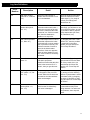
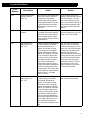
63
Field data starts
beyond EOR (record:
<1>, field: <2>)
The data for the fields begin
beyond the end of this record.
This record is most likely damaged. Delete the record and reenter it.
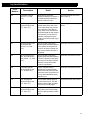
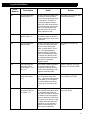
64
Invalid field type
(record: <1>, type:
<2>)
DataCheck recognizes all field
types in version 3.5 of 4D. The
types are: Alpha (0), Real (1),
Text (2), Picture (3), Date (4),
Boolean (6), Subtable (7), Integer (8), Longint (9), Time (11).
If you’ve got a recent version of
4D, then verify with Technical
Support that there are no
issues with this item. If there
are no issues with DataCheck,
then you’ve probably got a
damaged record which you can
fix by deleting and re-entering.
62