1
BEATBOXER MASTER ENSEMBLE ALL
SOUNDIRON
The
Beat
Boxer
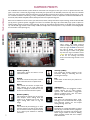
This master ensemble preset features all of the primary multi-sampled single-stroke 12x round-robin drum and sfx
articulations for each instrument. Each articulation is mapped as a single trigger key, starting at C-1 (midi note 12) and going
up to to G6 (103), when using our default mapping. This preset includes a huge number of samples and can use a lot of
voices, depending on how many mic positions are loaded, so we recommend it only for situations where you have plenty of
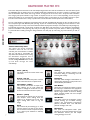
ram and CPU resources to spare. The main control interface has a variety of performance controls that allow real-time
performance customization.
You can create adaptive arpeggiations and simulated drum rolls with the ARP panel (See Page 14). You can load and mix the
two microphone types with the MIX panel. (See Page 13). You can customize the key mapping for each articulation or load
mapping presets from a variety of common standards and load and play back midi loops on the Midi/Mapping tab (See Page
6). The FX Rack page includes a wide variety of effects, from EQs, filters and compressors to amp simulation, chorus/flange/
phase and convolution reverb (See Page 16). And you can assign any midi CC to any knob, button or slider by right-clicking
it (command-click on OSX), pressing the “Assign Midi CC” box that pops up and moving any midi controller you wish to
assign.
Swell - (CC 72)
This knob controls the volume swell of the
instrument.
Velocity
This controls the dynamic response of the
intruments, adding or subtracting from the
incoming midi velocity.
Attack - (CC 74)
This knob controls the sharpness of attack.
Lower values have more of a pluck sound.
Humanize
This adds subtle intelligent randomization to
velocity, pitch and timing, to help create more
natural, life-like performances.
Start Offset - (CC91)
This controls the amount of sample start
offset allowing you to jump ahead into
samples to change the sound. This can also
be used to control the amount of “pluck.”
Solo Button
Turning this on controls the number of voices
that can play to simulate the basic polyphonic
limitations of a real human voice. Turning it off
allows a larger number of voices for stacking
effects, ensemble sounds and more complex
beat construction.
Release - (CC93)
This controls the release time of the main
note samples.* Lower settings cause the
sound to be damped and cut off, while
higher settings allow notes to ring out
longer.
ARP Button
This button opens the arpeggiation control
window, allowing you to create evolving,
dynamic and customizable arpeggiation
patterns, simulated drum rolls and other
patterns. See Page 14 for info.
Pitch
This controls the pitch shifting up or down
from the natural root pitch of each sample.
You can use this knob to transpose the pitch
up or down by 24 semitones in half-step
increments.
5
Mix Button
This opens the Microphone Mixer panel,
allowing you to load and unload each mic type
and customize volume, pan and output
routing. See Page 13 for info.