1
BEATBOXER MASTER ENSEMBLE ALL (continued...)
SOUNDIRON
The
Beat
Boxer
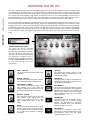
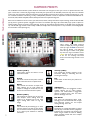
This preset includes a custom key mapping interface that allows you to assign any of the available instrument articulations to any midi
key. You can save and load your own custom maps, or chose from a number of different industry standard mapping templates through
the Preset drop-down menu. You can also load, playback and manipulate a variety of Midi drum loops included with this library in the
Midi Loop Select interface. Click on the Midi/Mapping tab at the bottom of the instrument to open this interface page.
Midi Loop Select Menu
This menu allows you to load and play back a variety of
standard midi drum loops in this library. Use the file browser
to select a .mid file and double-click to load it. Be sure to
copy the “Soundiron Beatboxer Midi” folder into the
Kontakt 5 user data folder stored on your main OS drive
here:
/Users/< name >/Documents/Native Instruments/Kontakt 5/
See Page 13 for more info on installing the midi pack.
Play Button
Press the Play button to start midi playback. You must first
load a midi loop by double-clicking on any file. You can skip
to another midi loop by double clicking on another midi file
or by using the left and right arrow buttons.
Drag & Drop Icon
After loading a Midi loop, click the Plus Sign at the top and
drag it into any program that allows midi clip pasting, such as
a midi track or midi editor in your DAW.
You can also use this menu to load any custom presets that
you have created and saved with the Save button to the
right. You can store 25 user-generated custom drum maps
here. The Delete button erases any currently selected usergenerated drum map. The default maps cannot be deleted.
Key Edit Box
First, type the midi key you’d like to assign an Articulation
to.You can type in a midi note name or number.
Quantize
You can quantize or loosen the notes with this knob, using 6
different grid divisions available in the Grid Size menu.
Select By Midi
Or you can turn on the Select By Midi button and play any
midi note to choose that key for assignment.
Swing
Add swing to the rhythm with this control. This can create
very cool results when used with Quantize and Grid Size.
Instrument Menu
Next, select the Instrument you’d like to assign to the key.
This menu always displays the currently assigned instrument
for that chosen midi key.
Velocity
This attenuates the note velocity for the loop to globally
shift everything up or down in dynamic intensity.
6
Preset Menu
This allows you to load common drum map templates used
by a number of popular drum kit libraries. Apocalypse
Percussion Ensemble is unique and intended for a different
purpose than any typical rock drum library. It has a different
array of sounds that would make a direct 1:1 mapping ratio
for every drum articulation virtually impossible. However,
there are plenty of analogous sounds that can work very
well with other drum libraries. The flexible control options
and variety of sounds we offer make this library a very
powerful tool to integrate with your existing creative
workflow.
Tempo
You can choose half-time, normal and double-time playback.
Articulation Menu
Then, select the specific Articulation you’d like to assign to
the key. This menu always displays the currently assigned
articulation for the chosen midi key.