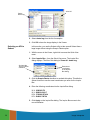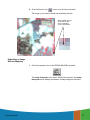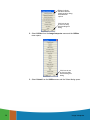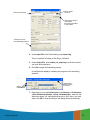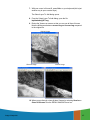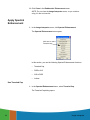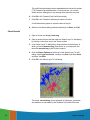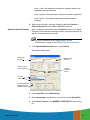
1
ERDAS IMAGINE®
Advantage
Tour Guides
November 2009
Copyright © 2009 ERDAS, Inc.
All rights reserved.
Printed in the United States of America.
The information contained in this document is the exclusive property of ERDAS, Inc. This work is protected under
United States copyright law and other international copyright treaties and conventions. No part of this work may be
reproduced or transmitted in any form or by any means, electronic or mechanical, including photocopying and
recording, or by any information storage or retrieval system, except as expressly permitted in writing by ERDAS, Inc.
All requests should be sent to the attention of:
Manager, Technical Documentation
ERDAS, Inc.
5051 Peachtree Corners Circle
Suite 100
Norcross, GA 30092-2500 USA.
The information contained in this document is subject to change without notice.
Government Reserved Rights. MrSID technology incorporated in the Software was developed in part through a
project at the Los Alamos National Laboratory, funded by the U.S. Government, managed under contract by the
University of California (University), and is under exclusive commercial license to LizardTech, Inc. It is used under
license from LizardTech. MrSID is protected by U.S. Patent No. 5,710,835. Foreign patents pending. The U.S.
Government and the University have reserved rights in MrSID technology, including without limitation: (a) The U.S.
Government has a non-exclusive, nontransferable, irrevocable, paid-up license to practice or have practiced
throughout the world, for or on behalf of the United States, inventions covered by U.S. Patent No. 5,710,835 and has
other rights under 35 U.S.C. § 200-212 and applicable implementing regulations; (b) If LizardTech's rights in the
MrSID Technology terminate during the term of this Agreement, you may continue to use the Software. Any provisions
of this license which could reasonably be deemed to do so would then protect the University and/or the U.S.
Government; and (c) The University has no obligation to furnish any know-how, technical assistance, or technical data
to users of MrSID software and makes no warranty or representation as to the validity of U.S. Patent 5,710,835 nor
that the MrSID Software will not infringe any patent or other proprietary right. For further information about these
provisions, contact LizardTech, 1008 Western Ave., Suite 200, Seattle, WA 98104.
ERDAS, ERDAS IMAGINE, IMAGINE OrthoBASE, Stereo Analyst and IMAGINE VirtualGIS are registered trademarks;
IMAGINE OrthoBASE Pro is a trademark of ERDAS, Inc.
SOCET SET is a registered trademark of BAE Systems Mission Solutions.
Other companies and products mentioned herein are trademarks or registered trademarks of their respective owners.
iii
iv
Table of Contents
Table of Contents . . . . . . . . . . . . . . . . . . . . . . . . . . . . . . . v
List of Tables . . . . . . . . . . . . . . . . . . . . . . . . . . . . . . . . . . ix
Preface . . . . . . . . . . . . . . . . . . . . . . . . . . . . . . . . . . . . . . xi
About This Manual . . . . . . . . . . . . . . . . . . . . . . . . . . . xi
Example Data . . . . . . . . . . . . . . . . . . . . . . . . . . . . . . xi
Time Required . . . . . . . . . . . . . . . . . . . . . . . . . . . . . . xi
Documentation . . . . . . . . . . . . . . . . . . . . . . . . . . . . . xi
Conventions Used in This Book . . . . . . . . . . . . . . . . . xii
Getting Started . . . . . . . . . . .
ERDAS IMAGINE Icon Panel . . .
ERDAS IMAGINE Menu Bar . . . .
Dialogs . . . . . . . . . . . . . . . . .
.
.
.
.
. . . . . . .
........
........
........
.
.
.
.
. . . . . . .
........
........
........
.
.
.
.
xiii
. xiii
. xiii
. xxi
More Information/Help . . . . . . . . . . . . . . . . . . . . . . xxi
Fourier Transform Editor . . . . . . . . . . . . . . . . . . . . . . . . . . 1
Introduction . . . . . . . . . . . . . . . . . . . . . . . . . . . . . . . . 1
Create an .fft Layer . . . . . . . . . . . . . . . . . . . . . . . . . . . 1
Display Source File . . . . . . . . . . . . . . . . . . . . . . . . . . . . . . 1
Create FFT Output File . . . . . . . . . . . . . . . . . . . . . . . . . . . . 3
Start the Fourier Transform Editor . . . . . . . . . . . . . . . 4
Edit Using Menu Options . . . . . . . . . . . .
Use Low-Pass Filtering . . . . . . . . . . . . . . . .
Select a Different Filter . . . . . . . . . . . . . . .
Save the File . . . . . . . . . . . . . . . . . . . . . .
Apply an Inverse Fourier Transformation . . .
Apply Other Filters . . . . . . . . . . . . . . . . . .
Use a Circular Mask . . . . . . . . . . . . . . . . .
Use a Rectangular Mask . . . . . . . . . . . . . .
Use a Wedge Mask . . . . . . . . . . . . . . . . . .
.
.
.
.
.
.
.
.
.
. . . . . . .
........
........
........
........
........
........
........
........
.
.
.
.
.
.
.
.
.
. .7
.. 7
.. 8
.. 9
.. 9
. 11
. 14
. 16
. 17
Edit Using Mouse-Driven Tools
Use Low-Pass Filtering . . . . . . . .
Use High-Pass Filtering . . . . . . .
Apply a Wedge Mask . . . . . . . . .
Combine Edits . . . . . . . . . . . . .
.
.
.
.
.
. . . . . . .
........
........
........
........
.
.
.
.
.
. 19
. 20
. 20
. 22
. 23
. . . . . . .
........
........
........
........
Image Interpreter . . . . . . . . . . . . . . . . . . . . . . . . . . . . . . 25
Introduction . . . . . . . . . . . . . . . . . . . . . . . . . . . . . . . 25
Subsetting an Image . . . . . . . . . . . . . . .
Selecting an AOI to Subset . . . . . . . . . . . .
Subsetting an Image Without Snapping . . . .
Displaying the Subset with the Original Data
Subsetting an Image With Snap to Raster . .
Viewing the Snapped Subset . . . . . . . . . . .
Table of Contents
Table of Contents
.
.
.
.
.
.
. . . . . . .
........
........
........
........
........
.
.
.
.
.
.
. 25
. 26
. 27
. 30
. 31
. 32
v
v
Apply Spatial Enhancement .
Apply Convolution . . . . . . . . .
Select Input/Output Files . . . .
Select Kernel . . . . . . . . . . . .
Check the File . . . . . . . . . . .
Apply Crisp . . . . . . . . . . . . .
Use the View Option . . . . . . .
View Results . . . . . . . . . . . .
.
.
.
.
.
.
.
.
.
.
.
.
.
.
.
.
. . . . . . .
........
........
........
........
........
........
........
.
.
.
.
.
.
.
.
. . . . . . .
........
........
........
........
........
........
........
.
.
.
.
.
.
.
.
. 33
. 34
. 35
. 35
. 36
. 37
. 38
. 40
Apply Radiometric Enhancement . . . . . .
Apply Brightness Inversion . . . . . . . . . . . .
Reverse . . . . . . . . . . . . . . . . . . . . . . . . . .
View Changes . . . . . . . . . . . . . . . . . . . . .
.
.
.
.
. . . . . . .
........
........
........
.
.
.
.
. 40
. 41
. 42
. 42
Apply Spectral Enhancement .
Use Tasseled Cap . . . . . . . . . .
Check Results . . . . . . . . . . . .
Use the Indices Function . . . . .
Choose RGB to IHS . . . . . . . . .
Choose IHS to RGB . . . . . . . . .
View the Results . . . . . . . . . . .
.
.
.
.
.
.
.
. . . . . . .
........
........
........
........
........
........
.
.
.
.
.
.
.
. 44
. 44
. 46
. 47
. 48
. 49
. 50
.
.
.
.
.
.
.
. . . . . . .
........
........
........
........
........
........
Wavelet Resolution Merge . . . . . . . . . . . . . . . . . . . . . 52
Orthorectification . . . . . . . . . . . . . . . . . . . . . . . . . . . . . . 57
Introduction . . . . . . . . . . . . . . . . . . . . . . . . . . . . . . . 57
Rectify a Camera Image . . . . . . . . . . . .
Perform Image to Image Rectification . . . . .
Prepare . . . . . . . . . . . . . . . . . . . . . . . . . .
Review Image Information . . . . . . . . . . . . .
Check for Map Model . . . . . . . . . . . . . . . . .
Redisplay the file . . . . . . . . . . . . . . . . . . .
Perform Geometric Correction . . . . . . . . . .
Set Camera Model Properties . . . . . . . . . . .
Edit Fiducials . . . . . . . . . . . . . . . . . . . . . .
Enter Film Coordinates . . . . . . . . . . . . . . .
Change Projection . . . . . . . . . . . . . . . . . . .
Name the Geometric Model . . . . . . . . . . . .
Start the GCP Tool and compute RMS Error .
Choose Your Path . . . . . . . . . . . . . . . . . . .
Resample the Image . . . . . . . . . . . . . . . . .
Calibrate the Image . . . . . . . . . . . . . . . . .
.
.
.
.
.
.
.
.
.
.
.
.
.
.
.
.
. . . . . . .
........
........
........
........
........
........
........
........
........
........
........
........
........
........
........
.
.
.
.
.
.
.
.
.
.
.
.
.
.
.
.
. 57
. 57
. 58
. 60
. 60
. 61
. 61
. 62
. 63
. 66
. 68
. 70
. 70
. 72
. 73
. 74
Terrain Surface Interpolation . . . . . . . . . . . . . . . . . . . . . . 77
Introduction . . . . . . . . . . . . . . . . . . . . . . . . . . . . . . . 77
Create a Surface . . . . . . . . .
Import an ASCII File . . . . . . .
Perform Surfacing . . . . . . . . .
Display the Surface . . . . . . . .
.
.
.
.
.
.
.
.
. . . . . . .
........
........
........
.
.
.
.
. . . . . . .
........
........
........
.
.
.
.
. 77
. 78
. 81
. 82
MosaicPro . . . . . . . . . . . . . . . . . . . . . . . . . . . . . . . . . . . 85
Introduction . . . . . . . . . . . . . . . . . . . . . . . . . . . . . . . 85
vi
Table of Contents
Mosaic Using Laguna Beach Images . . . . . . . . . . . . . . 85
Starting MosaicPro . . . . . . . . . . . . . . . . . . . . . . . . . . . . . 85
Adding and Displaying Images in MosaicPro . . . . . . . . . . . . 87
Drawing and Editing Seam
Correcting Color . . . . . . . .
Image Dodging . . . . . . . . .
Previewing the Mosaic . . . .
Setting Seamline Functions
Defining the Output Images
Running the Mosaic . . . . . .
Displaying the Mosaic . . . .
Polygons . . .
............
............
............
............
............
............
............
.
.
.
.
.
.
.
.
. . . . . . .
........
........
........
........
........
........
........
.
.
.
.
.
.
.
.
. 90
. 91
. 93
. 95
. 96
. 96
. 97
. 97
Viewshed Analysis . . . . . . . . . . . . . . . . . . . . . . . . . . . . . 99
Introduction . . . . . . . . . . . . . . . . . . . . . . . . . . . . . . . 99
Create a Viewshed . . . . . . . . . . . . . . . . . . . . . . . .
Add the Raster Image . . . . . . . . . . . . . . . . . . . . . . . . .
Start Image Drape Viewer and Set Level of Detail . . . . .
Start the Viewshed Analysis Tool . . . . . . . . . . . . . . . . .
Add First Observer . . . . . . . . . . . . . . . . . . . . . . . . . . .
Add Another Observer . . . . . . . . . . . . . . . . . . . . . . . . .
Link the Viewers and Set Eye and Target Positions . . . . .
Save the Viewshed . . . . . . . . . . . . . . . . . . . . . . . . . . .
Query Viewshed Data . . . . . . . . . . . . . . . . . . . . . . . . .
Add Area Column to the CellArray . . . . . . . . . . . . . . . . .
Query the Viewshed Layer . . . . . . . . . . . . . . . . . . . . . .
Finish . . . . . . . . . . . . . . . . . . . . . . . . . . . . . . . . . . . .
.
.
.
.
.
.
.
.
.
.
.
.
. 99
100
100
101
103
104
106
108
108
110
111
111
Index . . . . . . . . . . . . . . . . . . . . . . . . . . . . . . . . . . . . . 113
Table of Contents
vii
viii
Table of Contents
List of Tables
Table
Table
Table
Table
Table
Table
1:
2:
3:
4:
5:
6:
Session Menu Options . . . . . .
Main Menu Options . . . . . . .
Tools Menu Options . . . . . . .
Utility Menu Options . . . . . .
Help Menu Options . . . . . . .
Film X and Film Y Coordinates
List of Tables
List of Tables
.
.
.
.
.
.
.
.
.
.
.
.
.
.
.
.
.
.
.
.
.
.
.
.
.
.
.
.
.
.
.
.
.
.
.
.
.
.
.
.
.
.
.
.
.
.
.
.
.
.
.
.
.
.
.
.
.
.
.
.
.
.
.
.
.
.
.
.
.
.
.
.
.
.
.
.
.
.
.
.
.
.
.
.
.
.
.
.
.
.
.
.
.
.
.
.
.
.
.
.
.
.
.
.
.
.
.
.
.
.
.
.
.
.
.
.
.
.
.
.
.
.
.
.
.
.
.
.
.
.
.
.
.
.
.
.
.
.
.
.
.
.
.
.
.
.
.
.
.
.
.
.
.
.
.
.
. xiv
. xvi
xvii
. xix
. xx
. 66
ix
ix
x
List of Tables
Preface
About This Manual
The ERDAS IMAGINE Advantage Tour Guide manual is a compilation
of tutorials designed to help you learn how to use ERDAS IMAGINE®
software. This is a comprehensive manual, representing ERDAS
IMAGINE and its add-on modules. Each guide takes you step-by-step
through an entire process. The tour guides are not intended to tell you
everything there is to know about any one topic, but to show you how to
use some of the basic tools you need to get started.
This manual serves as a handy reference that you can refer to while
using ERDAS IMAGINE for your own projects. Included is a
comprehensive index, so that you can reference particular information
later.
There are two other ERDAS IMAGINE Tour Guides™ manuals. They
are based on the way ERDAS IMAGINE is packaged. These manuals
take you through IMAGINE in a step-by-step fashion to learn detailed
information about the various ERDAS IMAGINE functions. The other
ERDAS IMAGINE Tour Guides manuals are:
•
IMAGINE Essentials®
•
IMAGINE Professional®
Example Data
Sample data sets are provided with the software. This data is
separately installed from the data DVD. For the purposes of
documentation, <ERDAS_Data_Home> represents the name of the
directory where sample data is installed. The Tour Guides refer to
specific data which are stored in <ERDAS_Data_Home>/examples.
Time Required
Each individual tour guide takes a different amount of time to complete,
depending upon the options you choose and the length of the tour
guide. The approximate completion time is stated in the introduction to
each tour guide.
Documentation
This manual is part of a suite of on-line documentation that you receive
with ERDAS IMAGINE software. There are two basic types of
documents, digital hardcopy documents which are delivered as PDF
files suitable for printing or on-line viewing, and On-Line Help
Documentation, delivered as HTML files.
Preface
Preface
xi
xi
The PDF documents are found in <IMAGINE_HOME>\help\hardcopy.
Many of these documents are available from the ERDAS Start menu.
The on-line help system is accessed by clicking on the Help button in a
dialog or by selecting an item from a Help menu.
Conventions Used
in This Book
In ERDAS IMAGINE, the names of menus, menu options, buttons, and
other components of the interface are shown in bold type. For example:
“In the Select Layer To Add dialog, select the Fit to Frame option.”
When asked to use the mouse, you are directed to click, Shift-click,
middle-click, right-click, hold, drag, etc.
•
click—designates clicking with the left mouse button.
•
Shift-click—designates holding the Shift key down on your
keyboard and simultaneously clicking with the left mouse button.
•
middle-click—designates clicking with the middle mouse button.
•
right-click—designates clicking with the right mouse button.
•
hold—designates holding down the left (or right, as noted) mouse
button.
•
drag—designates dragging the mouse while holding down the left
mouse button.
The following paragraphs are used throughout the ERDAS IMAGINE
documentation:
These paragraphs contain strong warnings.
These paragraphs provide software-specific information.
These paragraphs contain important tips.
These paragraphs lead you to other areas of this book or other
ERDAS® manuals for additional information.
NOTE: Notes give additional instruction.
xii
Preface
Shaded Boxes
Shaded boxes contain supplemental information that is not required
to execute the steps of a tour guide, but is noteworthy. Generally, this
is technical information
Getting Started
To start ERDAS IMAGINE, in Microsoft Windows navigate to ERDAS
IMAGINE [version] from the Start menu, or type the following in a
UNIX command window: imagine.
ERDAS IMAGINE begins running; the icon panel automatically opens.
ERDAS IMAGINE Icon
Panel
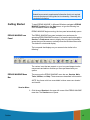
The ERDAS IMAGINE icon panel contains icons and menus for
accessing ERDAS IMAGINE functions. You have the option through the
Session -> Preferences menu to display the icon panel horizontally
across the top of the screen or vertically down the left side of the screen.
The default is a horizontal display.
The icon panel that displays on your screen looks similar to the
following:
The various icons that are present on your icon panel depend on the
components and add-on modules you have purchased with your
system.
ERDAS IMAGINE Menu
Bar
The menus on the ERDAS IMAGINE menu bar are: Session, Main,
Tools, Utilities, and Help. These menus are described in this section.
NOTE: Any items which are unavailable in these menus are shaded
and inactive.
Session Menu
1. Click the word Session in the upper left corner of the ERDAS IMAGINE
menu bar. The Session menu opens:
Preface
xiii
These menus are
identical to the ones
on the icon panel
Click here to end
the ERDAS IMAGINE
session
You can also place the
cursor anywhere in the
icon panel and press
Ctrl+Q to exit ERDAS
IMAGINE
The following table contains the Session menu selections and their
functionalities:
Table 1: Session Menu Options
Selection
xiv
Functionality
Preferences
Set individual or global default options for
many ERDAS IMAGINE functions
(Viewer, Map Composer, Spatial Modeler,
etc.).
Configuration
Configure peripheral devices for ERDAS
IMAGINE.
Session Log
View a real-time record of ERDAS
IMAGINE messages and commands.
Active Process List
View and cancel currently active
processes running in ERDAS IMAGINE.
Commands
Open the Session Command History
dialog, in which you can enter EML
commands to test during script
development, or view EML command
history.
Enter Log Message
Enter text to insert into the Session Log.
Start Recording Batch
Commands
Open the Batch Wizard. Collect
commands as they are generated by
clicking the Batch button that is
available on many ERDAS IMAGINE
dialogs.
Open Batch Command File
Open a Batch Command File (*.bcf) you
have saved previously.
Preface
Table 1: Session Menu Options (Continued)
Selection
Functionality
View Offline Batch Queue
Open the Scheduled Batch Job List
dialog, which lets you view, edit, or delete
pending batch jobs.
Flip Icons
Select horizontal or vertical icon panel
display.
Tile Viewers
Rearrange two or more Viewers on the
screen so that they do not overlap.
Close All Viewers
Close all Viewers that are currently open.
Main
Access a menu of tools that corresponds
to the icons along the ERDAS IMAGINE
icon bar.
Tools
Access a menu of tools that allow you to
view and edit various text and image
files.
Utilities
Access a menu of utility items that allow
you to perform general tasks in ERDAS
IMAGINE.
Help
Access the ERDAS IMAGINE On-Line
Help.
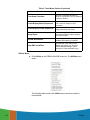
Properties
Open the IMAGINE Properties dialog
where system information, environment
variables and licensing information is
available.
Generate System Information
Report
Generate a report of essential IMAGINE
operating system parameters for printing.
Exit IMAGINE
Exit the ERDAS IMAGINE session
(keyboard shortcut: Ctrl+Q).
Main Menu
2. Click the word Main in the ERDAS IMAGINE menu bar. The Main menu
opens
Preface
xv
The following table contains the Main menu selections and their
functionalities:
.
Table 2: Main Menu Options
Selection
xvi
Functionality
Start IMAGINE Viewer
Start an empty Viewer.
Import/Export
Open the Import/Export dialog.
Data Preparation
Open the Data Preparation menu.
Map Composer
Open the Map Composer menu.
Image Interpreter
Open the Image Interpreter menu.
Image Catalog
Open the Image Catalog dialog.
Image Classification
Open the Classification menu.
Spatial Modeler
Open the Spatial Modeler menu.
Vector
Open the Vector Utilities menu.
Radar
Open the Radar menu.
VirtualGIS
Open the VirtualGIS menu.
Subpixel Classifier
Open the Subpixel Classifier menu.
DeltaCue
Open the DeltaCue menu.
Stereo Analyst
Open the Stereo Analyst menu.
IMAGINE AutoSync
Open the AutoSync menu.
IMAGINE Objective
Open the Objective Workstation.
Preface
Tools Menu
3. Click the word Tools in the ERDAS IMAGINE menu bar. The Tools
menu opens:
The following table contains the Tools menu selections and their
functionalities:
Table 3: Tools Menu Options
Selection
Preface
Functionality
Edit Text Files
Open the IMAGINE Text Editor to create
and edit ASCII text files.
Edit Raster Attributes
Open the Raster Attribute Editor to view
and edit raster attribute data.
View Binary Data
Open the DataView dialog to view the
contents of binary files in a number of
different ways.
View IMAGINE HFA File Structure
Open the HfaView dialog to view ERDAS
IMAGINE files stored in hierarchical file
architecture format.
Annotation Information
Open the Annotation Info dialog to view
information for annotation files, including
number of elements and projection
information.
Image Information
Open the ImageInfo dialog to view full
image information for a selected ERDAS
IMAGINE raster image.
Vector Information
Open the VectorInfo dialog to view full
image information for a selected ERDAS
IMAGINE vector coverage.
Image Command Tool
Open the Image Commands dialog to
use image manipulation tools.
NITF Metadata Viewer
Open the NITF Metadata Viewer dialog
to view the metadata for an NITF file.
xvii
Table 3: Tools Menu Options (Continued)
Selection
Functionality
Coordinate Calculator
Open the Coordinate Calculator to
transform coordinates from one spheroid
or datum to another.
Create/Display Movie Sequences
Open the Movie viewer to create and
view a series of images in rapid
succession.
Create/Display Viewer Sequences
Open the VUE Player to view a series of
images saved from the Viewer.
Image Drape
Open the Image Drape Viewer to create
a perspective view by draping imagery
over a terrain DEM.
DPPDB Workstation
Start the Digital Point Positioning
DataBase Workstation (if installed).
View EML ScriptFiles
Open the EML View dialog, which
enables you to view, edit, and print
ERDAS IMAGINE dialogs. (UNIX
Developer’s Toolkit installation only.)
Utilities Menu
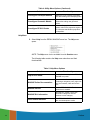
4. Click Utilities on the ERDAS IMAGINE menu bar. The Utilities menu
opens:
The following table contains the Utilities menu selections and their
functionalities:
xviii
Preface
Table 4: Utility Menu Options
Selection
Preface
Functionality
JPEG Compress Images
Compress raster images using the JPEG
compression technique and save them in
an ERDAS IMAGINE format.
Decompress JPEG Images
Decompress images compressed using
the JPEG Compress Images utility.
Convert Pixels to ASCII
Open the Pixel to Table dialog to output
raster data file values to an ASCII file.
Convert ASCII to Pixels
Open the Table to Pixel dialog to create
an image from an ASCII file.
Convert Images to Annotation
Convert a raster image to polygons
saved as ERDAS IMAGINE annotation
file (.ovr).
Convert Annotation to Raster
Convert an annotation file containing
vector graphics to a raster image file.
Create/Update Image Chips
Open the Image Chip Maker to generate
image chips for one or more images.
Create Font Tables
Open the Font Table Maker to create a
map of characters in a particular font.
Font to Symbol
Open the Font to Symbol Maker to create
a symbol library to use as annotation
characters from an existing font.
Compare Images
Open Image Compare dialog to compare
layers, raster, map info between two
images.
Oracle Spatial Table Tool
Open Oracle GeoRaster Table Manager
to edit records and columns in an Oracle
spatial database.
CSM Plug-in Manager
Open CSM Plug-in Manager dialog to
configure Community Sensor Model
plug-in DLLs.
Reconfigure Raster Formats
Update the list of available raster DLLs
after adding new raster DLLs.
Reconfigure Vector Formats
Update the list of available vector DLLs
after adding new vector DLLs.
xix
Table 4: Utility Menu Options (Continued)
Selection
Functionality
Reconfigure Resample Methods
Update the list of available resampling
DLLs after adding new resampling DLLs.
Reconfigure Geometric Models
Update the list of available geometric
models after adding new geometric
models.
Reconfigure PE GCS Codes
Calculate Geographic Coordinate
System codes in the projection engine, a
set of libraries that handles projections
for shapefiles.
Help Menu
5. Select Help from the ERDAS IMAGINE menu bar. The Help menu
opens.
NOTE: The Help menu is also available from the Session menu.
The following table contains the Help menu selections and their
functionalities:
Table 5: Help Menu Options
Selection
xx
Functionality
Help for Icon Panel
View the On-Line Help for the ERDAS
IMAGINE icon panel.
IMAGINE Online Documentation
Open the entire On-Line Help file,
containing a navigation pane, page view
pane and contents, index and search
tools.
IMAGINE Version
View the ERDAS IMAGINE software
version that is installed.
IMAGINE DLL Information
Open the DLL Version Tool to see
current DLL categories and DLL
instances in each category.
About ERDAS IMAGINE
View ERDAS IMAGINE version number,
date, and development credits.
Preface
Dialogs
A dialog is a window in which you enter file names, set parameters, and
execute processes. In most dialogs, there is very little typing required—
simply use the mouse to click the options you want to use.
Most of the dialogs used throughout the tour guides are reproduced
from the software, with arrows showing you where to click. These
instructions are for reference only. Follow the numbered steps to
actually select dialog options.
For On-Line Help with a particular dialog, click the Help button in that
dialog.
All of the dialogs that accompany the raster and vector editing tools, as
well as the Select Layer To Add dialog, contain a Preview chip pane,
which enables you to view the changes you make to the Viewer image
before you click Apply.
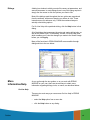
Many of the functions in ERDAS IMAGINE are accessible through
dialogs similar to the one below:
More
Information/Help
As you go through the tour guides, or as you work with ERDAS
IMAGINE on your own, there are several ways to obtain more
information regarding dialogs, tools, or menus, as described below.
On-Line Help
There are two main ways you can access On-Line Help in ERDAS
IMAGINE:
Preface
•
select the Help option from a menu bar
•
click the Help button on any dialog
xxi
Status Bar Help
The status bar at the bottom of the Viewer displays a quick explanation
for buttons when the mouse cursor is placed over the button. It is a good
idea to keep an eye on this status bar, since helpful information displays
here, even for other dialogs.
Bubble Help
The User Interface & Session category of the Preference Editor
enables you to turn on Bubble Help, so that the single-line Help displays
directly below your cursor when your cursor rests on a button or frame
part. This is helpful if the status bar is obscured by other windows.
xxii
Preface
Fourier Transform Editor
Introduction
In this tour guide, you enhance and destripe a 512 × 512 subset of a
Landsat Thematic Mapper image using both interactive and automatic
methods available in the ERDAS IMAGINE Fourier Analysis tools.
Not all of the edits in this tour guide necessarily enhance the image.
Many exercises are performed simply to show you how they affect the
image. When you use these techniques on other data sets, you may
want to experiment with different methods, or combinations of methods,
to find the techniques that work best.
We highly recommend that you read the Fourier Analysis section,
in the "Enhancement" chapter in the ERDAS Field Guide, Volume
2, before going through this tour guide.
If you are new to ERDAS IMAGINE, we recommend that you
complete “Viewer & Geospatial Light Table” tour guide in the
ERDAS IMAGINE Essentials Tour Guide before using the Fourier
Transform Editor.
Approximate completion time for this tour guide is 45 minutes.
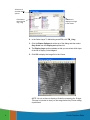
Create an .fft Layer
In order to use the Fourier Transform Editor, you must first create a
Fourier Transform (.fft) layer from the input image.
Display Source File
ERDAS IMAGINE must be running and you must have a Viewer open.
1. Select File -> Open -> Raster Layer from the Viewer menu bar.
The Select Layer To Add dialog opens.
Fourier Transform Editor
Fourier Transform Editor
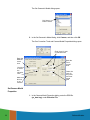
1
1
Click here to
view the raster
options
Click here to
select the file
TM_1.img
Click here to
display the image
in the Viewer
2. In the Select Layer To Add dialog under File, click TM_1.img.
3. Click the Raster Options tab at the top of the dialog and then select
Gray Scale from the Display as dropdown list.
4. The Display Layer section updates so that you can select which layer
of the file to display. Select Layer 1.
5. Click OK to display the image file in the Viewer.
NOTE: You do not have to display a file before computing the .fft layer.
This step is included to show you the image before any Fourier editing
is performed.
2
Fourier Transform Editor
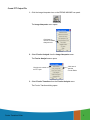
Create FFT Output File
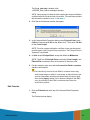
1. Click the Image Interpreter icon on the ERDAS IMAGINE icon panel.
The Image Interpreter menu opens.
Click here to
use the Fourier
Analysis tools
2. Select Fourier Analysis from the Image Interpreter menu.
The Fourier Analysis menu opens.
Click here to create
an FFT layer
Click here to
start the
Fourier Editor
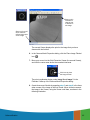
3. Select Fourier Transform from the Fourier Analysis menu.
The Fourier Transform dialog opens.
Fourier Transform Editor
3
Enter input
image file
name here
Enter output
.fft file name
here
Select layers
to use here
4. In the Fourier Transform dialog under Input File, type TM_1.img.
Layer 1 of this file is badly striped. In this example, you work with only
one layer to make the processing go faster. However, the techniques
you use are applicable to multiple layers.
5. The name for the Output File, TM_1.fft, is automatically generated.
Make sure it is in a directory in which you have write permission. The
default is your default data directory set by Session -> Preferences.
6. Enter 1:1 in the Select Layers field.
7. Click OK in the Fourier Transform dialog to create the new file.
A Job Status dialog displays, showing the progress of the function.
When the process is 100 percent complete, click OK.
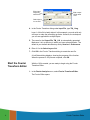
Start the Fourier
Transform Editor
With the .fft file created, you are ready to begin using the Fourier
Transform Editor.
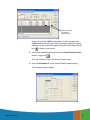
1. In the Fourier Analysis menu, select Fourier Transform Editor.
The Fourier Editor opens.
4
Fourier Transform Editor
Menu bar
Toolbar
FFT layer
displayed
here
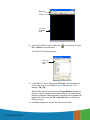
2. In the Fourier Editor, click the Open icon
File -> Open from the menu bar.
on the toolbar, or select
The Open FFT Layer dialog opens.
Enter FFT
layer to open
here
3. In the Open FFT Layer dialog under FFT Layer, enter the path and
name of the .fft layer you created in step 4. through step 5. (for
example, TM_1.fft).
Since this file contains only one layer, the Layer Number defaults to 1.
However, if the file contained more than one layer, you could choose
the layer to edit here. Edits performed on one layer can be applied to all
layers of the .fft file using the File -> Save All option on the Fourier
Editor menu bar.
4. Click OK to display the selected file in the Fourier Editor.
Fourier Transform Editor
5
A status meter opens as the layer is read. Then the layer displays.
You can resize the Fourier Editor window to see the entire file.
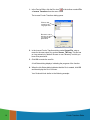
5. Click any point inside the Fourier Editor and the coordinates of that point
are shown in the status bar. Hold and drag to dynamically update the
coordinates.
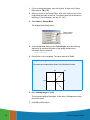
Fourier Editor Coordinates
The coordinates are referred to as (u,v) with the origin (u,v = 0,0) at
the center of the image. See the illustration below.
-u,-v
u,-v
0,0
-u,v
u,v
Since Fourier images are symmetrical, a point in one quadrant is
exactly the same as the corresponding point in the opposite
quadrant. For example, point (64,170) is the same as point
6
Fourier Transform Editor
Edit Using Menu
Options
As previously stated, the menu bar and mouse-driven tools offer the
same techniques and kinds of edits, only the method is different. In the
menu bar options, you enter all parameters into dialogs. In many cases
you want to use the mouse to view the coordinates of the .fft layer, so
that you know what information to enter into the dialogs. In the next
series of steps, you use some of the menu bar editing options. Then, in
the next section, you perform many of those same edits using the
mouse-driven tools.
Use Low-Pass Filtering
Low-pass filtering allows you to attenuate the high-frequency
components of the image, but allows the low-frequency components to
pass through.
1. Select Mask -> Filters from the Fourier Editor menu bar.
The Low/High Pass Filter dialog opens.
Select filter
to use here
Select window
function here
Set window
radius here
Filter Types
When the Filter Type is set to Low Pass, its function is the same as
the Low Pass Filter icon
on the toolbar.
When the Filter Type is set to High Pass, its function is the same as
the High Pass Filter icon
on the toolbar.
2. In the Low/High Pass Filter dialog, click the Window Function
dropdown list and select Ideal.
An ideal window function produces a sharp transition at the edge of the
filter.
3. Change the Radius to 10.00.
4. Leave all other parameters as they are and click OK.
Fourier Transform Editor
7
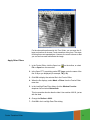
A low-pass filter is applied to all values outside of the radius of 10.00.
Therefore, the image is black, except for a small white circle in the
center.
Removing this much of the layer removes much of the content of the
image, so you may want to undo this edit and try again.
5. Select Edit -> Undo from the Fourier Editor menu bar.
The image is restored to its original state.
Select a Different Filter
1. Select Mask -> Filters.
2. In the Low/High Pass Filter dialog, click the Window Function
dropdown list and select Ideal.
3. Enter a Radius of 80.00.
4. Click OK in the Low/High Pass Filter dialog.
All frequencies outside the radius of 80 are attenuated and frequencies
inside the radius are unaffected. The .fft layer looks similar to the
following example:
8
Fourier Transform Editor
Save the File
1. Select File -> Save As from the Fourier Editor menu bar.
The Save Layer As dialog opens.
Enter a new
name for the
FFT layer here
2. In the directory of your choice, enter a name for the new .fft layer, such
as TM1lowpass.fft.
3. Click OK to save the file.
Apply an Inverse Fourier
Transformation
Now, perform an inverse Fourier transformation so that you can view
the original image and see what effect this edit had on it.
You must save your edits before performing an Inverse Transform
Operation.
Fourier Transform Editor
9
1. In the Fourier Editor, click the Run icon
on the toolbar or select File
-> Inverse Transform from the menu bar.
The Inverse Fourier Transform dialog opens.
Enter a new
name for the
.img layer here
Be sure to use a
directory in which
you have write
permission
2. In the Inverse Fourier Transform dialog under Output File, enter a
name for the new output file, such as inverse_TM1.img. This file has
an .img extension by default. Be sure to use a directory in which you
have write permission.
3. Click OK to create the new file.
A Job Status dialog displays, indicating the progress of the function.
4. When the Job Status dialog indicates that the file is created, click OK
and then display the file in a Viewer.
Your file should look similar to the following example:
10
Fourier Transform Editor
For the other edits performed in this Tour Guide, you can save the .fft
layer and perform an inverse Fourier transform at any time. The steps
for doing so are not repeated here. However, the result is shown so that
you can see how each edit affects the image.
Apply Other Filters
1. In the Fourier Editor, click the Open icon
File -> Open from the menu bar.
on the toolbar, or select
2. In the Open FFT Layer dialog under FFT Layer, enter the name of the
first .fft layer you displayed (for example, TM_1.fft).
3. Click OK to display the selected file in the Fourier Editor.
4. When the file displays, select Mask -> Filters from the Fourier Editor
menu bar.
5. In the Low/High Pass Filter dialog, click the Window Function
dropdown list and select Butterworth.
This is a smoother function than the Ideal. Use a radius of 80.00, just as
with the Ideal.
6. Change the Radius to 80.00.
7. Click OK in the Low/High Pass Filter dialog.
Fourier Transform Editor
11
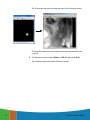
The .fft layer and the resulting image are shown in the following picture:
This filter eliminated much of the image content because the radius was
too small.
8. Try this same exercise using a Radius of 300.00, rather than 80.00
The resulting image looks like the following example:
12
Fourier Transform Editor
The image is visibly smoothed (perhaps too much). However, the
striping remains. You remove the stripes using the wedge filter later in
this tour guide. You could try using the Butterworth filter with an even
larger radius or the other windows.
The following graphics illustrate some of these other scenarios.
Fourier Transform Editor
13
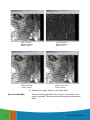
Type: Low Pass
Window: Hanning
Radius: 100.00
Type: High Pass
Window: Hanning
Radius: 20.00
Type: Low Pass
Window: Bartlett
Radius: 150.00
Type: Low Pass
Window: Gaussian
Radius: 200.00
9. Redisplay the original .fft layer in the Fourier Editor.
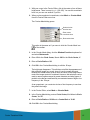
Use a Circular Mask
14
There are several bright spots in the .fft layer, such as those in the
upper left quadrant. These can be eliminated using the circular mask
option.
Fourier Transform Editor
1. With your cursor in the Fourier Editor, click in the center of one of these
bright areas. There is one at (u,v) = (-59,-200). You use this coordinate
here, but you can use another if you like.
2. When you have selected a coordinate, select Mask -> Circular Mask
from the Fourier Editor menu bar.
The Circular Mask dialog opens.
Select window
function here
Enter center
coordinate here
Enter radius here
This option is the same as if you were to click the Circular Mask icon
on the toolbar.
3. In the Circular Mask dialog, click the Window Function dropdown list
and select Butterworth.
4. Enter -59 for the Circle Center, U and -200 for the Circle Center, V.
5. Enter a Circle Radius of 20.
6. Click OK in the Circular Mask dialog to edit the .fft layer.
The bright spot disappears. This edit does not affect the appearance of
this particular image very much, since it is such a small area and
because the edited area is quite far from the center of the image where
most of the image content is contained. However, this technique can be
used to remove spikes caused by errant detectors and other types of
periodic noise that are manifested by concentrated areas of high or low
frequency in the .fft layer.
As an experiment, you create two circles of low frequency to see how
they affect the image.
7. In the Fourier Editor, select Mask -> Circular Mask.
8. In the Circular Mask dialog, enter a Circle Center, U of 44 and a Circle
Center, V of 57.
9. Enter a Circle Radius of 20.00 and a Central Gain of 10.00.
10. Click OK in the Circular Mask dialog.
Fourier Transform Editor
15
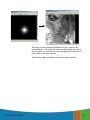
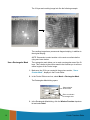
The .fft layer and resulting image look like the following example:
The resulting image has a pronounced diagonal striping, in addition to
the original striping.
NOTE: Remember to select another circle center coordinate before
trying each new window.
Use a Rectangular Mask
The rectangular mask allows you to mask a rectangular area of the .fft
layer. This is similar to the circular mask in that it allows you to edit noncentral regions of the Fourier image.
1. Make sure the .fft file you created in the previous section, “Use a
Circular Mask”, displays in the Fourier Editor.
2. In the Fourier Editor menu bar, select Mask -> Rectangular Mask.
The Rectangular Mask dialog opens.
Select window
function here
Enter coordinates
of rectangle here
3. In the Rectangular Mask dialog, click the Window Function dropdown
list and select Ideal.
16
Fourier Transform Editor
4. Enter an upper left u (UL U) of 80 and an upper left v (UL V) of 80.
5. Enter a lower right u (LR U) of 255 and a lower right v (LR V) of 255.
6. Click OK in the Rectangular Mask dialog.
The top left and bottom right corners of the .fft layer are black. To mask
the other two corners, you must repeat this procedure.
7. Select Mask -> Rectangular Mask.
8. In the Rectangular Mask dialog, click the Window Function dropdown
list and select Ideal.
9. Enter an upper left u (UL U) of 80 and an upper left v (UL V) of -255.
10. Enter a lower right u (LR U) of 255 and a lower right v (LR V) of -80.
11. Click OK in the Rectangular Mask dialog.
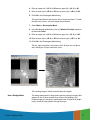
The top, right and bottom, left corners of the .fft layer are now black
also, making the .fft layer look like a cross.
The resulting image is visibly smoother than the original.
Use a Wedge Mask
Fourier Transform Editor
The wedge mask option is often used to remove striping in imagery that
appears in the .fft layer as radial lines. Most of the striping in the
Landsat image you are using is manifested in the .fft layer as the bright,
nearly vertical line that passes through the origin.
17
1. If it is not already displayed, open the original .fft layer in the Fourier
Editor (that is, TM_1.fft).
2. With your cursor in the Fourier Editor, click in the center of one of the
bright areas that make up the line. You need to enter this information in
the dialog. For this example, you use (35, -187).
3. Select Mask -> Wedge Mask.
The Wedge Mask dialog opens.
Select window
function here
4. In the Wedge Mask dialog for the Center Angle, enter the following
expression to calculate the center of the wedge, based on the
coordinate that you selected.
-atan(-185/36)
5. Press Enter on your keyboard. The value returned is 78.99.
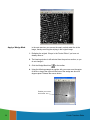
Wedge Mask Angles
The angles are measured as shown in the illustration below.
90°
180°
0,0
45°
0°
6. Enter a Wedge Angle of 10.00.
This is the total angle of the wedge, in this case, 5.00 degrees on either
side of the center.
7. Click OK to edit the layer.
18
Fourier Transform Editor
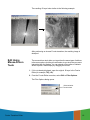
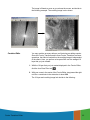
The resulting .fft layer looks similar to the following example:
After performing an inverse Fourier transform, the resulting image is
destriped.
Edit Using
Mouse-Driven
Tools
The mouse-driven tools allow you to perform the same types of edits as
in the menu options, but they are a bit easier to use since they are more
interactive than the dialogs. You can extend a filter radius or indicate
where to place a mask simply by dragging the mouse.
1. If it is not already displayed, open the original .fft layer in the Fourier
Editor (for example, TM_1.fft).
2. From the Fourier Editor menu bar, select Edit -> Filter Options.
The Filter Options dialog opens.
Select window
function here
Fourier Transform Editor
19
This is where you set the window that is used for all subsequent mousedriven editing options. However, you can change this window at any
time. The Minimum Affected Frequency option allows you to enter the
minimum frequency value that is affected by the filter. Setting this value
to a number less than 10.00 might eliminate very low frequency data
that are crucial to the content of the image.
3. In the Filter Options dialog, click the Window Function dropdown list
and select Ideal.
4. Click OK.
Use Low-Pass Filtering
The first tool you use is the Low-Pass Filter tool.
1. Click the Low-Pass Filter icon
on the Fourier Editor toolbar.
2. With your cursor in the center of the Fourier Editor, drag toward the right
until the u coordinate in the status bar reads 80. Then release the
mouse.
The image is filtered as soon as the mouse is released. This is
equivalent to the second filtering operation you performed using the
menu bar tools.
You can select Edit -> Undo at any time to undo an edit. Select File ->
Revert to undo a series of edits. The Low-Pass Filter tool remains
active until you either select another tool or click the Select tool.
Use High-Pass Filtering
Next, you use the High-Pass Filter tool.
1. Select Edit -> Filter Options from the Fourier Editor menu bar.
2. In the Filter Options dialog, click the Window Function dropdown list
and select Hanning.
3. Click OK in the Filter Options dialog.
4. Click the High-Pass Filter icon
on the toolbar.
5. With your cursor in the center of the Fourier Editor, drag toward the right
until the u coordinate in the status bar reads 20. Release the mouse
button.
The image is filtered as soon as the mouse is released. The
combination of filters (both Low-Pass and High-Pass) is shown in the
following example:
20
Fourier Transform Editor
6. Select File -> Save As from the menu bar.
The Save Layer As dialog opens.
7. In the Save Layer As dialog, enter a new name for the .fft layer, such as
TMhighpass.fft. Be sure to use a directory in which you have write
permission.
8. Click OK to save the layer.
9. Click the Run icon
on the toolbar, or select File -> Inverse
Transform from the menu bar to create an inverse Fourier layer for
display.
10. In the Inverse Fourier Transform dialog, enter a name for the new .img
layer in the directory of your choice, such as TM1highpass.img.
11. Click OK.
A Job Status dialog displays, indicating the progress of the function.
12. When the Job Status dialog indicates that the new .img layer is created,
click OK and then display the layer in a Viewer.
Your new image should look similar to the following example:
Fourier Transform Editor
21
Apply a Wedge Mask
In the next exercise, you remove the nearly vertical radial line in the
image, thereby removing the striping in the original image.
1. Redisplay the original .fft layer in the Fourier Editor if you have not
already done so.
2. The Hanning window is still selected from the previous section, so you
do not change it.
3. Click the Wedge Mask icon
on the toolbar.
4. Using the following example as a guide, with your cursor over the center
of the line, drag to the right until the lines of the wedge are about 20
degrees apart. Release the mouse button.
Position your cursor
in this area
22
Fourier Transform Editor
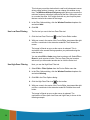
The image is filtered as soon as you release the mouse, and similar to
the following example. The resulting image is also shown.
Combine Edits
You may combine as many edits as you like during an editing session.
Since the Fourier Transform and Inverse Fourier Transform are linear
operations, the effect of each edit on the resulting image is independent
of the others. Here, you perform a low-pass filter over the wedged .fft
layer that you just created.
1. With the .fft layer that you just created displayed in the Fourier Editor,
click the Low-Pass Filter tool
.
2. With your cursor in the center of the Fourier Editor, drag toward the right
until the u coordinate in the status bar is about 200.
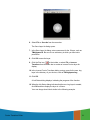
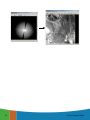
The .fft layer and resulting image look similar to the following:
Fourier Transform Editor
23
24
Fourier Transform Editor
Image Interpreter
Introduction
Image Interpreter is a group of over 50 functions that can be applied at
the touch of a button to images with parameters you input. Most of the
Image Interpreter functions are algorithms constructed as graphical
models with Model Maker. These algorithms are common
enhancements and utilities that have been made easily accessible
through the Image Interpreter.
NOTE: Some of these functions are found in other parts of ERDAS
IMAGINE, but are also listed in Image Interpreter for convenience.
The models used in Image Interpreter functions can be edited and
adapted as needed with Model Maker (from Spatial Modeler) or the
Spatial Modeler Language.
See the Spatial Modeler section of this manual for a description of
the relationship between Spatial Modeler Language, Model Maker,
and Image Interpreter. See the "Geographic Information Systems"
chapter in the ERDAS Field Guide Volume I for more information
on modeling.
Approximate completion time for this tour guide is 50 minutes.
Subsetting an
Image
Many images used in IMAGINE cover a large area, while the actual
area being studied can only cover a small portion of the image. To save
on disk space and processing time, IMAGINE lets you make new
images out of a subset of the entire data set.
In this exercise, you use the Subset Utility to take a subset of a small
urbanized Area of Interest (AOI) from a much larger Landsat scene of
San Diego.
ERDAS IMAGINE should be running with a Viewer open.
1. Select File -> Open Raster Layer from the Viewer menu bar.
The Select Layer to add dialog opens.
Image Interpreter
Image Interpreter
25
25
Click OK
Select
dmtm.img
2. Select dmtm.img from the list of examples.
3. Click OK to have the image display in the Viewer.
Selecting an AOI to
Subset
In this section, you use the Subset utility to take a small Subset from a
large image without using the Snap to Raster option.
1. With the cursor in the Viewer, right-click to access the Quick View
menu.
2. Select Inquire Box... from the Quick View menu. The Inquire Box
dialog displays. The title of this dialog is Viewer #1: dmtm.img.
Uncheck the
Snap to Raster
checkbox
Enter these
coordinates
in the Inquire
Box dialog.
3. Click the Snap to Raster checkbox to uncheck this option. This tells the
Subset function to use the exact coordinates you enter for the Inquire
Box.
4. Enter the following coordinates into the Inquire Box dialog:
ULX: 1698385.570
ULY: 288632.691217
LRX: 1702282.557434
LRY: 284900.708704
5. Click Apply on the Inquire Box dialog. The Inquire Box moves to the
new coordinates.
26
Image Interpreter
6. Click the Zoom In icon
to zoom in on the Area of Interest.
The image in your Viewer should look something like this:
Note that the corners
of the Inquire Box
are not snapped
to the pixel centers.
Subsetting an Image
Without Snapping
1. Click the Interpreter icon on the ERDAS IMAGINE icon panel.
The Image Interpreter menu opens. Each of the buttons in the Image
Interpreter menu displays a submenu of Image Interpreter functions
Image Interpreter
27
Ellipses indicate
that these buttons
display another dialog
with additional
options
Click here to see
an On-Line Help
file describing this
dialog
2. Select Utilities from the Image Interpreter menu and the Utilities
menu opens.
Click here to see
an On-Line Help
file describing this
dialog
3. Select Subset from the Utilities menu and the Subset dialog opens.
28
Image Interpreter
Enter output
file here
Enter input file here
Click here to import
coordinates
from the Inquire Box
in the Viewer
Click here to start
the Subsetting process
4. Under Input File in the Subset dialog, enter dmtm.img.
This is a Landsat TM image of San Diego, California.
5. Under Output File, enter subset_no_snap.img in a directory where
you have write permission.
6. Click OK to begin the Subsetting process.
A Job Status bar displays, indicating the progress of the subsetting
operation.
Status
updates here
Title bar tells
which function
is running
7. Depending on your eml Preferences (under Session -> Preferences > User Interface & Session -> Keep Job Status Box), when the Job
Status bar shows 100, indicating that the job is 100% done, you must
either click OK to close the dialog or the dialog closes automatically.
Image Interpreter
29
Displaying the Subset
with the Original Data
1. The original image should still be displayed in the Viewer.
2. Select File -> Open -> Raster Layer from the menu bar on the Viewer.
The Select Layer to Add dialog displays.
Click here
to access the
Raster Options
tab
Click here to
open a list
of recently
accessed files
3. Click the Recent button to open a list of recently accessed files.
4. Select subset_no_snap.img from the List of Recent Files.
5. Click OK to dismiss the List of Recent Files.
6. Click the Raster Options tab.
Click here
to uncheck
the Clear Display
option
7. Uncheck the Clear Display option so the new subset of the original
image appears superimposed on the original image.
30
Image Interpreter
8. Click OK.
The subset displays in the Viewer over the original image.
The darker pixels
belong to the subset
Note the original
Inquire Box
The pixels appear to “shift.”
Actually, the pixels are redrawn
to match the exact coordinates
of the Inquire Box. Note how
the corner of the Inquire box
is centered in the Subset pixel.
When a subset of an image is taken from an Inquire Box that is not
snapped to the pixel grid of the original image, the subset is drawn using
the exact coordinates of the of the Inquire Box. Because the subset
pixel grid differs slightly from the original image’s pixel grid, the subset
image appears “shifted” from the original image.
9. Click the Clear Top Layer icon
from the Viewer.
to remove subset_no_snap.img
The original image and the Inquire Box should still be displayed in the
Viewer.
Subsetting an Image
With Snap to Raster
1. In the Inquire Box dialog, click the Snap to Raster checkbox to make
sure it is active (checked). Click Apply.
The Inquire Box snaps to the pixels centers and looks like this:
Image Interpreter
31
The Inquire Box
snaps to the center
of the included pixels.
These guides appear
to show the edges
of the included pixels.
The coordinates in the Inquire Box dialog update to reflect the new
corner coordinates.
2. In the Utilities dialog, click the Subset button. The Subset dialog
displays.
3. Under Input File, enter dmtm.img.
4. In the Output File, enter subset_snap.img in a directory where you
have write permission.
5. Click the From Inquire Box button.
The coordinates in the Subset Definition area update to reflect the
corner coordinates of the Inquire Box.
6. Click OK to start the Subsetting Process.
The Subsetting Progress meter opens, displaying the progress of the
subsetting.
Viewing the Snapped
Subset
1. Select File -> Open -> Raster Layer from the menu bar in the Viewer.
The Select Layer to Add dialog opens.
2. Click the Recent button.
32
Image Interpreter
The List of Recent Files dialog displays.
3. Select subset_snap.img from the list.
4. Click OK on the List of Recent Files to close the dialog.
5. Click the Raster Options tab in the Select Layer to Add dialog.
6. Deselect the Clear Display option.
7. Click OK to open subset_snap.img in the Viewer on top of dmtm.img.
The subsetted image displays in the Viewer.
The pixels line up
with the pixels
in the original image.
Because the Inquire Box was snapped to the centers of the pixels
before the image was processed, the pixels in the output file lines up
exactly with the pixels in the original image.
8. Click Close on the Viewer.
9. Click Close on the Utilities menu.
Apply Spatial
Enhancement
ERDAS IMAGINE should be running with a Viewer open.
In this section, you use the convolution and crisp Spatial Enhancement
functions to enhance images.
1. Click the Interpreter icon on the ERDAS IMAGINE icon panel.
Image Interpreter
33
The Image Interpreter menu opens.
2. Select Spatial Enhancement from the Image Interpreter menu and
the Spatial Enhancement menu opens.
Click here to see
an On-Line Help
file describing this
dialog
Apply Convolution
1. Select Convolution from the Spatial Enhancement menu and the
Convolution dialog opens.
34
Image Interpreter
Enter kernel to use
Select kernel
from this
scroll list
Enter output file here
Enter input file here
Edit selected
kernel or
create new one
Click here to
add this function
to a batch file
Click here to
apply this function
to an area of interest
This interactive Convolution tool lets you perform convolution filtering
on images. It provides a scrolling list of standard filters and lets you
create new kernels. The new kernels can be saved to a library and used
again at a later time.
NOTE: Do not close the Image Interpreter menu, as you continue
using it in the next section.
Select Input/Output Files
1. In the Convolution dialog, under Input File, enter lanier.img.
2. Under Output File, enter convolve.img in the directory of your choice.
It is not necessary to add the .img extension when typing the file
name—ERDAS IMAGINE automatically appends the correct extension.
NOTE: Make sure you remember in which directory the output file is
saved. This is important when you try to display the output file in a
Viewer.
Select Kernel
Next, you must select the kernel to use for the convolution. A default
kernel library containing some of the most common convolution filters is
supplied with ERDAS IMAGINE. This library opens in the Kernel
Selection part of this dialog.
1. From the scrolling list under Kernel, click 3x3 Edge Detect.
Image Interpreter
35
2. Click the Edit button in the Kernel Selection box.
The 3 × 3 Edge Detect dialog opens.
For this exercise, you use the Kernel Editor to simply view the kernel
used for the 3 × 3 Edge Detect filter. However, if desired, you could
make changes to the kernel at this time by editing the CellArray.
3. Select File -> Close from the 3 × 3 Edge Detect dialog.
4. Click OK in the Convolution dialog.
A Job Status dialog displays, indicating the progress of the function.
5. When the Job Status dialog shows that the process is 100% complete,
click OK.
Check the File
1. Select File -> Open -> Raster Layer from the Viewer menu bar.
The Select Layer To Add dialog opens.
2. In the Select Layer To Add dialog under Filename, click lanier.img.
3. Click OK to display the file in the Viewer.
4. Open a second Viewer window by clicking on the Viewer icon on the
ERDAS IMAGINE icon panel.
36
Image Interpreter
5. Select File -> Open -> Raster Layer from the menu bar of the Viewer
you just opened.
The Select Layer To Add dialog opens.
6. In the Select Layer To Add dialog under Filename, enter the name of
the directory in which you saved convolve.img, and press the Enter
key on your keyboard.
7. In the list of files, click convolve.img and then click OK.
The output file generated by the Convolve function, convolve.img,
displays in the second Viewer.
8. In the ERDAS IMAGINE menu bar, select Session -> Tile Viewers to
compare the two files side by side.
9. When you are finished comparing the two files, select File -> Clear from
the menu bar of each Viewer.
Apply Crisp
1. Select Crisp from the Spatial Enhancement menu.
The Crisp dialog opens.
Image Interpreter
37
Enter input file here
Click here to
add this function
to a batch file
Click here to
view or edit the
graphical model
for this function
Enter output
file here
Click here to
apply this function
to an area of interest
The Crisp dialog is a good example of the basic Image Interpreter
dialog. Other dialogs may have more prompts for inputs, depending on
the function. Each dialog opens with default entries that are acceptable
for use. These entries can be changed, if necessary, to achieve specific
results.
2. Under Input File in the Crisp dialog, enter panAtlanta.img.
This is a SPOT panchromatic scene of downtown Atlanta, Georgia.
3. Under Output File, enter crisp.img in the directory of your choice as
the output file.
4. Under Output Options in the Crisp dialog, turn on the Stretch to
Unsigned 8 bit checkbox by clicking on it.
This option produces the output file in unsigned 8-bit format, which
saves disk space.
Use the View Option
1. Click the View button at the bottom of the Crisp dialog.
The Model Maker viewer window opens and displays the graphical
model used for the Crisp function.
38
Image Interpreter
The View button in each Image Interpreter dialog lets you view the
graphical model behind each function. If you want to change the model
for a specific purpose, you can edit it through the Model Maker and
apply the edited function to the image by running the model in Model
Maker.
See the “Spatial Modeler” chapter in the IMAGINE Professional
Tour Guides for information on editing and running a model in
Model Maker.
2. Exit the Model Maker by selecting File -> Close All.
3. Click OK in the Crisp dialog to start the process.
A Job Status dialog opens, indicating the progress of the function.
4. When the Job Status dialog shows that the process is 100% complete,
click OK.
Image Interpreter
39
View Results
1. Display panAtlanta.img in a Viewer.
2. Display crisp.img, the output file generated by the Crisp function, in the
other Viewer.
3. Note the differences between the two images; crisp.img appears to be
sharper.
4. Use the Zoom In icon in the Viewer toolbar to zoom in for a closer look
at the crispening of the image in crisp.img.
5. When you are through, close all the Viewers at once by selecting
Session -> Close All Viewers from the ERDAS IMAGINE menu bar.
6. Click Close in the Spatial Enhancement menu.
NOTE: Do not close the Image Interpreter menu, as you continue
using it in the next section.
Apply Radiometric
Enhancement
1. In the Image Interpreter menu, select Radiometric Enhancement.
The Radiometric Enhancement menu opens.
40
Image Interpreter
Click here to access
the Brightness Inversion
function
In this section, you use both the Inverse and Reverse options of the
Image Inversion function to enhance images. Inverse emphasizes
detail in the dark portions of an image. Reverse simply reverses the DN
values.
Apply Brightness
Inversion
1. In the Radiometric Enhancement menu, select Brightness
Inversion.
The Brightness Inversion dialog opens.
Enter output
file name here
Select this option
to reduce file size
Click here
to see model
in Model Maker
Select option
here
2. In the Brightness Inversion dialog under Input File, enter
loplakebedsig357.img.
3. Under Output File, enter inverse.img in the directory of your choice.
4. Under Output Options, turn on the Stretch to Unsigned 8 bit
checkbox by clicking on it.
Image Interpreter
41
5. Under Output Options, click Inverse.
6. Click OK in the Brightness Inversion dialog to start the process.
A Job Status dialog displays, indicating the progress of the function.
Reverse
1. Select Brightness Inversion from the Radiometric Enhancement
menu.
The Brightness Inversion dialog opens.
2. In the Brightness Inversion dialog, enter loplakebedsig357.img as the
input file.
3. Enter reverse.img in the directory of your choice as the Output File.
4. Turn on the Stretch to Unsigned 8 bit checkbox under Output
Options.
5. Click OK in the Brightness Inversion dialog to start the process.
A Job Status dialog displays, indicating the progress of the function.
View Changes
1. Open a Viewer and display inverse.img.
2. Right-hold within the Viewer and select Fit Window to Image from the
Quick View menu.
The Viewer changes size to bound the image data.
3. Select View -> Split -> Split Vertical from the Viewer menu bar.
A second Viewer opens.
4. In the second Viewer, click the Open icon
(this is the same as
selecting File -> Open -> Raster Layer from the Viewer menu bar).
The Select Layer To Add dialog opens.
5. From the Select Layer To Add dialog, open the file reverse.img.
6. In the second Viewer, select View -> Split -> Split Vertical from the
Viewer menu bar.
A third Viewer opens.
42
Image Interpreter
7. With your cursor in Viewer #3, press Ctrl-r on your keyboard (this is just
another way to open a raster layer).
The Select Layer To Add dialog opens.
8. From the Select Layer To Add dialog, open the file
loplakebedsig357.img.
9. Resize the Viewers on screen so that you can see all three Viewers.
Note the differences between reverse.img and inverse.img compared
to the original file.
Original image
Reverse image
Inverse image
10. When you are through, close all three Viewers by selecting Session ->
Close All Viewers from the ERDAS IMAGINE menu bar.
Image Interpreter
43
11. Click Close in the Radiometric Enhancement menu.
NOTE: Do not close the Image Interpreter menu, as you continue
using it in the next section.
Apply Spectral
Enhancement
1. In the Image Interpreter menu, click Spectral Enhancement.
The Spectral Enhancement menu opens.
Click here to select
Tasseled Cap
In this section, you use the following Spectral Enhancement functions:
•
Tasseled Cap
•
RGB to IHS
•
IHS to RGB
•
Indices
Use Tasseled Cap
1. In the Spectral Enhancement menu, select Tasseled Cap.
The Tasseled Cap dialog opens.
44
Image Interpreter
Enter output
file here
Enter input
file here
Click to
select this
option
Click to set
coefficients
2. Under Input File, enter lanier.img. That image is a Landsat TM image
of Lake Lanier, Georgia, which was obtained by the Landsat 5 sensor.
3. Enter tasseled.img in the directory of your choice as the Output File
name.
4. Under Output Options, turn on the Stretch to Unsigned 8 bit
checkbox by clicking on it.
5. Click Set Coefficients.
The Tasseled Cap Coefficients dialog opens.
Image Interpreter
45
The coefficients that display are the standard default entries for Landsat
5 TM Tasseled Cap transformation. For this exercise, you use the
default entries, although you may change these entries at any time.
6. Click OK in the Tasseled Cap Coefficients dialog.
7. Click OK in the Tasseled Cap dialog to start the function.
A Job Status dialog opens to report the state of the job.
8. When the Job Status dialog indicates that the job is Done, click OK.
Check Results
1. Open a Viewer and display lanier.img.
2. Open a second Viewer and then open the Select Layer To Add dialog
by clicking on the Open icon in the Viewer toolbar.
3. In the Select Layer To Add dialog, enter the name of the directory in
which you saved tasseled.img, press Enter on your keyboard, and
then click tasseled.img in the file list to select it.
4. Click the Raster Options tab at the top of the Select Layer To Add
dialog. Under Layers to Colors, use layer 1 as Red, layer 2 as Green,
and layer 3 as Blue.
5. Click OK in the Select Layer To Add dialog.
The image, tasseled.img, shows a degree of brightness, greenness,
and wetness, as calculated by the Tasseled Cap coefficients used.
46
Image Interpreter
•
Layer 1 (red) = the brightness component (indicates areas of low
vegetation and high reflectors)
•
Layer 2 (green) = the greenness component (indicates vegetation)
•
Layer 3 (blue) = the wetness component (indicates water or
moisture)
6. When you are through, close the Viewers by selecting Session ->
Close All Viewers from the ERDAS IMAGINE menu bar.
Use the Indices Function
Next, you apply a mineral ratio from the Indices function to a Landsat
TM image. Such ratios are commonly used by geologists searching for
specific mineral deposits in the earth.
For more information on this transformation, see the
"Enhancement" chapter in the ERDAS Field Guide Volume II.
1. In the Spectral Enhancement menu, select Indices.
The Indices dialog opens.
Enter input
file here
Enter output
file here
Click to select
sensor type
Click to
select this
option
Function
scroll list
Function definition
displays here for
selected function
2. Under Input File, enter tmAtlanta.img.
3. Enter mineral.img in the directory of your choice as the Output File.
4. Under Select Function, click MINERAL COMPOSITE in the scrolling
list.
Image Interpreter
47
This index is a composite of three mineral ratios.
•
Clay minerals = band 5 / band 7
•
Ferrous minerals = band 5 / band 4
•
Iron oxide = band 3 / band 1
NOTE: Notice how the selected function is defined beside the Function
label, underneath the Select Function scroll list.
5. Under Output Options, turn on the Stretch to Unsigned 8 bit
checkbox by clicking on it.
6. Click OK in the Indices dialog to start the process.
A Job Status dialog displays, indicating the progress of the function.
7. When the Job Status dialog indicates that the job is Done, click OK.
Choose RGB to IHS
Next, you use the RGB to IHS function (red, green, blue to intensity,
hue, saturation) and the reverse IHS to RGB function to enhance the
image information obtained by this mineral ratio.
The purpose of this function is to produce an input file for the IHS to
RGB function.
1. Select RGB to IHS from the Spectral Enhancement menu.
The RGB to IHS dialog opens.
2. Enter the mineral ratio output from the previous exercise (mineral.img)
as the Input File.
48
Image Interpreter
3. Enter RGBtoIHS.img (in the directory of your choice) as the Output
File.
4. Click OK in the RGB to IHS dialog.
A Job Status dialog displays, reporting the progress of the function.
5. When the Job Status dialog indicates that the job is Done, click OK.
Choose IHS to RGB
Now, you convert the IHS image back into an RGB image.
1. Select IHS to RGB from the Spectral Enhancement menu.
The IHS to RGB dialog opens.
2. In the IHS to RGB dialog, enter RGBtoIHS.img output from the
previous exercise as the Input File.
3. Enter IHStoRGB.img as the Output File in the directory of your choice.
4. On the IHS to RGB dialog, click Stretch I & S.
This option applies a global Min-Max contrast stretch to the Intensity
and Saturation values in the image before converting.
5. Click OK in the IHS to RGB dialog.
A Job Status dialog displays, reporting the progress of the function.
6. When the Job Status dialog indicates that the job is Done, click OK.
Image Interpreter
49
View the Results
1. Open three Viewers and then open the following files for comparison.
50
•
mineral.img—mineral ratio index. Proper interpretation can reveal
the presence or absence of iron, clay, or ferrous minerals.
•
RGBtoIHS.img—red, green, and blue values converted to
intensity, hue, and saturation values. This image does not appear
similar to the input file. It is not meant for interpretation; it is only
meant to produce an input for the IHS to RGB function.
Image Interpreter
•
Image Interpreter
IHStoRGB.img (see special instructions below)—intensity, hue,
and saturation values converted to red, green, and blue values
(appears similar to mineral.img). The intensity and saturation (red
and blue) values have been contrast-stretched for better
interpretation.
51
In the Open Raster Layer dialog, when displaying IHStoRGB.img,
be sure to load Layer 1 as Red, Layer 2 as Green, and Layer 3 as
Blue. This is because the order of the layers was reversed in the
transformation.
2. When you are through comparing the files, close the Viewers by
selecting Session -> Close All Viewers in the ERDAS IMAGINE menu
bar.
3. Click Close in the Image Interpreter menu. Click Close in the Spectral
Enhancement menu.
The Image Interpreter and Spectral Enhancement menus close.
Wavelet
Resolution Merge
Part of the Spatial Enhancement menu is the Wavelet Resolution
Merge feature. This tour will cover the feature by using two images from
the IMAGINE examples directory, Quickbird_Pyramids_Pan.img and
Quickbird_Pyramids_MS.img. Both images are of the Egyptian
pyramids and are courtesy of DigitalGlobe. Because both of these
images have been captured by the same satellite, they are inherently
coregistered. Before performing Wavelet Resolution Merge on your
own images, you should precisely coregister them to the subpixel level.
For more information on how to do this, see the tour for Subpixel
Coregistration at the end of the chapter on Polynomial Rectification.
In addition to being precisely coregistered, your images must also
have the same footprint on the ground. Wavelet Resolution Merge
will not produce the expected results if one image covers more
ground than the other image. In that case the images are rewritten
to fit one another by the geographic footprint rather than actual map
coordinates causing pixel replication.
1. Open a Viewer, and click File -> Open -> Raster Layer or the open file
icon to display the Select Layer to Add dialog.
2. Hold down the Ctrl key or the Shift key and select
QuickBird_Pyramids_MS.img and Quickbird_Pyramids_Pan.img.
3. Click the Raster Options tab, and click Clear Display to deselect it.
Click Fit to Frame, and OK.
You may want to rotate the image in the Viewer by clicking View ->
Rotate. A dialog will appear giving you degree and rotation direction
options. Whether or not to rotate the image is up to you.
52
Image Interpreter
4. In the Viewer menu, click Utility -> Swipe to open the Viewer Swipe
dialog.
5. In the Viewer Swipe dialog, take a few minutes to manually move the
swipe feature over the images both horizontally and vertically, so you
can see how precisely they are matched. You can also use the Auto
Mode and adjust its speed to your preference. When you are finished,
click Cancel in the Viewer Swipe dialog.
6. Next, click the Zoom In icon, and zoom in on some features that interest
you. This exercise also gives you a good idea of how well the two
images are matched. You can use the Zoom In and Zoom Out icons to
adjust your view. When you are finished, click the Reset Window Tools
or arrow icon to return to the arrow cursor.
7. Click the Interpreter button in the IMAGINE toolbar.
The Image Interpreter dialog opens.
Choose Spatial
Enhancement
Click Close
8. Select Spatial Enhancement, and click Close in the Image Interpreter
dialog after the Spatial Enhancement dialog opens.
Choose Wavelet
Resolution
Merge
Click Close
9. Select Wavelet Resolution Merge. After the Wavelet Resolution
Merge dialog opens, click Close in the Spatial Enhancement dialog.
Image Interpreter
53
10. Click the open file icon, and select Quickbird_Pyramids_Pan.img for
the High Resolution Input File.
11. Click the open file icon, and select Quickbird_Pyramids_MS.img for
the Multispectral Input File.
12. Click the open file icon, navigate to the directory where you want to
store your merged image, and type the name of the new file.
13. Under Layer Selection, you can type in the range of bands to use in
the Select Layers box. For this exercise, you will leave the range at 1:4.
14. Leave the Spectral Transform at Single Band.
NOTE: The IHS technique is limited to 3 bands, and there are 4 to be
considered for this merge. If you chose IHS instead of Single Band,
there would be distortions. Single band will use all 4 bands sequentially.
15. Leave the Resampling Technique, Data Type, and Output Options
at their defaults.
16. Click OK.
The Wavelet Resolution Merge processing dialog appears.
17. Click OK when the button is highlighted and the Job State is Done.
54
Image Interpreter
18. Open a Viewer and display both Quickbird_Pyramids_MS.img and
your new merged image. Make sure you click Clear Display in Raster
Options to deselect it before adding each image.
19. Using the Swipe and Zoom tools, check the accuracy of the newly
merged image.
Image Interpreter
55
56
Image Interpreter
Orthorectification
Introduction
Rectification is the process of projecting the data onto a plane and
making it conform to a map projection system. Assigning map
coordinates to the image data is called georeferencing. Since all map
projection systems are associated with map coordinates, rectification
involves georeferencing.
The orthorectification process removes the geometric distortion
inherent in imagery caused by camera/sensor orientation, topographic
relief displacement, and systematic errors associated with imagery.
Orthorectified images are planimetrically true images that represent
ground objects in their true “real-world” X and Y positions. For these
reasons, orthorectified imagery has become accepted as the ideal
reference image backdrop necessary for the creation and maintenance
of vector data contained within a GIS.
By performing space resection, the effects of camera/sensor orientation
have been considered and removed. By defining a DEM or constant
elevation value (ideal for use in areas containing minimal relief
variation), the effects of topographic relief displacement can be
considered and removed.
For information on bundle block adjustment, see the LPS Project
Manager User’s Manual and LPS Automatic Terrain Extraction
User’s Manual.
Approximate completion time for this tour guide is 30 minutes.
Rectify a Camera
Image
In this tour guide, you orthorectify a camera image of Palm Springs,
California, using a NAPP (National Aerial Photography Program) photo.
Perform Image to Image
Rectification
In rectifying the camera image, you use these basic steps:
Orthorectification
Orthorectification
•
Display a camera image.
•
Start the Geometric Correction Tool.
•
Enter the Camera model properties.
•
Record GCPs.
57
57
•
Resample or calibrate the image.
Resampling vs. Calibration
Resampling
Resampling is the process of calculating the file values for the
rectified image and creating the new file. All of the raster data layers
in the source file are resampled. The output image has as many
layers as the input image.
ERDAS IMAGINE provides these widely-known resampling
algorithms:
•
Nearest Neighbor
•
Bilinear Interpolation
•
Cubic Convolution
•
Bicubic Spline
Calibration
Instead of creating a new, rectified image by resampling the original
image based on the mathematical model, calibrating an image only
saves the mathematical model into the original image as a piece of
auxiliary information. Calibration does not generate new images, so
when the calibrated image is used, the math model comes into play
as needed.
For example, if you want to see the calibrated image in its rectified
map space in a Viewer, the image can be resampled on the fly based
on the math model, by selecting the Orient image to map system
option in the Select Layer To Add dialog.
A major drawback to image calibration is that the processes involved
with the calibrated image is slowed down significantly if the math
Prepare
ERDAS IMAGINE should be running and a Viewer open.
You must have write permission in a file if you wish to calibrate it.
1. In a command shell or Windows Explorer, navigate to the
<<ERDAS_Data_Home>/examples directory.
2. Copy the file ps_napp.img to a directory in which you have write
permission and at least 10 Mb of space.
58
Orthorectification
3. Set the permissions on ps_napp.img to read, write, execute on UNIX
by using the command chmod 777 ps_napp.img, or on Windows by
right-clicking on the file, selecting Properties and deselecting the
Read-only option.
Next, you should verify that ps_napp.img has no map or projection
information.
4. Select Tools -> Image Information from the ERDAS IMAGINE menu
bar.
5. Click the Open icon
ps_nappimg.
, then navigate to the location where you saved
6. Select the file, then click OK in the Image Files dialog to open your copy
of ps_napp.img.
7. Select Edit -> Delete Map Model.
8. Click Yes in the Attention dialog that opens.
Click Yes—you will
apply a projection
system to the image
9. Select File -> Close to dismiss the ImageInfo dialog.
Orthorectification
59
Review Image
Information
1. Select File -> Open -> Raster Layer from the Viewer menu bar, or click
the Open icon
on the Viewer toolbar.
The Select Layer To Add dialog opens.
2. In the Select Layer To Add dialog, select ps_napp.img from the
directory into which you copied it.
3. Click OK in the Select Layer To Add dialog to display the camera image
in the Viewer.
The file ps_napp.img opens in the Viewer. The Viewer image displays
with a view of the upper-left corner of the photo, as shown in the
following picture:
Check for Map Model
Before you continue with geometric correction, you must first make sure
that the image does not already have a map model.
1. On the Viewer toolbar, click the ImageInfo icon
.
The ImageInfo dialog opens.
60
Orthorectification
Note the pixel
coordinates
The model
is listed here
2. Look in the Map Info section by Geo. Model. If Geo. Model says
Camera, you must delete the map model, therefore, proceed to step 3..
If there is no model, select File -> Close to dismiss the ImageInfo
dialog, then proceed to “Perform Geometric Correction”.
3. Select Edit -> Delete Map Model from the ImageInfo menu bar.
4. Select File -> Close from the ImageInfo menu bar.
Redisplay the file
1. Click the Close icon
ps_napp.img.
2. Click the Open icon
which you saved it.
in the Viewer currently displaying
, and select ps_napp.img from the directory in
3. Move your cursor around the image and note the small coordinates in
the status area.
The small coordinates are pixel coordinates, not map coordinates. You
can now proceed with geometric correction.
Perform Geometric
Correction
1. Select Raster -> Geometric Correction from the Viewer menu bar.
Orthorectification
61
The Set Geometric Model dialog opens.
Click here to
select Camera
2. In the Set Geometric Model dialog, click Camera, and then click OK.
The Geo Correction Tools and Camera Model Properties dialogs open.
Enter X and Y point
coordinates here
Enter the
DEM file
name
here
Click here
to select
the
elevation
units
Make sure
this box
is not
checked
Enter the
Focal
Length
here
Select the
units for
the points
and focal
length
here
Set Camera Model
Properties
1. In the Camera Model Properties dialog, enter the DEM file
(ps_dem.img) under Elevation File.
62
Orthorectification
The file ps_dem.img is located in the
<<ERDAS_Data_Home>/examples directory.
NOTE: Upon request, the data provider supplies the camera calibration
certificate with the film at the time of purchase. This certificate provides
the information needed for step 3. and step 4..
2. Click Yes in the Attention window that opens.
3. In the Camera Model Properties dialog under Principal Point, enter 0.004 for X and accept 0.000 as the default for Y. Then enter 152.804
for the Focal Length.
NOTE: From the camera calibration certificate, there may be several
possible types of the Principal Point coordinates. The Principal Point of
Symmetry is preferable.
4. In Units under Principal Point, accept the default of Millimeters.
NOTE: The X and Y Principal Point coordinates, Focal Length, and
Fiducial Film coordinates must all be entered in the same units.
5. For this example, make sure that the Account for Earth’s curvature
checkbox not selected.
You should only account for the Earth’s curvature when using
small-scale images or when it is necessary to take this factor into
account. Alternately activating and deactivating this option (and
then clicking Apply) allows you to observe changes to the RMS
error. Accounting for the Earth’s curvature slows down the
rectification process.
Edit Fiducials
1. Click the Fiducials tab at the top of the Camera Model Properties
dialog.
The Fiducial options display.
Orthorectification
63
Click here to view
the Fiducials options
Click here to select
this Fiducial Type
Click here to select
the Viewer in which
to locate fiducials
2. Under Fiducial Type, click the Four Corners fiducial icon
3. Under Viewer Fiducial Locator, click the Toggle icon
.
.
4. Follow the instructions by clicking in the Viewer that contains
ps_napp.img.
A link box opens in the first Viewer, and the Chip Extraction Viewer also
displays (the second Viewer).
5. In the first Viewer, drag the link box to the fiducial in the image you want
to digitize (as illustrated in the following example). Place the center of
the link box on the fiducial at the center of the area (where the crosshair
intersects).
NOTE: Identifying the fiducial may sometimes require Breakpoint/LUT
adjustments.
64
Orthorectification
Drag on this
scroll bar to
view the top
or bottom of
the image
Drag on this scroll
bar to view the
left and right sides
of the image
The second Viewer displays the point in the image that you have
chosen with the link box.
6. In the Camera Model Properties dialog, click the Place Image Fiducial
icon
.
7. Move your cursor into the Chip Extraction Viewer (the second Viewer),
and click the center area where the crosshair intersects.
Click here to place
the image fiducial
The point coordinates display under Image X and Image Y in the
Fiducials CellArray of the Camera Model Properties dialog.
8. Create three more fiducials by repeating step 5. and step 6. in the three
other corners of the image in the first Viewer. Move clockwise around
the image in the Viewer, using the Viewer scroll bars, as shown in the
following illustration:
Orthorectification
65
Drag the scroll bars
to view the image in
clockwise order
(Fiducial #2)
Begin digitizing here
(Fiducial #1)
(Fiducial #3)
(Fiducial #4)
Enter Film Coordinates
It is necessary to enter the Film coordinates into the Camera Model
Properties dialog manually. The data provider can include this
information in the camera calibration certificate.
1. Being sure to match the point numbers with the proper coordinates,
enter the Film X and Film Y coordinates from the following table:
Table 6: Film X and Film Y Coordinates
Point
#
Film X
Film Y
1
-106.000
106.000
2
105.999
105.994
3
105.998
-105.999
4
-106.008
-105.999
When the last Film coordinate has been entered in the Camera Model
Properties dialog, the Status changes to Solved and the software
calculates the Error. The presence of the Error value indicates that the
interior orientation parameters have been solved.
66
Orthorectification
Enter the values
for the film
fiducials here
An error of less than 1.0000 is acceptable. An error of greater than
1.0000 indicates that the points were inaccurately measured or poorly
identified. You can reposition the points using the Select Image Fiducial
icon
to improve your results.
2. In the Camera Model Properties dialog under Viewer Fiducial Locator,
click the Toggle icon
.
The Chip Extraction Viewer (the second Viewer) closes.
3. Click the Orientation tab in the Camera Model Properties dialog.
The Orientation options display.
Orthorectification
67
If you have known parameters for the Rotation Angle and Perspective
Center Position derived from another triangulation package, Fixed, or
if you have estimated values, Estimate, you can enter them in the
Orientation tab.
In this example, the orientation parameters are Unknown.
If Account for Earth’s curvature is selected under the General tab,
then the options on the Orientation tab are disabled (see step 5.).
Change Projection
1. Click the Projection tab in the Camera Model Properties dialog.
The Projection options display.
Click this button
to change the
projection
2. In the Projection options, click Add/Change Projection.
The Projection Chooser dialog opens.
68
Orthorectification
Click here to
select UTM
Click here once
the projection
has been chosen
Click here to view
the Custom options
3. In the Projection Chooser dialog, click the Custom tab.
4. Change the Projection Type to UTM using the dropdown list.
5. Change the Spheroid Name to Clarke 1866 using the dropdown list.
6. Change the Datum Name to NAD27 using the dropdown list.
7. Change the UTM Zone to 11 by typing in the value or using the
increment nudgers.
8. Confirm that the NORTH or SOUTH window displays North.
9. Click OK in the Projection Chooser dialog.
The projection information you just entered displays under Current
Reference Map Projection in the Camera Model Properties dialog.
10. In the Camera Model Properties dialog, click the dropdown list next to
Map Units and select Meters (this activates the Apply button).
Orthorectification
69
11. Click Apply and then Save As in the Camera Model Properties dialog.
Name the Geometric
Model
The Geometric Model Name dialog opens.
1. In the Geometric Model Name dialog next to File name, enter the name
geomodel in the directory of your choice, then press Enter on your
keyboard.
The .gms file extension is added automatically.
2. Click OK in the Geometric Model Name dialog.
Start the GCP Tool and
compute RMS Error
1. In the Geo Correction Tools dialog, click the GCP Tool icon
.
The GCP Tool Reference Setup dialog opens.
70
Orthorectification
Select the GCP File
radio button
2. In the GCP Tool Reference Setup dialog, select GCP File (.gcc) under
Collect Reference Points From, and then click OK.
The Reference GCC File dialog opens.
3. In the Reference GCC File dialog, select ps_camera.gcc.
The reference points in this file were obtained from USGS 1:24,000
scale topographical maps using a digitizer.
4. Click OK in the Reference GCC File dialog.
A Chip Extraction Viewer (the second Viewer), a link box, and the GCP
Tool open.
Orthorectification
71
These file coordinates were
previously measured and saved
in the source file, ps_napp.img
These reference coordinates
are from the ps_camera.gcc file
5. In the GCP Tool, click the Solve Geometric Model icon
.
NOTE: The orthorectification models do not have the option of
Automatic Transform Calculation.
Clicking this icon solves the model and calculates the RMS error and
residuals. The Control Point Error for the X and Y values displays
beside the icons on the GCP Tool.
Error displays here
NOTE: The GCP Tool requires a minimum of three GCPs to run the
model and at least six GCPs to make the model accurate and stable.
6. Click Save in the Camera Model Properties dialog.
Choose Your Path
72
•
If you would like to resample the camera image, proceed to
“Resample the Image”.
•
If you would like to calibrate the camera image, proceed to
“Calibrate the Image”.
Orthorectification
Resample the Image
Resampling requires an input file and a transformation matrix by which
to create the new pixel grid.
1. In the Geo Correction Tools, click the Resample icon
.
The Resample dialog opens.
Enter the output
file name here
Click this dropdown
list to select
Cubic Convolution
Change the output
cell sizes here
Click to enable
the ignore
zeros option
2. In the Resample dialog under Output File, enter geomodel.img in the
directory of your choice.
3. Under Resample Method, click the dropdown list and select Cubic
Convolution.
4. Under Output Cell Sizes, enter 10 for X and 10 for Y.
NOTE: The default Output Cell Sizes are based on the triangulation.
The smaller the pixel size, the larger the output file size.
5. Click the Ignore Zero in Stats. checkbox to activate it.
6. Click OK in the Resample dialog.
A Job Status dialog displays, indicating the progress of the function.
7. When the Job Status dialog indicates that the process is 100%
complete, click OK.
8. Display geomodel.img in a Viewer to view the resampled orthoimage.
Orthorectification
73
Calibrate the Image
To proceed with this portion of the tour guide, you must have completed
the steps to rectify ps_napp.img in “Rectify a Camera Image”.
1. In the Geo Correction Tools dialog, click the Calibrate Image icon
.
A Calibrate Image warning box displays.
Click OK to
continue with
calibration
2. Click OK in the Calibrate Image warning box.
The Geo Correction Tool and all its associated dialogs close. The file
ps_napp.img closes and then reopens in the Viewer, with the Orient
Image to Map System option turned off. To apply the calibration to the
image in the Viewer, you must redisplay the output image with the
Orient Image to Map System option turned on.
3. Click the Open icon
ps_napp.img.
and navigate to the location where you saved
4. Select the file, then click the Raster Options tab.
74
Orthorectification
Select the Orient
Image to Map
System checkbox
to apply the
calibration
5. In the Raster Options tab, click to select the option Orient Image to
Map System, then click OK in the Select Layer To Add dialog.
NOTE: Once calibrated, this image cannot be reused in the
orthorectification process using the information/coordinates files
provided. Calibration must be deleted (Edit -> Delete Map Model in the
ImageInfo dialog) for this file to be used again for this tour guide.
6. In the Viewer, click the Info icon
to view the calibration information.
The ImageInfo dialog opens, displaying the information for the
calibrated image.
Orthorectification
75
For a more in-depth discussion of the concepts behind rectification,
see the chapter “Rectification” in the ERDAS Field Guide.
76
Orthorectification
Terrain Surface Interpolation
Introduction
The Surfacing Tool enables you to create a three-dimensional surface
from irregularly spaced points. Supported input data include:
•
ASCII point files
•
Arc point and line coverages
•
ERDAS IMAGINE *.ovr layers
•
existing raster images (IMG)
All input data sources must have X, Y, and Z values. Surface
Interpolation calculates Z values at spatial locations where no Z
samples exist in the input data source. The output is a continuous raster
image that contains Z values calculated from the interpolation process.
The ERDAS IMAGINE Surface Tool uses a TIN interpolation method.
At each point where there is a known value, that known value remains
unchanged in the output surface. Where the value is not known, it is
interpolated from the surrounding known values.
Two TIN interpolation methods are available in the Surface Tool: Linear
and Nonlinear. The Linear interpolation method, which makes use of a
first-order polynomial equation, results in the TIN triangles being
defined as angular planes. The Nonlinear interpolation method, which
uses a fifth-order polynomial, results in a smooth surface. In this case,
the TIN triangle areas are not considered to be planes, but areas that
have rubber sheet characteristics. The Linear interpolation method is
quicker and the results more predictable. However, the Nonlinear
interpolation method produces more continuous results from irregularly
distributed data sets where the observed phenomena has a rolling,
nonangular surface characteristic.
Approximate completion time for this tour guide is 15 minutes.
Create a Surface
ERDAS IMAGINE must be running and a Viewer open.
1. Click the DataPrep icon on the ERDAS IMAGINE icon panel.
Terrain Surface Interpolation
Terrain Surface Interpolation
77
77
The Data Preparation menu opens.
Click here to start
the Surface Tool
2. In the Data Preparation menu, click Create Surface.
The 3D Surfacing dialog opens.
3. Click Close in the Data Preparation menu to clear it from the screen.
Import an ASCII File
1. In the 3D Surfacing dialog, click the Read New Data icon
.
The Input Data dialog opens.
78
Terrain Surface Interpolation
Enter the name of
the source file here
Click this dropdown
and select ASCII
File
2. In the Read Points dialog, click the dropdown arrow next to Source File
Type and select ASCII File.
3. Under Source File Name, enter Inpts.dat.
This file is located in the <ERDAS_Data_Home>/examples
directory, where <ERDAS_Data_Home> represents the name of
the directory where sample data is installed.
4. Click OK in the Read Points dialog.
The Read Points dialog closes, and the Import Options dialog opens.
Click this tab
to preview the
input data
5. In the Import Options dialog, click the Input Preview tab to see how the
ASCII file is imported and mapped under the present parameter
settings.
Terrain Surface Interpolation
79
From the Input Preview display, you can tell that the Separator
Character is the comma and that Field 1 should be ignored.
6. Click the Field Definition tab.
7. Click the dropdown list next to Separator Character and select
Comma.
8. In the Column Mapping CellArray, alter the Input Field Number
column values vertically from 1, 2, 3 to 2, 3, 4 in order to ignore the ID
column of the input file.
9. Click OK in the Import Options dialog.
A Job Status dialog opens, reporting the progress of the function.
10. When the Job Status dialog shows that the process is 100% complete,
click OK (if necessary).
The X, Y, and Z columns of the 3D Surfacing CellArray are now
populated with 4,411 rows of X, Y, and Z coordinates.
80
Terrain Surface Interpolation
11. If you like, you can save these points as a Point Coverage (.arcinfo) or
an Annotation Layer (.ovr) by selecting File -> Save As from the 3D
Surfacing dialog menu bar.
Perform Surfacing
1. In the 3D Surfacing dialog, click the Perform Surfacing icon
.
The Surfacing dialog opens. The extent and cell size defaults are filled
in automatically, based on the source ASCII file.
Terrain Surface Interpolation
81
Enter the path
and name of the
output file here
Click here to
select the
surfacing
method
The information
in these fields is
automatically
generated
Click to enable
this checkbox
Click OK to run
the Surfacing
program
The two options for a surfacing method are Linear Rubber Sheeting
(1st Order Polynomial solution) and Non-linear Rubber Sheeting (5th
Order Polynomial solution).
2. Under Output File, enter the name of the output file (for example,
surface.img) in the directory of your choice.
3. Click the dropdown list next to Surfacing Method and select Nonlinear Rubber Sheeting.
4. Click the Ignore Zero In Output Stats checkbox to enable it.
5. Click OK in the Surfacing dialog.
A Job Status dialog displays, stating the progress of the function.
6. When the Job Status dialog reads that the function is 100% complete,
click OK (if necessary).
Display the Surface
1. Click the Open icon
in a Viewer.
The Select Layer To Add dialog opens.
82
Terrain Surface Interpolation
2. In the Select Layer To Add dialog under Filename, enter the name of
the output file you created in step 2., beginning with the directory path
in which you saved it.
3. Click OK in the Select Layer To Add dialog.
The output image displays in the Viewer for you to examine.
To edit portions of the resulting surface, use the raster editing
techniques described in Viewer & Geospatial Light Table,
“Raster Editor”.
Terrain Surface Interpolation
83
84
Terrain Surface Interpolation
MosaicPro
Introduction
This tour guide steps you through mosaicking two or more image files
to produce one image file. The mosaicking process works with rectified
and/or calibrated images. MosaicPro lets you draw and edit a new seam
polygon in an embedded viewer. The seam polygon is applied to the
image in which the first vertex is digitized, then the embedded viewer is
updated and the input images are stitched along the seam polygon
boundaries.
Mosaic Using
Laguna Beach
Images
In this section, you will mosaic Laguna beach images.
Starting MosaicPro
MosaicPro dialog is started from the LPS or the DataPrep menu, both
on the ERDAS IMAGINE icon panel.
Starting MosaicPro From LPS
1. In the ERDAS IMAGINE icon panel, click the LPS icon
.
The LPS Project Manager opens.
MosaicPro
MosaicPro
85
85
2. In the Project Manager, select File -> Open or click the Open icon
.
The Block File Name dialog opens.
3. In the Block File Name dialog under File name, select laguna.blk from
the list.
4. Click OK in the Block File Name dialog.
The file laguna.blk displays in the LPS Project Manger.
86
MosaicPro
Adding and Displaying
Images in MosaicPro
1. Click the Mosaic icon
.
The Start Ortho Mosaicking dialog opens.
2. Select MosaicPro from the dropdown list and click OK.
The MosaicPro Viewer and Elevation Source dialog opens.
3. In the Elevation Source dialog, click the DTM File button.
4. Click the Open icon
, and the DTM File dialog opens.
5. In the DTM File dialog under Filename, select
laguna_reference_dem.img from the list.
6. Click OK in the DTM File dialog.
MosaicPro
87
7. Click OK to dismiss the Elevation Source dialog.
The Add Images dialog opens.
8. Click the Compute Active Area button.
9. Click OK to close the Add Images dialog and add images in the
MosaicPro Viewer.
Starting MosaicPro From the DataPrep menu
1. In the ERDAS IMAGINE icon panel, click the DataPrep
Mosaic Images and select MosaicPro.
2. Click the Add Images
icon. Click
icon and select the laguna_beach images.
The MosaicPro Viewer opens.
88
MosaicPro
The data for laguna_beach images displays in the MosaicPro Image
List CellArray.
If the Image List is not automatically displayed at the bottom of the
MosaicPro viewer, go to Edit -> Show Image Lists, and select it.
3. Click the Vis box in the image list cellarray for each of the three images,
then select View -> Show Rasters in the viewer menu or click the
Display raster images icon
.
The raster images display.
Menu bar
Toolbar
Mosaicked
laguna_beach
images are
displayed in
embedded
viewer
Image List
MosaicPro
89
Drawing and
Editing Seam
Polygons
MosaicPro allows you to draw a seam polygon through images or a
single polygon in an individual image.
1. In the viewer, click the Seamlines Generation Options
icon.
The Seamline Generation Options dialog opens.
2. Select Most Nadir Seamline and click OK to accept this option.
3. Use the Zoom In icon
want to digitize.
to look closely at the seamline area you
4. Select the Create Polygon icon
on the viewer.
Once in the viewer, the cursor becomes a cross hair.
90
MosaicPro
5. Draw and edit the seam polygon: place the cursor in the image to be
included in the final mosaic, left click to start drawing the polygon, and
the first side of the polygon appears. Move the cursor to the right and
draw the polygon by left-clicking at each vertex. Double-click at the last
vertex to close the polygon. The seamlines redraw so that the image
containing your first left click is enlarged (seamlines drawn) by all
polygon sides in that image.
6. The edited seam polygon displays.
Correcting Color
1. Select Edit -> Color Corrections from the viewer menu or click the
Color Corrections icon
MosaicPro
and the Color Corrections dialog opens.
91
2. Select Use Color Balancing and click Set.
The Set Color Balancing Method dialog opens.
3. Select Manual Color Manipulation and click Set.
The progress meter displays and then the Mosaic Color Balancing
dialog opens.
92
MosaicPro
4. Click Reset Center Point.
5. Select Global and Global Balancing from the Color Balancing dialog.
6. Click Accept and then Preview. Notice that color correction has
reduced the haze in the image.
7. Click Close to accept these changes and close the Mosaic Color
Balancing dialog.
8. Click OK to close the Set Color Balancing Method dialog.
Image Dodging
In this section, you use the Image Dodging option to correct light
imbalances in an image.
1. Choose Use Image Dodging in the Color Corrections dialog, and click
the Set button.
The Image Dodging dialog opens.
MosaicPro
93
2. In the Image Dodging dialog, make sure under Display Setting, the
band choices are Red-1, Green-2, and Blue-3.
Notice the bright spot you need to correct.
3. Look under Statistics Collection at Grid Size, Skip Factor X, and
Skip Factor Y. You can change these numbers to suit your purposes,
but for this exercise leave them at the defaults of 10, 3, and 3.
4. Notice the Pyramid Level setting. This option allows you to accelerate
the image dodging process by creating an image layer that is reduced
by the power of 4 (if you choose 4:1). When you select more than one
pyramid level, the Skip Factor options are not applicable. For this
exercise, leave the setting at 1:1.
5. Look under Options For All Images, make sure Band Independent is
not selected (unchecked). This will yield Band Dependent results.
6. Click Preview to view the image after applying Image Dodging.
The image appears in the Dodge Image Preview section of the dialog.
94
MosaicPro
7. Click OK to accept the dodged image, and click Yes in the Attention
dialog. Wait for the statistics to compute.
8. Click OK to close Color Corrections dialog.
Previewing the Mosaic
1. Select the mosaic preview icon
.
2. Click and drag to select the area to preview.
3. Select Process -> Preview Mosaic for window.
The preview window is displayed in the image.
4. Click OK when the Job State meter reaches 100%.
MosaicPro
95
5. Use the Zoom In icon
to see the area previewed.
6. Select Process -> Delete the Preview Mosaic Window to delete the
Preview window.
Setting Seamline
Functions
1. Click the Function
icon in the viewer.
2. Click No Smoothing for the Smoothing Option.
3. Click Feathering for the Feathering Option.
4. Enter 5 in the Distance field.
5. Click OK to accept the changes and close the Set Seamline Function
dialog.
Defining the Output
Images
1. Click the Output Image
icon in the viewer.
The Output Image Options dialog opens.
96
MosaicPro
2. In the Output Image Options dialog under Define Output Map Area(s),
make sure that Union of all Inputs is selected.
3. Click OK to close the Output Image Options dialog.
Running the Mosaic
1. In the viewer, select Process -> Run Mosaic.
2. In the Run Mosaic dialog under Output File Name, enter
tour_laguna.img in the directory of your choice, then press Enter. Wait
for the Mosaic Job State meter to reach 100%.
3. Click OK to close the Mosaic process meter dialog.
Displaying the Mosaic
1. Open a viewer in the ERDAS IMAGINE icon panel.
2. Click the open icon
in the new viewer.
3. In the Select Layer to Add dialog under Filename, select
tour_laguna.img from the directory in which you saved it.
4. In the same dialog, click the Raster Options tab and click Fit To
Frame.
MosaicPro
97
5. Click OK to display the mosaicked image: tour_laguna.
98
MosaicPro
Viewshed Analysis
Introduction
One of the many tasks you can perform using IMAGINE Advantage is
Viewshed Analysis. This tour guide describes how to use this analysis
tool.
Viewshed Analysis allows you to position an observer on a DEM in a
Viewer and determine the visible areas within the terrain. You can
adjust the observer’s height either above ground level or above sea
level and set the visible range.
This tool is useful for planning the location and height of towers used for
observation or communications. It might also be used to determine
areas that lie within poor reception of standard broadcast towers and
are thus potential cable markets.
In this tour guide, you can learn how to:
•
start an Image Drape viewer
•
start the Viewshed tool
•
work with multiple observers
•
query Viewshed data and layers
Approximate completion time for this tour guide is 15 minutes.
Create a Viewshed
In this exercise, you create a viewshed, and analyze the terrain within it.
ERDAS IMAGINE must be running with a Viewer open.
1. Click the Open icon
Layer).
in the Viewer (or select File -> Open -> Raster
2. In the Select Layer To Add dialog, navigate to the
<ERDAS_Data_Home>/examples directory.
3. Select the file eldodem.img, then click the Raster Options tab.
4. In the Raster Options tab, make sure that the Fit to Frame checkbox
is active.
5. Click OK in the Select Layer To Add dialog.
Viewshed Analysis
Viewshed Analysis
99
99
Add the Raster Image
1. Click the Open icon again, and navigate to the
<ERDAS_Data_Home>/examples directory.
2. Select the file eldoatm.img, then click the Raster Options tab.
3. In the Raster Options tab, make sure that the Clear Display checkbox
is not active.
4. Click OK in the Select Layer to Add dialog.
Both files are displayed in the Viewer.
Start Image Drape Viewer
and Set Level of Detail
1. From the menu bar of the Viewer displaying eldodem.img, select
Utility -> Image Drape.
The Image Drape Viewer opens displaying eldodem.img, which
supplies terrain relief, and eldoatm.img, which supplies the color.
Position the Image Drape Viewer so that it does not cover the first
Viewer you opened. Now, you can set the level of detail.
2. Select View -> LOD Control from the Image Drape viewer menu bar.
The Level Of Detail dialog opens.
Change DEM
level of detail
in this field
Change raster
level of detail
in this field
You can also
change the
level of detail
using these
meter controls
3. In the field next to DEM LOD (%), enter 100, and press Enter on your
keyboard.
4. Click Apply to increase the level of detail in the Image Drape viewer.
5. Click Close to dismiss the Level Of Detail dialog.
Your two Viewers now look like the following:
100
Viewshed Analysis
Start the Viewshed
Analysis Tool
1. Click the Interpreter icon
on the ERDAS IMAGINE icon bar.
The Image Interpreter menu opens.
Select Topographic
Analysis
2. From the Image Interpreter menu, select Topographic Analysis.
The Topographic Analysis menu opens.
Viewshed Analysis
101
Click Viewshed
3. From the Topographic Analysis menu, select Viewshed.
A Viewer Selection Instructions dialog opens.
4. Click in the Viewer containing eldodem.img and eldoatm.img.
The Viewshed dialog opens.
5. At this time, click Close on both the Image Interpreter menu and the
Topographic Analysis menu to remove them from your display.
102
Viewshed Analysis
Click the Observers tab to add an observer
Select Multiple Viewsheds
An observer marker is automatically placed in the center of the Viewer
containing eldodem.img.
6. In the Function tab of the Viewshed dialog, click the dropdown list next
to Output Type to select Multiple Viewsheds.
Add First Observer
1. Click the Observers tab in the Viewshed dialog.
The Observers tab of the CellArray displays.
Specify the observer’s position in these columns
2. Click in the cell of the X column to enter 471950.88, then press Enter
on your keyboard.
Viewshed Analysis
103
3. Click in the cell of the Y column to enter 4421011.47, then press Enter
on your keyboard.
4. Click Apply in the Viewshed dialog.
The viewshed layer is generated and displays in the Viewer.
The area of the
viewshed is marked
by a circle
Add Another Observer
1. Click Create in the Viewshed dialog.
A new observer is added to the CellArray.
The second observer is added to row 2
Click create
2. Click in the cell of the second observer’s X column to enter 472474.65,
then press Enter on your keyboard.
104
Viewshed Analysis
3. Click in the cell of the second observer’s Y column to enter 4419343.08,
then press Enter on your keyboard.
4. Click Apply in the Viewshed dialog.
The second viewshed layer is generated and displays in the Viewer.
Portions of the
two viewsheds
intersect,
evidenced by
the overlap of
the red circles
5. Click the Function tab in Viewshed dialog to view the legend.
The Function tab opens, displaying the legend of the viewshed.
Viewshed Analysis
105
The legend displays here, in the Function tab
There are two basic kinds of output. The Viewshed outputs provide
a binary analysis of visibility within the specified range. In other
words, the image is color-coded to show only visible or hidden
areas. The Height outputs provide a color-coded map of the
invisible areas indicating the amount of change in observer height
required to see a given zone.
Link the Viewers and Set
Eye and Target Positions
1. Using your mouse, move the Eye of the Positioning tool on top of
Observer 1.
2. Move the Target on top of Observer 2 in the Viewer.
106
Viewshed Analysis
The Eye of the
position tool is
placed on top
of Observer 1
The Target of the
position tool is
placed on top
of Observer 2
As you move the Positioning tool, the 3D image in the Image Drape
viewer is updated. Observer 1 is now looking at the location of
Observer 2. The 3D image is positioned so that the target is centered
in the Image Drape viewer.
3. Switch the Eye and Target of the Positioning tool in the Viewer.
Observer 2 is now looking at the location of Observer 1.
Again, the 3D image rotates to match the Eye and Target positions of
the Viewer.
Viewshed Analysis
107
Save the Viewshed
What can we do with a saved viewshed? For example, the saved
viewshed can be used to create a map composition.
1. In the Viewshed dialog, click Save Image.
The Save Viewshed Image dialog opens.
Type the
name of the
viewshed
image here in
the directory
of your choice
2. In a directory where you have write permission, type vs_tour.img in the
Viewshed File window.
3. Click OK to dismiss the Save Viewshed Image dialog.
A Viewshed Analysis progress meter opens while the image is saved.
4. Click Close to dismiss the Viewshed dialog.
Query Viewshed Data
108
In this section, use the Raster Attribute Editor to query the viewshed
layer in the Viewer.
Viewshed Analysis
Create Class Names for Viewshed Regions
1. Open vs_tour.img in a viewer. This is the viewshed image that you
saved in Save the Viewshed on page 108.
2. Select Raster -> Attributes from the Viewer menu bar.
The Raster Attribute Editor opens.
Add a
column
for class
names
3. Select Edit -> Add Class Names from the Raster Attribute Editor menu
bar.
A new column is added to the front of the Raster Attributes CellArray.
4. In Row 1 of the Class Names column, enter Perimeter, and press
Enter on your keyboard.
5. In Row 2, enter Hidden Region, and press Enter on your keyboard.
6. In Row 3, enter Visible by One Observer, and press Enter on your
keyboard.
7. In Row 4, enter Visible by Two Observers, and press Enter on your
keyboard.
Class Names identify
each of the areas in
the viewshed
Viewshed Analysis
109
Add Area Column to the
CellArray
1. Now select Edit -> Add Area Column from the Raster Attribute Editor
menu bar.
The Add Area Column dialog opens.
Click OK to
accept hectares
2. Select acres from the Units dropdown list and click OK to dismiss the
Add Area Column dialog.
The Area column is added to end of the Raster Attributes CellArray.
3. Select Edit -> Column Properties from the Raster Attribute Editor
menu bar.
The Column Properties dialog opens.
Use the Up and
Down buttons to
rearrange
columns
4. In the Columns field, select Histogram, and click the Up button four
times to move it below the Color column.
5. Now select Area, and click the Up button until it is between Color and
Histogram.
6. Click OK to apply these changes to the CellArray. The Column
Properties dialog closes.
110
Viewshed Analysis
Columns are
displayed in the
new order
7. Select File -> Save in the Raster Attribute Editor to save all edits to the
CellArray.
You can now easily view the size and location of visible and hidden
areas in the viewsheds.
Query the Viewshed
Layer
1. Click an area inside the Viewer. The corresponding class is highlighted
in the CellArray of the Raster Attribute Editor dialog.
2. When you complete your query of the data, select File -> Close in the
Raster Attribute Editor to dismiss the dialog.
Finish
1. Click Close in the Viewshed dialog.
2. Select File -> Close in the Viewer.
3. Select File -> Close Image Drape in the Image Drape viewer.
Viewshed Analysis
111
112
Viewshed Analysis
Index
Numerics
3D Surfacing dialog 78
3X3 Edge Detect 35
3X3 Edge Detect dialog 36
B
Bicubic Spline 58
Bilinear Interpolation 58
Brightness Inversion dialog 41
C
Camera Model 57
Chip Extraction Viewer 64, 71
Circular Mask dialog 15
Convolution dialog 34
Crisp dialog 37
Cubic Convolution 58
D
Data Preparation menu 78
Dialog xxi
3D Surfacing 78
3X3 Edge Detect 36
Brightness Inversion 41
Circular Mask 15
Convolution 34
Crisp 37
Filter Options 19
Fourier Transform 3
GCP Tool Reference Setup 70
Geo Correction Tools 62
IHS to RGB 49
ImageInfo 75
Import Options 79
Indices 47
Inverse Fourier Transform 10
Job Status 36
Low/High Pass Filter 7
Open FFT Layer 5
Projection Chooser 68
Read Points 78
Rectangular Mask 16
Reference GCC File 71
Resample 73
RGB to IHS 48
Save Layer As 9, 21
Select Layer To Add 1, 36, 42, 82
Set Geometric Model 62
Surfacing 81
Index
Tasseled Cap 44
Tasseled Cap Coefficients 45
Wedge Mask 18
E
Enhancement
radiometric 40
spatial 33
spectral 44
ERDAS Field Guide 76
ERDAS IMAGINE icon panel xiii
F
Filter 35
Filter Options dialog 19
Fourier Analysis menu 3
Fourier Editor 4
Fourier Transform
create 1
Editor 1
start 4
using toolbar icons 19
Fourier Transform dialog 3
G
GCP Tool 71
GCP Tool Reference Setup dialog 70
Geo Correction Tools dialog 62
Geometric correction 61
Georeferencing 57
Graphical model 38
edit 39
view 38
H
High-Pass Filter icon 20
I
Icons
High-Pass Filter 20
Image Interpreter 3, 27, 33
Low-Pass Filter 20
Open 42
Run 10
Viewer 36
IHS to RGB 48, 49
IHS to RGB dialog 49
Image
invert 41
reverse 41
Image Interpreter 25
Image Interpreter icon 3, 27, 33
113
Image Interpreter menu 3, 27, 34
ImageInfo dialog 75
Import Options dialog 79
Index 47
Indices dialog 47
Inverse Fourier Transform dialog 10
J
Job Status dialog 36
K
Kernel 35
CellArray 36
library 35
L
Level of Detail 100
Low/High Pass Filter dialog 7
Low-Pass Filter icon 20
M
Map projection 57
Menu
Fourier Analysis 3
Image Interpreter 3, 27, 34
Radiometric Enhance 40
Session xiii
Spatial Enhancement 34
Spectral Enhancement 44
Tools xvii
Utilities xviii
Mineral ratio 48
Model Maker 25, 38
R
Radiometric Enhance menu 40
Read Points dialog 78
Rectangular Mask dialog 16
Rectification
image to image 57
steps 57
Reference GCC File dialog 71
Resample 58
Bicubic Spline 58
Bilinear Interpolation 58
Cubic Convolution 58
Nearest Neighbor 58
Resample dialog 73
RGB to IHS 48
RGB to IHS dialog 48
Run icon 10
S
Save Layer As dialog 9, 21
Select Layer To Add dialog 1, 36, 42, 82
Session menu xiii
Set Geometric Model dialog 62
Space resection 57
Spatial Enhancement menu 34
Spatial Modeler 25
Spatial Modeler Language 25
Spectral Enhancement menu 44
Subset 26
Surfacing dialog 81
T
Nearest Neighbor 58
Tab 2
Tasseled Cap Coefficients dialog 45
Tasseled Cap dialog 44
Tasseled Cap transformation 44
Tools menu xvii
O
U
N
On-Line Help xx
Open FFT Layer dialog 5
Open icon 42
Orthorectification 57
P
Preference Editor 29
Preview chip pane xxi
Projection Chooser dialog 68
Q
Utilities menu xviii
V
Viewer
Chip Extraction 64, 71
Viewer (ERDAS IMAGINE)
split 42
Viewer icon 36
Viewshed Analysis 99
Viewshed dialog 102, 104
viewshed layer 104, 105
Quick View menu 42
114
Index
W
Warning box 74
Wedge Mask dialog 18
Index
115
116
Index