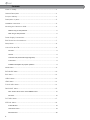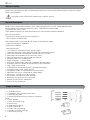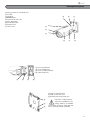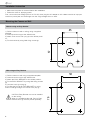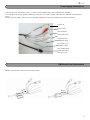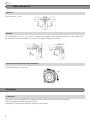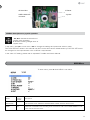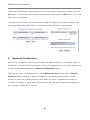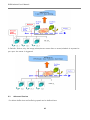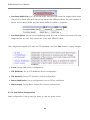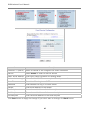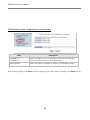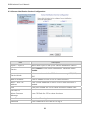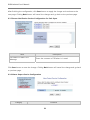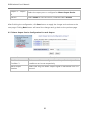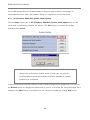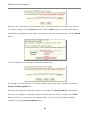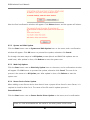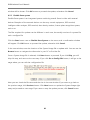
1
DE EN FR PL Full Manual Mega Pixel Network Bullet Camera PXB-2020MIR PXB-2080MIR Contents Notes on Safety.........................................................................................................4 General Description ................................................................................................4 Scope of delivery......................................................................................................4 Description of parts..................................................................................................5 Installation instruction...............................................................................................6 Mounting the Camera on Wall................................................................................6 Without using an Easy Bracket...............................................................................6 With using an Easy Bracket....................................................................................6 Power Supply Connections.....................................................................................7 EMI Ferrite Core Connections................................................................................7 Setup Menu................................................................................................................8 Limit of Pan and Tilt..................................................................................................8 Pan limit..................................................................................................................8 Tilt limit...................................................................................................................8 Inclination limit (Horizontal image alignment).........................................................8 In the menu.............................................................................................................8 SYMBOL descriptions for joystick operation ..........................................................9 MAIN Menu................................................................................................................9 EXPOSURE Menu.................................................................................................. 10 BLC Menu................................................................................................................ 12 HSBLC Menu.......................................................................................................... 13 LENS Menu............................................................................................................. 14 FOCUS ADJ. Menu................................................................................................ 14 DAY/NIGHT Menu.................................................................................................. 15 DAY / NIGHT AUTO menu and IR SMART menu.................................................15 NR menu..............................................................................................................16 PICT ADJ. Menu..................................................................................................... 17 SPECIAL Menu....................................................................................................... 18 D-ZOOM menu ....................................................................................................18 CAM TITLE menu.................................................................................................19 MOTION menu.....................................................................................................20 2 PRIVACY menu....................................................................................................20 PIXEL COMP menu .............................................................................................21 Dimensional Drawings.......................................................................................... 22 Specifications......................................................................................................... 23 Smart Viewer User‘s Manual .............................................................. Appendix A Web Admin User‘s Manual ................................................................. Appendix B 3 Notes on Safety Please also pay attention to the enclosed safety instructions, and carefully read through this instruction guide before initial operation. Important points of advice are marked with a caution symbol. General Description Mega Pixel IP camera which realizes 1.3M, 1280x720(30p/25p) or 2.0M, 1920x1080(30p/25p). Serves real time live view Max 30fps live view @ 1280x720p & 1920x1080p Compatible with Onvif / PSIA Highly detailed pictures can be achieved and color reproducibility deserves attention. With ICR mechanism, - Enhances its sensitivity about 10x at night time - Can accepts the infrared light With 24VAC/12VDC dual power & PoE (Power Over Ethernet) design, - Offers the flexibility of installation - Ensures the reliability Main features are; • 1/3” Panasonic Progressive Scan CMOS imager • 1280x720(30p/25p)/1920x1080(30p/25p) with 1.3MP/2MP Sensor • 16:9 Video format for most popular commercial HDTV monitors • Switchable HDTV standard for EU and US in menu • Auto TDN without focus shift by dual filter switcher • Patented Exact FOCUS setting aid • Smart IR support • Smart 3DNR • NTSC/PAL auxiliary video output for installation & maintenance • Flickerless mode for 50(60)Hz area at US(EU) HDTV standard • Onvif / PSIA Conformance • H.264/MJPEG dual streaming with TI DM365/368 engine • Full duplex 2 way audio, Alarm IN/OUT • Low latency & Max. 16 simultaneous user connection • Max 30fps live view @ 1280x720p & 1920x1080p • SD memory card slot for Local recording • PoE (Power Over Ethernet), IEEE 802.3af • AC24V/DC12V dual type of Local power • External Focus & Zoom Adjustment • One Touch 3 Axis Bracket Scope of delivery • 1x IR Bullet camera • 1x Installation and Operating Instructions • 1x Mounting template • 1x Sunshield panel with fixing screw for sunshield panel • 1x Easy Bracket • 1x 3mm Hex L-wrench ① • 4x Anchors ② • 4x Wall fixing screws ③ • 4x Wrench Bolts ④ • 1x Video Sub-out cable ⑤ • 1x Coupler for RJ45 Cable ⑥ • 1x EMI Ferrite Core ⑦ 4 ① ② ③ ⑥ ⑦ ④ ⑤ Description of parts ⓐ Fixing screw for sunshield (2x) ⓑ IR LED ⓒ Window ⓓ Bracket foot ⓔ Foot mount hole (4x) ⓕ Arm assembly ⓖ Sunshield panel ⓗ Bracket lock ⓘ OSD cover ⓓ ⓔ ⓕ ⓐ ⓑ ⓒ ⓖ ⓙ ⓚ ⓛ ⓜ ⓙ ⓚ ⓛ ⓘ ⓗ Focus adjustment Zoom adjustment Hook for Easy Bracket Cable exits (5x) ⓜ ⓝ Peg for Easy Bracket ⓞ Wall mount hole (4x) ⓟ Bracket foot fixing hole (4x) ⓝ ⓞ ⓟ CAUTION - Easy Bracket cannot be installed on the ceiling. When it is installed on the wall, ⓝ Peg for Easy bracket Hook must be placed upwardly. 5 Installation instruction • Make sure the power is removed before the installation. • Follow the order for applying power. First, connect the low voltage (AC24V or DC12V), then plug the AC adapter to AC outlets to avoid an improper reset from power jitter and a damage from the surge voltage when no load. Mounting the Camera on Wall Without using an Easy Bracket 56 45 76 57 1) Drill the holes on wall or ceiling using a supplied template. 2) Insert the anchors ② to the drilled holes. 3) Match Foot mount Hole (4x) (e) to the drilled position. 4) Fix the bracket by using Wall fixing screws ③. With using an Easy Bracket 56 CAUTION: Easy Bracket can not be installed on the ceiling. When it is installed at the wall, Peg for Easy bracket Hook ⓝ must be placed upwardly. 6 76 1) Drill the holes on wall using a supplied template. 2) Insert the anchors ② to the drilled holes. 3) Match the EASY BRACKET to the drilled position. 4) Fix the EASY BRACKET by using Wall fixing screws ③. 5) Connect hook ⓛ to peg ⓝ. 6) Fix Bracket Foot ⓓ to EASY BRACKET by using wrench bolts ④ through Foot mount Hole (4x) ⓔ. Power Supply Connections Camera can work with either 24AC or 12VDC, dual voltage power and PoE(IEEE Std. 802.3af). It is strongly required the polarity-matched connection for 12VDC supply, otherwise IR LEDs will not operate at night. Primary and secondary grounds are completely isolated to avoid the possible ground-loop problems. AUDIO IN AUDIO OUT AC24V/GND AC24V/DC12V GRN ALM IN / GRNWHT GND BLU ALM OUT / BLUWHT GND LAN CABLE with RJ-45 and PROTECTION CAP EMI Ferrite Core Connections Please connect EMI Ferrite Core as shown below. 50mm 50mm 7 Limit of Pan and Tilt Pan limit Pan is limited to +/- 90°. Tilt limit Tilt is limited to 0°(2°) min ~ 90° max. for wall(ceiling) installation respectively with reference to the ceiling when the inclination of camera module is 0°, that is, the image is aligned horizontally. Inclination limit (Horizontal image alignment) Inclination limited to +/-90° max. Setup Menu In the menu Setup menu can be accessed and controlled by OSD control joy stick on the side of camera. Five commands are available with the joy stick. The design of OSD could be different according to the Model. 8 SD Card Slot IP Reset VIDEO SUB-OUT connector Joystick SYMBOL descriptions for joystick operation ▲,▼,◄,► denotes the directions of Joystick lever operation. ● denotes Pressing straight down of Joystick lever In the menu, use ▲,▼ to move menu, ◄,► to change the settings and press ● to select or enter. FACTORY DEFAULT values in this manual may NOT be the same as the default values by FACTORY SET due to the changes for the improvements or the customer‘s requirements. In the case of IP setting, please refer to separate IP installer and Admin Manual. MAIN Menu To enter menu, press ● when MENU is not active MAIN Factory Default Descriptions EXPOSURE - Sets SHUTTER, AGC, SENSE-UP, BRIGHTNESS, D-WDR, DEFOG, BACK LIGHT. LENS DC Selects DC or MANUAL lens according to the mounted or built-in lens. BRIGHTNESS for both lenses can be set in the menu. 9 FOCUS ADJ. - Helps adjust the exact needle focus by simulating DAY & NIGHT and avoids from out of focus at night. DAY/NIGHT AUTO Sets DAY / NIGHT to EXT, AUTO, COLOR and B/W. EXT – Used when DAY or NIGHT is determined by the external light sensor. Camera with IR LED must be set to EXT. AUTO – Used when DAY or NIGHT is determined by the light level through the lens and DAY from/to NIGHT is switched automatically. DELAY, D-->N and N-->D can be set in the menu.(See DAY/NIGHT AUTO) NIGHT – Removes IR cut filter and switches to B/W regardless of light level. DAY – DAY/NIGHT is disabled and outputs color video. NR - Sets 2DNR, 3DNR, LEVEL, SMART NR.(See 2D & 3D NR) PICT ADJUST - Sets WHITE BAL, SHARPNESS, MONITOR, OSD, CORNER COMP, D-EFFECT. (See PIC ADJUST) SPECIAL - Sets CAM TITLE, MOTION, PRIVACY, LANGUAGE, PIXEL COMP, TV SYSTEM. (See SPECIAL) FACTORY RESET Pressing ● at RESET will restores all parameters from the factory default. EXIT - Saves and Exits. EXPOSURE Menu To enter EXPOSURE menu, press ● at MAIN>EXPOSURE. 10 EXPOSURE Factory Default Descriptions SHUTTER AUTO 1. SHUTTER is recommended to set to AUTO instead of 1/50s (1/60s) for 1.3MP ver. and 1/25s (1/30s) for 2MP ver. if auto iris lens is equipped. 2. Set to FLK (Flickerless mode) if TV system is US but power is 50Hz. The sensitivity will be lower about 30% at low light in FLK mode. 3. AUTO - Shutter varies linearly between 1/50s(60s)~1/50000s for 1.3MP ver. and 1/25s(30s)~1/50000s for 2MP. AUTO shutter mode combined with auto iris lens may extend the dynamic range but it is NOT recommended due to the cause of horizontal colour bar noise for the bright scene under florescent or similar lights. 4. At x2~x30, DSS (Digital Slow Shutter) is operating at the selected frame integration rates regardless of the light level. DC lens must be used for these settings to get a proper video level. 1. SHUTTER should be set to AUTO to get a proper video level with the automatic shutter if a fixed iris lens is equipped. 2. Shutter varies linearly between 1/50s(60s)~1/50000s for 1.3MP ver. and 1/25s(30s)~1/50000s for 2MP. 3. Color rolling or Video level hunting under Fluorescent or similar lighting may occur in this configuration. 4. Any other fixed shutter settings are not recommended with a fixed iris lens. AGC 20 AGC default is 20 and can be set between 1-32. When AGC is equal to or lower than 13, DAY/NIGHT function becomes disabled and changes to COLOR mode forcibly if DAY/NIGHT was AUTO mode. Other DAY/NIGHT mode such as EXT, COLOR, B/W keeps its mode and does NOT change even though AGC is lower than 13. SENS-UP AUTO SENS-UP here stands for the maximum limit of integration rate of frame by DSS (Digital Slow Shutter) operation in the low light. If set to AUTO, maximum integration limit for SENS-UP can be set to x2, x4, x6, x8, x10, x15, x20 or x30 in SENS-UP menu. The integration frames vary automatically within the maximum limit according to the light level when light becomes low and SENS-UP is AUTO. The higher sens-up rate, the higher sensitivity but the slower refresh rate. Some white dots may appear by sense-up due to the long accumulation by a long shutter period. BRIGHTNESS 30 Controls the brightness of video. The higher value, the brighter video. Brightness is adjusted by controlling the iris for the auto iris lens or the shutter speed for the fixed iris lens. D-WDR OFF D-WDR enhances the brightness at dark area of the scene by increasing the the gain partially. White spot noises may increase in the dark area if it is set to too high. DEFOG OFF Enhances visibility at foggy scene. The performance is very limited. This function does not work with the clean scene. BACKLIGHT OFF OFF, BLC and HSBLC are available. (See BLC & HSBLC menus for detail) 11 BLC Menu To enter BLC menu, press ● at EXPOSURE > BACKLIGHT > BLC. BLC (BACK LIGHT COMPENSATION) is useful where a camera is shooting from indoor to outside such as door gate or lobby when the back ground behind the object is very bright. BLC compensates the brightness of the object in the BLC window regardless of other area‘s saturation. BLC Factory Default Descriptions GAIN MIDDLE GAIN is the value how much the object‘s brightness compensates. Higher GAIN compensates the object brighter but other area becomes saturated and noise increases. BLC may not be perfect if the background is varying continuously in bright and dark. AREA – Sets the location and size of window. Too small size of window makes the compensation unstable and results in excessive compensation. Too big size of window results in less compensation. Position and size can be set if pressed at EXPOSURE > BACKLIGHT > BLC > AREA. BLC window has 15x8 blocks and its size and position can be set by a unit of row and column. DEFAULT – Resets the current settings and loads the default for BLC settings BLC OFF 12 BLC ON HSBLC Menu To enter HSBLC menu, press ● at EXPOSURE > BACKLIGHT > HSBLC. HSBLC cuts out and fills the highlighted area with black. The cut out area is excluded in determining the light level by the signal processor. HSBLC has four windows and they can be set independently in size, position, level and etc. HSBLC Factory Default Descriptions SELECT AREA1 Selects a window to adjust out of the AREA 1~4. WINDOW ON ON enables the selected window. Window position and size can be set by pressing > WINDOW > ON. at EXPOSURE > BACKLIGHT > HSBLC LEVEL 50 LEVEL determines the video level that starts cutting out. Lower setting starts the cut out at lower level. The cut out area is masked with black colour. MODE ALL DAY Sets ALL DAY or NIGHT. ALL DAY enables HSBLC regardless of DAY or NIGHT mode. NIGHT enables HSBLC only when camera works in NIGHT mode. BLACK MASK ON Sets ON or OFF of the displaying black mask. DEFAULT – Resets the current settings and loads the default for HSBLC settings. HSBLC OFF HSBLC ON 13 LENS Menu Lens can be selected either DC or MANUAL lens. Lens MUST be set to DC for the best image when DC iris lens is installed. Select Lens mode OUTDOOR or INDOOR according to installation place. Horizontal wave or bar may be seen when MANUAL is selected and the camera is working under florescent or similar lights. FOCUS ADJ. Menu Usually cameras are installed in the day time and they often become OUT OF FOCUS at night time and IN FOCUS again at next day time. This problem can occur at any cameras regardless of types or manufacturers. FOCUS ADJ. menu is the unique and patented feature that prevents from the wrong focus and helps the EXACT NEEDLE focus by simulating DAY & NIGHT conditions. Set zoom first and adjust focus to get NEEDLE FOCUS while switching AT DAY AND NIGHT. Horizontal wave or bar noises may be seen during FOCUS Adj. mode when the camera is working under the fluorescent or similar lights but it is a temporary problem caused by simulating DAT/ NIGHT. FOCUS ADJ. Factory Default Descriptions D/N DWELL 7 ICR switcher switches DAY & NIGHT at the interval of D/N DWELL to help the EXACT NIDDLE focus at DAY and NIGHT mode. Further simulations are performed internally during switching. POP ON CVBS OFF 14 Center area of analog video (NTSC/PAL) through the auxiliary video output is cropped and magnified for an easy focus adjustment. DAY/NIGHT Menu DAY&NIGHT menu can be set to AUTO, COLOR, B/W or EXT. In AUTO, camera determines DAY or NIGHT by the incoming light level through the lens only and IR CUT FILTER switches following the DAY/NIGHT modes. In COLOR, camera disables DAY/NIGHT feature and works as a regular color camera and IR CUT FILTER is inserted to cut out the infrared spectrum from the light. In B/W, camera disables DAY/NIGHT feature and works as a regular B/W camera and IR CUT FILTER is removed to pass the infrared spectrum from the light. In EXT, camera follows the decision for DAY or NIGHT by the light sensor built in the camera. A camera with IR leds must be set to EXT. DAY / NIGHT AUTO menu and IR SMART menu DAY&NIGHT is usually set to AUTO for cameras without IR LEDs while it must be set to EXT for a camera with IR LEDs. Camera determines DAY or NIGHT by the incoming light level through the lens only and IR CUT FILTER switches following the DAY/NIGHT modes. To enter DAY/NIGHT AUTO menu, press ● at MAIN > DAY/NIGHT > AUTO. 15 IMPORTANT!!! DAY->NIGHT and NIGHT->DAY operations must be examined and verified at the final step of the installation. Block the lens for a few seconds for NIGHT mode and release and let it return to DAY mode. If camera stays at NIGHT mode more than 10sec, decrease N-->D(THRES) a little and repeat the fore- mentioned steps. If the scene is too dim or lens iris was adjusted near close, it may not return to DAY. DAY NIGHT AUTO Factory Default Descriptions DELAY 5 DELAY is the duration which should maintain its status before making the D –> N or N –> D switches. Camera checks the light level seamlessly if it crosses over the threshold levels of D –> N (THRES) or N –> D (THRES). To make switching, the state must maintain unchanged for longer than DELAY time. DELAY can avoid the unwanted/frivolous switching by a short term lights such like the light from the passing car. D –> N (THRES) 30 D –> N LEVEL is a threshold level to switch from DAY to NIGHT. Lower value makes camera entered NIGHT at lower light level. TO ENTER NIGHT MODE AT LOWER ILLUMINATION, DECREASE it and vice versa Try NOT to make the gap too small between D –> N (THRES) and N –> D (THRES) LEVEL to avoid the switch repeating. N –> D (THRES) 80 N –> D LEVEL is a threshold level to switch from NIGHT to DAY. Higher value makes camera exited NIGHT at brighter light level. TO EXIT NIGHT MODE AT BRIGHTER ILLUMINATION, INCREASE it and vice versa Try NOT to make the gap too small between D –> N (THRES) and N –> D (THRES) LEVEL to avoid the switch repeating. CAUTION 1) DAY / NIGHT AUTO menu is strongly recommended to be adjusted for the actual object after completing all settings of lens for zoom and focus. 2) If the gap between D-->N(THRES) and N-->D(THRES) becomes too small, it is easy to repeat switching DAY from/to NIGHT. Gap is recommended bigger than 40. If the switching between DAY and NIGHT repeats, decrease D-->N(THRES) and increase N-->D(THRES) a little in turn until the repeating stops. NR menu target in the dark. To enter NR menu, press ● at MAIN > NR. 16 2D&3D NR is a very sophisticated and powerful noise reduction technology at low light. 2DNR reduces noise with the spatial frequency for each field. The effect of 2DNR is limited because too strong reduction in 2DNR results in loss of sharpness. 3DNR reduces noise by time based reduction with the several fields. Too strong 3DNR reduction results in the tail effect of a comet or motion blur for the fast moving 2D&3D NR Factory Default Descriptions 2DNR ON ON enables two dimensional noise reduction. Noise Reduction is effective at low light. 3DNR ON ON enables three dimensional noise reduction. Noise Reduction is effective at low light. Starting or Ending of noise reduction with respect to light level can be set. In 3DNR menu, START THRES sets the point from which level 3DNR starts while the illumination goes dim. Higher setting makes 3DNR started at brighter light level. END THRES sets the point from which level 3DNR stops while the illumination goes bright. Higher setting makes 3DNR ended at brighter light level. DEPTH 80 DEPTH sets the strength of noise reduction for 2D&3D. Higher setting stands for stronger reduction. Too high setting will result in loss of sharpness in 2DNR and the tail effect of a comet in 3DNR. SMART NR ON Camera continuously monitors motion on the screen. When NO motion is detected, 3DNR is automatically activated for the maximum reduction of noise at low light. This will save more HDD in DVR. 3DNR becomes immediately deactivated for the smooth motion capture for the moving target without the tail effect of a comet at low light if the motion is detected. PICT ADJ. Menu In PICT ADJUST menu, WHITE BAL, SHARPNESS, MONITOR, OSD COLOR, CORNER COMP and D-EFFECT can be set. To enter PICTURE menu, press ● at MAIN >PIC ADJUST. PICTURE Factory Default Descriptions WHITE BAL ATW 1.. ATW (Automatic Tracking White balance): WB is performed automatically. 2. AWC –> SET: WB is performed only whenever is pressed. WB stops even though the colour temperature changes. 3. INDOOR: WB is fixed for about 3100K. 4. OUTDOOR: WB is fixed for about 5100K. 5. MANUAL: Adjusts WB with the fixed values of BLUE and RED in MANUAL WB menu. SHARPNESS 42 Increases or decreases the sharpness of the picture. Too much sharpness makes the image harsh and shows more noise and line flicker at the edge of object in the picture. 17 MONITOR LCD Sets LCD or CRT For LCD, GAMMA, BLUE GAIN or RED GAIN is adjustable for the best view with LCD monitor. Low GAMMA compensates the dark area a little but contrast becomes less a little. High GAMMA increases contrast but looses the visibility at dark area. For CRT, BLACK LEVEL, BLUE GAIN or RED GAIN is adjustable. OSD COLOR – OSD color can be set out of 8 colours. Selected colour is applied to menu text and camera title. OUTLINE of OSD is displayed if ON. BACK TABLE is a menu bar where cursor is located and displayed if ON. CORNER COMP ON Enhances the brightness at the corners caused by the lens or the narrow emitting angle of IR LEDs. Picture could be noisy when it is ON. When relatively picture looks noisy, please set it to OFF. D-EFFECT - FREEZE: Image freezes and shows the still image when set to ON. MIRROR:OFF(normal display), MIRROR(Left & right mirrored), V-FLIP(upside down) and ROTATE(H/V-FLIP) D-ZOOM: Possible to digitally zoom the image up to x64. When D-ZOOM is greater than x2.0, digital PAN/TILT can be set. (See D-ZOOM) NEG.IMAGE: If set to ON, Negative image is output and useful to see the negative film. D-ZOOM menu D-ZOOM menu provides PIP window which displays a zoom area out of full field of view. PIP window can be ON/OFF and placed at any position by setting in PAN&TILT menu. D-ZOOM factor is X2 ~ X64 and the zoom area can be scanned by PAN&TILT. In PAN&TILT menu, PIP window can be moved when 'PIP' is displayed at the center of the monitor and a scan area for zoom can be moved when 'D-ZOOM' is displayed at center. 'PIP' to 'D-ZOOM' change can be done by pressing ●. DEFAULT resets all changes in D-ZOOM menu. NOTE When entering to or returning from zoom mode, video mutes about a second to reorganize the video memory and this is not a failure. SPECIAL Menu In SPECIAL menu, CAM TITLE, MOTION, PRIVACY, LANGUAGE, PIXEL COM and TV SYSTEM can be set. To enter SPECIAL menu, press ● at MAIN >SPECIAL 18 SPECIAL Factory Default Descriptions CAM TITLE ON If set to ON, CAM TITLE is displayed on the screen. (See CAM TITLE for detail) MOTION OFF If set to ON, motion is displayed on the monitor by means of digital effect. (See MOTION for settings) PRIVACY OFF If set to ON, up to 8 privacy masks are displayed on the monitor by means of blocks. (See PRIVACY for settings) LANGUAGE ENG ENGLISH, GERMAN, FRENCH, ITALIAN, POLISH, SPANISH, CHINESE I, II, JAPANESE are available. When changing LANGUAGE, select language and press to load new fonts. It takes about 4 seconds to load new language fonts. PIXEL COMP - The defect pixels on the image sensor can be compensated and remapped with this feature. (See PIXEL COMP) TV SYSTEM EU (50HZ) or US (60HZ) Sets US (60HZ) for US HDTV standard or EU (50HZ) for EU HDTV standard. CAM TITLE menu To enter CAM TITLE menu, press ● at MAIN >SPECIAL>CAM TITLE>ON Up to 15 characters from the character table can be input. Use ▲,▼,◀,▶ to move cursor(Blink character is on the cursor position) in the character table. Press ● to select and the selected character will be input and displayed on CAM TITLE input line. To move the input position CAM TITLE input line, press ● on To clear CAM TITLE input line, press ● on CLR on command line. To set the location of CAM TITLE to be displayed on the video, press ● on POS on command line and then menu disappears and CAM TITLE will be displayed on the video. Use ▲,▼,◀,▶ to locate CAM TITLE at the proper position and press ● to fix. Menu will appear again. To finish CAM TITLE menu, press ● on RET on command line. 19 MOTION menu Up to 3 motions detection areas can be programmed in size, position, sensitivity and display on/off. If MOTION in MAIN>SPECIAL menu is set to ON, ‘MOTION’ is displayed on the monitor whenever the motion is detected and the mosaic effect appears on the motioned area if MOTION VIEW is set to ON. To enter MOTION menu, press ● at MAIN >SPECIAL>MOTION>ON. MOTION Factory Default Descriptions SELECT AREA1 Selects the area to be adjusted out of AREA1~AREA3. WINDOW ON ON displays the selected window and enables the motion detection for that area. when WINDOW is ON. ‚POSITION‘ to POSITION and SIZE can be set after pressing ‚SIZE‘ change can be done by pressing . SENSITIVITY 40 Sets the sensitivity how sensitively motion will be detected for the window selected by AREA SELECT. Low value is the most sensitive detection for motion. MOSAIC VIEW ON MOSAIC VIEW setting is applied for all areas. ON enables the mosaic display for the motion area and ‚MOTION‘ warning on the bottom of monitor. OFF disables the mosaic display and displays ‚MOTION‘ warning only on the bottom of the monitor. DEFAULT – Loads the default for MOTION settings. PRIVACY menu Up to 8 privacy mask areas can be programmed in size, position, mask color and display on/off. If PRIVACY in MAIN>SPECIAL menu is set to ON, the masked areas are displayed on the monitor. To enter PRIVACY menu, press ● at MAIN >SPECIAL>PRIVACY>ON. 20 PRIVACY Factory Default Descriptions SELECT AREA1 Selects the area to be adjusted out of AREA1~AREA8. WINDOW ON ON displays the selected window and enables the privacy mask for that area. POSITION and SIZE can be set after pressing when WINDOW is ON. ‚POSITION‘ to ‚SIZE‘ change can be done by pressing . COLOR 2 Sets the colour for mask out of 16 colours. Each area can have its individual colour. DEFAULT – Loads the default for PRIVACY settings. PIXEL COMP menu Usually the image sensors have some defective pixels from the born and they can be compensated digitally by the image signal processor. This menu provides the defective pixel corrections in two ways. LIVE DPC compensates the defective pixels at real time. CAUTION High setting of LEVEL in LIVE DPC can reduce the sharpness. STATIC DPC detects the defective pixels at dark with lens closed and saves their data for compensation. When starting the detection, camera closes the lens automatically and detects the white dot noise exceeding the amplitude defined by LEVEL. However lens cap is strongly recommended for closing lens because some lenses are not closed perfectly by its iris. DEFECT Factory Default Descriptions LIVE DPC AUTO LIVE DPC compensates the defective pixels at real time for whose pixel amplitude exceeds the threshold. AUTO: Enables LIVE DPC and dynamically compensates the defect pixels whose amplitude exceeds the threshold calculated according to AGC. At low light, more defect pixels are compensated because the threshold becomes lower due to high AGC. ON: Enables LIVE DPC and compensates the defect pixels whose magnitude exceeds the threshold set by LEVEL. CAUTION: High setting of LEVEL in LIVE DPC reduces the sharpness OFF: Disables LIVE DPC LIVE THRES --- LEVEL is a threshold for white dot noise level caused by a defect pixel and is effective when LIVE DPC is AUTO and ON. Defect pixels exceeding LEVEL will be compensated and cleared. Lower setting in LEVEL compensates more pixels. STATIC DPC ON STATIC DPC detects the defect pixels at dark with lens closed. The detected pixels are saved for compensation. ON enables the compensation for the detected defect pixels. OFF does not apply the compensation. 21 DO STATIC – Pressing will execute STATIC DPC. Camera closes the lens automatically and detects the defect pixels. CAUTION: Lens cap is highly recommended for closing because the iris of some lens is not closed perfectly. STATIC THR 25 LEVEL is a threshold for white dot noise level caused by a defect pixel and is effective for STATIC DPC only. Defect pixels exceeding LEVEL will be compensated and cleared. Lower setting in LEVEL compensates more pixels up to 1024 pixels but too low setting can‘t compensate the entire image because most of regular noise are detected as a defect pixels at the top area of image and the number of defect pixels are filled with them up to 1024. PIXEL BOOST X4 It is easier to detect with PIXEL BOOST. High PIXEL BOOST rate will show more defect pixels to compensate but too high rate will cause the wrong detection for the regular noise. Dimensional Drawings 277 80 90.4 100 190 16.4 100 107.8 Unit: mm 22 Specifications MODEL PXB-2020MIR PXB-2080MIR Imaging Sensor 1/3” Panasonic Progressive scan MAICOVICON RGB CMOS Total Pixels 1376H x 1070V 2010H x 1108V Effective Pixels 1280H x 1024V 1944H x 1092V Min. Illumination 0.003Lux @B/W, 4x Sense-UP, F1.4, 40Ire Output Video Resolution 1280x720 30p/25p S/N ratio 50dB(AGC off) Day & Night TDN by dual filter switcher, AUTO, COLOR, B/W, EXT Lens support f2.8-10mm DC drive lens LEDs Built-in 40pcs x 850nm Infrared LEDs Protection Rating IP68 Noise Reduction Smart 3DNR, 2DNR Sense-UP 2x~30x White Balance ATW, AWC⇒SET, INDOOR, OUTDOOR, MANUAL Electronic shutter 1/50(1/60) ~ 1/50,000s Function 3DNR, SMART IR, D-WDR, MOTION DETECT, PRIVACY MASK,MIRROR, BLC/HLC, Digital ZOOM, Anti Fog OSD Language ENGLISH, GERMAN, FRENCH, ITALIAN, POLISH, SPANISH, CHINESE I, II, JAPANESE Video Encoding H.264 / MJPEG dual streaming Video Format(max.) 1280x720 Frame Rate 30fps max Exact FOCUS Setting Aid Patented Day/Night simulation & Magnification on Aux. video Connectivity Max. 16 simultaneous user connection SD memory card Standard SD memory card up to 16GB Audio & Alarm 2way full duplex audio & Alarm-IN/OUT PoE IEEE Std. 802.3af Aux. Video Output NTSC/PAL standard, 1Vpp @75Ω terminated Power AC24V +/-20% , DC11.5V~DC30V Operating Environment -40°C ~ 50°C, 30~80% RH, Non-condensing Housing Aluminum Housing Dimension 107.8mm(W) x 100mm(H) x 277(D) 1920x1080 30p/25p 1/25(1/30) ~ 1/50,000s 1920x1080 23 Smart Viewer User's Manual Smart Viewer User's Manual Version 1.1.0.4 eneo 1 eneo Smart Viewer User's Manual Smart Viewer® User’s Manual Document Part Number: V07/2012 Document Version: 1.1.0.5 About This Document This document is prepared for users of Smart Viewer and eneo products supplied by eneo. It is assumed that the users are familiar with Microsoft Windows operating systems and Web browsers such as Internet Explorer. It is also assumed that the users are well aware of how to install and use the network equipment such as LAN, Hub, router, and having basic knowledge of network terminologies. If you have any questions regarding network installations, please contact your network equipment vendor or network administrator or Internet service providers. For updated contents, detailed features and other applications from eneo, please refer to the user’s manual in CD-ROM provided with the product you purchased, or visit eneo’s Internet homepage at http://www.eneo-security.com/. Technical Support For technical support, visit our web site. Web site: www.eneo-security.com/ 2 eneo Smart Viewer User's Manual Index 1. 2. About Smart Viewer ..............................................................................................................................1 1.1. Introduction ................................................................................................................................1 1.2. Key Features ...............................................................................................................................1 1.3. System Requirement for PC ..........................................................................................................1 Installing and Uninstalling ......................................................................................................................2 2.1. 2.2. Installing Smart Viewer ................................................................................................................2 2.1.1. Installing on Web Browser ..................................................................................................2 2.1.2. Manual Installation ............................................................................................................3 Uninstalling Smart Viewer.............................................................................................................4 2.2.1. Uninstalling with Program Menu ..........................................................................................4 2.2.2. Uninstalling on Control Panel ..............................................................................................5 3. Starting Smart Viewer ...........................................................................................................................7 4. Smart Viewer Configuration ...................................................................................................................9 4.1. 5. Video Control........................................................................................................................................9 5.1. Display method ...........................................................................................................................9 5.2. OSD Channels Buttons .................................................................................................................9 5.3. 6. Channel Control Bar (NVS or Network Camera only) .......................................................................9 5.2.1. Saving as Image File ..........................................................................................................9 5.2.2. Saving as Video File ......................................................................................................... 10 5.2.3. Manual Recording ............................................................................................................ 12 5.2.4. Instant Playback .............................................................................................................. 12 Extended Features ..................................................................................................................... 13 5.3.1. Pausing Live Video ........................................................................................................... 13 5.3.2. FPS Control ..................................................................................................................... 14 5.3.3. Image Rotation................................................................................................................ 14 5.3.4. Navigate on Mini Window ................................................................................................. 14 I/O control ......................................................................................................................................... 15 6.1. Audio Control ............................................................................................................................ 15 6.1.1. Getting Audio from Server ................................................................................................ 15 6.1.2. Sending Audio to Server ................................................................................................... 15 6.1.3. Mute Audio...................................................................................................................... 15 6.2. Relay Output Control ................................................................................................................. 15 6.3. P/T/Z Control ............................................................................................................................ 16 7. Control Toolbar ................................................................................................................................... 18 8. Troubleshooting .................................................................................................................................. 19 8.1. Installation ................................................................................................................................ 19 3 eneo Smart Viewer User's Manual 8.2. Server ...................................................................................................................................... 19 8.3. Video........................................................................................................................................ 19 8.4. Audio ....................................................................................................................................... 20 8.5. PTZ Function ............................................................................................................................. 21 8.6. Relay Output ............................................................................................................................. 21 8.7. Others ...................................................................................................................................... 21 4 eneo Smart Viewer User's Manual 1. About Smart Viewer 1.1. Introduction Smart Viewer is an ActiveX program for Internet Explorer web browser, which enable users to control video and audio functionalities of network video devices over the TCP/IP network. Smart Viewer works with SmartNVR network video software, eneo Network Video Servers, Network Video Recorders, and Network Cameras to show real-time live video images and enables users to control audio, Relay Output, and PTZ functions. 1.2. Key Features Displays live video streams transmitted from eneo Servers Plays audio transmitted from eneo Servers Transmits audio from PC with Smart Viewer to eneo Servers Stores live video screen as image files Stores live video streams as video files Controls Relay Output of eneo servers and cameras Controls the PTZ function of supported cameras Displays live videos in full screen mode Supports Flexible Extra System 1.3. System Requirement for PC For best quality and performance, your computer needs to meet the minimum requirement as below. OS: Microsoft Windows XP Pro, Windows 7 Pro CPU: Intel Pentium 4, 2 GHz (Dual-Core or faster is recommended) System RAM: 2GB Video Card: 256MB Ram, 1024x768 Resolution 100 Mbps Network Adaptor 1 eneo Smart Viewer User's Manual 2. Installing and Uninstalling 2.1. Installing Smart Viewer Connect to the eneo Server on Internet Explorer, and click Live View on the main page. Then Smart Viewer will be automatically downloaded and installed. If the Internet connection is not available, it's possible to manually install the program file in advance and connect to the eneo Server later. 2.1.1. Installing on Web Browser Click 'Live View' after access to eneo Server on Internet Explorer. If you're using Windows XP Service Pack 2 or later, the Information message will show up just as below. Click the Information message. If the Information message doesn't come out due to the problems like network failure, you can start the manual 2 eneo Smart Viewer User's Manual installation as shown in the next section. Click the Install ActiveX Control, and the pop-up window will be displayed. After the installation is successfully completed, Smart Viewer window will be displayed. 2.1.2. Manual Installation When the Internet connection is not available or having some difficulties, you can manually download and install the Smart Viewer program file. Execute the downloaded file, and you will see the Smart Viewer Setup Wizard window as shown above. Click the Install button to start installing. The following window will be displayed during the installation. 3 eneo Smart Viewer User's Manual After installation is successfully completed, the following window will be displayed. Click the Finish button. 2.2. Uninstalling Smart Viewer There are two ways to uninstall Smart Viewer program from your computer. Before uninstalling, close all the Internet Explorer windows. 2.2.1. Uninstalling with Program Menu Click the Uninstall and the following window will be shown. Click the Yes button. 4 eneo Smart Viewer User's Manual If the uninstalling is successful, the following window will be displayed. Click OK to finish. 2.2.2. Uninstalling on Control Panel Click Start button on the screen, then select the Control Panel. 5 eneo Smart Viewer User's Manual In the Control Panel window, double-click the Add or Remove Programs icon. You will see the Currently installed programs list. Click Smart Viewer button, and then click Change/Remove button. It will start uninstalling process then. 6 eneo Smart Viewer User's Manual 3. Starting Smart Viewer Once Smart Viewer is installed in your computer, you can start it by connecting to the eneo Server on Internet Explorer and select Live View on the main menu. The appearance of Smart Viewer window varies depending on what type of eneo Server is connected to Network Video Server, Network Camera Server, or Network Video Recorder. Each Smart Viewer window is shown below respectively. Smart Viewer window for Network Video Server or Network Camera 7 eneo Smart Viewer User's Manual Control Tool Bar Displays or hide each control bar. Channel Control Bar Displays or hide channels. Set up the frame rate, video pause, storing images or video, Relay Output control, audio mute, FES data indication. Audio Control Bar Adjust audio control of eneo Server and volume of MIC and Speaker. PTZ Control Bar Control PTZ function. Live View screen Display live view video of eneo Server. OSD Channel Buttons Snapshot, AVI saving, force recording(NVR only), instant playback 8 eneo Smart Viewer User's Manual 4. Smart Viewer Configuration 4.1. Channel Control Bar (NVS or Network Camera only) When the Smart Viewer window is displayed for Network Video Server or Network Cameras, a channel control Bar will be shown on the left of the window. Channel 1 Display or hide the live view video from Channel 1 Channel 2 Display or hide the live view video from Channel 2 All Channel Display the live view videos from all the channels None Channel Hide the live view videos from all the channels Pause Pause the live view video from the chosen channel 5. Video Control 5.1. Display method There are 4 ways to control size of live video screen. Display live view in full screen mode. (Press ESC key to return to normal mode) The video will be displayed as the original resolution. Use the scroll wheel of mouse for zooming in and out. If the video becomes larger than the window size, a small screen is displayed to show location of the window in the video. Pressing the middle button of the mouse (scroll wheel) will display the video in actual size. You can also use +, -, / keys for zoom-in, zoom-out, and original size. If video is smaller than the screen, it is displayed in the original size. If video is larger than the screen, it is adjusted to fit to the screen with the same aspect ratio. Zooming is not supported in this mode. Video will be resized to fill the entire screen. Zooming is not supported in this mode. 5.2. OSD Channels Buttons 5.2.1. Saving as Image File In Smart Viewer, Live video currently displayed can be captured and saved as image file either in JPEG or BMP format. Select the live view video you want save, and click Snapshot button on OSD Channel Buttons. The following window will be displayed. 9 eneo Smart Viewer User's Manual In this dialog box, you see the captured image to be saved. Enter the folder and file name, and click the Save button, then the image will be saved with the name you entered. Note: If live view video is in MJPEG format, the image will be saved as a JPEG file. If the video is in MPEG-4 or H.264 format, it will be saved in BMP format. 5.2.2. Saving as Video File In Smart Viewer, Live video currently displayed can be captured and recorded as a video file in AVI format. Select a live view you want to save, and click Rec Avi button on OSD Channel Buttons. Clicking it again will finish recording. Max duration is 10 minutes and recording will be stopped after 10 min. 10 eneo Smart Viewer User's Manual In video files recorded from M-JPEG format video, the time information file will be generated in SMI subtitle format, which puts time stamp every second. When you play back the recorded video, the time stamp will be displayed as a subtitle on the video screen as shown the picture below. Note: When you play back videos recorded from MPEG-4 or H.264, proper CODEC’s may be required. 11 eneo Smart Viewer User's Manual 5.2.3. Manual Recording Under NVR or network video server and network camera with built-in local storage (microSD), live video can be recorded in the HDD or microSD card. The recorded video can be viewed by Instant Playback feature of OSD Channel Buttons or by running SmartPlayer program. To finish, push the button again. Max duration is 1 minute and recording will be stopped after 1 minute. 5.2.4. Instant Playback For the Products with local storage such as NVR or NVS & NC with Micro SD, the Instant Playback is supported. Clicking the Instant Playback button from OSD menu will open below window. Instant playback will scan the video data up to 1 min before it was executed. And scanned data will be played automatically 12 eneo Smart Viewer User's Manual Set the beginning of video data. Instant playback will scan 1 min after this. Se the playback speed. Begin searching data Playback Reverse playback. 1 frame playback 1 frame reverse playback Pause Stop 5.3. Extended Features When you click the right mouse button on the Live View Window, a pop-up menu will appear for extended features as shown below. 5.3.1. Pausing Live Video Click the Pause button to stop and resume live view video. 13 eneo Smart Viewer User's Manual 5.3.2. FPS Control FPS (Frame per Second) can be controlled only in MJPEG mode. In MPEG4 and H.264 video mode, FPS control is not supported. 5.3.3. Image Rotation By using this feature, you can make mirrored (horizontal) or flipped (vertical) image from the original. 5.3.4. Navigate on Mini Window Mini window helps users to find which portion of entire live view is being displayed. Mini window can be displayed or hidden. Click the right mouse button on the Live View Screen and select the Navigation. 14 eneo Smart Viewer User's Manual 6. I/O control 6.1. Audio Control 6.1.1. Getting Audio from Server To receive an audio transmitted from eneo Servers or cameras, a microphone or audio output should be connected to the Audio-In port. Select a proper channel on Smart Viewer and you will be able to hear the audio on the computer. Note: It is necessary to set up the audio function on the admin page in order to receive audio from eneo Server. 6.1.2. Sending Audio to Server To send an audio to eneo Server, first connect a microphone or other audio source to Audio Input port of your computer. Then select a proper channel on Smart Viewer and click Connect button on Audio Control bar. When an audio connection is made to eneo Server, Disconnected will change to Connected, and it will start sending the audio from PC’s audio input port. To disconnect the audio connection, click the Disconnected button. You can use volume control slider to adjust the audio level. Note: Once a connection is made to eneo Server, audio from it is also transmitted through same network path. So you will get better audio quality if network traffic is not heavy. 6.1.3. Mute Audio Select the Mute Audio from the pop-up menu on the Live View screen. Click it again will restore it to previous condition. 6.2. Relay Output Control By using Relay Output control, you can control external devices connected to eneo Servers or cameras. It can be turning lights on and off, starting alarms, and etc. To control Relay Output, click the right mouse button on the Live 15 eneo Smart Viewer User's Manual View screen. You will see the control on the pop-up menu. The port name is what you assigned at Admin menu in eneo Server. 6.3. P/T/Z Control If eneo Servers have PTZ devices connected to it, you can control them on Smart Viewer. You will also be able to use a Joystick to control PTZ device if your computer has a Joystick connected to it. Connect a PTZ-enabled camera to the eneo Server, go to the Admin menu of the Web page, and then set up the PTZ parameters as described in eneo Server User’s manual. On Smart Viewer, select a channel connected to a PTZ device, and use PTZ Control bar to control it. 16 eneo Smart Viewer User's Manual Speed Adjust the rate of camera motion. It can be between 1 and 16, and higher number is faster. Controls in 8 directions: Up, Down, Right, Left, 4 Diagonals. Adjust zooming. '+' for zoom-in and '-' for zoom-out. Adjust focus. '+' for focus far, '-' focus near. Control Auto Pan for the model supporting Auto Pan feature. Preset Call PTZ Move Mode Move the camera automatically to the preset position as it is configured in PTZ control on eneo Server. Moving cameras in two different modes: Step and Continuous modes. Step mode: Camera moves as much as previously defined each time. This mode is effective for remote cameras with slow network condition. Continuous mode: Camera keeps moving while direction control buttons is pressed. This mode is effective for local camera with fast responsiveness. Provides an extended use of PTZ. Works only with registered Groups and Tours. It can be used for control of camera power, light, AUX1, and AUX2. Assign group numbers at , and run Group. Run Tour with Tour configured. Control the camera power. Turns lights On or Off. Control AUX 1. Control AUX 2. Note: To enable PTZ bar for use, it is required to make PTZ function active in admin page in advance. 17 eneo Smart Viewer User's Manual 7. Control Toolbar You can use Control Toolbar to perform the functions such as displaying or hiding each control bar, displaying live video in full screen mode, alternate displaying between groups, showing the software information, and etc. Display / Hide Channel Control bar. Display / Hide PTZ Control bar. Display / Hide Audio Control bar. Display live view in full screen mode. (Press ESC key to return to normal mode) Display image size as it is. Zoom in/out through mouse scroll is available. Clicking wheel button will show original image size.(keys such as “+”,”-“, “/” can be used) Fit the live view size to window size. Zoom in/out will not be supported in this mode. Full screen mode. Zoom in/out will not be supported in this mode. Redraw the live video after median calculation if it’s smaller than the original size. (Turing on this feature will increase CPU usage) Display the version information of Smart Viewer. (FES version and type will be also shown if installed) 18 eneo Smart Viewer User's Manual 8. Troubleshooting 8.1. Installation Q) I can't start installation of Smart Viewer when I connect to eneo Server and click Live View. A) The Internet connection is not available. Manual installation is required. Q) It stopped during the installation showing the message 'Process is being used'. A) Close all the Internet Explorer windows running, and try installing again. Q) 'Reboot system' message is displayed after installation is finished. A) Smart Viewer was being used in another Internet Explorer during installation. Reboot is required. Q) After installation is finished, it requires me to install Smart Viewer again. A) It is the case when Smart Viewer program was updated. Install Smart Viewer again. Q) I still can't install Smart Viewer despite the Internet connection is available. A) It is cause by deleting any part of Smart Viewer. Uninstall and reinstall Smart Viewer. 8.2. Server Q) It shows a message saying that ‘Failed to retrieve server information from Smart Viewer or unauthorized user access.’ A) Make sure the followings: The access to eneo Server is good on Internet Explorer. At least one camera is authorized for video viewing. At least one remote server is registered if you’re running a network video record without a local camera. 8.3. Video Q) I can't see live view on screen. A) Make sure that at least one camera is registered in groups of network video recorder. Also check whether Channel Hide button is pressed. If so, select the channel to see. Q) ‘Connecting’ or ‘Disconnected’ message is displayed during live view. A) It may be caused by either the network is not available or eneo Server is turned off or rebooting. Check if the network is working properly and eneo Server is turned on. If you still see the same message while the network is good and the power is on, try rebooting the eneo Server. 19 eneo Smart Viewer User's Manual Q) ‘Extra users’ message is displayed in live view. A) It is displayed when there are excessive numbers of users viewing the video. You will be able to see the video when any of current users disconnects from the server. Q) 'No Signal' is displayed in live view. A) Camera may be disconnected to eneo Server. Connect a camera to eneo Server. Q) Frame rate of live view is getting low. A) It is caused by slow network. Improve the network condition or cancel the real-time monitoring of vaccine program if installed. Q) Only live view is displayed without Internet Explorer. A) Click ESC key to escape from Full Screen mode in Smart Viewer. Q) I can't save images. A) Make sure you have the permission to the folder. And check if you have enough space in hard drive. Q) I can't save videos. A) Make sure you have the permission to the folder. And check if you have enough space in hard drive. Q) Video recording stopped by itself. A) Video can be saved up to 10 minutes. It automatically stops recording if it exceed the 10 minutes. It also stops recording when image size is modified, video codec is changed, or video input is removed. For network video recorders, video input is removed when it is moved to other group. For network video servers or cameras, video input is removed when the channel button is pressed. 8.4. Audio Q) Audio is not played. A) First check if Audio-In port is connected to an audio source, and then select the camera linked to the Audio-In port on Smart Viewer. Check if Mute is activated. Check if the computer has the sound card driver properly installed. Also check the level of speaker volume. Q) I can't send audio to eneo Server. A) Sending audio from Smart Viewer to eneo Server is only allowed to the user who used that feature for the first time. Any other user can only receive audio from the server. Check if the computer has the sound card driver properly installed. Also check the level of speaker volume 20 eneo Smart Viewer User's Manual 8.5. PTZ Function Q) PTZ Control bar is not activated. A) Connect to eneo Server, and make sure PTZ set up is properly done on Admin menu. Q) Clicking PTZ buttons doesn’t work. A) When network condition is not good enough, there may be some latency time in camera movement. Try Step Mode if Move mode is currently set to Continuous. Q) Advanced features for PTZ don’t work. A) Advanced features are only available for the supported cameras. Make sure the PTZ camera in use supports the advanced features. 8.6. Relay Output Q) Relay Output button won’t be activated. A) The second channel of Dual Stream can be controlled only after Primary channel is set up for Relay Output control. Also make sure that eneo Server is connected to the network. Q) Relay Output button won’t work. A) Make sure that eneo Server is connected to the network. 8.7. Others Q) An error occurs if Internet Explorer is closed while Smart Viewer is working. A) It can be caused if you’re using Internet Explorer 6.0 together with Skype or FlashGet. You can work around the issue by uninstalling Skype or FlashGet, or disable them in Internet Explorer’s menu Tools > Manage Add-ons. Also it can be resolved by upgrading to Internet Explorer 7.0 or later. 21 eneo Web Admin User’s Manual Version 4.15 ENEO Admin User’s Manual Index 1. 2. 3. 4. Admin Menu of eneo Servers ....................................................................................................................... 6 1.1. Entering Admin Menu .................................................................................................................... 6 1.2. Admin Menu Structure ................................................................................................................... 7 Quick Configuration .......................................................................................................................................... 9 2.1. Step 1: Changing Server Name ................................................................................................ 10 2.2. Step 2: Time Setup ......................................................................................................................... 11 2.3. Step 3: Network Setup ................................................................................................................. 11 2.4. Step 4: IP-CCTV DNS..................................................................................................................... 11 2.5. Step 5: Recording Configuration for eneoNVR series.................................................... 11 2.6. Finish..................................................................................................................................................... 11 System Configuration Menu ........................................................................................................................ 12 3.1. Server Name Setup ........................................................................................................................ 12 3.2. Date & Time ...................................................................................................................................... 13 3.3. Admin Password .............................................................................................................................. 13 3.4. Access Control .................................................................................................................................. 14 3.5. User Registration ............................................................................................................................. 15 3.5.1. Add ............................................................................................................................................... 15 3.5.2. Edit ................................................................................................................................................ 16 3.5.3. Delete .......................................................................................................................................... 17 Network Configuration................................................................................................................................... 17 4.1. Network Configuration ................................................................................................................. 18 2 ENEO Admin User’s Manual 5. Static IP Configuration ......................................................................................................... 18 4.1.2. DHCP Client Configuration ................................................................................................ 19 4.1.3. PPPoE Configuration............................................................................................................. 19 4.2. Network Ports ................................................................................................................................... 19 4.3. Bandwidth Control Configuration ........................................................................................... 20 4.4. View Network Status ..................................................................................................................... 21 4.5. Network Status Notify .................................................................................................................. 22 4.6. IP-CCTV DNS Setup ....................................................................................................................... 24 4.7. Port Forwarding & UPnP ............................................................................................................. 25 4.8. RTP/RTSP Setup ............................................................................................................................... 26 4.9 SNMP Setup for Cameras ........................................................................................................... 26 Device Configuration ...................................................................................................................................... 29 5.1. 6. 4.1.1. Serial Ports ......................................................................................................................................... 29 5.1.1. Serial Input Mode .................................................................................................................. 29 5.1.2. Serial Output Mode .............................................................................................................. 32 5.1.3. Transparent Mode ................................................................................................................. 32 5.2. Privacy Zone ...................................................................................................................................... 33 5.3. Camera & Motion........................................................................................................................... 34 5.4. DI (Sensor Input) / DO (Alarm Output) ................................................................................ 40 Advanced Configuration ................................................................................................................................ 42 6.1. Advanced Services .......................................................................................................................... 43 3 ENEO Admin User’s Manual 7. 8. 6.1.1. E-mail Service Configuration............................................................................................. 39 6.1.2. FTP (Buffered) Service Configuration ............................................................................ 43 6.1.3. FTP (Periodic) Service Configuration ............................................................................. 45 6.1.4. Sensor Notification Service Configuration .................................................................. 47 6.1.5. Sensor Notification Service Configuration for Each Input................................... 48 6.1.6. Alarm Output Service Configuration ............................................................................. 49 6.1.7. Alarm Output Service Configuration for each Output .......................................... 49 Recording Configuration ............................................................................................................................. 58 7.1 SD Configuration ............................................................................................................................ 58 7.2 Recording Configuration............................................................................................................. 58 7.3 View Recording Profile ................................................................................................................. 70 7.4. Recording Mode.............................................................................................................................. 71 7.5. SD Status Report ............................................................................................................................. 72 7.6. Clear Recording Configuration ................................................................................................. 74 7.7. Delete Recorded Data .................................................................................................................. 74 Utilities ................................................................................................................................................................... 75 8.1. System Log ........................................................................................................................................ 75 8.2. Save Configuration ......................................................................................................................... 76 8.3. Reboot ................................................................................................................................................. 76 8.4. Factory Default ................................................................................................................................. 77 8.5. System Update ................................................................................................................................. 78 4 ENEO Admin User’s Manual 8.5.1. All (Firmware, RAM disk, System, Web) Update ...................................................... 79 8.5.2. System and Web Update ................................................................................................... 81 8.5.3. Web Only Update .................................................................................................................. 81 8.5.4. Sensor Device Driver Update............................................................................................ 81 8.5.5. Flexible Extra system............................................................................................................. 82 Admin User’s Manual Document Part Number: V07/2012 Document Version: 4.15 About This Document This document is prepared for users of eneo products supplied by eneo. It is assumed that the users are familiar with network equipment such as LAN, Hub, router, and having basic knowledge of network terminologies. If you have any questions regarding network installations, please contact your network equipment vendor or network administrator or Internet service providers. For updated contents, detailed features and other applications from eneo, please refer to the user’s manual in CD-ROM provided with the product you purchased, or visit eneo’s Internet homepage at http://www.eneo-security.com/ Technical Support For technical support, visit our web site. Web site: www.eneo-security.com/ 5 ENEO Admin User’s Manual 1. Admin Menu of eneo Servers After connecting to a eneo server on the web browser, you’ll find the web page as shown below. The rightmost item of the menu is Admin, where you can set up the most of features in the eneo Server you’re connecting to. 6 ENEO Admin User’s Manual 1.1. Entering Admin Menu Click Admin item of the menu, then you’ll see a login window. In the login window, enter root for both ID and password as they are the factory defaults. Press Enter key or click OK button. Once logged in, you can change the password to a new one. Now the Admin Menu will be displayed as shown below. This will guide you to the top level menu items, which are Quick, System, Network, Device, Advanced, Recording, and Utilities. Clicking any of these top level menu items will display submenu items and brief descriptions. 1.2. Admin Menu Structure The following table shows the hierarchy of the Admin menu structure that we’re going to deal with in this manual. 7 ENEO Admin User’s Manual Category Main Menu Level 1 Sub-Menu Level 2 SubMenu Step 1 Step 2 Quick Step 3 configuration Step 4 n/a n/a n/a n/a n/a n/a Step 5 Finish Server Name System Configuration Date & Time Admin. Password Access Control User Registration Network Configuration Network Ports Bandwidth Control Network Configuration View Network Status Network Status Notify IP-CCTV DNS™ Port Forwarding & UPnP RTP/RTSP SNMP Serial Input Mode Serial ports n/a Transparent Mode Device Configuration Serial Output Mode Privacy Zone Camera & Motion n/a Camera Control Motion Detection 8 n/a n/a ENEO Admin User’s Manual Primary stream Secondary stream DI/DI DI Status / DO Control Camera 1 n/a n/a n/a E-mail FTP(Buffered) FTP(Periodic) Sensor Notification Advanced Advanced Services Configuration (Network cameras) Alarm Output Camera 1 Camera 2 Camera 1 Camera 2 Camera 1 Camera 2 Camera 1 Camera 2 Camera 1 Camera 2 Camera 1 Sensor Notification Camera 2 Camera 3 Camera 4 Camera 1 Alarm Output Camera 2 Camera 3 Camera 4 SD Configuration SD Status & Format SD Information n/a Camera 1 Built-in Module 0 Recording Configuration Recording Camera 2 Camera 3 Camera 4 Configuration Built-in Module 1 (registered cam) 9 Camera 1 Camera 2 Camera 3 ENEO Admin User’s Manual Camera 4 Recording Profile Recording Mode SD Status Report Clear Recording n/a n/a n/a n/a Config. Delete Recorded Data System Log Save Configuration Utilities Reboot Factory Default System Update 2. Quick Configuration In Quick Configuration, you will be able to set up many of the essential parts of the configuration in a simple manner without going into details. Selecting Quick Configuration gives you the menu as below. You can perform each setup by clicking the one you would like to configure. 2.1. Step 1: Changing Server Name Click Server Name on System Configuration menu, then Server Name Setup windows will be displayed. See the section 3.1 Server Name Setup in page 11 to see how to change the server name. 10 ENEO Admin User’s Manual 2.2. Step 2: Time Setup Click Date & Time on System Configuration menu, then Local Date & Time Configuration window will be displayed. See the section 3.2 Date & Time in page 11 to see how to set up. 2.3. Step 3: Network Setup To make a connection to the Internet, it is required to figure out the type of the Internet service you’re using. See the section 4.1 Network Configuration in page 18 to see how to set up. 2.4. Step 4: IP-CCTV DNS When eneo Server is used in a Dynamic IP environment, it is required to utilize IP-CCTV DNS feature. See the section 4.6 IP-CCTV DNS Setup in page 24 to see how to set up. 2.5. Step 5: Recording Configuration for eneo Each camera can be configured for recording option in this section. 2.6. Finish (Save configuration) You need to save all the changes to the Flash Memory after finishing the configuration. The changes made to eneo Server will be permanent by this step. Click Finish on Quick Configuration menu. Click Save Configuration button. This will write the new settings to the system’s flash memory. If you don’t want to save them, click Back button. 11 ENEO Admin User’s Manual 3. System Configuration Menu When you click on System Configuration item on Admin Menu, the following sub menu will be displayed. 3.1. Server Name Setup Click Step 1 on Quick Configuration, then the following will be displayed and you will find out the system information such as model number of the eneo Server, server name, MAC address (serial number), firmware version, and Web image version. As an administrator, you can change the name of the server name, but other values are not allowed to change. To change the server name, enter a new server name in the Server Name filed. You may use up to 21 alphanumeric or up to 10 Unicode characters. Tab or any other special characters are not allowed. Click Apply button to save the setting and it will take effect immediately. 12 ENEO Admin User’s Manual 3.2. Date & Time Click Step 2 on Quick Configuration. Fill the Date and Time fields with your local time and date information. If you're in a different time zone, put a checkmark on Change Time Zone, then select the correct region from the list box. To take the time zone change in effect, you need to click Apply button and reboot the system. If you only changed Date and Time setting, simply click Apply button to take it into effect immediately. If you want to retrieve the exact current time from NTP server on the network, click Get NTP Server Time button. Clicking Refresh button will display the date and time Note: In order to retrieve Time and Date information from a NTP server, you need to put NTP server address in advance of setting up, such as pool.ntp.org. retrieved from eneo® Server. Then click Apply button to save it. 3.3. Admin Password To change the password for the administrator, click Admin Password on System Configuration menu. 13 ENEO Admin User’s Manual Default ID for admin account is fixed as “root” and not allowed to change. In Old Password field, enter the current password. In both New Password and Confirm Password fields, enter the same new password. The password must be between 4 and 23 alphanumeric letters. Click Apply button to put it into effect. Because you have replaced the password with a new one, the existing network connection made with old password to eneo Server is lost now. You will have to reconnect to the eneo server using new password. 3.4. Access Control Click Access Control on System Configuration menu. The following windows will be displayed. From the Access Permission window, select either one you would like to use. Click Apply button to save the change. Full Access: Any user can access the server and use all the features without limit. Limited Access: Only registered users can access the server and have limited privileges. 14 ENEO Admin User’s Manual 3.5. User Registration You can add, modify, or delete users for your eneo Server here. Once registered as Limited Access setting, the user can access the eneo Server with some limited privileges. 3.5.1. Add When Add is selected, you can add users and define their passwords, names, and access permission levels respectively. To add a user, click User Registration on System Configuration menu. Next, select Add, then the User Registration (Add) selection screen will be displayed. Enter a user ID, which must consist of up to 23 alphanumeric characters. In both Password and Confirm Password fields, enter the identical password respectively. The password must be between 4 and 23 alphanumeric characters. In Name filed, enter the user’s name that must be up to 31 alphanumeric or 15 Unicode characters. Now select one of the four items from System Resource Access Permission, which defines the permission level for registered users to the eneo server. All Channels Access: User can use all the features except for Configuration in Admin Page. General Access (only live viewing access): User can use only use Live View feature. No Access: User is not permitted of any of the features. Selective Access: User is allowed to use only the selected features. With this item selected, user can now configure the details under the menu. 15 ENEO Admin User’s Manual eneo Server can have multiple VS modules registered in it. When user ticks on any of Enable checkboxes, other fields in that row are enabled to select. VS Module ID: The registered user can select VS Modules that are available. (VS Module is a network device that has been registered in eneo® Server) Camera No.: Among the cameras of VS Module, select one to set up. (between 1 and 4) Alarm Control: Determine if Alarm control is to be allowed. PTZ Control: Determine if PTZ Control is to be allowed. Audio Control: Determine if Audio Control is to be allowed. Playback: Determine if searching can be done by recording conditions. After finishing the registration process, click Apply button to add the user. 3.5.2. Edit To edit a user account, select Edit. In this part, you can modify the existing user’s name, password, and access permission. User ID is not allowed to change. Once selecting a user ID for edit, the usage is the same as in Add section. 16 ENEO Admin User’s Manual To see existing users, click Select User ID, and select a user to be edited. Then change the password, name, or access permission, and click Apply button to save the setting. Setup of Access Permission can be done the same way as in Add section. 3.5.3. Delete To delete an existing user, select Delete. From the list of the users, select a user to delete. Click Delete button to confirm the deletion. 4. Network Configuration Configuration the network is dependent on how an IP address is assigned in Ethernet-based environment, which is static IP, dynamic IP (DHCP), or PPPoE. For wireless LAN, additional configuration is necessary to have a connection with wireless AP. In the case of wireless models, users have to choose between wired or wireless connection. In other words, both connections can’t be used at the same time. The way how to choose one of them is whether wired LAN cable is plugged into the product. When LAN cable is plugged in for longer than 5 seconds, the wired LAN is activated for data transmission. If LAN cable is unplugged more than 5secconds, wireless LAN is activated instead. If PPPoE is selected by user, wired LAN will be activated regardless of condition of LAN cable. For network configuration, select Network configuration from Admin page. 17 ENEO Admin User’s Manual To make a connection to the Internet, it is required to figure out the type of the Internet service you’re using. Depending on the service type, the network configuration can be in any of Static IP, DHCP Client, or PPPoE. You need to set up the eneo Server according to your network type. 4.1. Network Configuration 4.1.1. Static IP Configuration Selecting Network Configuration under Network configuration will show variables. Below picture is for products without wireless LAN. For static IP, select static IP and input values for IP address, NetMask, Gateway, DNS1, DNS2 and click apply for saving settings. After apply, program will ask closing web brower for updates, which will take 20~30 seconds. If Back button is pushed while configuration, all values will be discarded. If Refresh button is pushed, the program will load previous values. 18 ENEO Admin User’s Manual 4.1.2. DHCP Client Configuration For DHCP, DHCP server must exist in the network environment. Select DHCP Client from Network Configuration, click Apply. 4.1.3. PPPoE Configuration PPPoE is used to connect eneo products to PPPoE modem provided by ISP. Since PPPoE needs verification, ID and password are necessary to access network. Type ID and PW. 4.2. Network Ports In this configuration, you set up the HTTP port for eneo Server to communicate with the Client PC. HTTP Port is the network port that is used when a Client PC connects to the eneo Server’s Web page. It can be 19 ENEO Admin User’s Manual assigned between 80 and 65535 and the default value is 80. Note: If the HTTP port number is changed to other value than default (80), make sure the new HTTP port number goes together with the eneo Server's Internet address. For example, when eneo's IP address is 192.168.1.10 and set the HTTP port to 8080, you will have to enter http://192.168.1.110:8080 to connect to the server. 4.3. Bandwidth Control Configuration Bandwidth control is for limiting maximum network traffic. If it is enabled with certain limit, maximum data size transferred from eneo products won’t exceed bandwidth limit set by users. If transferred data is exceeded, part of data will be randomly lost If multiple users try to access a eneo product which bandwidth control is enabled, users connected to the eneo product will share network bandwidth limit. 20 ENEO Admin User’s Manual Note: This bandwidth control feature works fairly well in M-JPEG video transmission. But, for MPEG-4 and H.264, dropping data packets may cause low quality of video, so it is recommended to utilize CBR and frame rate control instead of bandwidth control for MPEG-4 and H.264 video. Note: Network Bandwidth control is managed by eneo Server and it drops any data packets if required, thus you may experience slow connection to the server when the feature is enabled. 4.4. View Network Status This menu shows network status of eneo products. Wireless LAN status will be added for wireless models. 21 ENEO Admin User’s Manual 4.5. Network Status Notify This feature helps to send updated network status information to registered email address if any changes happen. This function will work under DHCP or PPPoE. If Network Status Notify is set to Enable, eneo Server’s network status will be emailed to a specific person in case of the following events: When it is set to Dynamic IP on Network Configuration menu, and the eneo server has been given a new dynamic IP address and connected to the network. Or, When it is set to PPP Client on WAN-Modem menu, and the eneo server has been connected to the network with ISP or PPP server. To configure, click Network Status Notify on Network Configuration menu. The following window will be shown. 22 ENEO Admin User’s Manual First, select Enable to use the feature. Then enter the address of the SMTP server which is needed for email service. If your SMTP server requires a user ID and a password for authentication, you will have to get them from ISP or network admin. Enter the ID and password. In Sender field, enter your email address or other meaningful words that will show the message was sent from the eneo server as a notification. Now enter the email addresses of the recipients in the Recipient fields, up to 3 persons. In the User-Defined Message box, you may put a message to explain why the message was sent. After finishing the setup, click Apply to save settings. Mail Notification SMTP Server Enable: Send email Disable: Do not send email SMTP Server address for email service Enable: user ID and password are required for SMTP Authentication Login server Disable: user ID and password are not required User ID User ID for SMTP server 23 ENEO Admin User’s Manual 4.6. Password Password for SMTP server Sender Email address of Sender 1st / 2nd / 3rd Recipient Email Addresses of the Recipients (up to 3 persons) User Defined Message Message to be included in the Notification email IP-CCTV DNS Setup IP- CCTV DNS service provides a static & public domain name to help users access eneo products even though their IP address is changed or they are used in local network. For proper function of IP-CCTV DNS service, products should be accessible through internet. To use IP-CCTV DNS, users have to create ID from IP-CCTV DNS server(http://www.ipcctvdns.com) and register eneo products with MAC address and Product Key. Those information can be found from IP-CCTV DNS Setup menu. Enable service and click Apply. If it is configured properly, you can check the result by clicking Confirm button. . Note: Refer to IP-CCTV DNS™ User’s Manual for further details of the configuration. 24 ENEO Admin User’s Manual 4.7. Port Forwarding & UPnP UPnP(Universal Plug and Play) is a kind of network protocol to help users to find and configure network products in same local network area. Port forwarding is to assign a certain network port to a network product Proper so as users can access it from outside of Local Area Network. Generally, port forwarding can be configured from network router. UPnP port forwarding is made up with finding available network port, assigning it to a eneo product and reporting overall network configuration of a eneo product to IP-CCTV DNS server. Users have to register products to IPCCTVDNS server and IP-CCTV DNS service should be enabled. There are 3 options in UPNP Port Forwarding. Manual: User Assigned Port is used when users can access network router(hub) and manually assign available network port to eneo products. In this case, users have to type already-assigned network port under User Assigned port UPnP: User Assigned Port is used when users want eneo products to configure port forwarding menu of network hub with user-assigned network port. If it fails, try to change user-assigned port UPnP: Auto Selected Port is used to let eneo products deal with all network configuration automatically.. Please notice that network router should support UPnP Port Forwarding and there is a limit for maximum UPnP devices. If it is properly configured, results will be appeared under UPnP status. 25 ENEO Admin User’s Manual 4.8. RTP/RTSP Setup for Cameras RTSP (Real-Time Streaming Protocol) is a protocol to transfer video and audio stream over the network. Any application supporting Standard RTSP can be used for eneo server. Quick Time Player or VLC program can be used for this, but it may not be supported in the environment within firewall. There are two types of usages, one for Unicast address condition and the other for Multicast address condition. For Unicast Address: Use “rtsp://network video server ip address/cam0_0”. If there are multiple channels, use cam0_x, x (0~3) with each number applied. If there are multiple modules, use camx_0 x (0 ~ 3) with each module number applied. 26 ENEO Admin User’s Manual For Multicast Address: Use “rtsp://network video server ip address/mcam0_0”. If there are multiple channels, use mcam0_x, x (0~3) with each channel number applied. If there are multiple modules, use mcamx_0 x (0 ~ 3) with each module number applied. Service Enable: Start RTSP service Disable: Stop RTSP service In normal case, use default port number 554 to connect to RTSP service. If not using port 554, enter the port number you want to RTSP Port use. e.g.) port number 445==> rtsp:// network video server ip address:445/cam0_0 RTP Start Port The starting number of the port for video transfer. Each time video transfer connection is made, the port number also increases. 27 ENEO Admin User’s Manual Multicast Address for multicast video transfer. Address The multicast address 0.0.0.0 is for stopping multicast. Multicast Port Port number for viewing the video with a multicast address To use ONVIF protocol, RTP/RTSP must be enabled. 4.9. SNMP Setup for Cameras SNMP (Simple Network Management Protocol) is a protocol to monitor and configure network status of a network device. SNMP V1 and V2 are supported over MIB2 standard, and few functions are not supported. SNMP Trap can function when SNMP V1/V2 is enabled. SNMP V1/V2 Trap Destination IP Address Trap Community Available Traps Enable: Start SNMP service Disable: Stop SNMP service Enable: Start SNMP Trap service Disable: Stop SNMP Trap service IP Address to receive SNMP Trap messages. Key value used in SNMP Trap e.g.) public Type of SNMP Trap message 1. Cold Start : When SNMP starts 2. Authentication Failure : When key value of SNMP query 28 ENEO Admin User’s Manual is wrong 5. Device Configuration You set up the connection between eneo Server and the camera in this part of configuration. That includes Video data, external devices, Input / Output, Alarm control, and etc. 5.1. Serial Ports There are two serial ports configurable in the system, COM and AUX. COM port is primarily used for console, and AUX is for PTZ control, but they both can be used for other purposes when necessary. 5.1.1. Serial Input Mode When serial ports are in Serial Input Mode, eneo Server can be triggered by the external sensors to send images from the camera by email, or FTP. It can also activate Alarm Output by input from sensors inputs. For example in a real life, if a dam’s water level comes to a predefined value, the server can send the images of the dam’s water level meter from cameras. Another example is, when a car running on highway exceed the speed limit, it can send the picture of the car. To configure, click Serial Ports on Device Configuration. In COM Port or AUX Port, select Serial Input and click Apply button to apply the change. The system will reboot then. 29 ENEO Admin User’s Manual After rebooting, open the Serial Ports window in Device Configuration menu again. Select the Serial Input Mode, then the Serial Input Mode Configuration windows will be displayed as shown below. Current Port: This shows the name of the port currently configured. Current Protocol: This shows the protocol being used. (only RS-232 can be displayed) Note: If additional sensors need to be added, it will require installation of the device drivers. Serial Input Model: You can select the sensor’s model number to use for Serial Input. The following example is when a speed sensor is selected. 30 ENEO Admin User’s Manual Upper Limit: The highest value in the range to assign Lower Limit: The lowest value in the range to assign Initial String Length: The length of initial string from sensor Initial String Data: The initial string from sensor (Speed) Delay: select Enable if sensor input needs delay Internal process delay: The amount of delay for sensor input Sensor Aiming Position: The position for sensor to aim Camera Aiming Position: The position for camera to aim Add Vehicle length to calculate delay time: The length of vehicle for applying delay time 31 ENEO Admin User’s Manual 5.1.2. Serial Output Mode Using Serial Output Mode, you can send UART device commands to eneo® Server in order to control PTZ devices, Multiplexer, Access control box, X10 Protocol, z256 protocol by RS-232 or RS-485/422 communication. In the picture below, serial output mode can be selected among By-Pass, X10, or Z256. 5.1.3. Transparent Mode When there are two eneo Servers present on the network, they can act like a transparent interface between two different UART devices so that the communication between the UART devices can be made transparently without a flaw. Line Mode: The type of communication protocol 32 ENEO Admin User’s Manual Baud Rate: Data transfer rate Data Bit: The number of bits in data Stop Bit: The number of stop bit Parity Bit: Parity bit characteristic Network Protocol: The type of protocol used to send data Peer IP: IP address of other eneo server Network Port: Network port number of the server Data Start Pattern: Data start pattern (Not used if unchecked) Data Size: Data size in single transfer (Not used if unchecked) 5.2. Privacy Zone Users can set a privacy zone if a certain part of the screen needs to be unmonitored. To set the region, click Privacy Zone from Device Configuration category. 33 ENEO Admin User’s Manual Privacy zone is marked with a rectangular shape. When you click New button, red-colored box will pop up and users can change its size and location. After that, click Apply button which will make box to green-color and finish the configuration. Users can define the Privacy zone as many as 8 parts of the screen. If you add more than 8, an error message will pop up on the screen. To delete a privacy zone, click the zone and click Delete button followed by Apply button. 5.3. Camera & Motion This menu is used to set up the selection of video format, data added to video data, encoding speed, audio control, image resolution, video quality, motion detection, and etc. Click Camera & Motion on Device Configuration menu. The configuration menu will be displayed, and it may be different between eneo models. H.264: In this format, each frame data is related to other nearby frames. For this reason, it provides much higher compression ratio than M-JPEG and is adequate for video transfer. However, if network condition is not very good and having dropped frames in video data, the video quality can be relatively low. With eneo server, you can set the number of Pframes in the video which is independent still images between I-frames. 34 ENEO Admin User’s Manual M-JPEG: This format requires much higher network bandwidth than H.264 compression. But because of its higher quality of still image, it is adequate for detailed reviewing of stored video. Note: For Dual Stream products, the most of parameters are dependent on primary stream value. 5.3.1. Camera & Motion You can configure the video data format and other information to be contained in it. Video with Flexible Extra System data: If Enabled, video data will contain Flexible Extra Data from COM port. Video with user defined message: If Enabled, video data will contain the user-defined data. (Reserved Field) 35 ENEO Admin User’s Manual Video with PPP status: If Enabled, video data will contain PPP connection status. Video with camera name: If Enabled, video data will contain the camera name. Video with server name: If Enabled, video data will contain the server name that you defined. Video with IP address: If Enabled, video data will contain the IP address of the video server. Audio: Select if Audio function is to be used (applies to Primary Stream only). eneo Server provides 2-way audio streaming by combining microphone input with video data. Users can listen to the streamed audio on PC speakers. Frame Rate: For Primary Stream, this is the number of frames compressed in every second. You can control the network traffic with this parameter. For Secondary Stream, it can be set to manner of 1/2, 1/4, 1/8... of the primary stream. Image Size: Select the resolution of each channel’s video Encoding Standard: Select the compression method of each video, either M-JPEG or H.264 format. It is not allowed to set both channels to M-JPEG. To save the setting, click Apply button. Camera Configuration On the lower part of Camera & Motion Configuration menu, select a channel to configure. In the example shown below, Primary Stream is set to M-JPEG, and Secondary Stream set to H.264 for compression format. Enter detailed parameters of the camera selected here. 36 ENEO Admin User’s Manual Camera Name: Enter the name of the channel in up to 21 alphanumeric or up to 10 Unicode letters. Image Quality Setup 37 ENEO Admin User’s Manual H.264 Rate Control Mode: VBR (Variable Bit Image Quality: one of 6 quality levels Rate) (Low Compression / Highest / High Video frames are encoded with selected Normal / Low / Lowest) image quality and GOP. Encoded frames GOP Structure: Distance between I- have different data size from each other. Frames. That is filled with P-frames. Rate Control Mode: CBR (Constant Bit Bit Rate Control: Total number of Rate) Bits encoded per second. The higher Video frames are encoded with selected Bit Rate, the better image quality. image quality and GOP. Encoded frames Can be set between 32kbps and have the same data size as other frames. 2Mbps. Due to the constant bit rate, it has better GOP: Distance between I-Frames. stable transmission performance. That is filled with P-frames. Image Quality: one of 6 quality levels M-JPEG - (Low Compression / Highest / High Normal / Low / Lowest) Low Compression Highest High Normal Low Lowest In Image Quality level setup, select the left for higher image quality, but it requires higher network bandwidth. Selecting the right requires lower network bandwidth, but gives decreased image quality. After configuration is finished, click Apply button to save the setting. If you click Default button, the entire configuration will be reset to the original values. Camera Control Click Camera Control on the bottom of Camera & Motion Configuration menu. 38 ENEO Admin User’s Manual Motion Detection Click Motion Detection on the bottom of Camera & Motion Configuration menu. 39 ENEO Admin User’s Manual Motion Sensitivity: This value sets how sensitively the motion detection works for the motion detection functionality. It can be between –100 and 100 while 100 is the most sensitive. Motion Detection: This decided whether the Motion Detection is to be used. If Enable is selected, you can set which part of the camera image the Motion Detection does functioning. (Primary Stream only) After configuration is finished, click Apply button to save the setting. If you click Default button, the entire configuration will be reset to the original values. 5.4. DI (Sensor Input) / DO (Alarm Output) Select DI/DO from Device Configuration menu to configure Sensor Input and Alarm Output. After the setting up, select DI Status/DO Control on Device Configuration menu to configure the behavior of those Input and Output ports. DI/DO Setup DI/DO Control 40 ENEO Admin User’s Manual DI/DO functionality can be set to either Normal Open or Normal Closed type as follows. Normal Open Type: Normal is OPEN, and goes CLOSED when triggered by an event. Note: Make sure the type of the sensor and use it correctly to the type. If a Sensor Input is not used, it must be set to Normal Open Type to avoid a false input. Normal Close Type: Normal is CLOSED, and goes OPEN when triggered by an event. DI/DO Setup You can define Sensor Input Name and Alarm Output Name as you want, which should be up to 31 alphanumeric or up to 15 Unicode characters. DI/DO Control 41 ENEO Admin User’s Manual These eneo models have 1 Alarm output port and they act like a push button. When you click On button, it is essentially like the push button pressed. When you click Off button, it is like the push button not pressed. The status of Sensor Input can be monitored through DI. When the checkbox is marked, that means the Alarm is activated. When it’s not marked, then the Alarm is not activated. 6. Advanced Configuration eneo can be configured to start and stop certain pre-defined services by scheduling, event, or conditions. It also has ISENS feature, which is a way of integrating eneo with CMS software. You can set up the advanced services in Advanced Configuration menu. There are two types of advanced service, one is Buffered Service and the other is Periodic Service. In Buffering Service, a series of images are continuously being stored in a buffer memory of server for a certain period of time. When the server is triggered by an event or schedule, the images or alarm status just before and after the event/schedule are reported to you by email or buffered FTP services. 42 ENEO Admin User’s Manual In Periodic Service, only the image, alarm/sensor status after an event/schedule is reported to you upon the server is triggered. 6.1. Advanced Services Pre-Alarm buffer size and buffering speed can be defined here. 43 ENEO Admin User’s Manual Pre-Alarm Buffer Size: You can set the buffer size which will store the images before event. The unit is in frame, and each channel can be set with different values. The total number of frames for Pre-Alarm Buffer and Post-Alarm Buffer is limited to 10 frames. Pre-Alarm Speed: You can set the buffering speed. If it’s set to Fastest, the server will store images as fast as it can. Each cannel can be set with different values. This configuration applies to E-mail and FTP (Buffered), and click Save button to apply changes. E-mail: Set up Email Service configuration FTP (Buffered): Set up FTP (Buffered) Service configuration FTP (Periodic): Set up FTP (Periodic) Service configuration Sensor Notification: Set up configuration such as CGI by notification Alarm Output: Set up Alarm Output (DO Control) configuration 6.1.1. E-mail Service Configuration Email configuration is set up here for Alarm in case any event occurs. 44 ENEO Admin User’s Manual Item Description Camera 1~2 (max 4) Select a channel to be configured for email notification Service Select Enable in order to use this service SMTP server address Enter SMTP server’s address for sending email. Authentication Login Select Enable if SMTP server requires ID and password User ID Enter User ID to log in to SMTP server Password Enter Password to log in to SMTP server Sender Enter email address of the sender 1st Recipient Enter the email address of the first recipient 2nd Recipient Enter the email address of the second recipient 3rd Recipient Enter the email address of the third recipient Click Save button to apply the change. If you don’t want to change, click Back button. 45 ENEO Admin User’s Manual E-mail Service Setup for Each Channel For each channel, the following items can be configured for email service: Condition, Post-Alarm Buffer Size, and Post-Alarm speed. The content of text message and display style of DI value can be configured as well. 46 ENEO Admin User’s Manual Item Condition 1 ~ Condition 3 Description Select a condition for Email service to be activated. Pre-Alarm Buffer Size The Buffer size assigned for Pre-Alarm. Check Video buffer Click this link to go to Advanced Services for buffer setup. Pre-Alarm Images The number of image frames to store before Alarm Post-Alarm Images The number of image frames to store after Alarm Pre-Alarm Speed This field shows the speed of Pre-Alarm. Configuration can be done in Advances Services page. Post-Alarm Speed Select the speed of Post-Alarm. Fastest is the highest value. Subject Subject of the E-mail message to send. 1 Content of the first line in the email message. 2 Content of the second line in the email message. 3 Content of the third line in the email message. 4 Content of the fourth line in the email message Select the format for the Event or DI data to email. Value Format NONE: Don’t Send, BIN: Binary, INT: Decimal, HEX: Hexadecimal, IPA: IP Address, EVT: Name of Event After finishing setup, click Save button to apply. If you don’t want to change, click Back button. Condition, Schedule & Event Configuration 47 ENEO Admin User’s Manual If you click on a Condition link, the Advanced Service windows is displayed as shown below. Alarm Service is activated only when the conditions in Advanced Services are met. Item Description Service This shows what service this condition is for. Module ID Module ID for current setup Camera ID Channel ID for current setup Enable / Disable Select Enable to use Condition, otherwise select Disable. Always Schedule Only This Condition applies all the time. (Schedule or Event is not usable) Use Week, Time, and Date in Condition parameter. If none of weekdays is set, it is activated every day. It is activated only when any of the following events occurs. Event Only (Sensor, Motion Detection, Camera Connection, Server Booting) 48 ENEO Admin User’s Manual To save the setting, click Save button. If you want to cancel it, click Back. 6.1.2. FTP (Buffered) Service Configuration Item Camera 1 - Camera 4 Service Server Address Base Directory Name Description Select which channel to set up for FTP (Buffered). Select Enable to use the FTP (Buffered) service. Otherwise select Disable. FTP Server Address. The directory in FTP server where the data will be uploaded. (You should make the directory in the FTP server before using the service.) Base File Name The base file name of the data to be uploaded in FTP server. User ID Enter a User ID to log in to FTP server. Password Enter the Password for the user ID to log in to FTP server FTP Control Port Port number for FTP server (Normally 21 is used) 49 ENEO Admin User’s Manual Date Description Mode Connection Mode Select Date Display Style (e.g. 20090228) Select connection mode for FTP server If Directory Name is checked, new directory is created with server Server Name name. If File Name is checked, new file is created with server name. If Directory Name is checked, new directory name is created with Weekday weekday. If File Name is checked, new file name is created with weekday. If Directory Name is checked, new directory name is created with Month month. If File Name is checked, new file name is created with month. If Directory Name is checked, new directory name is created with Day day. If File Name is checked, new file name is created with day. If Directory Name is checked, new directory name is created with Hour hour. If File Name is checked, new file name is created with hour. Minute If checked, new file name is created with minute. Sec If checked, new file name is created with second. Sequence If checked, new files are created starting from 0, with increment of 1. If Directory Name is checked, new directory is created with camera Camera Number number. If File Name is checked, new file is created with camera number. To create a directory with the options shown above, click Make Directory button. After finishing the configuration, click Save button to apply the change and continue to the next page. Clicking Back button will cancel the changes and go back to the previous page. (This service is available only in M-JPEG mode.) FTP (Buffered) Service Configuration at Camera 1 50 ENEO Admin User’s Manual Item Description Condition 1 ~ Select a condition for FTP (Buffered) service to be activated. Up to Condition 3 3 conditions can be set. Pre-Alarm Buffer Size The Buffer size assigned for Pre-Alarm. Check Video buffer Click this link to go to Advanced Services for video buffer setup. Pre-Alarm Images The number of image frames to store before Alarm. Post-Alarm Images The number of image frames to store after Alarm. Pre-Alarm Speed Post-Alarm Speed This field shows the speed of Pre-Alarm. Configuration can be done in Advances Services page. Select the speed of Post-Alarm. Fastest is the highest value. After finishing setup, click Save button to apply. If you don’t want to change, click Back button. 51 ENEO Admin User’s Manual 6.1.3. FTP (Periodic) Service Configuration Item Camera 1 - Camera 4 Service Server Address Base Directory Name Description Select which channel to set up for FTP (Periodic) service Select Enable to use the FTP (Periodic) service. Otherwise select Disable. FTP Server Address. The directory in FTP server where the data will be uploaded. (You should make the directory in the FTP server before using the service.) Base File Name The base file name of the data to be uploaded in FTP server. User ID Enter a User ID to log in to FTP server. Password Enter the Password for the user ID to log in to FTP server Sequence Modulo Maximum number used in sequential file name FTP Control Port Port number for FTP server (Normally 21 is used) 52 ENEO Admin User’s Manual Date Description Mode Connection Mode Overwrite Select Date Display Style (e.g. 20090228) Select connection mode for FTP server If checked, new file overwrites the existing file with the same name. If Directory Name is checked, new directory is created with server Server Name name. If File Name is checked, new file is created with server name. If Directory Name is checked, new directory name is created with Weekday weekday. If File Name is checked, new file name is created with weekday. If Directory Name is checked, new directory name is created with Month month. If File Name is checked, new file name is created with month. If Directory Name is checked, new directory name is created with Day day. If File Name is checked, new file name is created with day. If Directory Name is checked, new directory name is created with Hour hour. If File Name is checked, new file name is created with hour. Minute If checked, new file name is created with minute. Sec If checked, new file name is created with second. Sequence If checked, new files are created starting from 0, with increment of 1. If Directory Name is checked, new directory is created with Camera Number camera number. If File Name is checked, new file is created with camera number. To create a directory with the options shown above, click Make Directory button. After finishing the configuration, click Save button to apply the change and continue to the next page. Clicking Back button will cancel the changes and go back to the previous page. (This service is available only in M-JPEG mode.) 53 ENEO Admin User’s Manual FTP (Periodic) Service Configuration for each channel Item Description Condition 1 ~ Select a condition for FTP (Periodic) service to be activated. Condition 3 Up to 3 conditions can be set respectively. Alarm Speed Select the speed of images to send in FTP(Periodic) service After finishing setup, click Save button to apply. If you don’t want to change, click Back button. 54 ENEO Admin User’s Manual 6.1.4. Sensor Notification Service Configuration Item Input 1 - Input 4 Service Service Mode Description Select which input to set up for Sensor Notification Service Select Enable to use Sensor Notification. Otherwise select Disable. Select network mode for CGI. Select one among HTTP, TCP, or UDP. Main IP address Enter IP address to use in CGI or other functions Aux1 ~ Aux 3 IP Enter 3 more addresses to use in CGI or other functions if address needed. Port Enter port number for CGI or other functions. Default is 80. CGI Path or Alarm Common Enter CGI Path for CGI or other functions. Message User ID Enter User ID to log in. Password Enter Password for the User ID to log in. 55 ENEO Admin User’s Manual After finishing the configuration, click Save button to apply the change and continue to the next page. Clicking Back button will cancel the changes and go back to the previous page. 6.1.5. Sensor Notification Service Configuration for Each Input Item CGI Name or Alarm Port Message Description Enter the contents of CGI when it is used. Click Save button to save the change. Clicking Back button will cancel the change and go back to previous page. 6.1.6. Alarm Output Service Configuration Category Contents 56 ENEO Admin User’s Manual Output 1 – Output 4 Service Select the output port to configure for Alarm Output Service. Select Enable to use the service, otherwise select Disable. After finishing the configuration, click Save button to apply the change and continue to the next page. Clicking Back button will cancel the changes and go back to the previous page. 6.1.7. Alarm Output Service Configuration for each Output Item Description Condition 1 - Select a condition to configure Alarm Output Service. Up to 3 Condition 3 conditions can be set respectively. Alarm Output Select how long the Alarm Output signal is maintained. Unit is in Duration second. 57 ENEO Admin User’s Manual 7. 7.1. Recording Configuration SD Configuration If a SD card is not present in the slot already, turn off the eneo network camera before inserting a SD card. Make sure to turn the power on after inserting the SD card. Open a web browser, type in the IP address of the eneo network camera. Log in as admin, and run Recording Configuration. Note: Be sure to turn off the device before installing a SD card. Otherwise, the SD card may become defective. Always check the recommended type of SD card because non-conforming SD cards can cause abnormal behavior of the system. Enter Recording Configuration menu, then click the SD Information to find out the SD card’s format information. If entire SD Information is shown as -None-, that means the SD card is not formatted. In that case, click the Back button followed by clicking SD Status & Format. 58 ENEO Admin User’s Manual Now you will see the list of SD cards available and whether they are formatted or not. To perform formatting the unformatted one, click the SD card. Then the following window will be displayed. Click the Partition and Format button, then a pop-up window will be shown to confirm the formatting. Click the OK button to proceed, or click the Cancel button to abort the formatting. 59 ENEO Admin User’s Manual Note: If the program is terminated during the format process, the SD card may be damaged. To avoid this problem, make sure to close the program in the right manner and check the SD card. After formatting is finished, the following window will appear informing it. Click the OK button. On SD Status & Format window, you will be able to see that the 1ST SD is shown formatted. After formatting SD card is finished, click the Reboot button to restart the system. After about 30 seconds, the system will be rebooted. You will be able to see the following information when you log in to the Admin web page of the eneo server. 60 ENEO Admin User’s Manual 7.2. Recording Configuration Each camera can be configured for recording option in this section. Configuration items include motion detection recording, 24-hour continuous recording, event-driven recording, and etc. It displays the information of the recording-capable servers such as VS Module ID (IP Devices), Server Name, Server IP Address, Service Port Number, Vendor, Camera Name, and Record ability. To configure, select a camera according to your need. 61 ENEO Admin User’s Manual Click on Camera 1, and it will display the screen for detailed configuration such as recording speed, camera name, Pre- and Post-alarm image speed. After configuring them properly, click the Save button to save the change. 62 ENEO Admin User’s Manual 63 ENEO Admin User’s Manual Item Description Condition 1~4 Set the conditions for recording Graphs for Time, Day of week, Alarm, Motion, Camera Graphic displays of conditions for recording Connection Recording Service Server Module ID Camera Number Camera Name Pre-Recording Speed Pre-Alarm Count Click Enable to record the video. Click Disable otherwise. Server ID number of the added VS Module ID (IP Devices). Camera number to select. The name of the camera selected. Use up to 31 alphanumeric or 15 Unicode characters. Recording speed before Event. Valid only when Recording condition is set to Always or Schedule. The number of frames stored before Event. Up to 5 frames. Valid only for Event-Driven Recording. Recording speed after Event. Valid only when Post-Recording Speed Recording condition is set to Event-Driven Recording. Post-Alarm Count The number of frames stored after Event. Up to 5 frames. Valid only for Event-Driven Recording. Up to 4 different recording conditions can be set per camera. All the conditions are checked by OR logic, so it will start recording when at least one of the conditions is met. To set a condition, click Condition 1, then Condition setup screen will be displayed. 64 ENEO Admin User’s Manual 65 ENEO Admin User’s Manual Category Select Mode Item Always Recording is enabled all the time. Schedule Only Recording is done by configured schedule. Event Only Recording is controlled by configured event. Schedule and Event Schedule Description Recording is controlled by both schedule and event. Week Set day of week Time Set time Date Set date Each of 1, 2, 3, 4 refers to the sensor number, and checked when Event-Driven Recording is selected. Alarm Sensor If all the four sensors are checked together, recording is enabled only when all four sensor are activated. Each of 1, 2, 3, 4 refers to the sensor number, and checked when Motion Detection Recording is selected. Event If all the four sensors are checked together, Motion Detection recording is enabled only when all four sensor are activated. When Hardware motion detection is used, you should set the detection area in Camera & Motion section. Camera Connected Recording is enabled when camera signal is detected. Camera Recording is enabled when camera signal is not Disconnected detected. Below is an example of configuring the recording condition, which means “Video is recorded if Alarm is activated or Motion is detected, on Saturday and Sunday every week.” If time condition is not specified, it is taken as setting 24 hours. If date is not specified, it is taken as setting all the months and weeks. Click the Back button if you want to return to previous page without saving. Click the Save button to save the change and return to previous page. 66 ENEO Admin User’s Manual The graph displayed below means “Video is recorded if alarm is activated on Saturday and Sunday.” You need to select Enable on Recording Service field for recording to be made by recording condition setup. If you want to prevent recording from starting even though recording conditions are configure, select it as Disable. It is possible to set the number of video frames to be recorded by setting up a recording condition. You can configure it as shown below. 67 ENEO Admin User’s Manual Example 1) Recording Condition: Always, Schedule Pre-Recording Speed: 1 fps Pre-Alarm Count: Post-Recording Speed: 10 fps Post-Alarm Count: Since the recording condition is Always and Schedule, Pre-Recording Speed is in effect. 5 5 So the recording speed is 1 fps. Other values don’t affect the recording. Example 2) Recording Condition: Motion, Sensor Pre-Recording Speed: 1 fps Pre-Alarm Count: Post-Recording Speed: 10 fps Post-Alarm Count: Post-Recording Speed is in effect. So the recording speed is 10 fps when Motion is 5 5 detected. Also, Pre-Recording Speed is in effect, so image is stored by Pre-Alarm Count setting. So 5 images will be recorded before Motion is detected (speed: 1 image per second). After Motion Detection (or Sensor) is over, Post-Recording Speed becomes in effect now, so only 5 images out of 10 will be stored afterwards. That means that the images captured until 0.5 second after Post-Alarm images are stored. 68 ENEO Admin User’s Manual If there are two recording conditions configured, it can start recording when at least one condition is valid. After configuration is finished, click the Save button to apply the change and return to previous screen. Now you will notice that the Recording Configuration is made. If the video is already being recorded, the status will display Recording. You need to click the Apply button in this case. If 69 ENEO Admin User’s Manual recording conditions are configured properly and video is not being recorded at the moment, you need to click the Record button to start recording. Once recording has been started, the Status field will change to Recording. From that point on, when the conditions meet the setup value in recording condition, the video will be recorded to the HDD. Note: Record button will become Stop button after pressing. If you want stop recording, click the Stop button again. 7.3. View Recording Profile When it’s needed to check recording configurations which have been made to each camera, it may take quite some time to go through the menu tree. In this case, you can get the overview of the recording configuration by clicking View Recording Profile on the menu. To view the recording profile, click Recording Profile. It will display a pop-up window that shows the recording configuration in one screen. 70 ENEO Admin User’s Manual 7.4. Recording Mode In this part, you can decide which action to take in case the SD capacity becomes full during recording video. To configure, click Recording Mode on the menu. The following will be displayed. Now you are to choose the action between two options. If you want the eneo Server to keep recording without interruption, select Circulation. In this setting, the oldest file in SD will be deleted first to make space for new video. If you want the eneo Server to stop recording and let you to replace the SD, click Pause at full and then select Pause at Full. 71 ENEO Admin User’s Manual Circulation: Every time the SD is out of space, it will delete the oldest file to make space. Pause at full: When the SD is out of space, it will stop recording and display STOP status. The capacity information of a SD can be sent to you by email, so you can be aware of the SD capacity information before it’s full. You can set a time limit on how long the recorded video will be kept in the hard drive by putting a check on Restrict Duration. If chosen to use, a time setting menu will be enabled to enter in days. The default is 90 days and it can be changed between 1 and 3650. For instance, if it’s set to 3 days, only the video since the 3 days ago will be kept. 7.5. SD Status Report If it is configured here, the capacity information of SD can be sent by email. This feature is very useful when Recording Mode is set to Pause at full, so that you can prevent a service interruption by full SD. Click SD Status Report on Recording Configuration menu. Set the condition of SD status for sending email, and Date/Time when email is sent. 72 ENEO Admin User’s Manual Disk Full Notification Periodic Notification Select Enable to use this feature. Select Enable if you want to receive the SD capacity information on specific Day of week and Time. Set the Day of week and Time you want to receive email Day & Time notification. (Above Example: Receiving SD capacity information at 3 pm every Monday and Wednesday) SD Error Notification Select Enable if you want to receive a notification upon SD Error. Now enter the email addresses to receive the email and the contents of the notification. 73 ENEO Admin User’s Manual SMTP Server Authentication Login IP address of the server for email service. Select Enable if the SMTP server requires user authentication. User ID User ID for authentication login Password Password for the User ID Sender Email address of sender 1st Recipient 2nd Recipient Email addresses of the recipients (up to 3 persons). 3rd Recipient User Defined Message 7.6. Contents of the message to add in the notification. Clear Recording Configuration This feature is useful when there are configurations for multiple cameras and you want to clear them all. It’d take quite a time to delete them one by one. You can clear all the contents of Recording Configuration in a single step. Click Clear Recording Config on Recording Configuration menu. Click Clear button, and a confirmation window will be displayed as below. Click OK button, then all the Recording Configuration data will be deleted from the server. 7.7. Delete Recorded Data All the stored video data will be deleted with this feature. Click Delete Recorded Data on Recording Configuration menu. The following will be displayed. Select the HDD to be deleted, 74 ENEO Admin User’s Manual and click Delete button. A confirmation window will be displayed as below. Click OK button to delete all the stored video data. 8. Utilities In Utilities part of the Admin menu, you can view the system log file, save the changed value during the configuration, reboot, restore the factory default condition, and update the system. 8.1. System Log System log file provides you the information about when and who access the contents of eneo Server such as HTTP file or CGI programs. In each line, log data consists of date, time, category, so eneo IP address, user ID logged in. Day of Week Month Day Hour:Minute:Second 75 Year Category IP Address User ID ENEO Admin User’s Manual 8.2. Save Configuration Changes to configuration will be saved automatically for this model 8.3. Reboot It is recommended to reboot the system after making changes and saving the configuration. To reboot, click Reboot on Utilities menu. A confirmation screen will be displayed as shown Click Save Configuration button, otherwise click Back button to cancel the rebooting. The second confirmation screen will be shown. This is only to confirm closing of web browser that eneo Server is on. Click OK button to close the web browser and reboot right away. If you 76 ENEO Admin User’s Manual click Cancel, the web browser is still open, but you will not be able to access the eneo Server until the rebooting is finished. 8.4. Factory Default Whenever it is required to restore the configuration of Camera setup to factory default condition, you can do it here. Network configuration is not affected by this action. Click Factory Default on Utilities menu. A confirmation screen will be displayed as shown Click Factory Default button, otherwise click Back button to cancel it. The second confirmation screen will appear. Click OK button to restore the factory default condition right away. If you click Cancel, web browser will go back to the previous screen without any change made. 77 ENEO Admin User’s Manual 8.5. System Update eneo Server’s system program and data are stored in Flash memory, and it consists of Kernel Image, RAM Disk Image, System Image, and Web Image. In order to update the system of the server, you should have proper image files ready in your PC. Click System Update on Utilities menu, then the following window will be displayed. From the Start buttons displayed, choose the one that meets your needs. All (Firmware, RAM disk, System, Web) Update: Update all four system images. System and Web Update: Only System and Web images are to be updated. Web Only Update: Only Web image is to be updated. Sensor Device Driver Update Flexible Extra System 78 ENEO Admin User’s Manual Up-to-date system files can be downloaded in Support page of eneo’s homepages at http://www.eneo.com. After the update is done, it is required to reboot the server. 8.5.1. All (Firmware, RAM disk, System, Web) Update Click the Start button next to All (Firmware, RAM disk, System, Web) Update item on the menu, and a confirmation window will appear. Click OK button to proceed the update, otherwise click Cancel. Note: If your web browser’s pop-up blocker is enabled, your PC many not display the confirmation window above. In that case, the pop-up blocking feature of the web browser should be disabled for system update to be completed. In the next window, enter the location of the Firmware Image file to update with. You can use the Browse button to navigate the directories in your PC to find the file. Once the image file is selected, click Next button to proceed. You can cancel the update by clicking Skip button. 79 ENEO Admin User’s Manual Now you can check the file name and the size in the new window. If you want to go back to the previous stage, click the Previous button. Click the Next button to update the firmware right away and proceed to next stage. If you want to stop the update process, click the Cancel button. The next window is for locating the RAM Disk Update file. Go through the same steps as in Firmware Update, and do the same in update process for System and Web Update files. After all the update processes pare finished, the window for Factory Default is displayed. If there was no problem in the entire update processes and you want to continue, click Next button. If you’re not sure about the system update, you can restore the Factory Default condition by clicking Factory Default button. 80 ENEO Admin User’s Manual Now the final confirmation window will appear. Click Reboot button and the system will reboot. 8.5.2. System and Web Update Click the Start button next to System and Web Update item on the menu, and a confirmation window will appear. Click OK button to proceed the update, otherwise click Cancel. Go through the same steps as in All Update process (Kernel and RAM Disk updates are not made here). After update is done, click Reboot to start the system over. 8.5.3. Web Only Update Click the Start button next to Web Only Update item on the menu, and a confirmation window will appear. Click OK button to proceed the update, otherwise click Cancel. The rest of the process is the same as in All Update part. After update is done, click Reboot to start the system over. 8.5.4. Sensor Device Driver Update When adding a new Sensor device that doesn’t have a proper driver found in eneo Server, it is required to install a driver for it. The name of the file used in update process is SensorModel.bin. Click the Start button next to Sensor Device Driver Update on the menu, and a confirmation Note: If a new SensorModel.bin file needs to be made, please contact eneo. 81 ENEO Admin User’s Manual window will be shown. Click OK button to proceed the update, otherwise click Cancel. 8.5.5. Flexible Extra system Flexible Extra system is an integrated system combining eneo® Server’s video with external devices. Examples of the external devices can be entry control equipment, POS terminal, intelligent video analyzer, GPS terminal, dust density monitor, license plate recognition system, and so on. The files required for updates can be different in each case, but usually consists of a system file and a configure file. Click the Start button next to Flexible Extra System on the menu, and a confirmation window will appear. Click OK button to proceed the update, otherwise click Cancel. In the next window, enter the location of the System Image file to update with. You can use the Browse button to navigate the directories in your PC to find the file. Once a System image file is selected, click Next button to proceed. If you click Skip, you will skip this step, and move to the next step. If you click Go to Config Edit button, it will go to the stage where you can edit the configuration file. Now you can check the file name and the size in the new window. If you want to go back to the previous stage, click Previous button. Click Next button to update the System Image right away and proceed to next stage. If you want to stop the update process, click Cancel button. 82 ENEO Admin User’s Manual Now the window to locate the Config Image file is displayed. Select a file after clicking Browse button. Click Next button to move to the next stage. If Previous button is clicked, it will go back to the file selection step. If Skip button is clicked, it will go to the next step without updating the file. Check the file name and the size of Config Image file. If Previous button is clicked, it’ll go back to start of file locating stage. If Next button is clicked, the update process will be done and go back to the next stage. If you want to stop the update, click Cancel button. After finishing all the update process, it displays a window for editing the configuration file. 83 ENEO Admin User’s Manual If you click Edit button, now you can edit the Config file after clicking Edit button which is found on the right of the file name. Click Save button to save the Config file. Click Close button to close the editing window. If you click Next button, a window for rebooting is displayed. Click Reboot button, and the system will start over. 84 eneo® is a registered trademark of Videor E. Hartig GmbH Exclusive distribution through specialised trade channels only. Videor E. Hartig GmbH Carl-Zeiss-Straße 8 · 63322 Rödermark/Germany Tel. +49 (0) 6074 / 888-0 · Fax +49 (0) 6074 / 888100 www.videor.com www.eneo-security.com Technical changes reserved © Copyright by Videor E. Hartig GmbH 08/2012