1
Chapter 4
Making Waveform Measurements
Creating Voltage Histograms
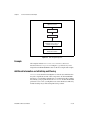
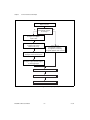
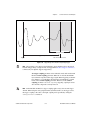
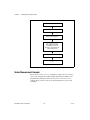
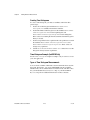
To create a voltage histogram, you must use attributes and follow these
general steps:
1.
Set the size of the histogram with the Measurement Voltage
Histogram Size attribute. The default is 256 bins.
2.
Set the limits of the voltage histogram with the Measurement
Voltage Histogram Low Volts and Measurement Voltage
Histogram High Volts attributes.
3.
Call the Clear Waveform Measurement Stats function to erase the
histogram’s history.
Voltage Histogram Example (LabVIEW Only)
See the Voltage Histogram example for sample code you can use to
create your own application.
Types of Voltage Histogram Measurements
You can obtain a number of different scalar measurements from any
voltage histogram. For instance, you can use NI-SCOPE constants to find
the number of hits, mean, standard deviation, median, mode, and other
values. See your NI-SCOPE Function Reference Help or the NI-SCOPE VI
Reference Help file for additional information on these constants.
Making Array Measurements
Array measurements are measurements on waveforms that result in an
array of values such as an FFT amplitude spectrum. This section covers
some key concepts needed to make array measurements. For a complete list
of array measurements available, see the NI-SCOPE Function Reference
Help or the NI-SCOPE VI Reference Help.
NI-SCOPE Software User Manual
4-12
ni.com