1
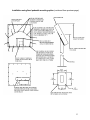
Control Panel Button
Mode
Description
Use this button for auto adjustment of the display.
AUTO
Always
Auto adjustment allows the monitor to self-adjust to the
incoming video signal. The values of fine, coarse and
position are adjusted automatically.
Auto adjustment will also occur automatically each time
the computer resolution is changed.
Use this button to turn the monitor on and off.
POWER
This light glows green during normal operation, and blinks
green once as the monitor saves your adjustments.
POWER
INDICATOR
OSD Functions
Picture
Menu
Description
Adjust the brightness.
Brightness
Contrast
Direct Access Feature: When OSD is not on the screen, push the “+”
button to adjust brightness.
Adjust the contrast.
Color
Menu
Color Tone
Color Control
Gamma
Description
The tone of the color can be changed to one of four modes: Cool, Normal, Warm and Custom.
Adjust individual Red, Green, and Blue color balance.
Select one of three pre-defined gammas:
• Mode 1 : Shows normal gamma
5