1
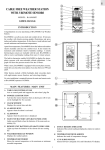
Thermo Sensor Unit Appearance.
D1: Transmission Indication LED
D2: Outdoor Temperature
D3: Wall Mount Hole
D4: °C/°F” button
D5: “TX” button
D6: Battery Compartment
D7: Stand
Set Up:
y
Insert batteries.
y
Use a pin to press the RESET (B8) button
Weather Forecast Function:
z
After Batteries inserted, or holding “WEATHER” button (B6) for 3 seconds, weather icon Flash (A3).
Enter the current weather pressing “- “ (B7) buttons. Press “ + “ (B6) button to confirm the setting.
The weather forecast may not be accurate if the current weather entered is not correct.
z
The current weather status should be entered again if the altitude of the Main Unit is changed.
( Barometric pressure is lower at higher altitude location. Therefore, altitude change will affect the
weather forecast). The weather station will start the first forecast at 6 hours later after the current
weather status is entered.
z
Totally 5 different weather status symbols in the weather forecast. They are forecasting the weather
in future.