1
ARIES User Guide
Human Ethics Module
This screen contains a considerable amount of data. In order to prevent you from being timed out
of your ARIES session, the system automatically saves every five minutes and consequently
prevents the data loss. This saving can be slightly disconcerting but it is preferable to the
alternative of data loss.
Documents
In addition to the basic data entry for protocols, investigators are able to upload documents
against each protocol. For example, the Information Sheet and Consent Form required for each
protocol will be stored in the ‘Documents’ tab.
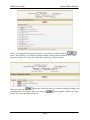
tab, and then the
button. This will bring up a screen
Click on the
where you name the document you are uploading, and then browse and select the document from
your hard drive.
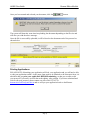
The documents uploaded to the documents tab must be uniquely named. The following
convention can be used: Year_ProtocolNo._Surname_document description i.e,
2007_123_Smith_InformationSheet If you delete a document, both the replacement document
name AND the document name in Aries, will need to be given a new name i.e.
2007_123_Smith_InformationSheet1
Page 14