1
ARIES User Guide
Human Ethics Module
Using the Human Ethics module of ARIES
Aries is accessed on the web using Mozilla Firefox, Internet Explorer or Safari or Google
Chrome. The URL for Aries is https://researchservices.anu.edu.au/ore/aries/
Log into ARIES using your HORUS id and password. If you get a message saying that your
password and ID are correct but you don’t have a profile, you will need to fill in a new user form.
You will find this link above where you log in.
https://aries.anu.edu.au/content/ASP/ANUlogin.asp
Navigating the System
Home Menu
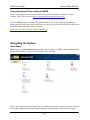
ARIES opens to a Home Menu displaying the various modules of ARIES. This includes Human
Ethics, Animal Ethics, Contracts/Grants, Publications and ERA.
Once a menu option has been selected, the user will be taken into the system. From here, the user
can navigate through the different modules using the tabs that appear at the top of the screen.
Page 1