1
dua1611-5aaa04.book Page 1 Friday, November 29, 2002 8:56 PM
SuperStack® 3
Webcache
User Guide
SuperStack 3 Webcache 1000 3C16115
SuperStack 3 Webcache 3000 3C16116
SuperStack 3 Web Site Filter 3C16118
http://www.3com.com/
Part No. DUA1611-5AAA04
Published November 2002
dua1611-5aaa04.book Page 2 Friday, November 29, 2002 8:56 PM
3Com Corporation
5400 Bayfront Plaza
Santa Clara, California
95052-8145
Copyright © 2002, 3Com Technologies. All rights reserved. No part of this documentation may be reproduced
in any form or by any means or used to make any derivative work (such as translation, transformation, or
adaptation) without written permission from 3Com Technologies.
3Com Technologies reserves the right to revise this documentation and to make changes in content from time
to time without obligation on the part of 3Com Technologies to provide notification of such revision or
change.
3Com Technologies provides this documentation without warranty, term, or condition of any kind, either
implied or expressed, including, but not limited to, the implied warranties, terms or conditions of
merchantability, satisfactory quality, and fitness for a particular purpose. 3Com may make improvements or
changes in the product(s) and/or the program(s) described in this documentation at any time.
If there is any software on removable media described in this documentation, it is furnished under a license
agreement included with the product as a separate document, in the hard copy documentation, or on the
removable media in a directory file named LICENSE.TXT or !LICENSE.TXT. If you are unable to locate a copy,
please contact 3Com and a copy will be provided to you.
UNITED STATES GOVERNMENT LEGEND
If you are a United States government agency, then this documentation and the software described herein are
provided to you subject to the following:
All technical data and computer software are commercial in nature and developed solely at private expense.
Software is delivered as “Commercial Computer Software” as defined in DFARS 252.227-7014 (June 1995) or
as a “commercial item” as defined in FAR 2.101(a) and as such is provided with only such rights as are
provided in 3Com’s standard commercial license for the Software. Technical data is provided with limited rights
only as provided in DFAR 252.227-7015 (Nov 1995) or FAR 52.227-14 (June 1987), whichever is applicable.
You agree not to remove or deface any portion of any legend provided on any licensed program or
documentation contained in, or delivered to you in conjunction with, this User Guide.
Unless otherwise indicated, 3Com registered trademarks are registered in the United States and may or may not
be registered in other countries.
3Com, the 3Com logo and SuperStack are registered trademarks of 3Com Corporation.
Intel and Pentium are registered trademarks of Intel Corporation. Microsoft, MS-DOS, Windows, and Windows
NT are registered trademarks of Microsoft Corporation. Novell and NetWare are registered trademarks of
Novell, Inc. UNIX is a registered trademark in the United States and other countries, licensed exclusively
through X/Open Company, Ltd.
Netscape Navigator is a registered trademark of Netscape Communications.
JavaScript is a trademark of Sun Microsystems
All other company and product names may be trademarks of the respective companies with which they are
associated.
ENVIRONMENTAL STATEMENT
It is the policy of 3Com Corporation to be environmentally-friendly in all operations. To uphold our policy, we
are committed to:
Establishing environmental performance standards that comply with national legislation and regulations.
Conserving energy, materials and natural resources in all operations.
Reducing the waste generated by all operations. Ensuring that all waste conforms to recognized environmental
standards. Maximizing the recyclable and reusable content of all products.
Ensuring that all products can be recycled, reused and disposed of safely.
Ensuring that all products are labelled according to recognized environmental standards.
Improving our environmental record on a continual basis.
End of Life Statement
3Com processes allow for the recovery, reclamation and safe disposal of all end-of-life electronic components.
Regulated Materials Statement
3Com products do not contain any hazardous or ozone-depleting material.
Environmental Statement about the Documentation
The documentation for this product is printed on paper that comes from sustainable, managed forests; it is
fully biodegradable and recyclable, and is completely chlorine-free. The varnish is environmentally-friendly, and
the inks are vegetable-based with a low heavy-metal content.
dua1611-5aaa04.book Page 3 Friday, November 29, 2002 8:56 PM
CONTENTS
ABOUT THIS GUIDE
Conventions 18
Related Documentation 19
Documentation Comments 20
Product Registration 20
I GETTING STARTED
1
WEB CACHING CONCEPTS AND DEPLOYMENT
What is the Webcache? 24
The Webcache and 3Com Network Supervisor 24
Before You Begin 25
Network Configuration Concepts 26
IP Addresses 26
IP Address Rules 27
Subnets and Using a Subnet Mask 27
Domain Name System 28
Domain Name System Syntax 28
Default Router 29
Web Caching Overview 30
Current and Expired Content 32
Revalidating HTTP Content 32
Deployment Modes Overview 32
Choosing a Deployment Mode 35
Transparent Cache Deployment 36
Deploying the SuperStack 3 Switch 4400, 4924 or 4950 with the
Webcache 38
Deploying the SuperStack 3 Server Load Balancer with the
Webcache 40
Web Cache Communication Protocol (WCCP) 41
WCCP Version 1 43
dua1611-5aaa04.book Page 4 Friday, November 29, 2002 8:56 PM
WCCP Version 2 43
Proxy Relay Deployment 44
Proxy Cache Deployment
45
Manual Configuration 47
Proxy Auto Configuration (PAC) Files 48
Web Proxy Auto-Discovery (WPAD) 49
Third-party Tools 52
Inline Cache Deployment 52
Parent Caching 53
How does Parent Caching Work? 54
Parent Caching Network Example 55
ICP Caching 56
2
INSTALLING THE WEBCACHE
Package Contents 60
Webcache — Front View Detail 61
LEDs 61
Webcache — Rear View Detail 62
Power Socket 63
Console Port 63
WAN Port 63
LAN Port 63
WAN and LAN Port LEDs 64
Choosing a Suitable Site 65
Rack-Mounting the Webcache 65
The Power-up Sequence 69
Powering-up the Webcache 69
Checking for Correct Operation of LEDs 69
Deploying the Webcache in Your Network 70
Setting Up the Webcache for Management 71
Setting Up Using the Web Interface 71
Setting Up Using the Command Line Interface 74
Connecting the Webcache to the Live Network 76
Choosing the Correct Cables 76
Connecting the Webcache 77
Installing an Additional Cache Storage Device 77
dua1611-5aaa04.book Page 5 Friday, November 29, 2002 8:56 PM
II MANAGING THE WEBCACHE
3
USING THE CLI INTERFACE
Accessing the Command Line Interface
82
Accessing the Command Line Interface Through the Console Port
Accessing the Command Line Interface Over the Network 83
Logging In To the Command Line Interface 83
Exiting the Interface 84
Understanding the Command Line Interface 84
Entering Commands 85
Displaying Menus 86
Obtaining Help 86
4
USING THE WEB INTERFACE
Management Software Interfaces
Logging in as a Default User 88
Accessing the Web Interface 89
Understanding the Web Interface
The Toolbar 92
The Navigation Tree 94
The Information Area 96
The Device Mimic 96
The Status Tables 99
The Performance View 100
The Help View 100
5
88
91
SECURING ACCESS TO THE WEBCACHE MANAGEMENT
INTERFACES
Passwords 104
Setting Passwords 104
Management Interface Setup 105
Disabling Port 80 105
Restricting Address Access 105
Password Recovery 106
Enabling/Disabling Password Recovery
106
82
dua1611-5aaa04.book Page 6 Friday, November 29, 2002 8:56 PM
Performing Password Recovery
107
III CONFIGURING THE WEBCACHE
6
CONFIGURING DEPLOYMENT MODES
Configuring Transparent Cache Mode 112
Configuring WCCP V1 112
Configuring WCCP V2 113
Configuring Proxy Relay with the SuperStack 3 Firewall
Configuring Proxy Cache Mode 115
Creating a Proxy Auto-configuration File 115
Using the Webcache as a PAC File Server 116
Configuring the Client Web Browser 117
Configuring Inline Cache Mode 118
Configuring Parent Caching 119
Creating a Parent Cache Exclusion List 119
Saving the Parent Cache Exclusion List 121
Clearing the Parent Cache Exclusion List 122
Configuring ICP Caching 123
Adding ICP Peers 124
Deleting ICP Peers 125
7
114
STATIC ROUTES
What are Static Routes? 128
Static Routes Example 128
Advantages of Static Routes 129
Configuring Static Routes 129
8
SYSTEM TIME
Configuring the System Time 132
Network Time Protocol 132
Choosing a Network Time Protocol Server 133
Configuring the System Time Using the Network Time Protocol
Configuring the System Time Manually 134
System Time and Performance Graphs 135
134
dua1611-5aaa04.book Page 7 Friday, November 29, 2002 8:56 PM
IV CONTROLLING AND MONITORING WEB ACCESS
9
MONITORING WEB ACCESS
Access Logging 140
Filter Logging 140
Storing the Log Files 140
Viewing the Access Log 142
Analyzing the Access Log 142
Viewing the Filter Log 143
10
USING CONTENT FILTERING
Introducing Content Filtering 146
Understanding Content Filtering Modes 146
3Com Web Site Filter 147
Registering the Webcache 149
Activating the Web Site Filter 149
Downloading a New Web Site Filter 150
Setting Up the 3Com Web Site Filter 151
Setting Up
Filtering Policies 152
Testing a URL 154
Websense Enterprise Filtering 155
Acquiring the Websense Enterprise Filtering Software 155
Installing the Websense Enterprise Filtering Software 155
Setting Up Websense Enterprise Filtering on your Webcache
Manual Content Filtering 157
Setting Up Manual Content Filtering 158
Default Rule 159
Setting the Default Rule 159
Filter Logging 159
Blocking and Logging Behavior 160
Setting Blocking and Logging Behavior 160
Storing the Filter Log 161
Viewing the Filter Log 161
Web Client Blocking 161
Using Web Client Blocking with DHCP Servers 162
156
dua1611-5aaa04.book Page 8 Friday, November 29, 2002 8:56 PM
Setting Up Web Client Blocking 162
Creating a Web Client Blocking List 163
Saving the Web Client Blocking List 165
Clearing the Web Client Blocking List 166
Filter Exclusions 166
Setting Up Filter Exclusion Lists 166
Editing the Filter Exclusion List 166
Loading Entries From a File into the Filter Exclusion List 167
Saving the New Filter Exclusion List 168
Clearing the Filter Exclusion List 169
Setting Up Allow Lists and Deny Lists 169
Editing the Allow and Deny Lists 169
Loading Entries From a File into the Allow List or Deny List 172
Saving the New Allow List or Deny List 173
Clearing the Allow List or Deny List 173
Keyword Blocking 174
Setting Up Keyword Blocking Lists 174
Editing the Keyword Blocking List 174
Loading Entries From a File into the Keyword Blocking List 175
Saving the New Keyword Blocking List 176
Clearing the Keyword Blocking List 176
Customizing the Content Filter Response Screen 176
V CONTROLLING CACHING
11
CONTROLLING HOW WEB SITES ARE CACHED
Cache Control 182
Setting Up Cache Control 182
Creating a Cache Control List 182
Saving the Cache Control List 185
Clearing the Cache Control List 185
Clearing the Cache 186
Cache Bypass 186
Setting Up Cache Bypass 188
Creating Cache Bypass Lists 188
Saving the Cache Bypass Lists 190
dua1611-5aaa04.book Page 9 Friday, November 29, 2002 8:56 PM
Clearing the Cache Bypass Lists
12
191
PRELOADING CONTENT
Introduction 194
Advantages and Disadvantages of Preloading Content 194
Methods of Preloading Content 195
Setting up Content Preload 195
Preloading a Site 196
Adding/Editing Scheduled Tasks 197
Temporarily Disabling a Scheduled Task 198
Forcing a Preload Task to Start Immediately 198
Deleting Scheduled Tasks 199
Checking the Status of Scheduled Tasks 199
Viewing Details of Scheduled Tasks 200
Using the 3Com Web Scheduler Browser Client 201
Configuring the Webcache for the 3Com Web Scheduler Browser
Client 201
Installing the 3Com Web Scheduler Browser Client 202
VI MONITORING THE WEBCACHE
13
MONITORING SYSTEM EVENTS
System Events 208
Email Notification 208
Configuring Email Notification 208
SMTP Authentication 210
SNMP Traps 212
Configuring SNMP Traps 212
Configuring SNMP Community Strings
Automatic System Events 214
14
212
PERFORMANCE MONITORING
Performance Monitoring 220
Viewing Performance Graphs 220
Viewing Caching Performance Graphs
220
dua1611-5aaa04.book Page 10 Friday, November 29, 2002 8:56 PM
Viewing I/O Performance Graphs 223
Viewing System Performance Graphs 224
Emailing Performance Graphs 224
Configuring Email Performance Graphs 225
15
SYSTEM DIAGNOSTICS
System Diagnostics 228
Pinging Other Devices 228
Performing a Ping 228
Tracing IP Addresses 229
Performing a Trace Route 229
System Log 230
Configuring the System Log 230
What is a Syslog Server? 231
Obtaining a Syslog Server 231
Viewing the System Log 232
VII MANAGING THE WEBCACHE SOFTWARE
16
CONFIGURATION MANAGEMENT
Saving and Restoring Configurations
Saving a Configuration 237
Restoring a Configuration 238
17
236
SOFTWARE UPGRADES
Software Upgrades 240
Software Upgrade SNMP Traps 240
Unsuccessful Software Upgrades 241
Software Downgrades 241
Detecting a Software Upgrade 241
Performing a Software Upgrade 243
Performing an Automatically Detected Software Upgrade
Performing a Manual Software Upgrade 245
243
dua1611-5aaa04.book Page 11 Friday, November 29, 2002 8:56 PM
VIII COMMAND LINE INTERFACE
18
COMMAND LINE INTERFACE
A Quick Guide to the Commands 252
Getting Started
253
Exiting the Command Line Interface 256
Displaying and Changing WAN and LAN Port Information 256
Configuring the WAN and LAN Ports 256
Displaying WAN and LAN Port Summary Information 257
Displaying and Changing Protocol Information 258
Specifying Basic Network Configuration 258
Specifying Domain Name System Configuration 259
Resetting IP and DNS Information to Factory Default Settings 260
Specifying IP Configuration 261
Pinging Other Devices 262
Displaying IP Summary Information 263
Tracing IP Addresses 263
Displaying and Changing Security Information 264
Securing the Management Interface 264
Changing the Admin Password 266
Enabling and Disabling Password Recovery 266
Displaying and Changing Webcache Information and Functions 267
Initializing the Webcache 267
Rebooting the Webcache 268
Setting the Webcache SNMP Community String 268
Specifying a Contact Name 269
Specifying Location Details 269
Specifying a Webcache Name 269
Displaying Summary Information 270
IX PROBLEM SOLVING
19
PROBLEM SOLVING
Accessing the Webcache via the Console Line
Accessing the Webcache via Telnet 276
276
dua1611-5aaa04.book Page 12 Friday, November 29, 2002 8:56 PM
Solving Problems Indicated by LEDs 277
Solving Web Interface Problems 277
Solving Command Line Interface Problems 280
Solving Webcache Performance Problems 280
Solving Client Browser Problems 282
Solving General Webcache Problems 283
X APPENDICES AND INDEX
A
SAFETY INFORMATION
Important Safety Information 288
Consignes importantes de sécurité 290
Wichtige Sicherheitsinformationen 292
B
CABLE SPECIFICATIONS AND PIN-OUTS
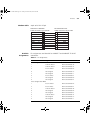
Cable Specifications 295
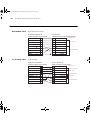
Pin-outs 296
Null-Modem Cable 296
PC-AT Serial Cable 296
Modem Cable 297
RJ-45 Pin Assignments 297
C
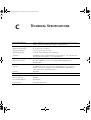
TECHNICAL SPECIFICATIONS
D
TECHNICAL SUPPORT
Online Technical Services 301
World Wide Web Site 301
3Com Knowledgebase Web Services 302
3Com FTP Site 302
Support from Your Network Supplier 302
Support from 3Com 303
Internet Support 303
Telephone Support 303
Returning Products for Repair 305
dua1611-5aaa04.book Page 13 Friday, November 29, 2002 8:56 PM
E
DEFAULT SETTINGS FOR THE WEBCACHE
Default Settings 307
Getting Started Wizard Settings
F
309
REPLACING AND INSTALLING CACHE STORAGE DEVICES
Replacing a Failed Cache Storage Device 314
Removing the Failed Cache Storage Device 314
Adding a New Cache Storage Device 316
Installing an Additional Cache Storage Device 317
G
CISCO WCCP COMMANDS
Configuring WCCP Version 1.0 320
Configuring WCCP Version 2.0 321
Configuring WCCP for a Service Group 321
Configuring WCCP Multicast 322
Example Configurations 322
Monitoring WCCP 323
Configuring WCCP Version 2.0 Within a Single Subnet
Enabling Cisco Express Forwarding (CEF) 324
Further Information 324
H
LOG FORMATS
Access Log Formats 325
Squid Log Format 326
Netscape Common Format 327
Netscape Extended Format 327
Netscape Extended 2 Format 328
WebTrends Extended Log Format 330
Filter Log Format 331
I
TRACE ROUTE SYMBOLS
J
CATEGORY SET DEFINITIONS
Core Categories 335
Sexually Explicit 335
324
dua1611-5aaa04.book Page 14 Friday, November 29, 2002 8:56 PM
Drugs/Alcohol 335
Gambling 336
Violence 336
Hate Speech 336
Productivity Categories 337
Astrology and Mysticism 337
Entertainment 337
Games 338
General News 338
Glamour and Intimate Apparel 338
Hobbies 338
Investment 339
Job Search 339
Motor Vehicles 339
Personals and Dating 339
Real Estate 339
Shopping 340
Sports 340
Travel 340
Usenet News 340
ChatBlock 340
dua1611-5aaa04.book Page 15 Friday, November 29, 2002 8:56 PM
GLOSSARY
INDEX
3COM END USER SOFTWARE LICENSE AGREEMENT
3COM END USER WEB SITE FILTER PRODUCT LICENSE
AGREEMENT
GNU GENERAL PUBLIC LICENSE VERSION 2, JUNE 1991
REGULATORY NOTICES
dua1611-5aaa04.book Page 16 Friday, November 29, 2002 8:56 PM
dua1611-5aaa04.book Page 17 Friday, November 29, 2002 8:56 PM
ABOUT THIS GUIDE
This guide provides all the information you need to install and use a
SuperStack® 3 Webcache 1000/3000. It also describes the features of the
Webcache and outlines how to use those features to optimize the
performance of the Webcache.
This guide is intended for the system or network administrator who is
responsible for installing, configuring and managing the network. It
assumes a basic working knowledge of local area network (LAN) and
wide area network (WAN) operations.
If release notes are shipped with your product and the information there
differs from the information in this guide, follow the instructions in the
release notes.
Most user guides and release notes are available in Adobe Acrobat
Reader Portable Document Format (PDF) or HTML on the 3Com
World Wide Web site:
http://www.3com.com/
dua1611-5aaa04.book Page 18 Friday, November 29, 2002 8:56 PM
18
ABOUT THIS GUIDE
Conventions
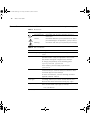
Table 1 and Table 2 list conventions that are used throughout this guide.
Table 1 Notice Icons
Icon
Notice Type
Description
Information note
Information that describes important features or
instructions
Caution
Information that alerts you to potential loss of data or
potential damage to an application, system, or device
Warning
Information that alerts you to potential personal injury
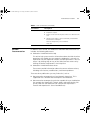
Table 2 Text Conventions
Convention
Description
Screen displays This typeface represents information as it appears on the
screen.
Syntax
The word “syntax” means that you must evaluate the syntax
provided and then supply the appropriate values for the
placeholders that appear in angle brackets. Example:
To change your password, use the following syntax:
system password <password>
In this example, you must supply a password for
<password>.
Commands
The word “command” means that you must enter the
command exactly as shown and then press Return or Enter.
Commands appear in bold. Example:
To reboot the Webcache, enter the following command:
system control reboot
The words “enter”
and “type”
When you see the word “enter” in this guide, you must type
something, and then press Return or Enter. Do not press
Return or Enter when an instruction simply says “type.”
Keyboard key names
If you must press two or more keys simultaneously, the key
names are linked with a plus sign (+). Example:
Press Ctrl+Alt+Del
(continued)
dua1611-5aaa04.book Page 19 Friday, November 29, 2002 8:56 PM
Related Documentation
19
Table 2 Text Conventions (continued)
Convention
Description
Words in italics
Italics are used to:
■
Emphasize a point.
■
Denote a new term at the place where it is defined in the
text.
■
Identify menu names, menu commands, and software
button names. Examples:
From the Help menu, select Contents.
Click OK.
Related
Documentation
In addition to this Guide, the Webcache 1000/3000 documentation set
includes the following documents:
■
Webcache 1000/3000 Online Help
This online help system contains information about the Web interface
operations that enable you to manage the Webcache. It contains an
explanation for each operation and the available parameters. You can
access it by clicking Help on any of the Web interface screens or by
clicking the Online Help button in the Help View.
■
Webcache 1000/3000 Release Notes
These notes provide information about the current software release,
including new features, modifications, and known problems.
There are other publications you may find useful, such as:
■
Documentation accompanying 3Com Network Supervisor. This is
supplied on the CD-ROM that accompanies the Webcache.
■
Documentation accompanying switches capable of Layer 4 redirection
(for example the SuperStack 3 Switch 4400), and other devices that
can be used with the Webcache (for example the SuperStack 3
Firewall and SuperStack 3 Server Load Balancer).
dua1611-5aaa04.book Page 20 Friday, November 29, 2002 8:56 PM
20
ABOUT THIS GUIDE
Documentation
Comments
Your suggestions are very important to us. They will help make our
documentation more useful to you. Please e-mail comments about this
document to 3Com at:
[email protected]
Please include the following information when contacting us:
■
Document title
■
Document part number (on the title page)
■
Page number (if appropriate)
Example:
■
SuperStack 3 Webcache 1000/3000 User Guide
■
Part number: DUA1611-5AAA04
■
Page 25
Please note that we can only respond to comments and questions about
3Com product documentation at this e-mail address. Questions related to
technical support or sales should be directed in the first instance to your
network supplier.
Product
Registration
You can now register your SuperStack 3 Webcache on the 3Com Web
site:
http://www.3com.com/register/
Registering your Webcache:
■
Provides access to the latest Webcache software (at time of
registration).
■
Activates the warranty. See the warranty flyer supplied with your
Webcache for details.
■
Allows you to activate the 30 day free trial of the Webcache Web Site
Filtering service. See “3Com Web Site Filter” on page 147.
dua1611-5aaa04.book Page 21 Friday, November 29, 2002 8:56 PM
I
GETTING STARTED
Chapter 1
Web Caching Concepts and Deployment
Chapter 2
Installing the Webcache
dua1611-5aaa04.book Page 22 Friday, November 29, 2002 8:56 PM
22
dua1611-5aaa04.book Page 23 Friday, November 29, 2002 8:56 PM
1
WEB CACHING CONCEPTS AND
DEPLOYMENT
This chapter contains information about the concepts of web caching
and the ways in which you can deploy the Webcache within your
network. It covers the following topics:
■
What is the Webcache?
■
The Webcache and 3Com Network Supervisor
■
Before You Begin
■
Network Configuration Concepts
■
Web Caching Overview
■
Deployment Modes Overview
■
Choosing a Deployment Mode
■
Transparent Cache Deployment
■
Proxy Relay Deployment
■
Proxy Cache Deployment
■
Inline Cache Deployment
■
Parent Caching
dua1611-5aaa04.book Page 24 Friday, November 29, 2002 8:56 PM
24
CHAPTER 1: WEB CACHING CONCEPTS AND DEPLOYMENT
What is the
Webcache?
The SuperStack® 3 Webcache 1000 and 3000 are high-performance,
easily configurable webcache appliances. They offer the following
benefits to your network:
■
Reduced Network Traffic
The Webcache locally stores frequently accessed Web content and
quickly serves it to the end user on demand. This reduces the amount
of traffic on the WAN, providing significant cost benefits by reducing
the bandwidth requirement on expensive WAN links.
■
Reduced Web Latency
The end user receives Web content more quickly and with greater
quality of service if it is served from a local, high-speed Webcache
than if it is served from the Internet. Web object requests that have to
travel over long distances are limited to the speed and capacity of the
slowest link in the path. A Webcache that is closer to the client
machines reduces the potential for slow links and dropped data
packets.
■
Smoother Traffic Flow
Traffic surges can stress your network and server. The Webcache can
help smooth out network traffic and reduce delays in serving Web
content. As more users request the same Web content, it becomes
more likely that the content will be stored in the Webcache, and in
turn the Webcache becomes more effective at eliminating upstream
traffic.
■
Controlled Web Access
The Webcache allows you to control which client machines in your
network can access the Internet, and which Web sites can be
accessed. Access Logs show you who has used the Internet and where
they have been.
The Webcache and
3Com Network
Supervisor
The latest version of 3Com Network Supervisor is supplied on the
CD-ROM that accompanies the Webcache. 3Com Network Supervisor
provides powerful, intuitive network management for small to medium
enterprise networks. It automatically discovers network devices and
reports network activity, stress monitoring and performance metrics for
network managers. This information helps to provide the most efficient,
cost-effective use of network resources.
dua1611-5aaa04.book Page 25 Friday, November 29, 2002 8:56 PM
Before You Begin
25
3Com Network Supervisor offers the following support:
Before You Begin
■
If your 3Com Network Supervisor management station is located on
the LAN, it discovers the Webcache automatically and displays it on
the topology map.
■
The topology map indicates that the Webcache is a 3Com Webcache
and uses a caching icon to represent it.
■
Double-clicking on the caching icon launches the Web interface of the
Webcache.
■
3Com Network Supervisor performs health checks on the Webcache
by requesting a factory-defined URL from the Webcache. This ensures
that Web traffic is not directed to a Webcache that is not currently
operating.
■
3Com Network Supervisor detects if the Webcache is directly
connected to a 3Com device capable of Layer 4 redirection (for
example the SuperStack 3 Switch 4400) and offers to automatically
configure both devices for transparent cache deployment. 3Com
Network Supervisor also detects mis-configurations of the Webcache
and Switch, for example if a Switch 4400 is not directly connected to
the Webcache.
To install the Webcache and set it up for management, you must
understand and correctly configure it with the following information.
Ensure that you have this information ready before you begin to install
the Webcache.
■
An IP address — for further information, see “IP Addresses” on
page 26.
■
A subnet mask — for further information, see “Subnets and Using a
Subnet Mask” on page 27.
■
A default router address — for further information, see “Default
Router” on page 29.
■
One or more Domain Name System (DNS) server addresses —
for further information, see “Domain Name System” on page 28.
■
A Host Name — The Host Name is combined with the Domain
Name to give the internet (DNS) name of the Webcache. The host
name is the name of the Webcache within the local domain.
■
A Domain Name — The Domain Name is combined with the Host
Name to give the internet (DNS) name of the Webcache. The domain
dua1611-5aaa04.book Page 26 Friday, November 29, 2002 8:56 PM
26
CHAPTER 1: WEB CACHING CONCEPTS AND DEPLOYMENT
is a grouping of computers with related properties. For example you
might group all computers in your company in the domain
mycompany.com.
Example
The internet (DNS) name webcache.mycompany.com is formed by
combining the Host Name webcache with the DNS domain
mycompany.com.
Network
Configuration
Concepts
IP Addresses
■
One or more Network Time Protocol (NTP) server addresses —
for further information, see the “System Time” chapter on page 131.
This is optional as you can choose to enter the system time manually
instead of using the Network Time Protocol.
■
A Caching Deployment Mode — for further information, see
“Deployment Modes Overview” on page 32.
■
Caching Port Numbers — The Caching Port Numbers are the ports
on which the Webcache will listen for traffic. The default number is
8080 for Proxy Cache mode and 80 for Transparent and Inline Cache
modes.
The following sections explain certain key concepts of configuring your
network, which you must understand in order to set up the Webcache
successfully.
To operate correctly, each device on your network (for example a
webcache or management station) must have a unique IP address. IP
addresses have the format nnn.nnn.nnn.nnn where n is a decimal
number between 0 and 255. An example IP address is ‘192.168.100.8’
with a subnet mask of 255.255.255.0.
The IP address can be split into two parts:
■
The first part (‘192.168.100’ in the example) identifies the network on
which the device resides.
■
The second part (‘8’ in the example) identifies the device within the
network.
If your network is internal to your organization only, you may use any
arbitrary IP address. We suggest you use addresses in the series
192.168.100.X (where X is a number between 1 and 254) with a subnet
mask of 255.255.255.0.
dua1611-5aaa04.book Page 27 Friday, November 29, 2002 8:56 PM
Network Configuration Concepts
27
These suggested IP addresses are part of a group of IP addresses that
have been set aside specially for use “in house” only.
CAUTION: If your network has a connection to the external IP network,
you must apply for a registered IP address. This registration system
ensures that every IP address used is unique; if you do not have a
registered IP address, you may be using an identical address to someone
else and your network will not operate correctly.
Obtaining a Registered IP Address
InterNIC Registration Services is the organization responsible for
supplying registered IP addresses. The following contact information is
correct at time of publication:
World Wide Web site: http://www.internic.net
IP Address Rules
There are certain rules that you must follow when entering an IP address
or IP address range:
■
■
Subnets and Using a
Subnet Mask
Individual IP addresses must be valid:
■
0.0.0.0 is disallowed.
■
Values above 255.255.255.255 are disallowed.
IP address ranges must be valid:
■
A range starting at 0.0.0.0 is disallowed.
■
A range ending above 255.255.255.255 is disallowed.
■
The second IP address in the range must be larger than the first.
You can divide your IP network into sub-networks also known as subnets.
Support for subnets is important because the number of bits assigned to
the device part of an IP address limits the number of devices that may be
addressed on any given network. For example, a Class C address is
restricted to 254 devices.
If you have a small network (less than 254 devices), you may decide not
to have multiple subnets.
A subnet mask is used to divide the device part of the IP address into two
further parts:
■
The first part identifies the subnet number.
dua1611-5aaa04.book Page 28 Friday, November 29, 2002 8:56 PM
28
CHAPTER 1: WEB CACHING CONCEPTS AND DEPLOYMENT
■
The second part identifies the device on that subnet.
The bits of the subnet mask are set to 1 if the device is to treat the
corresponding bit in the IP address as part of the original network
number or as part of the subnet number. These bits in the mask are set to
0 if the device is to treat the bit as part of the device number.
Domain Name System
The Domain Name System (DNS) maps a numerical Internet Protocol (IP)
address to a more meaningful and easy-to-remember name. When you
need to access another device on your network, you enter the name of
the device, instead of its IP address. A Domain Name System server on
your network is contacted and asked the electronic form of the question,
“What is the IP address of the destination device?”. The DNS server is a
machine that keeps track of all the names and their equivalent numeric IP
addresses. The DNS server responds with the correct IP address (e.g.
128.118.2.23), allowing the two devices to communicate with each
other.
To enable the Domain Name System, you must setup one or more DNS
servers on your network. If you are uncertain about how to do this,
contact your network administrator.
The following Webcache features are only available if you have setup a
DNS server:
Domain Name System
Syntax
■
Caching — The Webcache will be unable to cache Web content if a
DNS server is not setup. The Webcache must resolve the host names
accessed by the Web browser in order to serve the content.
■
Access to the Webcache by DNS Name — You can access the Web
interface or Command Line Interface of the Webcache via its DNS
name, rather than its IP address e.g. webcache.mycompany.com.
■
Web Proxy Auto-Discovery (WPAD) — This protocol can be used to
configure Web browsers on client machines in a Proxy Cache
deployment. For further information, see “Web Proxy Auto-Discovery
(WPAD)” on page 49.
You must use the following syntax for the DNS host name and domain
name:
■
Host Name
■
The host name must be at least 1 character long.
dua1611-5aaa04.book Page 29 Friday, November 29, 2002 8:56 PM
Network Configuration Concepts
■
■
■
■
29
The host name must not exceed 63 characters in length.
The host name must be comprised of alphanumeric characters,
- (hyphens) and _ (underscores).
You cannot enter a host name containing a space character.
Domain Name
■
■
■
■
■
■
■
■
The domain name must be at least 1 character long.
Each character string can only be comprised of alphanumeric
characters, - (hyphens) and _ (underscores).
You cannot enter a domain starting with http:.
You cannot enter a domain name starting or ending with a . (dot)
character. It must start and end with a letter or number.
Each part of the domain name (known as a label) must be
separated with a . (single dot) and must not exceed 63 characters
in length.
You cannot enter a domain name which has two . (dots) next to
each other.
You cannot enter a domain containing the / (forward slash)
character.
You cannot enter a domain containing a space character.
Each part of the domain name (known as a label) must be less than 64
characters. The host name plus the domain name must not exceed 255
characters in length.
Default Router
A Router is a device on your network which is used to forward IP packets
to a remote destination. An alternative name for a Router is a Gateway.
“Remote” refers to a destination device that is not directly attached to
the same network segment as the source device.
The source device cannot send IP packets directly to the destination
device because it is in a different network segment. Instead you configure
it to send the packets to a router which is attached to multiple segments.
When it receives the IP packets, the router determines the next network
hop on the path to the remote destination, and sends the packets to that
hop. This could either be the remote destination or another router closer
towards the destination.
dua1611-5aaa04.book Page 30 Friday, November 29, 2002 8:56 PM
30
CHAPTER 1: WEB CACHING CONCEPTS AND DEPLOYMENT
This hop-by-hop process continues until the IP packets reach the remote
destination.
The default router should be a device that is closer than the Webcache to
the WAN link in your network, which the Webcache can send Web
requests to in order to retrieve Web objects from the Internet. The default
router can be a firewall, internet gateway device, router or a switch.
To configure the Webcache, enter the IP address of the default router on
the local subnet in which the Webcache is located. If no default router
exists on your network leave the field blank.
Web Caching
Overview
In a network without a Webcache, all Web requests from browsers on
client machines must travel across the expensive WAN to the origin Web
server (the Web server that contains the original copy of the requested
information), and the response from the server must travel back across
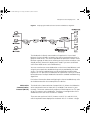
the WAN, as shown in Figure 1:
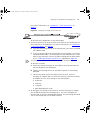
Figure 1 A Typical Web Request
The prime objective of web caching is to store Web content close to the
client machines that request it. This enables the content to be served
more quickly to the end user and reduces the amount of traffic on the
WAN. To achieve this aim, the Webcache is deployed in your LAN
dua1611-5aaa04.book Page 31 Friday, November 29, 2002 8:56 PM
Web Caching Overview
31
between the client machines and the origin Web servers. The Webcache
then intercepts and serves requests from the client machines for Web
content in the following way:
1 A URL is entered into a Web browser by a user on a client machine in
your network.
2 The Webcache receives the request for the URL from the client machine
and checks its cache for the requested content.
3 If the content is already in the cache and is current enough to serve
(see“Current and Expired Content” on page 32), the Webcache
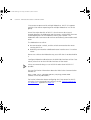
immediately serves it to the client machine. This is a cache hit, as shown
in Figure 2.
Figure 2 A Cache Hit
4 If the content is not in the cache or the content is expired (see“Current
and Expired Content” on page 32), the Webcache connects to the origin
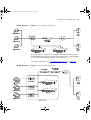
Web server and retrieves the content. This is a cache miss, as shown in
Figure 3. The content is then simultaneously served to the client machine
and stored in the cache. Subsequent requests for that content will be
served directly from the Webcache.
Figure 3 A Cache Miss
dua1611-5aaa04.book Page 32 Friday, November 29, 2002 8:56 PM
32
CHAPTER 1: WEB CACHING CONCEPTS AND DEPLOYMENT
Current and Expired
Content
Content stored in the cache can either be current (also known as fresh) or
expired (also known as stale). If it is current, the content is up to date and
the Webcache serves it to the client machine as a cache hit. If it is expired,
the content is out of date and the Webcache connects to the origin Web
server and retrieves the content.
The Webcache determines if content is expired or current differently
depending on the protocol involved:
Revalidating HTTP
Content
Deployment Modes
Overview
■
HTTP — Web documents support optional author-specified expiration
dates. The Webcache adheres to these expiration dates; otherwise it
uses advanced heuristics to pick an expiration date based on how
frequently the document is changing. In addition, documents can be
revalidated, where the Webcache checks with the origin server to find
out if a document is still current.
■
FTP — FTP documents stay in the cache for 72 hours.
If HTTP content in the cache is expired, the Webcache revalidates it. A
revalidation is a query to the origin server that asks if the content is
unchanged. The result of a revalidation can be:
■
The content is still current; the Webcache resets its limit and serves the
content.
■
A current copy of the content is available; the Webcache caches the
current content, replacing the expired copy, and serves the content to
the user simultaneously.
■
The content no longer exists on the origin server; the Webcache does
not serve the cached copy.
■
The origin server does not respond to the revalidation query. The
Webcache serves the expired content.
To operate successfully the Webcache must be able to intercept and
control client machine requests for Web content before those requests
reach the WAN. You must either explicitly configure the client machines
to send their requests directly to the Webcache, or use additional
network devices to transparently redirect the requests. You must choose a
method of directing Web requests from client machines in your network
to the Webcache before you install the Webcache in your network.
dua1611-5aaa04.book Page 33 Friday, November 29, 2002 8:56 PM
Deployment Modes Overview
33
The term “Web requests” refers to three types of network traffic; HTTP,
HTTPS (SSL encrypted) and HTTP-FTP. The Webcache can accept all of
these traffic types. In Proxy Cache mode, you should configure the Web
browser on each client machine to use the Webcache as the server for
each of these protocols.
HTTPS (SSL encrypted) traffic is only passed through by the Webcache; it
is not decoded or cached.
There are four deployment methods that you can choose from:
■
Transparent caching — the Web browser on each client machine
does not have to be configured and is unaware that it is
communicating with the Webcache. Web requests are intercepted by
a device in your network and redirected to the Webcache.
■
Proxy Relay caching — the Webcache is connected directly to a
SuperStack 3 Firewall, which acts as a Proxy Forwarder. Web requests
are intercepted by the Firewall and the Web browser on each client
machine does not have to be configured.
■
Proxy caching — the Web browser on each client machine must be
explicitly configured to send requests directly to the Webcache.
■
Inline caching — the Webcache is connected directly to a switch in
your LAN and a WAN gateway. The software built into the Webcache
essentially provides a Transparent caching solution. Therefore the Web
browser on each client machine does not have to be configured.
3Com recommends that you deploy your Webcache on the LAN side of a
firewall, or on the SuperStack 3 Firewall's DMZ port as described in
“Proxy Relay Deployment” on page 44.
dua1611-5aaa04.book Page 34 Friday, November 29, 2002 8:56 PM
34
CHAPTER 1: WEB CACHING CONCEPTS AND DEPLOYMENT
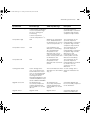
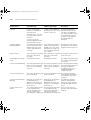
There are various configuration solutions for Transparent and Proxy
caching which are summarized in Table 3.
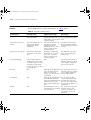
Table 3 Summary of Deployment Modes
Transparent caching
Transparent Cache
Deployment
An overview of the Transparent cache deployment mode.
Layer 4 redirecting switch.
The Webcache is connected to a Layer 4 redirecting switch, for
example the SuperStack 3 Switch 4400.
See
page 36
See
page 38
SuperStack 3 Server Load
Balancer
The Webcache is connected to a SuperStack 3 Server Load Balancer to See
page 40
improve the scaling and performance of a group of Web servers.
WCCP Router
The Webcache is connected to one or more WCCP-enabled Cisco
routers.
See
An overview of the Proxy Relay deployment mode.
See
page 41
Proxy Relay caching
Proxy Relay Deployment
page 44
Proxy caching
Proxy Cache Deployment
An overview of the Proxy cache deployment mode.
See
page 45
Manual Configuration
The Web browser on each client machine is configured to explicitly
direct its Web requests to the Webcache.
See
PAC Files
A Proxy Auto Configuration (PAC) file is used to configure the Web
browser on each client machine. PAC files allow you to create
configuration rules that determine how the Web browser operates.
See
page 47
page 48
Web Proxy Auto-Discovery
(WPAD)
The Webcache and Microsoft Internet Explorer 5 (and later versions) See
support the WPAD protocol. This protocol enables the Web browser page 49
on client machines to automatically find and load proxy configuration
information (stored in a PAC file) from a server on your network
without user intervention.
Third-Party Applications
There are applications from many vendors that can help you to
manage networks of client machines.
See
An overview of the Inline cache deployment mode.
See
page 52
Inline caching
Inline Cache Deployment
page 52
dua1611-5aaa04.book Page 35 Friday, November 29, 2002 8:56 PM
Choosing a Deployment Mode
Choosing a
Deployment Mode
35
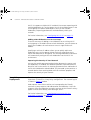
The flow chart shown in Figure 4 is a guide to choosing the most suitable
deployment mode for the Webcache in your network.
Figure 4 Choosing a Deployment Mode
dua1611-5aaa04.book Page 36 Friday, November 29, 2002 8:56 PM
36
CHAPTER 1: WEB CACHING CONCEPTS AND DEPLOYMENT
You should not configure the Webcache to operate in Transparent Cache
mode unless you have a suitable redirection device in your network.
Transparent Cache
Deployment
In Transparent Cache deployment the Webcache is connected to a Layer
4 device in your LAN which is capable of Redirection or a WCCP-enabled
Cisco router. The Layer 4 device (also known as a Layer 4 redirector or
Web-enabled device) or router automatically redirects all Web requests to
the Webcache. The Web browser on each client machine is unaware that
it is communicating with the Webcache. Therefore no configuration of
the Web browser on each client machine is needed, which avoids
configuration problems and reduces the demand on technical support.
For further information, see “Configuring Transparent Cache Mode” on
page 112.
Figure 5 Transparent Cache Deployment
Suitable 3Com Layer 4 redirection devices include switches and the
SuperStack 3 Server Load Balancer (refer to the documentation supplied
with your switch to find out if it is capable of Layer 4 redirection).
dua1611-5aaa04.book Page 37 Friday, November 29, 2002 8:56 PM
Transparent Cache Deployment
37
Advantages
■
You do not have to configure the Web browser on each client
machine that you want to access the Webcache. Deployment of the
Webcache within your network is therefore easier to achieve and
manage because you only need to configure the Layer 4 Redirection
device and the Webcache itself.
■
If the Webcache fails and the Layer 4 device or router supports
Webcache health-checks, the device will detect the failure and redirect
Web requests to the WAN, ensuring that access to the Web is
maintained.
■
Deploying the Webcache in Transparent mode has benefits for the
security of your network. It ensures that only client machines that are
inside your network can access the systems and resources within it,
and prevents client machines or malicious users from bypassing the
Webcache. This reduces the need for more complex access controls.
Disadvantages
■
You may have to add a new redirecting device to your network if it is
not already available.
■
The redirecting device needs to be located at a point in your network
where Web traffic converges, such as a core switch, an edge switch
close to the LAN, or an edge Cisco router.
Transparent Cache Solutions
You can deploy the Webcache using the following Transparent Cache
solutions:
■
Deploying the SuperStack 3 Switch 4400, 4924 or 4950 with the
Webcache
■
Deploying the SuperStack 3 Server Load Balancer with the Webcache
■
Web Cache Communication Protocol (WCCP)
dua1611-5aaa04.book Page 38 Friday, November 29, 2002 8:56 PM
38
CHAPTER 1: WEB CACHING CONCEPTS AND DEPLOYMENT
Deploying the
SuperStack 3 Switch
4400, 4924 or 4950
with the Webcache
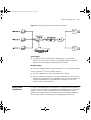
The following example describes how to install the SuperStack 3 Switch
4400, Switch 4924 or Switch 4950 as a Layer 4 Redirection device. The
network layout is shown in Figure 6 below.
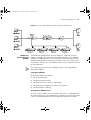
Figure 6 Deploying the Webcache and Switch 4400, 4924 or 4950 Together
When a Webcache is added to your network the lowest numbered
Switch 4400, 4924 or 4950 unit in a stack is elected as the master unit.
The master unit searches its internal database to retrieve the following
information about the Webcache: its IP address and status (enabled or
disabled), and the TCP port on which to redirect traffic. The master unit
distributes this information to the other units in the stack which update
their internal databases accordingly.
The master unit designates a polling unit — this can be the master unit or
another unit in the stack. The polling unit must have an IP address that is
on the same subnetwork as the Webcache. If multiple units are
configured in this way, then the master unit will select the first unit that
responds to be the polling unit. The polling unit polls for the Webcache
using the Webcache health check URL. When the polling unit receives a
response from the Webcache it resolves the Webcache’s IP address to a
MAC address and a port and passes it to other units in the stack.
The Switch then redirects all incoming HTTP traffic on TCP port 80 to the
Webcache. If the Webcache health check fails, for example because the
Webcache has failed or been powered down, caching will be disabled
and HTTP traffic will be directed over the WAN connection.
dua1611-5aaa04.book Page 39 Friday, November 29, 2002 8:56 PM
Transparent Cache Deployment
39
Important Considerations for the Switch 4400
This section contains some important considerations when deploying the
Webcache with the Switch 4400 (3C17203, 3C17204).
■
The Switch 4400 supports the SuperStack 3 Webcache 1000/3000.
■
The Switch 4400 unit must have software version 2.02 or later
installed.
■
The Webcache must be connected directly to the Switch 4400 —
there must be no intervening Switches or Hubs.
■
The Switch 4400 can only support one Webcache for a single unit or a
stack.
■
On the Switch 4400 the Webcache must reside on VLAN1.
■
The SuperStack 3 Webcache 1000/3000 can only receive untagged
packets, therefore it must be connected to an untagged port on the
Switch 4400.
■
The Switch 4400 only redirects HTTP requests it recognizes in VLAN1
and sends them untagged to the Webcache.
■
The traffic between any two pairs of IP addresses must always be
redirected through the same Webcache.
■
Only HTTP traffic is eligible for redirection.
■
The port to which the Webcache is connected cannot be a member of
an aggregated link.
■
IP packets with IP Options set will not be redirected.
For further information about configuring the Switch 4400, refer to the
documentation that accompanies the switch.
The Switch 4400SE (3C17206) cannot redirect web traffic to the
Webcache unless you purchase and install the SuperStack 3 Switch
4400SE Enhanced Software Upgrade (3C17207). Contact your supplier if
you need to purchase this upgrade.
Important Considerations for the Switch 4924 and 4950
This section contains some important considerations when deploying the
Webcache with the Switch 4924 (3C17701) or the Switch 4950
(3C17706).
■
The Switch 4924 or 4950 support the SuperStack 3 Webcache
1000/3000.
dua1611-5aaa04.book Page 40 Friday, November 29, 2002 8:56 PM
40
CHAPTER 1: WEB CACHING CONCEPTS AND DEPLOYMENT
■
The Webcache does not have to be directly connected to the Switch
4924 or 4950 - there can be intervening Layer 2 Switches or Hubs.
■
The Switch 4924 or 4950 can only support one Webcache for a single
unit.
■
The Webcache can be connected to any VLAN on the Switch 4924 or
4950 if there is an IP interface associated with that VLAN.
■
The SuperStack 3 Webcache 1000/3000 can only receive untagged
packets, therefore it must be connected to an untagged port on the
Switch 4924 or 4950.
■
The Switch 4924 or 4950 redirects HTTP requests it recognizes on all
VLANs and sends them untagged to the Webcache.
■
The traffic between any two pairs of IP addresses must always be
redirected through the same Webcache.
■
Only HTTP traffic is eligible for redirection.
■
The port on the Switch 4924 or 4950 to which the Webcache is
connected can be a member of an aggregated link.
■
IP packets with IP Options set will not be redirected.
For further information about configuring the Switch 4924 and 4950,
refer to the documentation that accompanies the switch.
The SuperStack 3 Switch 4900 and Switch 4900 SX do not support
Webcache redirection.
Deploying the
SuperStack 3 Server
Load Balancer with
the Webcache
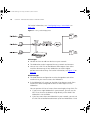
The following example describes how to deploy the SuperStack 3 Server
Load Balancer with the Webcache. The network layout is shown in
Figure 7 below.
dua1611-5aaa04.book Page 41 Friday, November 29, 2002 8:56 PM
Transparent Cache Deployment
41
Figure 7 Deploying the Webcache and Server Load Balancer Together
The Webcache is directly connected to a SuperStack 3 Server Load
Balancer via the LAN port to improve the scaling and performance of a
group of web servers. The Server Load Balancer partitions network traffic
between a group of Web servers offering services to client machines. You
should primarily choose this deployment mode if you want to offload
traffic from Web servers to the Webcache(s).
You can attach one or more Webcaches to the Server Load Balancer and
assign them to particular load balancing services provided by the Web
servers. The Server Load Balancer can be configured to redirect Web
requests on TCP port 80 to a Webcache for a particular service, or to load
balance between multiple Webcaches based on standard load balancing
algorithms.
For further information about configuring the Server Load Balancer, refer
to the documentation that accompanies the device.
Web Cache
Communication
Protocol (WCCP)
The Web Cache Communication Protocol (WCCP) allows the Webcache
to be connected to one or more WCCP-enabled Cisco routers in your
network. The router automatically redirects all Web requests on TCP port
80 or FTP requests to the Webcache. Therefore no configuration of the
Web browser on each client machine is needed.
There are two versions of WCCP, known as WCCP V1 and WCCP V2,
which require different deployment methods. WCCP V1 allows a single
dua1611-5aaa04.book Page 42 Friday, November 29, 2002 8:56 PM
42
CHAPTER 1: WEB CACHING CONCEPTS AND DEPLOYMENT
Cisco router to operate with multiple Webcaches. WCCP V2 supports
multiple Cisco routers operating with multiple Webcaches in a service
group.
One of the major benefits of WCCP is that there can be a Layer 3
network between the Webcache and the routers, which allows for more
flexible deployment of the Webcache within your network. The
Webcache and Cisco routers do not have to be directly connected to each
other.
The Webcache must either:
■
be connected to a switch, and the switch connected to the router
running WCCP or
■
be directly connected to a dedicated router interface on a 3 interface
router.
Do not use a hub as the Webcache may see traffic that is not destined for
it.
Configure Webcache redirection on the WAN side interfaces of the Cisco
router, rather than on the LAN side interfaces of the router.
3Com recommends that you use WCCP V2 rather than WCCP V1 if
possible.
You can find further information about the Web Cache Communication
Protocol at:
http://www.cisco.com/warp/public/732/wccp/index.html
(correct at time of publication)
For further information about configuring the Cisco routers for WCCP
using the Cisco Command Line Interface, see the “Default Settings for
the Webcache” appendix on page 307.
dua1611-5aaa04.book Page 43 Friday, November 29, 2002 8:56 PM
Transparent Cache Deployment
WCCP Version 1
43
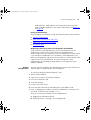
Figure 8 WCCP Version 1 Deployment
WCCP V1 allows a single WCCP-enabled Cisco router to operate with
multiple Webcaches in your network. You need to specify the IP address
of the router in the Web interface of each Webcache.
For further information, see “Configuring WCCP V1” on page 112.
WCCP Version 2
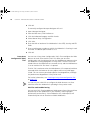
Figure 9 WCCP Version 2 Deployment
dua1611-5aaa04.book Page 44 Friday, November 29, 2002 8:56 PM
44
CHAPTER 1: WEB CACHING CONCEPTS AND DEPLOYMENT
WCCP V2 supports multiple WCCP-enabled Cisco routers operating with
multiple Webcaches in a service group. Any of the available routers in the
service group can redirect Web requests to any of the available
Webcaches, improving performance and redundancy within your
network.
For further information, see “Configuring WCCP V2” on page 113.
Adding a New Webcache to a Service Group
There are two ways of adding a new Webcache to an existing WCCP
service group. In the Web interface of each Webcache, you can choose to
specify the IP address for each router or enter a single multicast IP
address.
Specifying a multicast IP address allows you to quickly add a new
Webcache to the service group without having to reconfigure every
router and Webcache in that group. The existing Webcaches and routers
will automatically configure the new Webcache into the WCCP V2
environment.
Improving the Security of Your Network
You can also enable password authentication between the routers and
the Webcaches. If enabled, the Webcache provides a password when it
identifies itself to the router. An incorrect password causes redirection of
traffic to the Webcache to be disabled. This password system prevents a
network device from receiving Web traffic for malicious purposes and
inproves the security of your network.
Proxy Relay
Deployment
The following example describes how to deploy the Webcache with the
SuperStack 3 Firewall in a Proxy Relay configuration. The network layout
is shown in Figure 10 below.
Web requests from client machines are intercepted by the Firewall,
rewritten as proxy requests and redirected to the Webcache. Cache hit
responses from the Webcache are again rewritten by the Firewall so they
appear to have come directly from the origin server.
For further information, see “Configuring Proxy Relay with the
SuperStack 3 Firewall” on page 114.
dua1611-5aaa04.book Page 45 Friday, November 29, 2002 8:56 PM
Proxy Cache Deployment
45
Figure 10 Deploying the Firewall and Webcache Together
Advantages
■
You do not have to configure the Web browser on each client
machine that you want to access the Webcache because all Web
requests are automatically redirected by the Firewall.
Disadvantages
■
You have to add a Firewall to your network if it is not already available.
Prior to version 6.3.3 of the Firewall software:
Proxy Cache
Deployment
■
Only one Webcache can be connected to the Firewall.
■
The Firewall does not perform any health-checking to ensure that the
Webcache is operational. If the Webcache fails, the Firewall continues
to direct Web requests to the Webcache, causing a loss of client
machine access to the Internet.
In Proxy Cache deployment the Webcache is connected to an Ethernet
switch in your LAN. You must configure the Web browser on each client
machine in your network to explicitly direct its Web requests to the
Webcache. All Web requests are received and served by the Webcache.
All non-Web traffic is sent directly to the appropriate destination.
dua1611-5aaa04.book Page 46 Friday, November 29, 2002 8:56 PM
46
CHAPTER 1: WEB CACHING CONCEPTS AND DEPLOYMENT
For further information, see “Configuring Proxy Cache Mode” on
page 115.
Figure 11 Proxy Cache Deployment
Advantages
■
You do not have to add new devices to your network.
■
The Webcache can be integrated into any network environment.
■
You can use a PAC file to load balance Web requests from client
machines between up to four Webcaches to achieve higher
performance and resiliency. For further information, see Figure 12 on
page 49.
Disadvantages
■
The Web browser configuration must be changed on each client
machine that you want to access the Webcache.
■
If the Webcache fails, access to the Web is lost because each client
machine has been configured to direct its Web requests to the
Webcache.
You can prevent this loss of access from occurring by using a PAC file:
■
■
If you have a single Webcache in your network, you can use the
PAC file to instruct the browser to go directly to the Web if the
Webcache is not available.
If you have more than one Webcache in your network, you can use
the PAC file to load balance between up to four Webcaches. If one
dua1611-5aaa04.book Page 47 Friday, November 29, 2002 8:56 PM
Proxy Cache Deployment
47
Webcache fails, Web requests will automatically be sent to the
other available Webcaches. For further information, see Figure 12
on page 49.
Proxy Cache Solutions
You can deploy the Webcache using the following Proxy Cache solutions:
■
Manual Configuration
■
Proxy Auto Configuration (PAC) Files
■
Web Proxy Auto-Discovery (WPAD)
■
Third-party Tools
Migrating from Proxy Cache to Transparent Cache Mode
Client machines with Web browsers that are configured to use the
Webcache as a Proxy Cache (either directly or through Browser
Auto-Configuration) can continue to use the Webcache as a Proxy Cache
if you change the Webcache to a Transparent Cache deployment. This
allows you to gradually migrate the client machines in your network from
a pure Proxy Cache configuration to a pure Transparent Cache
configuration, by changing the Web browsers to Transparent Cache
mode as required.
Manual
Configuration
You can manually configure the Web browser on each client machine to
explicitly direct its Web requests to the Webcache.
To manually configure Internet Explorer 5 or 6:
1 Open Internet Explorer.
2 From the Tools menu, click Internet Options.
3 Click the Connections tab.
4 Click LAN Settings.
5 Check Use a proxy server.
6 Enter the URL or location of the Webcache in the Address field.
7 Enter a caching port number on which the Webcache is listening in the
Port field. The default port number is 8080.
You can view the port numbers for the Webcache by:
a Logging into the Web Interface.
b Selecting Device > Caching > Set Caching Mode.
dua1611-5aaa04.book Page 48 Friday, November 29, 2002 8:56 PM
48
CHAPTER 1: WEB CACHING CONCEPTS AND DEPLOYMENT
8 Click OK.
To manually configure Netscape Navigator 4.5 or 6:
1 Open Netscape Navigator.
2 From the Edit menu, click Preferences.
3 Click the Advanced category and click Proxies.
4 Select Manual Proxy Configuration.
5 Click View.
6 Enter the URL or location of the Webcache in the HTTP, Security and FTP
fields.
7 Enter a caching port number on which the Webcache is listening in each
Port field. The default port number is 8080.
8 Click OK.
Proxy Auto
Configuration (PAC)
Files
You can use a Proxy Auto Configuration (PAC) file to configure the Web
browser on each client machine. PAC files allow you to create
configuration rules that determine how the Web browser operates when
the Webcache is being deployed as a Proxy cache. The PAC file can be
stored either on the Webcache or a network server, and the Web browser
is set to read the PAC file when it is opened.
The PAC file is read once when the Web browser is first opened, and then
executed within the browser for every object within every Web page
visited. This can cause a perceived response time degradation, although
the performance degradation is likely to be small.
For further information, see “Creating a Proxy Auto-configuration File”
on page 115.
You can only use a PAC file to configure the Web browsers on client
machines when the Webcache is operating in Proxy cache mode.
PAC Files and Load Balancing
You can use a PAC file to load balance Web requests from client machines
between up to four Webcaches in your network, achieving higher
performance and resiliency. If one Webcache fails, Web requests will
automatically be sent to the other available Webcaches.
dua1611-5aaa04.book Page 49 Friday, November 29, 2002 8:56 PM
Proxy Cache Deployment
49
Figure 12 Proxy Cache Deployment with PAC File Load Balancing
Web Proxy
Auto-Discovery
(WPAD)
The Webcache and Microsoft Internet Explorer 5 (and later versions)
support the Web Proxy Auto-Discovery (WPAD) protocol. This protocol
enables the Web browser on client machines to automatically find and
load proxy configuration information (stored in a PAC file) without user
intervention. The PAC file is located either on a server in your network or
on the Webcache.
The Web Proxy Auto-Discovery (WPAD) protocol is not supported by
Netscape Navigator.
Configuring WPAD
To configure WPAD you need to:
■
Set up a WPAD server
■
Configure your DNS server
■
Configure your DHCP server (if applicable)
■
Configure Internet Explorer on each client machine
■
Test that WPAD is working
Setting Up a WPAD Server
You can set up a WPAD server that holds a PAC file in a suitable domain
on your network or use the Webcache as a WPAD server. You can create
a PAC file using the Browser Auto-Configuration wizard in the Web
dua1611-5aaa04.book Page 50 Friday, November 29, 2002 8:56 PM
50
CHAPTER 1: WEB CACHING CONCEPTS AND DEPLOYMENT
interface of the Webcache; for further information, see “Creating a Proxy
Auto-configuration File” on page 115.
When Internet Explorer is launched it searches for a WPAD server. The
Web browser adds the subdomain “wpad” to the beginning of the
fully-qualified domain name and progressively removes subdomains until
it either finds a WPAD server answering the domain name or reaches the
third-level domain. For example, Web browsers on client machines in the
a.b.3Com.com domain would query wpad.a.b.3Com, wpad.b.3Com.com,
and then wpad.3Com.com. If a WPAD server is found, the Web browser
downloads and executes the PAC file and configures the browser
settings.
Configuring Your DNS Server
You must define your network Domain Name System (DNS) server with
the appropriate use of domains in order to use WPAD. If you are using
the Webcache as the WPAD server, you need to create a DNS record
which resolves wpad.your.domain.name to the Webcache’s IP address.
For further information about the Domain Name System, see “Domain
Name System” on page 28.
When a Web browser on a client machine is configured to use a WPAD
server on your network or the Webcache as a WPAD server, there may be
a pause of several seconds when it first tries to connect. The delay is
caused by the Web browser connecting to your Domain Name System
(DNS) server when it is initially started. This is normal behavior. Once the
Web browser has accessed the WPAD server or Webcache, subsequent
browser requests will operate without delays caused by WPAD.
Configuring Your DHCP Server
You can use the Web Proxy Auto-Discovery (WPAD) protocol with
Dynamic Host Configuration Protocol (DHCP) client machines on your
network if:
■
the DHCP server is Windows 2000-based and
■
the DHCP client machines are Windows 2000-based and
■
the DHCP client machines are using Internet Explorer 5 or later
dua1611-5aaa04.book Page 51 Friday, November 29, 2002 8:56 PM
Proxy Cache Deployment
51
You need to add the WPAD functionality to your DHCP server using DHCP
Manager. For further information, view the Microsoft Knowledge Base at:
http://search.support.microsoft.com/kb/c.asp
(correct at time of publishing)
and search for the article ID number Q252898.
Configuring Internet Explorer to Use WPAD
To configure Internet Explorer to use WPAD:
1 Open Internet Explorer.
2 From the Tools menu, click Internet Options.
3 Click the Connections tab.
4 Click LAN Settings.
5 Check Automatically detect settings.
6 Click OK.
7 Close Internet Explorer.
Testing WPAD
To confirm that WPAD is working successfully:
1 Open Internet Explorer and log in to the Web interface.
2 Click Device on the Toolbar.
3 Select Caching > Access Logging in the Navigation Tree.
4 Check Enable Web Access Logging.
5 Select one of the five access log formats. Click OK.
6 Perform some Web browsing from a client machine that is configured to
use WPAD.
7 Log in to the Web interface again.
8 Click Device on the Toolbar.
9 Select Caching > View Access Log in the Navigation Tree.
10 Check that there are Web browser accesses in the Access Log.
WPAD Resources
You can view the Internet Draft for the Web Proxy Auto-Discovery
Protocol at:
dua1611-5aaa04.book Page 52 Friday, November 29, 2002 8:56 PM
52
CHAPTER 1: WEB CACHING CONCEPTS AND DEPLOYMENT
http://www.ietf.org/internet-drafts/draft-cooper-webi-wpad-0
0.txt
(correct at time of publishing)
Third-party Tools
There are applications from many vendors that can help you to manage
networks of client machines.
Microsoft offers the Internet Explorer Administration Kit and Systems
Management Server, which allow you to remotely configure Web
browsers and Proxy Cache settings.
http://www.microsoft.com/windows/ieak/en/default.asp
Windows 2000 Server has the capability to manage Web browser
configurations through the its domain management tools.
Other vendors include Hewlett Packard, Intel and Tivoli.
Inline Cache
Deployment
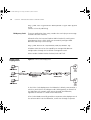
Figure 13 Inline Cache Deployment
In the Inline Cache deployment the Webcache is directly connected to a
switch in your LAN via the LAN port and a WAN gateway or firewall via
the WAN port. All network traffic passes through the Webcache,
regardless of whether it is Web or non-Web traffic.
Inline Cache Mode essentially provides transparent cache deployment via
the software built into the Webcache, rather than through a separate
dua1611-5aaa04.book Page 53 Friday, November 29, 2002 8:56 PM
Parent Caching
53
Layer 4 redirection device. All Web traffic arriving from client machines to
the LAN port of the Webcache is directed into the caching software. All
non-Web traffic is automatically sent back out onto the network via the
WAN port. Cache misses are automatically redirected from the LAN port
to the WAN port.
For further information, see “Configuring Inline Cache Mode” on
page 118.
Advantages
■
You do not have to add new devices to your network. Therefore it is
easy to try out the Webcache in your network.
■
No configuration of the Web browser on each client machine is
needed because all network traffic goes through the Webcache.
Disadvantages
Parent Caching
■
The Webcache is a single point of failure; if it fails, the entire network
becomes inaccessible.
■
All incoming and outgoing network traffic is handled by the software
built into the Webcache. The peak packet rate that can be sustained is
therefore lower than using a Layer 4 device, resulting in reduced
performance.
Parent Caching allows you to explicitly configure a hierarchy of
Webcaches within your network. Web requests from client machines that
are not fulfilled by a child Webcache (cache misses) can be routed to
parent Webcaches instead of the origin Web server. If a parent Webcache
has the requested content, it serves it back to the child Webcache, which
in turn caches and serves it back to the client machines.
For further information, see “Configuring Parent Caching” on page 119.
You can configure a child Webcache to use parent caching regardless of
which deployment mode it is currently operating in. The child Webcache
uses the TCP port number that you configure for the parent Webcache to
send its requests.
Any compliant HTTP proxy cache can be used as a parent Webcache. The
parent Webcache does not have to be a 3Com SuperStack 3 Webcache.
dua1611-5aaa04.book Page 54 Friday, November 29, 2002 8:56 PM
54
CHAPTER 1: WEB CACHING CONCEPTS AND DEPLOYMENT
You can configure a child Webcache to forward requests to up to four
parent Webcaches. If one of the parent Webcaches does not have the
requested content or is unavailable, the child Webcache will
automatically try the next specified parent Webcache. If none of the
parent Webcaches are available, the child Webcache will forward its
request to the origin server.
If you do not want all cache misses to be forwarded to the parent
Webaches, you can configure an Exclusion List on the child Webcache.
You can specify IP addresses, IP address ranges and domain names that
the child Webcache should request directly from the origin server instead
of from the parent Webcaches.
Example
You may want to exclude cache misses to a LAN server in your network. If
you choose not to exclude the server, the cache misses will be forwarded
across the network to the parent Webcaches and then back again, rather
than being retrieved directly from the local server.
All client machines and Web sites that you specify in the Cache Bypass
screen will not be sent to the parent Webcaches; for further information,
see “Cache Bypass” on page 186.
How does Parent
Caching Work?
Parent Caching operates in the following way:
1 A URL is entered into a Web browser by a user on a client machine in
your network.
2 The child Webcache receives the request for the URL from the client
machine and checks its cache for the requested content.
3 If the content is not in the cache or the content is expired (see“Current
and Expired Content” on page 32), the child Webcache forwards the
request to the parent Webcache.
4 If the content is in the parent Webcache it is simultaneously served to the
client machine and stored in the child Webcache, as shown in Figure 14.
Subsequent requests for that content will be served directly from the child
Webcache.
dua1611-5aaa04.book Page 55 Friday, November 29, 2002 8:56 PM
Parent Caching
55
Figure 14 Parent Caching
5 If the content is not in the parent Webcache, it is retrieved from either the
origin server or another parent Webcache. The content is then cached by
the parent Webcache and simultaneously served to the client machine
and stored in the child Webcache.
Parent Caching
Network Example
The single parent Webcache example in Figure 15 shows a local Branch
Office and a remote central Head Office. All requests for the Internet are
routed through the Head Office site before reaching the World Wide
Web because the Head Office site contains the physical WAN link.
Therefore the Webcache that is deployed between the Branch Office and
Head Office is the child Webcache. All cache misses from that Webcache
are forwarded to the parent Webcache, which is deployed between the
Head Office and the Internet.
Figure 15 Parent Cache Deployment (single parent)
dua1611-5aaa04.book Page 56 Friday, November 29, 2002 8:56 PM
56
CHAPTER 1: WEB CACHING CONCEPTS AND DEPLOYMENT
Accidental Webcache Hierarchies
An accidental Webcache hierarchy automatically exists in the networking
example shown in Figure 15 if the parent Webcache is configured in
either Transparent cache, Inline cache or WCCP mode. In each of these
deployment modes Web requests are transparently intercepted by a
device in your network and redirected to the Webcache. Therefore the
parent Webcache will accidentally serve Web requests that it has received
from the child Webcache, without the child being explicitly aware of the
existence of the parent.
The main advantage of an explicit parent Webcache configuration, as
opposed to an accidental hierarchy, is that it allows for a more flexible
network topology between child and parent cache. The child Webache
directly forwards its cache misses to the parent Webcache by using the
parent Webcache’s IP address or domain name and TCP port number.
Therefore you do not have to place the parent Webcache at a natural
point of convergence in your network and you do not have to add a new
redirecting device to your network.
ICP Caching
ICP Caching is an open standard protocol allowing multiple proxy caches
to cooperate and appear as a single larger Webcache. It originally
appeared at a time when there was very little storage capacity on an
individual cache. Now that storage capacity is so much larger, in most
environments ICP is no longer used. A single Webcache, or a Webcache
operating with Parent Caches offers better behavior and performance.
Some environments may still require ICP in order to integrate with other
legacy caches.
ICP Caching creates an extended hierarchy similar to Parent Caching. ICP
allows you to build hierarchies involving both ICP parent caches and ICP
peer caches. The Webcache requests content from its peer caches before
requesting content from its parents.
When a request is received from a browser, the Webcache first
determines if it has the content itself. If it does not, it will ask its peers
(i.e. those caches at the same level in the ICP hierarchy). If none of these
peers has the content it will ask its parents. If they do not have the
content, the Webcache will go directly to the origin server.
ICP Caching uses a different network protocol to Parent Caching. ICP
Caching uses UDP/IP for communication between caches whereas Parent
Caching uses TCP/IP.
dua1611-5aaa04.book Page 57 Friday, November 29, 2002 8:56 PM
ICP Caching
57
ICP Caching has two disadvantages against Parent Caching:
■
ICP Caching does not scale well — if your infrastructure grows and
more caches are installed, the network bandwidth used by ICP, and
the latency and reliability of the protocol can become an issue. This
does not occur with Parent Caching.
■
ICP Caching uses a connectionless protocol (UDP/IP) — if your
network is busy and a packet containing caching information is lost, it
will not be retransmitted. Consequently caching latency may go up as
UDP messages are lost and unnecessary cache misses occur.
3Com recommends that you use Parent Caching in preference to ICP
Caching unless you have an existing network of ICP Caches that you wish
to maintain.
dua1611-5aaa04.book Page 58 Friday, November 29, 2002 8:56 PM
58
CHAPTER 1: WEB CACHING CONCEPTS AND DEPLOYMENT
dua1611-5aaa04.book Page 59 Friday, November 29, 2002 8:56 PM
2
INSTALLING THE WEBCACHE
This chapter contains the information you need to install and set up the
Webcache 1000/3000. It covers the following topics:
■
Package Contents
■
Webcache — Front View Detail
■
Webcache — Rear View Detail
■
Choosing a Suitable Site
■
The Power-up Sequence
■
Deploying the Webcache in Your Network
■
Setting Up the Webcache for Management
■
Connecting the Webcache to the Live Network
■
Installing an Additional Cache Storage Device
WARNING: Safety Information. Before installing or removing any
components from the Webcache 1000/3000 or carrying out any
maintenance procedures, you must read the safety information provided
in Appendix A of this guide.
AVERTISSEMENT: Consignes de sécurité. Avant d'installer ou d'enlever
tout composant du Webcache 1000/3000 ou d'entamer une procédure
de maintenance, lisez les informations relatives à la sécurité qui se
trouvent dans l'Appendice A de ce guide.
VORSICHT: Sicherheitsinformationen. Bevor Sie Komponenten aus
dem Webcache 1000/3000 entfernen oder dem Webcache 1000/3000
hinzufuegen oder Instandhaltungsarbeiten verrichten, lesen Sie die
Sicherheitsanweisungen, die in Anhang A in diesem Handbuch
aufgefuehrt sind.
dua1611-5aaa04.book Page 60 Friday, November 29, 2002 8:56 PM
60
CHAPTER 2: INSTALLING THE WEBCACHE
Package Contents
■
Webcache 1000 (3C16115) or Webcache 3000 (3C16116)
■
CD-ROM
■
Documentation
■
User Guide (this guide)
■
Release Notes
■
Warranty Information Sheet
■
Power Cord
■
Rack-Mounting Kit containing:
■
2 x Rack Mounting Rails
■
2 x Rack Mounting Brackets
■
2 x Adjustable Brackets
■
2 x Front Plates
■
16 x Screws
You must use the rails and screws supplied with the Rack-Mounting Kit.
Damage caused to the Webcache by using incorrect rails and screws
invalidates your warranty.
For further information about rack-mounting the Webcache, refer to the
“Rack Mounting Instructions” that accompany your Webcache.
You must register the Webcache to activate the warranty. See “Product
Registration” on page 20.
dua1611-5aaa04.book Page 61 Friday, November 29, 2002 8:56 PM
Webcache — Front View Detail
Webcache — Front
View Detail
61
Figure 16 Webcache — Front View
Activity LED
Cache Storage
Status LED(s)
1
Power/Self
test LED
Link Status
LED(s)
2
3
Cache Storage Status
LAN
WAN
Activity
Power/Self test
Link Status
Cache Storage Status
green = ok
yellow = failed
Link Status
green = 100 Mbps
yellow = 10 Mbps
Webcache 3000
3C16116
®
SuperStack 3
The illustration above shows a Webcache 3000. The Webcache 1000
contains a single cache storage device and therefore has one Cache
Storage Status LED on the front panel. The Webcache 3000 contains two
cache storage devices and can also be upgraded with a third device;
therefore it has three Cache Storage Status LEDs.
LEDs
Table 4 lists LEDs visible on the front of the Webcache, and how to read
their status according to color. For information on using the LEDs for
problem solving, see “Solving Problems Indicated by LEDs” on page 277.
Table 4 LED Behavior
LED
Color
Indicates
Cache Storage Status LED(s)
Green
The cache storage device is present and operating normally.
Green flashing The cache storage device is being prepared for use by the
Webcache. The LED changes to Green when it is in use.
Yellow
The cache storage device has failed.
Yellow flashing The cache storage device is being prepared for removal. The
LED changes to Off when the drive is ready for removal.
Off
The cache storage device is not present.
Link Status LEDs
Green
A Fast Ethernet speed (100 Mbps) link is present, and the
port is enabled.
Yellow
An Ethernet speed (10 Mbps) link is present, and the port is
enabled.
Off
No link is present.
dua1611-5aaa04.book Page 62 Friday, November 29, 2002 8:56 PM
62
CHAPTER 2: INSTALLING THE WEBCACHE
LED
Color
Indicates
Activity LED
Green flashing The cache is active and caching is occurring.
Off
The cache is not active. This is normal behavior for an idle
Webcache.
Power/Self test LED
Green
The Webcache is powered-up and operating normally.
Green flashing The Webcache is either initializing or performing a software
upgrade (see note below).
Yellow
The Webcache is powered-up but a failure has occurred.
Yellow flashing An internal emergency recovery procedure has reset the
Webcache back to its factory default settings. The LED
continues to flash yellow until you change the IP address of
the Webcache.
Off
The Webcache is not powered-up. This may indicate a power
failure.
If the Webcache experiences an unrecoverable error during initialization
the Power/Self Test LED flashes Green. Take a note of the color and status
of each LED on the front before you contact 3Com technical support for
assistance.
Webcache — Rear
View Detail
Figure 17 Webcache — Rear View
WARNING: WAN and LAN RJ-45 Ports. These are shielded RJ-45 data
sockets. They cannot be used as standard traditional telephone sockets, or to
dua1611-5aaa04.book Page 63 Friday, November 29, 2002 8:56 PM
Webcache — Rear View Detail
63
connect the unit to a traditional PBX or public telephone network. Only
connect RJ-45 data connectors, Switches or Routers to these sockets.
Either shielded or unshielded data cables with shielded or unshielded
jacks can be connected to these data sockets.
Power Socket
The Webcache automatically adjusts its power setting to any supply
voltage in the range 90-240 VAC.
Console Port
The console port allows you to connect a terminal, terminal emulator or
modem and perform remote or local out-of-band management. The
console port uses a standard null-modem cable and is set to 9600 baud,
8 data bits, no parity and 1 stop bit.
WAN Port
The WAN port is an auto-negotiating 10BASE-T/100BASE-TX RJ-45 port.
It is used to connect the Webcache to the network in an Inline Cache
deployment environment. For further information, see “Inline Cache
Deployment” on page 52.
The WAN port should be left disconnected if the Webcache is not being
deployed in an Inline Cache configuration.
LAN Port
The LAN port is an auto-negotiating 10BASE-T/100BASE-TX RJ-45 port. It
is used to connect the Webcache to the network in either Proxy or
Transparent deployment environments. Web network traffic travels to
and from the Webcache via the LAN port. For further information, see
“Deploying the Webcache in Your Network” on page 70.
You must connect the WAN and LAN ports to your network using
appropriate network cables. For further information, see the “Cable
Specifications and Pin-outs” appendix on page 295.
Configuring the WAN and LAN Ports
You can configure the following settings for the WAN and LAN ports:
■
Auto-Negotiation — You can enable or disable this setting. It is
enabled by default.
If Autonegotiation is enabled, the negotiated link speed and duplex
setting are displayed.
dua1611-5aaa04.book Page 64 Friday, November 29, 2002 8:56 PM
64
CHAPTER 2: INSTALLING THE WEBCACHE
If Auto-Negotiation is disabled, you can configure:
■
Link Speed — You can set this to 100 Mbps or 10 Mbps.
■
Duplex State — You can set this to Full Duplex or Half Duplex.
You cannot enable or disable the WAN or LAN port itself. The port can
safely be left disconnected if it is not being used.
WAN and LAN Port
LEDs
Figure 18 Webcache — WAN and LAN Port LEDs
Table 5 lists LEDs visible on the rear of the Webcache, and how to read
their status according to color. For information on using the LEDs for
problem solving, see “Solving Problems Indicated by LEDs” on page 277.
Table 5 LED Behavior
LED
Color
Indicates
Port Activity LED
Green Flashing Full-duplex packets are being transmitted/received on the
port.
Yellow Flashing Half-duplex packets are being transmitted/received on the
port.
Off
No link is present.
Link Speed LED
Yellow On
A Fast Ethernet speed (100 Mbps) link is present.
Yellow Off
An Ethernet speed (10 Mbps) link is present.
The Link Speed LED does not change its state if the link is broken. It
remains in its current state until a new link is established. Therefore
Green Off, Yellow On indicates that no link is present and that the link
was previously 100 Mbps. It does not indicate that a 100 Mbps link is still
present.
dua1611-5aaa04.book Page 65 Friday, November 29, 2002 8:56 PM
Choosing a Suitable Site
Choosing a Suitable
Site
65
The Webcache must be mounted in a standard 19-inch 4-posted
equipment rack, and is suited for use in a wiring closet, an equipment
room, a server room, or telecommunications room. A rack-mounting kit is
supplied with the Webcache.
CAUTION: Ensure that the ventilation holes in the Webcache are not
obstructed.
When deciding where to position the Webcache, ensure that:
■
Cabling is located away from:
■
■
sources of electrical noise such as radios, transmitters and
broadband amplifiers.
power lines and fluorescent lighting fixtures.
■
The Webcache is accessible and cables can be connected easily.
■
Water or moisture cannot enter the case of the Webcache.
■
Air-flow is not restricted around the Webcache. 3Com recommends
that you provide a minimum of 25 mm (1 in.) clearance.
■
Air temperature around the Webcache does not exceed 40 °C (104 °F).
If the Webcache is installed in a 19-inch rack or closed assembly its local
air temperature may be greater than room ambient temperature.
Rack-Mounting the
Webcache
■
The air is as free from dust as possible.
■
The Webcache is situated away from sources of conductive (electrical)
dust, for example laser printers.
■
The Webcache is installed in a clean, air conditioned environment.
■
The AC supply used by the Webcache is separate to that used by units
that generate high levels of AC noise, for example air conditioning
units and laser printers.
The Webcache is 1U high and will fit in most standard 19-inch rack
mounts.
CAUTION: The rear of the Webcache must be supported. This is best
achieved through the use of a 19-inch 4-posted rack.
CAUTION: Disconnect all cables from the Webcache before continuing.
dua1611-5aaa04.book Page 66 Friday, November 29, 2002 8:56 PM
66
CHAPTER 2: INSTALLING THE WEBCACHE
You must use the rack-mounting rails and screws supplied with the
Webcache. Damage caused to the Webcache by using incorrect rails and
screws invalidates your warranty.
A Rack-Mounting Kit is supplied with the Webcache which contains the
items shown in Figure 19. The rack-mounting rails and rack-mounting
brackets are attached to the Webcache. The adjustable brackets and
screws are contained within the Webcache packaging.
Figure 19 The Rack-Mounting Kit Contents
dua1611-5aaa04.book Page 67 Friday, November 29, 2002 8:56 PM
Rack-Mounting the Webcache
67
To rack-mount your Webcache:
1 Place the Webcache the right way up on a hard flat surface, with the
front facing towards you. The rack-mounting brackets are attached to
each side of the Webcache, as shown in Figure 20.
Figure 20 Rack-Mounting Bracket Attached to the Webcache
2 Slide the rack-mounting rails off the rack-mounting brackets on both
sides of the Webcache.
3 Use an adjustable bracket to secure a rack-mounting rail to the rear of
your rack as shown in Figure 21. To do this:
a Slide the adjustable bracket onto the rack-mounting rail and attach it
using two of the screws provided at a position suitable for your rack.
b Adjust the rack-mounting rail to fit the depth of your rack.
c Use rack-nuts (not supplied) to attach the rack-mounting rail and
adjustable bracket assembly to the rear of your rack.
dua1611-5aaa04.book Page 68 Friday, November 29, 2002 8:56 PM
68
CHAPTER 2: INSTALLING THE WEBCACHE
Figure 21 Fitting a Rack-Mounting Rail to the Rear of the Rack
4 Attach the rack-mounting rail to the front of the rack. To do this:
a Insert two screws through aligned openings in the front plate, rack
and rack-mounting rail as shown in Figure 22.
b Tighten the screws with a suitable screwdriver.
Figure 22 Fitting a Rack-Mounting Rail to the Front of the Rack
5 Slide the rack-mounting brackets on the sides of the Webcache into the
rack-mounting rails.
6 Secure the front of the Webcache to the rack with the captive
thumbscrews, as shown in Figure 23. Screw the thumbscrews into
rack-nuts (not supplied).
dua1611-5aaa04.book Page 69 Friday, November 29, 2002 8:56 PM
The Power-up Sequence
69
Figure 23 Attaching the Webcache to the Rack
7 Ensure that the ventilation holes in the Webcache are not obstructed.
The Power-up
Sequence
Powering-up the
Webcache
The following sections describe how to get your Webcache powered-up
and ready for operation.
Use the following sequence of steps to power-up the Webcache:
1 Plug the power cord into the power socket at the rear of the Webcache.
2 Plug the other end of the power cord into your power outlet.
3 The Webcache automatically powers-up, which takes approximately
60-90 seconds. During power-up all of the LEDs light and the Power/Self
test LED flashes green. When the Webcache has powered-up and is
operating normally, the Power/Self test LED changes to non-flashing
green.
CAUTION: The Webcache has no ON/OFF switch; the only method of
connecting or disconnecting mains power is by connecting or
disconnecting the power cord.
Checking for Correct
Operation of LEDs
During the power-up of the Webcache, all ports on the Webcache are
disabled, all of the LEDs light and the Power/Self test LED flashes green
dua1611-5aaa04.book Page 70 Friday, November 29, 2002 8:56 PM
70
CHAPTER 2: INSTALLING THE WEBCACHE
When the power-up has completed, check the Power/Self test LED to
make sure that your Webcache is operating correctly. Table 6 shows
possible behavior for the LED.
Table 6
Power/Self test LED behavior
Color
State
Green
The Webcache is powered-up and operating normally.
Green flashing
The Webcache is either initializing or performing a
software upgrade.
Yellow
The Webcache is powered-up but is not caching — a
failure has occurred.
Yellow flashing
An internal emergency recovery procedure has reset the
Webcache back to its factory default settings. The LED
continues to flash yellow until you change the IP address
of the Webcache.
Off
The Webcache is not powered-up. This may also indicate
a power failure.
If the LEDs on the Webcache indicate a problem refer to “Solving
Problems Indicated by LEDs” on page 277.
Deploying the
Webcache in Your
Network
You must choose how you are going to deploy the Webcache in your
network. The Webcache can be deployed in the following ways:
■
Transparent caching
■
Proxy Relay caching
■
Proxy caching
■
Inline caching
For further information about each deployment mode, see “Deployment
Modes Overview” on page 32.
CAUTION: 3Com recommends you set up the Webcache for
management in a test network environment before you introduce it into
your live network. For further information, see “Setting Up the Webcache
for Management” on page 71.
dua1611-5aaa04.book Page 71 Friday, November 29, 2002 8:56 PM
Setting Up the Webcache for Management
Setting Up the
Webcache for
Management
71
You can quickly set up the Webcache for management in two ways:
■
Setting Up Using the Web Interface — Connect a management
workstation to the Webcache over an IP test network or directly via a
cross-over cable. For further information, see “Setting Up Using the
Web Interface” on page 71.
or
■
Setting Up Using the Command Line Interface — Connect a
management workstation to the Webcache over an IP test network or
connect a terminal or terminal emulator to the console port of the
Webcache directly, or through a modem. For further information, see
“Setting Up Using the Command Line Interface” on page 74.
CAUTION: You must configure the basic settings of the Webcache by
completing the Getting Started wizard before you introduce the
Webcache to your live network. In particular, ensure that the IP settings
of the Webcache fit into those of your network. For further information,
see “Getting Started Wizard Settings” on page 309.
Setting Up Using the
Web Interface
You can setup the Webcache for management via the Web interface by
using a Web browser on a management workstation that is connected to
the Webcache over your test network, or directly using a cross-over cable.
Setting Up Over the Test Network
The Webcache is pre-configured with a default IP address, which is within
the range of addresses reserved by the IETF for private IP networks. This
default address allows you to run the Web interface without any initial
configuration of IP addresses. The default IP address of the Webcache is
192.168.1.253.
Figure 24 Setting Up Over the Test Network
Switch/Hub
1
2
3
Cache Storage Status
LAN
WAN
Link Status
Activity
Power/Self test
Cache Storage Status
green = ok
yellow = failed
Link Status
green = 100 Mbps
yellow = 10 Mbps
Webcache 3000
3C16116
SuperStack® 3
Webcache
Client Machine
To connect the Webcache to the test network:
■
The client machine must be in the same subnet as the Webcache to be
able to access it using the default IP address.
dua1611-5aaa04.book Page 72 Friday, November 29, 2002 8:56 PM
72
CHAPTER 2: INSTALLING THE WEBCACHE
■
You must have an IP stack correctly installed on the client machine.
You can check this by trying to browse the World Wide Web; if you
can browse, an IP stack is installed. If you do not have access to the
World Wide Web, you can check that the IP stack is installed by
pinging another device in your network. For further information, see
“Pinging Other Devices” on page 228.
Setting Up Using a Cross-over Cable
Alternatively, you can directly connect a client machine to the Webcache
by attaching a cross-over cable to the LAN port on the rear panel. For
further information, see “Webcache — Rear View Detail” on page 62.
Figure 25 Setting Up Using a Cross-over Cable
Connected Using a Cross-over Cable
1
2
3
Cache Storage Status
LAN
WAN
Link Status
Activity
Power/Self test
Cache Storage Status
green = ok
yellow = failed
Link Status
green = 100 Mbps
yellow = 10 Mbps
Webcache 3000
3C16116
SuperStack® 3
Webcache
Client Machine
Accessing the Web Interface
To access the Web interface:
1 Open the Web browser on the management workstation. To display the
Web interface correctly, use one of the following Web browsers:
■
Microsoft Internet Explorer v4.0
■
Microsoft Internet Explorer v5.0
■
Microsoft Internet Explorer v5.5
■
Microsoft Internet Explorer v6.0
■
Netscape Communicator v4.5
■
Netscape Communicator v4.6
■
Netscape Communicator v4.7
■
Netscape Communicator v6.0
3Com recommends that you use a later version of Internet Explorer than
version 5.0.
For the browser to operate the Web interface correctly JavaScript™ and
Cascading Style Sheets must be enabled on your browser. These features
are enabled on a browser by default. You will only need to enable them if
you have changed your browser settings.
dua1611-5aaa04.book Page 73 Friday, November 29, 2002 8:56 PM
Setting Up the Webcache for Management
73
Also the Web interface has been optimized for PC screens with the
desktop area set to 800 by 600 pixels. 3Com recommends that you set
the font size to Small Fonts.
2 In the Location/Address field of the browser, enter the URL of the
Webcache. This must be in the format:
http://nnn.nnn.nnn.nnn
where nnn.nnn.nnn.nnn is the IP address of the Webcache.
192.168.1.253 is the default IP address of the Webcache.
You can include the port number on which the Webcache listens as part
of the URL of the Webcache i.e. http://192.168.1.253:8081.
3 When the browser has located the Webcache, a user name and password
screen is displayed as shown in Figure 26.
Figure 26 User name and password screen
If the user name and password screen is not displayed, see “Solving Web
Interface Problems” on page 277.
4 Enter your user name and password. For further information, see
“Logging in as a Default User” on page 88. Click OK.
5 The Getting Started wizard is displayed when the Web interface has
loaded. You must configure the basic settings of the Webcache by
completing the Getting Started wizard before you introduce the
dua1611-5aaa04.book Page 74 Friday, November 29, 2002 8:56 PM
74
CHAPTER 2: INSTALLING THE WEBCACHE
Webcache to your live network. For further information, see “Getting
Started Wizard Settings” on page 309.
Setting Up Using the
Command Line
Interface
You can setup the Webcache for management via the Command Line
Interface by running a Telnet session on a management workstation that
is connected to the Webcache over your test network, or locally via a
console port connection.
Setting Up Over the Test Network
The Webcache is pre-configured with a default IP address, which is within
the range of addresses reserved by the IETF for private IP networks. This
default address allows you to run the Command Line Interface without
any initial configuration of IP addresses. The default IP address of the
Webcache is 192.168.1.253.
Figure 27 Setting Up Over the Test Network
Switch/Hub
1
2
3
Cache Storage Status
LAN
WAN
Link Status
Activity
Power/Self test
Cache Storage Status
green = ok
yellow = failed
Link Status
green = 100 Mbps
yellow = 10 Mbps
Webcache 3000
3C16116
SuperStack® 3
Webcache
Client Machine
To setup the Webcache using the Command Line Interface over a test
network using Telnet, open a Telnet session using a terminal emulator by
specifying the IP address of the Webcache. If you are unsure how to do
this, check the documentation supplied with the Telnet facility
To connect the Webcache to the test network:
■
The client machine must be in the same subnet as the Webcache to be
able to access it using the default IP address.
■
You must have an IP stack correctly installed on the client machine.
You can check this by trying to browse the World Wide Web; if you
can browse, an IP stack is installed. If you do not have access to the
World Wide Web, you can check that the IP stack is installed by
pinging another device in your network. For further information, see
“Pinging Other Devices” on page 228.
Setting Up Through the Console Port
Alternatively, you can directly connect a client machine to the Webcache
by attaching a null-modem cable to the console port on the rear panel.
dua1611-5aaa04.book Page 75 Friday, November 29, 2002 8:56 PM
Setting Up the Webcache for Management
75
For further information, see “Webcache — Rear View Detail” on
page 62.
Figure 28 Setting Up Through the Console Port
To connect to the Webcache via the console port:
1 You must connect a terminal or terminal emulator to the console port on
the rear panel of the Webcache. For further information, see “Webcache
— Rear View Detail” on page 62.
■
If you are connecting directly to the console port, you need a standard
null-modem cable.
■
If you are connecting to the console port using a modem, you need a
standard modem cable. The console port of the Webcache has a male
9-pin D-type connector. You can find pin-out diagrams for both cables
in the “Cable Specifications and Pin-outs” appendix on page 295.
You must use a VT52 or VT100/ANSI compatible terminal emulator.
To connect the cable:
a Attach the female connector on the cable to the male connector on
the console port of the Webcache.
b Tighten the retaining screws on the cable to prevent it from being
loosened.
c Connect the other end of the cable to your terminal, terminal
emulator, or modem. Make sure that the terminal, terminal emulator,
or modem have the same settings as the console port:
■
8 data bits
■
no parity
■
1 stop bit
■
9600 baud (default value)
2 To configure the settings of the terminal, terminal emulator, or modem,
see the documentation that accompanies it. You must configure the
terminal and set the line speed (baud) to 9600. You can change the baud
rate of the console port via the Web interface.
dua1611-5aaa04.book Page 76 Friday, November 29, 2002 8:56 PM
76
CHAPTER 2: INSTALLING THE WEBCACHE
Accessing the Command Line Interface
To access the Command Line Interface, take the following steps:
1 The login sequence for the Command Line Interface begins as soon as
the Webcache detects a connection to its console port, or as soon as a
Telnet session is started.
If the login sequence does not begin immediately, press Return a few
times until it does begin. If the sequence still does not begin, see “Solving
Command Line Interface Problems” on page 280.
2 At the Login and Password prompts, enter your user name and password.
For further information, see “Logging in as a Default User” on page 88.
3 If you have logged on correctly, the Top-level menu of the Command Line
Interface is displayed as described in “Understanding the Command Line
Interface” on page 84. If you have not logged on correctly, the message
Incorrect password. is displayed and the login sequence starts again.
4 Access the Getting Started wizard, which allows you to quickly configure
the basic setup information for the Webcache.
At the Top-level menu, enter:
gettingStarted
5 The Getting Started wizard is displayed. You must configure the basic
settings of the Webcache by completing the Getting Started wizard
before you introduce the Webcache to your live network. For further
information, see “Getting Started Wizard Settings” on page 309.
Connecting the
Webcache to the
Live Network
The following sections describe how to connect the Webcache to your
live network.
CAUTION: You must configure the basic settings of the Webcache by
completing the Getting Started wizard before you introduce the
Webcache to your live network. In particular, ensure that the IP settings
of the Webcache fit into those of your network.
Choosing the Correct
Cables
3Com recommends that you use Category 5 cable to connect the LAN
port to your network — the maximum segment length for this type of
cable is 100 m (328 ft).
dua1611-5aaa04.book Page 77 Friday, November 29, 2002 8:56 PM
Installing an Additional Cache Storage Device
Connecting the
Webcache
77
Use the following sequence of steps to connect the Webcache to your
network:
1 Connect an appropriate network cable to the LAN port on the rear panel
of the Webcache. Simply slot the connector on the cable into the RJ-45
LAN port. When the connector is fully in, its latch locks in place. To
disconnect the cable, push the connector’s latch in and remove it.
2 Connect the other end of the network cable to a 10BASE-T/100BASE-TX
port on a suitable switch or hub in your network. The switch or hub that
you connect the Webcache to is determined by the deployment
environment that you choose; for further information, see “Deploying
the Webcache in Your Network” on page 70.
Installing an
Additional Cache
Storage Device
The Webcache 3000 has two cache storage devices installed when you
purchase it. You can install an additional cache storage device in the third
bay of the Webcache 3000. This improves the performance of the
Webcache in the following ways:
■
Reduced Web Latency
The amount of time that the Webcache takes to respond to client
machine Web requests is reduced.
■
Increased Peak Throughput
The maximum amount of Web throughput that the Webcache can
serve is increased.
■
Increased Hit Rate
Additional Web content can be stored on the Webcache, increasing
the chances of a cache hit.
You need to purchase a hard drive approved by 3Com and insert it into
the mounting tray in the third bay of the Webcache. A list of approved
hard drives can be found at:
htpp://www.3com.com/sswebcache
CAUTION: You must purchase and install a hard drive that 3Com has
approved. Your warranty will be invalidated if you install an unapproved
drive.
For further information, see the “Installing an Additional Cache Storage
Device” appendix on page 317.
dua1611-5aaa04.book Page 78 Friday, November 29, 2002 8:56 PM
78
CHAPTER 2: INSTALLING THE WEBCACHE
dua1611-5aaa04.book Page 79 Friday, November 29, 2002 8:56 PM
II
MANAGING
THE
WEBCACHE
Chapter 3
Using the CLI Interface
Chapter 4
Using the Web Interface
Chapter 5
Securing Access to the Webcache Management Interfaces
dua1611-5aaa04.book Page 80 Friday, November 29, 2002 8:56 PM
80
dua1611-5aaa04.book Page 81 Friday, November 29, 2002 8:56 PM
3
USING THE CLI INTERFACE
This chapter contains information about managing the Webcache using
the management software that resides on the Webcache. Managing the
Webcache can help you to improve the efficiency of the Webcache and
therefore the overall performance of your network. It allows you to make
full use of the features offered by the Webcache, and to change and
monitor the way it works. The following topics are covered:
The Webcache 1000/3000 has a Command Line Interface that allows you
to manage certain features from a terminal. You may want to use the
Command Line Interface to setup the Webcache for management
through the console port or over your network via Telnet.
This chapter describes how to access and use the Command Line
Interface. It covers the following topics:
■
Accessing the Command Line Interface
■
Logging In To the Command Line Interface
■
Understanding the Command Line Interface
dua1611-5aaa04.book Page 82 Friday, November 29, 2002 8:56 PM
82
CHAPTER 3: USING THE CLI INTERFACE
Accessing the
Command Line
Interface
You can access the Command Line Interface using:
■
A terminal or terminal emulator connected to the console port of the
Webcache directly, or through a modem.
■
A terminal or terminal emulator connected to the Webcache over an
IP network using Telnet. You can do this in two ways:
■
■
Run a telnet session explicitly to the IP address or Domain Name
System (DNS) name of the Webcache.
Select System > Control > Telnet in the Web interface. This opens a
telnet session to the Command Line Interface.
You must use a VT52 or VT100/ANSI compatible terminal emulator.
Accessing the
Command Line
Interface Through the
Console Port
To manage the Webcache using the Command Line Interface through the
console port:
1 Connect the terminal or terminal emulator to the console port.
■
If you are connecting directly to the console port, you need a standard
null-modem cable.
■
If you are connecting to the console port using a modem, you need a
standard modem cable. The console port of the Webcache has a male
9-pin D-type connector. You can find pin-out diagrams for both cables
in the “Cable Specifications and Pin-outs” chapter on page 295.
To connect the cable:
a Attach the female connector on the cable to the male connector on
the console port of the Webcache.
b Tighten the retaining screws on the cable to prevent it from being
loosened.
c Connect the other end of the cable to your terminal, terminal
emulator, or modem. Make sure that the terminal, terminal emulator,
or modem have the same settings as the console port:
■
8 data bits
■
no parity
■
1 stop bit
dua1611-5aaa04.book Page 83 Friday, November 29, 2002 8:56 PM
Logging In To the Command Line Interface
83
To configure the settings of the terminal, terminal emulator, or modem,
see the documentation that accompanies it. You must configure the
terminal and set the line speed (baud) to match that of the Webcache
console port. Unless you have changed it, the default line speed is 9600
baud. You can change the baud rate of the console port via the Web
interface.
2 Access the Command Line Interface using a valid user name and
password. Default user names and passwords are described in “Logging
in as a Default User” on page 88.
3 Configure the basic settings of the Webcache by completing the Getting
Started wizard. For further information, see “Setting Up Using the
Command Line Interface” on page 74.
Accessing the
Command Line
Interface Over the
Network
Logging In To the
Command Line
Interface
To manage the Webcache using the Command Line Interface over a
network using Telnet, open a Telnet session using a terminal emulator by
specifying the IP address of the Webcache. If you are unsure how to do
this, check the documentation supplied with the Telnet facility.
To log in to the Command Line Interface, take the following steps:
1 Set up your network for Command Line Interface management; for
further information, see “Accessing the Command Line Interface” on
page 82. The login sequence for the Command Line Interface begins as
soon as the Webcache detects a connection to its console port, or as
soon as a Telnet session is started.
If the login sequence does not begin immediately, press Return a few
times until it does begin. If the sequence still does not begin, see “Solving
Command Line Interface Problems” on page 280.
2 At the Login and Password prompts, enter your user name and password.
For further information, see “Logging in as a Default User” on page 88.
To prevent unauthorized configuration of the Webcache, 3Com
recommends that you change the default password as soon as possible.
To do this using the Command Line Interface, you need to log in as the
default user and then follow the steps described in “Changing the Admin
Password” on page 266.
dua1611-5aaa04.book Page 84 Friday, November 29, 2002 8:56 PM
84
CHAPTER 3: USING THE CLI INTERFACE
If you have logged on correctly, the Top-level menu of the Command Line
Interface is displayed as described in “Understanding the Command Line
Interface” on page 84. If you have not logged on correctly, the message
Incorrect password. is displayed and the login sequence starts again.
Exiting the Interface
Understanding the
Command Line
Interface
You can exit the Command Line Interface at any time; to do this, enter
logout at the Top-level of the Command Line Interface. If there is a
period of inactivity lasting longer than 30 minutes, you are logged out of
the Command Line Interface automatically. After the exit, the first key
that you press returns you to the login sequence.
Once you log in to the Command Line Interface, the Top-level menu is
displayed as shown below:
Figure 29 The Top-level Menu
The Command Line Interface is made up of two areas:
■
The Menu Area — Contains the current menu of commands. The
menu can contain commands to configure the Webcache or
commands to display other menus in the Command Line Interface.
Each command is accompanied by a brief description of its purpose.
■
The Command Area — Contains a Select menu option: prompt
where you can enter the commands displayed in the menu area.
dua1611-5aaa04.book Page 85 Friday, November 29, 2002 8:56 PM
Understanding the Command Line Interface
85
From the Top-level menu, you can access these sub-menus:
■
GettingStarted command
This command allows you to specify basic configuration settings for
the Webcache.
■
Logout command
This command allows you to logout of the Command Line Interface.
■
PhysicalInterface Menu
This menu contains commands that allow you to view and change the
physical setup of the WAN and LAN ports on the Webcache.
■
Protocol menu
This menu contains commands that allow you to view and change
Protocol information and to display diagnostics-related information for
the Webcache.
■
Security menu
This menu contains commands that allow you to view and change
security-related information for the Webcache and the network.
■
System menu
This menu contains commands that allow you to view and configure
information about the Webcache.
Entering Commands
The command area of the Command Line Interface contains a Select
menu option prompt that allows you to enter the commands in the menu
area.
Commands are not case-sensitive.
■
To enter a simple command:
At the prompt, enter the name of the command.
■
To enter multiple commands:
At the prompt, enter each command in succession. For example, to
enter the Protocol menu and change the Webcache IP configuration,
enter:
protocol basicConfig
from the Top-level menu.
dua1611-5aaa04.book Page 86 Friday, November 29, 2002 8:56 PM
86
CHAPTER 3: USING THE CLI INTERFACE
■
To enter commands that require values:
Append the values to the name of the command. For example, to
display the security menu and change your password, enter:
security password <password>
If you do not specify values for a command that requires them, you
are prompted to enter the values. At each prompt, the default value is
displayed in brackets.
■
To enter abbreviated commands:
At the prompt, enter enough characters to uniquely identify the
commands. For example, to enter the security menu and change the
password for the admin user, enter:
se pa <password>
from the Top-level menu.
■
To abort a command
Press [Esc] to return to the Top-level menu.
Displaying Menus
There are several ways to display the menus in the Command Line
Interface menu structure:
■
To display sub-menus:
At the Select menu option prompt, enter the name of the menu or
menus.
■
To display parent menus:
At the Select menu option prompt, enter q.
■
To display the Top-level menu:
Press [Esc].
Obtaining Help
You can access the Command Line Interface help system at any time by
entering ? at the Select menu option prompt.
dua1611-5aaa04.book Page 87 Friday, November 29, 2002 8:56 PM
4
USING THE WEB INTERFACE
This chapter contains information about managing the Webcache using
the management software that resides on the Webcache. Managing the
Webcache can help you to improve the efficiency of the Webcache and
therefore the overall performance of your network. It allows you to make
full use of the features offered by the Webcache, and to change and
monitor the way it works. The following topics are covered:
■
Management Software Interfaces
■
Logging in as a Default User
■
Accessing the Web Interface
■
Understanding the Web Interface
■
The Toolbar
■
The Navigation Tree
■
The Information Area
dua1611-5aaa04.book Page 88 Friday, November 29, 2002 8:56 PM
88
CHAPTER 4: USING THE WEB INTERFACE
Management
Software Interfaces
You can manage the Webcache using the Web interface management
software. This is an internal set of Web pages that allow you to manage the
Webcache using a Web browser that has JavaScript and Cascading Style
Sheets enabled. Refer to the Webcache Online Help for detailed information
about the Web interface.
The Webcache also has a Command Line Interface that allows you to
manage certain features; for further information, see the “Command
Line Interface” chapter on page 251.
Even if you do not intend to actively manage the Webcache, 3Com
recommends that you change the default password to prevent
unauthorized access to your Webcache. See Chapter 5 for further
information.
Logging in as a
Default User
If you manage the Webcache using the Web interface or the Command
Line Interface, you need to log in with a valid user name and password.
The Webcache has one user name, which is listed in Table 7. You cannot
create new user names for the Webcache.
Table 7 User Names
User name
admin
Default
Password
Access Level
(no password) The user can access and change all manageable
parameters
CAUTION: To prevent unauthorized access and configuration of the
Webcache, 3Com recommends that you set a password for the admin
user name as soon as possible.
The admin user name is case-sensitive.
dua1611-5aaa04.book Page 89 Friday, November 29, 2002 8:56 PM
Accessing the Web Interface
Accessing the Web
Interface
89
To access the Web interface:
1 Open the Web browser on the management workstation. To display the
Web interface correctly, use one of the following Web browsers:
■
Microsoft Internet Explorer v4.0
■
Microsoft Internet Explorer v5.0
■
Microsoft Internet Explorer v5.5
■
Microsoft Internet Explorer v6.0
■
Netscape Communicator v4.5
■
Netscape Communicator v4.6
■
Netscape Communicator v4.7
■
Netscape Communicator v6.0
If you use Internet Explorer, 3Com recommends that you use version 5.0
or later.
For the browser to operate the Web interface correctly Javascript and
Cascading Style Sheets must be enabled on your browser. These features
are enabled on a browser by default. You will only need to enable them if
you have changed your browser settings. Also the Web interface has
been optimized for PC screens with the desktop area set to 800 by 600
pixels. It is also recommended to set the font size to Small Fonts.
2 In the Location/Address field of the browser, enter the URL of the
Webcache. This must be in the format:
http://nnn.nnn.nnn.nnn
where nnn.nnn.nnn.nnn is the IP address of the Webcache.
192.168.1.253 is the default IP address of the Webcache.
You can include the port number on which the Webcache listens as part
of the URL of the Webcache i.e. http://192.168.1.253:8081.You must use
port 8081 if you disable the Web interface on port 80 (see page 105 for
more information).
3 When the browser has located the Webcache, a user name and password
screen is displayed as shown in Figure 30.
dua1611-5aaa04.book Page 90 Friday, November 29, 2002 8:56 PM
90
CHAPTER 4: USING THE WEB INTERFACE
Figure 30 User Name and Password Screen
If the user name and password screen is not displayed, see “Solving Web
Interface Problems” on page 277.
4 Enter your user name and password. For further information, see
“Logging in as a Default User” on page 88. Click OK.
dua1611-5aaa04.book Page 91 Friday, November 29, 2002 8:56 PM
Understanding the Web Interface
Understanding the
Web Interface
91
Figure 31 The Web Interface
Banner
Toolbar
Navigation
Tree
Information
Area
The Web interface is made up of four areas:
■
The Banner
This is always displayed at the top of the browser window. It displays
the 3Com logo and SuperStack logo.
■
The Toolbar
This is always displayed at the top of the browser window, underneath
the Banner. It contains three buttons which allow you to select
different views in the View Area. See “The Toolbar” below.
■
The Navigation Tree
This is always displayed on the left side of the browser window. It
contains various icons which allow you to manage your Webcache.
See page 94.
■
The Information Area
This is always displayed on the right side of the browser window. It
contains information about the managed Webcache. See page 96.
dua1611-5aaa04.book Page 92 Friday, November 29, 2002 8:56 PM
92
CHAPTER 4: USING THE WEB INTERFACE
The Toolbar
The Toolbar is always displayed at the top of the browser window,
underneath the Banner. It contains six buttons which allow you to select
different views. Click on a toolbar item to see the corresponding view:
Summary — This view shows a summary of the current configuration of
the Webcache but does not allow you to change any settings. The
following will be displayed:
■
The Navigation Tree displays the Summary Menu.
■
The Information Area displays Summary Information consisting of the
following Status Tables (see “The Status Tables” on page 99):
■
Device Summary
■
Enclosure Summary
■
Caching Summary
■
Caching Statistics Summary
■
Content Filtering Summary
■
Cache Storage Summary
Device — This view allows you to configure the physical and networking
aspects of the Webcache. The following will be displayed:
■
The Navigation Tree displays the Device Menu. See “Configuring the
Webcache” on page 109.
■
The Information Area displays the Device Mimic (see “The Device
Mimic” on page 96) and the following Status Tables (see “The Status
Tables” on page 99):
■
Device Summary
■
Enclosure Summary
■
Cache Storage Summary
Caching — This view allows you to control the content held by the
Webcache. The following will be displayed:
■
The Navigation Tree displays the Caching Menu. See “Controlling
Caching” on page 179.
dua1611-5aaa04.book Page 93 Friday, November 29, 2002 8:56 PM
The Toolbar
■
93
The Information Area displays the Device Mimic (see “The Device
Mimic” on page 96) and the following Status Tables (see “The Status
Tables” on page 99):
■
Caching Summary
■
Caching Statistics Summary
Content Filter — This view allows you to monitor and block access to
sites that you decide are inappropriate. The following will be displayed:
■
The Navigation Tree displays the Content Filter Menu. See
“Controlling and Monitoring Web Access” on page 137.
■
The Information Area displays the Device Mimic (see “The Device
Mimic” on page 96) and the following Status Tables (see “The Status
Tables” on page 99):
■
Content Filtering Summary
■
Content Filtering Statistics
Performance — This view shows graphs of the caching and filtering
statistics of the Webcache as well as the error rate generated by the sites
being cached. The following will be displayed (See Chapter 14,
“Performance Monitoring”):
■
The Navigation Tree displays the Performance Menu.
■
The Information Area displays the Performance View comprising the
Weekly Caching Performance Graphs. See Chapter 14.
Help — This view allows you to access the Online Help system for the
Webcache, additional information from the 3Com Web site and provides
specification guidelines for running the Web interface. The following will
be displayed (See “The Help View” on page 100):
■
The Navigation Tree displays the Help Menu.
■
The Information Area displays Online Help.
dua1611-5aaa04.book Page 94 Friday, November 29, 2002 8:56 PM
94
CHAPTER 4: USING THE WEB INTERFACE
The Navigation Tree
The Navigation Tree is always displayed on the left side of the browser
window. It is a Windows Explorer-like interface that contains various icons
which allow you to manage your Webcache.
Figure 32 The Summary View Navigation Tree
By default, when you open the Web interface, the Summary View is
selected and the Navigation Tree is fully collapsed with only the top-level
options displayed, as shown in Figure 32.
Operations that you can perform to manage your Webcache are grouped
into folders within the Navigation Tree. The options displayed depend on
the view you select in the Toolbar. The Device View is shown in Figure 33.
You can also perform some operations by using the device mimic.
Figure 33 The Device Navigation Tree
Click the folders or the nodes (the plus and minus symbols) to expand
and collapse the Navigation Tree.
Every option within the Navigation Tree is selected by single-clicking the
left mouse button.
dua1611-5aaa04.book Page 95 Friday, November 29, 2002 8:56 PM
The Navigation Tree
95
The following table shows the various Navigation Tree symbols and their
associated behavior:
Symbol
Behavior
Indicates that the next level of the Navigation Tree hierarchy is currently expanded. Click the
symbol to collapse the next level. This only affects the Navigation Tree — no changes are
made to the Information Area.
Indicates that the next level of the Navigation Tree hierarchy is currently collapsed. Click the
symbol to expand the next level to its last expanded state. This only affects the Navigation
Tree — no changes are made to the Information Area.
Indicates that the next level of the Navigation Tree hierarchy is currently expanded. Click the
symbol to collapse the next level. This only affects the Navigation Tree — no changes are
made to the Information Area.
Indicates that the next level of the Navigation Tree hierarchy is currently collapsed. Click the
symbol to expand the next level. This only affects the Navigation Tree — no changes are
made to the Information Area.
Click the symbol to update the Information Area with the latest summary information for the
unit. This symbol is only available in the Summary View.
Click the symbol to perform an operation by opening a new window.
Click the symbol to open a wizard in a new window.
Click the symbol to launch a Help operation.
dua1611-5aaa04.book Page 96 Friday, November 29, 2002 8:56 PM
96
CHAPTER 4: USING THE WEB INTERFACE
The Information
Area
The Device Mimic
The Information Area is always displayed on the right side of the browser
window. It contains information about the managed Webcache. The
information displayed depends on the view you select in the Toolbar:
■
If the Summary View is currently selected, a table is displayed which
shows summary information for the Webcache.
■
If one of the Device View, Caching View or Content Filter View is
currently selected, the Device Mimic and the tables relevant to the
view are displayed.
■
If the Performance View is selected the Performance Graphs are
displayed
■
If the Help View is currently selected, specification guidelines for
running the Web interface are displayed.
Clicking Device, Caching or Content Filter on the Toolbar will display the
device mimic. The device mimic allows you to configure the physical and
networking aspects of the Webcache.
The Information area specific to the view you have chosen is displayed on
the right side of the browser and contains the device mimic and the
tables relevant to the view.
Device Mimic
Figure 34 The Webcache 3000 Device Mimic
dua1611-5aaa04.book Page 97 Friday, November 29, 2002 8:56 PM
The Information Area
97
The device mimic is a virtual, interactive representation of the front and
rear panels and the current status of the Webcache. All of the ports on
the Webcache are shown. The device mimic is periodically updated to
reflect changes in the Webcache. You can also perform certain operations
by clicking on parts of the device mimic called “hotspots”:
■
Cache Storage Device Hotspots
The cache storage device bays on the front panel mimic for the
Webcache 3000 are “hotspots”. Click one of the bays to open a
pop-up menu that contains operations which you can launch for that
cache storage device.
The operations are Add Storage and Remove Storage.
For further information, see “Preloading Content” on page 193.
The Cache Storage Device Hotspots are not available on the device mimic
for the Webcache 1000 because cache storage devices cannot be added
or removed.
■
Console Port Hotspot
The Console Port on the rear panel mimic is a “hotspot”. Click the
port to open a pop-up menu that contains an operation which you
can launch for the console port.
The only operation available through this hotspot is Setup Console
Port.
■
WAN/LAN Port Hotspots
The WAN and LAN Ports on the rear panel mimic are “hotspots”. Click
the WAN or LAN port to open a pop-up menu that contains an
operation which you can launch for that port.
The only operation available through these hotspots is Port Setup.
For further information, see “Configuring the WAN and LAN Ports”on
page 63.
The device mimic also has three Controls, which are buttons that you can
use to control the mimic and its appearance and to provide help
information:
■
Polling Interval
Click this to set the rate at which the device mimic is refreshed. The
default rate is 30 seconds.
■
Poll Now
dua1611-5aaa04.book Page 98 Friday, November 29, 2002 8:56 PM
98
CHAPTER 4: USING THE WEB INTERFACE
Click this to refresh the device mimic now.
■
Mimic Help
Click this for an explanation of the symbols and colors on the device
mimic's ports and caching devices.
The following table shows the various device mimic symbols and their
associated behavior:
Figure 35 Device Mimic Symbols
Symbol
Behavior
Indicates that the link is present and the port is operating normally.
This is also indicated by the Port Activity LED on the rear panel of the
Webcache being Green Flashing.
Indicates that the port does not have an active link.
This is also indicated by the Port Activity LED, on the rear panel of the
Webcache, being Green.
Indicates that the port is disabled in the present caching mode.
This is also indicated by the Port Activity LED on the rear panel of the
Webcache being Off.
The icon, if shown without a Red border, indicates that the cache storage
device is present and operating normally.
This is also indicated by the Cache Storage Status LED on the front panel of
the Webcache being Green.
This symbol is only shown on the Webcache 3000 Device Mimic, as the
Webcache 1000 does not have accessible cache storage devices.
Indicates that the cache storage device is not present.
This is also indicated by the Cache Storage Status LED on the front panel of
the Webcache being Off.
This symbol is only shown on the Webcache 3000 Device Mimic, as the
Webcache 1000 does not have accessible cache storage devices.
You can add a cache storage device into the empty bay. For further
information, see Chapter 12 on page 193.
dua1611-5aaa04.book Page 99 Friday, November 29, 2002 8:56 PM
The Information Area
Symbol
99
Behavior
The icon, if shown with a Red border, indicates that the cache storage
device is present but has failed.
This is also indicated by the Cache Storage Status LED on the front panel of
the Webcache being Yellow.
This symbol is only shown on the Webcache 3000 Device Mimic, as the
Webcache 1000 does not have accessible cache storage devices.
An email notification and an SNMP trap are both sent to inform you that a
cache storage device has failed; for further information, see “Automatic
System Events” on page 214.
You should remove the failed cache storage device and return it to 3Com
for replacement. For further information, see “Replacing a Failed Cache
Storage Device” on page 314.
The Status Tables
Clicking Summary, Device, Caching or Content Filter on the Toolbar will
display Status Tables in the Information Area. The Summary View displays
most of the Status Tables and the Device Caching and Content Filter
views display relevant Status Tables below the Device Mimic.
Device Summary
(Appears in Summary and Device views)
The Device Summary table displays the following information for the
Webcache. It shows the DNS Name, Type, Software Version, Hardware
Version, IP Address, MAC Address, Boot Version, Product Number, Serial
Number, Up Time and System Time of the Webcache.
Enclosure Summary
(Appears in Summary and Device views)
The Enclosure Summary table displays the speed of the CPU fan and the
temperature inside the Webcache indicating when either of these fall
outside acceptable limits.
Caching Summary
(Appears in Summary and Caching views)
The Caching Summary table shows the Deployment Mode, Proxy Port,
Transparent Ports WCCP status and the method and status of Access
Logging.
Caching Statistics Summary
views)
(Appears in Summary and Caching
The Caching Statistics Summary table shows the current Hit Rate and
Request Rate of the Webcache.
dua1611-5aaa04.book Page 100 Friday, November 29, 2002 8:56 PM
100
CHAPTER 4: USING THE WEB INTERFACE
Content Filtering Summary
views)
(Appears in Summary and Content Filter
The Content Filtering Summary table shows the Filtering Mode currently
employed, the status of the filter licence, the status of the 3Com Filter
download and the time of the last successful download. The features
shown depends on the type of filtering system used. The Websense
Enterprise Filtering Mode will show different information to that of
Manual Filtering or 3Com Web Site Filtering.
Content Filtering Statistics
(Appears in Content Filter View)
The Content Filtering Statistics table shows the number of Web requests
blocked by the Webcache, the total number of Web requests made and
the percentage of Web requests that were blocked.
Cache Storage Summary
(Appears in Summary and Device views)
The Cache Storage Summary table displays the current status of the
Webcache’s cache storage devices. Each Device can be in one of the
following states:
■
OK — The cache storage device is present and operating normally.
■
Failed — The cache storage device has failed.
■
■
■
The Performance
View
The Help View
Add in Progress — The cache storage device is being prepared for
use by the Webcache. The Cache Storage Status LED on the front
panel of the Webcache changes to Green when it is in use.
Remove in Progress — The cache storage device is being prepared
for removal. The Cache Storage Status LED on the front panel of
the Webcache changes to Off when the drive is ready for removal.
Not Present — The cache storage device is not present.
The Performance View shows the bandwidth savings, hit/miss rate,
request rate, response time and throughput for the Webcache. See
Chapter 14, “Performance Monitoring”.
Click Help on the Toolbar to access the Help View. This view allows you to
access the Online Help system for the Webcache, additional information
from the 3Com Web site and provides specification guidelines for
running the Web interface.
The Help View Navigation Tree contains options that allow you to access
the Online Help system and additional information from the 3Com Web
dua1611-5aaa04.book Page 101 Friday, November 29, 2002 8:56 PM
The Information Area
101
site. Your management workstation must have access to the Web for the
3Com options to work:
■
Click Contacts to display contact information from the 3Com Web site
in a new browser window.
■
Click Disk Failure to open a 3Com Knowledge Base article which
informs you how to return a failed Cache Storage Device to 3Com.
■
Click Home Page to display the Home page of the 3Com Web site in a
new browser window.
■
Click On-line Help from the navigation tree or the Online Help button
to open the Table of Contents of the Online Help system in a new
browser window.
■
Click Product Registration to register the Webcache on the 3Com
Web site in a new browser window.
■
Click Webcache Support to display support information from the
3Com Web site in a new browser window.
The Help View Information Area provides specification guidelines for
running the Web interface. It is recommended that you access the Web
Interface using the suggested Web Browsers and PC Platforms.
dua1611-5aaa04.book Page 102 Friday, November 29, 2002 8:56 PM
102
CHAPTER 4: USING THE WEB INTERFACE
dua1611-5aaa04.book Page 103 Friday, November 29, 2002 8:56 PM
5
SECURING ACCESS TO THE
WEBCACHE MANAGEMENT
INTERFACES
This chapter contains information about ensuring that the Webcache is
secure. It covers the following topics:
■
Passwords
■
Management Interface Setup
■
Password Recovery
dua1611-5aaa04.book Page 104 Friday, November 29, 2002 8:56 PM
104
CHAPTER 5: SECURING ACCESS TO THE WEBCACHE MANAGEMENT INTERFACES
Passwords
Whenever you manage the Webcache using the Web interface or
Command Line Interface, you need to log in with the admin username
and password, as described in “Logging in as a Default User” on
page 88.
CAUTION: To prevent unauthorized access and configuration of the
Webcache, 3Com recommends that you set a password for the admin
username as soon as possible.
Setting Passwords
To set the password using the Web interface, you need to login as the
admin user, click Device on the toolbar and select Security > Set Password
in the Navigation Tree to access the Password Configuration screen. Then
follow the steps below.
You are prompted to set a password for the admin user account during
the Getting Started wizard, which automatically runs when you first
access the Webcache’s Web interface.
You must enter the following information in either the Getting Started
wizard or the Password Configuration screen:
1 Choose between the following options by clicking the appropriate radio
button:
■
Do Not Change Password
■
Change Password for the admin Account
■
Set admin Password to the Factory Default Setting
2 Either:
■
If you choose Do Not Change Password, the existing password will not
be changed.
■
If you choose Change Password for the admin Account, enter a new
password in the Password field and enter it again in the Confirm field.
Passwords can be up to 10 characters long, are case-sensitive and must
only contain alpha-numeric characters.
■
If you choose Set admin Password to the Factory Default Setting, the
password is automatically set to the default for the admin user
account (no password).
dua1611-5aaa04.book Page 105 Friday, November 29, 2002 8:56 PM
Management Interface Setup
Management
Interface Setup
105
There are two methods of restricting the visibility of the Webcache’s Web
Interface. Both methods are configured from the Setup Management
screen. To access the Setup Management screen:
1 Log in to the Web interface.
2 Click Device on the Toolbar.
3 Select Security > Setup Management in the Navigation Tree. The
Setup Management window is displayed.
4 Configure the restrictions. See “Disabling Port 80” and “Restricting
Address Access” below.
5 Click OK to save your changes or Cancel to return to the Web interface
without making any changes.
Disabling Port 80
By default, the Web interface of the Webcache is available on both TCP
port 80 and TCP port 8081. Since port 80 is the default port for Web
browsing, the login screen of the Web interface is available to any user on
your network by entering http://xxx.xxx.xxx.xxx/ into a Web
browser (where xxx.xxx.xxx.xxx is the IP address of the Webcache).
You can hide your Webcache from casual browsers by unchecking the
Make Web Interface Available on TCP port 80 box on the Setup
Management window. Once this change has been saved the Webcache
will no longer respond to default HTTP requests on this port and will be
invisible to most browsers.
To access the Web interface of the Webcache in this mode type the
following into your browser:
http://xxx.xxx.xxx.xxx:8081/
where xxx.xxx.xxx.xxx is the IP address or your Webcache. You will then
be able to administer the Webcache as before.
Disabling port 80 does not change the caching operation of the
Webcache. Only access to the Web interface is affected.
Restricting Address
Access
By default, the Web interface, CLI and SNMP interface of the Webcache
are available from any IP address on your network. If you have an address
or set of addresses from which the Webcache will be managed you can
restrict all management access only to those addresses.
dua1611-5aaa04.book Page 106 Friday, November 29, 2002 8:56 PM
106
CHAPTER 5: SECURING ACCESS TO THE WEBCACHE MANAGEMENT INTERFACES
You can restrict management of the Webcache by entering IP addresses
that are allowed access at the Access restricted to the following IP
Addresses: prompt. Enter a comma-separated list of IP addresses, an IP
range or a combination of both. For example if you enter:
192.168.1.5, 192.168.1.6, 192.168.1.7
you will have allowed only these three addresses access to the
management interfaces of the Webcache. You could have entered:
192.168.1.5-192.168.1.7
for the same outcome. You can combine address ranges and comma
separated lists as below:
192.168.1.5-192.168.1.7, 192.168.1.23
to allow these four addresses access to the management interfaces of the
Webcache. Up to four addresses or address ranges can be added.
CAUTION: If you do not include the IP address of your own computer in
the list or range, you will no longer be able to administer the Webcache
from your computer. If this occurs, you need to use the console port to
access the Command Line Interface and use the Security > Management
commands to change the restriction to the correct addresses.
Restricting access does not change the caching operation of the
Webcache. Only access to the management interfaces of the Webcache is
affected.
Password Recovery
Enabling/Disabling
Password Recovery
If you forget the password for the admin username, you will no longer be
able to perform important management operations on the Webcache.
Password Recovery allows you to define a new password for the admin
username, even though you have forgotten the current one, and regain
access to the management interfaces.
In order to perform password recovery, Password Recovery must be
enabled on the Webcache.
Password Recovery is enabled by default on the Webcache. You will only
need to complete the following steps if you want to check that password
recovery is enabled, or if you know that it has previously been disabled.
dua1611-5aaa04.book Page 107 Friday, November 29, 2002 8:56 PM
Password Recovery
107
You may want to disable password recovery if you are concerned about
the security of the Webcache. When password recovery is enabled,
anyone who has physical access to the Webcache can potentially change
the password and lock you out of the management interfaces.
CAUTION: 3Com recommends that you leave Password Recovery
enabled. If you disable it and subsequently forget the password for the
admin username, you will have to return the Webcache to 3Com.
To enable or disable Password Recovery using the Web interface:
1 Log in to the Web interface.
2 Click Device on the Toolbar.
3 Select Security > Recovery in the Navigation Tree. The Password Recovery
screen is displayed.
4 Check Enable Password Recovery Feature to enable Password Recovery,
or uncheck Enable Password Recovery Feature to disable it.
5 Click OK.
Performing Password
Recovery
Use the password recovery method outlined below to define a new
password for the admin username:
1 Access the Command Line Interface and enter the username “recover”
and password “recover” to place the Webcache in password recovery
mode. The Webcache remains in password recovery mode for a
maximum of 30 seconds, before it returns to the CLI login prompt.
2 Reboot the Webcache whilst it is in password recovery mode by removing
the power cord from the power socket at the rear of the Webcache and
reinserting it.
3Com recommends that you access the CLI in this instance by connecting
a standard null-modem cable to the console port on the Webcache.
Remove the power cord and then reinsert it to reboot the Webcache
before the password recovery mode resets.
You cannot use a soft reboot operation to reset the password of the
admin username. This will end the password recovery procedure and
return you to the CLI login prompt.
3 When the Webcache has rebooted enter a new password for the admin
username.
dua1611-5aaa04.book Page 108 Friday, November 29, 2002 8:56 PM
108
CHAPTER 5: SECURING ACCESS TO THE WEBCACHE MANAGEMENT INTERFACES
4 Enter enable to leave password recovery enabled, or enter disable to
turn it off. You are now logged in as the default admin user.
dua1611-5aaa04.book Page 109 Friday, November 29, 2002 8:56 PM
III
CONFIGURING
THE
Chapter 6
Configuring Deployment Modes
Chapter 7
Static Routes
Chapter 8
System Time
WEBCACHE
dua1611-5aaa04.book Page 110 Friday, November 29, 2002 8:56 PM
110
dua1611-5aaa04.book Page 111 Friday, November 29, 2002 8:56 PM
6
CONFIGURING DEPLOYMENT
MODES
This chapter contains information about how to configure the various
deployment modes of the Webcache:
■
Configuring Transparent Cache Mode
■
Configuring WCCP V1
■
Configuring WCCP V2
■
Configuring Proxy Relay with the SuperStack 3 Firewall
■
Configuring Proxy Cache Mode
■
Creating a Proxy Auto-configuration File
■
Configuring Inline Cache Mode
■
Configuring Parent Caching
■
Configuring ICP Caching
For further information about each deployment mode, see the “Web
Caching Concepts and Deployment” chapter on page 23.
dua1611-5aaa04.book Page 112 Friday, November 29, 2002 8:56 PM
112
CHAPTER 6: CONFIGURING DEPLOYMENT MODES
Configuring
Transparent Cache
Mode
To configure Transparent Cache mode using the Web interface:
1 Log in to the Web interface.
2 Click Caching on the Toolbar.
3 Select Set Caching Mode. The Set the Webcache Deployment Mode
screen is displayed.
4 Ensure that Enable Transparent Mode is checked.
5 In the Transparent/Inline Mode Ports field, enter a comma-separated list
of all the ports that the Webcache will listen on.
For further information, see “Transparent Cache Deployment” on
page 36.
Configuring WCCP
V1
To configure WCCP V1 using the Web interface of the Webcache:
1 Log in to the Web interface.
2 Click Caching on the Toolbar.
3 Select Set Caching Mode. The Set the Webcache Deployment Mode
screen is displayed.
4 Ensure that Enable Transparent Mode is checked and click OK to save this
information.
5 Select WCCP Setup in the Navigation Tree. The WCCP Setup wizard is
displayed.
6 Check Enable WCCP.
7 Select WCCP V1.0.
8 Enter the IP address of the Cisco router that will redirect traffic to the
Webcache in the Router IP Address field and click Next.
9 The Finish screen is displayed. Carefully read the summary information,
which displays the WCCP version and Router IP Address that you have
selected. Click Finish.
You should repeat this configuration process for each additional
Webcache that you want the Cisco router to operate with.
dua1611-5aaa04.book Page 113 Friday, November 29, 2002 8:56 PM
Configuring WCCP V2
113
If the Webcache is deployed in WCCP mode, you must use port 8081 to
access the Webcache’s Web interface e.g. http://192.168.1.253:8081. If
you use port 80, you may experience problems accessing the Web
interface.
For further information, see “WCCP Version 1” on page 43.
Configuring WCCP
V2
To configure WCCP V2 using the Web interface of the Webcache:
1 Log in to the Web interface.
2 Click Caching on the Toolbar.
3 Select Set Caching Mode. The Set the Webcache Deployment Mode
screen is displayed.
4 Ensure that Enable Transparent Mode is checked and click OK to save this
information.
5 Select WCCP Setup in the Navigation Tree. The WCCP Setup wizard is
displayed.
6 Check Enable WCCP.
7 Select WCCP V2.0.
8 In the Router IP Address List or Multicast Address field enter either:
■
A comma separated list of up to 10 Cisco routers that support WCCP
V2 which will form a service group with the Webcache
or
■
A single IP multicast address that the Webcache will use to declare
itself to Cisco routers in your network that support WCCP V2.
Click Next.
9 Select which protocols will be redirected to the Webcache by the
WCCP-enabled Cisco router by checking HTTP (port 80) and/or FTP. You
must choose at least one of the available protocols.
10 Check Enable WCCP Password Authentication. This allows you to enter a
password that is used by the Webcache and the Cisco routers to
authenticate the redirection of Web requests. The routers will only
redirect the traffic if the Webcache provides the correct password.
dua1611-5aaa04.book Page 114 Friday, November 29, 2002 8:56 PM
114
CHAPTER 6: CONFIGURING DEPLOYMENT MODES
11 Enter the authentication password used by the routers in the Password
field. Enter it again in the Confirm field. The password must be 8
characters or less and is case-sensitive. Click Next.
12 The Finish screen is displayed. Carefully read the summary information,
which displays the WCCP version, Router IP Addresses or Multicast
Address and whether WCCP Password Authentication is enabled or
disabled. Click Finish.
You should repeat this configuration process for each additional
Webcache that you want to include in the service group.
If the Webcache is deployed in WCCP mode, you must use port 8081 to
access the Webcache’s Web interface e.g. http://192.168.1.253:8081. If
you use port 80, you may experience problems accessing the Web
interface.
For further information about configuring the Cisco routers for WCCP
using the Cisco Command Line Interface, see the “Default Settings for
the Webcache” appendix on page 307.
For further information, see “WCCP Version 2” on page 43.
Configuring Proxy
Relay with the
SuperStack 3
Firewall
To configure Proxy Relay mode using the Web interface of the Webcache:
1 Install the Webcache as described in Chapter 2 “Installing the
Webcache”, taking into account any safety information.
a Connect the Webcache to the DMZ port of the Firewall. Use the LAN
port of the Webcache for this connection.
Network Address Translation (NAT) does not apply to the DMZ port of the
Firewall so you will need to configure the Webcache with a registered IP
address.
b Set the Webcache to Proxy Mode. This setting can be made from the
Getting Started Wizard or by selecting Caching > Set Caching Mode
from the Web interface.
c In the Proxy Mode Ports field enter the number 8080. This is the
default proxy relay TCP port number. You can enter a different TCP
port number if you wish.
dua1611-5aaa04.book Page 115 Friday, November 29, 2002 8:56 PM
Configuring Proxy Cache Mode
115
You should not enter multiple proxy relay TCP port numbers as the
SuperStack 3 Firewall redirects one TCP port number only (8080 by
default). If you configure multiple proxy relay TCP port numbers on the
Webcache, only the single port that you also configure on the Firewall
will be operational.
d Enable Web Site Blocking on the Webcache in preference to the
Firewall, as the Webcache has more advanced filtering abilities and is
able to use the 3Com Web Site Filter (3C16118) if installed.
2 Install the Firewall according to the SuperStack 3 Firewall User Guide
(DUA1611-0AAA0x) taking into account any safety information.
a On the Web interface of the Firewall click Advanced then Proxy Relay.
b In the Proxy Web Server Address field enter the IP address of your
Webcache.
c In the Proxy Web Server Port field enter the proxy relay TCP port
number that you selected in step 1c (port 8080 by default).
d Click Update to save your changes.
3 No configuration is necessary on the client machines. The Firewall will
intercept any HTTP requests for external URLs and will forward the traffic
to the Webcache.
For further information, see “Proxy Relay Deployment” on page 44.
Configuring Proxy
Cache Mode
To configure Proxy Cache mode using the Web interface:
1 Log in to the Web interface.
2 Click Caching on the Toolbar.
3 Select Set Caching Mode. The Set the Webcache Deployment Mode
screen is displayed.
4 In the Proxy Mode Ports field, enter a comma-separated list of all the
ports that the Webcache will listen on. The default TCP port is 8080.
For further information, see “Proxy Cache Deployment” on page 45.
Creating a Proxy
Auto-configuration
File
You can use the Browser Auto-Configuration screen to create a PAC file
which is stored on the Webcache or a network server. You can configure
the PAC file to:
dua1611-5aaa04.book Page 116 Friday, November 29, 2002 8:56 PM
116
CHAPTER 6: CONFIGURING DEPLOYMENT MODES
■
Select the protocols that the Web browsers on client machines should
direct to the Webcache
■
Bypass the Webcache for plain host names
■
Distribute Web requests from client machines between up to four
Webcaches to achieve higher performance and resiliency
For further information, see “Proxy Auto Configuration (PAC) Files” on
page 48.
Using the Webcache
as a PAC File Server
To use the Webcache as a PAC file server, first configure the Webcache
PAC file using the Browser Auto-Configuration screen:
1 Log in to the Web interface.
2 Click Caching on the Toolbar.
3 Select Browser Auto-Config in the Navigation Tree.
4 Select the protocols that the Web browsers on client machines should
direct to the Webcache by checking HTTP (port 80 only) or File Transfer
Protocol or both options.
5 Check Bypass Plain Host Names if you want to configure Web browsers
to bypass the Webcache for plain host names. These are typically domain
names which do not contain dots, commonly used for Intranet sites e.g.
http://intranet
6 You can enter the IP addresses and port numbers of up to three
additional Webcaches in your network. Web browsers on client machines
will then distribute their requests between all of the available Webcaches
that you have specified.
The IP address and first port number of the current Webcache is displayed
by default.
Leave the Additional Webcache fields blank if you only have a single
Webcache in your network.
For each additional Webcache, enter the IP address in the Webcache
Name/IP Address field and the port number on which each Webcache will
be listening in proxy mode for network traffic in the Port field.
You can only specify a single port number in the Port field for load
balancing, even though you can enter up to 10 Proxy mode port numbers
in the Set the Webcache Deployment Mode screen.
dua1611-5aaa04.book Page 117 Friday, November 29, 2002 8:56 PM
Creating a Proxy Auto-configuration File
117
If you wish to use the PAC file on a network server, click Save. The File
Download screen is displayed. Select Save this file to disk and enter a
filename and location to save the file to.
Configuring the
Client Web Browser
You must next set the Web browser to read the PAC file for its settings.
To set Internet Explorer 5:
1 Open Internet Explorer.
2 From the Tools menu, click Internet Options.
3 Click the Connections tab.
4 Click LAN Settings.
5 Check Use automatic configuration script.
6 Enter the URL or location of the Webcache PAC file in the Address field in
either of the following formats:
http://nnn.nnn.nnn.nnn:8082
or
http://nnn.nnn.nnn.nnn/config/proxy.pac
where nnn.nnn.nnn.nnn is the IP address or DNS name of the Webcache.
7 Click OK.
To set Netscape Navigator 4.5:
1 Open Netscape Navigator.
2 From the Edit menu, click Preferences.
3 Click the Advanced category and click Proxies.
4 Select Automatic Proxy Configuration.
5 Enter the URL or location of the Webcache PAC file in the Configuration
location field in either of the following formats:
http://nnn.nnn.nnn.nnn:8082
or
http://nnn.nnn.nnn.nnn/config/proxy.pac
where nnn.nnn.nnn.nnn is the IP address or DNS name of the Webcache.
6 Click Reload.
7 Click OK.
dua1611-5aaa04.book Page 118 Friday, November 29, 2002 8:56 PM
118
CHAPTER 6: CONFIGURING DEPLOYMENT MODES
Configuring Inline
Cache Mode
To configure Inline Cache mode using the Web interface:
1 Log in to the Web interface.
2 Click Caching on the Toolbar.
3 Select Set Caching Mode. The Set the Webcache Deployment Mode
screen is displayed.
4 Ensure that Enable Inline Mode is checked.
5 In the Transparent/Inline Mode Ports field, enter a comma-separated list
of all the ports that the Webcache will listen on.
For further information, see “Inline Cache Deployment” on page 52.
dua1611-5aaa04.book Page 119 Friday, November 29, 2002 8:56 PM
Configuring Parent Caching
Configuring Parent
Caching
119
To enable and configure Parent Caching using the Web interface:
1 Log in to the Web interface.
2 Click Caching on the Toolbar.
3 Select Parent Caches > Setup Parent Caches in the Navigation Tree.
4 Check Enable Parent Proxy Caches.
5 Select whether the Web browsers on client machines should direct FTP
requests to the Webcache by checking Use Parent Caches for File Transfer
Protocol (FTP). HTTP requests are automatically forwarded.
6 You can enter the DNS names or IP addresses and port numbers of up to
four parent Webcaches in your network. The child Webcache will then
distribute its cache misses between all of the available Webcaches that
you have specified. For each additional Webcache, enter the IP address or
DNS name in the Parent Cache Name/IP Address field and the port
number on which each Webcache will be listening for network traffic in
the Proxy Port field.
For further information, see “Parent Caching” on page 53.
Creating a Parent
Cache Exclusion List
You can create a list of the domain names, IP addresses and IP address
ranges that you want to prevent from being forwarded to the parent
Webcaches in the following ways:
■
Manually entering each Web site, IP address and IP address range in
the Edit Exclude List screen.
■
Loading an existing list of Web sites, IP addresses and IP address
ranges from an external text file in the Load Exclude List screen.
■
A combination of the above methods.
The subnet local to the Webcache is automatically added to the Parent
Cache Exclusion List as content can usually be fetched faster from origin
servers than parent caches in this case.
Manually Editing the Parent Cache Exclusion List
To manually enter a Web site, IP address or IP address range in the Parent
Cache Exclusion List:
1 Log in to the Web interface.
2 Click Caching on the Toolbar.
dua1611-5aaa04.book Page 120 Friday, November 29, 2002 8:56 PM
120
CHAPTER 6: CONFIGURING DEPLOYMENT MODES
3 Select Parent Caches > Edit Exclude List in the Navigation Tree.
4 In the Enter the Domain Name, IP Address or IP Address Range field,
enter the domain name, IP address or IP address range to add to the list
and click Add. Repeat this for each entry that you want to prevent from
being forwarded to the parent Webcaches.
Example
You can enter yahoo.com to prevent that entire domain from being
forwarded, or enter auctions.yahoo.com to prevent that subdomain.
You can enter 216.115.0.0-216.115.255.255 to prevent that IP address
range from being forwarded, or enter 216.115.105.2 to prevent that
specific IP address.
You must follow all of the rules listed in the “Domain Name System
Syntax” section on page 28 when adding an entry to the Parent Cache
Exclusion List.
5 If you want to remove an entry from the list, click on an entry in the list
and click Remove. To delete all entries at once, click Remove All.
Loading Entries From a File Into the Parent Cache Exclusion List
To load a list of Web sites, IP addresses and IP address ranges into the
Parent Cache Exclusion List:
1 Log in to the Web interface.
2 Click Caching on the Toolbar.
3 Select Parent Caches > Load Exclude List in the Navigation Tree.
4 In the Name of File To Load field enter the full pathname of the file that
you want to load.
You can also click Browse to search for the location of a file.
5 Select Replace the Current Parent Cache Exclusion List to replace the
current Parent Cache Exclude List with the list of Web sites, IP addresses
and IP address ranges in the file that you are loading, or select Merge
with the Current Parent Cache Exclusion List to merge the two lists
together.
You should choose to replace the current list if you have a complete list of
entries in an external file that you want to use to overwrite the list on the
Webcache.
dua1611-5aaa04.book Page 121 Friday, November 29, 2002 8:56 PM
Configuring Parent Caching
121
You should choose to merge with the current list if you have a partial list
of entries in an external file that you want to add to the list on the
Webcache.
6 Select Load to load the new list.
Loading a list may take a few seconds to complete, depending on the
number of entries being loaded.
List Rules
There are certain rules that you must follow when loading a list of Web
sites, IP addresses and IP address ranges into the Parent Cache Exclusion
List. The file must be a plain text file with the following restrictions:
■
Each entry must be on a separate line.
■
Each line in the file must not exceed 75 characters in length.
■
Blank lines are ignored.
■
There must be no spaces at the beginning of a line.
■
The Parent Cache Exclusion List can contain a maximum of 900
entries. If loading the file results in more than 900 entries in the Parent
Cache Exclusion List, all subsequent entries after the limit has been
reached will not be loaded into the List.
You must also follow all of the rules listed in the “Domain Name System
Syntax” section on page 28.
Saving the Parent
Cache Exclusion List
You can save the current Parent Cache Exclusion List to an external text
file. This allows you to modify and then load the file back onto the
Webcache using the Load Exclude List command, or to load and re-use
the list on another Webcache.
To save the Parent Cache Exclusion List:
1 Log in to the Web interface.
2 Click Caching on the Toolbar.
3 Select Parent Caches > Save Exclude List in the Navigation Tree.
4 Click Save.
5 The File Download screen is displayed. Select Save this file to disk and
enter a filename and location to save the file to.
dua1611-5aaa04.book Page 122 Friday, November 29, 2002 8:56 PM
122
CHAPTER 6: CONFIGURING DEPLOYMENT MODES
Saving a list may take a few seconds to complete, depending on the
number of entries being loaded.
Clearing the Parent
Cache Exclusion List
You can use the Clear Exclude List screen to delete all the current entries
in the Parent Cache Exclusion List.
To clear the Parent Cache Exclusion List:
1 Log in to the Web interface.
2 Click Caching on the Toolbar.
3 Select Parent Caches > Clear Exclude List in the Navigation Tree.
4 Click OK to clear the Parent Cache Exclusion List.
dua1611-5aaa04.book Page 123 Friday, November 29, 2002 8:56 PM
Configuring ICP Caching
Configuring ICP
Caching
123
In addition to Parent Caching the Webcache supports ICP Caching. This is
an older and more error-prone protocol but is supported by a wide variety
of legacy devices.
3Com recommends that you use Parent Caching in preference to ICP
Caching unless you have an existing network of ICP caches that you wish
to maintain.
To enable and configure ICP Caching:
1 Log in to the Web interface.
2 Click Caching on the Toolbar.
3 Select ICP Control > Setup ICP in the Navigation Tree.
4 Ensure that the Enable ICP box is checked.
5 Set the ICP Mode to:
■
Only Receive Queries — if the Webcache is only to be used as a
top-level cache with no peers, that is if the Webcache will not have to
query any other caches.
If configured to Only Receive Queries, the Webcache will respond to
incoming ICP requests from other cache devices, but will never initiate
any. If the Webcache does not have the requested content it will go
directly to the origin server or to a Parent Cache depending on its
configuration. This can be a useful setting when adding a Webcache to
an existing legacy ICP environment.
■
Send/Receive Queries — if the Webcache is not the top-level cache or
if the Webcache is the top-level cache but has peer caches, that is if
the Webcache needs to query a parent or peer before responding to
the client.
If configured to Send and Receive Queries, the Webcache will act as a full
ICP cache. If the Webcache does not have the requested content it will
query any other caches defined in the ICP peer list before going directly
to the origin server or to an configured Parent Caches
6 Set ICP Port to the port number on which you want your Webcache to
listen for ICP communication.
dua1611-5aaa04.book Page 124 Friday, November 29, 2002 8:56 PM
124
CHAPTER 6: CONFIGURING DEPLOYMENT MODES
The standard ICP port number is 3130 and should not be changed unless
the Webcache is being used in conjunction with other devices that
require a different port number.
7 Set ICP Query Timeout (seconds) to the length of time you want to
Webcache to wait for a response. The default is 5 seconds.
8 If you have a multicast address configured to send out the ICP packets
enable, ensure that the Enable ICP Multicast box is checked and enter the
multicast address in the Multicast IP box. Otherwise ensure that the
Enable ICP Multicast box is cleared.
9 Click OK.
CAUTION: Even if your Webcache is a top-level ICP cache with no
siblings, you must still add its children to the list of ICP peers. If you do
not, the it will not respond to their ICP requests.
Adding ICP Peers
To add ICP peers:
1 Log in to the Web interface.
2 Click Caching on the Toolbar.
3 Select ICP Control > Edit ICP Peers in the Navigation Tree.
4 Enter the IP address of another cache in the ICP Peer IP Address box.
5 Enter the TCP port on which the other cache listens for HTTP traffic in the
ICP Proxy Port box.
6 Select the relationship the other cache has to your Webcache from the
Type drop-down box. Choose Parent if the other cache is above your
Webcache in the caching hierarchy, Sibling/Child if it is an equal peer or
below your Webcache in the ICP hierarchy.
7 Enter the TCP port on which the other cache listens for ICP traffic in the
ICP Port box.
8 Click Add to add the cache to your Webcache’s hierarchy.
9 Repeat from step 4 to add more ICP peers.
You must add all ICP peers to this list including those that query the
Webcache. If you do not, the Webcache will not respond to their ICP
requests.
dua1611-5aaa04.book Page 125 Friday, November 29, 2002 8:56 PM
Configuring ICP Caching
Deleting ICP Peers
125
To delete ICP peers:
1 Log in to the Web interface.
2 Click Caching on the Toolbar.
3 Select ICP Control > Edit ICP Peers in the Navigation Tree.
4 Select the peer that you want to delete form the table at the bottom of
the window.
5 Click Remove to delete the listed peers or Remove All to delete all of the
listed peers. The Webcache will no longer make ICP requests to this peer.
dua1611-5aaa04.book Page 126 Friday, November 29, 2002 8:56 PM
126
CHAPTER 6: CONFIGURING DEPLOYMENT MODES
dua1611-5aaa04.book Page 127 Friday, November 29, 2002 8:56 PM
7
STATIC ROUTES
This chapter contains information about the concepts of static routing
and how to configure static routes on the Webcache. It covers the
following topics:
■
What are Static Routes?
■
Static Routes Example
■
Advantages of Static Routes
■
Configuring Static Routes
dua1611-5aaa04.book Page 128 Friday, November 29, 2002 8:56 PM
128
CHAPTER 7: STATIC ROUTES
What are Static
Routes?
Routes to remote networks are typically obtained dynamically through
routing protocols. However, you can also choose to provide routes
manually. These routes are referred to as Static Routes. A static route is
associated with an interface that represents the remote network. Unlike
dynamic routes, static routes are retained even if the router is restarted or
the interface is disabled.
Static routes are important for web caching because they allow you to
specify different default routers for particular networks or hosts. The
default router for the Webcache can sometimes be entirely the wrong
router to use for a particular network or server. Static routes provide
greater flexibility in transparent and inline deployments of the Webcache
within your network.
You can configure a static route on the Webcache by entering the IP
address and subnet mask of the remote network and the IP address of
the router for that network.
Static Routes
Example
Static routes are essential in the following scenario:
■
The Webcache is deployed in Transparent mode with a SuperStack 3
Switch 4400.
For further information, see “Deploying the SuperStack 3 Switch
4400, 4924 or 4950 with the Webcache” on page 38.
■
The default router is on the WAN side of the Switch.
■
There is also a LAN-side server.
A request comes from the WAN to the Webcache for the LAN-side server.
If the request is a cache miss the Webcache has to retrieve the content
from the LAN-side server. To do this it sends a GET request to the default
router with the expectation that the packet will be routed to the LAN side
server.
However, the route to the LAN-side server from the default router is
through the Switch 4400. Subsequently the request is sent from the
default router to the Switch 4400 and is then again redirected to the
Webcache. The packet becomes trapped in an endless loop between the
Webcache, the default router and the Switch 4400, resulting in no
connectivity and eventually failure of the request.
dua1611-5aaa04.book Page 129 Friday, November 29, 2002 8:56 PM
Configuring Static Routes
129
The solution in this scenario is to enter a static route on the Webcache to
use a LAN-side router for all requests destined for the LAN-side server.
When the Webcache processes the cache miss, instead of passing the
packet to the default router, it sends it to the LAN-side router which has
direct connectivity to the LAN-side server. Everything now functions as
expected.
Advantages of Static
Routes
Static routing has the following advantages over dynamic routing:
■
Predictability — The path a packet takes between two destinations is
always known precisely because you compute the route that the
packet takes in advance. With dynamic routing, the path taken
depends on which devices and links are functioning, and how the
routers interpret the updates from other routers.
■
Less Overhead — Static routing does not impose any overhead on
the routers or the network links because no dynamic routing protocol
is required. This overhead could amount to a significant portion of
network bandwidth on a low-speed dial-up link. In a network with
200 network segments, every 30 seconds, as required by the RIP
specification, all the routers send an update containing reachability
information for all 200 of these segments. With each route taking 16
octets of space, plus a small amount of overhead, the minimum size
for an update in this network is over three kilobytes. Each router must
therefore send a 3KB update on each of its interfaces every 30
seconds. For a large network, the bandwidth devoted to routing
updates can quickly add up.
In addition to Static Routes, the Webcache also listens to and respects
ICMP redirect messages directed to it from routers on your network.
Configuring Static
Routes
To configure static routes using the Web interface:
1 Log in to the Web interface.
2 Click Device on the Toolbar.
3 Select System > Protocol > Static Routes. The Static Routes screen is
displayed.
4 Enter the IP address of the network that you are creating a static route for
in the IP Address field.
dua1611-5aaa04.book Page 130 Friday, November 29, 2002 8:56 PM
130
CHAPTER 7: STATIC ROUTES
5 Enter the subnet mask of the network that you are creating a static route
for in the Subnet Mask field.
6 Enter the IP address of the router for the static route in the Gateway field.
7 Select the Add button to create the static route. All of the currently
defined static routes are displayed in the list at the bottom of the screen.
If you want to remove an entry from the list, click on an entry in the list
and click Remove. To delete more than one entry at a time, hold down
Ctrl, click on the entries that you want to delete and then click Remove.
To delete all entries at once, click Remove All.
dua1611-5aaa04.book Page 131 Friday, November 29, 2002 8:56 PM
8
SYSTEM TIME
This chapter explains how to configure the system time of the Webcache.
It contains the following topics:
■
Configuring the System Time
■
Network Time Protocol
■
Configuring the System Time Using the Network Time Protocol
■
Configuring the System Time Manually
■
System Time and Performance Graphs
dua1611-5aaa04.book Page 132 Friday, November 29, 2002 8:56 PM
132
CHAPTER 8: SYSTEM TIME
Configuring the
System Time
You must select how the Webcache determines the current time during
the Getting Started wizard, which automatically runs when you first
access the Webcache’s Web interface.
You can change how the Webcache determines the current time at any
point using the Time Configuration wizard. Select Device from the
Toolbar, then System > Management > Time Configuration in the
Navigation Tree to access the wizard.
You can configure the system time in either of the following ways:
■
Configuring the System Time Using the Network Time Protocol — for
further information, see page 134
■
Configuring the System Time Manually — for further information, see
page 134.
3Com recommends that you use the Network Time Protocol to configure
the system time of the Webcache.
Network Time
Protocol
The Network Time Protocol (NTP) is used to synchronize the time of client
machines and servers with other well-known, highly accurate servers or
reference time sources. It maintains a consistent Coordinated Universal
Time (UTC) within your network which is far more accurate than the
internal system clocks of client machines and prevents time drift from
occurring on the Webcache.
NTP provides client machine and server time accuracies typically within a
millisecond on LANs, relative to a primary NTP server synchronized to UTC
via a Global Positioning Service (GPS) receiver. Such accurate
time-keeping is an essential part of the operation of the Webcache.
NTP will only operate correctly if the Webcache can communicate with
the NTP server. The Webcache time will not be changed by the NTP server
if the two devices cannot communicate with each other, and will instead
simply rely on the internal clock and the last manually configured time.
Ensure that traffic on TCP port 123 is not blocked by a Firewall between
the Webcache and the NTP server.
dua1611-5aaa04.book Page 133 Friday, November 29, 2002 8:56 PM
Network Time Protocol
Choosing a Network
Time Protocol Server
133
You can choose to use one of the many public NTP servers that are
available on the Internet or set up your own NTP server. When you have
access to an NTP server, you can configure the Webcache to determine
the current time using NTP; see “Configuring the System Time Using the
Network Time Protocol” on page 134 for further information.
Public NTP servers are grouped into stratums. The NTP primary (stratum 1)
servers are connected to a reference clock, which is typically an expensive
cesium clock or cheaper GPS receiver. Servers operating at stratum 1 are
the most accurate available, but also the fewest in number because of
the prohibitive cost of reference clocks.
The NTP secondary (stratum 2) servers are in turn connected to a stratum
1 server and are therefore less accurate but greater in number. Stratum 3
servers are connected to stratum 2 servers, and so on, up to an imposed
limit of 15 strata. You should not use a high level public stratum server
because of their limited number and because the load placed on them is
increasingly heavy.
For a list of well known NTP servers available for public use, view the
Microsoft Knowledge Base at:
http://search.support.microsoft.com/kb/c.asp
(correct at time of publishing)
and search for the article ID number Q262680, or enter the following URL
in your Web browser:
http://www.eecis.udel.edu/~mills/ntp/servers.htm
(correct at time of publishing)
3Com recommends that if your network has an internal NTP server, you
should use this rather than a public stratum server. If not, you should use
the lowest stratum public NTP server available to you.
dua1611-5aaa04.book Page 134 Friday, November 29, 2002 8:56 PM
134
CHAPTER 8: SYSTEM TIME
Configuring the
System Time Using
the Network Time
Protocol
To configure the system time of the Webcache using the Network Time
Protocol, you must enter the following information in the Getting Started
wizard or Time Configuration command in the Web interface:
1 Select a timezone from the options in the Timezone drop-down list.
The Webcache automatically performs daylight savings adjustments
according to the timezone that you have selected.
2 Choose Network Time Protocol by clicking the appropriate radio button.
3 Enter the IP addresses of the primary and secondary NTP servers that you
want to use in the Primary NTP IP Address and Secondary NTP IP Address
fields. You should enter two NTP servers if possible to ensure that at least
one is available when the Webcache wishes to set the time.
If you enter primary and secondary NTP server addresses and both are
available, the Webcache automatically uses the server that has proven to
be the most reliably available to serve NTP requests.
Configuring the
System Time
Manually
To manually configure the system time of the Webcache, you must enter
the following information in the Getting Started wizard or Time
Configuration command in the Web interface:
1 Select a timezone from the options in the Timezone drop-down list.
The Webcache automatically performs daylight savings adjustments
according to the timezone that you have selected.
2 Choose Manual Time Configuration by clicking the appropriate radio
button.
3 Enter the current day, month, year and the current time (in 24 hour clock
format) in the appropriate fields.
4 Click Apply Now or OK as soon as you have manually entered this
information to ensure the greatest accuracy.
If you set the time manually, the Webcache may take a few seconds to be
updated.
If you change the system time of the Webcache manually, some access
log analysis tools e.g. Webtrends may discard entries in the access log.
This is due to the time changes that occur within the access log following
the system time change.
dua1611-5aaa04.book Page 135 Friday, November 29, 2002 8:56 PM
System Time and Performance Graphs
System Time and
Performance
Graphs
135
When the system time of the Webcache is set manually, all of the current
Performance Graphs are reset and all previous graph history is lost. You
should therefore only change the system time when it is absolutely
necessary. The following system time changes affect the Performance
Graphs in this way:
■
The system time is manually configured.
■
The system time is changed from Network Time Protocol to Manual
Time Configuration, or vice versa.
■
The IP address of the Network Time Protocol server is changed.
A Warning screen appears asking if you want to continue with the system
time change. Click Yes to continue and reset the Performance Graphs, or
No to cancel the change.
dua1611-5aaa04.book Page 136 Friday, November 29, 2002 8:56 PM
136
CHAPTER 8: SYSTEM TIME
dua1611-5aaa04.book Page 137 Friday, November 29, 2002 8:56 PM
IV
CONTROLLING
WEB ACCESS
Chapter 9
Monitoring Web Access
Chapter 10
Using Content Filtering
AND
MONITORING
dua1611-5aaa04.book Page 138 Friday, November 29, 2002 8:56 PM
138
dua1611-5aaa04.book Page 139 Friday, November 29, 2002 8:56 PM
9
MONITORING WEB ACCESS
This chapter contains information about controlling and monitoring the
access of the users of your network through the Webcache to the
Internet. It covers the following topics:
■
Access Logging
■
Filter Logging
■
Storing the Log Files
■
Viewing the Access Log
■
Analyzing the Access Log
■
Viewing the Filter Log
dua1611-5aaa04.book Page 140 Friday, November 29, 2002 8:56 PM
140
CHAPTER 9: MONITORING WEB ACCESS
Access Logging
Access Logging allows you to track which client machines have accessed
which Web sites through the Webcache. You can configure the
Webcache to log all Web accesses. Access Logging and the Squid access
log format are enabled by default but if you want to change the log
format do the following:
1 Log in to the Web interface.
2 Click Caching on the Toolbar.
3 Select Setup Access Log in the Navigation Tree.
4 Select one of the five access log formats:
■
Squid (default)
■
WebTrends Extended (WELF)
■
Netscape Common
■
Netscape Extended
■
Netscape Extended 2
You can view the last 256 lines of the Access Log using the View Access
Log command; for further information, see “Viewing the Access Log” on
page 142.
To disable Access Logging, simply un-check the Enable Web Access
Logging box from the Setup Access Log screen and click OK.
The Squid format is the most widely supported by log analysis tools. If
you are using WebTrends Firewall Suite to analyze the Webcache’s access
logs, you should always use the WebTrends Extended Log Format (WELF)
for additional Web access information.
Filter Logging
The Filter Log stores information about clients who try to access blocked
sites, and the reason why the request has or would have been blocked.
See “Filter Logging” on page 159.
Storing the Log
Files
You can specify an FTP server to which you want to periodically save the
log files. If this option is enabled, both the access and filter logs are
offloaded to the FTP server whenever any log file reaches 250 MB in size,
or every 24 hours, whichever comes first. You can see a complete history
of every Web request made through the Webcache and every Web
dua1611-5aaa04.book Page 141 Friday, November 29, 2002 8:56 PM
Storing the Log Files
141
request filtered, by combining the FTP logs. By default, the saved access
logs are based on the standard Squid access log format and can be
analyzed using off-the-shelf log analysis tools.
When the logs are offloaded both the Access Log and the Filter Log will
be saved. See Chapter 10 for more information about the Filter Log.
An SNMP trap is automatically generated if the Webcache fails to save
the access or filter log to the FTP server.
To set up the Webcache for use with an FTP server:
1 Log in to the Web interface.
2 Click Device on the Toolbar.
3 Select System > Management > Log Offload in the Navigation Tree.
4 Check Enable Log Offload to FTP Server.
5 In the FTP Server Address field, enter the Domain Name Server (DNS)
name or IP address of the FTP server that you want to save the access logs
to.
6 In the Directory field, enter the full path within the FTP server to which
you want to save the log files.
The directory can only contain alphanumeric and “/”, “.”, “-” or “_”
characters and can only be up to 32 characters in length.
If you are using a Windows based FTP server you cannot specify drive
letters e.g. C: or my_drive:. You must configure your FTP server so that
the FTP account that you specify in the Directory field has your desired
drive letter as its login.
7 In the Username field, enter the user name for the FTP server to which
you want to save the log files.
8 In the Password field, enter the password for the username entered in
step 7. The password must be between 1 and 32 characters in length.
When a password has been set, ********** is displayed in the Password
field, regardless of how many characters the password actually has. You
can change the password by clicking Change Password and entering the
new password.
9 If you want to test and upload the log files now, click FTP Now. Enter a
filename for the log and click OK. The filename can only contain
dua1611-5aaa04.book Page 142 Friday, November 29, 2002 8:56 PM
142
CHAPTER 9: MONITORING WEB ACCESS
alphanumeric and . (dot), - (hyphen) or _ (underscore) characters and can
only be up to 32 characters in length.
Clicking FTP Now will immediately send the currently active Access Log to
the FTP server. This allows you to test your FTP settings or to save the
Access Log without waiting for the next automatic FTP.
If no entries have been made in the logs when you click FTP Now, an
empty log file will be saved on the FTP server.
Viewing the Access
Log
To view the Access Log using the Web interface:
1 Log in to the Web interface.
2 Click Caching on the Toolbar.
3 Select View Access Log in the Navigation Tree.
The last 256 lines of the Access Log are displayed, with the most recent
information shown at the bottom of the log.
4 Click Refresh to update the displayed information.
If the Webcache is deployed in Proxy mode, multiple entries for the pages
in the Web interface itself will be made in the Access Log. This is standard
behavior for the Webcache, as it is “seeing” the requests for the Web
interface pages and logging these requests in the Access Log. You should
either leave the Web Interface open for only short periods of time to
reduce the entries made, or use a log analyzer tool such as Webtrends to
view and analyze the Access Log.
Analyzing the
Access Log
The access logs that have been saved on the FTP server are by default
based on the native Squid Log format. This is optimized for efficient
generation and can be analyzed using a wide variety of off-the-shelf log
analysis tools.
3Com recommends that you select the Webtrends Extended Log Format
(WELF) option and use Webtrends Log Analyzer or WebTrends Firewall
Suite to analyze the access logs that the Webcache produces:
http://www.webtrends.com
(correct at time of publication)
dua1611-5aaa04.book Page 143 Friday, November 29, 2002 8:56 PM
Viewing the Filter Log
143
Calamaris is a free open source tool available from the following URL:
http://calamaris.cord.de
(correct at time of publication)
All three Netscape format log files can be analyzed by Netscape’s
program Flexanlg, which is distributed with Netscape Web and Proxy
Servers beginning with version 2.0.
Viewing the Filter
Log
The View Filter Log command displays the last 256 entries registered by
the Filter Log.
To view the Filter Log:
1 Log in to the Web interface.
2 Click Content Filter on the Toolbar.
3 Select Webcache Filtering > View Filter Log in the Navigation Tree.
Click on Refresh to clear the Filter Log, or Finish to close the Filter Log.
dua1611-5aaa04.book Page 144 Friday, November 29, 2002 8:56 PM
144
CHAPTER 9: MONITORING WEB ACCESS
dua1611-5aaa04.book Page 145 Friday, November 29, 2002 8:56 PM
10
USING CONTENT FILTERING
This chapter explains how to use the Webcache to control and monitor
access to the Internet from your network. It covers the following topics:
■
Introducing Content Filtering
■
3Com Web Site Filter
■
Websense Enterprise Filtering
■
Manual Content Filtering
■
Default Rule
■
Filter Logging
■
Web Client Blocking
■
Filter Exclusions
■
Setting Up Allow Lists and Deny Lists
■
Keyword Blocking
■
Customizing the Content Filter Response Screen
dua1611-5aaa04.book Page 146 Friday, November 29, 2002 8:56 PM
146
CHAPTER 10: USING CONTENT FILTERING
Introducing
Content Filtering
The Webcache is able to stop users from accessing inappropriate Web
sites by using Content Filtering. The benefits of managing the Web sites
that can and cannot be accessed include:
■
Increased productivity.
■
Decreased legal liability.
■
Improved network performance.
The list of sites used to allow or deny access can be automatically loaded
using the 3Com SuperStack Web Site Filter and entered by hand using
the Allow and Deny lists of the Webcache. Alternatively control for
filtering Web sites can be passed to an external server which incorporates
a Websense Enterprise filter.
The Webcache can also log those users attempting to access the sites
that you have restricted either as an alternative to blocking or in addition
to blocking the users from restricted sites. See “Filter Logging” on
page 159.
Understanding
Content Filtering
Modes
There are three types of filtering modes available: 3Com Web Site
Filtering, Websense Enterprise filtering, and Manual Content Filtering.
■
3Com Web Site Filtering is a subscription-based service that
downloads a list of millions of categorized Web sites to your
Webcache from a 3Com server on the Internet. This list allows the
Webcache to block some or all of millions of Web sites by selecting
from twenty categories.
The 3Com Web Site Filtering service offers improved business
productivity, reduced legal and privacy risks with little configuration
and minimal administrative overhead. The key advantage of the 3Com
Web Site Filtering service is that it is performed on the Webcache
itself, without the need to administer an external server with third
party software, sourced from different suppliers. The filter is activated
by registering a license key at http://www.3com.com/register to
enable the service, then simply defining what content categories are
deemed unacceptable.
With 3Com Web Site Filtering enabled, you can create filter policies
that are checked before deciding whether to allow or deny a web
request. These policies can be scheduled so that the different subsets
of the categories can be applied at different times and on different
dua1611-5aaa04.book Page 147 Friday, November 29, 2002 8:56 PM
3Com Web Site Filter
147
days. In addition to the sites included in the Web Site Filter you can
manually customize the list. See “3Com Web Site Filter” on page 147.
3Com Web Site
Filter
■
Websense Enterprise filtering enables your Webcache to interoperate
with a Websense Enterprise server on your network. Each Web
request that arrives at the Webcache is sent to the Websense server to
determine whether the request should be allowed or denied. This
server must be administered separately to the Webcache. See
“Websense Enterprise Filtering” on page 155.
■
Manual Content Filtering requires you to enter IP addresses, Domain
Names and Keywords to determine what Web sites can be accessed.
By setting up Allow and Deny Lists, Filtering Exclusions, Keyword
Blocking and Web Client Blocking, you can control Internet access in
your organisation. See “Manual Content Filtering” on page 157.
The 3Com Web Site Filter (3C16118) provides the Webcache with
advanced Content Filtering capabilities. It provides your Webcache with a
content filter list containing millions of Web sites, each assigned to
appropriate categories, that might be deemed unsuitable for business
use. The latest Web Site Filter can be downloaded on a user scheduled,
regular basis.
If you are using the Web Site Filter and your Webcache fails, you can
transfer the Web Site Filter license to a replacement Webcache. You must
first raise a Return Materials Authorization (RMA) with 3Com for your
failed Webcache. This will release any registered Web Site Filter license
keys allowing you to re-register them against the replacement product.
See “Returning Products for Repair” on page 305.
With the Web Site Filter loaded onto the Webcache, you can determine
which Web site categories are made accessible to the organisation by
setting up a filtering policy. A filtering policy not only determines which
Web sites are filtered but also specifies the time of day and days of the
week when the filtering is applied to suit the needs and requirements of
the organisation.
When you configure your Webcache to use Manual Filtering or the 3Com
Web Site Filtering service, the Websense Enterprise filtering commands
on the Webcache are disabled.
dua1611-5aaa04.book Page 148 Friday, November 29, 2002 8:56 PM
148
CHAPTER 10: USING CONTENT FILTERING
When a client computer attempts to access a Web site, the Webcache
applies the following rules in the order listed:
1 Web Client Blocking — If Web Client Blocking has been activated the
Webcache checks to see if the client is on the Web Client Blocking List.
Unauthorized clients will be filtered. See “Web Client Blocking”on
page 161 for more information.
2 Filter Exclusion — The Webcache checks to see if the client is on the Filter
Exclusion list. For authorized clients, further rules will be bypassed and
the clients granted access to the Website. See “Filter Exclusions” on
page 166 for more information.
3 Allow and Deny Lists — The Webcache checks to see if the Web site
being accessed has been expressly allowed or blocked (denied) by an
administrator. If the Web site is on the Allow List, the user is granted
access. If it is on the Deny List the access is blocked. If the site is not listed
then the Webcache looks at the next rule. See “Setting Up Allow Lists
and Deny Lists” on page 169 for more information.
If a domain name appears in both the Allow and Deny Lists then it will be
denied. To stop the site from being denied, remove it from the Deny List.
4 Keyword Blocking — The Webcache checks all the entries in the Keyword
Blocking list against the URL of the Web site for a partial match. If a
partial or complete match is found then the site is filtered, otherwise the
Webcache continues with the next rule. See “Keyword Blocking” on
page 174 for more information.
It is important to use caution when adding keywords to the Keyword
Blocking list as you may filter sites other than you intend. For example,
blocking the word breast may filter sites on breast cancer as well as
objectionable or pornographic sites.
5 Web Site Filter Subscription Status — If the Web Site Filter is enabled but
its subscription has expired then the Webcache will filter according to the
Default Rule (Allow All or Deny All) otherwise it will continue with the
next rule. See “Default Rule” on page 159 for more information about
the Default Rule.
6 3Com Web Site Filter — The Webcache compares the Web site against all
the sites in the categories that are in the currently active Filter Policy. See
below for setup and configuration information and “Setting Up
Filtering Policies” on page 152 for information on the Web Site Filter
Categories.
dua1611-5aaa04.book Page 149 Friday, November 29, 2002 8:56 PM
3Com Web Site Filter
Registering the
Webcache
149
Before activating the 30 day free subscription to the 3Com Web Site Filter
you must register the Webcache.
Registration also:
■
Provides access to the latest Webcache software (at time of
registration).
■
Activates the warranty. See the warranty flyer supplied with your
Webcache for details.
To register your Webcache:
1 Go to the Webcache’s registration page:
http://www.3com.com/register
2 Click on the Webcaches and Web Site Filter link.
3 Click the Register Webcache link.
4 Enter your details and the Webcache serial number.
The Webcache serial number is printed on the rear of the Webcache and
is also displayed in the Webcache Web interface Device Summary table.
5 Click Register.
After a short while, a message confirming the registration and ability to
activate the 30 day trial Web Site Filter will be displayed in the Web
browser window.
Activating the Web
Site Filter
When you register the Webcache you may activate a 30 day free
subscription to the 3Com Web Site Filter. Activating the 30 day trial
enables you to immediately download the Web Site Filter from 3Com’s
servers. To extend the use of the 3Com Web Site Filter you need to
purchase Web Site Filter licenses from your 3Com reseller.
3Com will send you an email when your Web Site Filter license is about to
expire. If your Web Site Filter license does expire, the 3Com Web Site
Filter will continue to operate using the most recently downloaded list for
30 days. When this grace period expires and if you have configured the
Webcache with Email notification, the Webcache will send you an email
informing you that the Web Site Filter has expired, and the 3Com Web
Site Filter will be disabled. The Webcache will then operate using the
dua1611-5aaa04.book Page 150 Friday, November 29, 2002 8:56 PM
150
CHAPTER 10: USING CONTENT FILTERING
Default Rule as described in “Setting the Default Rule” on page 159. In
this case:
■
All existing blocking log files will be deleted.
■
All downloaded filter files will be deleted from the Webcache hard
drives.
You need to register the Webcache before you can make use of the
3Com Web Site Filter license or the free 30 day trial.
To activate the Web Site Filter:
1 Go to the Webcache’s registration page:
http://www.3com.com/register
2 Click on the Webcaches and Web Site Filter link.
3 Click the Activate Web Site Filter 30-day Trial link.
4 Enter your details and the Webcache serial number.
The Webcache serial number is printed on the rear of the Webcache and
is also displayed in the Webcache Web interface Device Summary table.
5 Click Register.
After a short while, a message confirming the activation of the 30 day
trial Web Site Filter will be displayed in the Web browser window. You
may now download the Web Site Filter.
Downloading a New
Web Site Filter
After registering a Web Site Filter license for the first time, you must
download the 3Com Web Site Filter to the Webcache as described below.
Until there is a Web Site Filter list available, the Web Site Filter service will
apply the default rule.
You can also set up the Webcache to automatically download the latest
Web Site Filter from the 3Com Web Site at a specified time. To download
the Web Site Filter:
1 Log in to the Web interface.
2 Click Content Filter on the Toolbar.
3 Select Webcache Filtering > 3Com Web Site Filter > Filter List Update in
the Navigation Tree.
4 Select a download time from the drop-down menu list.
dua1611-5aaa04.book Page 151 Friday, November 29, 2002 8:56 PM
3Com Web Site Filter
151
5 Select the days of the week that you want the update to take place.
6 Click OK, to close the Filter List Update WIndow.
The Update Now button on the Filter List Update command starts an
immediate download of the filters without waiting for the next scheduled
download time. You should click this when you first activate the license or
you start the 30 day trial.
Setting Up the 3Com
Web Site Filter
To set up the 3Com Web Site Filter using the Web interface:
1 Log in to the Web interface.
2 Click Content Filter on the Toolbar.
3 Select the Setup Filtering wizard in the Navigation Tree.
4 Click Next.
5 Select the 3Com Web Site Filter mode from the list.
6 Click Next.
7 Click the View License button to proceed.
A window will appear requesting you to read and accept the terms of the
3Com Web Site Filter Licence. Before the 3Com Web Site Filter can be
enabled, you must accept the terms of the license.
8 Click Done, after reading the licence to close window.
9 Select Accept from the Setup Filtering wizard if you agree to the licence
terms.
10 Click Next.
11 Select the default rule to be applied to all web requests if the 3Com Web
Site Filter service is not available or has expired.
Choose Deny All to deny access to all Web sites or Allow All to allow
access to all Web sites.
12 Select the type of blocking and logging behavior for the Filter Log. The
Filter Log contains information about the clients who try to access
blocked sites, and the reason why the request has been blocked. Choose
from Block Only; Log Only or Block and Log.
For more information about the Filter Log, see the “Filter Logging”
section on page 159.
13 Click Next and then Finish to close the Setup Filtering Wizard.
dua1611-5aaa04.book Page 152 Friday, November 29, 2002 8:56 PM
152
CHAPTER 10: USING CONTENT FILTERING
Setting Up
Filtering Policies
To set up a filtering policy you need to first specify different Category Sets
that describe the type of access you want to enforce. You must then
assign what Category Sets are active on which days and at which times
by creating a Policy Schedule.
Setting Up a Category Set
A Category Set forms part of the filtering policy and comprises a subset
of the twenty Web Site Filter categories. When you create a Category Set,
you can include categories from two distinct groups: Core Categories and
Productivity Categories.
■
Core Categories include Sexually Explicit Material; Gambling;
Violence; Drugs, Alcohol and Tobacco and Hate Speech.
■
Productivity Categories include Astrology and Mysticism; Games;
Hobbies; Motor Vehicles; Shopping; Chat; General News; Investments;
Personals and Dating; Sports; Entertainment; Glamour and Intimate
Apparel; Job Search; Real Estate and Travel.
For further information about these categories and their meaning, see
Appendix J.
More than one Category Set can exist at the same time and can be
enforced at different times of the day on different days of the week.
Furthermore, multiple Category Sets can be active at the same time in the
policy schedule.
To set up a Category Set using the Web interface:
1 Log in to the Web interface.
2 Click Content Filter on the Toolbar.
3 Select Webcache Filtering > 3Com Web Site Filter > Category Sets in the
Navigation Tree.
4 To add a Category Set, enter the name in the Category Set Name field,
then select Add. Repeat this for each Category Set that you want to add.
A newly added Category Set will have no categories selected. Edit the
categories by clicking the Edit button.
All Category Set Names must be unique on the Webcache. If you enter a
name that conflicts with an existing Category Set Name, an error
message is displayed.
5 To modify the categories that will be blocked by the Category Set, click
on an entry in the list and click Edit.
dua1611-5aaa04.book Page 153 Friday, November 29, 2002 8:56 PM
3Com Web Site Filter
153
6 Check the various Web site categories that you want to block when the
Category Set is active.
7 If you want to remove the Category Set from the list, click on an entry in
the list and click Remove. To delete all entries at once, click Remove All.
8 Click OK.
Setting up the Policy Schedule
The Policy Schedule determines the time of day and days of the week
when the various Category Sets should be used for content filtering by
the Webcache.
You can schedule policies that overlap. When this happens a category will
be filtered if either policy is set to filter that category. This can, for
example, be used to set a ‘baseline policy’ that applies at all times adding
additional categories during core work hours.
To set up the Policy Schedule using the Web interface:
1 Log in to the Web interface.
2 Click Content Filter on the Toolbar.
3 Select Webcache Filtering > 3Com Web Site Filter > Policy Schedule in the
Navigation Tree.
4 Click Add, to add a policy to the Policy Schedule.
5 Select the Category Set, that you want to assign to the policy, from the
Assign Category Set window.
6 Click Edit.
7 Select the days and the times for when this Category Set should be
applied. Repeat this for each Category Set that you have created and
want to add to the Schedule Policy, then Click OK.
The Policy Schedule should now display all the defined policies.
8 Click OK, to close the Policy Schedule.
Editing the Policy Schedule
To edit the Policy Schedule:
1 Log in to the Web interface.
2 Click Content Filter on the Toolbar.
dua1611-5aaa04.book Page 154 Friday, November 29, 2002 8:56 PM
154
CHAPTER 10: USING CONTENT FILTERING
3 Select Webcache Filtering > 3Com Web Site Filter > Policy Schedule in the
Navigation Tree.
4 To edit the schedule of an existing policy, click on the policy in the list and
click Edit; then select the days and the time for when this Category Set
should be active.
5 To remove a policy from the schedule, click on the policy in the list and
click Remove. To delete all policies at once, click Remove All.
6 Click OK.
Testing a URL
You can test a URL against the contents in the 3Com Web Site Filtering
service by using the Test a URL command. This command displays a list of
categories that the URL is rated as being a member of.
To test a URL:
1 Log in to the Web interface.
2 Click Content Filter on the Toolbar.
3 Select Webcache Filtering > 3Com Web Site Filter > Test a URL in the
Navigation Tree.
4 Enter the URL that you want to test.
5 Click Test.
If the URL is not categorised by the 3Com Web Site Filtering service or
you believe that it has been wrongly categorised, you can submit the URL
for review by clicking the Submit for Review button. When you submit a
URL for review, a new browser window will open that will allow you to
specify the change that you are proposing.
The following sections apply to the 3Com Web Site Filter:
■
“Default Rule” on page 159
■
“Filter Logging” on page 159
■
“Web Client Blocking” on page 161
■
“Filter Exclusions” on page 166
■
“Setting Up Allow Lists and Deny Lists” on page 169
■
“Keyword Blocking” on page 174
■
“Customizing the Content Filter Response Screen” on page 176
dua1611-5aaa04.book Page 155 Friday, November 29, 2002 8:56 PM
Websense Enterprise Filtering
Websense
Enterprise Filtering
155
Websense Enterprise filtering is a third party software package that
allows you to apply content filtering through the Webcache. An external
Websense Enterprise Server is queried for every Web request the
Webcache receives. Websense Enterprise then decides whether to allow
or deny the request. When you configure your Webcache to use
Websense Enterprise filtering, the Manual Filtering and the 3Com Web
Site Filtering commands on the Webcache will be disabled.
When a client computer attempts to access a Web site, the Webcache
applies the following rules in the order listed:
1 Web Client Blocking — If Web Client Blocking has been activated the
Webcache checks to see if the client is on the Web Client Blocking List.
Unauthorized clients will be blocked. See “Web Client Blocking”on
page 161 for more information.
2 Websense Enterprise Server Status — If the Websense Enterprise Server
does not respond then the Webcache will filter according to the Default
Rule (Allow All or Deny All) otherwise it will continue with the next rule.
See “Default Rule” on page 159 for more information about the Default
Rule.
3 Websense Enterprise Server — The Webcache asks the Websense
Enterprise Server if the Web site should be filtered. See below for a
summary of the installation of Websense Enterprise filtering software and
follow the instructions in “Setting Up Websense Enterprise Filtering on
your Webcache” on page 156 to set up your Webcache to use Websense
Enterprise filtering. Refer to the documentation provided by Websense
for more information about the Websense Enterprise filtering software.
The Filter Exclusion, Allow, Deny, and Keyword Blocking lists are ignored
when using a Websense Enterprise filtering Server.
Acquiring the
Websense Enterprise
Filtering Software
You can acquire the Websense Enterprise filtering software from
Websense Enterprise resellers around the world. For more information
about obtaining the software and finding a reseller, go to the Websense
Web site:
http://www.websense.com
Installing the
Websense Enterprise
Filtering Software
When you install the software, you must install and configure Websense
Enterprise on a server of your choice. When you are offered a choice of
the integration mode in the Websense Enterprise installer, you must
dua1611-5aaa04.book Page 156 Friday, November 29, 2002 8:56 PM
156
CHAPTER 10: USING CONTENT FILTERING
select the Universal option. For further information, see the instructions
that accompany the Websense Enterprise software.
Setting Up Websense
Enterprise Filtering
on your Webcache
Having acquired and installed the Websense Enterprise filtering software
on your server, you can now set up your Webcache for Websense
filtering.
To set up Websense Enterprise filtering using the Web interface:
1 Log in to the Web interface.
2 Click Content Filter on the Toolbar.
3 Select the Setup Filtering wizard in the Navigation Tree.
4 Click Next.
5 Select the Websense Enterprise Filtering mode from the list.
6 Click Next.
7 Enter the IP address and the TCP port number in use by the Websense
Enterprise Server.
8 Select the default rule to be applied to all web requests if the Websense
Enterprise Server is unavailable. Choose Deny All to deny access to all
Web sites or Allow All to allow access to all Web sites.
9 Click Next and then Finish to close the Setup Filtering Wizard.
Editing the Websense Enterprise Filtering Settings
To edit the Websense Enterprise filtering settings:
1 Log in to the Web interface.
2 Click Content Filter on the Toolbar.
3 Select Websense Filtering > Setup Websense in the Navigation Tree.
4 Enter the IP address and the TCP port number in use by the Websense
Enterprise Server.
5 Select the default rule to be applied to all web requests if the Websense
Enterprise Server is unavailable. Choose Deny All to deny access to all
Web sites or Allow All to allow access to all Web sites.
6 Click OK to close the Setup Websense window.
The following sections apply to Websense Enterprise filtering:
■
“Default Rule” on page 159
dua1611-5aaa04.book Page 157 Friday, November 29, 2002 8:56 PM
Manual Content Filtering
Manual Content
Filtering
■
“Web Client Blocking” on page 161
■
“Customizing the Content Filter Response Screen” on page 176
157
Manual Content Filtering allows you to control which Web sites can be
accessed through the Webcache. If you enable Manual Content Filtering,
you must manually create a list of the domain names, IP addresses or IP
address ranges of Web sites to which you want to either allow or deny
access.
When you configure your Webcache to use Manual Filtering or the 3Com
Web Site Filtering service, the Websense Enterprise filtering commands
on the Webcache are disabled.
When a client computer attempts to access a Web site, the Webcache
applies the following rules in the order listed:
1 Web Client Blocking — If Web Client Blocking has been activated the
Webcache checks to see if the client is on the Web Client Blocking List.
Unauthorized clients will be blocked. See “Web Client Blocking”on
page 161 for more information.
2 Filter Exclusion — The Webcache checks to see if the client is on the Filter
Exclusion list. For authorized clients, further rules will be bypassed and
the clients granted access to the Website. See “Filter Exclusions” on
page 166 for more information.
3 Allow and Deny Lists — The Webcache checks to see if the Web site
being accessed has been expressly allowed or blocked (denied) by an
administrator. If the Web site is on the Allow List, the user is granted
access. If it is on the Deny List the access is blocked. If the site is not listed
then the Webcache looks at the next rule. See “Setting Up Allow Lists
and Deny Lists” on page 169 for more information.
If a domain name appears in both the Allow and Deny Lists then it will be
filtered. To stop the site from being filtered, remove it from the Deny List.
4 Keyword Blocking — The Webcache checks all the entries in the Keyword
Blocking list against the domain name of the Web site for a partial match.
If a partial or complete match is found then the site is filtered, otherwise
the Webcache continues with the next rule. See “Keyword Blocking” on
page 174 for more information.
dua1611-5aaa04.book Page 158 Friday, November 29, 2002 8:56 PM
158
CHAPTER 10: USING CONTENT FILTERING
It is important to use caution when adding keywords to the list as you
may filter sites other than you intend. For example, blocking the word
breast may filter sites on breast cancer as well as objectionable or
pornographic sites.
5 Default Rule — The Webcache will filter according to the Default Rule
(Allow All or Deny All). See “Default Rule” on page 159 for more
information.
Setting Up Manual
Content Filtering
To set up Manual Content Filtering using the Web interface:
1 Log in to the Web interface.
2 Click Content Filter on the Toolbar.
3 Select the Setup Filtering wizard in the Navigation Tree.
4 Click Next.
5 Select the Manual Filtering mode from the list.
6 Click Next.
7 Select the default rule to be applied to all web requests that are not
covered by the Allow and Deny Lists (see “Setting Up Allow Lists and
Deny Lists” on page 169) or Keyword Blocking (see “Setting Up Keyword
Blocking Lists” on page 174).
Choose Deny All to deny access to all Web sites except the ones that you
enter in the list, or Allow All to allow access to all Web sites except those
listed.
8 Select the type of blocking and logging behavior for the Filter Log. The
Filter Log contains information about the clients who try to access
blocked sites. Choose from Block Only; Log Only or Block and Log.
For more information about the Filter Log, see the Filter Logging section
on page 159.
9 Click Next and then Finish to close the Setup Filtering Wizard.
The following sections apply to Manual Content Filtering:
■
“Default Rule” on page 159
■
“Filter Logging” on page 159
■
“Web Client Blocking” on page 161
■
“Filter Exclusions” on page 166
dua1611-5aaa04.book Page 159 Friday, November 29, 2002 8:56 PM
Default Rule
Default Rule
■
“Setting Up Allow Lists and Deny Lists” on page 169
■
“Keyword Blocking” on page 174
■
“Customizing the Content Filter Response Screen” on page 176
159
The Default Rule is the last filter used if Manual Filtering has been
selected and the rule that is applied if the 3Com Web Site Filter has
expired or if the Websense Enterprise server fails to respond.
The Default Rule can take one of two values:
Setting the Default
Rule
■
Allow All — All Web sites that have not already been filtered will be
allowed. This will allow your users access to a wider range of Web
sites but will lead to a higher chance of finding questionable material.
This will allow your users unrestricted access to all Web sites should
the content filter service fails.
■
Deny All — All Web sites that have not already been filtered will be
filtered (denied). This will stop users accessing questionable material
as all sites that have not been specifically allowed will be filtered. This
will prevent your users from accessing any Web sites at all if the
content filter service fails.
The Default Rule is set using the same Setup Filtering Wizard that is used
to set the filtering mode. You can set the Default Rule when you choose
the filtering mode.
Follow the steps below to change the Default Rule:
1 Log in to the Web interface.
2 Click Content Filter on the Toolbar.
3 Select the Setup Filtering wizard in the Navigation Tree.
4 Click Next.
5 The filtering mode will show the current option selected.
6 Select the Default Rule for the Webcache. Click Next and then Finish to
close the Setup Filtering Wizard.
Filter Logging
When you set up the Webcache for Manual Content Filtering or 3Com
Web Site Filtering, you will have been prompted to enable the Filter Log.
dua1611-5aaa04.book Page 160 Friday, November 29, 2002 8:56 PM
160
CHAPTER 10: USING CONTENT FILTERING
The Filter Log stores information about the clients who try to access
blocked sites, and the reason why the request has been blocked. This
section explains the filter logging options.
Blocking and Logging
Behavior
Setting Blocking and
Logging Behavior
When the Webcache filters a Web site it can perform one of three
actions:
■
Block Only — Access to the Web site is blocked. The Custom
Response screen will be shown to the user. No record is made of the
Web site that the user attempted to visit.
■
Log Only — Access to the Web site is allowed. No indication that the
Web site is filtered is given to the user. The Web site that the user
visited and the user’s IP address are logged in the Filter Log.
■
Block and Log — Access to the Web site is blocked. The Custom
Response screen will be shown to the user. The Web site that the user
attempted to visit and the user’s IP address are logged in the Filter Log.
You can set up the blocking and logging behavior of the Webcache using
the same Setup Filtering Wizard that is used to set the filtering mode. You
can set the blocking and logging behavior when you choose the filtering
mode.
The Webcache will only log and block in the 3Com Web Filter and
Manual modes. If you are using Websense Enterprise filtering refer to the
documentation supplied with Websense Enterprise for an equivalent
function.
Follow the steps below to set up or change the blocking and logging
behavior:
1 Log in to the Web interface.
2 Click Content Filter on the Toolbar.
3 Select the Setup Filtering wizard in the Navigation Tree.
4 Click Next.
5 The filtering mode will show the current option selected.
6 Select the type of blocking and logging behavior for the Filter Log. The
Filter Log contains information about the clients who try to access sites
blocked by the Deny List. Choose from Block Only; Log Only or Block and
Log.
dua1611-5aaa04.book Page 161 Friday, November 29, 2002 8:56 PM
Web Client Blocking
161
7 Click Next and then Finish to close the Setup Filtering Wizard.
Storing the Filter Log
Viewing the Filter
Log
You can specify an FTP server to which you want to periodically save the
log files. If this option is enabled, the logs are offloaded to the FTP server
whenever any log reaches 250 MB in size, or every 24 hours, whichever
comes first. See “Storing the Log Files” on page 140.
The View Filter Log command displays the last 256 entries registered by
the Filter Log.
To view the Filter Log:
1 Log in to the Web interface.
2 Click Content Filter on the Toolbar.
3 Select Webcache Filtering > View Filter Log in the Navigation Tree.
Click on Refresh to clear the Filter Log, or Finish to close the Filter Log.
Web Client Blocking
Web Client Blocking allows you to control which client machines in your
network can access the Web through the Webcache. If you enable Web
Client Blocking, you can create a list of the static IP addresses or IP
address ranges of client machines that you are allowing or denying access
to the Web through the Webcache. If the client machine is blocked by
Web Client Blocking, the Customize Response screen will not appear.
The Webcache is capable of blocking Web Clients in two different ways:
■
Deny all except — to stop all clients accessing the Web except for
those you specifically allow.
■
Allow all except — to allow all clients to access the Web except for
those you specifically block.
CAUTION: If the browser on the client machine that you are using to
configure the Webcache is also using the Webcache as a proxy, and you
enable Web Client Blocking, ensure that your client is allowed Web
access. If you do not do this, access from the client machine to the
Webcache will be blocked, preventing you from using the Web interface.
You can regain access by either:
■
Changing the client machine’s browser settings to remove the use of
the Webcache as a proxy or
dua1611-5aaa04.book Page 162 Friday, November 29, 2002 8:56 PM
162
CHAPTER 10: USING CONTENT FILTERING
■
Using a browser on a client machine whose IP address is not blocked
by Web Client Blocking to access the Web Interface.
All client machines that you specify in the Cache Bypass screen will not be
prevented by the Webcache from accessing the Web. Cache Bypass takes
precedence over Web Client Blocking when the Webcache receives a
client machine request. For further information, see “Cache Bypass” on
page 186.
Using Web Client
Blocking with DHCP
Servers
Dynamic Host Configuration Protocol (DHCP) servers can be used with
Web Client Blocking in two ways:
■
You can configure your network into subnets and assign specific client
machines IP addresses within these subnets. You can then allow or
deny specific subnet IP address ranges access to the Web through the
Webcache using Web Client Blocking.
Example
You configure your user group A to use a subnet defined as
10.1.2.0-255, and user group B to use another subnet defined as
10.1.3.0-255. If you want to prevent everyone except group B from
accessing the Web, you would set the Web Client Blocking to Deny all
except and add the subnet 10.1.3.0-255 to the Web Client Blocking
list. Group B would then be able to access the Web, while everyone
else, including group A, would have no access to the Web.
■
Setting Up Web
Client Blocking
You can configure your DHCP server to return specific IP addresses
based on the requesting client machine’s MAC address. You can
configure Web Client Blocking to block or allow specific client
machine IP addresses, or ranges of IP addresses, as appropriate.
To set up Web Client Blocking using the Web interface:
1 Log in to the Web interface.
2 Click Content Filter on the Toolbar.
3 Select Webcache Filtering > Web Client Blocking > Setup Client Blocking
in the Navigation Tree.
4 Check Enable Web Client Blocking.
5 Select either:
■
Deny all except — to stop all clients accessing the Web except for
those you specifically allow.
dua1611-5aaa04.book Page 163 Friday, November 29, 2002 8:56 PM
Web Client Blocking
■
163
Allow all except — to allow all clients to access the Web except for
those you specifically block.
6 Click OK.
Creating a Web Client
Blocking List
You can create a list of the IP addresses or IP address ranges of the client
machines for which you want to change the default Web Client Blocking
behavior:
■
If you selected Deny all except when setting up Web Client Blocking
then the addresses on the Web Client Blocking List will be allowed
access to the Web.
■
If you selected Allow all except when setting up Web Client Blocking
then the addresses on the Web Client Blocking List will be blocked
from accessing the Web.
The Web Client Blocking List can be created in one of the following ways:
■
Manually entering each IP address or IP address range in the Edit List
screen.
■
Loading an existing list of IP addresses or IP address ranges from an
external text file in the Load List From File screen.
■
A combination of the above methods.
Manually Entering an IP Address into the Web Client Blocking List
To manually enter an IP address or IP address range in the Web Client
Blocking List:
1 Log in to the Web interface.
2 Click Content Filter on the Toolbar.
3 Select Webcache Filtering > Web Client Blocking > Edit List in the
Navigation Tree.
4 Enter the IP address or IP address range of the client machine(s) that you
want to add to the list in the Enter the IP Address or Address Range to
add to the Web Client Blocking List field, and click Add. Repeat this for
each IP address for which you want to change the default Web Client
Blocking behavior.
You must follow all of the rules listed in “IP Address Rules” on page 27
when adding an entry in the Web Client Blocking List.
dua1611-5aaa04.book Page 164 Friday, November 29, 2002 8:56 PM
164
CHAPTER 10: USING CONTENT FILTERING
5 If you want to remove an entry from the list, click on an entry in the list
and click Remove. To delete all entries at once, click Remove All.
Example
If you select Deny all except when you set up Web Client Blocking (see
“Setting Up Web Client Blocking” on page 162), you can enter
216.115.0.0-216.115.255.255 to allow access for that IP address
range, or enter 216.115.105.2 to allow access for that specific IP
address.
Example
If you select Allow all except when you set up Web Client Blocking (see
“Setting Up Web Client Blocking” on page 162), you can block individual
client machines, instantaneously disconnecting them from the Internet,
and preventing them from breaking your Internet access policy. Such
actions may be necessary even with Content Filtering active, as there may
still be Web users who deliberately try to find newly created sites not yet
added to the filters. You can identify these users by examining the Access
Log (see “Monitoring Web Access” on page 139).
Loading Entries From a File Into the Web Client Blocking List
To load a list of Web clients into the Web Client Blocking List:
1 Log in to the Web interface.
2 Click Content Filter on the Toolbar.
3 Select Webcache Filtering > Web Client Blocking > Load List From File in
the Navigation Tree.
4 Enter the full pathname of the file that you want to load in the Name of
File To Load field.
You can also click Browse to search for the location of a file.
5 Select Replace the Current Web Client Blocking List to replace the current
Web Client Blocking List with the list of Web clients in the file that you
are loading, or select Merge with the Current Web Client Blocking List to
merge the two lists together.
You should choose to replace the current list if you have a complete list of
entries in an external file that you want to use to overwrite the list on the
Webcache.
You should choose to merge with the current list if you have a list of
entries in an external file that you want to add to the list on the
Webcache.
dua1611-5aaa04.book Page 165 Friday, November 29, 2002 8:56 PM
Web Client Blocking
165
6 Select Load to load the new list.
Loading a list may take a few seconds to complete, depending on the
number of entries being loaded.
List Rules
There are certain rules that you must follow when loading a list of Web
clients into the Web Client Blocking List. When loading a file into the
Web Client Blocking List, the file must be a plain text file with the
following restrictions:
■
Each entry must be on a separate line.
■
Each line must not exceed 32 characters in length.
■
Blank lines are ignored.
■
There must be no spaces at the beginning of a line.
■
The Web Client Blocking List can contain a maximum of 900 entries. If
loading the file results in more than 900 entries in the Web Client
Blocking List, all subsequent entries after the limit has been reached
will not be loaded into the List.
You must also follow all of the rules listed in “IP Address Rules” on
page 27.
Saving the Web
Client Blocking List
You can save the current Web Client Blocking List to an external text file.
This allows you to modify and then load the file back onto the Webcache
using the Load List From File command, or to load and re-use the list on
another Webcache.
To save the Web Client Blocking List:
1 Log in to the Web interface.
2 Click Content Filter on the Toolbar.
3 Select Webcache Filtering > Web Client Blocking > Save List To File in the
Navigation Tree.
4 Click Save.
5 The File Download screen is displayed. Select Save this file to disk and
enter a filename and location to store the saved list.
Saving a list may take a few seconds to complete, depending on the
number of entries being saved.
dua1611-5aaa04.book Page 166 Friday, November 29, 2002 8:56 PM
166
CHAPTER 10: USING CONTENT FILTERING
Clearing the Web
Client Blocking List
You can use the Clear List screen to delete all the current entries in the
Web Client Blocking List.
To clear the Web Client Blocking List:
1 Log in to the Web interface.
2 Click Content Filter on the Toolbar.
3 Select Webcache Filtering > Web Client Blocking > Clear List in the
Navigation Tree.
4 Click OK to clear the Web Client Blocking list.
Filter Exclusions
Filter Exclusions allow you to specify and exclude particular client
machines from any content filtering. The Exclusion List can be enabled
when you set up the Webcache for Manual Content Filtering or 3Com
Web Site Filtering. One use of the Filter Exclusion List is to exclude
machines used by network administrators who must be exempt from
content filtering.
If you configure the Webcache to use a Websense Enterprise server for
content filtering then the Filter Exclusion List will be disabled.
Setting Up Filter
Exclusion Lists
To set up Exclusion lists using the Web interface:
1 Log in to the Web interface.
2 Click Content Filter on the Toolbar.
3 Select Webcache Filtering > Filter Exclusion > Setup Filter Exclusion in the
Navigation Tree.
4 Select Enable Filter Exclusion to allow entries to be entered into the Filter
Exclusion List.
Editing the Filter
Exclusion List
You can create a list of the IP addresses or IP address ranges of clients that
you want to exclude from being filtered in the following ways:
■
Manually entering each IP address in the Filter Exclusion List.
■
Loading an existing list of IP addresses from an external text file in the
Load List From File screen.
■
A combination of the above methods.
dua1611-5aaa04.book Page 167 Friday, November 29, 2002 8:56 PM
Filter Exclusions
167
To add a client to the Filter Exclusion List:
1 Log in to the Web interface.
2 Click Content Filter on the Toolbar.
3 Select Webcache Filtering > Filter Exclusion > Edit List in the Navigation
Tree.
4 Enter the IP address or IP address range of the clients who you want to
add to the Filter Exclusion List and click Add. Repeat this for each Client
who you want to exclude.
Example
You can enter 216.115.0.0-216.115.255.255 to exclude from filtering
that IP address range, or enter 216.115.105.2 to exclude that specific IP
address.
You must follow all of the rules listed in the “IP Address Rules” section on
page 27 when adding an entry in the Filter Exclusion List.
You can enter a maximum of 900 entries into the Filter Exclusion List on
the Webcache. If you enter more that 500 entries, you will be presented
with an error message. If you want to enter more than 500 entries you
must use the Load List From File feature that allows you to load and
manage 900 entries. If you load more that 900 entries, all entries after
the 900th will be discarded.
5 If you want to remove an entry from the list, click on an entry and click
Remove. To delete all entries at once, click Remove All.
Loading Entries From
a File into the Filter
Exclusion List
A text file containing a list of excluded clients can be loaded into the Filter
Exclusion List. To do this:
1 Log in to the Web interface.
2 Click Content Filter on the Toolbar.
3 Select Webcache Filtering > Filter Exclusion > Load List From File in the
Navigation Tree.
4 Enter the full pathname of the file that you want to load in the Name of
File To Load field.
You can also click Browse to search for the location of the file.
5 Select Replace the Current Filter Exclusion List to replace the current list
settings with the contents of the file that you are loading, or select Merge
with Current Filter Exclusion List to merge the two lists together.
dua1611-5aaa04.book Page 168 Friday, November 29, 2002 8:56 PM
168
CHAPTER 10: USING CONTENT FILTERING
You should choose to replace the current list if you have a complete list of
entries in an external file that you want to use to overwrite the list on the
Webcache.
You should choose to merge with the current list if you have a partial list
of entries in an external file that you want to add to the list on the
Webcache.
6 Select Load to load the new file.
Loading a list may take a few seconds to complete, depending on the
number of entries being loaded.
List Rules
There are certain rules that you must follow when loading a list of
IP addresses or IP address ranges into the Filter Exclusion List. When
loading a file into the Filter Exclusion List, the file must be a plain text file
with the following restrictions:
Saving the New Filter
Exclusion List
■
Each entry must be on a separate line.
■
Each line in the file must not exceed 75 characters in length.
■
Blank lines are ignored.
■
There must be no spaces at the beginning of a line.
■
The list can contain a maximum of 900 entries. If loading the file
results in more than 900 entries, all subsequent entries after the limit
has been reached will not be loaded into the List.
You can save the current list to an external text file. This allows you to
modify and then load the file back onto the Webcache using the Load List
From File command, or to load and re-use the list on another Webcache.
To save the list:
1 Log in to the Web interface.
2 Click Content Filtering on the Toolbar.
3 Select Webcache Filtering > Filter Exclusion > Save List To File in the
Navigation Tree.
4 Click Save.
5 The File Download screen is displayed. Select Save this file to disk and
enter a filename and location to store the saved list.
dua1611-5aaa04.book Page 169 Friday, November 29, 2002 8:56 PM
Setting Up Allow Lists and Deny Lists
169
Saving a list may take a few seconds to complete, depending on the
number of entries being saved.
Clearing the Filter
Exclusion List
You can use the Clear List screen to delete all the current entries in the
Filter Exclusion List.
To do this:
1 Log in to the Web interface.
2 Click Content Filter on the Toolbar.
3 Select Webcache Filtering > Filter Exclusion > Clear List in the Navigation
Tree.
4 Click OK to clear the Filter Exclusion List.
Setting Up
Allow Lists and
Deny Lists
You can create a list of the domain names, IP addresses or IP address
ranges of Web sites that you want to either allow or deny access to when
you select the Manual Content Filtering or 3Com Web Site Filtering
modes.
To set up Allow/Deny lists using the Web interface:
1 Log in to the Web interface.
2 Click Content Filter on the Toolbar.
3 Select Webcache Filtering > Allow/Deny Lists > Setup Allow/Deny in the
Navigation Tree.
4 Select Enable Allow List to allow access to Web sites that might otherwise
be blocked, or Enable Deny List to deny access to Web sites that might
otherwise be allowed. You can select either or both features.
If a domain name appears in both the Allow and Deny Lists then it will be
filtered. To stop the site from being filtered, remove it from the Deny List.
Editing the Allow and
Deny Lists
You can edit the Allow and Deny Lists in the following ways:
■
Manually entering each Web site in the Allow and Deny Lists.
■
Loading an existing list of Web sites from an external text file in the
Load List From File screen.
■
A combination of the above methods.
dua1611-5aaa04.book Page 170 Friday, November 29, 2002 8:56 PM
170
CHAPTER 10: USING CONTENT FILTERING
Manually Entering a Web Site into the Allow List
To manually enter a Web site into the Allow List:
1 Log in to the Web interface.
2 Click Content Filter on the Toolbar.
3 Select Webcache Filtering > Allow/Deny Lists > Edit Allow List in the
Navigation Tree.
4 Enter the domain name, IP address or IP address range of the Web site
you want to add to the list and click Add. Repeat this for each Web site
that you want to allow.
Example
You can enter yahoo.com to allow that entire domain, or enter
auctions.yahoo.com to allow that subdomain.
You can enter 216.115.0.0-216.115.255.255 to allow that IP address
range, or enter 216.115.105.2 to allow that specific IP address.
You must follow all of the rules listed in the “Domain Name System
Syntax”on page 28 and “IP Address Rules” starting on page 27 when
adding an entry in the Allow List.
You cannot enter a URL into an Allow or Deny list; you must enter a
domain or IP address. For example, http://mysite.com/goodurl.html
is incorrect. The site should be entered as mysite.com.
You can enter a maximum of 900 entries into the Edit Allow List on the
Webcache. If you enter more that 500 entries, you will be presented with
an error message. If you want to enter more than 500 entries you must
use the Load List From File command that allows you to load and manage
900 entries. If you load more that 900 entries, all entries after the 900th
will be discarded.
The Webcache may take some time to process long lists or lists
containing large IP address ranges. While the Webcache is processing the
lists the allow or deny lists will not be used the filter Web traffic. During
this time the Web interface will show the Current Status of the Webcache
as Updating.
5 If you want to remove an entry from the list, click on an entry in the list
and click Remove. To delete all entries at once, click Remove All.
dua1611-5aaa04.book Page 171 Friday, November 29, 2002 8:56 PM
Setting Up Allow Lists and Deny Lists
171
Manually Entering a Web Site into the Deny List
To manually enter a Web site in the Deny List:
1 Log in to the Web interface.
2 Click Content Filter on the Toolbar.
3 Select Webcache Filtering > Allow/Deny Lists > Edit Deny List in the
Navigation Tree.
4 Enter the domain name, IP address or IP address range of the Web site
you want to add to the list and click Add. Repeat this for each Web site
that you want to deny.
Example
You can enter yahoo.com to deny that entire domain, or enter
auctions.yahoo.com to deny that subdomain.
You can enter 216.115.0.0-216.115.255.255 to deny that IP address
range, or enter 216.115.105.2 to deny that specific IP address.
You must follow all of the rules listed in the “Domain Name System
Syntax”on page 28 and “IP Address Rules” starting on page 27 when
adding an entry in the Deny List.
You cannot enter a URL into an Allow or Deny list; you must enter a
domain or IP address. For example, http://mysite.com/badurl.html is
incorrect. The site should be entered as mysite.com.
You can enter a maximum of 900 entries into the Edit Deny List on the
Webcache. If you enter more that 500 entries, you will be presented with
an error message. If you want to enter more than 500 entries you must
use the Load List From File feature that allows you to load and manage
900 entries. If you load more that 900 entries, all entries after the 900th
will be discarded.
The Webcache may take some time to process long lists or lists
containing large IP address ranges. While the Webcache is processing the
lists, the changes to the Allow and Deny lists will not be used to filter
Web traffic. During this time the Web interface will show the Current
Status of the Webcache as Updating.
5 If you want to remove an entry from the list, click on an entry in the list
and click Remove. To delete all entries at once, click Remove All.
dua1611-5aaa04.book Page 172 Friday, November 29, 2002 8:56 PM
172
CHAPTER 10: USING CONTENT FILTERING
Loading Entries From
a File into the Allow
List or Deny List
A text file containing a list of domain names, IP addresses or IP address
ranges, can be loaded into the Allow List or Deny List. To do this:
1 Log in to the Web interface.
2 Click Content Filtering on the Toolbar.
3 Select Webcache Filtering > Allow/Deny Lists > Load List From File in the
Navigation Tree.
4 Select which list you want to load the file into. Choose either Load into
Allow List or Load into Deny List.
5 Enter the full pathname of the file that you want to load in the Name of
File To Load field.
You can also click Browse to search for the location of the file.
6 Select Replace the Current List to replace the current list settings with the
contents of the file that you are loading, or select Merge with the Current
List to merge the two lists together.
You should choose to replace the current list if you have a complete list of
entries in an external file that you want to use to overwrite the list on the
Webcache.
You should choose to merge with the current list if you have a list of
entries in an external file that you want to add to the list on the
Webcache. If duplicate entries exist in both lists, they will be ignored.
7 Select Load to load the new file.
Loading a list may take a few seconds to complete, depending on the
number of entries being loaded.
The Webcache may take some time to process long lists or lists
containing large IP address ranges. While the Webcache is processing the
lists the allow or deny lists will not be used the filter Web traffic. During
this time the Web interface will show the Current Status of the Webcache
as Updating.
List Rules
There are certain rules that you must follow when loading a list of
domain names, IP addresses or IP address ranges into the Allow or Deny
List. When loading a file into the Allow or Deny List, the file must be a
plain text file with the following restrictions:
■
Each entry must be on a separate line.
dua1611-5aaa04.book Page 173 Friday, November 29, 2002 8:56 PM
Setting Up Allow Lists and Deny Lists
173
■
Each line in the file must not exceed 75 characters in length.
■
Blank lines are ignored.
■
There must be no spaces at the beginning of a line.
■
The list can contain a maximum of 900 entries. If loading the file
results in more than 900 entries, all subsequent entries after the limit
has been reached will not be loaded into the list.
You must follow all of the rules listed in “Domain Name System Syntax”
and “IP Address Rules” in Chapter 1.
Saving the New
Allow List or
Deny List
You can save the current list to an external text file. This allows you to
modify and then load the file back onto the Webcache using the Load List
From File command, or to load and re-use the list on another Webcache.
To save the list:
1 Log in to the Web interface.
2 Click Content Filter on the Toolbar.
3 Select Webcache Filtering > Allow/Deny Lists > Save List To File in the
Navigation Tree.
4 Select the list that you want to save. Choose Save Allow List or Save Deny
List.
5 Click Save. The File Download screen is displayed. Select Save this file to
disk and enter a filename and location to store the saved list.
Saving the list may take a few seconds to complete, depending on the
number of entries being saved.
Clearing the
Allow List or
Deny List
You can use the Clear List command to delete all the current entries in the
Allow List or Deny List.
To do this:
1 Log in to the Web interface.
2 Click Content Filter on the Toolbar.
3 Select Webcache Filtering > Allow/Deny Lists > Clear List in the
Navigation Tree.
4 Select which list you wish to clear. Choose Clear Allow List or Clear Deny
List.
5 Click OK to clear the Allow or Deny List.
dua1611-5aaa04.book Page 174 Friday, November 29, 2002 8:56 PM
174
CHAPTER 10: USING CONTENT FILTERING
Keyword Blocking
Keyword blocking allows the Webcache to prevent access to URLs
containing particular words. Keyword Blocking can be enabled when you
set up the Webcache for Manual Content Filtering or 3Com Web Site
Filtering. You may specify a list of up to 900 URL keywords to the
Webcache. Any request containing these keywords in the URL will trigger
content filtering. Keyword Blocking is applied as a system wide policy
regardless of individual category sets in the Filter Policy.
Keyword blocking searches for keywords in the URL and not the Web site
itself. Blocking the keyword gun will block http://www.gun.com/ as well
as http://www.guncontrol.com/ but not http://www.weapons.com/ even
if it mentions guns in the text.
Setting Up Keyword
Blocking Lists
To set up Keyword Blocking lists using the Web interface:
1 Log in to the Web interface.
2 Click Content Filter on the Toolbar.
3 Select Webcache Filtering > Keyword Blocking > Setup Keywords in the
Navigation Tree.
4 Select Enable Keyword Blocking to deny access to URLs that contain the
specific keyword.
Editing the Keyword
Blocking List
To add a keyword to the Keyword Blocking List:
1 Log in to the Web interface.
2 Click Content Filter on the Toolbar.
3 Select Webcache Filtering > Keyword Blocking > Edit List in the
Navigation Tree.
4 Enter the keyword that you want to add to the Keyword Blocking List and
click Add. Repeat this for each keyword that you want to add.
You can enter a maximum of 900 entries into the Keyword Blocking List
on the Webcache. If you enter more that 500 entries, you will be
presented with an error message. If you want to enter more than 500
entries you must use the Load List From File command that allows you to
load and manage 900 entries. If you load more that 900 entries, all
entries after the 900th will be discarded.
dua1611-5aaa04.book Page 175 Friday, November 29, 2002 8:56 PM
Keyword Blocking
175
5 If you want to remove an entry from the list, click on an entry and click
Remove. To delete all entries at once, click Remove All.
Loading Entries From
a File into the
Keyword Blocking
List
A text file containing a list of keywords can be loaded into the Keyword
Blocking List. To do this:
1 Log in to the Web interface.
2 Click Content Filter on the Toolbar.
3 Select Webcache Filtering > Keyword Blocking > Load List From File in the
Navigation Tree.
4 Enter the full pathname of the file that you want to load in the Name of
File To Load field.
You can also click Browse to search for the location of the file.
5 Select Replace the Current Keyword Blocking List to replace the current
list settings with the list of keywords in the file that you are loading, or
select Merge with Current Keyword Blocking List to merge the two lists
together.
You should choose to replace the current list if you have a complete list of
entries in an external file that you want to use to overwrite the list on the
Webcache.
You should choose to merge with the current list if you have a list of
entries in an external file that you want to add to the list on the
Webcache.
6 Select Load to load the new file.
Loading a list may take a few seconds to complete, depending on the
number of entries being loaded.
List Rules
There are certain rules that you must follow when loading a list of
keywords into the Keyword Blocking List. When loading a file into the
Keyword Blocking List, the file must be a plain text file with the following
restrictions:
■
Each entry must be on a separate line.
■
Each line in the file must not exceed 75 characters in length.
■
Blank lines are ignored.
dua1611-5aaa04.book Page 176 Friday, November 29, 2002 8:56 PM
176
CHAPTER 10: USING CONTENT FILTERING
Saving the New
Keyword Blocking
List
■
There must be no spaces at the beginning of a line.
■
The List can contain a maximum of 900 entries. If loading the file
results in more than 900 entries, all subsequent entries after the limit
has been reached will not be loaded.
You can save the current list to an external text file. This allows you to
modify and then load the file back onto the Webcache using the Load List
From File command, or to load and re-use the list on another Webcache.
To save the List:
1 Log in to the Web interface.
2 Click Content Filtering on the Toolbar.
3 Select Webcache Filtering > Keyword Blocking > Save List To File in the
Navigation Tree.
4 Click Save.
5 The File Download screen is displayed. Select Save this file to disk and
enter a filename and location to store the saved list.
Saving a list may take a few seconds to complete, depending on the
number of entries being saved.
Clearing the Keyword
Blocking List
You can use the Clear List screen to delete all the current entries in the
Keyword Blocking List.
To do this:
1 Log in to the Web interface.
2 Click Content Filter on the Toolbar.
3 Select Webcache Filtering > Keyword Blocking > Clear List in the
Navigation Tree.
4 Click OK to clear the Keyword Blocking List.
Customizing the
Content Filter
Response Screen
You can modify the response screen that is automatically generated by
the Webcache when a client machine tries to access a Web site that is
blocked. This allows you to enter additional information to customize the
response screen for your organization. For example, you could add
“Access to this website has been denied. If you do not agree with this site
being blocked, please contact your IT department”.
dua1611-5aaa04.book Page 177 Friday, November 29, 2002 8:56 PM
Customizing the Content Filter Response Screen
177
If the client machine is blocked by Web Client Blocking, the Customize
Response screen will not appear.
To customize the response using the Web interface:
1 Click Content Filter on the Toolbar.
2 Select Webcache Filtering > Custom Response in the Navigation Tree.
3 Enter up to 512 characters of text or HTML code in the Add This Text field
that you want to add to the response screen that informs the end user
that access has been denied. The text or HTML that you enter will be
appended to the standard text that appears, which is “You are not
authorized to view this page”. You cannot change or delete this standard
text.
You cannot add images to the Customize Response screen e.g. gif or jpg
files.
4 If you want to view your changes before saving them to check that your
text or HTML is correct, click Preview.
5 Click OK to save the text or HTML code that you have entered.
There is a default option in Microsoft Internet Explorer 4 and later
versions that will cause a “friendly HTTP error message” to be displayed
when a Web site is blocked, rather than the response page generated by
the Webcache. You can turn this setting off from Internet Explorer by
selecting Tools > Internet Options > Advanced and unchecking Show
friendly HTTP error messages. The response page generated by the
Webcache will never be displayed by Internet Explorer if you do not
change this setting.
For a description of the use of friendly HTTP-status error messages, view
the Microsoft Knowledge Base at:
http://support.microsoft.com/
(correct at time of publishing)
and search for the article ID number Q218155.
dua1611-5aaa04.book Page 178 Friday, November 29, 2002 8:56 PM
178
CHAPTER 10: USING CONTENT FILTERING
dua1611-5aaa04.book Page 179 Friday, November 29, 2002 8:56 PM
V
CONTROLLING CACHING
Chapter 11
Controlling How Web Sites Are Cached
Chapter 12
Preloading Content
dua1611-5aaa04.book Page 180 Friday, November 29, 2002 8:56 PM
180
dua1611-5aaa04.book Page 181 Friday, November 29, 2002 8:56 PM
11
CONTROLLING HOW WEB SITES
ARE CACHED
This chapter contains information about
■
Cache Control
■
Clearing the Cache
■
Cache Bypass
dua1611-5aaa04.book Page 182 Friday, November 29, 2002 8:56 PM
182
CHAPTER 11: CONTROLLING HOW WEB SITES ARE CACHED
Cache Control
Cache Control allows you to control the caching behavior of the
Webcache for specific Web sites. Cache control works in any deployment
mode and has two functions:
■
Cache Control can be used to reduce traffic across your WAN network
and improve response time to your clients by pinning content for a
period of time between an hour and a week. The Web sites that are
pinned when requested by a client will be served from the Webcache
without checking if the content has changed.
■
Cache Control can also be used to prevent the caching of Web sites
that do not work correctly if cached. For example, if you believe a Web
site is returning expired content, you may wish to ensure it is not
cached by including it in the Cache Control list.
Unlike Cache Bypass, requests made to Web sites marked Never Cache
are still subject to Content Filtering, as described in Chapter 10, and are
also recorded in the Access Log.
Setting Up Cache
Control
To set up Cache Control using the Web interface:
1 Log in to the Web interface.
2 Click Caching on the Toolbar.
3 Select Cache Control > Setup Cache Control in the Navigation Tree.
4 Check Enable Cache Control.
You will be warned that entries in the Cache Control list will not take
effect until cached objects are cleared with the Clear Cache command.
5 Click OK to save your changes.
You must clear cached objects before the current Cache Control list can
take effect. If you are going to further configure Cache Control, for
example by adding or removing domains from the list, you may want to
wait until you have completed those tasks before clearing the cache.
To clear the cache see “Clearing the Cache” on page 186.
Creating a Cache
Control List
You can create a list of the domain names, IP addresses or IP address
ranges of Web sites that you want to prevent from being cached or have
pinned in the following ways:
dua1611-5aaa04.book Page 183 Friday, November 29, 2002 8:56 PM
Cache Control
183
■
Manually entering each Web site in the Edit List screen.
■
Loading an existing list of Web sites from an external text file in the
Load List From File screen.
■
A combination of the above methods.
Manually Entering a Web Site Into the Cache Control List
To manually enter a Web site in the Cache Control List:
1 Log in to the Web interface.
2 Click Caching on the Toolbar.
3 Select Cache Control > Edit List in the Navigation Tree.
4 In the Enter the domain to add to the Cache Control List field, enter the
domain name, IP address or IP address range of the Web site you want to
add to the list.
5 In the Caching Behavior field select either:
■
the length of time you want the content to be pinned or
■
Never Cache if you want the Webcache never to cache the content.
6 Click Add to add the domain name, IP address or IP address range to the
list.
7 Repeat step 4 to step 6 for each Web site that you want to prevent from
being cached or pin in the cache.
If you want to remove an entry from the list, click on an entry in the list
and click Remove. To delete all entries at once, click Remove All.
8 Click OK to save your changes.
You must clear cached objects before the current Cache Control list can
take effect. If you are going to further configure Cache Control, for
example by adding or removing domains from the list, you may want to
wait until you have completed those tasks before clearing the cache.
For example, if you want to prevent the all the subdomains of the
another.com Web site from being cached, enter another.com, select
Never Cache from the Caching Behavior drop-down box and click OK.
This will prevent www.another.com, sales.another.com and
yet.another.com from being cached. Alternatively you could enter the IP
address or IP address range of the site. This might look like
192.168.5.204-192.168.5.208.
dua1611-5aaa04.book Page 184 Friday, November 29, 2002 8:56 PM
184
CHAPTER 11: CONTROLLING HOW WEB SITES ARE CACHED
Alternatively, if you want the Webcache to cache and use the material
from the site for a week, select Pin for one week instead of Never Cache.
You must follow all of the rules listed in the “Domain Name System
Syntax” and “IP Address Rules” section in Chapter 1 when adding an
entry in the Cache Control List.
Loading Entries From a File Into the Cache Control List
To load a list of domain names, IP addresses or IP address ranges into the
Cache Control List:
1 Log in to the Web interface.
2 Click Caching on the Toolbar.
3 Select Cache Control > Load List From File in the Navigation Tree.
4 In the Name of File To Load field enter the full pathname of the file that
you want to load.
You can click Browse to search for the location of a file.
5 Select Replace the Current Cache Control List to replace the current
Cache Control List with the list of Web sites in the file that you are
loading, or select Merge with the Current Cache Control List to merge the
two lists together.
You should choose to replace the current list if you have a complete list of
entries in an external file that you want to use to overwrite the list on the
Webcache.
You should choose to merge with the current list if you have a partial list
of entries in an external file that you want to add to the list on the
Webcache.
6 Select Load to load the new list.
The load list process may take a few seconds to complete, depending on
the number of entries in the file.
Load List Rules
There are certain rules that you must follow when loading a list of
domain names, IP addresses or IP address ranges into the Cache Control
List. The file must be a plain text file with the following restrictions:
■
Each entry must be on a separate line.
■
Each entry comprises A DNS domain name, IP address or address
range followed by a space then the caching time in hours.
dua1611-5aaa04.book Page 185 Friday, November 29, 2002 8:56 PM
Cache Control
185
■
The caching time, in hours, must have one of the following values 0,
24, 48, 168, where 0 is equivalent to Never Cache and indicates that
the site should not be cached.
■
The Cache Control List can contain a maximum of 900 entries. If
loading the file results in more than 900 entries in the Cache Control
List, all subsequent entries after the limit has been reached will not be
loaded into the List.
Valid examples are:
www.3com.com 0
www.domain1.com 2
www.domain2.com 24
215.115.0.0 48
216.115.0.0-216.115.255.255 168
You must follow all of the rules listed in “Domain Name System Syntax”
on page 28 and “IP Address Rules” on page 27.
Saving the Cache
Control List
You can save the current Cache Control List to an external text file. This
allows you to modify and then load the file back onto the Webcache
using the Load List From File command, or to load and re-use the list on
another Webcache.
To save the Cache Control List:
1 Log in to the Web interface.
2 Click Caching on the Toolbar.
3 Select Cache Control > Save List To File in the Navigation Tree.
4 Click Save. The File Download screen is displayed.
5 Select Save this file to disk and enter a filename and location to save the
file to.
The save list process may take a few seconds to complete, depending on
the number of entries in the list.
Clearing the Cache
Control List
You can use the Clear List screen to delete all the current entries in the
Cache Control List.
dua1611-5aaa04.book Page 186 Friday, November 29, 2002 8:56 PM
186
CHAPTER 11: CONTROLLING HOW WEB SITES ARE CACHED
To clear the Cache Control List:
1 Log in to the Web interface.
2 Click Caching on the Toolbar.
3 Select Cache Control > Clear List in the Navigation Tree.
4 Click OK to clear the Cache Control List.
The clear list process may take a few seconds to complete, depending on
the number of entries in the list.
You can choose to clear the Cache Control list even if Cache Control is
currently disabled.
Clearing the Cache
You can clear the cache to remove all cached Web content or all DNS
information from the Webcache. To clear the cache:
1 Log in to the Web interface.
2 Click Caching on the Toolbar.
3 Select Clear Cache in the Navigation Tree.
4 Choose one of the following options:
■
Clear DNS Cache — The Webcache will erase all cached information
linking domain names to IP addresses. The next time the Webcache
needs to query a Web server it will request the address of the web
server from another DNS server. Use this option if a Web site has
moved servers and you are no longer able to reach it.
■
Clear Cached Web Objects — The Webcache will erase all cached
Web pages and images. The next time a client requests content from a
Web server the Webcache will need to fetch this content from the
Web server as it will not have any cached Web objects. Use this option
if you have recently activated or updated the Cache Control list.
5 Click OK.
Clearing the cache will slow down the access for your clients and increase
the WAN bandwidth that you use, until the Webcache has built up a
cache of DNS entries and Web objects.
Cache Bypass
Cache Bypass allows you to prevent the Webcache from processing Web
requests that cannot be served successfully when the Webcache is
dua1611-5aaa04.book Page 187 Friday, November 29, 2002 8:56 PM
Cache Bypass
187
deployed in Transparent cache mode. Cache Bypass is useful in the
unlikely event that you have a Transparent cache deployment (not Proxy
Relay) and find a Web site that does not operate correctly with the
Transparent cache. A small number of Web sites perform IP address
validation with the client machine that sent the Web request and will
refuse a connection if a Transparent Webcache is present.
If you administer an NBX system you may find that the Webcache times
out when retrieving Call Logging information. If this happens, add the
IP address of your NBX system to the Client Bypass list.
3Com maintains a list of IP addresses of Websites that do not work
correctly with Transparent Webcaches. Please check 3Com's
Knowledgebase for the current list. Enter the following URL into your
Web browser:
http://knowledgebase.3com.com
(correct at time of publication)
Cache Bypass allows you to prevent the Webcache from being involved in
requests to those particular Web sites. All requests to the Web sites that
you include in the Cache Bypass lists will completely bypass the
Webcache and go straight to the origin servers, ensuring that the Web
sites that did not work with a Transparent cache will function correctly.
The Web requests will not appear in the Access Log and will not be
subject to the access control settings that you make in the Web Site
Blocking or Filtering Exclusion commands.
Changes that you make to Cache Bypass are performed without
interrupting the caching service. The changes may, however, take a few
seconds to be implemented.
You can create two types of Cache Bypass list:
■
Client Bypass List
You can create a list of client machine IP addresses or address ranges.
All Web requests from those client machines will bypass the
Webcache and go straight to the origin server.
■
Web Site Bypass List
dua1611-5aaa04.book Page 188 Friday, November 29, 2002 8:56 PM
188
CHAPTER 11: CONTROLLING HOW WEB SITES ARE CACHED
You can create a list of Web site IP addresses or address ranges. All
requests from client machines to those domains will bypass the
Webcache and go straight to the origin server.
You can only use Cache Bypass lists when the Webcache is deployed in
Transparent Cache mode. For further information, see “Transparent
Cache Deployment” on page 36.
Setting Up Cache
Bypass
To set up Cache Bypass using the Web interface:
1 Log in to the Web interface.
2 Click Caching on the Toolbar.
3 Select Cache Bypass > Setup Cache Bypass in the Navigation Tree.
4 Check Enable Cache Bypass.
This process may take a few seconds to complete.
Creating Cache
Bypass Lists
There are two types of Cache Bypass List that you can create, Client
Bypass and Web Site Bypass. The method for creating each type of list is
the same. Each list contains the IP addresses or IP address ranges of the
client machines or Web sites that you want to bypass and both list types
are created in the following ways:
■
Manually entering each IP address or IP address range in the Edit
Client Bypass List or Edit Site Bypass List screens.
■
Loading an existing list of IP addresses or IP address ranges from an
external text file in the Load List From File screen.
■
A combination of the above methods.
Manually Entering an IP Address Into the Cache Bypass Lists
To manually enter an IP address or IP address range in the Client Bypass
List or Web Site Bypass List:
1 Log in to the Web interface.
2 Click Caching on the Toolbar.
3 Select Cache Bypass > Edit Client Bypass List or Edit Site Bypass List in the
Navigation Tree.
4 In the Enter the IP Address to add to the Client/Web Site Cache Bypass
List field, enter the IP address or IP address range of the client machine(s)
dua1611-5aaa04.book Page 189 Friday, November 29, 2002 8:56 PM
Cache Bypass
189
or Web sites that you want to add to the list and click Add. Repeat this
for each IP address that you want to bypass.
Example
You can enter 216.115.0.0-216.115.255.255 to bypass that IP address
range, or enter 216.115.105.2 to bypass that IP address.
You must follow all of the rules listed in “IP Address Rules” on page 27
when adding an entry in the Client Bypass List.
5 If you want to remove an entry from the list, click on an entry in the list
and click Remove. To delete all entries at once, click Remove All.
The edit list process may take a few seconds to complete, depending on
the number of entries in the list.
Loading Entries From a File Into the Cache Bypass Lists
To load a list of client machines or Web sites into the Client Bypass List
and Web Site Bypass List respectively:
1 Log in to the Web interface.
2 Click Caching on the Toolbar.
3 Select Cache Bypass > Load List From File in the Navigation Tree.
4 Select the specific Cache Bypass list that you want to load the file into by
clicking Load Into Web Client Bypass List or Load Into Web Site Bypass
List.
5 In the Name of File To Load field enter the full pathname of the file that
you want to load.
You can also click Browse to search for the location of the file.
6 Select Replace the Current Cache Bypass List to replace the current Cache
Bypass List that you have selected with the list in the file that you are
loading, or select Merge with the Current Cache Bypass List to merge the
two lists together.
You should choose to replace the current list if you have a complete list of
entries in an external file that you want to use to overwrite the list on the
Webcache.
You should choose to merge with the current list if you have a partial list
of entries in an external file that you want to add to the list on the
Webcache.
7 Select Load to load the new list.
dua1611-5aaa04.book Page 190 Friday, November 29, 2002 8:56 PM
190
CHAPTER 11: CONTROLLING HOW WEB SITES ARE CACHED
The load list process may take a few seconds to complete, depending on
the number of entries in the file.
Load List Rules
There are certain rules that you must follow when loading a list of Web
sites into the Client Bypass and Web Site Bypass Lists. The file must be a
plain text file with the following restrictions:
■
Each entry must be on a separate line.
■
Each line must not exceed 32 characters in length.
■
Blank lines are ignored.
■
There must be no spaces at the beginning of a line.
■
The Client Bypass List and Web Site Bypass List can each contain a
maximum of 900 entries. If loading the file results in more than 900
entries in the List, all subsequent entries after the limit has been
reached will not be loaded into the List.
You must also follow all of the rules listed in “IP Address Rules” on
page 27.
Saving the Cache
Bypass Lists
You can save the current Cache Bypass Lists to an external text file. This
allows you to modify and then load the file back onto the Webcache
using the Load List From File command, or to load and re-use the list on
another Webcache.
To save the Cache Bypass Lists:
1 Log in to the Web interface.
2 Click Caching on the Toolbar.
3 Select Cache Bypass > Save List To File in the Navigation Tree.
4 Select the specific Cache Bypass list that you want to save by clicking Save
Web Client Bypass List or Save Web Site Bypass List.
5 Click Save.
6 The File Download screen is displayed. Select Save this file to disk and
enter a filename and location to save the file to.
The save list process may take a few seconds to complete, depending on
the number of entries in the list.
dua1611-5aaa04.book Page 191 Friday, November 29, 2002 8:56 PM
Cache Bypass
Clearing the Cache
Bypass Lists
191
You can use the Clear List screen to delete all the current entries in the
Cache Bypass List(s).
To clear the Cache Bypass List(s):
1 Log in to the Web interface.
2 Click Caching on the Toolbar.
3 Select Cache Bypass > Clear List in the Navigation Tree.
4 Select the specific Cache Bypass list that you want to clear by clicking
Clear the Client Bypass List or Clear the Web Site Bypass List or both.
5 Click OK to clear the list(s) that you have selected.
The clear list process may take a few seconds to complete, depending on
how large the list is.
You can choose to clear the Cache Bypass List(s) even if Cache Bypass is
currently disabled.
dua1611-5aaa04.book Page 192 Friday, November 29, 2002 8:56 PM
192
CHAPTER 11: CONTROLLING HOW WEB SITES ARE CACHED
dua1611-5aaa04.book Page 193 Friday, November 29, 2002 8:56 PM
12
PRELOADING CONTENT
This chapter contains information about preloading Web sites into your
Webcache before they are requested by clients browsing the Web. It is
split into the following sections:
■
Introduction
■
Setting up Content Preload
■
Preloading a Site
■
Checking the Status of Scheduled Tasks
■
Using the 3Com Web Scheduler Browser Client
dua1611-5aaa04.book Page 194 Friday, November 29, 2002 8:56 PM
194
CHAPTER 12: PRELOADING CONTENT
Introduction
The Preload Content Feature enables the administrator and other
authorized users to preload required sites onto the Webcache before they
are requested. These preloads can be done manually or run on a schedule
outside working hours and enable you to store content in the Webcache
that you know will be required by a client’s Web browser.
Preloading content will not cache dynamic Web pages such as those
served from Web searches or those pages disallowed by use of a
robots.txt file.
As part of these preloads, the administrator may also specify a content
lifetime for the Web pages that are preloaded. The Content Lifetime
ensures that the content, once preloaded is guaranteed to be a cache hit
for a period of time. The lifetime rules will override any server HTTP cache
control directives (excluding dynamic content and pages marked
‘no-cache’ by the Web server), and remove the need for any freshness
checks by the Webcache itself.
Cache Control settings take precedence over Content Preload. If a site is
marked as Never Cache in Cache Control then it will never be cached
even if Content Preload gives it a Cache Lifetime.
Advantages and
Disadvantages of
Preloading Content
Preloading content results in a faster response time for the clients of the
Webcache and less activity across your Internet connection. Any request
made for a Web page within its Content Lifetime will not result in any
traffic external to your network as the Webcache is able to serve the page
from the cached content. Additionally, preload tasks can be scheduled
when your network is quietest, for example by using spare WAN
bandwidth at night.
When preloading content, care needs to be taken with the Content
Lifetime that is set. A site that is accessed within its Content Lifetime will
be served from the Webcache without reference to the origin server.
Preloading a daily news Web site with a Content Lifetime of one week
will result in your users seeing the same day’s news for the seven day
period. Even pinning the content for a day will result in your users missing
out on any news flashes and possibly seeing the previous days news if the
content is preloaded before the site is refreshed.
In summary, preloading content:
■
Saves the WAN bandwidth of your network.
dua1611-5aaa04.book Page 195 Friday, November 29, 2002 8:56 PM
Setting up Content Preload
Methods of
Preloading Content
Setting up Content
Preload
195
■
Speeds up Web access within your network.
■
May delay current content reaching your users if used inappropriately.
The Webcache offers two methods of scheduling the preloading of
content:
■
Using the Web interface — Content can be preloaded using
commands on the Content Preload menu. These commands allow an
administrator to examine and edit existing tasks, schedule new tasks
and change global Preload Content settings. See “Setting up Content
Preload” below, “Preloading a Site” on page 196 and “Checking the
Status of Scheduled Tasks” on page 199.
■
Using the 3Com Web Scheduler Browser Client — The Webcache is
shipped with a Browser plug-in for Microsoft Internet Explorer that
allows designated users to schedule Content Preload tasks. See
“Using the 3Com Web Scheduler Browser Client” on page 201
The Content Preload feature can be configured so that it minimizes the
impact on the amount of bandwidth used by your users. The preload
tasks can be scheduled to run individually at specific times. This allows
you to preload content when you know there is particularly low WAN
network usage — for example, at night. You can also configure the
Webcache to adjust its bandwidth use for preload tasks at particular
hours on particular days of the week.
To set up Content Preload:
1 Log in to the Web interface.
2 Click Caching on the toolbar.
3 Select Content Preload > Setup Preload to see the Setup Content Preload
window.
4 Ensure that the Enable Content Preload box is checked to allow preloads
to be scheduled and to configure the other settings in the Setup Content
Preload window.
5 Select the days on which you want to restrict the bandwidth available to
the Content Preload tasks.
6 Select the hours between which you want to restrict the bandwidth
available to the Content Preload tasks by clicking on the hours listed in
the two drop-down boxes.
dua1611-5aaa04.book Page 196 Friday, November 29, 2002 8:56 PM
196
CHAPTER 12: PRELOADING CONTENT
By default, the Webcache will limit the bandwidth used for preload tasks
to 10Mbits/s between the selected times. The hours selected will have no
effect on days where the bandwidth has not been restricted.
7 Enter the maximum bandwidth that the Webcache is to use for preload
tasks during restricted times. You may enter the amount in kilobits per
second (Kbit/s) or megabits per second (Mbit/s). Select the units you have
used from the drop-down box.
1 Mbit/s = 1,000 Kbit/s = 1,000,000 bps (bits per second)
The maximum bandwidth only takes effect during the restricted times as
set in steps 5 and 6 above. To set a global maximum, ensure that all the
day boxes are checked and set the hours to 00:00 and 23:59.
8 To enable verbose logging ensure that the Verbose Preload Task Logs box
is checked. This will increase the size of the log files but provides more
information for administrators.
9 To enable the 3Com Web Scheduler Browser Client ensure that the
Enable 3Com Web Scheduler Browser Client box is checked. Enabling the
Web Scheduler Browser Client allows users who do not have the
administration password to set up Preload Tasks using Internet Explorer. If
you do not check this box the 3Com Web Scheduler Browser Client will
not be able to access or create preload tasks on the Webcache. See
“Using the 3Com Web Scheduler Browser Client” on page 201.
10 If you have enabled the Web Scheduler Browser Client click the Change
Password button and enter a password in the Password box. You must
supply this password to users of the Web Scheduler Browser Client to
allow them to use this feature. See “Using the 3Com Web Scheduler
Browser Client” on page 201.
The default preload password is preload. 3Com recommends that you
change the password from its default value.
11 Click the OK button to save your changes or the Cancel button to close
the window without making any changes.
Preloading a Site
The Webcache supports the preloading of a site either automatically to a
regular schedule or manually as a one-time preload. In addition you can
specify how much of a Web site is to be preloaded.
dua1611-5aaa04.book Page 197 Friday, November 29, 2002 8:56 PM
Preloading a Site
Adding/Editing
Scheduled Tasks
197
To define a preload task:
1 Log in to the Web interface.
2 Click Caching on the toolbar.
3 Select Content Preload > Preload Tasks > Preload Tasks to see the Edit
Preload Tasks window.
4 To add a new Preload Task, click Add. To edit an existing Preload Task,
highlight the task in the list and click Edit.
5 If you are adding a new Preload Task, choose a name for the task. The
name must be unique and should be descriptive of the task you are
adding.
If you are editing a Preload Task, the name of the task will be greyed out
as you cannot rename tasks once created.
6 Enter or amend the Starting URL for the task. This is often the base URL
for a site e.g. http://www.3com.com but can be any URL that you can
enter from a Web browser.
7 Select Recursion Level from the drop-down box. The Recursion Level
determines how deep the Webcache is to scan when looking for pages to
preload. Selecting None will preload only the Starting URL and the images
contained on the page. Selecting 1 will preload not only the Starting URL
and its images but each page linked from it. You may recurse up to five
pages deep.
8 Select Content Lifetime from the drop-down box. The Content Lifetime
determines how long the Webcache will assume the preloaded content is
current and therefore a cache hit, before reverting back to using its
standard checks that may involve revalidation of the content with the
Web server.
9 Check the Follow Links to Different Hosts box to allow the preload task to
follow links to other web sites. The Web pages you frequently preload
will contain links to other web sites in a different domain. For example,
http://www.amazon.com may contain a direct link to
http://www.toysrus.com. You can control whether the preload task
follows such links when recursing, or whether the task will remain only
within the initial web site. Normally, you will want to follow links to other
web sites. To prevent this content being preloaded ensure that the box is
cleared.
dua1611-5aaa04.book Page 198 Friday, November 29, 2002 8:56 PM
198
CHAPTER 12: PRELOADING CONTENT
10 Select the frequency of the preload task from Every Hour, Every Day, Every
Week or Once.
11 Select the start time from the at: drop-down box. The preload task will
start at the specified time of day but will not have a guaranteed finish
time since it is conditional on the Web site and the performance of the
Internet. Allocate plenty of time to run the preload task so the Web
content is available when you need it.
12 Select the start day from the on drop-down box. The day will be grayed
out if you previously selected a preload frequency of Every Hour or Every
Day.
13 Click OK to save your changes or Cancel to return without saving.
If the preload task has not finished before its next scheduled start time,
the Webcache will ignore the new schedule and complete the current
schedule. The preload task will then attempt to run again at the next
scheduled start time.
Temporarily Disabling
a Scheduled Task
To disable a scheduled task without deleting it:
1 Log in to the Web interface.
2 Click Caching on the toolbar.
3 Select Content Preload > Preload Tasks > Preload Tasks to see the Edit
Preload Tasks window.
4 Select a Preload Task from the list.
5 Click Disable.
If there is an Enable button displayed on the window when you have
selected a task then the task has already been disabled. Click Enable to
re-enable the task.
6 Click OK to return to the Web interface.
Forcing a Preload Task
to Start Immediately
To force a Preload to start immediately:
1 Log in to the Web interface.
2 Click Caching on the toolbar.
3 Select Content Preload > Preload Tasks > Preload Tasks to see the Edit
Preload Tasks window.
dua1611-5aaa04.book Page 199 Friday, November 29, 2002 8:56 PM
Checking the Status of Scheduled Tasks
199
4 Select a Preload Task from the list.
5 Click Preload Now. The preload will start regardless of the scheduled
time.
6 Click OK to return to the Web interface.
You can only force one preload task at a time. If you try to force a preload
task whilst another is running, you will be given the option to abort the
current task. Aborting the current task will allow the new task to run.
Deleting Scheduled
Tasks
To delete a preload task:
1 Log in to the Web interface.
2 Click Caching on the toolbar.
3 Select Content Preload > Preload Tasks > Preload Tasks to see the Edit
Preload Tasks window.
4 Select a Preload Task from the list.
5 Click Remove.
To delete all the tasks click Remove All and confirm the action at the
popup. There is no need to highlight a task first.
6 Click OK to return to the Web interface.
Checking the Status
of Scheduled Tasks
After performing a preload task, you can check to see if the task was
successful and whether it retrieved the Web pages you required. To check
the status of currently scheduled preload tasks:
1 Log in to the Web interface.
2 Click Caching on the toolbar.
3 Select Content Preload > Preload Tasks > Preload Status to see the
Preload Task Status window. The following items will be displayed:
■
Name — The name of the task.
■
Start URL — The base URL that was specified as the starting point for
the preload task.
■
Current State — Indicates whether the task is Enabled, Disabled or
Active (currently running).
dua1611-5aaa04.book Page 200 Friday, November 29, 2002 8:56 PM
200
CHAPTER 12: PRELOADING CONTENT
■
Last Complete Status — Shows if the preload task failed. A preload
task has failed if no Web objects were retrieved. If the task retrieved
any objects the word OK is displayed.
■
Last Complete Time — Displays the time at which the task last
completed. Subtracting the Start Time from this figure gives the
amount of time the task took to complete.
Running multiple tasks at the same time may cause each task to take
longer to complete. Scheduling regular tasks at different times may speed
up the execution of each task and have less impact on your network.
4 To refresh the view, for example to see if a task has completed, click
Refresh.
5 Click Finish to return to the Web interface.
Viewing Details of
Scheduled Tasks
To view details of a preload task:
1 Log in to the Web interface.
2 Click Caching on the toolbar.
3 Select Content Preload > Preload Tasks > Preload Status to see the
Preload Task Status window.
4 Highlight a task and click View Detail. The following items will be
displayed:
■
Name — The name of the task.
■
Start URL — The base URL that was specified as the starting point for
the preload task.
■
Recursion — Shows the depth of links that will be preloaded.
■
Last Completion Status — Shows any errors the task may have
encountered. If the task completed without error the word OK is
displayed.
■
Last Completion Time — Displays the time at which the task last
completed. Subtracting the Start Time from this figure gives the
amount of time the task took to complete.
■
Objects Retrieved — Shows the number of web pages, images and
other embedded items that have been retrieved. If the task is currently
active this number can be updated by clicking the Refresh button.
dua1611-5aaa04.book Page 201 Friday, November 29, 2002 8:56 PM
Using the 3Com Web Scheduler Browser Client
201
■
Error Count — Shows the number of errors encountered while
completing the task. Errors may be caused by missing images, broken
links between Web pages or by heavy traffic causing requests by the
Webcache to time out. If the task is currently active this number can
be updated by clicking the Refresh button. Details of the errors can be
seen in the Debug Output.
■
Preload Task Log — This text box contains a full listing of every
transaction between the Webcache and the Web server being
preloaded. For all but the smallest preload tasks this contains a very
large amount of text. It can be used to track errors.
5 To refresh the view, for example to see if a task has completed, click
Refresh.
6 Click Done to return to the Preload Task Status screen.
7 Click Finish on the Preload Task Status screen to return to the Web
interface.
Using the 3Com
Web Scheduler
Browser Client
The 3Com Web Scheduler Browser Client is a browser plug-in that allows
designated users to create, view, amend preload tasks without accessing
the Web interface of the Webcache. When using the Web Scheduler:
■
The user does not need administrator access to the Webcache.
■
The user can specify preloads from different Web sites and with
differing recursion levels as part of the same preload task.
The 3Com Web Scheduler Browser Client is designed for use with
Internet Explorer 5 or later and is on the CD-ROM supplied with your
Webcache.
Configuring the
Webcache for the
3Com Web Scheduler
Browser Client
To stop unauthorised users from scheduling preload tasks, access to the
Webcache from the 3Com Web Scheduler Web Browser Client is
protected by a password. You must supply this password to users of the
3Com Web Scheduler Web Browser Client.
To set the Preload Plug-in password
1 Log in to the Web interface.
2 Click Caching on the toolbar.
3 Select Content Preload > Setup Preload to see the Setup Content Preload
window.
dua1611-5aaa04.book Page 202 Friday, November 29, 2002 8:56 PM
202
CHAPTER 12: PRELOADING CONTENT
4 Ensure that the Enable 3Com Web Scheduler Browser Client box is
checked.
5 Click the Change Password button, choose a password for the 3Com
Web Scheduler Browser Client, and enter it in the Password box. You
must supply this password to users of the 3Com Web Scheduler Browser
Client to allow them to use this feature.
The default preload password is preload. 3Com recommends that you
change the password from its default value.
6 Click the OK button to save your changes or the Cancel button to close
the window without making any changes.
Installing the 3Com
Web Scheduler
Browser Client
The 3Com Web Scheduler Browser Client can be found on the CD–ROM
supplied with your Webcache. Table 8, below, shows the requirements of
the Web Scheduler Browser Client.
Table 8 3Com Web Scheduler Browser Client Requirements
Requirement
Minimum
Recommended
Processor
266 MHz Pentium II
500 MHz Pentium III
RAM
64 MB
128 Mb
Free hard disk space
15 MB
15 MB
Display
SVGA, 256 colors,
800 x 600
SVGA, 256 colors;
1024 x 768
Network Interface Card (NIC)
Yes
Yes
CD-ROM drive or an Internet
connection
A CD-ROM drive (2x speed or higher) is required
if Web Scheduler is installed from CD-ROM. An
Internet connection is required if Web Scheduler
is downloaded from the web.
Operating system
Web Scheduler works with these operating
systems: Windows 95, Windows 98 SE,
Windows ME, Windows 2000 Professional,
Windows NT v4.0 Workstation, Windows XP
Software
Microsoft Internet Explorer v5.0 or later. Web
Scheduler does not support Netscape browsers.
To install the 3Com Web Scheduler Browser Client on a client machine:
1 Insert the CD in the drive of the client machine, allow it to autostart and
select Install 3Com Web Scheduler Browser Client from the menu.
If your CD does not autostart the Web Scheduler Browser Client can be
installed by running the setup program from the CD.
dua1611-5aaa04.book Page 203 Friday, November 29, 2002 8:56 PM
Using the 3Com Web Scheduler Browser Client
203
2 Follow the instructions displayed during the install. When completed start
Internet Explorer to display the toolbar shown in Figure 36 below.
Figure 36 3Com Web Scheduler Browser Client
Toolbar
3 Click on the Options button on the Web Scheduler Browser Client. The
3Com Web Scheduler Options window will pop up.
4 In the Connection tab of the window enter the IP address of the
Webcache and the Preload Account Password (as set up in “Configuring
the Webcache for the 3Com Web Scheduler Browser Client” on
page 201).
5 In the File Location tab of the window enter the location where the user
is to store their preload tasks ready for transfer to the Webcache.
6 Click OK to complete the configuration.
dua1611-5aaa04.book Page 204 Friday, November 29, 2002 8:56 PM
204
CHAPTER 12: PRELOADING CONTENT
dua1611-5aaa04.book Page 205 Friday, November 29, 2002 8:56 PM
VI
MONITORING THE WEBCACHE
Chapter 13
Monitoring System Events
Chapter 14
Performance Monitoring
Chapter 15
System Diagnostics
dua1611-5aaa04.book Page 206 Friday, November 29, 2002 8:56 PM
206
dua1611-5aaa04.book Page 207 Friday, November 29, 2002 8:56 PM
13
MONITORING SYSTEM EVENTS
This chapter contains information about the system events that can occur
on the Webcache 1000/3000. It covers the following topics:
■
System Events
■
Email Notification
■
SNMP Traps
■
Automatic System Events
dua1611-5aaa04.book Page 208 Friday, November 29, 2002 8:56 PM
208
CHAPTER 13: MONITORING SYSTEM EVENTS
System Events
System events are events that occur on the Webcache which can be
reported to you. They range in significance from minor, such as New
Software Upgrade Detected, to major, such as System Error. You can
configure the Webcache to automatically inform you about these events
using email notification and SNMP traps. Such notification allows you to
respond more quickly to Webcache events and helps save you valuable
time and effort. It is an important element in the remote management of
the Webcache.
Email Notification
You can configure the Webcache to automatically send emails to
specified email accounts when certain significant system events occur.
The emails are generated internally within the Webcache in a fixed
format that is also used by 3Com Network Supervisor. The emails can be
sent to as many accounts as you like.
3Com recommends that you enable Email Notification to ensure that you
have the most detailed information about the operation of the
Webcache.
Configuring Email
Notification
To configure Email Notification using the Web interface:
1 Log in to the Web interface.
2 Click Device on the Toolbar.
3 Select System > Management > Events > Email Notification in the
Navigation Tree. The Email Notification screen is displayed.
4 Check Enable Email Notification of System Events.
5 In the SMTP Server Name/IP Address field, enter the Domain Name Server
(DNS) name or IP address of the server to which the email notifications
from the Webcache will be sent.
6 In the From Addresses for Notifications field, enter the address of the
email account from which the email notifications will appear to be sent
from.
CAUTION: You will not be able to successfully configure Email
Notification if you do not enter a valid email address. A valid email
address is a fully specified address containing a domain name, for
example “[email protected]”. The partial address “webcache” would
be rejected by the server.
dua1611-5aaa04.book Page 209 Friday, November 29, 2002 8:56 PM
Email Notification
209
3Com recommends that you use the domain name of the Webcache as
the email address. If you have entered “webcache” as the host name and
“mycompany.com” as the DNS domain name of the Webcache, then you
would enter “[email protected]” as the email address.
7 In the To Addresses to Receive Notifications field, enter the addresses of
all the email accounts that will receive the email notifications. Ensure that
you separate each address with a comma. You can enter up to 255
characters in this field.
8 Check Enable SMTP Authentication if you want to enable SMTP
Authentication for Email Notification.
9 In the SMTP Username field, you must enter the SMTP username that is
required by the SMTP server.
10 In the SMTP Password field, you must enter the SMTP authentication
string that is required by the SMTP server.
11 In the Realm/Domain Name field, you can enter the Unix realm or
Windows domain that the SMTP user belongs to, or leave the field blank.
For further information about how SMTP Authentication operates on the
Webcache, see “SMTP Authentication” on page 210.
12 You can configure the Webcache to send an email notification when
certain system events occur by checking the relevant boxes:
■
Webcache Software Upgrade Events
This includes the following events:
■
A new software upgrade is available.
This email notification will only be sent if you have enabled automatic
software upgrade detection on the Webcache. You can do this using the
Upgrade Detection screen; for further information, “Detecting a
Software Upgrade” on page 241.
■
■
The Webcache has failed to download the new software upgrade.
■
A software upgrade has succeeded.
■
A software upgrade has failed.
Webcache System Failure Events
This includes the following events:
■
■
A cache storage device has failed.
Content Preload Events
This includes the following events:
dua1611-5aaa04.book Page 210 Friday, November 29, 2002 8:56 PM
210
CHAPTER 13: MONITORING SYSTEM EVENTS
■
■
A preload task has failed.
Content Filtering Events
This includes the following events:
■
The content filter license has expired.
■
The Websense Enterprise server is unreachable.
In addition to the above, the Webcache automatically generates the
email notifications shown in “Automatic System Events” on page 214.
You can send a test email to the SMTP server immediately by clicking
Send Now. You may want to do this to test that the Email Notification
settings are correct. The Webcache will indicate if the test email has been
sent successfully or not. If there is a problem it may take up to one
minute for the Send Now operation to time out depending on the type of
problem.
SMTP Authentication
If you choose to configure Email Notification or Email Graphs on the
Webcache, you can enable and configure Simple Mail Transfer Protocol
(SMTP) Authentication.
Enabling SMTP Authentication
You can enable SMTP Authentication for Email Notification or Email
Graphs by checking Enable SMTP Authentication and specifying an SMTP
Username and SMTP Password. The SMTP server will attempt to
authenticate email in the following way:
■
If the SMTP server reports that it cannot perform authentication, the
email will fail. An entry is made in the Webcache’s System Log to
record the failure.
■
If the SMTP server can perform authentication, the Webcache will
automatically use the strongest form of authentication supported by
both the Webcache and SMTP server. It attempts to use CRAM-MD5
and Plain authentication in that order. CRAM-MD5 authentication
prevents the username and password from being sent as clear text.
Plain authentication sends the username and password as clear text.
The SMTP server must support CRAM-MD5 authentication for the
Webcache to use that method. CRAM-MD5 is an option in Unix SMTP
servers such as Sendmail. You must configure Sendmail to use a type
of SMTP authentication. Windows Exchange does not support
dua1611-5aaa04.book Page 211 Friday, November 29, 2002 8:56 PM
Email Notification
211
CRAM-MD5. Both Windows Exchange and Unix servers support Plain
authentication.
Disabling SMTP Authentication
If you disable SMTP Authentication by leaving Enable SMTP
Authentication blank and not specifying an SMTP Username and SMTP
Password, the SMTP server will attempt to authenticate email in the
following way:
■
If the SMTP server reports that it cannot accept unauthenticated
email, the email will fail. An entry is made in the Webcache’s System
Log to record the failure.
■
If the server can accept unauthenticated email, the email will be sent.
In all cases, if an email fails, an entry is made in the Webcache’s System
Log; for further information, see “System Log” on page 230.
Specifying Realms and Domains
If you enable SMTP Authentication you can optionally enter the Windows
domain or Unix realm that the SMTP user that you have specified belongs
to. You may need to do this if your SMTP server supports multiple email
domains from the same server.
Example
If you create an SMTP email user called Webcache_Admin in your
Windows Exchange Server configuration and that user is a member of
the mycompany.com domain, you would specify the following in the Email
Notification and Email Graphs screens:
■
SMTP Username: Webcache_Admin
■
Realm/Domain Name: mycompany.com
If your SMTP server only has one realm/domain, you can leave the
Realm/Domain Name field blank.
dua1611-5aaa04.book Page 212 Friday, November 29, 2002 8:56 PM
212
CHAPTER 13: MONITORING SYSTEM EVENTS
SNMP Traps
You can configure the Webcache to automatically generate Simple
Network Management Protocol (SNMP) traps when certain significant
system events occur. An SNMP trap is a message generated by the
Webcache in response to a particular event. It is sent to a specified
network management station in your network which receives and filters
it. You can configure the network management station to log the
generated traps, filter out the traps that you are not interested in and
issue event notifications. The structure and content of the SNMP traps are
defined in the Management Information Bases (MIBs) that the Webcache
supports (standard MIB and Webcache MIB traps).
All of the SNMP traps that the Webcache automatically generates are
shown in “Automatic System Events” on page 214.
Configuring SNMP
Traps
To configure SNMP Traps using the Web interface:
1 Log in to the Web interface.
2 Click Device on the Toolbar.
3 Select System > Management > Events > SNMP Traps in the Navigation
Tree. The SNMP Trap Destination Setup screen is displayed.
4 Enter the IP address of the network management station in your network
that will handle the SNMP traps in the IP Address of Management Station
field.
You can send a test SNMP trap to the network management station
immediately by clicking Send Now. You may want to do this to test that
the SNMP Trap settings are correct.
Configuring SNMP
Community Strings
SNMP community strings authenticate access to the Management
Information Bases (MIBs) in the Webcache. Community strings essentially
function as “passwords” embedded in every SNMP network packet. The
community string in the packet must match one of the two community
strings configured in the Webcache for the message to be processed
successfully. If the community string is correct, the Webcache performs
the requested operation. If the community string is incorrect, the
Webcache discards the request and does not respond.
dua1611-5aaa04.book Page 213 Friday, November 29, 2002 8:56 PM
SNMP Traps
213
There are two community strings, one for each of the following type of
access:
■
Public — A network management station that makes SNMP requests
using the correct Public community string will gain read-only access to
the Webcache to view its status or configuration information.
■
Private — A network management station that makes SNMP
requests using the correct Private community string will gain read and
write access to the Webcache to change its status or configuration.
3Com recommends that you change the default community strings to
prevent unwanted users from gaining access to the Webcache.
To change the Public and Private community strings using the Web
interface:
1 Log in to the Web interface.
2 Click Device on the Toolbar.
3 Select System > Management > Community in the Navigation Tree. The
SNMP Community screen is displayed.
4 Enter the community string for Private (Set/Write) requests to the
Webcache in the Private (Set/Write) SNMP community field. The default
string is private.
5 Enter the community string for Public (Get/Read) requests to the
Webcache in the Public (Get/Read) SNMP community field. The default
string is public.
You can enter a maximum of 30 characters for each community string.
You can select Reset Community Strings to change both the Private and
Public community strings back to their default values.
dua1611-5aaa04.book Page 214 Friday, November 29, 2002 8:56 PM
214
CHAPTER 13: MONITORING SYSTEM EVENTS
Automatic System
Events
Both an SNMP Trap and an Email Notification are automatically generated
by the Webcache if a system event shown in Table 9 occurs.
Table 9 Automatic System Events
System Event
Email Message
SNMP Trap Message
Description
System Error
Webcache has failed and is
attempting reboot.
Webcache has failed and is The Webcache has failed
attempting reboot. This is a and is attempting to reboot
major failure. Contact 3Com itself.
Technical support.
System Error (too many
reboots)
The 3Com Webcache is in
System Error. Reboot
attempts have been
exhausted.
The 3Com Webcache is in
System Error. Reboot
attempts have been
exhausted. This is a critical
failure. Contact 3Com
Technical Support.
The Webcache has failed
and the maximum number
of reboot attempts has been
reached.
System Error (no reboots)
Webcache is failing and
declared to be in system
error.
Webcache is failing and
declared to be in system
error. This is a critical
failure. Contact 3Com
Technical Support.
The Webcache has failed
and is not attempting to
reboot itself.
Fan Speed Warning
Fan speed warning. The
N/A
<PSU/Chassis> fan is out of
acceptable range. The unit is
in danger of overheating.
The speed of the specified
fan (PSU, Chassis) is outside
the acceptable range and
the fan may overheat.
Current fan speed: <current
fan speed> rpm.
Fan Slow
N/A
Warning, the <PSU/Chassis>
fan in the Webcache has
fallen to <current fan
speed> rpm. This may cause
overheating.
The speed of the specified
fan (PSU, Chassis) is outside
the acceptable range and
the fan may overheat.
Fan Stopped
N/A
Warning, the <PSU/Chassis>
fan in the Webcache has
stopped. The Webcache may
overheat. Please remove
power from the Webcache
unit.
The specified fan (PSU,
Chassis) has stopped and
the Webcache may now
overheat. You must remove
power from the Webcache
immediately.
Fan OK
N/A
The <PSU/Chassis> fan in
The speed of the specified
the Webcache has returned fan (PSU, Chassis) has
to normal speed.
returned to normal. You
can continue to use the
Webcache.
(continued)
dua1611-5aaa04.book Page 215 Friday, November 29, 2002 8:56 PM
Automatic System Events
System Event
Email Message
SNMP Trap Message
Temperature Warning
Temperature warning. The N/A
<motherboard> temperature
is out of acceptable range.
The unit is in danger of
overheating.
215
Description
The temperature of the
specified component
(motherboard) is outside the
acceptable range and the
component may overheat.
Current temperature:
<current temperature> °C.
Temperature High
N/A
Warning, the temperature
of the <motherboard> in
the Webcache has risen to
<current temperature> °C.
The temperature of the
specified component
(motherboard) is outside the
acceptable range and the
component may overheat.
Temperature Critical
N/A
Critical Warning, the
Webcache is overheating.
The <motherboard>
temperature in the
Webcache has risen to
<current temperature> °C.
Please remove power from
the Webcache unit.
The temperature of the
specified component
(motherboard) is outside the
acceptable range and the
Webcache is now
overheating. You must
remove power from the
Webcache immediately.
Temperature OK
N/A
The <motherboard>
temperature in the
Webcache has returned to
normal.
The temperature of the
specified component
(motherboard) has returned
to normal. You can
continue to use the
Webcache.
Caching Disk Failed
Cache Storage device
'The 3Com Webcache has a A cache storage device
<0,1,2> has failed in the
disk failure for disk number: within the Webcache has
3Com WebCache. Please
<0,1,2>.
failed.
refer to the following URL
for more information on
resolving this failure:
http://knowledgebase.3com.
com/division/publisher.asp?i
d=2.0.77094716.3290900
Upgrade Successful
The Webcache has
successfully completed a
software upgrade from
version aa.bb-cc to version
dd.ee-ff.
The Webcache has
successfully completed a
software upgrade from
version aa.bb-cc to version
dd.ee-ff.
A Software Upgrade has
been successfully completed
on the Webcache.
Upgrade Failed
Upgrade failed.
Upgrade failed.
A Software Upgrade has
failed on the Webcache.
(continued)
dua1611-5aaa04.book Page 216 Friday, November 29, 2002 8:56 PM
216
CHAPTER 13: MONITORING SYSTEM EVENTS
System Event
Email Message
SNMP Trap Message
Description
New Software Upgrade
Detected
A new software image
(version <new version
number>) is available for
your Webcache.
'A new image (version
<aa.bb-cc>) is available for
your WebCache. The current
version is <dd.ee-ff>.
The Webcache has detected
and downloaded a new
software version that you
can choose to upgrade to.
The current software version
on the Webcache and the
software version that has
been downloaded is
displayed.
The Webcache is currently
running <current version
number>.
Click here to run the
Software Upgrade wizard:
http://nnn.nnn.nnn.nnn
Software Upgrade
Download Failed
3Com Webcache unable to
retrieve information from
upgrade detection server
<server name/FTP failure
message>
3Com Webcache unable to The Webcache has failed to
retrieve information from
download the new software
upgrade server. FTP status: upgrade from the FTP server.
<FTP failure message>. For
server <upgrade detection
server name>.
Log FTP Failed
FTP of Webcache Log failed FTP of Webcache Log failed The Log has not been saved
with error <FTP failure
with error: <FTP failure
to the FTP server.
message>
message>.
Invalid SNMP community
string
Authentication Failure.
Authentication Failure.
The SNMP community string
has not been authenticated
successfully.
Content Preload Warning
The content preload for <job
name> has not completed
before its next scheduled
start time.
The content preload for <job
name> has not completed
before its next scheduled
start time.
The content preload is taking
too long. Possibly the task is
too big, scheduled too
frequently or there is not
enough bandwidth to
complete the task
Content Preload Failure
The content preload for <job The content preload for <job The content preload has
name> has failed.
name> has failed.
failed. Possible the Web site
is unavailable or has been
mistyped.
Content Filter Download
Warning
Warning, the content filter
list download to the
Webcache has failed. The
Webcache is not using the
latest filter list.
Content Filter License
Failure
The content filtering license The content filtering license The licence has expired.
for the Webcache has
for the Webcache has
Renew or switch to Manual
expired. The Webcache is
expired. The Webcache is
Filtering.
now offering filtering
now offering filtering
according to the default rule. according to the default rule.
Warning, the content filter
list download to the
Webcache has failed. The
Webcache is not using the
latest filter list.
The Webcache has been
unable to download the
latest filter. Check Firewall
settings and WAN network
access.
dua1611-5aaa04.book Page 217 Friday, November 29, 2002 8:56 PM
Automatic System Events
217
System Event
Email Message
SNMP Trap Message
Description
Content Filter License
Warning
The content filtering license
for the Webcache has
expired. The Webcache will
continue to filter using the
last downloaded list for a
further 30 days.
The content filtering license
for the Webcache has
expired. The Webcache will
continue to filter using the
last downloaded list for a
further 30 days.
The licence is about to
expire. Renew within the
next 30 days or switch to
Manual Filtering at the end
of the 30 days.
dua1611-5aaa04.book Page 218 Friday, November 29, 2002 8:56 PM
218
CHAPTER 13: MONITORING SYSTEM EVENTS
dua1611-5aaa04.book Page 219 Friday, November 29, 2002 8:56 PM
14
PERFORMANCE MONITORING
This chapter contains information about monitoring the performance of
the Webcache 1000/3000. It covers the following topics:
■
Performance Monitoring
■
Viewing Performance Graphs
■
■
Viewing Caching Performance Graphs
■
Viewing System Performance Graphs
■
Viewing I/O Performance Graphs
Emailing Performance Graphs
dua1611-5aaa04.book Page 220 Friday, November 29, 2002 8:56 PM
220
CHAPTER 14: PERFORMANCE MONITORING
Performance
Monitoring
Performance monitoring allows you to assess the caching and system
performance of the Webcache via a series of easy-to-understand graphs.
The Caching Performance graphs show the bandwidth savings, hit/miss
rate, request rate, response time and throughput for the Webcache. You
can use them to find out quickly and accurately how the Webcache is
performing and how much value it is providing to your network.
The System Performance and I/O Performance graphs show more detailed
information which is intended for use by your System Administrator and
3Com support personnel.
Performance monitoring is always enabled; you cannot turn it off.
You can also set up automatic emailing of the performance graphs to
specified email accounts, enabling you to easily demonstrate the benefits
of the Webcache to other people within your organization.
Viewing
Performance
Graphs
The Performance graphs show detailed information about different
aspects of the Webcache. They are divided into three sections:
■
Caching — shows caching and filtering performance.
■
IO — (Input/Output) shows disk and network performance.
■
System — shows CPU and storage performance.
To view the Performance graphs:
1 Log in to the Web interface.
2 Select Performance from the toolbar.
3 Select the time period over which you want to view the Performance
graphs by clicking on the appropriate folder from the navigation tree. The
available time periods are Daily Graphs, Weekly Graphs, or Monthly
Graphs.
Viewing Caching
Performance Graphs
To view the Caching Performance graphs select Caching from the
navigation tree. The following items will be displayed:
■
Bandwidth Saving
The average percentage of bandwidth savings obtained through the
use of the Webcache for HTTP and FTP traffic (if cached). This is
dua1611-5aaa04.book Page 221 Friday, November 29, 2002 8:56 PM
Viewing Performance Graphs
221
calculated as the ratio of bytes served by the Webcache to total
requested bytes. A high graph rating is desirable because it indicates
that the Webcache has reduced WAN bandwidth use. A low graph
rating indicates the opposite.
■
Hit Rate
The hit rate reveals how effective the Webcache is at dealing with
HTTP requests sent by clients. A full hit occurs when the Webcache
serves the request without having to check with the origin server first.
A revalidated hit occurs when the Webcache serves the request, only
after checking with the original server that the content is current. A
cache miss happens when the Webcache is unable to serve a HTTP
request. The hit rate is determined by the total number of full hits and
revalidated hits against the total number of requests and is registered
as a percentage.
When the Webcache is first deployed, there will be a high number of
revalidated hits as the Webcache learns how to cache the content.
When the Webcache learns how to cache, you should expect a higher
percentage of full hits. However, some Web sites do not allow full
caching so, even though the number of revalidated hits is high, it does
not necessarily mean that there is a problem.
A high hit rate indicates a more efficient operation, as the Webcache
is saving requests from being sent to the Web, which speeds up
response time and reduces bandwidth use. A good hit rate is 40-60%.
The hit rate that the Webcache achieves is largely dependant upon:
■
■
■
■
How frequently the same request is made. The hit rate will be low
if there is no revisiting of sites. Caching only works well if the same
request is made frequently. The smaller the range of requests
made, the more effective the Webache will be and the higher the
hit rate will be.
Whether the content provider on the origin web site allows the
content to be cached or not. Some content providers will prevent
certain information from being cached.
Whether the content is frequently changed on the origin web site.
If so, the copy held on the Webcache must be discarded, and the
new version retrieved. This is treated as a cache miss.
Request Rate
The average number of client machine HTTP requests sent to the
Webcache per second. A high request rate — even up to the
dua1611-5aaa04.book Page 222 Friday, November 29, 2002 8:56 PM
222
CHAPTER 14: PERFORMANCE MONITORING
Webcache’s peak capacity — will normally improve the caching
behavior. However, a very low or zero request rate might indicate that
the Webcache is not receiving the requests correctly and furthermore
suggests that there is a problem with the setup and the deployment
mode.
■
Hit and Miss Latencies
The average time per request in milliseconds that the Webcache takes
to respond to client machine HTTP requests. The response time graph
shows both cache hits and cache misses.
An average response time, normally less than 100 milliseconds,
indicates that the system is operating efficiently because more content
is being served from the high speed Webcache, and less from the slow
World Wide Web. If the response time is above-average, it may
indicate a higher proportion of revalidate hits that require contact with
the origin server, as shown on the Hit Rate graph in the Web Interface.
Very high hit response times that require several seconds or more
suggest that there may be a problem with the Webcache disk. If you
suspect this, check the Disk Status LEDs on the Webcache.
■
Throughput
The amount of traffic in kilobits per second (Kbits/sec) between the
Webcache and its clients and also between the Webcache and the
Web servers.
1 Kbit/sec = 1,000 bps (bits per second)
■
Client Connections
The number of TCP/IP connections currently open when the
Webcache plots a point on the graph. Each client will typically make
several connections to the Webcache when fetching a web page.
■
Abort and Error Rate
The percentage of client connections that resulted in an error or were
aborted by client before the data was served. If the error rate is
greater than 30%, it may indicate that the Webcache has problems
communicating with the Web servers over the Internet. An abort rate
of over 30% is considered high and may indicate that clients consider
the performance too poor and subsequently abort the request to
download pages. If this happens, there may be a performance
problem with the Webcache.
Causes of aborts and errors include:
dua1611-5aaa04.book Page 223 Friday, November 29, 2002 8:56 PM
Viewing Performance Graphs
■
■
■
■
223
Clients looking for servers that do not exist.
Clients hitting the stop button on their browser before the page is
loaded.
Connections timing out due to excessive traffic.
Filtering Block Rate
The percentage of requests from users that were blocked or logged by
3Com Web Site Filtering and Manual Filtering.
If Websense Enterprise filtering is enabled, the Filtering Block Rate will
always show zero.
Viewing I/O
Performance Graphs
To view the Input/Output Performance graphs select IO from the
navigation tree. The following items will be displayed:
■
Disk Activity
The average number of disk operations per second to the caching
disk(s). The Webcache may read or write several pieces of information
to disk in one operation so this will not reflect the number of items
written to and read from the cache file.
■
Disk Blocks
The number of blocks of data read from and written to the caching
disk(s) per second.
■
Network Packets
The average number per second of TCP packets sent to and received
by the Webcache. The difference between the Packet Transmitted and
Packet Sent lines on the graph shows the bandwidth saving.
■
TCP Connections Rate
The average number per second of TCP connections established by
clients to the Webcache.
■
TCP Sends and Retransmits
The number of packets sent by the Webcache and the number of
packets that have been retransmitted because of network errors and
network congestion.
■
DNS Hit Rate
The average percentage of Domain Name System (DNS) server
requests served by the Webcache. This is calculated as the ratio of
host database hits to host database requests.
dua1611-5aaa04.book Page 224 Friday, November 29, 2002 8:56 PM
224
CHAPTER 14: PERFORMANCE MONITORING
The Webcache has its own internal cache of DNS entries. The DNS Hit
Rate shows how effective this cache is being in avoiding DNS lookups to
the DNS server.
Viewing System
Performance Graphs
To view the System Performance graphs select System from the
navigation tree. The following items will be displayed:
■
CPU Load
The average and maximum percentage of load on the Webcache’s
central processing unit (CPU).
■
Memory Usage
The average amount of physical memory in megabytes that is being
used in the Webcache.
■
Buffers and Cached Memory Usage
The amount of memory in megabytes used by the Webcache’s
operating system as buffer memory and cache memory.
■
Swap Usage
The amount of disk space in megabytes used by the Webcache’s
operating system as swap space.
■
Cache Storage Usage
The percentage of the caching disk(s) currently in use. Space is cleared
on the caching disk(s) only when it is needed. The Webcache does not
contain any cached articles when it is first deployed so the Cache
Storage Graph starts at 0% and increases towards 100% as articles
are cached. If the cache is cleared, the Cache Storage Graph will
return to 0%.
Emailing
Performance
Graphs
You can set up automatic emailing of the performance graphs to
specified email accounts, enabling you to easily demonstrate the benefits
of the Webcache to other people within your organization. You can
specify how often the performance graphs are emailed and who the
emails are sent to. Each graph is attached to the email in PNG file format.
The email also contains text that indicates which Webcache sent the
email, the date on which the email was sent and the period of time that
the graphs cover.
dua1611-5aaa04.book Page 225 Friday, November 29, 2002 8:56 PM
Emailing Performance Graphs
Configuring Email
Performance Graphs
225
To configure Email Performance Graphs using the Web interface:
1 Log in to the Web interface.
2 Select the Performance from the toolbar.
3 Select Email Graphs in the Navigation Tree. The Email Performance
Graphs screen is displayed.
4 Check Enable Emailing of Performance Graphs.
5 Select how often you want the performance graphs to be emailed:
■
Daily — Sent at Midnight every day.
■
Weekly — Sent at Midnight on the Monday of each calendar week.
■
Monthly — Sent at Midnight on the 1st of each calendar month.
6 In the SMTP Server Name/IP Address field, enter the Domain Name Server
(DNS) name or IP address of the server to which the email notifications
from the Webcache will be sent.
7 In the From Address for Graph Email field, enter the address of the email
account from which the performance graphs will appear to be sent from.
CAUTION: You will not be able to successfully configure Email
Performance Graphs if you do not enter a valid email address. A valid
email address is a fully specified address containing a domain name, for
example “[email protected]”. The partial address “webcache” would
be rejected by the server.
3Com recommends that you use the domain name of the Webcache as
the email address. If you have entered “webcache” as the host name and
“mycompany.com” as the DNS domain name of the Webcache, then you
would enter “[email protected]” as the email address.
8 In the To Addresses to Receive Emails field, enter the addresses of all the
email accounts that will receive the performance graphs. Ensure that you
separate each address with a comma. You can enter up to 255 characters
in this field.
9 Check Enable SMTP Authentication if you want to enable SMTP
Authentication for Email Performance Graphs.
10 In the SMTP Username field, you must enter the SMTP username that is
required by the SMTP server.
11 In the SMTP Password field, you must enter the SMTP authentication
string that is required by the SMTP server.
dua1611-5aaa04.book Page 226 Friday, November 29, 2002 8:56 PM
226
CHAPTER 14: PERFORMANCE MONITORING
12 In the Realm/Domain Name field, you can enter the Unix realm or
Windows domain that the SMTP user belongs to, or leave the field blank.
For further information about how SMTP Authentication operates on the
Webcache, see “SMTP Authentication” on page 210.
You can send a test email to the SMTP server immediately by clicking
Send Now. You may want to do this to test that the Email Graphs settings
are correct. The Webcache will indicate if the test email has been sent
successfully or not. If there is a problem it may take up to one minute for
the Send Now operation to time out depending on the type of problem.
dua1611-5aaa04.book Page 227 Friday, November 29, 2002 8:56 PM
15
SYSTEM DIAGNOSTICS
This chapter contains information about troubleshooting the
configuration and network connectivity of the Webcache 1000/3000. It
covers the following topics:
■
System Diagnostics
■
Pinging Other Devices
■
Tracing IP Addresses
■
System Log
dua1611-5aaa04.book Page 228 Friday, November 29, 2002 8:56 PM
228
CHAPTER 15: SYSTEM DIAGNOSTICS
System Diagnostics
Pinging Other
Devices
Performing a Ping
You can use the various system diagnostic capabilities of the Webcache to
help you identify any problems that may occur.
■
Ping — Ping other devices on the network.
■
Trace Route — Trace the network hops to a device on your network.
■
System Log — View information about the Webcache.
The PING feature allows you to send out PING requests to test whether
devices on an IP network are accessible and functioning correctly. This
feature is useful to diagnose connectivity problems such as a failed
network device between the Webcache and the web server being
accessed, or to help diagnose DNS setup problems. For example, if the
Webcache cannot access www.mycompany.com, enter
www.mycompany.com in the IP Address/DNS Name field and click Ping. If
the IP address for www.mycompany.com appears the DNS server is
contactable and working correctly. The problem is therefore a
connectivity issue between the Webcache and the origin web server.
To ping a device using the Web interface:
1 Log in to the Web interface.
2 Click Device on the Toolbar.
3 Select Protocol > Ping/TraceRoute in the Navigation Tree. The
Ping/Traceroute screen is displayed.
4 In the IP Address/DNS Name field, enter the IP address or Domain Name
Server name of the device that you want to PING. Click Ping.
5 The Webcache sends PING requests indefinitely to the specified device
until you click Stop. A message similar to the following is displayed:
Starting ping, resolution of displayed time is 10
milli-seconds
If the device is accessible and functioning correctly, a message similar to
the following is displayed:
64 bytes from 192.168.1.254: icmp_seq=0 ttl=248 time=195.2 ms
If the device is not accessible, or is not functioning correctly, a message
similar to the following is displayed:
No answer from 192.168.1.254
dua1611-5aaa04.book Page 229 Friday, November 29, 2002 8:56 PM
Tracing IP Addresses
229
You can interrupt a PING request at any time by clicking Stop.
Some network environments block PING traffic on the network. The PING
request may therefore fail even if the network device is operating
normally.
Tracing IP
Addresses
Performing a Trace
Route
The Trace Route feature allows you to display the network hops from the
Webcache to a device on an IP network. This feature is useful to diagnose
connectivity problems such as a failed network device between the
Webcache and the web server being accessed.
To perform a trace route to a device using the Web interface:
1 Log in to the Web interface.
2 Click Device on the Toolbar.
3 Select Protocol > Ping/TraceRoute in the Navigation Tree. The
Ping/Traceroute screen is displayed.
4 In the IP Address/DNS Name field, enter the IP address or Domain Name
Server name of the device that you want to trace. Click TraceRoute.
5 The Webcache sends a trace route request to the specified device and a
message similar to the following is displayed:
traceroute to 192.168.1.254, 30 hops max, 38 byte packets
If the device is accessible and functioning correctly, a message similar to
the following is displayed which displays the network hops. Each hop
may take a few seconds to complete:
1.router1
2.router2
3.router3
4.router4
(192.168.1.255)
(192.168.1.256)
(192.168.1.257)
(192.168.1.258)
1.292ms, 1.343ms, 1.810ms
26.027ms, 27.156ms, 44.902ms
24.323ms, 24.854ms, 30.096ms
27.303ms, 33.639ms
If the device is not accessible, or is not functioning correctly, only the hops
that worked are displayed.
Trace Route Symbols
A symbol may be displayed after a network hop which provides further
information about that hop. For further information, see the “Trace
Route Symbols” appendix on page 333.
dua1611-5aaa04.book Page 230 Friday, November 29, 2002 8:56 PM
230
CHAPTER 15: SYSTEM DIAGNOSTICS
You can interrupt a trace route request at any time by clicking Stop.
Some network environments block trace route traffic on the network.
The TraceRoute request may therefore fail even if the network device is
operating normally.
System Log
Configuring the
System Log
The System Log records all of the events that occur on the Webcache and
displays the information in text format. You can configure how detailed
the information is, how much of it is displayed and how it is accessed.
The System Log is primarily intended to be used by your System
Administrator and 3Com support personnel to troubleshoot the
Webcache.
To configure the System Log using the Web interface:
1 Log in to the Web interface.
2 Click Device on the Toolbar.
3 Select Diagnostics > Setup System Log in the Navigation Tree. The Setup
System Log screen is displayed.
4 You can choose to save the contents of the System Log onto a single
management station in your network that has syslog analysis tools. This is
of particular benefit if you are working with 3Com support personnel.
Enter the IP address of the syslog server in the Enter Syslog Server IP
Address field to enable this feature.
You must configure your syslog server to receive facility “daemon”
messages at severity “info” and higher.
5 If you want to record more detailed System Log information, check
Enable Verbose Logging and select either Low, Medium or High.
By default, the save System Log information feature is disabled. You must
enable this feature if you want to view the entire contents of the System
Log on a syslog server. You can only view the last 256 lines of the log
using the View System Log command of the Web interface. However,
enabling verbose system logging may affect the performance of the
Webcache because of the extra information that it is recording. You
dua1611-5aaa04.book Page 231 Friday, November 29, 2002 8:56 PM
System Log
231
should only enable it if you have been instructed to do so by 3Com
support personnel.
What is a Syslog
Server?
Syslog is a standard protocol for reporting system events that occur on
the Webcache and most other modern network devices. A syslog server
allows you to capture these system events, store them and display them
in a variety of formats.
The purpose of a syslog server is to listen for incoming syslog messages
(system events) on a UDP port (usually 514) and then decode and process
the messages for logging and notification purposes. Syslog servers are
also known as “syslog daemon” or, on Unix, “syslogd und Unix”. Unix
systems always have a syslog server installed, but Microsoft Windows
does not include one.
Obtaining a Syslog
Server
The CD-ROM contains a freeware application called 3CDaemon that
allows you to configure a Syslog and TFTP server on a Microsoft Windows
server. You can use the 3CDaemon syslog server to capture syslog events
from devices and machines on your network. Note that 3CDaemon is
provided without warranty by 3Com.
WebTrends Firewall Suite has an integral Syslog server which you can also
use to capture syslog events from devices and machines on your network.
Download this from:
http://www.netiq.com/webtrends/
(correct at time of publishing)
Microsoft recommends free syslog servers for Windows:
http://www.microsoft.com/ntserver/partners/findoffering/serv
ersolutions/special.asp
(correct at time of publishing)
You can purchase a syslog server program for Windows. For example you
can purchase WinSyslog from:
http://www.winsyslog.com/en/
(correct at time of publishing)
dua1611-5aaa04.book Page 232 Friday, November 29, 2002 8:56 PM
232
CHAPTER 15: SYSTEM DIAGNOSTICS
Viewing the System
Log
To view the contents of the System Log using the Web interface:
1 Log in to the Web interface.
2 Click Device on the Toolbar.
3 Select Diagnostics > View System Log in the Navigation Tree. The System
Log screen is displayed. The last 256 lines of the System Log are
displayed, with the most recent information shown at the bottom of the
log. Click Refresh to update the information that is displayed.
The System Log is primarily intended to be used by your System
Administrator and 3Com support personnel to troubleshoot the
Webcache.
dua1611-5aaa04.book Page 233 Friday, November 29, 2002 8:56 PM
VII
MANAGING THE WEBCACHE
SOFTWARE
Chapter 16
Configuration Management
Chapter 17
Software Upgrades
dua1611-5aaa04.book Page 234 Friday, November 29, 2002 8:56 PM
234
dua1611-5aaa04.book Page 235 Friday, November 29, 2002 8:56 PM
16
CONFIGURATION MANAGEMENT
This chapter contains information about saving and restoring the
configuration settings of the Webcache 1000/3000. It covers the
following topics:
■
Saving and Restoring Configurations
■
Saving a Configuration
■
Restoring a Configuration
dua1611-5aaa04.book Page 236 Friday, November 29, 2002 8:56 PM
236
CHAPTER 16: CONFIGURATION MANAGEMENT
Saving and
Restoring
Configurations
Saving and Restoring configurations is primarily intended to allow you to
revert to a previous software version in the unlikely event that you are
experiencing problems following a software upgrade of the Webcache.
You should always save your system configuration prior to commencing a
software upgrade. You can save a snapshot of the current configuration
settings of the Webcache to another client machine or server on your
network. This is useful if you need to install an older version of software
on the Webcache, as all configuration settings are lost after a software
installation. You can save the configuration settings at any time for the
current Webcache software version. Also, if the Webcache fails and is
replaced with a new unit, you can use a saved configuration to quickly
configure the settings of the replacement Webcache.
The Save Configuration operation saves the Webcache’s current system
configuration as a file in another location on your network. The saved
system configuration file includes a record of the Webcache software
version that was running when the configuration was saved.
The Restore Configuration operation restores the system configuration
from the file to the Webcache. It checks that the system configuration
being restored was created on the same Webcache software version as
the one that the Webcache is running.
Example
You perform a software upgrade and experience problems with the
Webcache. You now want to return the Webcache to a previous working
software version. You need to install the previous software version and
then restore the configuration that you saved prior to commencing the
upgrade.
To do this, you need to install the software image of the previous
software version. This is available either on the CD supplied with the
Webcache or on the 3Com FTP site.
You need to perform a software installation to return the Webcache to a
previous working software version. All of the Webcache’s configuration
settings are lost after a software installation has been completed, except
the IP and DNS configuration. You should now browse to the Webcache’s
Web interface and restore the system configuration file that you saved
the last time the Webcache was running this older software version. You
would perform the Restore Configuration command to go back to a fully
configured Webcache running the previous software version.
dua1611-5aaa04.book Page 237 Friday, November 29, 2002 8:56 PM
Saving a Configuration
237
If you had not previously saved a system configuration file for the older
software version, you would still be able to install a previous software
image, but you would have to re-enter all of the configuration settings.
CAUTION: You cannot restore a system configuration which was created
on a different software version to the version that the Webcache is
currently running.
Example: You save a configuration when the Webcache is running
software version 1.00. You later perform a software upgrade to version
1.01 and attempt to restore the 1.00 system configuration to the
Webcache. The Web interface will not allow you to restore the
configuration.
Therefore you should save a configuration file for each different software
version that you run on the Webcache. If you need to go back to an
earlier software version via a software installation, you can use a
matching configuration file to restore the settings.
Saving a
Configuration
To save the current system configuration of the Webcache using the Web
interface:
1 Log in to the Web interface.
2 Click Device on the Toolbar.
3 Select System > Control > Save Configuration in the Navigation Tree. The
Save Configuration screen is displayed.
4 Click Save.
5 Your Web browser prompts you to enter a filename and to choose a
location. When you have entered the required information, click OK. The
save process may take a few seconds to complete.
6 Write down the filename and location of the system configuration file for
future reference. You should repeat this for every configuration that you
save.
7 The Save Configuration screen in the Web interface does not close
automatically when the save process has been completed. Click Cancel to
close the screen when the configuration has been saved.
You can exit the Save Configuration screen without saving a system
configuration file by clicking Cancel instead of Save.
dua1611-5aaa04.book Page 238 Friday, November 29, 2002 8:56 PM
238
CHAPTER 16: CONFIGURATION MANAGEMENT
The Webcache will automatically prompt you to save the current system
configuration of the Webcache before you perform a software upgrade
or a software installation.
3Com recommends that you always save the current system
configuration of the Webcache before you make any significant changes
to the configuration of the Webcache.
Restoring a
Configuration
To restore a saved system configuration file to the Webcache using the
Web interface:
1 Log in to the Web interface.
2 Click Device on the Toolbar.
3 Select System > Control > Restore Configuration in the Navigation Tree.
The Restore Configuration screen is displayed.
4 In the Configuration Filename field, enter the network path and filename
of the saved system configuration file that you want to restore.
You can click Browse to search for the location of a file.
CAUTION: You cannot restore a system configuration file which was
created on a different software version to the version that the Webcache
is currently running.
5 Click Restore. The restore process begins.
6 The Restore Configuration Successful screen appears. Click OK to reboot
the Webcache and complete the restoration of the system configuration
file. The Device View is displayed in the Web interface.
You can exit the Restore Configuration screen without restoring a system
configuration file by clicking Cancel instead of Restore.
dua1611-5aaa04.book Page 239 Friday, November 29, 2002 8:56 PM
17
SOFTWARE UPGRADES
This chapter contains information about upgrading and installing the
management software of the Webcache 1000/3000. It covers the
following topics:
■
Software Upgrades
■
Software Downgrades
■
Detecting a Software Upgrade
■
Performing a Software Upgrade
dua1611-5aaa04.book Page 240 Friday, November 29, 2002 8:56 PM
240
CHAPTER 17: SOFTWARE UPGRADES
Software Upgrades
You can upgrade the management software of the Webcache when a
new version becomes available.
The Webcache can detect any new Webcache software that has been
made publicly available. There may be even newer functional releases or
bug fixes available for your Webcache. To receive the very latest releases
you must purchase a support contract for your Webcache from your
reseller.
You can configure the Webcache to automatically detect and download
new software versions, and notify you of their availability (via email
notification; for further information, see “Email Notification” on
page 208). The next time that you log in to the Webcache, the Upgrade
Software wizard opens and guides you through the software upgrade
process.
Alternatively, you can manually perform a software upgrade, by
downloading and locating the software upgrade file yourself.
The configuration of the Webcache is preserved after a software upgrade
has been performed; you do not have to re-configure the settings.
3Com recommends that you configure the Webcache to automatically
detect new software versions.
Software Upgrade
SNMP Traps
An SNMP Trap is sent to your network management station when any of
the following events occur:
■
When the software upgrade server is not available and automatic
software upgrade detection is enabled.
■
A new software upgrade is detected.
■
A software upgrade is successful.
If the software upgrade is completed successfully, the trap indicates
that the upgrade has been successful and tells you what software
version the Webcache is now running.
■
A software upgrade fails.
If the software upgrade is completed unsuccessfully, the trap indicates
that the upgrade has been unsuccessful and tells you why it failed.
dua1611-5aaa04.book Page 241 Friday, November 29, 2002 8:56 PM
Software Downgrades
241
For further information about SNMP Traps, see “SNMP Traps” on
page 212.
Unsuccessful
Software Upgrades
Software
Downgrades
The Webcache software upgrade process is robust and guards against an
upgrade failure. Should a software upgrade fail, the Webcache will
automatically revert to using the software version that was installed
before the upgrade was started. The upgrade process is resilient to power
failure, network failure or system failure. Prior to offering an automatic
software upgrade, the Webcache will download the new software
version onto temporary storage on the Webcache, ensuring that the
complete software image file is available before commencing the
upgrade.
You can downgrade the Webcache software using the same method as
Manual Upgrade. This is useful in the unlikely event that you are
experiencing problems following a software upgrade of the Webcache. A
software downgrade should only be performed as an emergency recovery
procedure.
During a software downgrade all settings apart from IP and DNS
information will be lost and you will have to restore the settings from a
previously saved configuration file. Configuration files can only be used
with the version of software that created them.
To perform a software upgrade or downgrade see “Performing a Manual
Software Upgrade” on page 245.
3Com Network Supervisor cannot be used to perform software
downgrades. It can only upgrade the software on the Webcache.
Detecting a
Software Upgrade
You can configure the Webcache to automatically detect and download
new software versions, and notify you of their availability. If you enable
automatic detection, the Webcache checks for a new software version
every 24 hours after it was last rebooted, at the same time each day.
You should leave the Upgrade Detection Settings screen at its factory
default settings, unless you are instructed to change them by 3Com
support personnel.
dua1611-5aaa04.book Page 242 Friday, November 29, 2002 8:56 PM
242
CHAPTER 17: SOFTWARE UPGRADES
The Webcache can detect any new Webcache software that has been
made publicly available. There may be even newer functional releases or
bug fixes available for your Webcache. To receive the very latest releases
you must purchase a support contract for your Webcache from your
reseller.
You must ensure that FTP requests are not blocked by a Firewall on TCP
ports 20 and 21. Upgrade detection will fail if your Firewall blocks FTP
requests. A “Software Upgrade Download Failed” SNMP trap and email
notification will be issued (if configured) to inform you of the failure; for
further information, see “Automatic System Events” on page 214.
To configure the detection of software upgrades using the Web interface:
1 Click Device on the Toolbar.
2 Select System > Control > Upgrade Detection in the Navigation Tree.
3 If you want the Webcache to automatically detect and download new
software versions, and notify you of their availability, check Enable
Automatic Software Upgrade Detection.
The Webcache notifies you of the availability of new software versions via
an SNMP trap and email notification; for further information, see
“Automatic System Events” on page 214.
If you want to disable automatic detection, and instead perform software
upgrades from a file on a local server, ensure that Enable Automatic
Software Upgrade Detection is unchecked.
4 The default FTP site settings are displayed:
■
FTP Server Address: ftp.3com.com
■
FTP Server Directory: pub/webcache
■
Username: anonymous
■
Password: [email protected]
When a password has been set, ********** is displayed in the Password
field, regardless of how many characters the password actually is. You
can change the password by clicking Change Password and entering the
new password. The password must be between 1 and 32 characters in
length. The default password is [email protected]. If
you set the DNS domain name to be mycompany.com and the DNS host
name to be mycache, the default FTP password would be
[email protected]. If the DNS host name and domain
are not set, the default password is Webcache.
dua1611-5aaa04.book Page 243 Friday, November 29, 2002 8:56 PM
Performing a Software Upgrade
243
If necessary, you can change the FTP site that the Webcache automatically
downloads software upgrades from by entering the new FTP address,
directory, user name and password in the appropriate fields. You may
want to change the FTP site in order to download a software upgrade
from a location other than the default 3Com FTP site.
You can restore the FTP site to the factory defaults by clicking Restore
Defaults.
Performing a
Software Upgrade
You can perform a software upgrade in one of the following ways:
■
Automatically Detected Software Upgrade
■
Manual Upgrade/Downgrade
It is not possible to downgrade the software of the Webcache
automatically. To downgrade the software you must use the Manual
Upgrade/Downgrade procedure.
Additionally, it is possible to upgrade the software using the Agent
Upgrade capabilities of the 3Com Network Supervisor Advanced
Package. See the documentation supplied with the package for
instructions.
3Com Network Supervisor cannot be used to perform software
downgrades. It can only upgrade the software on the Webcache.
Performing an
Automatically
Detected Software
Upgrade
This occurs if Enable Automatic Software Upgrade Detection is checked
in the Upgrade Detection screen and a new software version has been
detected. The Software Upgrade wizard will automatically start the next
time that you log in to the Webcache.
To perform an automatically detected software upgrade:
1 Log in to the Web interface.
2 If a new software version has been detected, the first screen of the
Upgrade Software wizard is displayed. Click Next.
If a new software version has not been yet detected, you can force the
Webcache to check now by selecting System > Control > Upgrade
Detection > and clicking Detect Now. The Webcache will begin and
upgrade detection in the background. The Webcache will send you an
email and generate an SNMP trap if an upgrade is detected providing you
have these features enabled.
dua1611-5aaa04.book Page 244 Friday, November 29, 2002 8:56 PM
244
CHAPTER 17: SOFTWARE UPGRADES
3 The Save Configuration screen is displayed.
Click Save Configuration if you want to save the system configuration.
The Save Configuration operation saves the Webcache’s current system
configuration as a file in another location on your network.
3Com recommends that you save your system configuration settings
before you perform a software upgrade. Saving the configuration
settings ensures that you can recover your entire system configuration if
you need to re-install an older software version. For further information,
see “Performing a Manual Software Upgrade” on page 245.
Click Next.
4 The Software Upgrade Available screen is displayed. Click Next.
5 You have four options to choose from:
■
View Upgrade Version Release Notes
Select this to view detailed information about the new software
version.
■
Upgrade Now
Select this to upgrade the Webcache to the new software version
now.
■
Upgrade Later
Select this to upgrade the Webcache to the new software version at a
later time. You will be reminded about the upgrade when you next log
in to the Webcache, as the Upgrade Software wizard will
automatically open.
■
Discard Upgrade
Select this if you do not want to upgrade the Webcache to the new
software version. You will not be reminded about the upgrade to this
particular version. The Upgrade Software wizard will not offer you the
chance to upgrade to this version if you discard the software version.
If you select Discard Upgrade and later wish to install the software
version, you must perform a manual software upgrade.
Select an option and click Next.
6 If you selected View Upgrade Version Release Notes, the release notes are
displayed in a new instance of the browser window. Click Close to return
to the Software Upgrade Available screen.
If you selected Upgrade Now, the Finish screen is displayed. Go to step 7.
dua1611-5aaa04.book Page 245 Friday, November 29, 2002 8:56 PM
Performing a Software Upgrade
245
If you selected Upgrade Later, the Upgrade Later screen is displayed. Click
Finish to exit the Upgrade Software wizard.
If you selected Discard Upgrade, the Discard Upgrade screen is displayed.
Click Finish to exit the Upgrade Software wizard.
7 Carefully read the summary information, which displays the name of the
software image file, its software version and the date on which it was
created. Click Next.
8 The Software License Terms screen is displayed. You must click Read
License to read the 3Com End User Software License agreement. You
cannot accept or decline the agreement until you have read it.
9 The 3Com End User Software License is displayed. Carefully read it and
click Print if you want to print it out. Click Done to continue.
10 The Software License Terms screen is displayed again. If you accept the
terms of the License, select Accept. Go to step 11.
If you do not accept the terms of the License, select Decline. The software
upgrade will be ended.
11 The Finish screen is displayed again. Click Next to start the software
upgrade.
12 The software upgrade may take several minutes to complete. The
Software Upgrade Successful screen is displayed when the software
upgrade has been successful.
13 Click Reboot to exit the Upgrade Software wizard and reboot the
Webcache. This will complete the software upgrade. The Device View is
displayed in the Web interface.
Performing a Manual
Software Upgrade
You can manually perform a software upgrade or downgrade by
downloading and locating the software image yourself.
If you are downgrading the software, all settings apart from IP and DNS
information will be lost and you will have to restore the settings from a
previously saved configuration file. Configuration files can only be used
with the version of software that created them.
To perform a manual software upgrade or downgrade:
1 Log in to the Web interface.
2 Click Device on the Toolbar.
dua1611-5aaa04.book Page 246 Friday, November 29, 2002 8:56 PM
246
CHAPTER 17: SOFTWARE UPGRADES
3 Select System > Control > Upgrade Software in the Navigation Tree. The
first screen of the Upgrade Software wizard is displayed. Click Next.
4 You will be informed if an automatic upgrade is available. Click Manual
Upgrade/Downgrade to continue.
5 The Manual Upgrade/Downgrade screen is displayed. In the Webcache
Software Image field, enter the network path and filename of the
software image file which you want to use.
You can click Browse to search for the location of a software image file.
Click Next. The software image file is transferred to the Webcache. This
may take up to one minute, depending on how fast the link is between
the Webcache and the Web browser.
6 The Webcache will verify if the file that you have selected is valid. If it is
not valid, the software upgrade fails.
If the file is valid, the final screen of the wizard is displayed. Carefully read
the summary information, which displays the name, software version and
creation date of the current software image file and the new software
image file that you are upgrading to. Ensure that the software image is
the one that you want to upgrade to. Click Next.
7 The Software License Terms screen is displayed. You must click View
License to view the 3Com End User Software License agreement. You
cannot accept or decline the agreement until you have viewed it.
8 The 3Com End User Software License is displayed. Carefully read it and
click Print if you want to print it out. Click Done to continue.
9 The Software License Terms screen is displayed again. If you accept the
terms of the License, select Accept. Go to step 10.
If you do not accept the terms of the License, select Decline. The software
upgrade will be ended.
10 The Save Configuration screen is displayed.
Click Save Configuration if you want to save the system configuration.
3Com recommends that you save your system settings before you
perform a software upgrade. Saving the configuration settings ensures
that you can recover your entire system configuration if you need to
re-install an older software version.
11 The Finish screen is displayed again. Click Next to start the software
upgrade.
dua1611-5aaa04.book Page 247 Friday, November 29, 2002 8:56 PM
Performing a Software Upgrade
247
12 The software upgrade may take several minutes to complete. The
Software Upgrade Successful screen is displayed when the software
upgrade has been successful.
13 Click Reboot to exit the Upgrade Software wizard and reboot the
Webcache. This will complete the software upgrade. The Device View is
displayed in the Web interface.
If you have downgraded the software the Getting Started Wizard will
start automatically and you will now have to restore the system
configuration. See “Restoring a Configuration” on page 238.
dua1611-5aaa04.book Page 248 Friday, November 29, 2002 8:56 PM
248
CHAPTER 17: SOFTWARE UPGRADES
dua1611-5aaa04.book Page 249 Friday, November 29, 2002 8:56 PM
VIII
Chapter 18
COMMAND LINE INTERFACE
Command Line Interface
dua1611-5aaa04.book Page 250 Friday, November 29, 2002 8:56 PM
250
dua1611-5aaa04.book Page 251 Friday, November 29, 2002 8:56 PM
18
COMMAND LINE INTERFACE
The Webcache 1000/3000 has a Command Line Interface that allows you
to manage certain features from a terminal. You may want to use the
Command Line Interface to setup the Webcache for management
through the console port or over your network via Telnet.
This chapter describes how to access and use the Command Line
Interface. It covers the following topics:
■
A Quick Guide to the Commands
■
Getting Started
■
Displaying and Changing WAN and LAN Port Information
■
Displaying and Changing Protocol Information
■
Displaying and Changing Security Information
■
Displaying and Changing Webcache Information and Functions
dua1611-5aaa04.book Page 252 Friday, November 29, 2002 8:56 PM
252
CHAPTER 18: COMMAND LINE INTERFACE
A Quick Guide to
the Commands
Table 10 describes the commands that are available in the Command Line
Interface.
Table 10 Command Line Interface commands
Command
What does it do?
gettingStarted
Specifies basic setup information for the Webcache.
logout
Exits the current user from the Command Line Interface.
physicalInterface portMode
Sets the mode of operation of the WAN and LAN ports.
physicalInterface summary
Displays summary information for the WAN and LAN ports.
protocol basicConfig
Specifies IP and Domain Name System (DNS) configuration.
protocol dnsConfig
Specifies Domain Name System (DNS) configuration.
protocol initializeConfig
Resets IP information to factory default settings.
protocol ipConfig
Specifies IP management configuration.
protocol ping
Pings other devices on your network.
protocol summary
Displays IP summary information.
protocol traceRoute
Traces the network hops to devices on your network.
security management
Secures the management interfaces of the Webcache.
security password
Specifies the password for the current user.
security pwdRecover
Enables and disables password recovery.
system control initialize
Initializes the Webcache to factory default settings.
system control reboot
Reboots the Webcache.
system management community
Sets the SNMP community string.
system management contact
Specifies a contact name for the Webcache.
system management location
Specifies location details for the Webcache.
system management name
Specifies a name for the Webcache.
system summary
Displays summary information for the Webcache.
dua1611-5aaa04.book Page 253 Friday, November 29, 2002 8:56 PM
Getting Started
Getting Started
253
The Getting Started command allows you to quickly configure or view
basic setup information for the Webcache.
To configure basic setup information:
1 At the Top-level menu, enter:
gettingStarted
The following prompt is displayed:
Enter system name:
2 Enter a system name for the Webcache. The name can be up to 80
characters long.
The following prompt is displayed:
Enter system contact:
3 Enter a system contact for the Webcache. The name can be up to 80
characters long.
The following prompt is displayed:
Enter system location:
4 Enter a physical location for the Webcache. The location name can be up
to 80 characters long.
The following prompt is displayed:
Enter IP address [192.168.1.253]:
5 Enter a valid IP address.
The following prompt is displayed:
Enter subnet mask [255.255.255.0]
6 Enter a valid subnet mask.
The following prompt is displayed:
Enter gateway IP address [0.0.0.0]:
7 Enter a valid gateway IP address.
The following prompt is displayed:
Enter Host name
8 Enter a valid host name.
The following prompt is displayed:
Enter Domain name
dua1611-5aaa04.book Page 254 Friday, November 29, 2002 8:56 PM
254
CHAPTER 18: COMMAND LINE INTERFACE
9 Enter a valid domain name.
The following prompt is displayed:
Enter First Search Domain
10 Enter a valid search domain name.
The following prompt is displayed:
Enter Second Search Domain
11 Enter a valid search domain name.
The following prompt is displayed:
Enter First DNS Server [0.0.0.0]:
12 Enter a valid Domain Network System (DNS) Server IP address.
The following prompt is displayed:
Enter Second DNS Server [0.0.0.0]:
13 Enter a valid Domain Network System (DNS) Server IP address.
The following prompt is displayed:
Enter Third DNS Server [0.0.0.0]:
14 Enter a valid Domain Network System (DNS) Server IP address.
The following prompt and a list of timezones is displayed:
Enter the index of timezone [12]:
15 Enter the index number of the timezone that you want the Webcache to
operate in.
Example
Enter 8 if you want to select (T - 06:00) Central Time (US).
The following prompt is displayed:
Enter time option (NTP,manual) [manual]:
16 Enter either NTP (Network Time Protocol) or manual.
■
If you entered NTP, the following prompt is displayed:
Enter Primary NTP Server [0.0.0.0]:
Enter a valid NTP server IP address.
The following prompt is displayed:
Enter Secondary NTP Server [0.0.0.0]:
Enter a valid NTP server IP address.
dua1611-5aaa04.book Page 255 Friday, November 29, 2002 8:56 PM
Getting Started
255
If you enter primary and secondary NTP server addresses and both are
available, the Webcache automatically uses the most reliable one.
■
If you entered manual, the following prompt is displayed:
Enter date [dd/mm/yy]:
Enter a valid date.
The following prompt is displayed:
Enter time: [hour:min:sec]
Enter a valid time.
The date and time are set as soon as you press Return.
17 The following prompt is displayed:
Current System Time is November 19 07:27:33 2001
Do you want to set the System Time? (yes/no) [no]:
Enter yes if you want to set the system time of the Webcache.
The Webcache is rebooted at the end of the Getting Started command if
you chose to set the system time; for further information, see “Rebooting
the Webcache” on page 268.
Enter no if you do not want to set the current system time of the
Webcache.
The following prompt is displayed:
Old password:
18 Enter the current password for the admin user.
The following prompt is displayed:
Enter new password:
If you press Return without entering a password, the password is set to
<no password>.
19 Enter the new password for the admin user.
The following prompt is displayed:
Retype password:
20 Re-enter the new password. A message is displayed informing you that
the password has been successfully changed.
dua1611-5aaa04.book Page 256 Friday, November 29, 2002 8:56 PM
256
CHAPTER 18: COMMAND LINE INTERFACE
The following prompt is displayed:
Enter the mode of operation (proxy, transparent, inline)
[transparent]:
21 Enter either proxy, transparent or inline.
For further information, see “Deploying the Webcache in Your Network”
on page 70.
If you entered proxy, the following prompt is displayed:
Enter the port number [8080]:
22 Enter the port number on which the Webcache will listen for traffic.
The Finish prompt is displayed, which summarises the selections that you
have made.
Exiting the
Command Line
Interface
You can exit the Command Line Interface at any time using the logout
command on the Top-level menu.
To exit the Command Line Interface, at the Top-level menu, enter:
logout
If a period of inactivity lasts longer than 30 minutes, the Webcache will
automatically log you out.
After the exit, the first key that you press returns you to the login
sequence.
Displaying and
Changing WAN and
LAN Port
Information
Configuring the WAN
and LAN Ports
You can display and change the WAN and LAN port information for the
Webcache using the commands on the Physical Interface menu. These
commands allow you to:
■
Configure the WAN and LAN Ports
■
Display WAN and LAN Port Information
You can use the portMode command on the PhysicalInterface menu to
configure the WAN and LAN port settings of the Webcache. This
command allows you to configure the autonegotiation setting, link speed
and duplex state for each port.
dua1611-5aaa04.book Page 257 Friday, November 29, 2002 8:56 PM
Displaying and Changing WAN and LAN Port Information
257
To configure the WAN and LAN port settings:
1 At the Top-level menu, enter:
physicalInterface portMode
The following prompt is displayed:
Warning: Changing the port configuration may cause loss of
any existing network connections to the Webcache.
Do you wish to continue (yes/no) [no]:
2 Enter yes if you wish to proceed, or no if you want to stop the
configuration.
If you enter yes, the following prompt is displayed:
Select Ethernet port (LAN/WAN) [LAN]:
3 Enter either LAN if you want to configure the LAN port, or WAN if you want
to configure the WAN port.
The following prompt is displayed:
Set autonegotiation (enable/disable) [enable]:
4 Enter either enable if you want to enable autonegotiation on the port, or
disable if you want to disable it.
If you enter disable, the following prompt is displayed:
Set link (10half, 10full, 100half, 100full) [100full]:
Enter the Link Speed (10 or 100) and Duplex State (half or full) setting for
the port.
Displaying WAN and
LAN Port Summary
Information
You can use the summary command on the PhysicalInterface menu to
view summary information for the WAN and LAN ports.
To display the WAN and LAN information:
1 At the Top-level menu, enter:
physicalInterface summary
The summary information for the WAN and LAN ports is displayed.
dua1611-5aaa04.book Page 258 Friday, November 29, 2002 8:56 PM
258
CHAPTER 18: COMMAND LINE INTERFACE
An example of the summary information is shown below:
Displaying and
Changing Protocol
Information
Specifying Basic
Network
Configuration
Port
Mode
Current Speed
Current Duplex
LAN
Autonegotiate
100M
Full duplex
WAN
Autonegotiate
No link
No link
You can display and change the Protocol information for the Webcache
using the commands on the IP menu. These commands allow you to:
■
Configure the IP and Domain Name System settings
■
Configure the Domain Name System settings
■
Reset IP information to factory default settings
■
Configure the IP management settings
■
Send out a PING request
■
Display IP summary information
■
Specify an IP address to be traced
You can use the basicConfig command on the Protocol menu to
configure the IP and Domain Name System settings of the Webcache.
This command allows you to configure the IP address, subnet mask,
default gateway IP address, host name, domain name, search domains
and Domain Network System (DNS) server addresses.
To configure the IP and Domain Name System settings:
1 At the Top-level menu, enter:
protocol basicConfig
The following prompt is displayed:
Enter IP address [196.168.100.1]:
2 Enter a valid IP address.
The following prompt is displayed:
Enter Subnet mask [255.255.255.0]
3 Enter a valid subnet mask.
The following prompt is displayed:
Enter Gateway IP address [196.168.100.2]:
dua1611-5aaa04.book Page 259 Friday, November 29, 2002 8:56 PM
Displaying and Changing Protocol Information
259
4 Enter a valid gateway IP address.
The following prompt is displayed:
Enter Host name:
5 Enter a valid host name.
The following prompt is displayed:
Enter Domain name
6 Enter a valid domain name.
The following prompt is displayed:
Enter First Search Domain
7 Enter a valid search domain name.
The following prompt is displayed:
Enter Second Search Domain
8 Enter a valid search domain name.
The following prompt is displayed:
Enter First DNS Server [0.0.0.0]:
9 Enter a valid Domain Network System (DNS) Server IP address.
The following prompt is displayed:
Enter Second DNS Server [0.0.0.0]:
10 Enter a valid Domain Network System (DNS) Server IP address.
The following prompt is displayed:
Enter Third DNS Server [0.0.0.0]:
Enter a valid Domain Network System (DNS) Server IP address.
Specifying Domain
Name System
Configuration
You can use the dnsConfig command on the Protocol menu to configure
the Domain Name System settings of the Webcache. This command
allows you to configure the host name, domain name, search domains
and Domain Network System (DNS) server addresses.
To configure the Domain Name System settings:
1 At the Top-level menu, enter:
protocol dnsConfig
The following prompt is displayed:
Enter Host name:
dua1611-5aaa04.book Page 260 Friday, November 29, 2002 8:56 PM
260
CHAPTER 18: COMMAND LINE INTERFACE
2 Enter a valid host name.
The following prompt is displayed:
Enter Domain name
3 Enter a valid domain name.
The following prompt is displayed:
Enter First Search Domain
4 Enter a valid domain name.
The following prompt is displayed:
Enter Second Search Domain
5 Enter a valid domain name.
The following prompt is displayed:
Enter First DNS Server [0.0.0.0]:
6 Enter a valid Domain Network System (DNS) Server IP address.
The following prompt is displayed:
Enter Second DNS Server [0.0.0.0]:
7 Enter a valid Domain Network System (DNS) Server IP address.
The following prompt is displayed:
Enter Third DNS Server [0.0.0.0]:
Enter a valid Domain Network System (DNS) Server IP address.
Resetting IP and DNS
Information to
Factory Default
Settings
You can reset all IP and DNS information on the Webcache to factory
default settings using the initializeConfig command on the Protocol
menu.
To reset IP and DNS information to factory defaults:
1 At the Top-level menu, enter:
protocol initializeConfig
dua1611-5aaa04.book Page 261 Friday, November 29, 2002 8:56 PM
Displaying and Changing Protocol Information
261
The following prompt is displayed:
This will reset the IP and DNS configurations to factory
default settings:
Default IP address
192.168.1.253
Default Subnet mask
255.255.255.0
Default gateway
0.0.0.0
Default DNS hostname
none
Default DNS domain name:
Default First DNS server
0.0.0.0
Default Second DNS server
0.0.0.0
Default Third DNS server
0.0.0.0
WARNING: You will lose any existing network connections to
the web cache.
Do you wish to continue (yes,no)[no]:
2 Enter yes to reset the IP and DNS information for the Webcache.
Specifying IP
Configuration
You can use the ipConfig command on the Protocol menu to configure
the IP stack of the Webcache. This will allow you to manage the
Webcache over IP via the CLI or Web interface. This command allows you
to configure the IP address, subnet mask and the default gateway IP
address.
To configure IP management:
1 At the Top-level menu, enter:
protocol ipConfig
The following prompt is displayed:
Enter IP address [196.168.100.1]:
2 Enter a valid IP address.
The following prompt is displayed:
Enter Subnet mask [255.255.255.0]
3 Enter a valid subnet mask.
The following prompt is displayed:
Enter Gateway IP address [196.168.100.2]:
Enter a valid gateway IP address.
dua1611-5aaa04.book Page 262 Friday, November 29, 2002 8:56 PM
262
CHAPTER 18: COMMAND LINE INTERFACE
Pinging Other
Devices
The PING feature allows you to send out PING requests to test whether
devices on an IP network are accessible and functioning correctly. This
feature is useful to diagnose connectivity problems such as a failed
network device between the Webcache and the web server being
accessed, or to help diagnose DNS setup problems. For example, if the
Webcache cannot access www.mycompany.com, enter
www.mycompany.com in the IP Address/DNS Name field and click Ping. If
the IP address for www.mycompany.com appears the DNS server is
contactable and working correctly. The problem is therefore a
connectivity issue between the Webcache and the DNS server.
You can PING other devices on your network using the ping command
on the Protocol menu.
To PING a device:
1 At the Top-level menu, enter:
protocol ping
The following prompt is displayed:
Enter destination IP address/DNS Name:
2 Enter the IP address or Domain Name Server name of the device that you
want to PING.
The Webcache sends PING requests indefinitely to the specified device
until you press Esc. A message similar to the following is displayed:
Starting ping, resolution of displayed time is 10
milli-seconds
If the device is accessible and functioning correctly, a message similar to
the following is displayed:
64 bytes from 192.156.136.22: icmp_seq=0 ttl=248 time=195.2
ms
If the device is not accessible, or is not functioning correctly, a message
similar to the following is displayed:
No answer from 192.156.136.22
You can interrupt a PING request at any time by pressing Esc.
Some network environments block PING traffic on the network. The PING
request may therefore fail even if the network device is operating
normally.
dua1611-5aaa04.book Page 263 Friday, November 29, 2002 8:56 PM
Displaying and Changing Protocol Information
Displaying IP
Summary
Information
263
You can display IP summary information for the Webcache using the
summary command on the Protocol menu.
To display the IP information, at the Top-level menu, enter:
protocol summary
The IP information for the Webcache is displayed.
An example of the IP information is shown below:
IP address: 196.168.100.1
Subnet mask: 255.255.255.0
Default gateway: 196.168.100.2
Host name: webcache
Domain name: mycompany.com
First search domain:
Second search domain:
First DNS Server IP address: 196.168.100.3
Second DNS Server IP address: 0.0.0.0
Third DNS Server IP address: 0.0.0.0
Tracing IP Addresses
The Trace Route feature allows you to display the network hops from the
Webcache to a device on an IP network. This feature is useful for testing
that the Webcache is installed and set up correctly, and that your network
connections are working.
You can perform a trace route to other devices on your network using the
traceRoute command on the Protocol menu.
1 At the Top-level menu, enter:
protocol traceRoute
The following prompt is displayed:
Enter destination IP address/DNS name:
2 Enter the IP address or Domain Name Server name of the device that you
want to trace.
The Webcache sends a trace route request to the specified device and a
message similar to the following is displayed:
traceroute to 191.128.40.121, 30 hops max, 38 byte packets
If the device is accessible and functioning correctly, a message similar to
the following is displayed which displays the network hops:
1.routerc1 (140.204.20.20) 1.292ms, 1.343ms, 1.810ms
dua1611-5aaa04.book Page 264 Friday, November 29, 2002 8:56 PM
264
CHAPTER 18: COMMAND LINE INTERFACE
2.BW-RTR-4.EUR.3Com.COM (161.71.21.45) 26.027ms, 27.156ms,
44.902ms
3.BW-RTR-1.EUR.3Com.COM (140.204.220.15) 24.323ms, 24.854ms,
30.096ms
4.janeway (161.71.123.36) 27.303ms, 33.639ms
If the device is not accessible, or is not functioning correctly, a message
similar to the following is displayed:
No answer from 191.128.40.121
Trace Route Symbols
A symbol may be displayed after a network hop which provides further
information about that hop. For further information, see the “Trace
Route Symbols” appendix on page 333.
You can interrupt a trace route request at any time by pressing Esc.
Some network environments block trace route traffic on the network.
The TraceRoute request may therefore fail even if the network device is
operating normally.
Displaying and
Changing Security
Information
Securing the
Management
Interface
You can display and change the Security-related information for the
Webcache using the commands on the Security menu. These commands
allow you to:
■
Secure the management interface
■
Specify the password for the current user
■
Enable and disable password recovery
You can restrict both the visibility of the Webcache’s Web interface and
the accessibility of the Web interface, CLI via Telnet, and SNMP interface.
To restrict access, login as the admin user and follow the steps below:
1 At the Top-level menu enter:
security management
dua1611-5aaa04.book Page 265 Friday, November 29, 2002 8:56 PM
Displaying and Changing Security Information
265
The following message is displayed:
By default, the web interface is available on port 80 and
port 8081.
You can disable the web interface on port 80.
Web interface is available on TCP Port 80 (yes/no) [yes]:
2 Enter yes to keep the Web interface available on port 80 (the default
HTTP port), or no to restrict the Web interface to port 8081.
The following message is displayed:
You can also specify individual IP addresses or IP address
ranges that are allowed to manage the Webcache.
Enter 'none' if there should be no restriction.
Web/Telnet management restricted to IP addresses [none]:
3 Enter a comma-separated list of IP addresses, an IP range or a
combination of both. For example if you enter:
192.168.1.5, 192.168.1.6, 192.168.1.7
you will have allowed only these three addresses access to the Web
interface of the web. You could have entered:
192.168.1.5-192.168.1.7
for the same outcome. You can combine address ranges and comma
separated lists as below:
192.168.1.5-192.168.1.7, 192.168.1.23
to allow these four addresses access to the Web interface.
To allow unrestricted access enter:
none
CAUTION: If you do not include the IP address of your own computer in
the list or range, you will no longer be able to administer the Webcache
from your computer. If this occurs, you need to use the console port to
access the Command Line Interface and use the Security > Management
commands to change the restriction to the correct addresses.
dua1611-5aaa04.book Page 266 Friday, November 29, 2002 8:56 PM
266
CHAPTER 18: COMMAND LINE INTERFACE
Restricting access does not change the caching operation of the
Webcache. Only access to the Web interface, CLI via Telnet and SNMP is
affected.
Changing the Admin
Password
You can change the password for the admin user using the password
command on the Security menu.
To change the password, you need to login as the admin user and then
follow the steps below:
1 At the Top-level menu, enter:
security password
The following prompt is displayed, allowing you to enter a new
password:
Enter the password:
2 Enter the new password for the admin user.
The following prompt is displayed, allowing you to re-enter the new
password as confirmation:
Re-enter the password:
If you press Return without entering a password, the password is set to
<no password>.
3 A message is displayed informing you that the password has been
successfully changed.
Enabling and
Disabling Password
Recovery
You can enable or disable password recovery for the Webcache using the
pwdRecover command on the Security menu. For further information
about password recovery, see the “Securing Access to the Webcache
Management Interfaces”chapter on page 103.
CAUTION: 3Com recommends that you leave Password Recovery
enabled. If you disable it and subsequently forget the password for the
admin user name, you will have to return the Webcache to 3Com.
To enable or disable password recovery:
1 At the Top-level menu, enter:
security pwdRecover
The following example prompt is displayed:
dua1611-5aaa04.book Page 267 Friday, November 29, 2002 8:56 PM
Displaying and Changing Webcache Information and Functions
267
The Password Recovery feature is enabled.
Enter new value (enable,disable) [enable]:
Displaying and
Changing
Webcache
Information and
Functions
Initializing the
Webcache
You can display and change information about the Webcache using the
commands on the System menu. These commands allow you to:
■
Initialize the Webcache to factory default settings
■
Reboot the Webcache
■
Specify a community string for the Webcache
■
Specify a contact name for the Webcache
■
Specify location details for the Webcache
■
Specify a name for the Webcache
■
Display summary information for the Webcache
You can initialize the Webcache using the initialize command on the
Control menu.
To initialize the Webcache:
1 At the Top-level menu, enter:
system control initialize
The following prompt is displayed:
WARNING: This command initializes the system to factory
defaults (excluding IP details) and causes a reset.
Do you wish to continue (yes,no) [no]:
2 Enter yes if you wish to proceed, or no if you want to stop the
initialization.
What Happens During an Initialization?
Initializing the Webcache returns it to its default (factory) settings, except
for the current IP and DNS configuration. All cached Web objects and the
DNS cache are cleared. For further information see “Choosing a Suitable
Site” on page 65.
You may want to initialize the Webcache if it has previously been used in
a different part of your network, and its settings are incorrect for the new
environment.
dua1611-5aaa04.book Page 268 Friday, November 29, 2002 8:56 PM
268
CHAPTER 18: COMMAND LINE INTERFACE
CAUTION: Use great care when initializing the Webcache. It removes all
configuration information, including password and security information.
The Webcache is rebooted, which takes approximately 60-90 seconds.
While the Webcache is being rebooted, you cannot communicate with it.
Rebooting the
Webcache
You can reboot the Webcache using the reboot command on the
Control menu.
To reboot the Webcache:
1 At the Top-level menu, enter:
system control reboot
The following prompt is displayed:
Are you sure you want to reboot the system (yes,no) [no]:
2 Enter yes if you wish to proceed, or no if you want to stop the reboot.
What Happens During a Reboot?
Rebooting the Webcache simulates a power-off/on cycle. The Telnet
session to the Webcache will be terminated.
The Webcache takes about approximately 60-90 seconds to reboot.
While the Webcache is being rebooted, you cannot communicate with it.
Setting the Webcache
SNMP Community
String
You can change the Public and Private SNMP community strings for the
Webcache using the community command on the Management menu.
For further information, see “Configuring SNMP Community Strings” on
page 212.
3Com recommends that you change the default community strings to
prevent unwanted users from gaining access to the Webcache.
To change the community strings:
1 At the Top-level menu, enter:
system management community
The following prompt is displayed:
Enter new Private (Set/Write) community [private]:
2 Enter the community string for Private (Set/Write) requests to the
Webcache.
dua1611-5aaa04.book Page 269 Friday, November 29, 2002 8:56 PM
Displaying and Changing Webcache Information and Functions
269
The following prompt is displayed:
Enter new Public (Get/Read) community [public]:
3 Enter the community string for Public (Get/Read) requests to the
Webcache.
You can enter a maximum of 30 characters for each community string.
Specifying a Contact
Name
You can specify contact name details for the Webcache using the
contact command on the Management menu.
To specify the contact name details:
1 At the Top-level menu, enter:
system management contact
The following prompt is displayed:
Enter system contact [<contact name>]:
2 Enter a system contact for the Webcache. The name can be up to 80
characters long.
Specifying Location
Details
You can specify physical location details for the Webcache using the
location command on the Management menu.
To specify the location details:
1 At the Top-level menu, enter:
system management location
The following prompt is displayed:
Enter system location [<location>]:
2 Enter a physical location for the Webcache. The location name can be up
to 80 characters long.
Specifying a
Webcache Name
You can specify a Webcache name using the name command on the
Management menu.
To specify the name:
1 At the Top-level menu, enter:
system management name
The following prompt is displayed:
dua1611-5aaa04.book Page 270 Friday, November 29, 2002 8:56 PM
270
CHAPTER 18: COMMAND LINE INTERFACE
Enter system name [<system name>]:
2 Enter a system name for the Webcache. The name can be up to 80
characters long.
Displaying Summary
Information
You can display the summary information for the Webcache using the
summary command on the System menu. This information may be useful
for your technical support representative if you have a problem.
To display the information:
1 At the Top-level menu, enter:
system summary
The administration details are displayed as shown in the example below:
System Name
: Development
Location
: Wiring Closet, Floor 1
Contact
: System Administrator
Up Time
: 2 days, 3 hours, 10 minutes
Software Version
: 1_00
Hardware Version
: 1.0
Boot Version
: 1.10
MAC Address
: 08:00:00:00:11:11
Product Number
: 3C16115
Serial Number
: 7ZNR001111
The following read-only fields are displayed:
■
System Name
Displays the descriptive name, or system name, for the Webcache. For
information about assigning a new name, see “Specifying a
Webcache Name”on page 269.
■
Location
Displays the physical location of the Webcache. For information about
assigning a new location, see “Specifying Location Details” on
page 269.
dua1611-5aaa04.book Page 271 Friday, November 29, 2002 8:56 PM
Displaying and Changing Webcache Information and Functions
■
271
Contact
Displays the details of a person to contact about the Webcache. For
information about assigning new contact details, see “Specifying a
Contact Name” on page 269.
■
Up Time
Displays the time that has elapsed since the Webcache was last reset,
initialized or powered-up.
■
Software Version
Displays the version number of the management software currently
installed on the Webcache.
■
Hardware Version
Displays the version number of the Webcache hardware.
■
Boot Version
Displays the boot version of the Webcache.
■
MAC Address
Displays the MAC (Ethernet) address of the Webcache.
■
Product Number
Displays the product number of the Webcache.
■
Serial Number
Displays the serial number of the Webcache.
dua1611-5aaa04.book Page 272 Friday, November 29, 2002 8:56 PM
272
CHAPTER 18: COMMAND LINE INTERFACE
dua1611-5aaa04.book Page 273 Friday, November 29, 2002 8:56 PM
IX
PROBLEM SOLVING
Chapter 19
Problem Solving
dua1611-5aaa04.book Page 274 Friday, November 29, 2002 8:56 PM
274
dua1611-5aaa04.book Page 275 Friday, November 29, 2002 8:56 PM
19
PROBLEM SOLVING
This chapter contains a list of known problems and suggested solutions. It
covers the following topics:
■
Accessing the Webcache via the Console Line
■
Accessing the Webcache via Telnet
■
Solving Problems Indicated by LEDs
■
Solving Web Interface Problems
■
Solving Command Line Interface Problems
■
Solving Webcache Performance Problems
■
Solving Client Browser Problems
■
Solving General Webcache Problems
dua1611-5aaa04.book Page 276 Friday, November 29, 2002 8:56 PM
276
CHAPTER 19: PROBLEM SOLVING
Accessing the
Webcache via the
Console Line
The terminal or terminal emulator cannot access the Webcache.
Check that:
■
Your terminal or terminal emulator is correctly configured to operate
as a generic (TTY) terminal, or a VT100 terminal.
■
You have performed the Command Line Interface wake-up procedure
by pressing [Return] a few times.
■
The settings on your terminal or terminal emulator are correct and
match those set for the Webcache console port:
■
8 data bits
■
no parity
■
1 stop bit
■
9600 baud (default)
The Webcache only works with line speeds from 1200 to 19,200
baud. The default line speed of the Webcache is 9600 baud.
If the login sequence still does not display, reset the Webcache. For
further information, see “Rebooting the Webcache” on page 268. If this
does not work, initialize the Webcache. For further information, see
“Initializing the Webcache” on page 267.
Accessing the
Webcache via
Telnet
You cannot access the Webcache using Telnet.
Check that:
■
The network cables are secure.
■
The network cable used to access the Webcache is connected to the
LAN port.
■
The Port Activity LED on the Webcache LAN port is Green or Green
Flashing.
■
The duplex settings are as expected by the rest of your network.
■
You can ping the Webcache.
■
The terminal or terminal emulator is set to VT52 or VT100 mode.
■
Press Return a few times to wake up the CLI.
The terminal or terminal emulator can no longer access the
Webcache over the network.
dua1611-5aaa04.book Page 277 Friday, November 29, 2002 8:56 PM
Solving Problems Indicated by LEDs
277
Check that the connections and network cabling for the LAN port are in
place.
If there is still a problem, try accessing the Webcache through a different
port. If you can now access the Webcache, a problem may have occurred
with the original port. Contact your supplier for further advice.
Solving Problems
Indicated by LEDs
If the LEDs on the Webcache indicate a problem, refer to Table 11, which
contains a list of problems and suggested solutions.
Table 11 Problems Indicated by LEDs
Problem
Suggested Solution
The Power/Self test
LED does not light
Check that the power cable is firmly connected to the
Webcache and to the supply outlet. If the connection is
secure and there is still no power, you may have a faulty
power cord.
On powering-up, the
Power/Self test LED
lights yellow
The Webcache has failed during its power-up sequence
because of an internal problem. Contact your supplier for
advice.
The Power/Self test
LED is flashing yellow
Log on to the Web interface using the factory default IP
address (192.168.1.253). Reconfigure the IP information
for the Webcache using the Protocol > IP Setup
command. Restore all other Webcache settings.
A link is connected but Check that:
the Status LED for the
■
All connections are secure.
port does not light
■
The devices at both ends of the link are powered-up.
■
Solving Web
Interface Problems
The quality of cable is satisfactory.
The Web interface is not displayed in the Web browser.
The Web interface can be accessed by any browser that conforms to the
following W3C standards: HTML 4.0, CSS 1.0, DOM, ECMA 262. To
display the Web interface correctly, use one of the following Web
browsers:
■
Microsoft Internet Explorer v4.0
■
Microsoft Internet Explorer v5.0
■
Microsoft Internet Explorer v5.5
■
Microsoft Internet Explorer v6.0
■
Netscape Communicator v4.5
dua1611-5aaa04.book Page 278 Friday, November 29, 2002 8:56 PM
278
CHAPTER 19: PROBLEM SOLVING
■
Netscape Communicator v4.6
■
Netscape Communicator v4.7
■
Netscape Communicator v6.0
For the browser to operate the Web interface correctly JavaScript™ and
Cascading Style Sheets must be enabled on your browser. These features
are enabled on a browser by default. You will only need to enable them if
you have changed your browser settings.
You cannot access the Web interface.
If the browser on the client machine that you are using to configure the
Webcache is also using the Webcache as a proxy, and you enable Web
Client Blocking, you must ensure that you add the client machine to the
Except these IP Addresses field. If you do not do this, access from the
client machine to the Webcache will be blocked, preventing you from
using the Web interface.You can regain access by doing one of the
following:
■
Changing the client machine’s browser settings to remove the use of
the Webcache as a proxy.
■
Using a browser on a client machine whose IP address is not blocked
by Web Client Blocking to access the Web Interface.
■
Using a browser on a client machine whose IP address is not blocked
due to restricted access addresses.
■
Accessing the webcache on port 8081 if port 80 has been blocked for
management.
■
Accessing the Webcache using the console port.
You are using Internet Explorer to manage multiple Webcaches
and the Device Summary table is not updating.
If you are using Internet Explorer to manage more than one Webcache at
the same time, the settings displayed in the Device Summary table will
not update when you change between the Webcaches. You must delete
the browser’s Temporary Internet Pages and then click Refresh to update
the Web interface with the correct information.
Some of the Web interface is not displayed in the Web browser
after downloading.
The Web interface responds slowly to commands.
This is probably due either to misbehavior of the Web browser, or large
dua1611-5aaa04.book Page 279 Friday, November 29, 2002 8:56 PM
Solving Web Interface Problems
279
amounts of traffic on the network. Reload the Web interface by clicking
Reload on the browser’s toolbar. If this does not solve the problem, go to
the end of the URL in the Address field of the browser and press [Return].
This causes the page to be reloaded entirely. If this does not solve the
problem, click in the part of the Web interface that has not displayed and
repeat the above.
Web interface screens are not displayed or do not operate
correctly following a Software Upgrade or Software Installation
You must clear the Web browser cache.
In Internet Explorer, select Tools > Options > Delete Files.
In Netscape, select Edit > Preferences > Advanced > Cache and select
both Clear Disk Cache and Clear Memory Cache.
Some of the text is not displayed in the Web interface screens.
You must ensure that the Display Font Size for your System is set to Small
Fonts (96 dpi). If it is set to Large Fonts, the Web interface will not
display correctly.
“URL not found” messages are displayed when the Contacts,
Home Page, Library or Support icons in the Help View are clicked.
Your management workstation cannot access the World Wide Web.
Contact your network administrator.
You forget the password for the admin user name and can no
longer perform important management operations.
Use the password recovery method outlined on page 107 to define a new
password for the admin user name.
The System Time does not update in the Web interface
The system time shown in the Device Summary table does not get
automatically refreshed in the Web interface. Click Refresh in your
browser to update the time.
The System Time is inaccurate
Check that:
■
The Webcache system time is configured to be set through the
Network Time Protocol (NTP).
■
NTP is enabled on the Webcache. If it is enabled, ping the NTP server
that you have specified to check that it is operational.
dua1611-5aaa04.book Page 280 Friday, November 29, 2002 8:56 PM
280
CHAPTER 19: PROBLEM SOLVING
If the NTP server is not functional, or you are not confident it is
working correctly, try using another NTP server.
■
If NTP is enabled and operational, check that traffic on TCP port 123 is
not blocked by a Firewall between the Webcache and the NTP server.
■
The timezone is set correctly.
Alternatively, the Webcache system time can be set manually. If you have
configured the system time manually and it is inaccurate, the Webcache
clock has probably drifted over time. 3Com recommends that you use the
Network Time Protocol to prevent this. If this is not possible, reset the
system time manually using the Time Configuration screen. Also check
that the timezone is set correctly.
Software upgrade detection has failed
You must ensure that FTP requests are not blocked by a Firewall on TCP
ports 20 and 21. Upgrade detection will fail if your Firewall blocks FTP
requests. A “Software Upgrade Download Failed“ SNMP trap and e-mail
notification will be issued (if configured) to inform you of the failure; for
further information, see “Automatic System Events” on page 214.
Solving Command
Line Interface
Problems
The Command Line Interface responds slowly to commands.
This is probably due to large amounts of traffic on the network. Logout
and then login again later when the amount of traffic to the Webcache is
less.
You forget the password for the admin user name and can no
longer perform important management operations.
Use the password recovery method outlined on page 107 to define a new
password for the admin user name.
Solving Webcache
Performance
Problems
The performance of the Webcache is poor
Check:
■
Whether any of the cache storage devices have failed. Examine the
front panel LEDs to ensure there are no faults found. If there are, enter
this URL into your Internet browser:
http://knowledgebase.3com.com/division/publisher.asp?id=2.
0.77094716.3290900
(correct at time of publication)
dua1611-5aaa04.book Page 281 Friday, November 29, 2002 8:56 PM
Solving Webcache Performance Problems
281
This service provides access to instructions about how to obtain a
replacement cache storage device.
As long as there is at least one working cache storage device, the
Webcache will operate as a cache, but the failure of a cache storage
device will degrade the performance of the Webcache. If all cache
storage devices have failed, the Webcache will pass all requests
through to the Web without performing any caching.
■
The Caching Performance graphs in the Performance View.
Specifically check the Hit and Miss Rate graph. If the hit rate
percentage is low, save the Access Log onto another device in your
network. Then use a utility such as Webtrends to analyze your web
traffic and see if a higher hit rate is expected.
■
Run a network performance test between your client machines and
your Webcache using the Ping command. Check that the response
time is reasonable.
■
Analyze your network to look for network errors.
■
If you are using Proxy Auto Configuration (PAC) files to configure
browsers, try setting the browser settings manually to avoid the
overhead of PAC files.
■
If you are using the Web Proxy Auto-Discovery (WPAD) protocol to
configure the browsers on client machines, try setting the browser
settings manually to avoid the overhead of the WPAD protocol.
■
The Webcache Domain Name Server configuration to check that it can
access the DNS server.
The Firewall does not allow the Webcache to connect to the World
Wide Web
You must configure your Firewall to pass through traffic on TCP port
number 80. This is the port number that the Webcache uses to
communicate with origin servers in all deployment modes. The
SuperStack 3 Firewall passes through traffic on port 80 by default.
The SuperStack 3 Firewall does not allow the Webcache to connect
to the LAN
In the Proxy Relay deployment mode the SuperStack 3 Firewall is
essentially the default gateway for all client machines who are accessing
servers on the LAN. You must configure the Firewall to allow devices on
the DMZ port to access the LAN servers by modifying the security options
of the Firewall, as the Firewall does not allow DMZ to LAN access by
default.
dua1611-5aaa04.book Page 282 Friday, November 29, 2002 8:56 PM
282
CHAPTER 19: PROBLEM SOLVING
For further information about deploying the SuperStack 3 Firewall with
the Webcache, see “Proxy Relay Deployment” on page 44.
You have enabled Cache Bypass and the Webcache can no longer
connect to the World Wide Web
In a WCCP version 2.0 deployment, if the Webcache and client machines
reside on the same subnet in your network, special settings are required
on the Cisco router to implement the WCCP solution (see page 324).
Configuring the Webcache for Cache Bypass will no longer work in this
configuration. Enabling Cache Bypass on the Webcache will result in a
loss of web connectivity. You should ensure that Cache Bypass is disabled
on the Webcache.
To disable Cache Bypass:
1 Log in to the Web interface.
2 Click Device on the Toolbar.
3 Select Caching > Cache Bypass > Setup Cache Bypass in the Navigation
Tree.
4 Uncheck Enable Cache Bypass.
You can implement client machine bypass capability using the Cisco
router to perform the bypass. Consult the documentation that
accompanies your Cisco router for further information. See also “Client
Exclusion List” on page 323.
Some Sites do not display correctly when using the SuperStack 3
Firewall and Webcache in a Proxy Relay configuration
Check that the Webcache is configured for Proxy Mode only. Ensure that
the Enable Transparent Mode and Enable Inline Mode tick boxes are not
checked in the Caching > Set Caching Mode command.
Solving Client
Browser Problems
The Customize Response page is not displayed when a Web site is
blocked.
There is a default option in Microsoft Internet Explorer 4 and later
versions that will cause a “friendly HTTP error message” to be displayed
dua1611-5aaa04.book Page 283 Friday, November 29, 2002 8:56 PM
Solving General Webcache Problems
283
when a Web site is blocked, rather than the response page generated by
the Webcache. You can turn this setting off by selecting Tools > Internet
Options > Advanced and unchecking Show friendly HTTP error messages.
The Proxy Auto Configuration (PAC) file is ignored by the Web
browser.
You must set the Web browser to read the PAC file for its settings; for
further information, see “Proxy Auto Configuration (PAC) Files” on
page 48. In Netscape, you can enter a shortened PAC address such as
webcache:8082 and Netscape successfully configures itself using the PAC
file. In Internet Explorer, however, this address is not recognized and you
are not warned that the PAC file is being ignored. You must include
http:// at the start of the URL e.g. http://webcache:8082.
Solving General
Webcache Problems
The Webcache fails to power-up
Check if:
■
The Power/Self Test LED on the front panel is Yellow or Off. This
possibly indicates a system error. If so, contact 3Com support
personnel.
■
The Power/Self Test LED on the front panel is flashing Yellow. An
internal emergency recovery procedure has reset the Webcache back
to its factory default settings. The LED continues to flash yellow until
you change the IP address of the Webcache. For further information,
see “Solving Problems Indicated by LEDs” on page 277.
If no front panel LEDs are lit, check the power connection to the
Webcache.
No Web sites can be accessed using the Webcache
Check the Webcache DNS and Default Router settings, and try to ping
these addresses from the Webcache.
If Content Filtering is enabled and the default rule is set to Deny All then,
if the filter service is not available or the license expires, the Webcache
will block all Web traffic.
Local domain sites cannot be accessed using the Webcache as a
proxy
This is caused by an incorrect setting of the DNS domain name on the
dua1611-5aaa04.book Page 284 Friday, November 29, 2002 8:56 PM
284
CHAPTER 19: PROBLEM SOLVING
Webcache. Check the DNS configuration of the Webcache. You must
ensure that you enter the full domain e.g. 3com.com. It is not sufficient to
only enter 3Com.
The Cache Storage Status LED on the front panel of the Webcache
is Yellow
A yellow Cache Storage Status LED indicates that the cache storage
device has failed and needs to be replaced.
Only the Webcache 3000 has accessible cache storage devices; you
cannot remove them from the Webcache 1000. If a cache storage device
fails in the Webcache 1000, you should return the whole unit to 3Com.
If a cache storage device fails in the Webcache 3000, you can remove the
device and return it to 3Com for replacement. For further information,
see the “Replacing a Failed Cache Storage Device” appendix on
page 314.
Accessing NBX Call Logging Information Fails
The 3Com NBX products can produce sizeable Call Logging information
via a Web based application. This process may take several minutes to
complete depending on the amount of Call Logging information to be
retrieved. When there is a SuperStack 3 Webcache deployed in
Transparent mode, using a SuperStack 3 4400, 4924 or 4950 switch, it is
possible for the Webcache to time out the response from the NBX. This
results in the administrator of the NBX being unable to retrieve the Call
Logging information.
You should ensure that software version 2.0 or later is installed on the
SuperStack 3 Webcache. The problem can be resolved by adding the NBX
to the Cache Bypass List on the Webcache. To do this:
1 Log in to the Web interface.
2 Click Device on the Toolbar.
3 Select Caching > Cache Bypass > Edit Client Bypass in the Navigation Tree.
4 In the Enter the IP Address or IP Address Range field, enter the IP address
of the NBX and click Add.
5 Click OK. On completion, the Webcache will not be involved in accesses
to the NBX Web interface, and the Call Logging information can be
retrieved.
dua1611-5aaa04.book Page 285 Friday, November 29, 2002 8:56 PM
X
APPENDICES
AND INDEX
Appendix A
Safety Information
Appendix B
Cable Specifications and Pin-outs
Appendix C
Technical Specifications
Appendix D
Technical Support
Appendix E
Default Settings for the Webcache
Appendix F
Replacing and Installing Cache Storage Devices
Appendix G
Cisco WCCP Commands
Appendix H
Log Formats
Appendix I
Trace Route Symbols
Appendix J
Category Set Definitions
Glossary
Index
dua1611-5aaa04.book Page 286 Friday, November 29, 2002 8:56 PM
286
dua1611-5aaa04.book Page 287 Friday, November 29, 2002 8:56 PM
A
SAFETY INFORMATION
You must read the following safety information before carrying out any
installation or removal of components, or any maintenance procedures
on the Webcache 1000/3000.
WARNING: Warnings contain directions that you must follow for your
personal safety. Follow all directions carefully.
You must read the following safety information carefully before you
install or remove the unit.
AVERTISSEMENT: Les avertissements présentent des consignes que vous
devez respecter pour garantir votre sécurité personnelle. Vous devez
respecter attentivement toutes les consignes.
Nous vous demandons de lire attentivement les consignes suivantes de
sécurité avant d’installer ou de retirer l’appareil.
VORSICHT: Warnhinweise enthalten Anweisungen, die Sie zu Ihrer eigenen
Sicherheit befolgen müssen. Alle Anweisungen sind sorgfältig zu befolgen.
Sie müssen die folgenden Sicherheitsinformationen sorgfältig durchlesen,
bevor Sie das Gerät installieren oder ausbauen.
dua1611-5aaa04.book Page 288 Friday, November 29, 2002 8:56 PM
288
APPENDIX A: SAFETY INFORMATION
Important Safety
Information
WARNING: Installation and removal of the unit must be carried out by
qualified personnel only.
WARNING: The unit must be earthed (grounded).
WARNING: The unit must be connected to an earthed (grounded) outlet
to comply with European safety standards and EMC standards.
WARNING: Power Cord Set
This must be approved for the country where it is used:
UK
The supply plug must comply with BS1363 (3-pin 13
amp) and be fitted with a 5A fuse which complies with
BS1362.
The mains cord must be <HAR> or <BASEC> marked and
be of type HO3VVF3gO.75 (minimum).
Europe
The supply plug must comply with CEE 7/7 (“SCHUKO”).
The supply plug must comply with CE123-16/VII.
USA and
Canada
The cord set must be UL-approved and CSA certified.
The minimum specification for the flexible cord is:
No. 18 AWG
Type SV or SJ
3-conductor
The cord set must have a rated current capacity of at least
10A.
The attachment plug must be an earth-grounding type
with a NEMA 5-15P (15A, 125V) or NEMA 6-15P (15A,
250V) configuration.
Denmark
The supply plug must comply with section 107-2-D1,
standard DK2-1a or DK2-5a.
Switzerland
The supply plug must comply with SEV/ASE 1011.
dua1611-5aaa04.book Page 289 Friday, November 29, 2002 8:56 PM
Important Safety Information
289
WARNING: This unit operates under SELV (Safety Extra Low Voltage)
conditions according to IEC 950. The conditions are only maintained if
the equipment to which it is connected also operates under SELV
conditions.
WARNING: The appliance coupler (the connector to the unit and not the
wall plug) must have a configuration for mating with an EN60320/IEC320
appliance inlet.
WARNING: The socket outlet must be near to the unit and easily
accessible. You can only remove power from the unit by disconnecting
the power cord from the outlet.
WARNING: France and Peru only
This unit cannot be powered from IT† supplies. If your supplies are of IT
type, this unit must be powered by 230V (2P+T) via an isolation
transformer ratio 1:1, with the secondary connection point labelled
Neutral, connected directly to earth (ground).
†Impédance à la terre
WARNING: U.K. Only:
If connecting a modem to the console port of the Webcache 1000/3000,
only use a modem which is suitable for connection to the
telecommunications system.
WARNING: RJ-45 Ports. These are shielded RJ-45 data sockets. They cannot
be used as standard traditional telephone sockets, or to connect the unit to a
traditional PBX or public telephone network. Only connect RJ-45 data
connectors, network telephony systems, or network telephones to these
sockets.
Either shielded or unshielded data cables with shielded or unshielded
jacks can be connected to these data sockets.
dua1611-5aaa04.book Page 290 Friday, November 29, 2002 8:56 PM
290
APPENDIX A: SAFETY INFORMATION
Consignes
importantes de
sécurité
AVERTISSEMENT: L'installation et la dépose de ce groupe doivent être
confiés à un personnel qualifié.
AVERTISSEMENT: Vous devez mettre l’appareil à la terre (à la masse) ce
groupe.
AVERTISSEMENT: Vous devez raccorder ce groupe à une sortie mise à la
terre (mise à la masse) afin de respecter les normes européennes de
sécurité.
AVERTISSEMENT: Cordon électrique
Il doit être agréé dans le pays d'utilisation:
Royaume-Uni
La prise secteur doit être conforme aux normes
BS1363 (tripolaire, 13 amp) et équipée d'un fusible
5A à conformité BS1362.
Le cordon secteur doit porter la mention <HAR> ou
<BASEC> et doit être de type HO3VVF3GO.75
(minimum).
Europe
La prise secteur doit être conforme aux normes CEE
7/7 ("SCHUKO")
La prise secteur doit être conforme aux normes
CEI23-16/VII.
dua1611-5aaa04.book Page 291 Friday, November 29, 2002 8:56 PM
Consignes importantes de sécurité
Etats-Unis et
Canada
291
Le cordon doit avoir reçu l'homologation des UL et un
certificat de la CSA
Le cordon souple doit respecter, à titre minimum, les
spécifications suivantes:
Calibre 18 AWG
Type SV ou 5J
A 3 conducteurs
Le cordon doit être en mesure d'acheminer un
courant nominal d'au moins 10 A
La prise femelle de branchement doit être du type à
mise à la terre (mise à la masse) et respecter la
configuration NEMA 5-15P (15 A, 125 V) ou NEMA
6-15P (15 A, 250 V)
Danemark
La prise mâle d'alimentation doit respecter la section
107-2 D1 de la norme DK2 1a ou DK2 5a
Suisse
La prise mâle d'alimentation doit respecter la norme
SEV/ASE 1011
AVERTISSEMENT: L’appareil fonctionne à une tension extrêmement
basse de sécurité qui est conforme à la norme CEI 950. Ces conditions ne
sont maintenues que si l'équipement auquel il est raccordé fonctionne
dans les mêmes conditions.
AVERTISSEMENT: Le coupleur d'appareil (le connecteur du groupe et
non pas la prise murale) doit respecter une configuration qui permet un
branchement sur une entrée d'appareil EN60320/CEI 320.
AVERTISSEMENT: France et Pérou uniquement: Ce groupe ne peut pas
être alimenté par un dispositif à impédance à la terre. Si vos alimentations
sont du type impédance à la terre, ce groupe doit être alimenté par une
tension de 230 V (2 P+T) par le biais d'un transformateur d'isolement à
rapport 1:1, avec un point secondaire de connexion portant l'appellation
Neutre et avec raccordement direct à la terre (masse).
AVERTISSEMENT: Points d’accès RJ-45. Ceux-ci sont protégés par des
prises de données. Ils ne peuvent pas être utilisés comme prises de
téléphone conventionnelles standard, ni pour la connection de l’unité à
un réseau téléphonique central privé ou public. Raccorder seulement
dua1611-5aaa04.book Page 292 Friday, November 29, 2002 8:56 PM
292
APPENDIX A: SAFETY INFORMATION
connecteurs de données RJ-45, systèmes de réseaux de téléphonie ou
téléphones de réseaux à ces prises.
Il est possible de raccorder des câbles protégés ou non protégés avec des
jacks protégés ou non protégés à ces prises de données.
Wichtige
Sicherheitsinformat
ionen
VORSICHT: Die Installation und der Ausbau des Geräts darf nur durch
Fachpersonal erfolgen.
VORSICHT: Das Gerät muß geerdet sein.
VORSICHT: Das Gerät muß an eine geerdete Steckdose angeschlossen
werden, die europäischen Sicherheitsvorschriften und den Vorschriften
zur EMV entspricht.
VORSICHT: Netzstecker
Dies muss von dem Land, in dem es benutzt wird geprüft werden.
Vereinigtes
Der Netzstecker muß die Norm BS1363 (13 Ampere,
Königreich:
3 Stifte) erfüllen und mit einer 5-A-Sicherung gemäß
Norm BS1362 ausgestattet sein.
Das Netzkabel muß vom Typ HO3VVF3GO.75
(Mindestanforderung) sein und die Aufschrift <HAR>
oder <BASEC> tragen.
Europa
Der Netzstecker muß die Norm CEE 7/7 erfüllen
("SCHUKO").
Der Netzstecker muß die Norm CEI23-16/VII erfüllen.
USA und Kanada Dänemark
Der Netzstecker muß die Vorschriften laut Abshcnitt
107-2-01 der Norm DK2-1a oder DK2-5a erfüllen.
Die Schweiz
Der Netzstecker muß die Norm SEV/ASE 1011
erfüllen.
VORSICHT: Der Betrieb dieses Geräts erfolgt unter den
SELV-Bedingungen (Sicherheitskleinstspannung) gemäß IEC 950. Diese
dua1611-5aaa04.book Page 293 Friday, November 29, 2002 8:56 PM
Wichtige Sicherheitsinformationen
293
Bedingungen sind nur gegeben, wenn auch die an das Gerät
angeschlossenen Geräte unter SELV-Bedingungen betrieben werden.
VORSICHT: Der Gerätestecker (der Anschluß an das Gerät, nicht der
Wandsteckdosenstecker) muß eine passende Konfiguration für einen
Geräteeingang gemäß EN60320/IEC320 haben.
VORSICHT: Nur für Frankreich: Diese Einheit kann nicht über Anschlüsse
des Typs IT† betrieben werden. Wenn Sie über IT-Anschlüsse verfügen,
muß die Einheit über einen geerdeten Trenner mit einem.
Übersetzungsverhältnis 1:1 mit 230 V (2P+T) betrieben werden; dabei
muß der zweite Anschlußpunkt die Bezeichnung Neutral tragen.
†Impédance à la terre.
VORSICHT: RJ-45-Porte. Diese Porte sind geschützte Datensteckdosen.
Sie dürfen weder wie normale traditionelle Telefonsteckdosen noch für
die Verbindung der Einheit mit einem traditionellem privatem oder
öffentlichem Telefonnetzwerk gebraucht werden. Nur
RJ-45-Datenanscluße, Telefonnetzsysteme or Netztelefone an diese
Steckdosen anschließen.
Entweder geschützte oder ungeschützte Buchsen dürfen an diese
Datensteckdosen angeschlossen werden.
dua1611-5aaa04.book Page 294 Friday, November 29, 2002 8:56 PM
294
APPENDIX A: SAFETY INFORMATION
dua1611-5aaa04.book Page 295 Friday, November 29, 2002 8:56 PM
B
Cable Specifications
CABLE SPECIFICATIONS AND
PIN-OUTS
The Webcache supports the following cable types:
■
Category 3
One of five grades of Twisted Pair (TP) cabling defined by the
EIA/TIA-586 standard. Category 3 is voice grade cable and can only be
used in Ethernet networks (10BASE-T) to transmit data at speeds of up
to 10 Mbps.
■
Category 5
One of five grades of Twisted Pair (TP) cabling defined by the
EIA/TIA-586 standard. Category 5 can be used in Ethernet (10BASE-T)
and Fast Ethernet networks (100BASE-TX) and can transmit data at
speeds of up to 100 Mbps. Category 5 cabling is better to use for
network cabling than Category 3, because it supports both Ethernet
(10 Mbps) and Fast Ethernet (100 Mbps) speeds.
3Com recommends that you use Category 5 cable — the maximum
segment length for this type of cable is 100 m (328 ft).
dua1611-5aaa04.book Page 296 Friday, November 29, 2002 8:56 PM
296
APPENDIX B: CABLE SPECIFICATIONS AND PIN-OUTS
Pin-outs
Null-Modem Cable
9-pin to RS-232 25-pin
Webcache 1000/3000
Cable connector: 9-pin female
PC-AT Serial Cable
PC/Terminal
Cable connector: 25-pin male/female
Screen
TxD
RxD
Ground
RTS
CTS
Shell
3
2
5
7
8
1
3
2
7
4
20
Screen
RxD
TxD
Ground
RTS
DTR
DSR
DCD
DTR
6
1
4
5
6
8
CTS
DSR
DCD
only required if screen
always required
required for handshake
9-pin to 9-pin
Webcache 1000/3000
Cable connector: 9-pin female
PC-AT Serial Port
Cable connector: 9-pin female
Screen
DTR
TxD
RxD
CTS
Ground
Shell
4
3
2
8
5
Shell
1
2
3
4
5
DSR
RTS
DCD
6
7
1
6
7
8
Screen
DCD
RxD
TxD
DTR
Ground
DSR
RTS
CTS
only required if screen
Required for handshake
always required
required for handshake
always required
required for handshake
dua1611-5aaa04.book Page 297 Friday, November 29, 2002 8:56 PM
Pin-outs
Modem Cable
9-pin to RS-232 25-pin
Webcache 1000/3000
Cable connector: 9-pin female
RJ-45 Pin
Assignments
Screen
TxD
RxD
RTS
CTS
DSR
Shell
3
2
7
8
6
Ground
DCD
DTR
5
1
4
RS-232 Modem Port
Cable connector: 25-pin male
1
2
3
4
5
6
7
8
20
Screen
TxD
RxD
RTS
CTS
DSR
Ground
DCD
DTR
Pin assignments are identical for 10BASE-T and 100BASE-TX RJ-45
connectors.
Table 12 Pin Assignments
Pin Number
Signal
Function
1
Transmit Data +
Bidirectional Data A+
2
Transmit Data +
Bidirectional Data A-
3
Receive Data +
Bidirectional Data B+
4
Not assigned
Bidirectional Data C+
5
Not assigned
Bidirectional Data C-
6
Receive Data –
Bidirectional Data B-
7
Not assigned
Bidirectional Data D+
8
Not assigned
Bidirectional Data D-
Ports configured as MDI
Ports configured as MDIX
1
Receive Data +
Bidirectional Data B+
2
Receive Data -
Bidirectional Data B-
3
Transmit Data +
Bidirectional Data A+
4
Not assigned
Bidirectional Data D+
5
Not assigned
Bidirectional Data D-
6
Transmit Data –
Bidirectional Data A-
7
Not assigned
Bidirectional Data C+
8
Not assigned
Bidirectional Data C-
297
dua1611-5aaa04.book Page 298 Friday, November 29, 2002 8:56 PM
298
APPENDIX B: CABLE SPECIFICATIONS AND PIN-OUTS
dua1611-5aaa04.book Page 299 Friday, November 29, 2002 8:56 PM
C
TECHNICAL SPECIFICATIONS
Physical Dimensions
Height: 44.45mm (1.75 in.) x Width: 482.6 mm (19.00 in.) x Depth: 610 mm
(24.02 in.) (not including bulge). Weight: 13 Kg (28.66 lbs)
Environmental Requirements
Operating Temperature
0 ° to 40 °C (32 ° to 104 °F)
Storage Temperature
–10 ° to +70 °C (14 ° to 158 °F)
Operating Humidity
10–95% relative humidity, non-condensing
Standards
EN60068 to 3Com schedule (Package testing: paras 2.1, 2.2, 2.30, and 2.32.
Operational testing: paras 2.1, 2.2, 2.30 and 2.13).
Safety
Agency Certifications
UL 1950, EN60950, CSA 22.2 No. 950, IEC 60950, NOM-019 SCFI,
AS/NZS 60950
EMC
Emissions
ICES-003 Class A, FCC Part 15 Class A, EN55022 Class A, VCCI Class A,
AS/NZS 3548 Class A, CISPRR 22 Class A, EN61000-3-2, EN61000-3-3,
CNS 13438 Class A, Korean EMI Class A
Immunity
EN 55024
Heat Dissipation
400 watts maximum (1300 BTU/hour maximum)
Power Supply
AC Line Frequency
50/60 Hz
Input Voltage Options
90–240 VAC
Current Rating
4 A (amps) (maximum)
(continued)
dua1611-5aaa04.book Page 300 Friday, November 29, 2002 8:56 PM
300
APPENDIX C: TECHNICAL SPECIFICATIONS
Standards Supported
SNMP:
SNMP protocol (RFC 1517)
MIB-II (RFC 1213)
Terminal Emulation:
Telnet (RFC 854)
Protocols Used for Administration:
Interface MIB (RFC 1573)
UDP (RFC 768)
Remote Monitoring MIB (RFC
1757)
IP (RFC 791)
ICMP (RFC 792)
TCP (RFC 793)
ARP (RFC 826)
TFTP (RFC 783)
dua1611-5aaa04.book Page 301 Friday, November 29, 2002 8:56 PM
D
TECHNICAL SUPPORT
3Com provides easy access to technical support information through a
variety of services. This appendix describes these services.
You can purchase additional services from your network supplier or from
3Com. These services can enhance warranty response times. They can
also provide supplementary services not included in your product
warranty. These services include telephone support 24 hours a day,
7 days a week, advance shipment of replacement hardware, and on-site
support.
Information contained in this appendix is correct at time of publication. For
the most recent information, 3Com recommends that you access the
3Com Corporation World Wide Web site.
Online Technical
Services
World Wide Web Site
3Com offers worldwide product support 24 hours a day, 7 days a week,
through the following online systems:
■
World Wide Web site
■
3Com Knowledgebase Web Services
■
3Com FTP site
To access the latest networking information on the 3Com Corporation
World Wide Web site, enter this URL into your Internet browser:
http://www.3com.com/
This service provides access to online support information such as technical
documentation and software, as well as support options that range from
technical education to maintenance and professional services.
dua1611-5aaa04.book Page 302 Friday, November 29, 2002 8:56 PM
302
APPENDIX D: TECHNICAL SUPPORT
3Com
Knowledgebase Web
Services
The 3Com Knowledgebase is a database of technical information to help
you install, upgrade, configure, or support 3Com products. The
Knowledgebase is updated daily with technical information discovered by
3Com technical support engineers. This complimentary service, which is
available 24 hours a day, 7 days a week to 3Com customers and partners,
is located on the 3Com Corporation World Wide Web site at:
http://knowledgebase.3com.com
3Com FTP Site
Download content across the Internet from the 3Com public FTP site. This
service is available 24 hours a day, 7 days a week.
To connect to the 3Com FTP site, enter the following information into
your FTP client:
■
Hostname: ftp.3com.com
■
Username: anonymous
■
Password: <your Internet e-mail address>
You do not need a user name and password with Web browser software
such as Netscape Navigator and Microsoft Internet Explorer.
Support from Your
Network Supplier
If you require additional assistance, ask your network supplier about the
professional services available in your area for the assessment,
installation, and implementation of your network. You can also purchase
maintenance contracts for most products.
When you contact your network supplier for assistance, have the
following information ready:
■
Product model name, part number, and serial number
■
A list of system hardware and software, including revision levels
■
Diagnostic error messages
■
Details about recent configuration changes, if applicable
If you are unable to contact your network supplier, see the following
section on how to contact 3Com.
dua1611-5aaa04.book Page 303 Friday, November 29, 2002 8:56 PM
Support from 3Com
Support from 3Com
Internet Support
303
If you are unable to obtain assistance from the 3Com online technical
resources discussed earlier in this appendix, or from your network
supplier, 3Com offers a range of support services. Purchase of a support
contract gives you priority response and is typically more cost effective
than purchasing service for a specific incident. To find out more about
your support options, e-mail or call the 3Com technical support services
at the location nearest you.
Some 3Com regions offer an Internet support service. To access this
service for your region, use the appropriate URL or e-mail address from
the list below.
Asia, Pacific Rim
From this region, e-mail:
[email protected]
Europe, Middle East and Africa
From this region, enter the URL:
http://emea.3com.com/support/email.html
Latin America
Spanish speakers, enter the URL:
http://lat.3com.com/lat/support/form.html
Portuguese speakers, enter the URL:
http://lat.3com.com/br/support/form.html
English speakers, e-mail:
[email protected]
Telephone Support
When you contact 3Com for assistance, have the following information
ready:
■
Product model name, part number, and serial number
■
A list of system hardware and software, including revision levels
■
Diagnostic error messages
■
Details about recent configuration changes, if applicable
dua1611-5aaa04.book Page 304 Friday, November 29, 2002 8:56 PM
304
APPENDIX D: TECHNICAL SUPPORT
Here is a list of worldwide technical telephone support numbers. These
numbers are correct at the time of publication. Refer to the 3Com Web
site for updated information.
Country
Telephone Number
Country
Telephone Number
1 800 678 515
800 933 486
+61 2 9424 5179 or
000800 650 1111
001 803 61009
00531 616 439 or
03 5977 7991
1800 801 777
0800 446 398
+61 2 9937 5083
Philippines
1235 61 266 2602 or
+61 2 9937 5076
10800 61 00137 or
021 6350 1590 or
00800 0638 3266
800 6161 463
00798 611 2230 or
02 3455 6455
00801 611 261
001 800 611 2000
Asia, Pacific Rim
Australia
Hong Kong
India
Indonesia
Japan
Malaysia
New Zealand
Pakistan
P.R. of China
Singapore
S. Korea
Taiwan
Thailand
Europe, Middle East, and Africa
From anywhere in these
regions, call:
+44 (0)1442 435529
From the following countries, you may use the numbers shown:
Austria
Belgium (Flemish)
Belgium (French)
Denmark
Finland
France
Germany
Hungary
Ireland
Israel
Italy
01 7956 7124
070 700 000
070 700 770
7010 7289
01080 2783
0825 809 622
01805 404 747
06800 14466
1800 509359
1800 943 2632
199 161346
Luxembourg
Netherlands
Norway
Poland
Portugal
South Africa
Spain
Sweden
Switzerland
U.K.
800 29880
0900 777 7737
815 33 047
00800 441 1357
707 200 123
0800 991196
9 021 60455
07711 14453
08488 50112
0870 241 3901
Antigua
Argentina
Aruba
Bahamas
Barbados
Belize
Bermuda
Bonaire
Brazil
Cayman
Chile
Colombia
Costa Rica
Curacao
Ecuador
Dominican Republic
1 800 988 2112
0 810 444 3COM
1 800 998 2112
1 800 998 2112
1 800 998 2112
52 5 201 0010
1 800 998 2112
1 800 998 2112
0800 13 3COM
1 800 998 2112
AT&T +800 998 2112
AT&T +800 998 2112
AT&T +800 998 2112
1 800 998 2112
AT&T +800 998 2112
AT&T +800 998 2112
Guatemala
Haiti
Honduras
Jamiaca
Martinique
Mexico
Nicaragua
Panama
Paraguay
Peru
Puerto Rico
Salvador
Trinidad and Tobago
Uruguay
Venezuela
Virgin Islands
AT&T +800 998 2112
57 1 657 0888
AT&T +800 998 2112
1 800 998 2112
571 657 0888
01 800 849CARE
AT&T +800 998 2112
AT&T +800 998 2112
54 11 4894 1888
AT&T +800 998 2112
1 800 998 2112
AT&T +800 998 2112
1 800 998 2112
AT&T +800 998 2112
AT&T +800 998 2112
57 1 657 0888
North America
1 800 876 3266
Latin America
dua1611-5aaa04.book Page 305 Friday, November 29, 2002 8:56 PM
Returning Products for Repair
Returning Products
for Repair
305
Before you send a product directly to 3Com for repair, you must first
obtain an authorization number. Products sent to 3Com without
authorization numbers will be returned to the sender unopened, at the
sender’s expense.
To return the a product to 3Com:
1 Ensure that the product has a fault that cannot be corrected by e-mail or
telephone support.
3Com recommends that you use the technical support services detailed in
this chapter before returning your product for repair.
2 Obtain a Return Materials Authorization number (RMA) by either:
■
entering the following URL into your Internet browser:
http://www.3com.com/support/en_US/repair
or
■
calling or faxing one of the numbers listed in Table 13 below.
3 When you receive a replacement Webcache, register the product at:
http://www.3com.com/register
If you have a Web Site Filter license you will not be able to use the Web
Site Filter service until you re-register your Webcache and Web Site Filter
License.
Your Web Site Filter License is non-transferable, unless your Webcache
units fails. If your Webcache fails and it is using Web Site Filter, you can
transfer the Web Site Filter licenses to a replacement Webcache. You
must first raise a Return Materials Authorization (RMA) with 3Com for the
failed Webcache. This will release any registered Web Site Filter license
keys allowing you to re-register them against the replacement product.
dua1611-5aaa04.book Page 306 Friday, November 29, 2002 8:56 PM
306
APPENDIX D: TECHNICAL SUPPORT
Table 13 Product Return Telephone Numbers
Country
Telephone Number
Country
Telephone Number
Asia, Pacific Rim
From anywhere in this
region, call:
+ 65 543 6500 phone
+ 65 543 6348 fax
Europe, Middle East and Africa
From anywhere in these
regions, call:
+44 (0)1442 435529
From the following countries, you may use the numbers shown:
Austria
Belgium (Flemish)
Belgium (French)
Denmark
Finland
France
Germany
Hungary
Ireland
Israel
Italy
01 7956 7124
070 700 000
070 700 770
7010 7289
01080 2783
0825 809 622
01805 404 747
06800 14466
1800 509359
1800 943 2632
199 161346
Luxembourg
Netherlands
Norway
Poland
Portugal
South Africa
Spain
Sweden
Switzerland
U.K.
800 29880
0900 777 7737
815 33 047
00800 441 1357
707 200 123
0800 991196
9 021 60455
07711 14453
08488 50112
0870 241 3901
Antigua
Argentina
Aruba
Bahamas
Barbados
Belize
Bermuda
Bonaire
Brazil
Cayman
Chile
Colombia
Costa Rica
Curacao
Ecuador
Dominican Republic
1 800 988 2112
0 810 444 3COM
1 800 998 2112
1 800 998 2112
1 800 998 2112
52 5 201 0010
1 800 998 2112
1 800 998 2112
0800 13 3COM
1 800 998 2112
AT&T +800 998 2112
AT&T +800 998 2112
AT&T +800 998 2112
1 800 998 2112
AT&T +800 998 2112
AT&T +800 998 2112
Guatemala
Haiti
Honduras
Jamiaca
Martinique
Mexico
Nicaragua
Panama
Paraguay
Peru
Puerto Rico
Salvador
Trinidad and Tobago
Uruguay
Venezuela
Virgin Islands
AT&T +800 998 2112
57 1 657 0888
AT&T +800 998 2112
1 800 998 2112
571 657 0888
01 800 849CARE
AT&T +800 998 2112
AT&T +800 998 2112
54 11 4894 1888
AT&T +800 998 2112
1 800 998 2112
AT&T +800 998 2112
1 800 998 2112
AT&T +800 998 2112
AT&T +800 998 2112
57 1 657 0888
North America
From USA and Canada, call:
1 800 876 3266 phone
1 508 323 6061 fax (not toll free)
Latin America
dua1611-5aaa04.book Page 307 Friday, November 29, 2002 8:56 PM
E
Default Settings
DEFAULT SETTINGS FOR THE
WEBCACHE
Table 14 shows the factory default settings for the Webcache:
Table 14 Default Settings
Feature
Webcache 1000/3000
Port Status
LAN Port: Enabled Auto-negotiation
WAN Port: Enabled Auto-negotiation
Port Speed
10BASE-T/100BASE-TX Mbps ports are
auto-negotiated
Duplex Mode
10BASE-T and 100BASE-TX ports are auto-negotiated
Flow Control
Enabled with auto-negotiation in full duplex
Console Port
9600 Baud, 8 data bits, no parity, 1 stop bit, no flow
control
IP Address
192.168.1.253 non-broadcast address
Subnet Mask
255.255.255.0
Domain Name System
(DNS) Server
0.0.0.0
Default Router
0.0.0.0
Host Name
Null
Domain Name System
(DNS) Domain
Null
Caching
Enabled
Caching Mode
Proxy Cache mode on port 8080
Caching Port
Proxy Cache mode: 8080
Transparent, Inline Cache or WCCP modes: 80
Access Logging
On — squid format
Web Site Blocking
Disabled
Web Client Blocking
Disabled
Cache Bypass
Disabled
(continued)
dua1611-5aaa04.book Page 308 Friday, November 29, 2002 8:56 PM
308
APPENDIX E: DEFAULT SETTINGS FOR THE WEBCACHE
Feature
Webcache 1000/3000
Cache Control
Disabled
Web Cache
Disabled
Communication Protocol
(WCCP)
Simple Network
Management Protocol
(SNMP)
Enabled but requires configuration
Network Time Protocol
(NTP)
Disabled
Web Browser
Auto-Configuration
Disabled
Upgrade Notification
Enabled
Upgrade
Detection/Download
Enabled
Email Notification Events Enabled but requires SMTP configuration
MRTG/RRDTool Graphs
Always Enabled
admin Password
(none)
IP access control
Disabled
Password Recovery
Enabled
Web site blocking
Disabled
Web Client Blocking
Disabled
Content Filter Mode
Manual
Content Preload
Disabled
3Com Web Scheduler
Disabled
Filter Exclusion
Disabled
Allow List
Disabled
Deny List
Disabled
If you initialize the Webcache by selecting System > Control > Initialize
from the Device menu in the Web interface or by entering system
control initialize in the Command Line Interface, the following
settings are retained to allow you to connect to and manage the
Webcache:
■
IP Address
■
Subnet Mask
■
Default Router
■
Domain Name System (DNS) Server
dua1611-5aaa04.book Page 309 Friday, November 29, 2002 8:56 PM
Getting Started Wizard Settings
■
Host Name
■
Domain Name System (DNS) Domain
309
All other settings are reset to the default values shown in Table 14.
Getting Started
Wizard Settings
The following table shows the settings that you can configure in both the
Web interface and Command Line Interface Getting Started wizards.
Table 15 Getting Started wizard Settings
Setting
Meaning
Name
A name that uniquely identifies the Webcache (none)
in your network. Can be up to 255 characters
long.
Webcache 3000 #1
Location
A description that identifies the location of
(none)
the Webcache in your network. Can be up to
255 characters long.
Main server room
Contact
The name of the person who is responsible for (none)
the Webcache. Can be up to 255 characters
long.
Joe Brown
IP Address
A unique IP address for the Webcache.
192.168.1.253
192.168.1.253
Subnet Mask
A suitable Subnet Mask for the Webcache.
(none)
255.255.255.0
Default Router
The IP address of the default IP router
(gateway) in your network.
(none)
192.168.2.0
Host Name
The Host Name is combined with the DNS
(none)
Domain Name to give the internet name of
the Webcache. The host name is the name of
the Webcache within the local domain.
webcache
Domain Name System
(DNS) Domain Name
The DNS Domain Name is combined with the
Host Name to give the internet name of the
Webcache. The Domain Name is a grouping
of computers with related properties.
mycompany.com
(continued)
Default
(none)
Example
dua1611-5aaa04.book Page 310 Friday, November 29, 2002 8:56 PM
310
APPENDIX E: DEFAULT SETTINGS FOR THE WEBCACHE
Setting
Meaning
Search Domains
Search domains allow you to control how
(none)
unqualified URLs are handled by the
Webcache. An example of an unqualified URL
is http://info/. They are typically used for
Intranet web servers. If 2 search domains are
specified, the Webcache will search for:
■
URL.host_name_dns_domain_name
■
URL.first_search_domain
■
URL.second_search_domain
■
URL
Default
Example
test.mycompany.com
mycompany.com
in that order to find and cache the unqualified
URL.
Domain Name System
(DNS) Servers
The IP addresses of the primary and backup
Domain Name System (DNS) servers in your
network.
(none)
192.168.25.0
Timezone
The timezone in which the Webcache will
operate.
(GMT - 05:00)
Eastern Time (US)
(GMT) London,
Dublin, Edinburgh
NTP IP Addresses
The IP addresses of primary and secondary
Network Time Protocol servers.
(none)
200.49.40.1
Current Date
The current day, month and year.
(none)
06 March 2001
Current Time
The current time in 24hr clock format.
(none)
12:15:45
Password
A password for the admin user name, which (no password)
you must enter whenever you manage the
Webcache via the Web interface or Command
Line Interface. Can be up to 10 characters
long, is case-sensitive and must only contain
alpha-numeric characters.
(continued)
(continued)
1a2b3c4d4e
dua1611-5aaa04.book Page 311 Friday, November 29, 2002 8:56 PM
Getting Started Wizard Settings
Setting
Meaning
Default
Caching Mode
Choose how the Webcache is deployed within Proxy Mode
your network - either Proxy Mode,
Transparent Mode or Inline Mode. Note that
Proxy Mode is always enabled.
Example
N/A
You must enable Transparent Mode if you
want to deploy the Webcache with the
SuperStack 3 Switch 4400, 4924 or 4950. For
further information see “Deploying the
SuperStack 3 Switch 4400, 4924 or
4950 with the Webcache” on page 38.
You must enable Transparent Mode if you
want to deploy the Webcache with Cisco
routers using WCCP. For further information
see “Web Cache Communication
Protocol (WCCP)” on page 41.
Caching Port Numbers
Up to ten TCP port numbers on which the
Webcache will listen for traffic.
8080 (Proxy Mode)
80 (Transparent
You cannot use any of the following ports or Mode)
ranges: 1, 6, 23, 123, 161, 2048, 8081-8089,
49152-65535.
Ports that you use for Proxy Mode cannot also
be used for Transparent Mode. 3Com
recommends you use the default port number
of 8080 for Proxy Mode. Port 80 is always
cached in Transparent and Inline Cache
modes, regardless of the other port numbers
chosen.
8080
311
dua1611-5aaa04.book Page 312 Friday, November 29, 2002 8:56 PM
312
APPENDIX E: DEFAULT SETTINGS FOR THE WEBCACHE
dua1611-5aaa04.book Page 313 Friday, November 29, 2002 8:56 PM
F
REPLACING AND INSTALLING
CACHE STORAGE DEVICES
This chapter contains information about replacing failed cache storage
devices and installing a third cache storage device in the Webcache 3000.
It covers the following topics:
■
Replacing a Failed Cache Storage Device
■
Installing an Additional Cache Storage Device
WARNING: You can only replace and install Cache Storage Devices
without removing power from the Webcache, if the Webcache is
currently running software version 2.0 or later.
dua1611-5aaa04.book Page 314 Friday, November 29, 2002 8:56 PM
314
APPENDIX F: REPLACING AND INSTALLING CACHE STORAGE DEVICES
Replacing a Failed
Cache Storage
Device
If a cache storage device fails in the Webcache 3000, you can remove it
and return it to 3Com for replacement. A Yellow Cache Storage Status
LED on the front of the Webcache indicates that a cache storage device
has failed. Also the SNMP trap “Caching Disk Failed” is automatically
generated when a cache storage device fails. For further information
about SNMP traps, see “SNMP Traps” on page 212.
Only the Webcache 3000 has accessible cache storage devices; you
cannot remove them from the Webcache 1000. If a cache storage device
fails in the Webcache 1000, you should return the whole unit to 3Com.
The Webcache will continue to operate with reduced performance if at
least one cache storage device is functioning normally. If all cache storage
devices have failed, the Webcache automatically directs all requests to the
origin server.
Removing the Failed
Cache Storage Device
To remove a cache storage device from the Webcache 3000:
1 Log in to the Web interface.
2 Click Device on the Toolbar.
3 Select System > Storage > Remove Disk in the Navigation Tree. The
Remove Cache Storage screen is displayed.
You can also open this screen by clicking the cache storage device that
you want to remove on the Device Mimic and selecting Remove Storage
from the pop-up menu. For further information, see “Device Mimic” on
page 96.
4 Select the cache storage device that you want to remove from the Select
the Cache Storage Device list. Click Remove.
5 The Webcache automatically stops using the cache storage device that
you have selected and prepares it for removal. You can safely remove the
device from the Webcache when the Cache Storage Status LED on the
front panel changes to Yellow Flashing and then to Off. For further
information about LEDs, see “LEDs” on page 61.
CAUTION: The Webcache service will be interrupted during the removal
of the cache storage device and client machines may experience network
problems.
dua1611-5aaa04.book Page 315 Friday, November 29, 2002 8:56 PM
Replacing a Failed Cache Storage Device
315
6 If you have mounted the Webcache in a rack using the supplied
rack-mounting kit, you must slide the Webcache forward by
approximately 1 inch, in order to fully open the front panel.
7 Open the front panel of the Webcache, as shown in Figure 37.
Figure 37 Opening the Front Panel
1
Cache Storage
Status
Activity
Power/Self
test
2
3
8 Each cache storage device is mounted in a tray. Unclip the arms at the
front of the tray and pull the tray forwards out of the Webcache, as
shown in Figure 38.
Figure 38 Removing a Cache Storage Device
1
1
2
Cache Storage
Status
3
Activity
Power/Self test
2
dua1611-5aaa04.book Page 316 Friday, November 29, 2002 8:56 PM
316
APPENDIX F: REPLACING AND INSTALLING CACHE STORAGE DEVICES
9 Close the front panel of the Webcache.
10 Return the cache storage device to 3Com.
For further information about returning a failed cache storage device to
3Com, enter the following URL into your Web browser:
http://knowledgebase.3com.com/division/publisher.asp?id=2.0.
77094716.3290900
(correct at time of publication)
Adding a New Cache
Storage Device
You can use a new cache storage device supplied by 3Com to replace the
failed device.
To add a cache storage device to the Webcache 3000:
1 If you have mounted the Webcache in a rack using the supplied
rack-mounting kit, you must slide the Webcache forward by
approximately 1 inch, in order to fully open the front panel.
2 Open the front panel of the Webcache, as shown in Figure 37 on
page 315.
3 The new cache storage device is mounted in a tray. Insert the tray into
bay 1 or 2 in the Webcache and push it forwards firmly until it stops.
4 Push in the arms on the front of the tray to click them into place.
5 Close the front panel of the Webcache.
6 Log in to the Web interface.
7 Click Device on the Toolbar.
8 Select System > Storage > Add Disk in the Navigation Tree. The Add
Cache Storage screen is displayed.
You can also open this screen by clicking the cache storage device that
you want to remove on the Device Mimic and selecting Add Storage from
the pop-up menu. For further information, see “Device Mimic” on
page 96.
9 Select the cache storage device that you want to add from the Select the
Cache Storage Device list. Click Add.
10 The Webcache automatically starts preparing the new cache storage
device for use. The Cache Storage Status LED on the front panel changes
to Green Flashing whilst the device is being prepared and then to Green
when it is in use. For further information about LEDs, see “LEDs” on
page 61.
dua1611-5aaa04.book Page 317 Friday, November 29, 2002 8:56 PM
Installing an Additional Cache Storage Device
317
CAUTION: The Webcache service will be interrupted during the addition
of the cache storage device and client machines may experience network
problems.
Installing an
Additional Cache
Storage Device
The Webcache 3000 has two cache storage devices installed in bays 1
and 2 when you purchase it. You can install an additional cache storage
device in the third bay of the Webcache 3000. You may want to do this
to improve the capacity and performance of the Webcache.
Only the Webcache 3000 has accessible cache storage devices; you
cannot install additional devices in the Webcache 1000.
Installing an additional cache storage device is different to replacing a
failed cache storage device. A mounting tray is already installed in the
third bay of the Webcache 3000. You simply need to purchase a
3Com-approved hard drive and insert it into the mounting tray in the
third bay.
A list of approved hard drives can be found at:
http://www.3com.com/sswebcache
CAUTION: You must purchase and install a hard drive that 3Com has
approved. Your warranty will be invalidated if you install an unapproved
drive.
If your Webcache does not have a mounting tray installed in the third bay,
please contact 3Com who will supply you with a mounting tray kit.
To install an additional cache storage device in the Webcache 3000:
1 If you have mounted the Webcache in a rack using the supplied
rack-mounting kit, you must slide the Webcache forward by
approximately 1 inch, in order to fully open the front panel.
2 Open the front panel of the Webcache, as shown in Figure 37 on
page 315.
3 Unclip the arms at the front of the tray in the third bay and pull out the
mounting tray.
4 Fully insert the hard drive into the mounting tray.
5 You must use the screws supplied with the Webcache to screw the hard
drive into place in the mounting tray.
dua1611-5aaa04.book Page 318 Friday, November 29, 2002 8:56 PM
318
APPENDIX F: REPLACING AND INSTALLING CACHE STORAGE DEVICES
6 Gently push the mounting tray back into the Webcache until it stops.
7 Push in the arms on the front of the tray to click them into place.
8 Close the front panel of the Webcache.
9 Log in to the Web interface.
10 Click Device on the Toolbar.
11 Select System > Storage > Add Disk in the Navigation Tree. The Add
Cache Storage screen is displayed.
You can also open this screen by clicking the cache storage device that
you want to add on the Device Mimic and selecting Add Storage from the
pop-up menu. For further information, see “Device Mimic” on page 96.
12 Select Cache Storage Disk 3 from the options in the Select the Cache
Storage Device list. Click Add.
13 The Webcache automatically starts preparing the new cache storage
device for use. The Cache Storage Status LED on the front panel changes
to Green Flashing whilst the device is being prepared and then to Green
when it is in use. For further information about LEDs, see “LEDs” on
page 61.
CAUTION: The Webcache service will be interrupted during the addition
of the cache storage device and client machines may experience network
problems. To avoid network problems you should install an additional
cache storage device at a time when throughput to the Webcache is
typically low.
dua1611-5aaa04.book Page 319 Friday, November 29, 2002 8:56 PM
G
CISCO WCCP COMMANDS
The Web Cache Communication Protocol (WCCP) allows the Webcache
to be connected to one or more WCCP-enabled Cisco routers in your
network. There are two versions of WCCP, known as WCCP V1 and
WCCP V2, which require different deployment methods. In addition to
configuring the Webcache, you also need to configure the Cisco routers
using the Cisco Command Line Interface:
■
Configuring WCCP Version 1.0
■
Configuring WCCP Version 2.0
For further information about configuring the Webcache for WCCP
deployment, see “Web Cache Communication Protocol (WCCP)” on
page 41.
The information given in this Appendix is correct at the time of
publication. You should consult the documentation that accompanies
your Cisco router for the latest information.
dua1611-5aaa04.book Page 320 Friday, November 29, 2002 8:56 PM
320
APPENDIX G: CISCO WCCP COMMANDS
Configuring WCCP
Version 1.0
To configure WCCP version 1.0 on a Cisco router enter the following
settings in the Cisco Command Line Interface:
ip wccp version 1
ip wccp web-cache
interface eth0
ip wccp web-cache redirect out
ip route-cache same-interface
exit
show ip wccp
Global WCCP information:
Router information:
Router Identifier:
Protocol Version:
Service Identifier: web-cache
Number of Cache Engines:
Number of routers:
Total Packets Redirected:
Redirect access-list:
Total Packets Denied Redirect:
Total Packets Unassigned:
Group access-list:
Total Messages Denied to Group:
Total Authentication failures:
192.168.1.100
1.0
1
1
0
-none0
0
-none0
0
show ip wccp web-cache detail
WCCP Cache-Engine information:
IP Address:
192.168.1.253
Protocol Version:
0.3
State:
Usable
Initial Hash Info:
00000000000000000000000000000000
00000000000000000000000000000000
Assigned Hash Info: FFFFFFFFFFFFFFFFFFFFFFFFFFFFFFFF
FFFFFFFFFFFFFFFFFFFFFFFFFFFFFFFF
Hash Allotment:
256 (100.00%)
Packets Redirected: 0
Connect Time:
00:00:31
dua1611-5aaa04.book Page 321 Friday, November 29, 2002 8:56 PM
Configuring WCCP Version 2.0
Configuring WCCP
Version 2.0
321
The WCCP 2.0 router commands have the general form of:
ip wccp service-id
The following services are defined in the Webcache:
■
service-id 0 — HTTP
■
service-id 5 — FTP
Wherever you see <service-id> in this appendix, it needs to be replaced
by one of the above service-id numbers.
Cisco routers allow the use of multicast groups and security passwords on
a per service group basis. For WCCP version 2.0 deployment on the
3Com SuperStack 3 Webcache, all service groups must be configured
identically. For example, if you set a password for one service group, you
must set the same password for all the other service groups.
Configuring WCCP for
a Service Group
To enable or disable WCCP version 2.0 for a specific service group on a
Cisco router, enter the following settings in the Cisco Command Line
Interface:
1 Enter:
configure terminal
2 Enter the following command:
[no] ip wccp <service-id> password [0-7] <passwd>
This enables or disables the WCCP feature with a password.
3 Enter the following command:
ip wccp <service-id> redirect out
This enables packet redirection on an outbound interface using WCCP.
This rule is applied to a specific outbound interface. It is not a global
router command. It is applied only to the interfaces that are connected to
the Internet/origin servers.
4 Enter the following command:
ip wccp redirect exclude in
This excludes packets received on an interface from being checked for
redirection.
dua1611-5aaa04.book Page 322 Friday, November 29, 2002 8:56 PM
322
APPENDIX G: CISCO WCCP COMMANDS
This rule is applied on a per interface basis and is applied to the interface
connected to the caches. It prevents packets being redirected to the
internet from looping back to the Webcaches.
Configuring WCCP
Multicast
To enable or disable WCCP multicast on a Cisco router, enter the
following settings in the Cisco Command Line Interface:
1 Enter:
configure terminal
2 Enter the following command:
wccp <service-id> group-address <multicast address>
The multicast must be between 224/8 and address 239.255.255.255.
3 Enter the following command:
wccp <service-id> group-listen
This is for the interface receiving the multicast packets.
Example
Configurations
Turning on HTTP processing
This will configure the router to capture HTTP traffic on port 80 and
redirect it to the Webcache.
Enter the following commands:
configure terminal
ip wccp <service-id>
interface ethernet0
ip wccp <service-id> redirect out
General
Enter the following commands:
configure terminal
ip wccp <service-id> group-address 224.1.1.100 password 3com
interface ethernet 0
ip wccp <service-id> redirect out
interface ethernet 1
ip wccp <service-id> group-listen
dua1611-5aaa04.book Page 323 Friday, November 29, 2002 8:56 PM
Configuring WCCP Version 2.0
323
Cache Access List
To achieve better security, you can tell the router which IP addresses are
valid addresses for a webcache attempting to register with the current
router, using a standard access list. The following example shows a
standard access list configuration session where the access list number is
10 for a sample host:
Enter the following commands:
configure terminal
access-list 10 permit host 11.1.1.1
access-list 10 permit host 11.1.1.2
access-list 10 permit host 11.1.1.3
ip wccp <service-id> group-list 10
Client Exclusion List
You can use WCCP access lists to disable caching for certain client
machines, servers or client/server pairs. The following example shows any
request coming from 10.1.1.1 or going to 12.1.1.1 will bypass the cache
while all other requests will be serviced normally:
Enter the following commands:
configure terminal.
access-list 120 deny tcp host 10.1.1.1
access-list 120 deny tcp any host 12.1.1.1
access-list 120 permit ip any any
ip wccp <service-id> redirect-list 120
Monitoring WCCP
Enter the following commands:
configure terminal
show ip wccp
show ip wccp <service-id> detail
show ip interface
show ip wccp <service-id> view
show running-config
clear ip wccp
clear ip wccp <service-id>
The clear ip wccp command clears the general WCCP statistics.
The clear ip wccp <service-id> command clears the statistics for a
particular service-id.
dua1611-5aaa04.book Page 324 Friday, November 29, 2002 8:56 PM
324
APPENDIX G: CISCO WCCP COMMANDS
Configuring WCCP
Version 2.0 Within a
Single Subnet
If you are configuring a network where the Webcache and client
machines reside on the same segment, special settings are required on
the Cisco router to implement a WCCP solution.
Remove the ip wccp redirect exclude in command on the router
interface that the Webcache is connected to.
Enter the command:
ip route-cache same-interface
on the router interface that the Webcache is connected to. Issue the
command write run start to save the configuration.
Configuring the Webcache for Cache Bypass will no longer work in this
configuration. Enabling Cache Bypass on the Webcache will result in a
loss of web connectivity.
Enabling Cisco
Express Forwarding
(CEF)
Cisco's Express Forwarding (CEF) is an alternative routing technology
available on the following Cisco routers (correct at time of publishing):
■
Cisco 7000 series routers equipped with RSP7000
■
Cisco 7200 series
■
Cisco 7500 series
■
Cisco 12000 series
If your router supports CEF, you may see improved routing and Webcache
redirection performance by enabling CEF.
More information on CEF is available at:
http://www.cisco.com/univercd/cc/td/doc/product/software/ios
120/12cgcr/switch_c/xcprt2/index.htm
and
http://www.cisco.com/univercd/cc/td/doc/product/software/ios
112/ios112p/gsr/cef.htm#xtocid262644
(correct at time of publishing)
Further Information
For further information on WCCP 2.0, please refer to:
http://www.cisco.com/warp/public/732/wccp/index.html
(correct at time of publication)
dua1611-5aaa04.book Page 325 Friday, November 29, 2002 8:56 PM
H
LOG FORMATS
The Webcache can save its log files to an FTP server (see “Storing the Log
Files” on page 140). The Access Logs are saved in five formats, described
in “Access Log Formats” below. The format of the Filter Log is described
in “Filter Log Format” on page 331.
Access Log Formats
The Webcache supports the following Access Log formats:
■
Squid Log Format (default)
The access logs generated by the Webcache are by default based on
the standard Squid Access Log format and can be analyzed using
off-the-shelf log analysis tools.
■
Netscape Common Format
The Netscape Common Format is the most basic of the Access Log
formats supported by the Webcache. The information that it provides
is not very detailed and it can only be used by some log analysis
packages.
■
Netscape Extended Format
The Netscape Extended Format includes additional fields and is more
detailed than the Netscape Common Format.
■
Netscape Extended 2 Format
The Netscape Extended Format 2 includes more fields than the
Netscape Extended Format and is the most detailed of the Netscape
formats.
All three Netscape format log files can be analyzed by Netscape’s
program Flexanlg, which is distributed with Netscape Web and Proxy
Servers beginning with version 2.0.
■
WebTrends Extended Log Format (WELF)
dua1611-5aaa04.book Page 326 Friday, November 29, 2002 8:56 PM
326
APPENDIX H: LOG FORMATS
The Webcache supports WELF, the WebTrends Enhanced Log Format,
so that you can analyze the Webcache Access Log files with
WebTrends reporting tools.
3Com recommends that you select the Webtrends Extended Log Format
(WELF) option and use Webtrends Log Analyzer or WebTrends Firewall
Suite to analyze the access logs that the Webcache produces:
http://www.webtrends.com
(correct at time of publication)
For further information about configuring access logging, see “Access
Logging” on page 140.
Squid Log Format
Table 16 lists the Squid logging fields.
The format of Squid log file entries is:
time elapsed client action/code size method url ident
hierarchy/from content
Table 16 Squid logging fields
Squid
Meaning
time
The client request timestamp; date and time of the client
request, in seconds since January 1,1970.
elapsed
The transfer time; total transfer time in milliseconds.
client
The client host IP; the IP address of the client’s host machine.
action/code
The cache result code; specifies how the cache responded to
the request (HIT, MISS, ...).
The proxy response status code; the HTTP response status
code from proxy to client.
size
The proxy response transfer length (includes header and
content length).
method
The client request HTTP method; method (GET, POST,...)
from client to proxy.
url
The client request canonical URL; blanks and other characters
that might not be parsed by log analysis tools are replaced by
escape sequences. The escape sequence is the ASCII code
number.
ident
The client authenticated user name; result of the
RFC931/ident lookup of the client user name.
(continued)
dua1611-5aaa04.book Page 327 Friday, November 29, 2002 8:56 PM
Access Log Formats
327
Table 16 Squid logging fields (continued)
Squid
Meaning
hierarchy/from
The proxy hierarchy route; the route that the proxy used to
retrieve the document.
The proxy request server name.
content
Netscape Common
Format
The proxy response content type; content type of the
document (e.g. img/gif) from server response header.
Table 17 lists the Netscape Common Format logging fields.
The format of Netscape Common Format log file entries is:
host - usr [time] "req" status length
Table 17 Netscape Common Format logging fields
Netscape Common
Meaning
host
The client host IP; the IP address of the client’s host machine.
usr
The client authenticated user name; result of the
RFC931/ident lookup of the client user name.
[time]
The client request timestamp; date and time of the client’s
request.
“req“
The full HTTP client request text, minus headers; for example,
GET http://www.3com.com HTTP/1.0
Netscape Extended
Format
status
The proxy response status code; the HTTP response status
code from proxy to client.
length
The proxy response transfer length; response length (bytes)
from proxy to client.
Table 18 lists the Netscape Extended Format logging fields.
The format of Netscape Extended Format log file entries is:
host - usr [time] "req" status length servstat servlngth
creql sreql chdrl prspl preql srspl tts
Table 18 Netscape Extended Format logging fields
Netscape Extended Meaning
host
The client host IP; the IP address of the client’s host machine.
usr
The client authenticated user name; result of the
RFC931/ident lookup of the client user name.
(continued)
dua1611-5aaa04.book Page 328 Friday, November 29, 2002 8:56 PM
328
APPENDIX H: LOG FORMATS
Table 18 Netscape Extended Format logging fields (continued)
Netscape Extended Meaning
[time]
The client request timestamp; date and time of the client’s
request.
“req“
The full HTTP client request text, minus headers; for example,
GET http://www.3com.com HTTP/1.0
Netscape Extended 2
Format
status
The proxy response status code; the HTTP response status
code from proxy to client.
length
The proxy response transfer length; response length (bytes)
from proxy to client.
servstat
The server response status code; the HTTP response status
code from server to proxy.
servlngth
The server response transfer length; response length (bytes)
from server to proxy.
creql
The client request transfer length; request body length
(bytes) from client to proxy.
sreql
The proxy request transfer length; request body length
(bytes) from proxy to server.
chdrl
The client request header length; request header length
(bytes) from client to proxy.
prspl
The proxy response header length; response header length
(bytes) from proxy to client.
preql
The proxy request header length; request header length
(bytes) from proxy to server.
srspl
The server response header length; response header length
(bytes) from server to proxy.
tts
The transfer time in seconds; specifies the transfer time of
the document in seconds.
Table 19 lists the Netscape Extended 2 Format logging fields.
The format of Netscape Extended Format 2 log file entries is:
host - usr [time] "req" status length servstat servlngth
creql sreql chdrl prspl preql srspl tts route cs ss crc
Table 19 Netscape Extended 2 Format logging fields
Netscape Extended 2
Meaning
host
The client host IP; the IP address of the client’s host
machine.
(continued)
dua1611-5aaa04.book Page 329 Friday, November 29, 2002 8:56 PM
Access Log Formats
329
Table 19 Netscape Extended 2 Format logging fields (continued)
Netscape Extended 2
Meaning
usr
The client authenticated user name; result of the
RFC931/ident lookup of the client user name.
[time]
The client request timestamp; date and time of the
client’s request.
“req“
The full HTTP client request text, minus headers; for
example,
GET http://www.3com.com HTTP/1.0
status
The proxy response status code; the HTTP response status
code from proxy to client.
length
The proxy response transfer length; response length
(bytes) from proxy to client.
servstat
The server response status code; the HTTP response
status code from server to proxy.
servlngth
The server response transfer length; response length
(bytes) from server to proxy.
creql
The client request transfer length; request body length
(bytes) from client to proxy.
sreql
The proxy request transfer length; request body length
(bytes) from proxy to server.
chdrl
The client request header length; request header length
(bytes) from client to proxy.
prspl
The proxy response header length; response header
length (bytes) from proxy to client.
preql
The proxy request header length; request header length
(bytes) from proxy to server.
srspl
The server response header length; response header
length (bytes) from server to proxy.
tts
The transfer time in seconds; specifies the transfer time of
the document in seconds.
route
The proxy hierarchy route; the route that the proxy used
to retrieve the document.
cs
The client finish status code; specifies whether the client
request to the proxy was successfully completed (FIN) or
interrupted (INTR).
ss
The proxy finish status code; specifies whether the proxy
request to the server was successfully completed (FIN) or
interrupted (INTR).
crc
The cache result code; specifies how the cache responded
to the request (HIT, MISS, ...).
dua1611-5aaa04.book Page 330 Friday, November 29, 2002 8:56 PM
330
APPENDIX H: LOG FORMATS
WebTrends Extended
Log Format
Table 20 lists the WebTrends Extended Log Format logging fields.
The format of WebTrends Extended Log Format log file entries is:
id=firewall time fw pri proto duration sent rcvd src dst
dstname user op arg result ref agent cache
Table 20 WebTrends Extended Log Format (WELF) logging fields
WebTrends
Meaning
Examples
id
The type of record; for log files produced by the
Webcache, the type will always be firewall.
id=firewall
time
Shows the date and time of the event, in terms of local
time. The form of the date/time field is:
time=”2001-01-01 18:00:00”
time=”yyyy-mm-dd hh:mm:ss”
fw
pri
proto
Identifies the webcache that generated the log record.
This is represented as an IP address or a client machine
name.
fw=192.168.1.253
The priority of the event. Legal values are:
pri=0
■
0 - emergency
■
1 - alert
■
2 - critical
■
3 - error
■
4 - warning
■
5 - notice
■
6 - information
■
7 - debug
The protocol used by the event.
fw=Webcache 3000 #1
pri=5
proto=http
proto=ftp
proto=snmp
duration
The time that is required to perform the operation, in
duration=180.00
seconds. For example, for an FTP file transfer, this would
be the amount of time used to perform the transfer.
sent
The number of bytes transferred from the source to the
destination.
rcvd
The number of bytes transferred from the destination to rcvd=1426
the source.
src
The IP address that generated the event.
src=192.168.1.253
dst
The IP address that received the event.
dst=192.168.1.254
(continued)
sent=1426
dua1611-5aaa04.book Page 331 Friday, November 29, 2002 8:56 PM
Filter Log Format
331
Table 20 WebTrends Extended Log Format (WELF) logging fields (continued)
WebTrends
Meaning
Examples
dstname
The more user-friendly version of the dst= field.
dstname=Webcache 3000 #1
dstname=www.3com.com
user
The user name is logged in this field.
user=admin
op
For HTTP and FTP requests, this is the operation such as
GET, POST, etc.
op=GET
arg
For HTTP and FTP requests, this is the URL accessed.
arg=/3com.com/logo.gif
result
For HTTP requests, this is the standard result code, such
as 200 for success, 304 for returned from cache, etc.
result=200
op=POST
result=304
result=404
ref
For incoming web records, this field contains the
referring site.
agent
For incoming or outgoing web records, this field contains agent="Microsoft Internet
the agent (usually the browser).
Explorer/6.0.2600.0000
(Windows 2000)"
cache
For outgoing web records, this field holds the proxy
cache status.
Filter Log Format
ref=http://search.yahoo.com
cache=TCP_MISS
cache=TCP_HIT
The Filter Log file lists all web accesses that were filtered by the
Webcache. See “Using Content Filtering” on page 145 for information
on Content Filtering and Table 21 below for descriptions of the Filter Log
fields.
The format of Filter Log file entries is:
time="time" src="src" ident="ident" category="block-category"
policy="block-policy" method="method" host="hostname"
url="url"
Table 21 Filter Log Format logging fields
Filter Log
Meaning
time
The client request timestamp; expressed as number of
seconds since January 1,1970.
src
The IP address of the web client machine that issued the
request.
(continued)
dua1611-5aaa04.book Page 332 Friday, November 29, 2002 8:56 PM
332
APPENDIX H: LOG FORMATS
Table 21 Filter Log Format logging fields (continued)
Filter Log
Meaning
ident
The client authenticated user name if per-user
authentication is enabled. If per-user authentication is not
enabled, this field has the value "-".
category
The filter category (one of those described in Section
3.2.2) that prevented the access, e.g. Core, Productivity…
(See Appendix J for a description of the categories).
policy
Reserved for future use.
method
The HTTP method used by the client e.g. GET, POST.
host
The Hostname: field in the HTTP request. In transparent
deployments this can be more useful than the destination
IP address. If no Hostname was provided, this field has
the value "-".
url
The destination URL.
dua1611-5aaa04.book Page 333 Friday, November 29, 2002 8:56 PM
I
TRACE ROUTE SYMBOLS
The Trace Route feature allows you to display the network hops from the
Webcache to a device on an IP network.
A symbol may be displayed after a network hop which provides further
information about that hop. The symbol may indicate systems that are
unwilling to participate in a traceroute, or a problem with the system
concerned.
The symbols and their meanings are shown in Table 22.
Table 22 Trace Route Symbols
Symbol
Meaning
!H
Host unreachable
!N
Network unreachable
!P
Protocol unreachable
!S
Source Route failed
!F
Fragmentation needed
!X
Communication administratively prohibited
!N
ICMP unreachable code N
Example
2.router1 (192.168.1.255) 26.027ms !H, 27.156ms!H,44.902ms !H
In this example, !H is displayed after every network hop for the system
router1, indicating that the system is unreachable.
For further information about the Trace Route feature, see “Performing a
Trace Route” on page 229 and “Tracing IP Addresses” on page 263.
dua1611-5aaa04.book Page 334 Friday, November 29, 2002 8:56 PM
334
APPENDIX I: TRACE ROUTE SYMBOLS
dua1611-5aaa04.book Page 335 Friday, November 29, 2002 8:56 PM
J
Core Categories
Sexually Explicit
CATEGORY SET DEFINITIONS
The 3Com Web Site Filter groups sites in the Core Categories so that you
can block individual topics. The Web Site Filter will also block entire web
hosting sites (ISPs) under all core categories. This is because such sites
often hold a substantial amount of core content, and change particularly
rapidly making them very difficult to track at the individual web page
level. If you find a hosting site blocked inappropriately at the domain
level, 3Com recommends you add it to the Allow List.
This includes:
■
Sexually-oriented or erotic full or partial nudity depictions or images of
sexual acts, including animals or other inanimate objects used in a
sexual manner.
■
Erotic stories and textual descriptions of sexual acts.
■
Sexually exploitative or sexually violent text or graphics.
■
Bondage, fetishes and genital piercing.
■
Adult products including sex toys, CD-ROMs and videos.
■
Adult services including videoconferencing, escort services and strip
clubs.
Sexual health, breast cancer or sexually transmitted diseases (except in
graphic examples) are not considered sexually explicit.
Drugs/Alcohol
This includes:
■
Recipes, instructions or kits for manufacturing or growing illicit
substances including alcohol. These include purposes other than
industrial usage sites that glamorize, encourage, or instruct on the use
of or masking the use of alcohol, tobacco, illegal drugs or other
substances that are illegal to minors.
dua1611-5aaa04.book Page 336 Friday, November 29, 2002 8:56 PM
336
APPENDIX J: CATEGORY SET DEFINITIONS
■
Alcohol and tobacco manufacturers' commercial Web sites.
■
Sites detailing how to achieve ‘legal highs’, glue sniffing, misuse of
prescription drugs or abuse of other legal substances.
■
Sites that make available alcohol, illegal drugs, or tobacco free or for a
charge displaying, selling, or detailing use of drug paraphernalia.
Web sites discussing medicinal drug use, industrial hemp use, or public
debate on the issue of legalizing certain drugs are not included in this
Category Set. Nor are Web sites that are sponsored by a public or private
agency that provides educational information on drug use.
Gambling
This includes:
■
Violence
Online gambling or lottery Web sites that invite the use of real money
sites. This also includes Web sites that provide phone numbers, online
contacts or advice for placing wagers, participating in lotteries, or
gambling real money newsgroups or sites discussing number running
virtual casinos and offshore gambling ventures sports picks and
betting pools.
This includes:
■
Web Sites portraying, describing or advocating physical assault against
humans, animals or institutions.
■
Depictions of torture, mutilation, gore or horrific death.
■
Web Sites advocating suicide or self-mutilation.
■
Instructions, recipes or kits for making bombs or other harmful or
destructive devices.
■
Web sites that primarily sell guns, weapons, ammunition or poisonous
substances. Furthermore, Web sites that allow online purchasing or
ordering information, including lists of prices and dealer locations
excessive use of profanity or obscene gesticulation.
News, historical, or press incidents that may include the above criteria
(except in graphic examples) and are not blocked.
Hate Speech
This includes:
■
Web sites advocating or inciting degradation or attack of specified
populations or institutions based on associations such as religion, race,
nationality, gender, age, disability, or sexual orientation sites which
dua1611-5aaa04.book Page 337 Friday, November 29, 2002 8:56 PM
Productivity Categories
337
promote a political or social agenda which is supremacist in nature
and exclusionary of others based on their race, religion, nationality,
gender, age, disability or sexual orientation.
■
Holocaust revision/denial sites.
■
Coercion or recruitment for membership in a gang or cult. A gang is
defined as a group whose primary activities are the commission of
felonious criminal acts, which has a common name or identifying sign
or symbol and whose members individually or collectively engage in
criminal activity in the name of the group. A cult is defined as a group
whose followers have been deceptively and manipulatively recruited
and retained through undue influence such that followers'
personalities and behavior are altered. Leadership is all-powerful,
ideology is totalistic and the will of the individual is subordinate to the
group. A cult sets itself outside of society.
News, historical, or press incidents that may include the above criteria
(except in graphic examples) and are not blocked.
Productivity
Categories
Astrology and
Mysticism
Entertainment
The 3Com Web Site Filter aims to primarily cover the 20% of web sites
that generate 80% of the traffic under the productivity categories. The
entire internet is simply large to filter and still perform satisfactorily.
This includes:
■
Online horoscopes, numerology or astrological readings.
■
Tarot card readings or predictions by other people.
■
Occultism, witchcraft, black arts and magic.
■
Books or magazines related to astrology, zodiac, tarot cards and
numerology.
This includes:
■
Television, movies, music and video programming guides.
■
Comics, movie, video or sound clips.
■
Discussion forums on television, movies, music and videos.
■
Online magazines and reviews on the entertainment industry.
■
Circuses, theatre, variety magazines and radio.
■
Jokes, comedians and any site designed to be funny or satirical.
dua1611-5aaa04.book Page 338 Friday, November 29, 2002 8:56 PM
338
APPENDIX J: CATEGORY SET DEFINITIONS
Games
General News
Glamour and Intimate
Apparel
Hobbies
■
Celebrity fan sites.
■
City Guides.
This includes:
■
Web sites that allow a user to download or play online games.
■
Tips and advice on playing computer and Internet-based games.
■
Journals and magazines dedicated to game playing.
■
Web sites hosting games and contests.
This includes:
■
Online newspapers.
■
Headline news sites.
■
News wire services.
■
Personalized news sources.
This includes:
■
Lingerie, negligee or swimwear modeling.
■
Supermodel fan pages.
■
Fashion, clothing and glamour magazines or catalogues.
■
Beauty and cosmetics.
■
Fitness models and sports celebrities.
■
Modeling information and agencies.
This includes:
■
Recreational pastimes such as collecting, gardening and kit airplanes.
■
Outdoor recreational activities such as hiking, camping and rock
climbing.
■
Web sites communicating tips or trends focused on a specific art, craft
or technique.
■
Online publications on a specific pastime or recreational activity.
■
Online clubs, associations or forums dedicated to a hobby.
dua1611-5aaa04.book Page 339 Friday, November 29, 2002 8:56 PM
Productivity Categories
Investment
Job Search
Motor Vehicles
Personals and Dating
Real Estate
339
This includes:
■
Web sites that provide stock quotes, stock tickers and fund rates.
■
Web sites that allow stock or equity trading online.
■
Investing advice or contacts for trading securities.
■
Money management/investment services or firms.
This includes:
■
Sites hosting job and resume listings.
■
Tips and strategies for job seekers and interviewees.
■
Online job finding services.
This includes:
■
Car reviews, vehicle purchasing or sales tips and parts catalogues.
■
Auto trading, photos, discussion of vehicles including motorcycles,
boats, cars, trucks and RVs.
■
Journals and magazines on vehicle modification, repair or
customization.
■
Online automotive enthusiast clubs.
This includes:
■
Web sites that provide singles listings.
■
Matchmaking and dating services.
■
Advice for dating or relationships.
■
Romance tips and suggestions.
This includes:
■
Home, apartment, and land listings.
■
Rental or relocation services.
■
Tips on buying or selling a home.
■
Mortgage and home loan information.
■
Home improvement.
■
Real estate agents and agencies.
dua1611-5aaa04.book Page 340 Friday, November 29, 2002 8:56 PM
340
APPENDIX J: CATEGORY SET DEFINITIONS
Shopping
Sports
Travel
Usenet News
ChatBlock
This includes:
■
Internet malls and online auctions.
■
Department stores, retail stores, company catalogs online.
■
Online downloadable product warehouses; specialty items for sale.
■
Companies online dedicated to freebies or merchandise giveaways.
This includes:
■
Official team or conference Web sites.
■
National, international, college, professional scores and schedules.
■
Virtual sports leagues and teams.
■
Sports-related online magazines or newsletters.
This includes:
■
Airlines and online flight booking agencies.
■
Accommodation, information and weather bureaus.
■
Leisure travel package listings.
■
Tourist information and maps.
This blocks access to newsgroups accessed through the http protocol.
This blocks access to all Web-based chat rooms.
dua1611-5aaa04.book Page 341 Friday, November 29, 2002 8:56 PM
GLOSSARY
3Com Network
Supervisor
The 3Com umbrella management system used to manage all of 3Com’s
networking solutions.
3Com Web Scheduler
A Web browser plug-in that allows permitted users to schedule content
preloads without administrator access to the Webcache.
10BASE-T
100BASE-TX
The IEEE specification for 10 Mbps Ethernet over Category 3, 4 or 5
twisted pair cable.
The IEEE specification for 100 Mbps Fast Ethernet over Category 5
twisted-pair cable.
auto-negotiation
A feature on twisted pair ports that allows them to advertise their
capabilities for speed, duplex and flow control. When connected to a
port that also supports auto-negotiation, the link can automatically
configure itself to the optimum setup.
bandwidth
The information capacity, measured in bits per second, that a channel
can transmit. The bandwidth of Ethernet is 10 Mbps and the
bandwidth of Fast Ethernet is 100 Mbps.
baud
The signalling rate of a line, that is, the number of transitions (voltage
or frequency changes) made per second. Also known as line speed.
cache
Stores copies of frequently accessed objects close to users and serves
them to users when requested.
cache hit
cache miss
An object in the cache that can be served directly to the client
machine.
An object that is not in the cache or that is in the cache but no longer
valid. In both cases, the Webcache must get the object from the origin
server.
dua1611-5aaa04.book Page 342 Friday, November 29, 2002 8:56 PM
342
GLOSSARY
client machine
A computer, printer or server that is connected to a network. In this
User Guide, client machine is used to describe a machine on your
network which is running a Web browser such as Internet Explorer or
Netscape Navigator.
content filtering
The blocking or logging access to Web sites that are considered
unsuitable by the administrator of a network
content preload
Downloading Web pages and their contents into the Webcache before
they are needed. This is typically done during times when WAN
bandwidth is not fully utilized.
current
Content stored in the cache can either be current (also known as fresh)
or expired (also known as stale). If it is current, the content is up to
date and the Webcache serves it to the client machine as a cache hit.
See also fresh.
default rule
The rule that is applied during content filtering if a Web site has not
already been allowed ar denied by an earlier rule. The default rule can
be Allow All or Deny All.
DNS
Domain Name System. This system maps a numerical Internet Protocol
(IP) address to a more meaningful and easy-to-remember name. When
you need to access another device on your network, you enter the
name of the device, instead of its IP address.
Ethernet
Ethernet address
expired
Fast Ethernet
Filter Log
A LAN specification developed jointly by Xerox, Intel and Digital
Equipment Corporation. Ethernet networks use CSMA/CD to transmit
packets at a rate of 10 Mbps over a variety of cables.
See MAC address.
Content stored in the cache can either be current (also known as fresh)
or expired (also known as stale). If it is expired, the content is out of
date and the Webcache connects to the origin Web server and retrieves
the content.
See also stale.
An Ethernet system that is designed to operate at 100Mbps.
A list of all the sites that have been content filtered by the Webcache.
A limited list is stored on the Webcache which can be automatically
saved to create a permanent record.
dua1611-5aaa04.book Page 343 Friday, November 29, 2002 8:56 PM
GLOSSARY
fresh
FTP
full duplex
gateway
half duplex
343
Content stored in the cache can either be fresh (also known as current)
or stale (also known as expired). If it is fresh, the content is up to date
and the Webcache serves it to the client machine as a cache hit.
See also current.
File Transfer Protocol. A protocol based on TCP/IP for reliable file
transfer.
A system that allows packets to be transmitted and received at the
same time and, in effect, doubles the potential throughput of a link.
See router.
A system that allows packets to transmitted and received, but not at
the same time. Contrast with full duplex.
HTTP
Hypertext Transfer Protocol. This is a set of rules for exchanging files
(text, graphic images, sound, video, and other multimedia files) on the
World Wide Web.
ICMP
Internet Control Message Protocol. A message control and
error-reporting protocol between a host server and a gateway to the
Internet.
IETF
Internet Engineering Task Force. An organization responsible for
providing engineering solutions for TCP/IP networks. In the network
management area, this group is responsible for the development of the
SNMP protocol.
inline cache
The Webcache is directly connected to a switch in your LAN via the
LAN port and a WAN gateway or firewall via the WAN port. All
network traffic passes through the Webcache, regardless of whether it
is Web or non-Web traffic.
Intranet
An Intranet is an organization wide network using Internet protocols
such as web services, TCP/IP, HTTP and HTML. An Intranet is normally
used for internal communication and information, and is not accessible
to computers on the wider Internet.
IP
Internet Protocol. IP is a layer 3 network protocol that is the standard
for sending data through a network. IP is part of the TCP/IP set of
protocols that describe the routing of packets to addressed devices.
dua1611-5aaa04.book Page 344 Friday, November 29, 2002 8:56 PM
344
GLOSSARY
IP address
Internet Protocol address. A unique identifier for a device attached to a
network using TCP/IP. The address is written as four octets separated
with periods (full-stops), and is made up of a network section, an
optional subnet section and a host section.
LAN
Local Area Network. A network of client machines (such as PCs,
printers, servers) and network devices (hubs and switches) that cover a
relatively small geographic area (usually not larger than a floor or
building). LANs are characterized by high transmission speeds over
short distances (up to 1000 m).
LAN port
An auto-negotiating 10BASE-T/100BASE-TX RJ-45 port which is used to
connect the Webcache to the Local Area Network (LAN).
latency
The delay between a web request being issued from the Web browser
on a client machine and the information arriving back at the browser.
line speed
MRTG
See baud.
Multi Router Traffic Grapher. A graphing tool provided with the
Webcache that enables you to monitor the Webcache’s performance.
Netscape log format
A standard Access Log format. Using the Netscape log format, you can
analyze Webcache Access Log files with off-the-shelf log analysis tools.
NTP
Network Time Protocol. This protocol is used to synchronize the time of
client machines and servers with other well-known, highly accurate
servers or reference time sources (such as a radio, satellite receiver or
modem). It maintains a consistent Coordinated Universal Time (UTC)
within your network which is far more accurate than the internal
system clocks of client machines.
origin server
The web server that contains the original copy of the requested
information.
PAC
Proxy Auto Configuration. PAC files allow you to create configuration
rules that determine how Web browsers operate when the Webcache is
being deployed in a Proxy cache.
parent caching
Parent Caching allows you to explicitly configure a hierarchy of
Webcaches within your network. Web requests from client machines
that are not fulfilled by a child Webcache (cache misses) can be routed
to parent Webcaches instead of the origin Web server.
dua1611-5aaa04.book Page 345 Friday, November 29, 2002 8:56 PM
GLOSSARY
PING
protocol
proxy cache
345
Packet Internet or Inter-Network Gropher. This feature allows you to
send out a PING request to test whether devices on an IP network are
accessible and functioning correctly.
A set of rules for communication between devices on a network. The
rules dictate format, timing, sequencing and error control.
The Webcache is connected to a Layer 2 switch in your LAN. The Web
browser on each client machine in your network must be configured to
explicitly direct its Web requests to the Webcache.
router
A router is a device on your network which is used to forward IP
packets to a remote destination. An alternative name for a router is a
gateway.
server
A computer in a network that holds the master version of a web
page/object. A web request that is not served by the Webcache must
go to the server across the World Wide Web. This is termed a cache
miss. A web request served by the Webcache is termed a cache hit.
SNMP
Simple Network Management Protocol. The current IETF standard
protocol for managing devices on an TCP/IP network.
Squid log format
A standard Access Log format. Using the Squid log format, you can
analyze Webcache Access Log files with off-the-shelf log analysis tools.
stale
Content stored in the cache can either be fresh (also known as current)
or stale (also known as expired). If it is stale, the content is out of date
and the Webcache connects to the origin Web server and retrieves the
content.
See also expired.
subnet
An IP network can be divided into sub-networks, also known as
subnets. If you have a small network (less than 254 devices), you may
decide not to have multiple subnets.
subnet mask
A subnet mask is used to divide the device part of the IP address into two
further parts. The first part identifies the subnet number. The second part
identifies the device on that subnet.
TCP/IP
Transmission Control Protocol/Internet Protocol. This is the name for
two of the most well-known protocols developed for the
interconnection of networks. Originally a UNIX standard, TCP/IP is now
supported on almost all platforms, and is the protocol of the Internet.
dua1611-5aaa04.book Page 346 Friday, November 29, 2002 8:56 PM
346
GLOSSARY
TCP relates to the content of the data travelling through a network —
ensuring that the information sent arrives in one piece when it reaches
its destination. IP relates to the address of the client machine to which
data is being sent, as well as the address of the destination network.
Telnet
trace route
transparent cache
A TCP/IP application protocol that provides a virtual terminal service,
letting a user log into another computer system and access a device as
if the user were connected directly to the device.
This feature allows you to display the network hops from the
Webcache to a device on an IP network.
The Webcache is connected to a Layer 4 device in your LAN which is
capable of Redirection. The Layer 4 switch (also known as a Layer 4
redirector or Web enabled switch) automatically redirects all Web
requests to the Webcache.
VLAN
Virtual LAN. A group of location- and topology-independent devices
that communicate as if they are on the same physical LAN.
WAN
Wide Area Network. A communications network that covers a wide
area. A WAN can cover a large geographic area, and may contain
several LANs within it.
URL
Uniform Resource Locator. The address that defines the route to a file
on the web or other Internet facility.
UTC
Coordinated Universal Time. This is the standard time common to every
place in the world. Formerly and still widely called Greenwich Mean
Time (GMT) and also World Time, UTC nominally reflects the mean
solar time along the Earth's prime meridian.
WAN port
On the Webcache, the WAN port is an auto-negotiating
10BASE-T/100BASE-TX RJ-45 port which is used to connect the
Webcache to the network in an inline deployment environment.
WCCP
Web Cache Communication Protocol. This protocol allows the
Webcache to be connected to one or more WCCP-enabled Cisco
routers in your network.
WELF
WebTrends Extended Log Format. A proprietary Access Log format.
Using WELF, you can analyze Webcache access log files with WebTrends
Log Analyzer or Firewall Suite.
dua1611-5aaa04.book Page 347 Friday, November 29, 2002 8:56 PM
GLOSSARY
WPAD
347
Web Proxy Auto-Discovery. This protocol enables the Web browser on
client machines to automatically find and load proxy configuration
information from a server without user intervention.
dua1611-5aaa04.book Page 348 Friday, November 29, 2002 8:56 PM
348
GLOSSARY
dua1611-5aaa04.book Page 349 Friday, November 29, 2002 8:56 PM
INDEX
INDEX
Numbers
10BASE-T/100BASE-TX port 63
3Com Knowledgebase Web services 302
3Com Network Supervisor 24, 208
3Com URL 301
3Com Web Scheduler 201
3Com Web Site Filter 147
A
access levels of default users 88
access logging 140
analyzing the logs 142
configuring 140
log offload 140
Netscape Common 327
Netscape Extended 327
Netscape Extended 2 328
squid 141, 326
viewing 142
Webtrends Extended 330
accessing the Web interface 72, 89
addresses
IP 26
admin user name 104
B
banner 91
basicConfig command 259, 261
C
cable
modem 75
null-modem 75
pin-outs 295, 296
specifications 295
cache
hierarchical 53
inline 52
parent 53
proxy 45
349
manually configuring Web browsers 47
Proxy Auto Configuration (PAC) 48
Web Proxy Auto-Discovery (WPAD) 49
proxy relay 44
transparent 36
Cache Bypass 186
creating lists 188
saving the lists 190
setting up 188
Cache Control 182
creating a list 182
setting up 182
cache storage device
adding 316
additional 317
failure 314
installing additional 317
removing 314
replacing 314
replacing and installing 313
caching
ICP 123
caching performance graph 220
abort and error rate 222
bandwidth saving 220
filtering block rate 223
hit and miss latencies 222
hit rate 221
request rate 221
throughput 222
category set
definitions 335
specifying 152
CD-ROM 60
Cisco WCCP commands 319
Client Blocking 161
Command Line Interface 251
accessing 82
basicConfig command 259, 261
community command 268
contact command 269
displaying menus 86
dnsConfig command 259
entering commands 85
exiting 84
getting started command 253
help 86
initialize command 267
initializeConfig command 260
location command 269
logging in 83
logout 84
logout command 256
dua1611-5aaa04.book Page 350 Friday, November 29, 2002 8:56 PM
350
INDEX
management
setting up over the network 83
setting up through the console port 82, 83
name command 269
operating 83
password command 266
ping command 262
Protocol 258
pwdRecover command 266
quick guide 252
reboot command 268
Security 264
solving problems 280
summary (System) command 270
summary command 263
System 267
traceroute command 263
understanding 84
community command 268
community string 268
community strings 212
configurations
restoring 236, 238
saving 236, 237
connecting to the live network 76
console port 63, 74
hotspot 97
contact command 269
content
current 32
expired 32
fresh 32
stale 32
content filtering
3Com Web Site 147
allow/deny lists 169
blocking response screen 161
customizing the response screen 176
exclusion lists 166
keyword blocking 174
logging 159
manual 157
Web client blocking 161
Websense Enterprise 155
content lifetime
preloading content 197
Content Preload 195
controlling Web access 139
conventions
notice icons, about this guide 18
text, about this guide 18
Coordinated Universal Time 132
cross-over cable 72
customizing the response screen 176
D
default
IP address 71, 74
settings 65, 307
users 88
default rule 159
default settings
307
deploying the Webcache 81, 111
inline cache 52
proxy cache 45
proxy relay 44
transparent cache 36
WCCP 41
device mimic 96
Device View 96
diagnostics 227
ping 228
trace route 229
disabling port 80 105
disk
adding 316
additional 317
failure 314
installing additional 317
removing 314
replacing 314
dnsConfig command 259
documentation 60
release notes 60
user guide 60
Domain Name System (DNS) 28
syntax 28
E
e-mail notification 208
configuring 208
error count
preloading content 201
events 230
events, system 207, 208
automatic 214
e-mail notification 208, 214
configuring 208
SNMP traps 212, 214
configuring 212
dua1611-5aaa04.book Page 351 Friday, November 29, 2002 8:56 PM
INDEX
F
L
factory defaults 65, 307
filter policy
creating 152
forcing a preload
preloading content 198
forgetting your password 106
front panel 61
front panel LEDs 61
activity 62
cache storage status 61
link status 61
power/self test 62
LAN port 63, 77
Hotspot 97
LEDs 64
LEDs
color 69
front panel 61
activity 62
cache storage status 61
link status 61
power/self test 62
LAN port 64
operation 69
problems 277
rear panel 64
link speed 64
port activity 64
WAN port 64
Linux license 358
location command 269
log formats 325
log offload 140
log, system 230
configuring 230
viewing 232
logging access 140
analyzing the logs 142
configuring 140
viewing 142
logging in
password 104
user name 104
logging in as a default user 88
logout command 256
G
getting started command 253
GNU General Public License 358
H
Help View 100
hiding the web interface 105
hierarchical caching 53
hotspots
console port 97
LAN port 97
I
I/O performance graph 223
disk activity 223
disk blocks 223
DNS hit rate 223
network packets 223
TCP connections rate 223
TCP sends and retransmits 223
ICP caching 123
information area 96
initialize command 267, 308
initializeConfig command 260
inline cache 52
installing the Webcache 59
Internet
addresses 26
InterNIC 27
IP address 26
default 71, 74
obtaining 27
rules 27
M
management
Command Line Interface 251
Management Information Bases (MIBs) 212
management interface setup 105
management software
upgrading 235, 240
management software upgrades
configuring 241
performing 243
SNMP traps 240
unsuccessful 241
managing the Webcache 82, 88
manual content filtering 157
MIBs 212
mimic 96
351
dua1611-5aaa04.book Page 352 Friday, November 29, 2002 8:56 PM
352
INDEX
modem cable 75
pin-outs 297
monitoring performance 219
monitoring Web access 139
MRTG license 358
N
name command 269
navigation tree 94
Netscape Common Log Format 327
Netscape Extended 2 log format 328
Netscape Extended log format 327
network
addresses 26
hops 333
network hops 229
symbols 333
Network Supervisor 24
network supplier support 302
Network Time Protocol 131, 132
choosing a server 133
configuring 134
public servers 133
network, deploying the Webcache 81, 111
NTP 131
null-modem cable 75
pin-outs 296
O
objects retrieved
preloading content 200
obtaining
registered IP address 27
offloading log files 140
online technical services 301
P
package contents 60
parent caching 53
password command 266
password recovery 106
disabling 106
enabling 106
performing 107
passwords 104
of default users 88
setting 104
PC-AT serial cable
pin-outs 296
performance graphs
caching 220
abort and error rate 222
bandwidth saving 220
filtering block rate 223
hit and miss latencies 222
hit rate 221
request rate 221
throughput 222
I/O 223
disk activity 223
disk blocks 223
DNS hit rate 223
network packets 223
TCP connections rate 223
TCP sends and retransmits 223
system 224
buffers and cached memory usage 224
cache storage usage 224
CPU load 224
memory usage 224
swap usage 224
performance monitoring 219
ping 228
ping command 262
pin-outs 295, 296
modem cable 297
null-modem cable 296
PC-AT serial cable 296
RJ-45 assignments 297
port
console 63
LAN 63, 77
RJ-45 62
WAN 63
port 80
disabling 105
positioning the Webcache 65
power cord 60
power socket 63
power-up 69
preloading a site 196
preloading content 195
content lifetime 197
error count 201
forcing a preload 198
objects retrieved 200
recursion 200
recursion level 197
start URL 200
starting URL 197
problem solving 275
command line interface 280
Web interface 277
dua1611-5aaa04.book Page 353 Friday, November 29, 2002 8:56 PM
INDEX
Proxy Auto Configuration (PAC) 48
proxy cache 45
manually configuring Web browsers 47
Proxy Auto Configuration (PAC) 48
Web Proxy Auto-Discovery (WPAD) 49
proxy mode 63
proxy relay 44
pwdRecover command 266
R
rack-mounting kit 60
rear panel 62
console port 63
LAN port 63
LEDs 64
link speed 64
port activity 64
power socket 63
WAN port 63
reboot command 268
recursion
preloading content 200
recursion level
preloading content 197
registered IP address, obtaining 27
release notes 60
response screen, customizing 176
Restore Configuration 236, 238
restricting address access 105
returning products for repair 305
RJ-45 assignments 297
RJ-45 ports 62
routes
static 127, 128
RRDTool license 358
S
safety information 287
English 288
French 290
German 292
Save Configuration 236, 237
security 103
setting a password 104
setting up the Webcache 59, 71
using the Command Line Interface 74
using the Web interface 71
setup management 105
Simple Network Management Protocol (SNMP) 212
siting the Webcache 65
SMTP authentication 210
SMTP Client license 358
SNMP 212
community string 268
community strings 212
SNMP traps 212
software upgrades 240
software 235, 239
installation 235, 239
upgrade 235, 239
software downgrades 241
software upgrades 235, 240
configuring 241
performing 243
SNMP traps 240
unsuccessful 241
solving problems 275
specifications, technical 299
squid 141
squid log format 326
start URL
preloading content 200
starting URL
preloading content 197
static routes 127, 128
advantages 129
configuring 129
example 128
status tables 99
stratums 133
subnet mask 27
subnets 27
sub-networks. See subnets
summary (System) command 270
summary command 263
syslog server 231
system diagnostics 227
ping 228
trace route 229
system events 207, 208
automatic 214
e-mail notification 208, 214
configuring 208
SNMP traps 212, 214
configuring 212
system log 230
configuring 230
viewing 232
system performance graph 224
buffers and cached memory usage 224
cache storage usage 224
CPU load 224
memory usage 224
swap usage 224
353
dua1611-5aaa04.book Page 354 Friday, November 29, 2002 8:56 PM
354
INDEX
system time 131
configuring 132
manual 134
Network Time Protocol 134
T
technical specifications 299
technical support
3Com Knowledgebase Web services 302
3Com URL 301
network suppliers 302
product repair 305
test network 71, 74
third-party tools 52
time configuration 131
toolbar 92
trace route 229, 333
symbols 333
traceroute command 263
tracking access 140
analyzing the logs 142
configuring 140
viewing 142
transparent cache 36
transparent mode 63
troubleshooting 227
U
upgrading software 235, 240
configuring 241
performing 243
SNMP traps 240
unsuccessful 241
URL 301
user guide 60
user name, admin 104
UTC 132
W
WAN port 63
LEDs 64
warranty information sheet 60
WCCP 41
Cisco commands 319
Web access
controlling 139
monitoring 139
Web browsers
configuring with third-party tools 52
manual configuration 47
Proxy Auto Configuration (PAC) 48
Web Proxy Auto-Discovery (WPAD) 49
Web Cache Communication Protocol (WCCP) 41
Web Client Blocking 161
Web client blocking
creating a list 163
saving the list 185, 190
Web content
current 32
expired 32
fresh 32
stale 32
Web interface
accessing 72, 89
banner 91
information area 96
navigation tree 94
solving problems 277
toolbar 92
web interface
hiding 105
Web Proxy Auto-Discovery (WPAD) 49
resources 51
Web Scheduler 201
Web site blocking
setting up 158
Web Site Filter, 3Com 147
Webcache
connecting to the live network 76
default settings 65, 307
front view detail 61
installing 59
management 82, 88
performance 219
rear view detail 62
security 103
setting up 59, 71
setting up over the test network 71, 74
setting up through the console port 74
setting up using a cross-over cable 72
setting up using the Command Line
Interface 74
setting up using the Web interface 71
what is it? 24
Websense Enterprise filtering 155
Webtrends
Extended log format 330
Firewall Suite 142, 326
Log Analyzer 326
log analyzer 142
WGET license 358
World Wide Web (WWW) 301, 302
dua1611-5aaa04.book Page 355 Friday, November 29, 2002 8:56 PM
3COM END USER SOFTWARE LICENSE AGREEMENT
IMPORTANT: Read Before Using This Product
YOU SHOULD CAREFULLY READ THE FOLLOWING TERMS AND CONDITIONS BEFORE
DOWNLOADING, INSTALLING AND USING THIS PRODUCT, THE USE OF WHICH IS LICENSED BY
3COM CORPORATION ("3COM") TO ITS CUSTOMERS FOR THEIR USE ONLY AS SET FORTH BELOW.
DOWNLOADING, INSTALLING OR OTHERWISE USING ANY PART OF THE SOFTWARE OR
DOCUMENTATION INDICATES THAT YOU ACCEPT THESE TERMS AND CONDITIONS. IF YOU DO NOT
AGREE TO THE TERMS AND CONDITIONS OF THIS AGREEMENT, DO NOT DOWNLOAD, INSTALL OR
OTHERWISE USE THE SOFTWARE OR DOCUMENTATION, DO NOT CLICK ON THE "I AGREE" OR
SIMILAR BUTTON. AND IF YOU HAVE RECEIVED THE SOFTWARE AND DOCUMENTATION ON
PHYSICAL MEDIA, RETURN THE ENTIRE PRODUCT WITH THE SOFTWARE AND DOCUMENTATION
UNUSED TO THE SUPPLIER WHERE YOU OBTAINED IT.
LICENSE: 3Com grants you a nonexclusive, nontransferable (except as specified herein) license to use the
accompanying software program(s) in executable form (the "Software") and accompanying documentation
(the "Documentation"), subject to the terms and restrictions set forth in this Agreement. You are not
permitted to lease, rent, distribute or sublicense (except as specified herein) the Software or Documentation
or to use the Software or Documentation in a time-sharing arrangement or in any other unauthorized
manner. Further, no license is granted to you in the human readable code of the Software (source code).
Except as provided below, this Agreement does not grant you any rights to patents, copyrights, trade secrets,
trademarks, or any other rights with respect to the Software or Documentation.
Subject to the restrictions set forth herein, the Software is licensed to be used on the number of 3Com
products for which licenses have been purchased for your internal use. For example, if you purchased a five
(5) pack license for a specific 3Com product, you may use it on five (5) units of such 3Com product.
Otherwise, the Software and Documentation may be copied only as essential for backup or archive purposes
in support of your use of the Software as permitted hereunder. Each copy of the Software and
Documentation must contain 3Com's and its licensors' proprietary rights and copyright notices in the same
form as on the original. You agree not to remove or deface any portion of any legend provided on any
licensed program or documentation delivered to you under this Agreement.
NO ASSIGNMENT; NO REVERSE ENGINEERING: You may transfer the Software, Documentation and the
licenses granted herein to another party in the same country in which you obtained the Software and
Documentation if the other party agrees in writing to accept and be bound by the terms and conditions of
this Agreement. If you transfer the Software and Documentation, you must at the same time either transfer
all copies of the Software and Documentation to the party or you must destroy any copies not transferred.
Except as set forth above, you may not assign or transfer your rights under this Agreement.
Modification, reverse engineering, reverse compiling, or disassembly of the Software is expressly prohibited.
However, if you are a European Union ("EU") resident, information necessary to achieve interoperability of
the Software with other programs within the meaning of the EU Directive on the Legal Protection of
Computer Programs is available to you from 3Com upon written request.
EXPORT RESTRICTIONS: The Software, including the Documentation and all related technical data (and any
copies thereof) (collectively "Technical Data"), is subject to United States Export control laws and may be
subject to export or import regulations in other countries. In addition, the Technical Data covered by this
Agreement may contain data encryption code which is unlawful to export or transfer from the United States
or country where you legally obtained it without an approved U.S. Department of Commerce export license
and appropriate foreign export or import license, as required. You agree that you will not export or re-export
the Technical Data (or any copies thereof) or any products utilizing the Technical Data in violation of any
applicable laws or regulations of the United States or the country where you legally obtained it. You are
responsible for obtaining any licenses to export, re-export or import the Technical Data.
In addition to the above, the Product may not be used, exported or re-exported (i) into or to a national or
resident of any country to which the U.S. has embargoed; or (ii) to any one on the U.S. Commerce
Department's Table of Denial Orders or the U.S. Treasury Department's list of Specially Designated Nationals.
TRADE SECRETS; TITLE: You acknowledge and agree that the structure, sequence and organization of the
Software are the valuable trade secrets of 3Com and its suppliers. You agree to hold such trade secrets in
confidence. You further acknowledge and agree that ownership of, and title to, the Software and
Documentation and all subsequent copies thereof regardless of the form or media are held by 3Com and its
suppliers.
UNITED STATES GOVERNMENT LEGENDS: The Software, Documentation and any other technical data
provided hereunder is commercial in nature and developed solely at private expense. The Software is
delivered as "Commercial Computer Software" as defined in DFARS 252.227-7014 (June 1995) or as a
commercial item as defined in FAR 2.101(a) and as such is provided with only such rights as are provided in
this Agreement, which is 3Com's standard commercial license for the Software. Technical data is provided
with limited rights only as provided in DFAR 252.227-7015 (Nov. 1995) or FAR 52.227-14 (June 1987),
whichever is applicable.
TERM AND TERMINATION: The licenses granted hereunder are perpetual unless terminated earlier as
dua1611-5aaa04.book Page 356 Friday, November 29, 2002 8:56 PM
specified below. You may terminate the licenses and this Agreement at any time by destroying the Software
and Documentation together with all copies and merged portions in any form. The licenses and this
Agreement will also terminate immediately if you fail to comply with any term or condition of this
Agreement. Upon such termination you agree to destroy the Software and Documentation, together with all
copies and merged portions in any form.
LIMITED WARRANTIES AND LIMITATION OF LIABILITY: All warranties and limitations of liability applicable
to the Software are as stated on the Limited Warranty Card or in the product manual, whether in paper or
electronic form, accompanying the Software. Such warranties and limitations of liability are incorporated
herein in their entirety by this reference.
GOVERNING LAW: This Agreement shall be governed by the laws of the State of California, U.S.A. excluding
its conflicts of laws principles and excluding the United Nations Convention on Contracts for the International
Sale of Goods.
SEVERABILITY: In the event any provision of this Agreement is found to be invalid, illegal or unenforceable,
the validity, legality and enforceability of any of the remaining provisions shall not in any way be affected or
impaired and a valid, legal and enforceable provision of similar intent and economic impact shall be
substituted therefor.
ENTIRE AGREEMENT: This Agreement sets forth the entire understanding and agreement between you and
3Com and supersedes all prior agreements, whether written or oral, with respect to the Software and
Documentation, and may be amended only in a writing signed by both parties.
Should you have any questions concerning this Agreement or if you desire to contact 3Com for any reason,
please contact the 3Com subsidiary serving your country, or write: 3Com Corporation, Customer Support
Information, 5400 Bayfront Plaza, Santa Clara, CA 95052
3Com Corporation
5400 Bayfront Plaza, P.O. Box 58145
Santa Clara, CA 95052-8145
(408) 326-5000
3COM END USER WEB SITE FILTER PRODUCT LICENSE AGREEMENT
IMPORTANT: Read Before Activating the Web Site Filter Product
YOU SHOULD CAREFULLY READ THE FOLLOWING TERMS AND CONDITIONS BEFORE USING THIS PRODUCT,
THE USE OF WHICH IS LICENSED BY 3COM CORPORATION (“3COM”) TO ITS CUSTOMERS FOR THEIR USE
ONLY AS SET FORTH BELOW. USING ANY PART OF THE CONTENT FILTERING PRODUCT INDICATES THAT
YOU ACCEPT THESE TERMS AND CONDITIONS. IF YOU DO NOT AGREE TO THE TERMS AND CONDITIONS
OF THIS AGREEMENT, DO NOT ACTIVATE OR USE THE WEB SITE FILTER PRODUCT, DO NOT CLICK ON THE "I
AGREE" OR SIMILAR BUTTON. AND IF YOU HAVE RECEIVED ACCESS TO THE PRODUCT ON PHYSICAL
MEDIA, RETURN THE ENTIRE PRODUCT UNUSED TO THE SUPPLIER WHERE YOU OBTAINED IT.
LICENSE: 3Com grants you a nonexclusive, nontransferable license to use the Web Site Filtering software
program(s) in executable form (the “Software”) and the URL Category Lists (the “URL Category Lists”) (the
Software and URL Category Lists hereinafter known as the “Product”), subject to the terms and restrictions
set forth in this Agreement. You are not permitted to lease, rent, distribute or sublicense (except as specified
herein) the Product or to use the Product in a time-sharing arrangement or in any other unauthorized
manner. Further, no license is granted to you in the human readable code of the Software (source code).
Except as provided below, this Agreement does not grant you any rights to patents, copyrights, trade secrets,
trademarks, or any other rights with respect to the Product.
Subject to the restrictions set forth herein, the Product is licensed to be used from any workstation or any
network server owned by or leased to you, for your internal use, provided that the Product is used only with
the 3Com®SuperStack® Webcache product. You agree not to remove or deface any portion of any legend
provided on any part of the Product.
NO REVERSE ENGINEERING: Modification, reverse engineering, reverse compiling, or disassembly of the
Product is expressly prohibited. However, if you are a European Union (“EU”) resident, information necessary
to achieve interoperability of the Product with other programs within the meaning of the EU Directive on the
Legal Protection of Computer Programs is available to you from 3Com upon written request.
EXPORT RESTRICTIONS: The Product and all related technical data (and any copies thereof) (collectively
“Technical Data”), is subject to United States Export control laws and may be subject to export or import
regulations in other countries. In addition, the Technical Data covered by this Agreement may contain
data encryption code which is unlawful to export or transfer from the United States or country
where you legally obtained it without an approved U.S. Department of Commerce export license
and appropriate foreign export or import license, as required. You agree that you will not export or
re-export the Technical Data (or any copies thereof) or any products utilizing the Technical Data in violation of
any applicable laws or regulations of the United States or the country where you legally obtained it. You are
responsible for obtaining any licenses to export, re-export or import the Technical Data. In addition to the
dua1611-5aaa04.book Page 357 Friday, November 29, 2002 8:56 PM
above, the Product may not be used, exported or re-exported (i) into or to a national or resident of any
country to which the U.S. has embargoed; or (ii) to any one on the U.S. Commerce Department’s Table of
Denial Orders or the U.S. Treasury Department’s list of Specially Designated Nationals.
TRADE SECRETS; TITLE: You acknowledge and agree that the structure, sequence and organization of the
Product are the valuable trade secrets of 3Com and its suppliers. You agree to hold such trade secrets in
confidence. You further acknowledge and agree that ownership of, and title to, the Product and all
subsequent copies thereof regardless of the form or media are held by 3Com and its suppliers.
UNITED STATES GOVERNMENT LEGENDS: The Product and any other technical data provided hereunder
is commercial in nature and developed solely at private expense. The Product is delivered as “Commercial
Computer Software” as defined in DFARS 252.227-7014 (June 1995) or as a commercial item as defined in
FAR 2.101(a) and as such is provided with only such rights as are provided in this Agreement, which is
3Com’s standard commercial license for the Product. Technical data is provided with limited rights only as
provided in DFAR 252.227-7015 (Nov. 1995) or FAR 52.227-14 (June 1987), whichever is applicable.
TERM AND TERMINATION: The licenses granted hereunder are valid for one (1) year from the date of
activation of the Product unless renewed for further one (1) year periods by the purchase of additional
licenses, or unless terminated earlier as specified below. You may terminate the licenses and this Agreement
at any time by deactivating and destroying the Product together with all copies and merged portions in any
form in your possession, custody or control. The licenses will also terminate immediately if you fail to comply
with any term or condition of this Agreement. Upon such termination you agree to destroy the Product,
together with all copies and merged portions in any form in your possession, custody or control.
LIMITED WARRANTIES AND LIMITATION OF LIABILITY: 3Com warrants that the Product will, if operated
as directed in the user documentation, substantially achieve the functionality described in the user
documentation for a period of ninety (90) days from the date of purchase from 3Com or its authorized
reseller. No Software updates or upgrades are provided under this warranty, although 3Com will make
available updates of the URL Category Lists as are made available to 3Com for automatic download and use
by correctly configured 3Com SuperStack Webcache products. 3Com's sole obligation under this express
warranty shall be, at 3Com's option and expense, to refund the purchase price for the Product or replace the
Product with a product which meets the requirements of this warranty as described above. You assume
responsibility for the selection of the appropriate programs and associated reference materials.
3Com makes no warranty or representation that the Product will meet your requirements or work in
combination with any hardware or software products provided by third parties, that the operation of the
Product will be uninterrupted or error free, or that all defects in the Product will be corrected. For any third
party products listed in the specifications as being compatible, 3Com will make reasonable efforts to provide
compatibility, except where the non-compatibility is caused by a "bug" or defect in the third party's product
or from use of the Product not in accordance with 3Com’s published specifications or user manual.
WARRANTIES EXCLUSIVE, WARRANTY DISCLAIMER: TO THE FULL EXTENT ALLOWED BY LAW, THE
FOREGOING WARRANTIES AND REMEDIES ARE EXCLUSIVE AND ARE IN LIEU OF ALL OTHER WARRANTIES,
terms or conditions, EXPRESS OR IMPLIED, EITHER IN FACT OR BY OPERATION OF LAW, STATUTORY OR
OTHERWISE, INCLUDING, WITHOUT LIMITATION, WARRANTIES, TERMS OR CONDITIONS OF
MERCHANTABILITY, FITNESS FOR A PARTICULAR PURPOSE, satisfactory quality, CORRESPONDENCE WITH
DESCRIPTION, NON-INFRINgeMENT AND QUIET ENJOYMENT, ALL OF WHICH ARE EXPRESSLY DISCLAIMED.
3COM NEITHER ASSUMES NOR AUTHORIZES ANY OTHER PERSON TO ASSUME FOR IT ANY OTHER LIABILITY
IN CONNECTION WITH THE SALE, INSTALLATION, MAINTENANCE OR USE OF this PRODUCT. IN PARTICULAR
3COM DOES NOT WARRANT, GUARANTEE OR MAKE ANY REPRESENTATIONS REGARDING THE USE, OR
THE RESULTS OF USE, OF THE PRODUCT IN TERMS OF CORRECTNESS, ACCURACY, COMPLETENESS,
RELIABILITY, CURRENTNESS OR OTHERWISE. 3COM DOES NOT WARRANT THAT THE PRODUCT WILL
PREVENT ACCESS TO OFFENSIVE OR OBSCENE MATERIAL AND YOU ACKNOWLEDGE THAT IT IS YOUR SOLE
RESPONSIBILITY TO MAINTAIN SUCH WORKPLACE POLICIES AND PROCEDURES TO ENSURE AN
ENVIRONMENT FREE OF HOSTILITY AND SEXUAL HARASSMENT. YOU ASSUME THE ENTIRE RISK AS TO THE
RESULTS AND PERFORMANCE OF THE PRODUCT.
3COM SHALL NOT BE LIABLE UNDER THIS WARRANTY IF ITS TESTING AND EXAMINATION DISCLOSE THAT
THE ALLEGED DEFECT OR MALFUNCTION IN THE PRODUCT DOES NOT EXIST OR WAS CAUSED BY
CUSTOMER'S OR ANY THIRD PERSON'S MISUSE, NEGLECT, IMPROPER INSTALLATION OR TESTING,
UNAUTHORIZED ATTEMPTS TO OPEN, REPAIR OR MODIFY THE PRODUCT, OR ANY OTHER CAUSE BEYOND
THE RANGE OF THE INTENDED USE, OR BY ACCIDENT, FIRE, LIGHTNING, POWER CUTS OR OUTAGES,
OTHER HAZARDS, OR ACTS OF GOD.
LIMITATION OF LIABILITY: TO THE FULL EXTENT ALLOWED BY LAW, 3COM ALSO EXCLUDES for itself
and its licensors and suppliers ANY LIABILITY, WHETHER BASED IN CONTRACT OR TORT (INCLUDING
NEGLIGENCE), FOR INCIDENTAL, CONSEQUENTIAL, INDIRECT, SPECIAL, OR PUNITIVE DAMAGES OF ANY
KIND, OR FOR LOSS OF REVENUE or profits, LOSS OF BUSINESS, loss of information or data, OR OTHER
FINANCIAL LOSS ARISING OUT OF OR IN CONNECTION WITH THE SALE, INSTALLATION, MAINTENANCE,
USE, PERFORMANCE, FAILURE, OR INTERRUPTION OF ITS PRODUCTS, even if 3com or its authorized reseller
has been advised of the possibility of such damages, AND LIMITS ITS LIABILITY TO REPAIR, REPLACEMENT,
OR REFUND OF THE PURCHASE PRICE paid, AT 3COM'S OPTION. THIS DISCLAIMER OF LIABILITY FOR
DAMAGES WILL NOT BE AFFECTED IF ANY REMEDY PROVIDED HEREIN SHALL FAIL OF ITS ESSENTIAL
PURPOSE.
dua1611-5aaa04.book Page 358 Friday, November 29, 2002 8:56 PM
Some countries, states, or provinces do not allow the exclusion or limitation of implied warranties or the
limitation of incidental or consequential damages for certain products supplied to consumers, or the
limitation of liability for death or personal injury, so the above limitations and exclusions may be limited in
their application to you. When the implied warranties are not allowed to be excluded in their entirety, they
will be limited to the duration of the applicable written warranty. This warranty gives you specific legal rights
which may vary depending on local law.
GOVERNING LAW: This Agreement shall be governed by the laws of the State of California, U.S.A.
excluding its conflicts of laws principles and excluding the United Nations Convention on Contracts for the
International Sale of Goods.
SEVERABILITY: In the event any provision of this Agreement is found to be invalid, illegal or unenforceable,
the validity, legality and enforceability of any of the remaining provisions shall not in any way be affected or
impaired and a valid, legal and enforceable provision of similar intent and economic impact shall be
substituted therefor.
ENTIRE AGREEMENT: This Agreement sets forth the entire understanding and agreement between you and
3Com and supersedes all prior agreements, whether written or oral, with respect to the Product, and may be
amended only in a writing signed by both parties.
Should you have any questions concerning this Agreement or if you desire to contact 3Com for any reason,
please contact the 3Com subsidiary serving your country, or write: 3Com Corporation, Customer Support
Information, 5400 Bayfront Plaza, Santa Clara, CA 95052
3Com Corporation, 5400 Bayfront Plaza, P.O. Box 58145, Santa Clara, CA 95052-8145. (408) 326-5000
Copyright © 2002 3Com Corporation. All rights reserved. 3Com and SuperStack are registered trademarks
of 3Com Corporation.
GNU GENERAL PUBLIC LICENSE VERSION 2, JUNE 1991
The 3Com Webcache uses the following items covered by the GNU General Public Licence:
• Red Hat Linux
• MRTG
• RRDTool
• SMTP Client
• WGET
Some of these items of software have been modified by 3Com.
The source code for the above is available from 3Com on request.
Copyright (C) 1989, 1991 Free Software Foundation, Inc., 59 Temple Place, Suite 330, Boston MA
02111-1307 USA. Everyone is permitted to copy and distribute verbatim copies of this license document, but
changing it is not allowed.
Preamble
The licenses for most software are designed to take away your freedom to share and change it. By contrast,
the GNU General Public License is intended to guarantee your freedom to share and change free software--to
make sure the software is free for all its users. This General Public License applies to most of the Free
Software Foundation's software and to any other program whose authors commit to using it. (Some other
Free Software Foundation software is covered by the GNU Library General Public License instead.) You can
apply it to your programs, too.
When we speak of free software, we are referring to freedom, not price. Our General Public Licenses are
designed to make sure that you have the freedom to distribute copies of free software (and charge for this
service if you wish), that you receive source code or can get it if you want it, that you can change the
software or use pieces of it in new free programs; and that you know you can do these things.
To protect your rights, we need to make restrictions that forbid anyone to deny you these rights or to ask you
to surrender the rights. These restrictions translate to certain responsibilities for you if you distribute copies of
the software, or if you modify it.
For example, if you distribute copies of such a program, whether gratis or for a fee, you must give the
recipients all the rights that you have. You must make sure that they, too, receive or can get the source code.
And you must show them these terms so they know their rights.
We protect your rights with two steps: (1) copyright the software, and (2) offer you this license which gives
you legal permission to copy, distribute and/or modify the software.
Also, for each author's protection and ours, we want to make certain that everyone understands that there is
no warranty for this free software. If the software is modified by someone else and passed on, we want its
dua1611-5aaa04.book Page 359 Friday, November 29, 2002 8:56 PM
recipients to know that what they have is not the original, so that any problems introduced by others will not
reflect on the original authors' reputations.
Finally, any free program is threatened constantly by software patents. We wish to avoid the danger that
redistributors of a free program will individually obtain patent licenses, in effect making the program
proprietary. To prevent this, we have made it clear that any patent must be licensed for everyone's free use or
not licensed at all.
The precise terms and conditions for copying, distribution and modification follow.
GNU GENERAL PUBLIC LICENSE TERMS AND CONDITIONS FOR COPYING, DISTRIBUTION AND
MODIFICATION
0. This License applies to any program or other work which contains a notice placed by the copyright holder
saying it may be distributed under the terms of this General Public License. The "Program", below, refers to
any such program or work, and a "work based on the Program" means either the Program or any derivative
work under copyright law: that is to say, a work containing the Program or a portion of it, either verbatim or
with modifications and/or translated into another language. (Hereinafter, translation is included without
limitation in the term "modification".) Each licensee is addressed as "you".
Activities other than copying, distribution and modification are not covered by this License; they are outside
its scope. The act of running the Program is not restricted, and the output from the Program is covered only
if its contents constitute a work based on the Program (independent of having been made by running the
Program).Whether that is true depends on what the Program does.
1. You may copy and distribute verbatim copies of the Program's source code as you receive it, in any
medium, provided that you conspicuously and appropriately publish on each copy an appropriate copyright
notice and disclaimer of warranty; keep intact all the notices that refer to this License and to the absence of
any warranty; and give any other recipients of the Program a copy of this License along with the Program.
You may charge a fee for the physical act of transferring a copy, and you may at your option offer warranty
protection in exchange for a fee.
2. You may modify your copy or copies of the Program or any portion of it, thus forming a work based on the
Program, and copy and distribute such modifications or work under the terms of Section 1 above, provided
that you also meet all of these conditions:
a) You must cause the modified files to carry prominent notices stating that you changed the files and the
date of any change.
b) You must cause any work that you distribute or publish, that in whole or in part contains or is derived from
the Program or any part thereof, to be licensed as a whole at no charge to all third parties under the terms of
this License.
c) If the modified program normally reads commands interactively when run, you must cause it, when started
running for such interactive use in the most ordinary way, to print or display an announcement including an
appropriate copyright notice and a notice that there is no warranty (or else, saying that you provide a
warranty) and that users may redistribute the program under these conditions, and telling the user how to
view a copy of this License. (Exception: if the Program itself is interactive but does not normally print such an
announcement, your work based on the Program is not required to print an announcement.)
These requirements apply to the modified work as a whole. If identifiable sections of that work are not
derived from the Program, and can be reasonably considered independent and separate works in themselves,
then this License, and its terms, do not apply to those sections when you distribute them as separate works.
But when you distribute the same sections as part of a whole which is a work based on the Program, the
distribution of the whole must be on the terms of this License, whose permissions for other licensees extend
to the entire whole, and thus to each and every part regardless of who wrote it.
Thus, it is not the intent of this section to claim rights or contest your rights to work written entirely by you;
rather, the intent is to exercise the right to control the distribution of derivative or collective works based on
the Program.
In addition, mere aggregation of another work not based on the Program with the Program (or with a work
based on the Program) on a volume of a storage or distribution medium does not bring the other work under
the scope of this License.
3. You may copy and distribute the Program (or a work based on it, under Section 2) in object code or
executable form under the terms of Sections 1 and 2 above provided that you also do one of the following:
a) Accompany it with the complete corresponding machine-readable source code, which must be distributed
under the terms of Sections 1 and 2 above on a medium customarily used for software interchange; or,
b) Accompany it with a written offer, valid for at least three years, to give any third party, for a charge no
more than your cost of physically performing source distribution, a complete machine-readable copy of the
corresponding source code, to be distributed under the terms of Sections 1 and 2 above on a medium
customarily used for software interchange; or,
c) Accompany it with the information you received as to the offer to distribute corresponding source code.
(This alternative is allowed only for noncommercial distribution and only if you received the program in object
dua1611-5aaa04.book Page 360 Friday, November 29, 2002 8:56 PM
code or executable form with such an offer, in accord with Subsection b above.)
The source code for a work means the preferred form of the work for making modifications to it. For an
executable work, complete source code means all the source code for all modules it contains, plus any
associated interface definition files, plus the scripts used to control compilation and installation of the
executable. However, as a special exception, the source code distributed need not include anything that is
normally distributed (in either source or binary form) with the major components (compiler, kernel, and so
on) of the operating system on which the executable runs, unless that component itself accompanies the
executable.
If distribution of executable or object code is made by offering access to copy from a designated place, then
offering equivalent access to copy the source code from the same place counts as distribution of the source
code, even though third parties are not compelled to copy the source along with the object code.
4. You may not copy, modify, sublicense, or distribute the Program except as expressly provided under this
License. Any attempt otherwise to copy, modify, sublicense or distribute the Program is void, and will
automatically terminate your rights under this License. However, parties who have received copies, or rights,
from you under this License will not have their licenses terminated so long as such parties remain in full
compliance.
5. You are not required to accept this License, since you have not signed it. However, nothing else grants you
permission to modify or distribute the Program or its derivative works. These actions are prohibited by law if
you do not accept this License. Therefore, by modifying or distributing the Program (or any work based on
the Program), you indicate your acceptance of this License to do so, and all its terms and conditions for
copying, distributing or modifying the Program or works based on it.
6. Each time you redistribute the Program (or any work based on the Program), the recipient automatically
receives a license from the original licensor to copy, distribute or modify the Program subject to these terms
and conditions. You may not impose any further restrictions on the recipients' exercise of the rights granted
herein.You are not responsible for enforcing compliance by third parties to this License.
7. If, as a consequence of a court judgment or allegation of patent infringement or for any other reason (not
limited to patent issues), conditions are imposed on you (whether by court order, agreement or otherwise)
that contradict the conditions of this License, they do not excuse you from the conditions of this License. If
you cannot distribute so as to satisfy simultaneously your obligations under this License and any other
pertinent obligations, then as a consequence you may not distribute the Program at all. For example, if a
patent license would not permit royalty-free redistribution of the Program by all those who receive copies
directly or indirectly through you, then the only way you could satisfy both it and this License would be to
refrain entirely from distribution of the Program.
If any portion of this section is held invalid or unenforceable under any particular circumstance, the balance
of the section is intended to apply and the section as a whole is intended to apply in other circumstances. It is
not the purpose of this section to induce you to infringe any patents or other property right claims or to
contest validity of any such claims; this section has the sole purpose of protecting the integrity of the free
software distribution system, which is implemented by public license practices. Many people have made
generous contributions to the wide range of software distributed through that system in reliance on
consistent application of that system; it is up to the author/donor to decide if he or she is willing to distribute
software through any other system and a licensee cannot impose that choice.
This section is intended to make thoroughly clear what is believed to be a consequence of the rest of this
License.
8. If the distribution and/or use of the Program is restricted in certain countries either by patents or by
copyrighted interfaces, the original copyright holder who places the Program under this License may add an
explicit geographical distribution limitation excluding those countries, so that distribution is permitted only in
or among countries not thus excluded. In such case, this License incorporates the limitation as if written in the
body of this License.
9. The Free Software Foundation may publish revised and/or new versions of the General Public License from
time to time. Such new versions will be similar in spirit to the present version, but may differ in detail to
address new problems or concerns.
Each version is given a distinguishing version number. If the Program specifies a version number of this
License which applies to it and “any later version”, you have the option of following the terms and conditions
either of that version or of any later version published by the Free Software Foundation. If the Program does
not specify a version number of this License, you may choose any version ever published by the Free Software
Foundation.
10. If you wish to incorporate parts of the Program into other free programs whose distribution conditions
are different, write to the author to ask for permission. For software which is copyrighted by the Free
Software Foundation, write to the Free Software Foundation; we sometimes make exceptions for this. Our
decision will be guided by the two goals of preserving the free status of all derivatives of our free software
and of promoting the sharing and reuse of software generally.
NO WARRANTY
11. BECAUSE THE PROGRAM IS LICENSED FREE OF CHARGE, THERE IS NO WARRANTY FOR THE PROGRAM,
TO THE EXTENT PERMITTED BY APPLICABLE LAW. EXCEPT WHEN OTHERWISE STATED IN WRITING THE
dua1611-5aaa04.book Page 361 Friday, November 29, 2002 8:56 PM
COPYRIGHT HOLDERS AND/OR OTHER PARTIES PROVIDE THE PROGRAM “AS IS” WITHOUT WARRANTY OF
ANY KIND, EITHER EXPRESSED OR IMPLIED, INCLUDING, BUT NOT LIMITED TO, THE IMPLIED WARRANTIES
OF MERCHANTABILITY AND FITNESS FOR A PARTICULAR PURPOSE. THE ENTIRE RISK AS TO THE QUALITY
AND PERFORMANCE OF THE PROGRAM IS WITH YOU. SHOULD THE PROGRAM PROVE DEFECTIVE, YOU
ASSUME THE COST OF ALL NECESSARY SERVICING, REPAIR OR CORRECTION.
12. IN NO EVENT UNLESS REQUIRED BY APPLICABLE LAW OR AGREED TO IN WRITING WILL ANY
COPYRIGHT HOLDER, OR ANY OTHER PARTY WHO MAY MODIFY AND/OR REDISTRIBUTE THE PROGRAM AS
PERMITTED ABOVE, BE LIABLE TO YOU FOR DAMAGES, INCLUDING ANY GENERAL, SPECIAL, INCIDENTAL
OR CONSEQUENTIAL DAMAGES ARISING OUT OF THE USE OR INABILITY TO USE THE PROGRAM
(INCLUDING BUT NOT LIMITED TO LOSS OF DATA OR DATA BEING RENDERED INACCURATE OR LOSSES
SUSTAINED BY YOU OR THIRD PARTIES OR A FAILURE OF THE PROGRAM TO OPERATE WITH ANY OTHER
PROGRAMS), EVEN IF SUCH HOLDER OR OTHER PARTY HAS BEEN ADVISED OF THE POSSIBILITY OF SUCH
DAMAGES.
END OF TERMS AND CONDITIONS
How to Apply These Terms to Your New Programs
If you develop a new program, and you want it to be of the greatest possible use to the public, the best way
to achieve this is to make it free software which everyone can redistribute and change under these terms.
To do so, attach the following notices to the program. It is safest to attach them to the start of each source
file to most effectively convey the exclusion of warranty; and each file should have at least the “copyright”
line and a pointer to where the full notice is found.
<one line to give the program's name and a brief idea of what it does.>
Copyright (C) 19yy <name of author>
This program is free software; you can redistribute it and/or modify it under the terms of the GNU General
Public License as published by the Free Software Foundation; either version 2 of the License, or (at your
option) any later version.
This program is distributed in the hope that it will be useful, but WITHOUT ANY WARRANTY; without even
the implied warranty of MERCHANTABILITY or FITNESS FOR A PARTICULAR PURPOSE. See the GNU General
Public License for more details.
You should have received a copy of the GNU General Public License along with this program; if not, write to
the Free Software Foundation, Inc., 59 Temple Place, Suite 330, Boston, MA 02111-1307 USA
Also add information on how to contact you by electronic and paper mail.
If the program is interactive, make it output a short notice like this when it starts in an interactive mode:
Gnomovision version 69, Copyright (C) 19yy name of author Gnomovision comes with ABSOLUTELY NO
WARRANTY; for details type `show w'. This is free software, and you are welcome to redistribute it under
certain conditions; type `show c' for details.
The hypothetical commands `show w' and `show c' should show the appropriate parts of the General Public
License. Of course, the commands you use may be called something other than `show w' and `show c'; they
could even be mouse-clicks or menu items--whatever suits your program.
You should also get your employer (if you work as a programmer) or your school, if any, to sign a “copyright
disclaimer” for the program, if necessary. Here is a sample; alter the names:
Yoyodyne, Inc., hereby disclaims all copyright interest in the program `Gnomovision' (which makes passes at
compilers) written by James Hacker.
<signature of Ty Coon>, 1 April 1989
Ty Coon, President of Vice
This General Public License does not permit incorporating your program into proprietary programs. If your
program is a subroutine library, you may consider it more useful to permit linking proprietary applications
with the library. If this is what you want to do, use the GNU Library General Public License instead of this
License.
dua1611-5aaa04.book Page 362 Friday, November 29, 2002 8:56 PM
REGULATORY NOTICES
FCC STATEMENT
This equipment has been tested and found to comply with the limits for a Class A digital device, pursuant to
part 15 of the FCC rules. These limits are designed to provide reasonable protection against harmful
interference when the equipment is operated in a commercial environment. This equipment generates, uses
and can radiate radio frequency energy and, if not installed and used in accordance with the instructions,
may cause harmful interference to radio communications. Operation of this equipment in a residential area is
likely to cause harmful interference to radio communications, in which case the user will be required to
correct the interference at their own expense.
INFORMATION TO THE USER
If this equipment does cause interference to radio or television reception, which can be determined by
turning the equipment off and on, the user is encouraged to try to correct the interference by one or more of
the following measures:
n
Reorient the receiving antenna.
n
Relocate the equipment with respect to the receiver.
n
Move the equipment away from the receiver.
n
Plug the equipment into a different outlet so that equipment and receiver are on different branch circuits.
If necessary, the user should consult the dealer or an experienced radio/television technician for additional
suggestions. The user may find the following booklet prepared by the Federal Communications Commission
helpful:
How to Identify and Resolve Radio-TV Interference Problems
This booklet is available from the U.S. Government Printing Office, Washington, DC 20402, Stock No.
004-000-00345-4.
In order to meet FCC emissions limits, this equipment must be used only with cables which comply with IEEE
802.3.
CSA STATEMENT
This Class A digital apparatus meets all requirements of the Canadian Interference-Causing Equipment
Regulations.
Cet appareil numérique de la classe A respecte toutes les exigences du Règlement sur le matériel brouilleur
du Canada.
CE STATEMENT (EUROPE)
This product complies with the European Low Voltage Directive 73/23/EEC and EMC Directive 89/336/EEC as
amended by European Directive 93/68/EEC.
Warning: This is a class A product. In a domestic environment this product may cause radio interference in
which case the user may be required to take adequate measures.
VCCI STATEMENT
BSMI STATEMENT