1
INTRODUCTION
Congratulations on your purchase of the Gefen TV Auto Volume Stabilizer. Your complete satisfaction is very important to us.
GefenTV
GefenTV is a unique product line catering to the growing needs for innovative home theater solutions. We specialize
in total integration for your home theater, while also focusing on going above and beyond customer expectations to
ensure you get the most from your hardware. We invite you to explore our distinct product line. We’ll be happy to
assist you with your particular needs.
The GefenTV Auto Volume Stabilizer
Annoyed by loud commercials? Enjoy listening to the same volume levels when watching any TV program or during
commercials, no matter what is on. The GefenTV Auto Volume Stabilizer with Digital Audio Decoder product serves
two functions: it is a high-quality volume stabilizer and it also delivers a mixdown from 5.1-channel to two-channel, Left
Right audio signals using Dolby AC3 decoding. It actually makes volume adjustments in such a subtle way that you
won’t even notice the changes.
Using Dolby Volume™ technology, the unit senses changes in volume levels, and then maintains a steady volume
level for any input sound coming from DVD, Blu-ray or other multimedia source. Listen to movies and TV shows easily
without the inconvenience of continuously fiddling with the volume levels. An additional feature includes a bypass
button that allows incoming audio to pass through the Stabilizer unmodified, ideal for situations where volume levelling
would be undesirable, such as when enjoying movies and classical music where volume can vary significantly.
How It Works
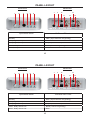
Place the GefenTV Auto Volume Stabilizer somewhere close to where you want to connect it. Connect the audio
source into the back of the unit (either digital audio or analog). Connect the audio output of the unit to an A/V receiver.
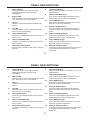
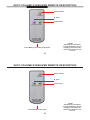
Connect the included 5V DC external power supply to the back of the unit. The LED in the front will light up red showing that the unit is in “standby mode.” Next push the “Bypass” button or press the “Power” button on the supplied I/R
remote control, and the LED next to the “Bypass” button will change to Blue or Off while one of the three audio input
LEDs will also light up bright blue. This corresponds to the chosen audio input source connected at the rear panel of
the unit. Press the audio selector button at the back of the unit to select the audio input.
1
INTRODUCTION
Congratulations on your purchase of the Gefen TV Auto Volume Stabilizer. Your complete satisfaction is very important to us.
GefenTV
GefenTV is a unique product line catering to the growing needs for innovative home theater solutions. We specialize
in total integration for your home theater, while also focusing on going above and beyond customer expectations to
ensure you get the most from your hardware. We invite you to explore our distinct product line. We’ll be happy to
assist you with your particular needs.
The GefenTV Auto Volume Stabilizer
Annoyed by loud commercials? Enjoy listening to the same volume levels when watching any TV program or during
commercials, no matter what is on. The GefenTV Auto Volume Stabilizer with Digital Audio Decoder product serves
two functions: it is a high-quality volume stabilizer and it also delivers a mixdown from 5.1-channel to two-channel, Left
Right audio signals using Dolby AC3 decoding. It actually makes volume adjustments in such a subtle way that you
won’t even notice the changes.
Using Dolby Volume™ technology, the unit senses changes in volume levels, and then maintains a steady volume
level for any input sound coming from DVD, Blu-ray or other multimedia source. Listen to movies and TV shows easily
without the inconvenience of continuously fiddling with the volume levels. An additional feature includes a bypass
button that allows incoming audio to pass through the Stabilizer unmodified, ideal for situations where volume levelling
would be undesirable, such as when enjoying movies and classical music where volume can vary significantly.
How It Works
Place the GefenTV Auto Volume Stabilizer somewhere close to where you want to connect it. Connect the audio
source into the back of the unit (either digital audio or analog). Connect the audio output of the unit to an A/V receiver.
Connect the included 5V DC external power supply to the back of the unit. The LED in the front will light up red showing that the unit is in “standby mode.” Next push the “Bypass” button or press the “Power” button on the supplied I/R
remote control, and the LED next to the “Bypass” button will change to Blue or off while one of the three audio input
LEDs will also light up bright blue. This corresponds to the chosen audio input source connected at the rear panel of
the unit. Press the audio selector button at the back of the unit to select the audio input.
1