1
T2 : Automated Testing Tool for Java
User Manual
(for T2 version 2.1)
http://www.cs.uu.nl/wiki/WP/T2Framework
Wishnu Prasetya
URL: http://www.cs.uu.nl/~ wishnu
email: [email protected]
2
T2 : Automated Testing Tool for Java, User Manual
Copyright 2007, Wishnu Prasetya.
Contents
1 Quick Start
1.1 What is T2? .
1.2 Screen shots .
1.3 Installation .
1.4 Using T2 . .
.
.
.
.
5
5
5
5
5
2 Overview
2.1 Features . . . . . . . . . . . . . . . . . . . . . . . . . . . . . . . . . . . . . . . . . .
2.2 Limitations . . . . . . . . . . . . . . . . . . . . . . . . . . . . . . . . . . . . . . . .
9
9
10
3 Examples
3.1 How Does T2 Test a Class? . . . . . . . . . . . . . . . . . . . . . . . . . . . . . . .
3.2 Adding Specifications . . . . . . . . . . . . . . . . . . . . . . . . . . . . . . . . . .
3.3 Handling type variable (generic) . . . . . . . . . . . . . . . . . . . . . . . . . . . .
13
14
14
17
4 T2 Report
21
5 Replaying Tests (Regression)
25
.
.
.
.
.
.
.
.
.
.
.
.
.
.
.
.
.
.
.
.
.
.
.
.
.
.
.
.
6 More on T2 Algorithm
6.1 How T2 generates objects
6.2 Testing Scope . . . . . . .
6.3 Search Mode . . . . . . .
6.4 Combinatoric Testing . .
.
.
.
.
.
.
.
.
.
.
.
.
.
.
.
.
.
.
.
.
.
.
.
.
.
.
.
.
.
.
.
.
.
.
.
.
.
.
.
.
.
.
.
.
.
.
.
.
.
.
.
.
.
.
.
.
.
.
.
.
.
.
.
.
.
.
.
.
.
.
.
.
.
.
.
.
.
.
.
.
.
.
.
.
.
.
.
.
.
.
.
.
.
.
.
.
.
.
.
.
.
.
.
.
.
.
.
.
.
.
.
.
.
.
.
.
.
.
.
.
.
.
.
.
.
.
.
.
27
27
29
31
32
7 Integration with Junit and IDE
7.1 Calling T2 from your own Java class . . . . . . . . . . . . . . . . . . . . . . . . . .
7.2 Integration with Junit . . . . . . . . . . . . . . . . . . . . . . . . . . . . . . . . . .
7.3 Integration with IDE . . . . . . . . . . . . . . . . . . . . . . . . . . . . . . . . . . .
33
33
33
34
8 Usage and Options
8.1 Using the Default Testing Tool . . . . . . . . . .
8.1.1 Options for controling the main iteration
8.1.2 Options related to reporting . . . . . . . .
8.1.3 Options for controling testing scope . . .
8.1.4 Options for controlling probabilities . . .
8.1.5 Using Custom Interface Map . . . . . . .
8.1.6 Using Custom Base Domain . . . . . . . .
8.1.7 Using Custom Object Pool . . . . . . . .
8.1.8 Model based testing . . . . . . . . . . . .
8.1.9 Other options . . . . . . . . . . . . . . . .
8.1.10 Specifying Options as Annotations . . . .
8.2 Using the replay/regression tool . . . . . . . . . .
37
37
38
39
39
40
41
42
43
44
44
44
45
.
.
.
.
.
.
.
.
.
.
.
.
.
.
.
.
.
.
.
.
.
.
.
.
.
.
.
.
.
.
.
.
3
.
.
.
.
.
.
.
.
.
.
.
.
.
.
.
.
.
.
.
.
.
.
.
.
.
.
.
.
.
.
.
.
.
.
.
.
.
.
.
.
.
.
.
.
.
.
.
.
.
.
.
.
.
.
.
.
.
.
.
.
.
.
.
.
.
.
.
.
.
.
.
.
.
.
.
.
.
.
.
.
.
.
.
.
.
.
.
.
.
.
.
.
.
.
.
.
.
.
.
.
.
.
.
.
.
.
.
.
.
.
.
.
.
.
.
.
.
.
.
.
.
.
.
.
.
.
.
.
.
.
.
.
.
.
.
.
.
.
.
.
.
.
.
.
.
.
.
.
.
.
.
.
.
.
.
.
.
.
.
.
.
.
.
.
.
.
.
.
.
.
.
.
.
.
.
.
.
.
.
.
.
.
.
.
.
.
.
.
.
.
.
.
.
.
.
.
.
.
.
.
.
.
.
.
.
.
.
.
.
.
.
.
.
.
.
.
.
.
.
.
.
.
.
.
.
.
.
.
.
.
.
.
.
.
.
.
.
.
.
.
.
.
.
.
.
.
.
.
.
.
.
.
.
.
.
.
.
.
.
.
.
.
.
.
.
.
.
.
.
.
.
.
.
.
.
.
.
.
.
.
.
.
.
.
.
.
.
.
.
.
.
.
.
.
.
.
.
.
.
.
.
.
.
.
.
.
.
.
.
.
.
.
.
.
.
.
.
.
.
.
4
CONTENTS
8.3
8.4
Using T2 from Java (as API) . . . . . . . . . . . . . . . . . . . . . . . . . . . . . .
Using the Combinatoric Testing Tool . . . . . . . . . . . . . . . . . . . . . . . . . .
9 More Advanced Specifications
9.1 Some useful specification patterns . . .
9.2 Model-based Testing . . . . . . . . . .
9.2.1 Predicative Application Model
9.2.2 Imperative Application Model .
9.3 Specifying Temporal Properties . . . .
9.3.1 Stutter Insensitive Property . .
.
.
.
.
.
.
.
.
.
.
.
.
.
.
.
.
.
.
.
.
.
.
.
.
.
.
.
.
.
.
.
.
.
.
.
.
.
.
.
.
.
.
.
.
.
.
.
.
.
.
.
.
.
.
.
.
.
.
.
.
.
.
.
.
.
.
.
.
.
.
.
.
.
.
.
.
.
.
.
.
.
.
.
.
.
.
.
.
.
.
.
.
.
.
.
.
.
.
.
.
.
.
.
.
.
.
.
.
.
.
.
.
.
.
.
.
.
.
.
.
.
.
.
.
.
.
.
.
.
.
.
.
.
.
.
.
.
.
.
.
.
.
.
.
.
.
.
.
.
.
46
46
47
47
49
49
51
53
55
10 Pluging Custom Object Generators
57
11 Dealing with Persistent Components
61
Chapter 1
Quick Start
1.1
What is T2?
• T2 is an automatic unit testing tool for Java. Use it to test your class.
• It is easy to use. It integrates with Junit, and any IDE supporting Junit.
• Write your specifications directly in Java! And yes, you can express quite sophisticated
specifications with just plain Java.
• T2 supports multiple test automation strategies. It supports model based testing too.
• Lots of options!
1.2
Screen shots
See Chapter 7.
1.3
Installation
Download T2 jar, and put it somewhere. That’s it. Just include this jar in your class path
whenever you want to use T2.
1.4
Using T2
T2 can be used in several ways:
1. as a stand alone console application
2. as an API that can be called from another Java class.
3. used from within Junit framework.
For now I will just explain the first use (so, as a console application). The other uses will be
explained later in this Manual.
To use T2 from the console, basically you just call the main tool Sequenic.T2.Main, passing
to it the name of the target class you want to test; e.g. like this:
java
-ea
-cp TT.jar
Sequenic.T2.Main
java.awt.Point
5
6
CHAPTER 1. QUICK START
This will unleash T2 to test the class Point from the java.awt package. A couple of things to
note here:
1. You need to supply a fully qualified name of the target class.
2. The must turn on the -ea flag! This enables assertion checking. Else T2 will skip off your
specifications.
3. Include the path to your TT jar in the -cp (class path) argument.
If T2 finds an error, it will report it. You probably won’t find any error in the class Point. To
see how T2 reports an error let’s try to run it on one of the example classes included in T2 jar.
Try this:
java
-ea
-cp TT.jar
Sequenic.T2.Main
Examples.SimpleSortedList
This will test the class SimpleSortedList from the package Examples. As the name suggest, the
class is a simple implementation of a sorted list. It contains an error, and see how T2 finds it.
The code of this class is in Figure 3.1.
Options
T2 allows you to specify options to influence its behavior. Options are listed after the name of the
target class (the class to test). By default T2 will stop after trying 500 steps, or after finding the
first violation. Using the option --violmax we can make T2 to search for more violations. For
example to make it find up to 3 violations in SimpleSortedList we do:
java
-ea
-cp TT.jar
Sequenic.T2.Main
Examples.SimpleSortedList --violmax=3
There is no guarantee however that T2 will find three different errors; its strategy to generate
tests is basically random-based. Anyway, we have seen an example of how to pass an option to
T2.
The main tool (Sequenic.T2.Main) it self is actually a bundle of several tools. It contains
at least T2’s random-based test generator tool and a replay (regression) tool. Each tool plugged
into Main can be called by passing the right selector, with the exception the the test generator
tool, which is the default tool. It requires no selector to pass (which is why we don’t see it in the
examples above). Calling Main with no argument:
java -cp TT.jar
Sequenic.T2.Main
will show the general use of Main, and available tool selector. This:
java -cp TT.jar
java -cp TT.jar
Sequenic.T2.Main -E --help
Sequenic.T2.Main -R --help
will show the general use of the test generator tool respectively the replay tool, and short
descriptions of available options.
T2 has lots of options. See Chapter 8.
Replay tool
The typical work cycle when using T2 is:
1. Write your class. Code in your specifications as needed.
2. Run a test with T2. Ask T2 to save test sequences, including violating ones.
3. Repair bugs.
1.4. USING T2
7
4. Replay the saved sequences to see if the bugs disappear.
5. Repeat the cycle write-run-repair-replay until you are happy.
As an example consider this very trivial class:
public class Trivial{
int x=0 ;
public void inc(){ x++ ; assert x>0 ; }
public int ouch() { x=0/0; return x ; }
}
The method inc simply increases x. The assert statement there express our specification for
this method. The method ouch contains the obvious error of doing 0/0, but let us pretend we
don’t see this.
So after writing the class, and adding the specification we arrive at the above code, and at this
point we want to test with T2. So we do:
java -ea -cp TT.jar
Sequenic.T2.Main
Trivial
T2 will generate random sequences of method calls to (objects of) the class Trivial. The odd
is very good that one of the sequence calls ouch, and thus discovers a violation. The sequence
producing this violation will be automatically saved, so that you can replay it latter to retest
Trivial after you fix it. However, you may want to save more violating sequences, and even some
of the non-violating sequences. So let us do this:
java -ea -cp TT.jar
Sequenic.T2.Main
Trivial
--violmax=3
--savegoodtr=3
This will save 3 violating sequences, and 3 good (non-violating) sequences. The sequences are
saved in the file Trivial.tr. The extension .tr comes from ’traces’ which is how we used to call
’sequences’ in older T2s.
Now let’s fix Trivial:
public class Trivial{
int x=0 ;
public void inc(){ x++ ; assert x>0 ; }
public int ouch() { x=0; return x ; }
}
Using the replay tool we can reload saved sequences and test them again. Note that this only
works if you do not change the signature of the methods of your target class. We can do the replay
test as follows:
java -ea -cp TT.jar Sequenic.T2.Main -R Trivial.tr
You have to set the -R selector. Unlike the test generator, for the replay tool you need to pass the
name of the save file (where the sequences are saved); in this case it is Trivial.tr.
In principle replay test is the same as regression test. However in practice ’regression test’
usually means re-doing lots of tests at the system level. Because T2 replay test is at the unit
testing level, it tends to be much smaller. Still, we can in principle do large regression with the
replay tool if we want to.
Limitation
Some testing problems are beyond T2 ability. E.g. T2 cannot handle a non-deterministic class
(e.g. if it uses random or multi threading). For more information, see Section 2.2.
8
CHAPTER 1. QUICK START
Chapter 2
Overview
2.1
Features
• T2 is a automatic unit testing tool. Using it requires little effort and it is almost interactive;
depending on the complexity of your class it can respond in less than a second, in which
time it can inject thousands of tests!
• T2 checks for internal errors, run time exceptions, method specifications, and class invariant.
It can even check temporal properties. Unlike other testing tools, T2 reads specifications
written in plain java! They are usually placed in the class we want to specify. Specifications
written in the same language as the programming language (in this case Java) are called
in-code specifications. Though not as fancy as Z or JML, these plain java specifications do
posse other charasteristic attributes of specifications: unambigous, declarative, formal, and
powerful. Because they are in-code, their maintenance is also minimum.
• Unlike other testing tools T2 does not check individual methods in isolation. T2 does not
generate Junit test classes; it performs the test directly (also called ’on the fly’). This is
much faster, because there is no generation and compilation of Junit classes in between. We
may add Junit generation in the future, if people really want it; but at the moment our
position is that you simply don’t need it.
• T2 on-the-fly testing is very fast, perhaps even giving the feel that it is interactive. Internally
it generates tests in the form of sequences of field updates and method calls; each will be
checked. Using sequences has the effect that methods are basically checking each other.
That is, in e.g. a sequence m1 (), m2 (), m3 () the call to m1 will checked against its own
specification (as far as one exists). However, even if this fails to detect a fault (because the
specification is only partial), the fault may cause an error further down the sequence. That
is, it can be caught as the specification of m2 or m3 . The situation is then reversed when
we generate another sequence with a different order, e.g. m3 (), m2 (), m1 (). This will check
m3 against the specs of other methods.
• Using sequences methods are essentially checking each other. This is called reflexive testing.
The huge benefit of this is that it can still find errors and generates less meaningless sequences
even if the specifications provided are individually very partial, whereas other testing tools
would typically require fairly complete specifications. The catch is that the actual cause of
an error (the ’fault’) may not be in the same method that raises the error. You will have
to analyze the execution report produced by T2 to locate the fault. This can be a problem
is you have a very long sequence. Fortunately you can control how long the sequences are.
The default is 5.
• By default T2 will generate the sequences randomly. This means that T2 randomly select
which method to call or which field to update at each step, and randomly construct its
9
10
CHAPTER 2. OVERVIEW
parameters. When a parameter is needed, it may construct a fresh object of the right type,
or choose to pass on an old object (to simulate side effects). The decision is also random.
The are options to control the probability of various decisions, and there are also options to
specify which methods and fields are to be included into the testing scope.
• The basic mode to generate the test sequences is random. Currently two extra modes are
supported. In the ’search mode’ a trace that violates a pre-condition is not dropped, but
retried with a different variation. The the ’combinatorial mode’ the engines tries to generate
all possible combinations of sequences (modulo the parameters passed to them).
• There are situations when methods of a target class have to be called in a certain order (e.g.
perhaps a class implementing a door requires that the method open can only be called after
close). T2 can accept an ’application model’, with which we can specify what valid orders
are.
• Out of the box, it is a unit testing tool. The ’unit’ in T2 is ’class’ (and not method!). So, in
principle T2 tests a given target class as a whole. This is simply the consequence of using
sequences. However, when desired it is possible to configure T2 to tests individual methods.
On paper it is also possible to set up T2 to do system testing. However, because a system is
not a class, this requires a ’proxy class’ to be hand crafted to provide an interface between
T2 and the system.
• Violating sequences are reported, and can be saved. But we can also ask T2 to save nonviolating sequences as well. Saved sequences are very useful for retesting. After fixing bugs,
or after modifying the target class we will want to replay the same tests to see e.g. if the
the violations now disappear. T2 provides a tool to reload and replay saved sequences.
• T2 uses real execution to test; this is in contrast to approaches that test on models or alternate representations. It follows that by definition T2 is sound and complete: it never
produces a false positive nor a false negative. A sequence is a false positive if it is reported
as violating by T2, but actually does not violate any non-assumptive assertions of the target
class, nor throws an unexpected exception. It is a false negative if T2 sees it as non-violating,
but actually it does violate some non-assumptive assertion or throws an unexpected axception.
• Although T2 generates the sequences randomly it does take pre-conditions and application
models, if provided, into account. They filter out meaningless sequences. That is, a sequence
is droped as soon as it is identified as meaningless. It is possible that some pre-conditions
are too complicated to be met by purely random values generation; this means that T2 may
be unable to generate sufficient number of meaningful sequences. T2 does provide hooks to
allow custom value generators to be plugged-in.
• As a final note, being just a hunble a random-based tool T2 is not a substitute for cleverly
hand crafted tests. It can however give you structural coverage with just a push of a button.
The best way to use it is to use it is to complement manual testing. Though this appears to
double the cost of unit testing, the combination is also more powerful. In the end we save
a lot by leaking less faults to the latter development stages, where the cost of fixing them
would multiply.
2.2
Limitations
• T2 cannot check a class that contains non-deterministic behavior. The following is typically
a source of non-determinism:
1. Use of random generator.
2. Multi threading.
2.2. LIMITATIONS
11
3. Interaction with user.
4. Interaction with other concurrent programs.
All those cases are beyond the reach of T2. The reason that T2 cannot handle nondeterminsm, is that it prevents T2 from replaying exacting the same execution that originally
produce the error. Even T2 reporting relies on replayability.
• T2 crucially assumes that the test sequences it generates does not interfere with each other.
This assumption can be broken in several situation:
1. If a target class can changes a static field at the runtime, this will break the assumption,
because the previous sequence may alter the static field, and thus influencing the next
sequence.
2. If the target class uses a persistent object (like a file or a database), the state of this
object persists over multiple sequences. So this too breaks the assumption.
This problem can still be circumvented by forcing the target class and all the persistent
objects it uses to be reinnitialized at the start of each sequence. The hook to do this in T2
is by rewriting the method reset of the class Pool; this can be done by writing your own
subclass of Pool. The method reset is always called at the beginning of every sequence.
• T2 cannot completely handles type parameters (generics). When T2 needs to generate
objects during a test, it does so based on the type of the object. This type is obtained
through reflection. However Java compiler currently erases information on type parameters
(type erasure), so reflection cannot recover it. Current solution (of T2) is to allow a global
option where the tester can specify the type of the elements of e.g. collection like objects.
This option applies globally in the sense that during a full run of the test engine it will use
this option for all collections it has to generate. This is a very ad-hoc solution and works very
limitedly. A general solution will probably have to wait until Java comes with a compiler
with an option that supresses type erasure.
• Let u, v be objects; v is a subobject of u if v is reachable by following pointers inside u. We
say u owns v if all access to v has to go through u. Ownership is often implicitly assumed.
Unfortunately it is not statically checked by Java.
T2 does not check ownership relations. More precisely, it does not check if a target class C
respects ownership assumptions made by other classes it uses. Furthermore, if an instance
u of C contains a subobject v of class D, and C does not claim ownership over v, T2 does
not simulate calls to v’s methods (another way to see it is that T2 simply assumes that v
own all its subobjects).
• T2 does not attempt to avoid generating isomorphic objects. Future work.
• T2 does not generate mock objects for external resources (e.g. files, database). Use other
tools to make your mocks (or write them manually). In addition you will still have to write
wrappers over the methods you want to test, so that they interact with the mocks instead.
• T2 can detect potential non-termination (simply by using timer), but it cannot report the
exact source of the non-termination (e.g. line number). It may still be able to identify the
method that causes the problem. Future work.
12
CHAPTER 2. OVERVIEW
Chapter 3
Examples
Figure3.1 shows a simple class. It is a simplistic implementation of sorted lists. Each SortedList
object represents a sorted list. The list is maintained internally in the variable s, and can hold
instances of Comparable. The method insert inserts a new element into the list, and the method
get retrieves the greatest element from the list. Both are supposed to maintain the list sorted.
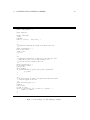
public class SortedList {
private LinkedList<Comparable> s ;
private Comparable max ;
public SortedList() { s = new LinkedList<Comparable>() ; }
public void insert(Comparable x) {
int i = 0 ;
for (Comparable y : s) {
if (y.compareTo(x) > 0) break ;
i++ ; }
s.add(i,x) ;
if (max==null || x.compareTo(max) < 0) max = x ;
}
public Comparable get() {
Comparable x = max ;
s.remove(max) ;
max = s.getLast() ;
return x ;
}
}
Figure 3.1: A simple class with an error.
The class has a single constructor, which just produces an empty list. We additionally maintain
a variable max to point to one of the greatest elements in the list (if the list is not empty).
There are indeed some faults in the class, but let us pretend we are unaware of them. We’ll
proceed to testing the class. So far you don’t have any specification. Still, you can test SortedList
with T2. Just do:
java
-ea
-cp .;TT.jar
Sequenic.T2.Main
13
SortedList
14
CHAPTER 3. EXAMPLES
It will probably report some errors, e.g. that the call to getLast in the body of get throws a
NoSuchElementException.
Without a specification T2 can still check for internal error and unexpected runtime exception.
T2 defines internal error as an instance of Error (which means that it can also be an instance of
a subclass of Error) thrown by the target class. An unexpected runtime exception is an instance
of RuntimeException thrown by the target class. Both kinds are considered as violation by T2.
3.1
How Does T2 Test a Class?
When given a target class C to test, T2 randomly generates tests for C. Each test is generated
and executed on the fly. This is unlike other tools that first generate Junit code, which need
to be compiled first before we can run it. On the fly testing is much faster. Depending on the
complexity of your class, T2 can inject thousands of tests and report back in less than a second.
Each test is a sequence of step, and each step is either a call to a method of C, or an update
to one of its field. By default T2 considers all non-private methods and fields, but this can be
customized with options. See Subsection 2.2 for more information about the default testing scope
of T2. After each step, the C’s class invariant, if specified, will be checked. If a method is called
in a step, and its specification exists, it will be checked as well.
To be more precise, each test starts with the creation of so-called target object, which is an
instance of C. When a step updates a field, it will be a field of the target object. When a step
calls a method, it will be either a method that takes the target object as the receiver, or takes the
target object as an ordinary parameter. So, each step potentially affects the target object.
Note that unlike many other tools, T2 does not test each individual method in isolation (though
it can do that, via some options). Instead it may call various methods in a single test sequence.
The approach is called sequence-based testing.
The problem with testing each method in isolation is that we usually need a quite complete
specification both to generate meaningful receiver objects for the method and as an oracle for
catching faults. Though this problem does not completely disappear in sequence-based testing, it
is much less acute.
A very beneficial side effect of using sequences as tests is that in a sequence, methods are
basically checking each other (called reflexive testing). E.g. in a sequence m1(); m2() we do not
just check m1() against its own specification, but also against m2()’s and m3 ’s specifications,
and whatever fault detection mechanisms built into those methods. So, in sequence based testing
we essentially check C against the conjunction of all specifications of its methods, plus the fault
detection built in Java, and the fault detection built into the class by the programmer himself.
Together they make a pretty strong correctness criterion, even if each individual specification is
weak.
3.2
Adding Specifications
Before we fix the class SortedList, let us first add some simple specifications. We don’t need
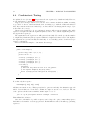
JML, OCL, Z, etc to write specifications. We’ll just use plain Java. Specifications written in
the same language as the used programming language are called in-code specifications. Though
not as fancy as Z or JML, in-code specifications are nevertheless non-ambigous, declarative, and
powerful.
They are usually written in the target class that you want to specify. Java compiler itself will
make sure that they are syntactically consistent with the class they specify, so their maintenance
is also minimum.
Let us begin by specifying a class invariant. T2 defines a class invariant of a class C as a
predicate that holds after an instance of C is created, and after each call to a method of C. Now,
to specify a class invariant we write a boolean method called classinv, as shown in the example
below:
3.2. ADDING SPECIFICATIONS
15
public class SortedList {
private LinkedList<Comparable> s ;
private Comparable max ;
...
private boolean classinv() { return s.isEmpty() || s.contains(max) ; }
}
It just says that if s is not empty, then max should be an element of s. This is indeed a very weak
invariant (it does not even mention that s is kept sorted). But it is okay for now; we don’t have
to start with a complete specification. We can start with just simple specifications like the one
above. We can check it with T2. It may already expose faults. If not, we may decide to add more
details, thus making it stronger. A stronger specification has a better chance of catching faults.
In this way we can develop our specifications incrementally.
The method classinv should takes no argument and return a boolean. It has to be non-static
and private1 , and should not declare as throwing exceptions. See the above example. If it throws
something other than an AssertionError, it is considered as false (violation to the invariant).
Next, we can specify each method individually. There are two ways to do it. First we’ll just
write the specification in the method itself. We do this by adding assertions. For example we can
add these assertions to the method get:
public Comparable get() {
assert !s.isEmpty() : "PRE" ;
Comparable x = max ;
s.remove(max) ;
max = s.getLast() ;
assert s.isEmpty() || x.compareTo(s.getLast()) >= 0 : "POST" ;
return x ;
}
The specification will impose that s is non-empty as the pre-condition of get, and some other
condition as its post-condition.
It is important to mark a pre-condition with the marker "PRE". A pre-condition is treated as
an assumption. When a test is about to call a method m, and it violates its pre-condition the
test is considered as meaningless, and is discarded by T2. Violating other assertions does count
as violations.
You can put as many assertions as you want in a method, and in any place (so not only in in
the post-condition position). This includes placing a PRE-marked assertion in the middle (rather
1 T2 still accepts a classinv which is not private. The problem with this is as follows. Suppose that the target
class C is a subclass of D. We may want to check if C also repects D’s classinv. To do this T2 needs to call the
latter from an instance of D. However, let u be an instance of C, Java’s dynamic binding will refuse to associate
a call u.classinv() to D’s classinv (even if we first cast u to D). Making all classinvs private is a trick to get
around this.
16
CHAPTER 3. EXAMPLES
than at the beginning) of a method. The only thing you have to remember is the special treatment
of PRE marking as explained above.
Another way to specify a method m is by writting a method named m spec with exactly the
same header as m, lists the same exceptions, and is given the same access modifier. The method
m spec should call m, and pass on the value returned by m. We put our assertions in m spec, for
example:
public Comparable get_spec() {
assert !s.isEmpty() : "PRE" ;
Comparable ret = get() ;
assert s.isEmpty() || ret.compareTo(s.getLast()) >= 0 : "POST" ;
return ret ;
}
The advantage of this approach is that we don’t clutter m with assertions. Furthermore, we can
specify the post-conditions when m throws an exception. On the other hand, we won’t be able to
specify e.g. a loop invariant.
During the testing T2 will check if m spec exists. If it does, it will be used instead of m.
To summerize, here is then the code of SortedList, along with the specifications we come up
so far:
public class SortedList {
private LinkedList<Comparable> s ;
private Comparable max ;
public SortedList() { s = new LinkedList<Comparable>() ; }
private boolean classinv() {
return s.isEmpty() || s.contains(max) ;
}
public void insert(Comparable x) {
int i = 0 ;
for (Comparable y : s) {
if (y.compareTo(x) > 0) break ;
i++ ; }
s.add(i,x) ;
if (max==null || x.compareTo(max) < 0) max = x ;
}
public Comparable get() {
Comparable x = max ;
s.remove(max) ;
max = s.getLast() ;
return x ;
}
public Comparable get_spec() {
assert !s.isEmpty() : "PRE" ;
Comparable ret = get() ;
assert s.isEmpty() || ret.compareTo(s.getLast()) >= 0 : "POST" ;
return ret ;
}
}
3.3. HANDLING TYPE VARIABLE (GENERIC)
17
There is a mistake in the last line of insert. Rather than setting max = x when x.compareTo(max) <
0 (when x is less than max), we have to do it when x is greater than max.
If we are to test insert in isolation, the testing tool won’t discover this, because insert
doesn’t even have a specification. The tool will also generate lots of meaningless inputs, since the
class invariant we have does not mention that we should only consider instances of SortedList
whose s is sorted.
However, this sequence:
u = new SortedList() ;
u.insert(0) ;
u.insert(1) ;
u.get()
will expose the fault, as we now get a violation to get’s specification. This demonstrates the
strength of sequence-based testing.
Try to test SortedList with T2:
java -ea -cp .;TT.jar Sequenic.T2.Main SortedList
3.3
Handling type variable (generic)
Consider the class below; it implements linked lists. We omit most parts of the code —the full
listing is provided at the end of this section. The most important thing to note here is that this
class has a type parameter.
public class MyList<T>
{
// note the type variable
...
public void insert(T i) { ... }
public void remove(T x) { ... }
public void remove_spec(T x) { ... } // specification of remove
}
When during a test T2 generates a class to a method m, it also has to generate parameters
for m. To do this T2 needs to know the types of those parameters; it can then search for e.g.
matching constructors, or for matching objets in its pool of old objects. T2 relies on reflection to
inquiry the types of the parameters of m.
When the type of m contains type variables (aka type parameters aka generics), e.g. as the
methods of MyList above, this poses a problem. When we compile a Java program the compiler
checks the syntax, including the typing of the program (if it is type-correct). Type variables have
to follow certain typing rules too; these are checked by the compiler. However, once this check
is passed Java compiler erases the type variables from the byte code. This is for the reason of
compatibility with order versions of Java that do not know the concept of type variable. In the
place where a type variable T should occur, it is then replaced by an ordinary class. Usually (but
not always; you may want to check out Java’s tutorial on generics) it is the Object. So, the
method insert and remove above appears to be of the following type:
18
CHAPTER 3. EXAMPLES
public void insert(Object i) { ... }
public void remove(Object x) { ... }
T2 obtains typing information using reflection, which works on the byte code. So, it only sees
the typing information as the compiler places it in the byte code. It means that T2 won’t see the
original type variables; it will see e.g. insert and remove to have the types as above. What we
still can do is to give T2 a little hint, though this only works limitedly. As long as Java compiler
still erases types, we will have no general way to solve the problem.
Suppose now we want to test MyList above using java.awt.Point for T. We can tell this to
T2 using the --elemty option:
java -ea -cp .;TT.jar Sequenic.T2.Main MyList --elemty=java.awt.Point
This option forces T2 to do the following. Whenever it has to generate an instance of class Object,
it tries to generate an instance of java.awt.Point instead. Effectively, we replace parameters of
type Object with type Point.
If we pass no elemty option, T2 will default it to the class Sequenic.T2.OBJECT which is just
this minimalistic class:
public class OBJECT {}
So it has not fields nor methods. The only interesting thing we can do with it is to compare
whether two references (of type OBJECT) are the same (pointing to the same OBJECT instance) or
not.
The full code of MyList is shown in Figure 3.2 . It contains a fault in the method remove.
Using either Point or OBJECT as elemty will expose this fault. So, the option works for this
example.
However, the elemty option will fall short if we have more than one type variables, because
both will then just be replaced with the elemty class. It is probably possible to have a more
sophisticated type substitution scheme, but no such thing is currently implemented.
3.3. HANDLING TYPE VARIABLE (GENERIC)
public class MyList<T>
{
public Link list ;
private class Link {
T item ;
Link next ;
Link(T i) { item = i ; next = null ; }
}
/**
* A method for inserting an element at the head of the list.
*/
public void insert(T i) {
Link u = new Link(i) ;
u.next = list ;
list = u ;
}
/**
* A method for deleting all occurences of x from the list. This
* method has an error: it will miss removing x if it
* occurs as the first element in the list.
*/
public void remove(T x) {
if (list==null) return ;
Link p = list ;
while (p!=null) {
if (p.next!=null && x == p.next.item) p.next = p.next.next ;
p = p.next ;
}
}
/**
* The specification of remove; it requires that after the removal
* x does not appear in the list.
*/
public void remove_spec(T x) {
remove(x) ;
Link p = list ;
boolean ok = true ;
while (p != null && ok) { ok = p.item != x ; p=p.next ; }
assert ok : "POST" ;
}
}
Figure 3.2: An example of a class with type variables.
19
20
CHAPTER 3. EXAMPLES
Chapter 4
T2 Report
The report produced by T2 consists of several sections.
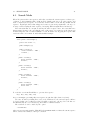
The first section reports the configuration of the test engine, e.g. the name of the target class,
the maximum number of test steps that will be generated, the maximum length of each test, etc.
Example:
** Invoked CONFIGURATION
** CUT = Examples.SimpleSortedList
** TYVAR0 = Sequenic.T2.OBJECT
** Pool = Sequenic.T2.Pool
** Base domain = Sequenic.T2.BaseDomainSmall
** Interface map = Sequenic.T2.InterfaceMap0
** Time-out = 20000
** Max. number of steps = 500
** Max. execution depth = 4
** Max. number of violations to look = 1
** Max. object depth (on creation) = 4
** Max. show depth = 5
** Max. array/collection size = 4
** Incl. Private = false
** Incl. Default = true
** Incl. Protected = true
** Incl. Static = true
** Incl. superclass members = true
** Incl. superclass classinvs = false
** Field update enabled = true
** Prob. of updating field = 0.1
** Prob. to generate NULL = 0.1
** Prob. to pass targetobj as param = 0.4
** Prob. of trying pool before constuctor = 0.7
**
The next section contains reports on violating executions, if any is found. After that there comes
a section giving a summary of the testing result, mentioning e.g. the number of violations found
before T2 halts, number of test steps generated, elapse time, etc:
** VIOLATIONS FOUND: 1
1 assertion violations.
** number of irrelevant checks
3 PRE violations.
** total number of traces : 5
** total execution steps : 16
** average trace lenght
: 3.0
: 3.
21
22
CHAPTER 4. T2 REPORT
** time
** average time per step
...
** Saving 1 traces...
: 172ms.
: 10.0ms.
Note that it also mentions how many sequences are saved. Found violating sequences are always
saved; but we can also ask T2 to save a number of non-violating sequences.
So, in the middle section T2 reports the violating sequences it encounters. Usually T2 will
stop after the first violation, but we can ask it to search for more. For each violating sequence
T2 prints the state of the target object after each step, which field is updated by a step, or which
method is called, and what are the parameters passed to it. And finally, T2 informs what kind of
violation the test commits, and when possible it also prints the stack trace, from where we can
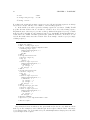
read the line number that causes the violation. Here is an example of such a report (of a single
violating sequence):
** Begin test sequence.
** STEP 0: creating target object.
** Calling constructor Examples.SimpleSortedList
** Resulting target object:
(Examples.SimpleSortedList) @ 0
s (LinkedList) @ 1
max NULL
** STEP 1.
** Calling method insert with:
** Receiver: target-obj
** Arg [0:]
(Integer) : 2
** State of target object now:
(Examples.SimpleSortedList) @ 0
s (LinkedList) @ 1
[0] (Integer) : 2
max (Integer) : 2
** STEP 2.
** Calling method insert with:
** Receiver: target-obj
** Arg [0:]
(Integer) : -3
** State of target object now:
(Examples.SimpleSortedList) @ 0
s (LinkedList) @ 1
[0] (Integer) : -3
[1] (Integer) : 2
max (Integer) : -3
** STEP 3.
** Calling method get_spec with:
** Receiver: target-obj
** State of target object now:
(Examples.SimpleSortedList) @ 0
s (LinkedList) @ 1
[0] (Integer) : 2
max (Integer) : 2
xx Assertion VIOLATED!
** Strack trace: java.lang.AssertionError: POST
...
** End test sequence
Objects involved in an executions are also given numbers (@0, @1, @2, etc), which are shown
in the report. For example we can see that through out the sequence that the s field of the target
object always points to an object numbered by @1; which implies that s always point to the same
object through out the sequence.
23
Values from primitive types (e.g. int and their corresponding boxing classes (e.g. Integer)
cannot be numbered. The reason is technical.
24
CHAPTER 4. T2 REPORT
Chapter 5
Replaying Tests (Regression)
T2 always saves violating tests. The default is that T2 stops after the first violation, so it will
only save that one test that causes the violation. However we can ask T2 to keep on searching for
more violations:
java -ea -cp .;TT.jar Sequenic.T2.Main MyClass --violmax=10
Now T2 will stop after 10 violations instead of 1; all the 10 violating tests are then saved. We can
also ask T2 to also save random non-violating tests as well:
java -ea -cp .;TT.jar Sequenic.T2.Main MyClass --violmax=10 --savegoodtr=10
This will additionally save 10 non-violating tests. However, in both cases T2 will also stop if the
maximum of total number of steps is exceeded (recall that each sequence is made of steps). The
default is 500. This default can be changed with the --nmax option. We can also change the
length of the sequences with the --lenexec option. The default is 4.
By default, the tests are saved in a file named MyClass.tr (to be more precise, the fully qualified
name of the target class, appended with .tr).
After fixing MyClass you would want to replay the saved sequences, to see if the errors found
now disappear, and hopefully no new error emerges. This is also called regression test. It is very
easy to do it with T2:
java -ea -cp .;TT.jar Sequenic.T2.Main -R MyClass.tr
This will load the test sequences saved in MyClass.tr and rerun them.
The assumption here is that you don’t change the types of the members of MyClass. If you
do, the tests may fail to reload.
By default T2 will replay all reloaded sequences, but there are options to make it just choose
randomly, or to only replay sequences which were violating –see Chapter 8.
25
26
CHAPTER 5. REPLAYING TESTS (REGRESSION)
Chapter 6
More on T2 Algorithm
Section 3.1 explains globally how T2 works. This explanation is probably sufficient to figure out
how to use T2 to test simple classes. When you have a complicated class, you may want to
configure T2 is specific ways. T2 offers lots of options. See Chapter 8 It is a powerful tool that
let you configure it in many different ways. However advanced configurations may require you to
understand a bit more about T2’s algorithm.
T2 main loop is essentially quite simple. This is as explained in Section 3.1. Given a target
class C to test, T2 will generate a whole bunch of tests for it. Each test σ is a sequence; it starts
by creating an instance of C, which becomes the target object for the sequence. In the subsequent
steps of σ, each step is either an update to a field of the target object, or a call to a method from
C, that takes the target object as a parameter.
As T2 executes a test sequence, it will need to generate objects needed as parameters e.g. for
the methods called in the sequence. The algorithm for generating objects is more complicated.
6.1
How T2 generates objects
One option is to keep generating fresh objects when we need them. However, this would not be
realistic as it prevents methods to side effect each other through common objects. In practice this
pattern occurs a lot, so we definitely do not want to exclude it from out testing scope. So, rather
than keep creating fresh objects, we will also allow old objects to be passed on.
To facilitate the reuse of old objects, T2 maintains an object pool, implemented by the class
Pool. Whenever objects are created during an execution, they are put in the pool. When an
execution needs an object, T2 can decide to just pick one (of the right type) from the pool rather
than creating a fresh one. Each object in the pool receives a unique integer ID. This ID is very
important. Each test keeps track of the IDs of the pooled objects it uses. This allows us to later
on replay exactly the same execution as the original execution of a sequence. This features is
essential for T2 replay/regression functionality.
Note that the pool essentially holds the part of the JVM state that can be affected by a
sequence.
T2 crucially assumes that sequences do not interfere with each other. That is, a test sequence
is assumed to have no side effect on another sequence. Without this assumption an error in
a sequence can be caused by some fault in a previously generated sequence. This forces us to
analyze not just the violating sequence, but all its preceeding sequences. Obviouly this is not
practical.
To make sure that sequences do not interfere with each other, T2 will reset its object pool
whenever it starts a new sequence. This is done by calling the method reset() from the class
Pool. By default it will just clear the pool (making it empty). Mostly this is sufficient. However
there are cases where this is not sufficient. For example when the target class update some static
variables, or when it uses persistent elements (e.g. files or databases). We have to reset these
27
28
CHAPTER 6. MORE ON T2 ALGORITHM
elements too. This can be done by implementing a custom pool, overiding the method reset
accordingly. We can pass a custom pool to T2 as an option.
Another reason to write a custom pool is if we want to have a pool with some pre-population.
In the sequel, when we say an object ”u to be of class D”, we mean that the actual class of u
is either D or a subclass of D. When we say ”u is an instance of D”, we mean that the actual
class of u is exactly D.
In addition to a object pool, the object generation algorithm also uses two more data structures.
We list them, including the pool, below. We also explain some notation which we will use later to
describe the algorithm itself.
1. An object pool (as explained above).
If P is an object pool, and E is a class, let E ∈ P means that the pool contains an object
of class E; P.get(E) will then deliver us such an object (randomly chosen).
2. An interface map; this is an instance of the class InterfaceMap. It is a mapping from class
to class.
If Imap is an interface map, let E ∈ Imap means that the class E is in the domain of Imap;
Imap.get(E) will deliver a class F to which E is mapped to.
Imap should make sure that F is a subclass of E.
3. A base domain; this is an instance of the class BaseDomain.
If Dom is a base domain, E ∈ Dom means that the base domain can deliver an instance of
E; Dom.get(E) will then deliver us such an instance.
The object generation algorithm is described by the program META mkObject below. It takes
a class E as a parameter, and uses P ool, Imap, and Dom, which are an object pool, an interface
map, and a base domain repectively, as global variables. T2 uses certain defaults for these data
structures, but they are fully configurable —see Chapter 8.
META mkObject(E) =
1. Consult the interface map Imap
If E ∈ Imap, and let F = Imap.get(E), then return an instance of F instead. So, we do
this:
return META mkObject(F)
This mechanism is primarily used to deal with the situation when E is an interface or an
abstract class. We cannot directly make an instance of such an E. The interface map can
direct T2 to a concrete implementation of E.
However, this mechanism can also be used to reroute T2 to generate instances of E through
a custom generator (e.g. to implement a certain statistical distribution or to generate structures which are too difficult to generate randomly). We can do this by implementing the
custom generator as a subclass of E and register it to Imap.
2. Else (so, if E 6∈ Imap), consult the base domain Dom.
If E ∈ Dom, then ask Dom to deliver an instance x of E. To be precise, we do not actually
use x, but a clone of x. So, we do:
return clone(Dom.get(E))
T2 uses deep cloning. The reason for cloning is to make sure that the base domain is
protected from the side effect of the sequences. Dropping this protection will complicate
6.2. TESTING SCOPE
29
the analysis of violating sequence; we will then need to take the internal states of the base
domain into account. We also already have a mechanism for exposing side effects, namely
the pool.
A base domain is primarily used to generate values of primitive types (e.g. int) or their
boxing counterparts (e.g. Integer), and strings. However it can also be used to implement
custom generation of instances of any class F .
The only constraint is that F must implement serialization (thus allowing deep cloning).
Furthermore, because the base domain is always checked first before we fall back to using
constructors to generate an instance (see below), we can also use it to limit the range of the
instances of a certain class. For example, if the only intergers in the base domain are -1 and
1, then these will be the only integers T2 generates whevener it needs one (and alternatively,
we can of course choose to use a base domain that supplies a random integer from the entire
range of int values).
3. Else (when 1 and 2 fail), then randomly (based on a certain probability) decide to first check
the pool.
If we decide to check pool, and E ∈ pool, then ask pool to deliver us an instance; so we do:
return pool.get(E)
4. Else (when 1,2,3 fail) then randomly chooses whether to just deliver a null (because it is
also an instance of E), or to create a fresh instance x using a randomly chosen constructor
of E.
If this constructor needs a parameter of class E 0 , then generate its instance by recursively
calling META mkObject(E0).
Because x is a fresh object, we also add it to pool.
6.2
Testing Scope
As explained before (Section 3.1) T2 does not test a single method1 . Rather it tests a whole class
by exposing it to test sequences, each is a sequence of field updates and method calls. But which
fields and methods are included in the tests?
The set of constructors, fields, and methods that are included in the tests is called the testing
scope. T2 defines a default scope, but it also allows you to define a custom testing scope, as long
as it is still a subset of its maximum scope. So if you want to do this you probably need to know
what this maximum scope is. Even if you just stick with T2 default scope, at some point you may
need to know which members are exactly included in the default scope.
Roughly the maximum scope consists of all declared and inherited members of the target class,
and the default scope consists of all non-private members from the maximum scope. The precise
definitions are however more complicated and contain several subtle points.
Let in the sequel C be the target object.
Maximum scope
Consists of the following members:
• All declared constructors of C, including private ones, except those which are marked with
the T2annotation.exclude annotation.
• All declared and inherited fields of C, except:
1 Although
it can, if you configure it so.
30
CHAPTER 6. MORE ON T2 ALGORITHM
1. Static fields.
2. Final fields.
3. Abstract fields.
4. Hidden fields.
5. Fields inherited from Object.
6. Fields whose name start with AUX . T2 considers these fields
7. Fields that are marked with the T2annotation.exclude annotation.
• All declared and inherited methods of C, except:
1. Abstract methods.
2. Hidden and overriden methods.
3. Methods inherited from Object.
4. Methods whose name is classinv.
5. Methods whose name end with spec. They are considered as specifications.
6. The static public void main(String[]) method.
7. Methods that are marked with the T2annotation.exclude annotation.
T2 default testing scope
T2 default scope consists of all non-private members of the maximum scope. However only static
methods that can accept the an instance of C as a parameter. This is reasonable because a (static)
method that cannot accept an instance of C can be thought as unable to update instances of C
(this is not completely true however), and from this perspective is irrelevant to be included in the
testing of C.
Class invariants of super classes
Let C be our target class (the class we want to test). Obviously, C has to satisfy its own class
invariant. But should we also check it against the class invariant of its superclass D? Afterall,
every instance of C is also an instance of D. T2 leaves this decision to the tester. By default it
won’t check against the class invariant of the superclasses of C; but we can enable this checking
by setting on the --inclsuperinv option.
Checking the m spec specifications
Recall (Section 3.2) that when T2 decides to call a method m is a test step, then it will first search
if a method named m spec with the same signature exists. If it exists, it will be called instead of
m. T2 assumes that m spec will simply pass its arguments to m, but additionally it may assert
some specifications.
Due to inheritence, there may be more than one m spec with the same signature (just as there
may be more than one m with the same signature). T2 will only take the m spec which is declared
in the same class as the class that declares m. This is always safe: you won’t accidentally check
m against an old specification intended for another m from a superclass.
However, this also means that you can’t m against the m spec of its superclass. You probably
don’t want to do this anyway. The fact that you have define a new m to override or to hide an old
one usually means that your new m has a different specification. So it is a bit strange to check it
against an old specification.
6.3. SEARCH MODE
6.3
31
Search Mode
When T2 generates the test sequences, and it discovers that the current sequence violates a precondition or other assumption-like conditions, T2’s default reaction is to drop the sequence and
start a completely new sequence. Note that the violation will be at the last step in this current
sequence. In principle, this violation happens because we pass wrong arguments to the step. So
we may consider retrying the same sequence, but trying different arguments for its last step.
T2’s rational is that we can just as well try the whole sequence anew. Of course this is not
always smart. It may be the case that the state of the target object just before the last step is
an interesting state but one that is difficult to reach. In such a case dropping the sequence that
reaches it is indeed not smart. Consider this artificial example:
static public class Example {
private int status = 0 ;
public Example() {}
public void m1() {
assert status==0 : "PRE" ;
status=1 ;
}
public void m2(){
assert status==1 : "PRE" ;
status=2 ;
}
public void m3(){
assert status==2 : "PRE" ;
status=3 ;
}
public void m4(){
assert status==3 : "PRE" ;
status=4 ;
}
public void m5(){
assert status==4 : "PRE" ;
assert false ;
}
}
To reach the error in m5 T2 will have to generate the sequence:
m1(); m2(); m3(); m4(); m5()
As you can imagine generating this exact sequence is quite hard (the chance is 1/3125).
We can solve this by enabling T2’s search mode. In this mode, the current sequence will not
be dropped when a pre-condition is violated. It will be retried up to the step before the last one.
T2 will randomly choose a new last step; after that it continues as usual.
The search mode can be enabled by the option:
--searchmode=n
where n is a non-negative number. This will be the maximum number of times the current sequence
will be retried if it continues to fail a pre-condition.
32
6.4
CHAPTER 6. MORE ON T2 ALGORITHM
Combinatoric Testing
As explained before (Section 3.1) T2 generates the test sequences by default randomly. However,
we also implement a combinatoric-based strategy.
Suppose C is our target class. Let U be the set of C’s constructors which are within our testing
scope, and V be the set of fields and methods in our testing scope, with the additional restriction
that only non-static methods are included (so, we know that we can always pass the target object
as the methods’ receiver).
Given a trace length k (≥ 2) our combinatoric strategy will generate in principle all possible
sequences of length k modulo the arguments (that is, if we do not count the arguments passed to
the steps in the sequences).
The arguments for the sequences are still generated randomly. We can also specify the number
d of duplicates (default is 2). Every sequence will then be duplicated d times, but for each duplicate
the arguments are generated freshly and randomly. So we basically generate d random test per
sequence combination.
Here is an artificial example to demonstrate the strategy:
public class Example {
private int[] order = {-1,-1,-1} ;
private int k = 0 ;
void m1() { order[k]=1 ;k++ ; }
void m2() { order[k]=2 ;k++ ; }
void m3() { order[k]=3 ;k++ ; }
void m4() { order[k]=4 ;k++ ; }
void ouch() {
order[k]=5 ;
// This will only throw an error if we can generate
// the sequence Example();m3();m1();ouch():
assert !(order[0]==3 && order[1]==1 && order[2]==5) ;
}
}
Note that only the sequence:
new Example(); m3(); m1(); ouch()
will throw an assertion error. This is pretty hard to generate randomly. An exhaustive approach
will do better in this case. To fire T2’s combinatoric engine we use the -C tool selector. The rest
of the options work the same as with its default engine. So we do:
java -ea -cp TT.jar Sequenic.T2.Main -C Example --lenexec=4
This will find the violation.
Since the total number of possible sequences can be huge; the option --nmax always gives a
hard limit to the number of test steps generated. If that limit is reached, T2 will stop generating
sequences.
Chapter 7
Integration with Junit and IDE
7.1
Calling T2 from your own Java class
So far we only use T2 as a console (command line) application. But we can also directly call T2
from your Java class. Suppose you have a class called MyClass, and you want to test it using a
test class MyClassTest. You can use T2 to do test, which you can call from inside MyClassTest.
We can write MyClassTest as follows:
public class MyClassTest {
static public void main(String[] args) {
String T2options = "" ; // specify your T2 options here
Sequenic.T2.Main.main(MyClass.class.getName() + " " + T2options) ;
}
}
Running MyClassTest will then call T2 with the options as you specify in the code above.
7.2
Integration with Junit
If you use Junit as your testing framework, you can easily integrate T2 into it. When using Junit
you just write the above tester class MyClassTest a bit differently. We can furthermore mix
automatic test with T2 with usual hand written tests with Junit:
import org.junit.Test ;
import static org.junit.Assert ;
public class MyClassTest {
@Test // Test with T2
public void test1() {
String T2options = "" ; // specify your T2 options here
Sequenic.T2.Main.Junit(MyClass.class.getName() + " " + T2options) ;
}
@Test // A hand crafted test
public void test1() {
MyClass u = new MyClass() ;
assertTrue(u.checkme) ;
}
}
33
34
CHAPTER 7. INTEGRATION WITH JUNIT AND IDE
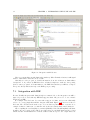
Figure 7.1: Integration with Netbeans.
Then you can run this test with Junit in the usual way. When T2 finds violations, it will signal
Junit; so Junit will see that the test above fails.
Currently we can’t yet pass on detailed information about the violations as Junit failures
descriptions. So if you have an IDE that relies on Junit descriptions to make its own reporting
then we cannot yet passed on T2 information to the IDE. It means that you will have to inspect
T2 reports directly without the help of the IDE’s post processing.
7.3
Integration with IDE
Because T2 fully integrates with Junit (though as commented above the integration can still be
improved), it can be used with any IDE that supports Junit. All you need to do is to include
T2-jar in your IDE.
For example I use Netbeans. It comes with a support for Junit, and you can additionally
add a code coverage plugin that will also integrate with Junit. Figure 7.1 shows a screen shot of
Netbeans. The edit window shows the source of a test class very much like the one in the above
example. It has two Junit tests, one with T2, and another an ordinary hand crafted Junit test.
After compiling the test class (F9) we can run it (Shift-F6). Netbeans will implicitly call Junit.
It will produce an overview of the result (botton left), where we can which Junit tests succeed and
which ones fail. T2 will furthermore send its detailed violations report to the output window at
7.3. INTEGRATION WITH IDE
35
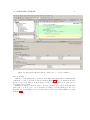
Figure 7.2: Integration with Netbeans also enables us to do coverage evaluation.
the bottom right.
With the coverage plugin (can be downloaded from inside Netbeans itself) we can subsequently
evaluate the coverage of our tests. See the screen shot in Figure 7.2. The bottom window show the
global coverage report window. It shows us the overall coverage statistics for the entire project,
per package, and per class.
Furthermore, when you view the source code in the edit window, we can see in details which
parts of the code are not yet covered. Netbeans color fully covered lines with green, uncovered
lines with red, and partially covered ones with yellow (so there is one still partially covered line
in Figure 7.2).
36
CHAPTER 7. INTEGRATION WITH JUNIT AND IDE
Chapter 8
Usage and Options
Recall that regardless how we use T2 (e.g. from a console, or from Junit) we always use it through
the class Sequenic.T2.Main. This class is actually more a tool box rather than single tool. We
can plugin tools into Main. For example by default it contains T2’s automated testing tool and
T2’s replay tool. In the future we may plugin more tools to Main. Main provides a single entry to
all tools provided by T2.
The general use of this Main tool box is:
java -ea -cp TT-jar Sequenic.T2.Main [selector] Parameters
TT-jar is the name of your TT jar (e.g. TT.jar), possibly prefixed by the path leading to it. A
selector is used to select a tool. Paramaters typically specify a target for the selected tool, plus
other options. Parameters are passed to the selected tool. If no selector is given then the default
tool will be selected, which is the automatic random testing tool. Available selectors:
1. -E to select the random testing tool. This selector can be omitted.
2. -R to select the replay tool.
3. -C to select the combinatoric testing tool. This combinatorically generates the sequences.
See Section 6.4.
The syntax for using T2 as APIs is basically analogous; see Section 8.3.
Printing short help
The following will print a help screen on T2 general use:
java -cp TT-jar Sequenic.T2.Main --help
The following will list available options for the selected tool, along with a short description of
each option:
java -cp TT-jar Sequenic.T2.Main selector --help
8.1
Using the Default Testing Tool
T2’s default testing tool is the random testing tool. We can use it through Main. The general use
is (from console):
java -ea -cp TT-jar Sequenic.T2.Main [-E] target-class option*
37
38
CHAPTER 8. USAGE AND OPTIONS
This will apply automated random-based testing on the specified target class. The selector -E can
be omitted.
The syntax for using T2 as APIs is basically analogous; see Section Section 8.3.
The target-class is the name of the target class. The name has to be in Java fully qualified
format. E.g. to test the class Point from the java.awt package you have to pass java.awt.Point
as target-class.
Available options are explained below. Also, rather than passing the options directly to Main
as above, we can also specify options as annotations in the target class. This is useful because we
do not have to keep rembering and retyping a long sequence of options. See Subsection 8.1.10.
8.1.1
Options for controling the main iteration
• -n int or --nmax=int
Set a maximum on the total number of steps (total length) of all test sequences generated
by T2. The default is 500.
• -v int or --violmax=int
Set a maximum on the number of violations that T2 will search. When this number is
reached, T2 will stop. The default is 1.
T2 will stop too if nmax is reached (see above).
• --elemty=name
name is a fully qualified name of a class. Supposed this class is D. Whenever T2 has to
supply an instance of the class Object, it will now try to generate an instance of D instead.
Note that if the target class has a method m(Collection<T> U), after the type erasure the
type of the parameter U becomes Collection<Object>. With this option on, T2 will then
treat it as if it has the type Collection<D>, and will thus try to create a collection of
D-objects as the parameter for m, when it is needed by a test.
The default for elemty is Sequenic.T2.OBJECT, which is a simple class with no field and no
method.
• -l int or --lenexec=int
The length of each test sequence. The default is 4.
All non-violating sequences (except perhaps the last one) will have this length. A violating
sequence may be shorter, as T2 will stop the sequence after the violation.
• --searchmode=int
Turn on the search mode. See Section 6.3 for more explanation.
The integer parameter has to be non-negative. It specifies the maximum number of times
the current sequence will be retried if it continues to fail a pre-condition.
Currently the search mode does not work in combination with combinatorial mode.
• -d int or --depthobj=int
When T2 needs to generate a fresh object of class D (so when it cannot or chooses not to
take it from the base domain or from the pool), it generates it by calling a construtor of D.
If this constructor has parameters, it in turn requires more objects to be generated. So, to
generate an object T2 may generate a tree of calls to constructors. The above option set a
maximum on the depth of this tree. The default is 4.
• --maxarraylen=int
When T2 needs to generate an array, this option sets a maximum of the length of the generated array. If the array has multiple dimentions, the maximum applies to each dimension.
The default is 4.
8.1. USING THE DEFAULT TESTING TOOL
39
• --savegoodtr=int
T2 always save violating sequences. This option will cause T2 to additionaly search up to
the specified number of non-violating traces to be saved as well. The default is 0.
• --savefile=name
If there are test sequences to be saved, they will now be saved in the specified file. The
default savefile is C.tr.”,
• --timeout=int
When it is run, T2 will also set an internal timer. When it expires, it will interrupt the test
engine and tries to stop it. This is useful to break from a non-terminating method in the
target class. Using this option we can manualy set how long this time out is. The default is
20 seconds.
Setting it to 0 or a negative value will disable the timer.
8.1.2
Options related to reporting
• --outfile=name
This will cause the report to be sent to the specified file rather than the console.
• --silent
When set, T2 will not report the execution of violating sequences. It still reports the global
statistics.
• --showdepth=int
When reporting a violating test, T2 prints the state of the target object after each step, and
also the state of the objects passed as parameters to each step. If an object has subobjects,
the state of the subobjects will also be printed. This goes on recursively (but T2 can detect
cycles), up to the maximum depth set by the above option. The default is 5.
• --hideintermstep
When reporting a violating sequence T2 will normally report every step in the sequence.
However, when this option is set intermediate steps will not be reported. Only the creation
step, the first step, and the last step in the sequence will be reported.
8.1.3
Options for controling testing scope
• --ownclassonly
If set the T2 will include members of a target class C which are really declared in C in the
testing scope. Inherited members (members of C’s superclasses) are excluded.
• --inclprivate
If set T2 will include private members in its scope (so it will also generate calls to private
methods and updates to private fields of the target class).
• --excldefault
If set T2 will exclude members with the default access modifier from its scope.
• --exclprotected
If set T2 will exclude members with the protected access modifier from its scope.
• --pubonly
If set T2 will only check public members of the target class. This option overrides --inclprivate.
40
CHAPTER 8. USAGE AND OPTIONS
• --exclstatic
If set T2 will exclude static methods from its scope.
• --exclfield
If set T2 will exclude fields from its scope; so, it won’t directly update any field (but of
course it can still update a field through a method call).
• [--meth=name]+
This option can be specified multiple times. It will cause T2 to only test methods whose
names are as specified by this option. This option takes options like --inclprivate and
--pubonly into account. So, if m is private, to set T2 to only test it we have to use the
combined options:
--meth=m
--inclprivate
Furthermore, if --meth option is present, it will exlcude field updates.
• [--xmeth=name]+
This option can be specified multiple times. Methods whose names are as specified by this
option will be exlucded from the scope, regardless option like --inclprivate or --meth.
• --inclsuperinv
Will cause T2 to also check the class invariants of C’s superclasses (except OBject).
8.1.4
Options for controlling probabilities
The following options control the probabilities with which T2 random test generator takes various
decisions, e.g. to generate a null. A probability is specified as a floating number. The probability of
a certain decision to be taken is by default uniformly distributed between 0.0 and 1.0; probability
1.0 means that the decision in question will always be taken, probability 0.0 or negative means
that it will never be taken.
Although internally we can implement different distributions (e.g. normal instead of uniform),
currently we provide no option to let users configure this.
Also please note that options that takes e.g. floating numbers are subject to JVM’s default
Locale setting. E.g. in some Locale 0.99 has to be written as 0,99.
Another thing to keep in mind is the following. We can set e.g. the probability that T2
generates null when it needs to generate an object (e.g. as a parameter to a method call) with the
option nullprob. E.g. to set this probability to 0.3 we do:
java -ea -cp .;TT.jar Sequenic.T2.Main MyClass --nullprob=0.3
However, this is not the real probability of generating null. At some point internally T2 uses
this probability to make a decision as to whether or not it will generate null. However, there may
be other points in T2 algorithm where a null can be generated (in fact there are). However, it is
still true that sliding --nullprob towards 0 would make null rare, and sliding it towards 1 would
make it more common.
Now, the list of available probability options:
• --nullprob=float
When T2 needs to generate an fresh object, and it does not get it from the base domain, and
it decides not to pick it from the pool, then it may choose between generating a fresh object,
or generating null. This option sets the probability for choosing null. Use a negative value
to surpress it.
The default is 0.1.
8.1. USING THE DEFAULT TESTING TOOL
41
• --pickpoolprob=float
When T2 needs to generate a object, and it does not get it from the base domain, it may
either choose to try to take one from the pool, or to generate a fresh object. This option
sets the probability to choose for trying the pool. Use negative value surpress it.
The default is 0.7.
• --fupdateprob=float
When T2 generates a test step, it can either choose to update a field (of the target class C),
or to call one of C’s methods. This option sets the probability to choose field update. Use
negative value to surpress it.
The default is 0.1.
• --tobjasparam=float
When T2 generates a test step where it chooses to call a method (of the target class C). If a
non-static method is chosen, we can always pass the target object as its receiver. However,
sometimes it is also possible to pass the target object as an ordinary parameter of a method.
This option sets the probability for choosing a method of the second kind. Use negative
value to surpress.
The default is 0.4.
8.1.5
Using Custom Interface Map
Recall that T2 uses an ’interface map’ to map interfaces to their concrete implementations. In
general T2 cannot on its own generate instances of an interface of an abstract class, because they
have no constructor. The the help of an interface map is needed, to direct T2 to an implementation
that does provide a constructor. Furthermore, an interface map can also be used to direct T2 to
a custom generator for object generator. See also the explanation in Chapter 6. T2’s default
interface map is rather minimalistic, but usually sufficient for most purposes. You will have to
write your map if you want a more sophisticated one, and pass this to T2.
Changing the interface map
When you need to pass your own custom interface map, set this option:
--imap=name
where name is a fully qualified Java name of the class of your custom interface.
T2 default interface map
The default map is Sequenic.T2.InterfaceMap0; it maintains the following mapping:
java.lang.Comparable
java.util.Collection
java.util.List
java.util.Queue
java.util.Set
java.util.Map
→
→
→
→
→
→
java.lang.Integer
java.util.LinkedList
java.util.LinkedList
java.util.LinkedList
java.util.HashSet
java.util.HashMap
The class implementing this default is Sequenic.T2.InterfaceMap0.
42
CHAPTER 8. USAGE AND OPTIONS
Writing a custom interface map
To write a custom interface map you need to subclass the class InterfaceMap and provide/overide
these members:
1. A public constructor with no parameter.
2. The method getImplementation of this type:
Class getImplementation(Class I)
Given an interface I this method should return a concrete class (so, not abstract class)
implementing I. You can also use an interface map to map a normal class E to its subclass
E 0 . This allows us to implement a custom generator for E in the form of a subclass E 0 .
8.1.6
Using Custom Base Domain
Recall that T2 uses base domain for generating primitive values and strings. It means that you
can also use a base domain to e.g. limit the range of primitive values. You can also use the base
domain to hook in a custom object generator, See also the explanation in Chapter 6.
T2 comes with a default base domain; its behavior is explained below. But you can pass your
own base domain.
Changing base domain
Use this option to change the base domain:
--bdomain=name
where name is the fully qualified Java name of the class of your base domain.
Default base domain
T2’s default base domain is Sequenic.T2.BaseDomainSmall; it has the following behavior:
• If an instance of an enumeration type is requested, one will be picked randomly.
• If an instance of a boolean or Boolean is requested, than true or false will be chosen
randomly.
• If an instance of a int-like numeric type (primitive or its wrapper) is requested, a value
between -3 upto (and exclusive) range − 1 will be picked randomly. The default of range is
7.
• If an instance of a float-like numeric type (primitive or its wrapper) is requested, a value
between -3 upto (and inclusive) range − 1 will be picked randomly.
• If an instance of a char or Character is requested, one of the following will be chosen
randomly: a, A, , \n , \u0000, \uFFFF.
• If an instance of a String is requested, one of the following will be chosen randomly: "",
"croco", "TiGeR", "1", "line1 \n line2", "\n \t", "~!@#$%^&*()_-+<>?,.:;’[]{}‘",
"\"quote me\"", "\"".
• If a value of a primitive type is requested, this base domain always return a value of its
wrapper type.
• The default base domain never returns a null.
8.1. USING THE DEFAULT TESTING TOOL
43
Writing a custom base domain
To write a custom base domain you need to subclass the class Sequenic.T2.BaseDomain and
provide/override these members:
1. A public constructor with no parameter.
2. The method get of this type:
Object[] get(Class C)
This method returns a singleton array (array of size 1) containing an instance of C, if C is
within the scope of your base domain. Else it returns a null. T2 interprets this null to mean
that no instance of C can be found in your base domain, and thus it will try other means
to generate it. Keep in mind that you should only include serializable classes in your base
domain.
8.1.7
Using Custom Object Pool
Recall that whenever T2 create a new test sequence, it keeps track of objects it created starting
from the creation of the sequence up to the current step of the sequence. The objects are kept
in an ’object pool’. When T2 generates the next step, e.g. a method call, it may decide to reuse
objects from the pool to pass as parameters to the method.
T2’s default pool behaves basically just as a set of objects. It is implemented by the class
Sequenic.T2.Pool. Customizing it should not be necessary, but there are two situations where
you want to do it:
1. T2 requires that sequences do not influence each other. If you target class writes to some
static fields or some persistent elements (e.g. a file or a database), then this assumption is
broken. A way around it is to reset them before starting a sequence. Since T2 calls the
reset method of the pool, we can hook in a custom reset by overriding this reset method;
thus we need to write a custom pool.
2. You want the pool to have some pre-population.
Changing the pool
To change the pool use this option:
--pool=name
where name is the fully qualified Java name of the class of your custom pool.
Writing a custom pool
To write a custom pool you need to subclass the class Sequenic.T2.Pool, and provide/override
these members:
1. A public constructor with no parameter.
2. The method void reset() (whose default behavior is just to emtpy the pool).
44
CHAPTER 8. USAGE AND OPTIONS
8.1.8
Model based testing
By default T2 generates the test sequences purely randomly. However this may not be what we
want. T2 can also accept an ’application model’. Such a model provide more direction, as it
can specify which next steps are allowed in a particular state. There are two ways to specify an
application model: predicative and imperative. Predicative model is more abstract, but in can be
expensive in terms of computation. Imperative model is fast, but requires more effort to write.
For examples, see Section 9.2.
Models, either predicative or imperative, are written in the target class. However, to use an
imperative application model, you also need to tell T2 so. Just turn on this option:
--customtracedir
8.1.9
Other options
• --debug
Will turn on assertion checking inside T2 itself. Only useful for T2 developers.
8.1.10
Specifying Options as Annotations
Options can also be specified as an annotation on the target class. The name of the annotation is @T2annotation.option from the package Sequenic.T2. In the exampe below we specify
--pubonly and --bdomain options as an annotation:
import Sequenic.T2.* ;
@T2annotation.option("--pubonly --bdomain=MyPackage.BD0")
public class MyClass {
...
}
Options passed through @T2annotation.option will be appended to the options passed from the
console.
You can use the annotation T2annotation.exclude to specifically exclude one or more members from your testing scope. In the example below, the first constructor will be excluded by
T2:
import Sequenic.T2.* ;
public class MyClass {
@T2annotation.exclude
public MyClass() ...
public MyClass(int x) ...
...
}
Members with the T2annotation.exclude will be excluded regardless options such as --inclprivate.
8.2. USING THE REPLAY/REGRESSION TOOL
8.2
45
Using the replay/regression tool
The replay tool is used to replay saved test sequences. We can call the tool through Main; the
general use is (from console):
java -ea -cp TT-jar Sequenic.T2.Main -R save-file option*
The syntax for using it as APIs is basically analogous; see Section Section 8.3.
The save-file is the name file in which the test sequences were saved. The file usually has a
.tr extension.
Available options are listed below.
• --tmax=int
Will only replay up to the specified number of sequences. When negative it poses no constraint.
• --randomtr
When set will cause T2 to chose random sequences (from the saved sequences) and replay
them. Up to tmax number will be selected.
This option is ignored if onlyviol is set.
• --onlyviol
If set, it will cause T2 to only replay sequences which were marked as violating (they were
marked so when they were saved).
• --timeout=int
Will set a timeout to the specified number (in ms). When this timeout expires T2 will try
to kill the test. This mechanism is useful to exit from a possibly non-terminating method in
the target class.
• --showdepth=int
When reporting a violating test, T2 prints the state of the target object after each step, and
also the state of the objects passed as parameters to each step. If an object has subobjects,
the state of the subobjects will also be printed. This goes on recursively (but T2 can detect
cycles), up to the maximum depth set by the above option. The default is 5.
• --silent
When set, T2 will not report the execution of violating sequences. It still reports the global
statistics.
• --hideintermstep
When reporting a violating sequence T2 will normally report every step in the sequence.
However, when this option is set intermediate steps will not be reported. Only the creation
step, the first step, and the last step in the sequence will be reported.
• --outfile=name
This will cause the report to be sent to the specified file rather than the console.
46
CHAPTER 8. USAGE AND OPTIONS
8.3
Using T2 from Java (as API)
So far in this chapter we explained of T2 from console. But we can also use T2 as an API. That
is, we want to call T2 from a Java class. This includes calling T2 from your Junit test class. See
also the examples in Chapter 7.
The use is completely analogous with the console use. The only thing that is different is that
you now need an explicit API to call. There two; both are method of the class Sequenic.T2.Main:
1. static public void main(String parameters)
2. static public void Junit(String parameters)
Both do essentially the same as calling Sequenic.T2.Main from a console. Use the Junit API to
call T2 from inside a Junit test class.
Both APIs above expect a single string. This string is just the arguments that you would
otherwise pass to T2 when you use it from console. The sytax of those arguments is exactly the
same. So, e.g. if you do this from console:
java -ea -cp .;TT.jar Sequenic.T2.Main MyClass --violmax=10
Then this is how you call the API Junit from your Junit test class:
public class myJUnitTest {
...
@Test
void test1(){
...
Sequenic.T2.Main.Junit(MyClass.class.getName() + " --violmax=10") ;
}
}
Also keep in mind that T2 requires the JVM flag -ea to be turned-on. So when you run Junit
to execute the above class, you also need to turn on the -ea flag.
8.4
Using the Combinatoric Testing Tool
The combinatoric testing tool can generate all possible the test sequences up to a certain length
—see also Section 6.4. The tool can be called through Main; the general use is (from console):
java -ea -cp TT-jar Sequenic.T2.Main -C target-class option*
This will apply combinatoric-based testing on the specified target class.
The syntax for using it as APIs is basically analogous; see Section Section 8.3.
The target-class is the name of the target class. The name has to be in Java fully qualified
format. This convention is the same as with the default testing tool. Available options are the
same as with the default tool (Section 8.1), except the following.
The engine will try to generate all possible sequences of length as specified by the --lenexec
option (or its default if it is not specified). It will however stop generating if the number of steps
has reached tt –nmax (or its default if it is not specified).
As explained in Section 8.3, the arguments passed to the steps in the sequences are still
generated randomly.
The engine will also duplicate each sequence --dup number of times (or its default, if it is not
specified). For each duplicate, the arguments are generated randomly.
Chapter 9
More Advanced Specifications
9.1
Some useful specification patterns
Specifying collection-like structures
Suppose we have this class Club:
public class Club {
Set<Member> members ;
...
public boolean cleanup() { ... }
}
The method cleanup removes all ’inactive’ members. Suppose we want to explicitly express
this in a specification. This is how we can code the specification in Java:
public class Club {
Set<Member> members ;
...
public boolean cleanup() { ... }
cleanup_spec() {
// Call the specified method:
boolean result = cleanup() ;
// Specify that after cleanup there is no inactive members left:
for (Member m : members) assert m.active ;
return result ;
}
}
47
48
CHAPTER 9. MORE ADVANCED SPECIFICATIONS
Using freeze variables
Consider again the Club example above. Suppose now that as part of the post-condition we
also want to say that cleanup returns true if it removed at least one member, and otherwise
false. It is probably easier to express this specification as an assertion in the method cleanup
itself. However, suppose that for some reason we do not want to do that. Expressing this in
cleanup spec requires a bit more effort. We need to know e.g. how many members were there
before we call cleanup. However, in the post-condition we will lose this information. We can get
around this by introducing local variables that ’freeze’ the old values of our variables (before the
call). For our example, this willl do:
cleanup_spec() {
// Freezing initial size of members:
int oldsize = members.size() ;
// Call the specified method:
boolean result = cleanup() ;
// Now, specify the post-condition:
assert return = members.size() < oldsize ;
for (Member m : members) assert m.active ;
return result ;
}
}
Variables like oldsize above, because of their role, are called freeze variables.
Specifying state after exception
Suppose the class Club also has a method readFromFile:
public class Club {
Set<Member> members ;
...
public void readFromFile(File f) throws IOException { ... }
}
This method readFromFile reads new members data from the specified file and add them
to the members list. However it should only do so if it can successfully read the file. So, if an
IOException is thrown, then members should not change. We can express this by the following
specification:
public void readFromFile_spec(File f) throws IOException {
// Freeze the initial size of members:
int oldsize = members.size() ;
9.2. MODEL-BASED TESTING
49
// Call the specified method:
try { readFromFile(f) ; }
catch(IOException e) {
// Now specify what to expect when IOException is thrown:
assert members.size == oldsize ;
throw e ;
}
}
The specification is partial, because it doesn’t really say that members does not change. It just
says that its size does not change. We can express a more complete specification if we want to; I
leave it to you as an exercise ,.
9.2
Model-based Testing
By default T2 generates the sequences randomly. In many cases this works pretty well. But there
are cases where we want to have more control. For example suppose we have a class Buffer with
two methods put and get. Suppose we expect that any application that uses Buffer will only
call its methods in this order:
put; get, put, get, ...
So, a sequence like get, get is not an allowed sequence. In practice an assumption like this is
often left implicit, or if documented it is only informally documented.
In any case, when we want to generate specific patterns of sequence, pure random generation
may not be the most efficient way to do it.
What we can do is to write a ’model’ of the proper use of our class, and use this model to
provide more direction in generating test sequences. This is also called model based testing. We
will also call such a model an application model.
From T2 perspective you do not have to supply a complete application model (in other words
you may give T2 an under specified model). T2 sees it simply as a mechanism that determines
which members of the target class are in scope to be selected for the next test step.
You have two ways to specify an application model: predicatively, or imperatively.
9.2.1
Predicative Application Model
A predicative application model express the model as a predicate. T2 uses this predicate to
filter the sequences it generate; thus dropping those sequences that do not satisfy the predicate.
The advantage of this kind of model is that it is more abstract (than imperative models). The
disadvantage is that this way of generating sequences can be inefficient (which is the case if the
predicate is very hard to satisfy).
As an example, consider the following simple class:
public class Simple {
public int x = 0 ;
public void inc() { x++ ; }
public void dec() { x-- ; }
private boolean classinv() { return x>=0 ; }
}
50
CHAPTER 9. MORE ADVANCED SPECIFICATIONS
The specification of this class is expressed by a simple class invariant requiring x≥0. You can
immediately see that this will be a problem. However, suppose we assume that an application
using this class should not set the value of x to a negative value; nor should it call a method of
Simple that can cause x to be negative. Under this assumption, the above specification makes
sense.
Now to make T2 to take this assumption into account, we need to make it explicit and we need
a mechanism to inform it to T2. We express such an assumption in an application model. That
is, such a model express the proper way for an environment or an application of a target class to
use the class. E.g. it may put constraints on the sequence of the methods to call, or constraints
on parameters passed to them, etc.
A predicative application model is checked after each test step (including after the first step
that creates the target object for the current sequence). Because T2 calls the method classinv
after each test step, we can therefore insert our application model inside classinv. However, keep
in mind that despite its placement inside classinv, an application model is not a class invariant.
Anyway, to make this clearer here is now how we can express the above application model in
classinv:
public class Simple {
public int x = 0 ;
public void inc() { x++ ; }
public void dec() { x-- ; }
private boolean classinv() {
assert x>=0 : "APPMODEL" ; // a simple application model
return return x>=0 ;
}
}
Notice that classinv contains now contains an assertion x≥0, tagged with the APPMODEL
marker. This informs T2 that the assertion should be interpreted as an (predicative) application
model. When T2 checks classinv, and discovers that its APPMODEL is violated, then it simply
drops the current test sequence. Such a sequence violates our application model, and thus is not
an allowed use of the target class. There is no point to test such a sequence.
The above application model will prevent T2 from generating test sequences on Simple that
will make x to become negative.
Now let’s try a bit more sophisticated application model. Suppose we want to enforce that
T2 only generates alternating sequences of inc, dec, inc, . . . So we want to write an application
model that imposes this sequencing. We need an additional mechanism to do it; it is called slot
variable.
A target class may declare one or more slot variables. These are private variables with some
pre-defined names and types. T2 fills these variables with its run time information. One of the
slot variable is aux laststep of type String.
After each test step, T2 will put a string identifying this step in this variable. If the step was
a method call, then the name of this method will be put; if it was a field update, then the name
of the field will be put. The only exception is the creation step (the step that starts a sequence).
A creation step is always a call to the constructor of the target class. T2 will then put the (fully
qualified name) of the target class in aux laststep.
9.2. MODEL-BASED TESTING
51
So, by looking at the value of this variable the target class can infer what the last test step
was in T2, and based on this information its application model can determine what the possible
next steps are. Now consider this application model:
public class Simple {
public int x = 0 ;
public void inc() { x++ ; }
public void dec() { x-- ; }
private String aux_laststep ; // declaring a slot variable
private int
aux_k = 0
; // an auxilliary variable
private boolean classinv() {
if (aux_k == 1) assert aux_laststep.equals("inc") : "APPMODEL" ;
if (aux_k == 2) assert aux_laststep.equals("dec") : "APPMODEL" ;
if (aux_k < 2) aux_k++ ; else aux_k-- ;
return x>=0 ;
}
}
Another mechanism involved here is auxilliary variable. T2 will not mess with any variable/field
whose name starts with aux . These variables are considered to be part of some specifications.
The auxilliary variable aux k above acts like an internal state of our application model. It has
thus three states: 0,1,2. State 0 is used to identify the starting state. After that the model goes
alternatingly between the state 1 and state 2. The model above imposes that when it is in state
1, then the test step that brings the model to this state should be inc, and otherwise it should be
dec. Effectively this will filter the sequences generated by T2 so that only alternating sequences
of the form inc, dec, inc, . . . will be considered.
This works, but it can also be problematic. Suppose you have instructed T2 to create sequences
of length 4 (it’s the default btw). Under the hood T2 still generates the sequences randomly. It
justs uses the application model to filter out meaningless sequences. However, the chance of
sucessfully creating an alternating sequence inc, dec, inc, . . . of length 4 is only 1/16, which is a
bit small, but it still doable. However if you now request sequences of length 10, the odd will be
very small (2/1024).
Specifying an application model using predicates (the APPMODEL assertions) as above is
more abstract; but in terms of performance it can be quite bad.
9.2.2
Imperative Application Model
There is another way to write an application model: the imperative way. The idea is to explicitly
specify which methods can be called in the next step. This must be programmed in this method
in the target class:
private List < Method > customTraceDirector()
This method is also called trace director. When T2 is called with the --customtracedir option set,
it will drop its own algorithm for generating sequences. Instead, it uses the trace director that you
wrote. That is, whenever T2 wants to construct the next test step, it calls customTraceDirector.
This returns a list of methods. One will then chosen randomly, and it is then taken as the next test
step. So, the trace director now fully dictates the generation of the sequences. T2 still controls
the generation of the parameters supplied to the methods in those sequences.
52
CHAPTER 9. MORE ADVANCED SPECIFICATIONS
To write a trace director you also have to know a little meta programming in Java (programming
with reflection).
As an example let’s try to rewrite the application model from the previous subsection. It is the
one that generates alternating sequences inc, dec, inc, . . . for the class Simple. Let’s now rewrite
it in the imperative style:
import java.util.* ;
import java.lang.reflect.* ;
public class Simple {
public int x = 0 ;
public void inc() { x++ ; }
public void dec() { x-- ; }
public boolean classinv(){ return x>=0 ; }
static private Method INC ; // Meta representation of the method ’inc’
static private Method DEC ; // Meta representation of the method ’dec’
{
// Setup INC and DEC:
try {
INC = ImperativeAppModelDemo.class.getDeclaredMethod("inc", new Class[0]) ;
DEC = ImperativeAppModelDemo.class.getDeclaredMethod("dec", new Class[0]) ;
}
catch (Exception e) { }
}
private List<Method> aux_nextsteps = new LinkedList<Method>() ;
private int aux_k = 0
; // a help variable
// The application model is here:
private List<Method> customTraceDirector() {
aux_nextsteps.clear() ;
if (aux_k == 0) aux_nextsteps.add(INC) ; else aux_nextsteps.add(DEC) ;
aux_k = (aux_k+1) % 2 ;
return aux_nextsteps ;
}
}
So we see above that classinv is restored to be as it was originally; we insert no boiler code
there now.
However now we must specify an explicit trace director (in the method customTraceDirector).
We use the variables INC and DEC; these are meta representations for the methods inc and dec.
In the trace director we specify that at one time only INC is possible, and at the next time only
DEC.
The obvious thing to notice above is that we have more boiler plates. But on the other hand
it is very efficient. Unlike the predicative style, it will have no problem generating an alternating
sequence of any length.
9.3. SPECIFYING TEMPORAL PROPERTIES
9.3
53
Specifying Temporal Properties
With a bit extra work we can also use T2 to check temporal properties. A temporal property
is a property of an object over time. In many formal frameworks, temporal properties are often
associated with concurrent systems. It is true that many interesting properties of concurrent
systems are temporal. These would be beyond T2’s power, since it can test concurrent threads.
However, we can also express temporal properties of a sequential system. ’Temporal’ simply means
that they are time related.
Linear temporal properties are properties defined in terms of sequences of states that are
observable during the execution of a system. For example we may want to express that if p
holds on some state in a sequence, then q should hold on the next state. Since T2 also generates
sequences, we may wonder if can use it to check linear temporal properties. To some extend we
can.
We will need to fix the concept of ’sequences’ over which we will interpret our temporal properties: our sequences are sequences of field updates and method calls. So, the kind of sequences
generated by T2. More precisely, our temporal properties are interpreted over the sequences of
observable states induced by T2 sequences. The states we consider observable are the states after
each step in a test. In particular, the states of a target object during a method execution (that is,
its states as we are still inside the method) are considered as not observable. Its states just before
and after the call are observable.
Stringly speaking, temporal properties are properties over infinite sequences. In general they
cannot be directly checked, because T2 cannot generate infinite sequences. However we can do
a trick common in LTL (linear time temporal logic) model checking: we can convert it to an
automaton (called Buchi automaton, also known as never claim) which can be checked over finite
sequences.
Not all temporal properties require Buchi encoding though. Some can be translated quite
easily to a class invariant. Here is a simple example. This class Simple maintains a private integer
variable x and a private boolean variable open. The user of this class can call inc or dec on a
Simple object to increase or decrease the value of its x. However, once he calls close the state of
this object will freeze (it won’t change anymore).
private int x = 0;
private boolean open = true;
public void inc() { if (open) x++; }
public void dec() { if (open) x--; }
public void close() { if (open) open=false ; }
}
Suppose we want to express the following temporal property. In LYL notation it would be expressed as follows:
2(¬open ∧ (x = N ) → ◦(¬open ∧ x = N ))
for all N .
It says that once open becomes false, it will remain false, and furthermore the value of x will
not change anymore.
The implicit quantification over N is a bit problem. The straight forward implementation of
this will require us to to test the property for various N . Let’s introduce new variables that will
54
CHAPTER 9. MORE ADVANCED SPECIFICATIONS
record the ’previous value’ of open and x. With these variables we can re-express the property as
below. This time we have no quantification:
2(¬open old → (¬open ∧ x = x old))
Furthermore, open old should be initialized to true. Such a property can actually be directly
encoded as a class invariant. We only need to additionally take care of the proper update of ’old’
variables.
public class Simple {
private int x = 0;
private boolean open = true;
public void inc() { if (open) x++; }
public void dec() { if (open) x--; }
public void close() { if (open) open=false ; }
// Defining old-variables:
private boolean aux_open_old;
private int aux_x_old;
// A check to temporal spec is encoded in the class invariant:
private boolean classinv() {
// Evaluate the property:
boolean ok = aux_open_old || (!open && (x == aux_x_old)) ;
// Update the old-vars:
aux_open_old = open;
aux_x_old = x;
// Return the value of the property (true or not):
return ok;
}
}
Let’s now try something more complicated. We want to check if our Simple class satisfies this
property (in LTL):
3(¬open)
You can probably already see that this is not a valid property of Simple. But our concern now is
more on how to express this property in Java.
Unlike the previous property, this one cannot be straight forwardly converted into a class
invariant. For this property we need to convert it first to a Buchi automaton:
open
0
¬open
∗
1
State 0 is marked as a so-called ’accepting’ state. For us it is used as the state that would
mark a violation; so the term ’error’ state is perhaps better. However, the notion of violation in a
Buchi automaton is that of ω-violation. That is, a sequence is a violating sequence if it visits the
9.3. SPECIFYING TEMPORAL PROPERTIES
55
error state infinitely many times. This implies that if we can detect a cycle that goes through an
error state, then we have detected a violation.
Now, let us implement this checking in Java —see below. The implementation maintains
the variable aux state which keeps track in which state in the Buchi automaton above we are
currently in. It maintains a history of the states of the target object. However, we do not actually
store full images of the states; we just store their hashcode. This is very efficient, but incomplete
due to hash collisions. Moreover, it also depends on the specific implementation of the method
hashCode(). It uses this history to check cycle.
public class Simple{
private int x = 0;
private boolean open = true;
public void inc() { if (open) x++; }
public void dec() { if (open) x--; }
public void close() { if (open) open=false ; }
// Defining auxiliary variables
private List<Integer> aux_history = new LinkedList<Integer>() ;
private int aux_state = 0 ;
static private final int ERROR_STATE = 0 ;
private boolean classinv() {
boolean violation = false ;
// If we’re in an error state, check cycle:
if (aux_state == ERROR_STATE) violation = aux_history.contains(hashCode()) ;
// Update Buchi state:
if (aux_state==0 && !open) aux_state=1 ;
// Update history:
if (aux_state == ERROR_STATE) aux_history.add(hashCode()) ;
// Returning the result of checking:
return !violation ;
}
}
Note that this approach requires you to first convert your temporal property to a Buchi automaton. The resulting automaton can be quite elaborate; so you may want to use a tool to
automate the conversion. There are some tools out there that can do this; but probably there is
none that can directly convert it to Java. Currently T2 also provides no support here. Future
work :)
9.3.1
Stutter Insensitive Property
A temporal property φ is called stutter insentitive if it cannot be violated by a step that does
nothing (skip). For example (x=0) → ◦(x=0 ∨ y=0) is stutter insensitive, but (x=0) → ◦(x=1) is
not.
You should only specify a temporal property which is stutter insentitive. Otherwise it does not
make much sense, because it forces the environment of an object to do something that changes
the object’s state, whereas in general an object usually can’t force its environment to make an
action.
56
CHAPTER 9. MORE ADVANCED SPECIFICATIONS
Chapter 10
Pluging Custom Object
Generators
Consider the following class Person that uses the class PhoneNumber:
public class Person {
String name ;
Set<PhoneNumber> pnumbers ;
...
addNewNumber(PhoneNumber n) {
assert n.isValid : "PRE" ;
pnumbers.add(n) ;
}
private boolean classinv() {
for (PhoneNumber n: pnmubers) assert n.isValid() ;
return true ;
}
}
public class PhoneNumber {
String nationCode ;
String areaCode ;
String nr ;
public PhoneNumber(String number) {
String[] parts = number.split("-") ;
assert parts.length == 3 : "PRE" ;
nationCode = parts[0] ; areaCode = parts[1] ; nr = parts[2] ;
}
public boolean isValid() ;
}
The class invariant of Person requires that all phone numbers in the set pnumbers are valid
numbers. For this reason we have to guard the method addNewNumber with a pre-condition that
the new number must be a valid number. This however creates a problem when testing the
57
58
CHAPTER 10. PLUGING CUSTOM OBJECT GENERATORS
class Person. Given the definition of the class PhoneNumber it is very hard for T2 randombased algorithm to generate valid phone numbers. It would have to do so via the constructor of
PhoneNumber, for which T2 has to pass a single string. But it has to be a string in a certain format
to make a valid phone number, of which T2 has totally no knowledge of.
This is a very typical problem in testing. T2 will need your help to solve this. You will have
to come up with a custom PhoneNumber generator (either by writing it yourself or by using some
library). You will also have to somehow hook this custom generator in T2. There are several ways
to do this, I’ll just explain here the easiest way to do it.
Just for the sake of example, let’s now write a very simple PhoneNumber generator. The easiest
way to hook this in to T2 is by implementing the generator as a subclass of PhoneNumber:
public class PhoneNumberGenerator extends PhoneNumber {
static String[] data = { "031-20-334221", "021-62-111111", "001-06-112221" }
@Sequenic.T2.T2annotation.exclude
PhoneNumberGenerator(String number) { super(number) ; }
public PhoneNumberGenerator(int pickone) {
this(data[pickone % 3]) ;
}
}
Assuming the phone numbers listed in data are valid numbers, the constructor of this generator
always produces PhoneNumber objects satisfying the isValid predicate.
To actually plug this generator in T2 we still to take few more extra steps. When T2 has to
generate an object of class D, recall that it first consults its interface map (Chapter 6). If the
map maps D to E, then T2 proceed by trying to generate an object of class E instead. This
is now the mechanism that we are going to use to reroute the generation of PhoneNumber to
PhoneNumberGenerator. We need to add the mapping:
PhoneNumber 7→ PhoneNumberGenerator
to the interface map. However you not allowed to mess up with T2’s internal state. Instead, the
way to do it is to first define your own interface map, that includes the above mapping, and then
pass this map as an option to T2. We’ll do this by subclassing T2’s default interface map, which
is the class InterfaceMap0:
public class MyInterfaceMap extends InterfaceMap0 {
public MyInterfaceMap() { super() ; }
public Class getImplementation(Class D) {
if (D == PhoneNumber.class) return PhoneNumberGenerator.class ;
else return super.getImplementation(D) ;
}
}
The custom interface map needs to implement a non-argument constructor, and the method
getImplementation. Next we need to pass the above class MyInterfaceMap to T2 when we test
our target class, which is Person. So, we do:
59
java -ea -cp TT.jar Sequenic.T2.Main Person --imap=MyInterfaceMap
Note: you may need to specify the fully qualified name of Person and MyInterfaceMap if they
are part of some packages.
That’s it. Now T2 will use your PhoneNumberGenerator for generating PhoneNumber objects.
Note however, that T2 does not look in its interface map when it wants to generate an instance of the target class. So, even if your interface map contains a mapping from Person to
PersonGenerator, this generator will not be used. The rationale behind this is that when testing
Person it would be part of the testing job to test whether its constructors produce ’valid’ persons.
60
CHAPTER 10. PLUGING CUSTOM OBJECT GENERATORS
Chapter 11
Dealing with Persistent
Components
A persistent component is a state carrying component of a program that remains to exists over
multiple executions of the program. A file or a database are typical examples thereof.
There are a number of problems in testing a class that uses persistent components. The first
problem is that of generation. If a method if our testing scope takes a file as an argument, T2 will
have to generate a file when it calls the method in a test sequence. If the method expects e.g. a
HTML file, a pure random generation ala T2 will be very ineffective.
An HTML file does not contain an arbitrary string, but a string with a very specific format.
Fortunately, T2 allows you to plug in custom generators (Chapter 10). Of course this still means
that someone has to provide those generators.
The second problem is specific T2. T2 assumes that test sequences do not interfere with each
other. This is a very crucial assumption (Chapter 6). Using a persistent object may break this
assumption. This happens e.g. when a sequence reads from a file, which has been updated by an
earlier sequence.
In order not to break the assumption you must reset all the persistent components at the
beginning of every sequence. Fortunately this can be done without having to hack into T2. When
T2 is about to create a new sequence it always ’reset’ its object pool. This is done by calling the
method reset() of the pool. Since T2 allows us to replace its default pool with a custom pool,
we can use this mechanism for reseting the persistent components.
Consider this simple class Thermometer below. It has a method log that will log the value of
the temperature at that moment to some log file. This value will be appended to the file. Just to
make it simple we hard-code the name of this file, which is mylog.
import java.io.* ;
public class Thermometer {
int temperature ;
FileWriter fw ;
public Thermometer() {
try { fw = new FileWriter("mylog",true) ; }
catch (Exception e) { }
}
... // other members
public void log(){
61
62
CHAPTER 11. DEALING WITH PERSISTENT COMPONENTS
try { fw.write(":" + temperature) ; fw.flush() ; }
catch (Exception e) { }
}
}
Running T2 to test this class raises a problem. Values appended by a sequence to mylog will be
carried over to the next sequence; thus breaking T2’s non-inteference assumption.
This problem can be solved by reseting the content mylog to some fix value whenever we start
a new sequence. This makes sure that a sequence won’t influence the next ones through this file.
We do this by subclassing Pool, and implement our reset procedure in its reset method:
public class MyPool {
public MyPool() { super() ; }
public void reset() {
// This will do to empty the file:
try { new FileWriter("mylog") ; }
catch (Exception e) { }
super.reset() ;
}
}
Now we only need to pass the above class MyPool to T2 to test Simple, which we can do it like
this:
java -ea -cp TT.jar Sequenic.T2.Main Thermometer --pool=MyPool